2003 INFINITI G35 lights
[x] Cancel search: lightsPage 124 of 256
power lines, electric signs and even traffic
lights.
SATELLITE RADIO RECEPTION When the satellite radio is first installed or the
battery has been replaced, the satellite radio
may not work properly. This is not a malfunc-
tion. Wait more than 10 minutes with satellite
radio ON for satellite radio to receive all of the
necessary data.
AUDIO OPERATION
PRECAUTIONS
Cassette player O To maintain good quality sound,
INFINITI recommends using cassette
tapes of 60 minutes or shorter in length.
O Cassette tapes should be removed from
the player when not in use. Store cas-
settes in their protective cases and away
from direct sunlight, heat, dust, mois-
ture and magnetic sources.
O Direct sunlight can cause the cassette to
become deformed. The use of deformed
cassettes may cause the cassette to jam
in the player.
O Do not use cassettes with labels which
are peeling and loose. If used, the label could jam in the player.
O If a cassette has loose tape, insert a
pencil through one of the cassette hubs
and rewind the tape firmly around the
hubs. Loose tape may cause tape jam-
ming and wavering sound quality.
O Over a period of time, the playback
head, capstan and pinch roller may col-
lect a tape coating residue as the tape is
played. This residue accumulation can
cause weak or wavering sound, and
should be removed periodically with a
head cleaning tape. If the residue is not
removed periodically, the player may
need to be disassembled for cleaning.
Compact Disc (CD) player O During cold weather or rainy days, the
player may malfunction due to the hu-
midity. If this occurs, remove the CD and
dehumidify or ventilate the player com-
pletely.
O The player may skip while driving on
rough roads.
O The CD player sometimes cannot func-
tion when the compartment temperature
is extremely high. Decrease the tem-
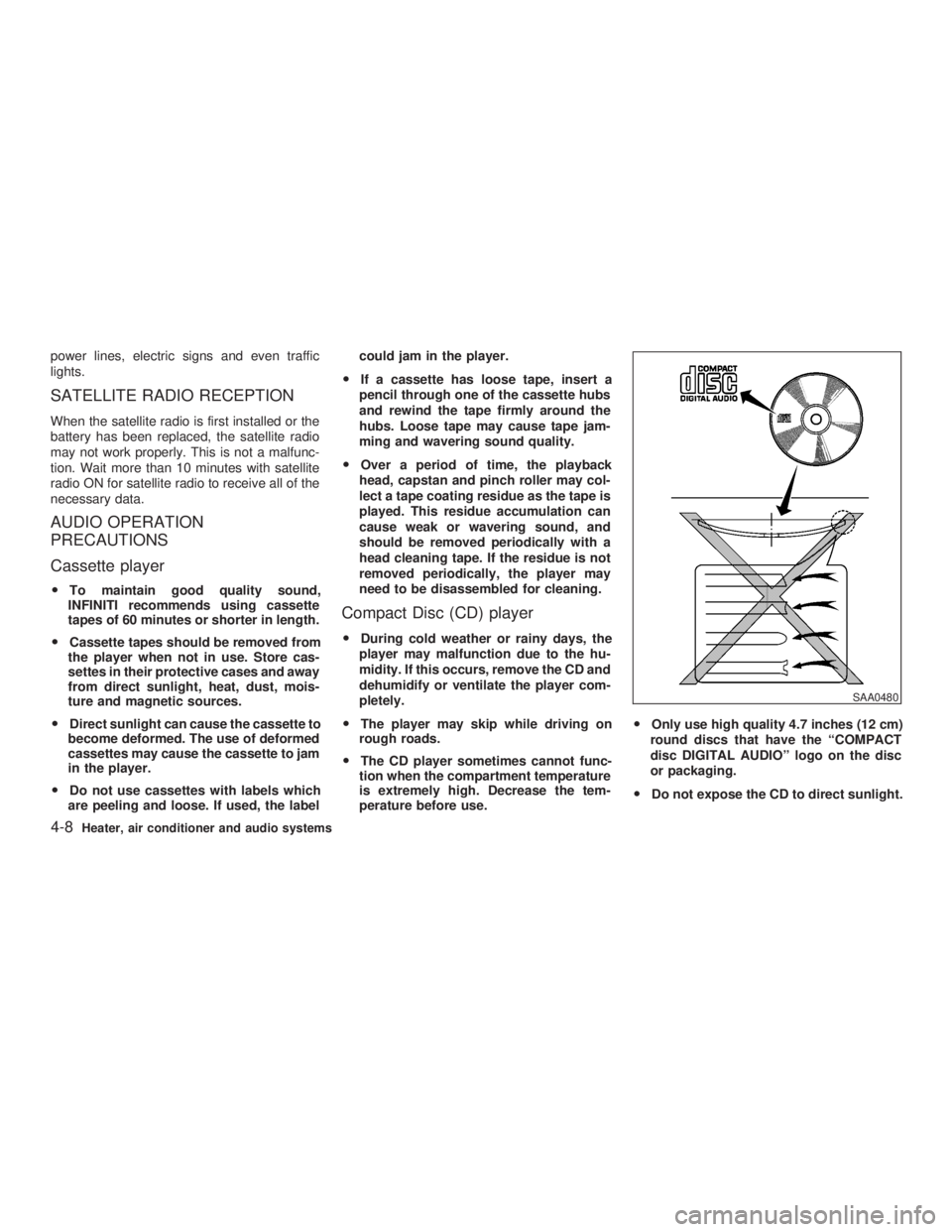
perature before use. O Only use high quality 4.7 inches (12 cm)
round discs that have the ªCOMPACT
disc DIGITAL AUDIOº logo on the disc
or packaging.
O Do not expose the CD to direct sunlight. SAA0480
4-8 Heater, air conditioner and audio systems
Z 02.7.29/V35-D/V5.0
X
Page 141 of 256
O Make sure the area around the vehicle is
clear.
O Maintenance items should be checked pe-
riodically, e.g., each time you check engine
oil.
O Check that all windows and lights are clean.
O Visually inspect tires for their appearance
and condition. Also, check tires for proper
inflation.
O Lock all doors.
O Position seat and adjust head restraints.
O Adjust inside and outside mirrors.
O Fasten seat belts and ask all passengers to
do likewise.
O Check the operation of warning lights when
key is turned to the ON (3) position. 1. Apply the parking brake.
2. Automatic transmission:
Move the selector lever to P (Park) or N
(Neutral). (P preferred.)
The starter is designed not to operate if the
selector lever is in one of the driving posi-
tions.
Manual transmission:
Move the shift lever to N (Neutral) position,
and depress the clutch pedal to the floor
while cranking the engine.
The starter is designed not to operate un-
less the clutch pedal is fully depressed.
3. Crank the engine with your foot off the
accelerator pedal by turning the ignition
key to START. Release the key when the
engine starts. If the engine starts, but fails
to run, repeat the above procedure.
O If the engine is very hard to start in ex-
tremely cold weather or when restarting,
depress the accelerator pedal a little (ap-
proximately 1/5 to the floor) and hold it then
crank the engine. Release the key and the
accelerator pedal when the engine starts.
O If the engine is very hard to start because it
is flooded, depress the accelerator pedal all the way to the floor and hold it. Crank the
engine for 5 to 6 seconds. After cranking
the engine, release the accelerator pedal.
Crank the engine with your foot off the
accelerator pedal by turning the ignition
key to START. Release the key when the
engine starts. If the engine starts, but fails
to run, repeat the above procedure.
CAUTION Do not operate the starter for more than
15 seconds at a time. If the engine does
not start, turn the key off and wait 10
seconds before cranking again, other-
wise the starter could be damaged.
4. Warm-up
Allow the engine to idle for at least 30
seconds after starting. Drive at moderate
speed for a short distance first, especially in
cold weather.BEFORE STARTING THE ENGINE STARTING THE ENGINE
Starting and driving
5-7
Z 02.7.29/V35-D/V5.0
X
Page 150 of 256
To set at cruising speed, accelerate your
vehicle to the desired speed, push the
COAST/SET switch and release it. (The SET
indicator light will come on.) Take your foot off
the accelerator pedal. Your vehicle will main-
tain the set speed.
O To pass another vehicle, depress the
accelerator pedal. When you release the
pedal, the vehicle will return to the previ-
ously set speed.
O The vehicle may not maintain the set speed
when going up or down steep hills. If this
happens, drive without the cruise control.
To cancel the preset speed, follow either of
these three methods:
a) Push the cancel switch; The SET indicator
light will go out.
b) Tap the brake pedal; The SET indicator
light will go out.
c) Turn the main switch off. Both the CRUISE
indicator and SET indicator lights will go
out.
O If you depress the brake pedal while push-
ing the RES/ACCEL set switch and reset at
the cruising speed, turn the main switch off
once and then turn it on again.
O The cruise control will automatically be can- celled if the vehicle slows down below
approximately 8 MPH (13 km/h).
O Depress the clutch pedal (manual transmis-
sion), or move the selector lever to N (Neu-
tral) position (automatic transmission). The
SET indicator light will go out.
To reset at a faster cruising speed, use one
of the following three methods:
a) Depress the accelerator pedal. When the
vehicle attains the desired speed, push and
release the COAST/SET switch.
b) Push and hold the RES/ACCEL set switch.
When the vehicle attains the speed you
desire, release the switch.
c) Push, then quickly release the RES/ACCEL
set switch. Each time you do this, the set
speed will increase by about 1 MPH (1.6
km/h).
To reset at a slower cruising speed, use one
of the following three methods:
a) Lightly tap the brake pedal. When the ve-
hicle attains the desired speed, push the
COAST/SET switch and release it.
b) Push and hold the COAST/SET switch.
Release the switch when the vehicle slows
down to the desired speed. c) Push, then quickly release the COAST/
SET switch. Each time you do this, the set
speed will decrease by about 1 MPH (1.6
km/h).
To resume the preset speed, push and re-
lease the RES/ACCEL set switch. The vehicle
will resume the last set cruising speed when
the vehicle speed is over 25 MPH (40 km/h).
5-16 Starting and driving
Z 02.7.29/V35-D/V5.0
X
Page 155 of 256

cidents resulting from careless or dan-
gerous driving techniques. It can help
maintain vehicle control during braking
on slippery surfaces, but remember that
the stopping distance on slippery sur-
faces will be longer than on normal
surfaces, even with the anti-lock sys-
tem. Stopping distances may also be
longer on rough, gravel or snow covered
roads, or if you are using tire chains.
Always maintain a safe distance from
the vehicle in front of you. Ultimately,
the responsibility for safety of yourself
and others rests in the hands of the
driver.
Tire type and condition of tires may also
affect braking effectiveness.
O When replacing tires, install the
specified size of tires on all four
wheels.
O When installing a spare tire, make
sure it is the proper size and type as
specified on the tire placard. See ªVe-
hicle identificationº in the ª10. Tech-
nical and consumer informationº sec- tion for tire placard location. When driving on slippery surfaces or suddenly
avoiding obstacles on roads, the vehicle might
swerve or slip. With the vehicle dynamics
control (VDC) system, sensors detect these
movements and control the braking and en-
gine output to help improve vehicle stability
while driving.
O When the vehicle dynamics control system
is operating, the slip indicator in the instru-
ment panel blinks.
O When only the traction control system por-
tion of the vehicle dynamics control system
is operating, the slip indicator will also blink.
O If the slip indicator blinks, the vehicle is
under slippery conditions. Be sure to drive
carefully. See ªSlip indicator lightº, and ªVe-
hicle dynamics control off indicator lightº in
the ª2. Instruments and controlsº section.
O Indicator light
If a malfunction occurs in the system, the
SLIP and indicator lights come on in
the meter panel.
As long as these warning lights are on, the
traction control function is canceled.
The VDC system uses a Brake Limited Slip
Differential (LSD) system to improve vehicle
traction. The brake LSD system works when
one of the driving wheels is spinning on aVEHICLE DYNAMICS CONTROL
(VDC) SYSTEM
Starting and driving
5-21
Z 02.7.29/V35-D/V5.0
X
Page 179 of 256

8 Do-it-yourself Maintenance precautions .......................................... 8-2
Engine compartment check locations ....................... 8-4
Engine cooling system .............................................. 8-5
Checking engine coolant level ............................. 8-5
Changing engine coolant ..................................... 8-6
Engine oil .................................................................. 8-7
Checking engine oil level ..................................... 8-7
Changing engine oil and filter .............................. 8-8
Automatic transmission fluid ................................... 8-10
Power steering fluid ................................................ 8-10
Brake and clutch fluid ............................................. 8-11
Brake fluid .......................................................... 8-11
Clutch fluid.......................................................... 8-11
Window washer fluid ............................................... 8-12
Battery ..................................................................... 8-13
Jump starting ...................................................... 8-14
Drive belts ............................................................... 8-14
Spark plugs ............................................................. 8-15
Replacing spark plugs ........................................ 8-15
Air cleaner ............................................................... 8-16
Windshield wiper blades ......................................... 8-16
Cleaning ............................................................. 8-16
Replacing............................................................ 8-17 Parking brake and brake pedal ............................... 8-18
Checking parking brake ..................................... 8-18
Checking brake pedal ........................................ 8-18
Brake booster ..................................................... 8-19
Fuses....................................................................... 8-20
Engine compartment .......................................... 8-20
Passenger compartment .................................... 8-21
Keyfob battery replacement .................................... 8-21
Lights ....................................................................... 8-23
Headlights........................................................... 8-25
Exterior and interior lights .................................. 8-26
Wheels and tires ..................................................... 8-30
Tire pressure ...................................................... 8-30
Types of tires...................................................... 8-30
Tire chains .......................................................... 8-31
Changing wheels and tires ................................. 8-32
Z 02.7.29/V35-D/V5.0
X
Page 201 of 256
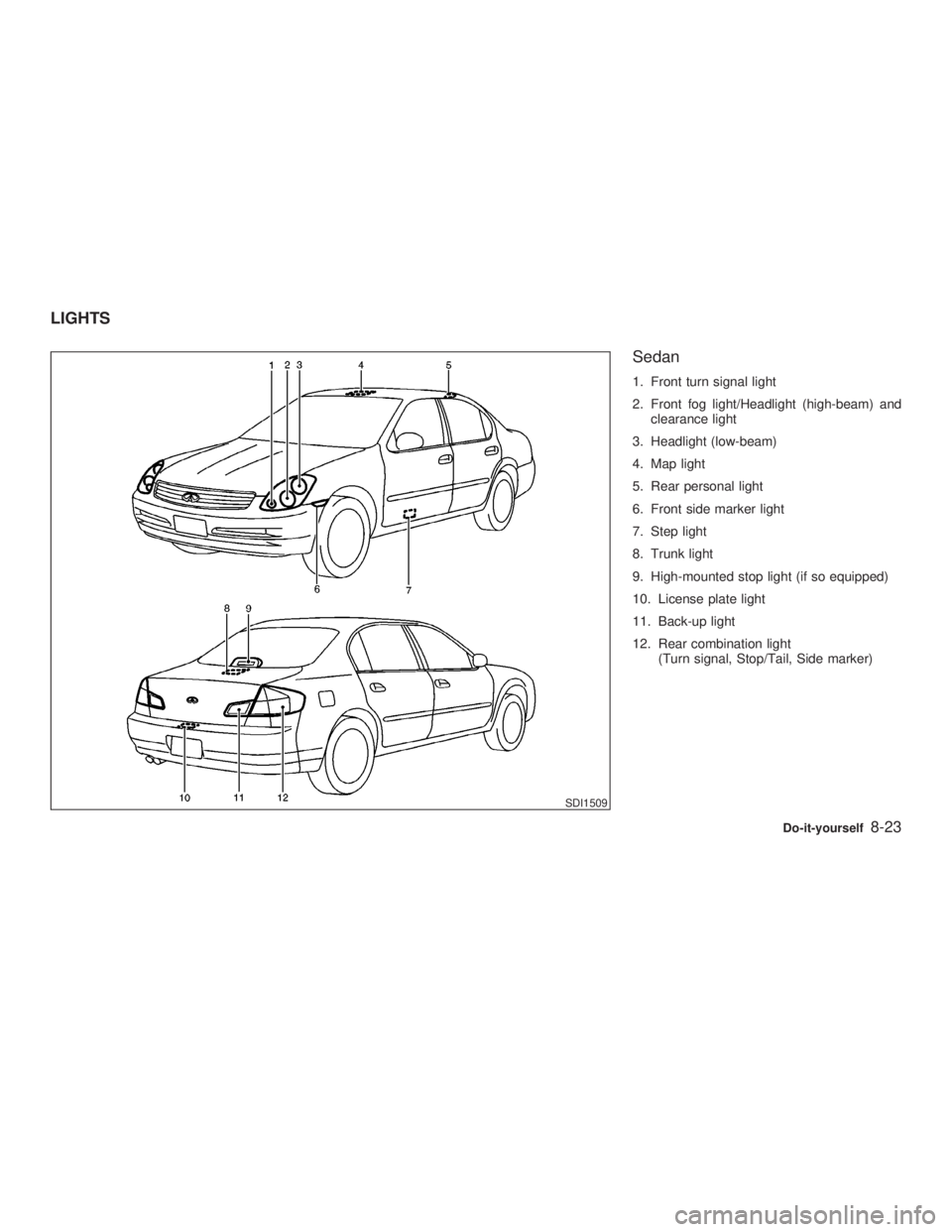
Sedan 1. Front turn signal light
2. Front fog light/Headlight (high-beam) and
clearance light
3. Headlight (low-beam)
4. Map light
5. Rear personal light
6. Front side marker light
7. Step light
8. Trunk light
9. High-mounted stop light (if so equipped)
10. License plate light
11. Back-up light
12. Rear combination light
(Turn signal, Stop/Tail, Side marker)
SDI1509LIGHTS
Do-it-yourself
8-23
Z 02.7.29/V35-D/V5.0
X
Page 203 of 256
HEADLIGHTS
Replacing If replacement is required, see an authorized
INFINITI retailer.
Xenon headlight bulb:
WARNING HIGH VOLTAGE
When xenon headlights are on, they
produce a high voltage. To prevent an
electric shock, never attempt to modify
or disassemble the headlight assembly.
Always have your xenon headlights re-
placed at an authorized INFINITI retailer.
For additional information, see ªHead-
light and turn signal switchº in the ª2.
Instruments and controlsº section.
Halogen headlight bulb:
A bulb can be replaced from under the engine
compartment without removing the headlight
assembly. CAUTION O High pressure halogen gas is sealed
inside the halogen bulb. The bulb
may break if the glass envelope is
scratched or the bulb is dropped.
O When handling the bulb, do not touch
the glass envelope.
O Do not touch the bulb.
O Use the same number and wattage as
originally installed:
Bulb no. H1 (55W) - Low-beam
HB2 (60/55W) - High-beam/
Fog light
O Do not leave the bulb out of the head-
light reflector for a long period of time
as dust, moisture, and smoke may
enter the headlight body and affect
the performance of the headlight.
Do-it-yourself
8-25
Z 02.7.29/V35-D/V5.0
X
Page 204 of 256
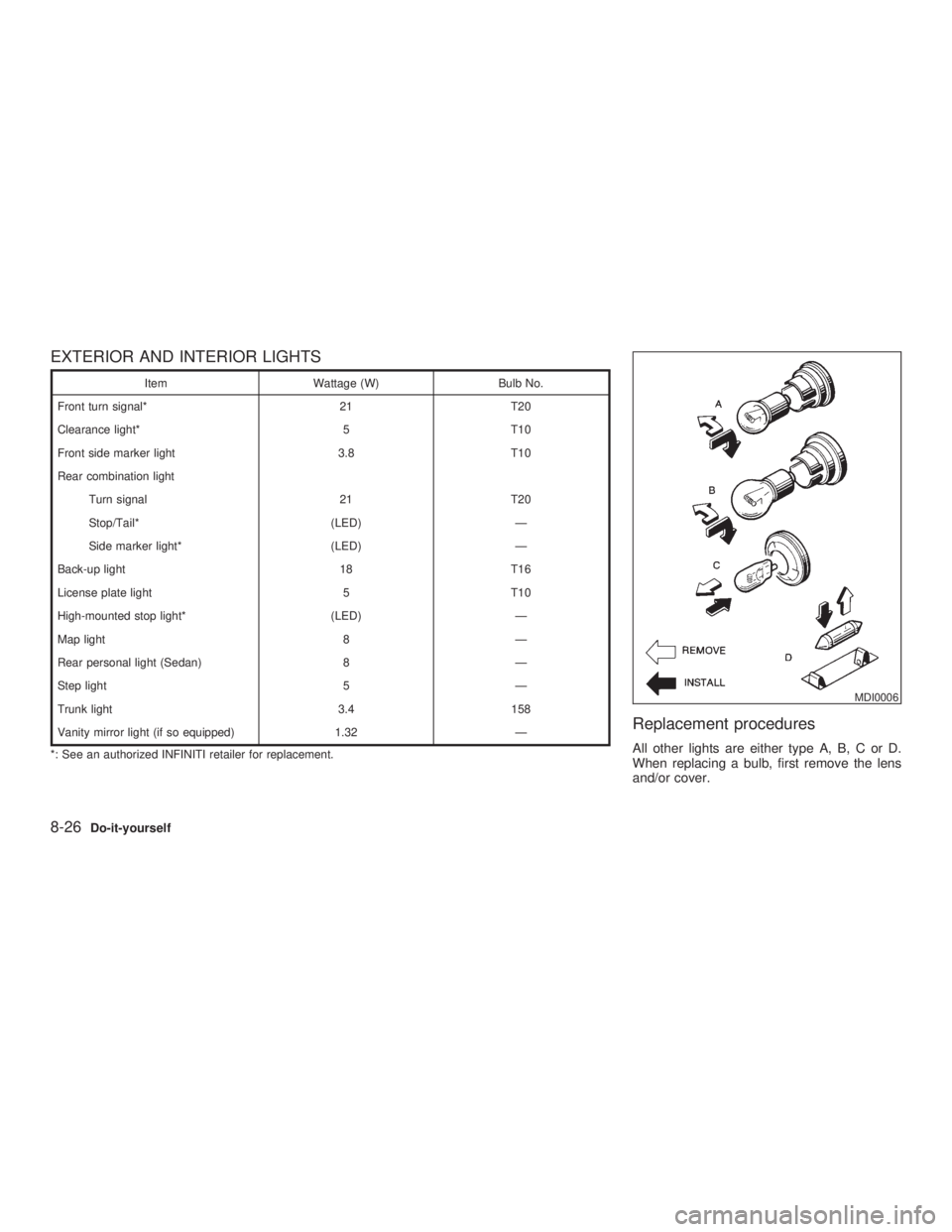
EXTERIOR AND INTERIOR LIGHTS Item Wattage (W) Bulb No.
Front turn signal* 21 T20
Clearance light* 5 T10
Front side marker light 3.8 T10
Rear combination light
Turn signal 21 T20
Stop/Tail* (LED) Ð
Side marker light* (LED) Ð
Back-up light 18 T16
License plate light 5 T10
High-mounted stop light* (LED) Ð
Map light 8 Ð
Rear personal light (Sedan) 8 Ð
Step light 5 Ð
Trunk light 3.4 158
Vanity mirror light (if so equipped) 1.32 Ð
*: See an authorized INFINITI retailer for replacement.
Replacement procedures All other lights are either type A, B, C or D.
When replacing a bulb, first remove the lens
and/or cover. MDI0006
8-26 Do-it-yourself
Z 02.7.29/V35-D/V5.0
X