2003 INFINITI G35 ECO mode
[x] Cancel search: ECO modePage 121 of 256

air into the passenger compartment. The indi-
cator light on the button will come on.
Air recirculation Push the air recirculation button to recir-
culate interior air inside the vehicle. The indi-
cator light on the button will come on.
The air recirculation button will not be acti-
vated when the air conditioner is in DEF mode.
Air flow control (MODE) Pushing the MODE button selects the air outlet
to:
: Air flows from center and side ventila-
tors.
: Air flows from center and side ventila-
tors and foot outlets.
: Air flows mainly from foot outlets.
: Air flows from defroster and foot out-
lets.
To turn the system off Push the OFF button.
DUAL ZONE BUTTON (if so
equipped) You can set the temperature of the driver and front passenger sides individually.
Pushing the DUAL zone button changes the
setting position as follows:
Driver/Passenger ! Driver ! Passenger
If selecting the Driver/Passenger position
again after the temperature is individually set,
the display will show the temperature set for
the driver side.
AMBIENT TEMPERATURE The outside ambient temperature will be
shown on the center display.
The ambient temperature sensor is located in
front of the radiator. The sensor may be af-
fected by road or engine heat, wind direction
and other driving conditions. The display may
differ from the actual outside temperature or
the temperature displayed on various signs or
billboards.
OPERATING TIPS When the engine coolant temperature and
outside air temperature are low, the air flow
from the foot outlets may not operate for a
maximum of 150 seconds. However, this is not
a malfunction. After the coolant temperature
warms up, the air flow from the foot outlets will
operate normally. The sensor on the instrument panel helps
maintain a constant temperature; do not put
anything on or around this sensor.
IN-CABIN MICROFILTER The air conditioning system is equipped with a
in-cabin microfilter which collects dirt, pollen,
dust, etc. To make sure air conditioner heats,
defogs, and ventilates efficiently, replace the
filter in accordance with the maintenance
schedule in this manual. To replace the filter,
contact your INFINITI retailer.
The filter should be replaced if air flow
decreases significantly or if windows fog HA1011
Heater, air conditioner and audio systems
4-5
Z 02.7.29/V35-D/V5.0
X
Page 127 of 256
FM-AM-SATELLITE RADIO WITH
CASSETTE PLAYER AND
COMPACT DISC (CD) CHANGER
Audio main operation Head unit:
The radio has an FM diversity reception sys-
tem, which employs two antennas printed on
the rear window. This system automatically
switches to the antenna which is receiving less
interference.
The tape deck employs a permalloy head
which allows for improved reproduction of high
frequency ranges. Noise is also greatly re-
duced by the combined use of the Dolby NR
(Noise Reduction) system. The auto loudness
circuit enhances the low frequency range au-
tomatically in both radio reception and tape
and CD playback.
POWER on/off:
Turn the ignition key to ACC or ON, and then
push the POWER on/off button while the sys-
tem is off to call up the mode (radio, tape or
CD) which was playing immediately before the
system was turned off. When no CD or tape is
loaded, the radio will come on. While the
system is on, pushing the POWER on/off
button turns the system off. Volume control:
Push the volume control button (VOL)
(down) or (up) to adjust the vol-
ume.
This vehicle has Speed sensitive Control
Volume (SCV) for audio . The audio volume
changes as the driving speed changes.
AUDIO button (BASS, TREBLE, FADER,
BALANCE, SCV and NR (Dolby)):
Press the AUDIO button to change the select-
ing mode as follows.
BASS ! TREBLE ! FADER ! BALANCE !
SCV ! NR (when cassette playing) ! (Nor-
mal) ! BASS
To adjust Bass, Treble, Fader and Balance,
press the AUDIO button until the desired mode
BASS, TREBLE, FADER or BALANCE ap-
pears in the display. Press the TUNE (
or ) button to adjust Bass and Treble to
the desired level. Use the or button
also to adjust Fader or Balance modes. Fader
adjusts the sound level between the front and
rear speakers and Balance adjusts the sound
between the right and left speakers.
To change the SCV mode to OFF, LOW, MID
or HIGH, press the or (TUNE) but-
ton. To change the NR (Dolby) mode to OFF or
ON, press the or (TUNE) button
while cassette tape is playing. When Dolby is
ON, the display indicates the mark.
After 10 seconds, the radio, cassette tape or
CD display reappears. Once the sound quality
is set to the desired level, press the AUDIO
button repeatedly until the radio, cassette tape
or CD display appears.
Dolby noise reduction manufactured under li-
cense from Dolby Laboratories Licensing Cor-
poration. Dolby NR and the double-D symbol
are trademarks of Dolby Laboratories
Licensing Corporation.
Metal or chrome tape usage:
The cassette player will be automatically set to
high performance play when playing a metal or
chrome cassette tape.
FM-AM radio operation FM/AM band select:
Pushing the FM/AM band select button will
change the band as follows:
AM ! FM1 ! FM2 ! AM
When FM/AM band select button is pushed
while the ignition switch is in the ACC or ON,
Heater, air conditioner and audio systems
4-11
Z 02.7.29/V35-D/V5.0
X
Page 128 of 256
the radio will come on at the station last
played.
The last station played will also come on when
the POWER button is turned to ON.
If another audio source is playing when the
FM/AM band select button is turned to ON, the
other audio source will automatically be turned
off and the last radio station played will come
on.
The FM stereo indicator ST will glow during
FM stereo reception. When the stereo broad-
cast signal is weak, the radio will automatically
change from stereo to monaural reception.
Satellite radio operation
SAT Satellite channel select:
Pushing the SAT channel select button will
change the band as follows:
SAT1 ! SAT2 ! SAT1
If you have not signed up for satellite radio, or
if satellite radio receiver is not installed, ªNO
SATº will be shown on the display.
When SAT channel select button is pushed
while the ignition switch is in the ACC or ON
position, the radio will come on at the channel
last played. The last channel played will also come on
when the POWER button is turned to ON.
If another audio source is playing when the
SAT channel select button is turned to ON, the
other audio source will automatically be turned
off and the last channel played will come on.
TUNE (Tuning):
WARNING The radio should not be tuned while
driving so full attention may be given to
vehicle operation.
Use these buttons for manual tuning. To move
quickly through the channels, hold either of the
TUNE buttons down for more than 0.5 sec-
onds.
SEEK tuning:
For AM and FM radio:
Push the SEEK button or , to tune
from high to low or low to high frequencies and
stops at the next broadcasting station.
For satellite radio:
Push the SEEK button or to seek channels of the next or previous category.
SCAN tuning:
Push the SCAN tuning button to tune from low
to high frequencies and stops at each broad-
casting station for 5 seconds. Pushing the
button again during this 5 seconds period will
stop SCAN tuning and the radio will remain
tuned to that station.
If the SCAN tuning button is not pushed within
5 seconds, SCAN tuning moves to the next
station.
(DISP) Display mode of satellite
radio:
O Pushing the RPT button will display addi-
tional information about the satellite radio
broadcast (for example: Artist name, Title).
O Keep pushing the RPT button, and it will
change the information of the satellite radio
broadcast to be displayed as follows:
CH Number ! CH Name ! Artist Name !
Song Title ! CH Number
Station memory operations:
Twelve stations/channels can be set for the
FM band (six for FM1, six for FM2), twelve for
satellite radio (six for SAT1, six for SAT2) and
six stations can be set for the AM band.
4-12 Heater, air conditioner and audio systems
Z 02.7.29/V35-D/V5.0
X
Page 129 of 256

1. Tune to the desired station using the SEEK,
SCAN or TUNE button.
2. Select the desired station/channel and
keep pushing any of the desired
station/channel memory buttons (1 to 6)
until a beep sound is heard. (The radio
mutes when the select button is pushed.)
3. The channel indicator will then come on
and the sound will resume. Memorizing is
now complete.
4. Other buttons can be set in the same
manner.
If the battery cable is disconnected, or if the
fuse blows, the radio memory will be can-
celled. In that case, reset the desired stations.
Automatic preset:
To select the preset FM, AM, SAT or PTY
station/channel, push the AUTO.P button for
less than 1.5 seconds.
To preset the FM, AM, SAT or PTY
station/channel, push the AUTO.P button for
more than 1.5 seconds.
(CAT) Program type/category:
When the PTY button is pressed during FM
mode, the PTY name of the current tuned
station is displayed. When the PTY (CAT) button is pressed during
the satellite radio mode, the category name of
the current channel is displayed. During this
time if the PTY data code is zero, or the data is
unreadable; the display will show NONE.
1. PTY (CAT) selection mode
PTY (CAT) name selection can be done by
the up/down TUNE button or in
the PTY (CAT) selection mode.
It is possible to shift the PTY (CAT) name by
one step, with one push of the up/down tuning
button or .
PTY name selection can also be achieved by
pressing the preset buttons.
Initial PTY names are stored in the preset
buttons; but these can be changed by pressing
the preset buttons for more than 1.5 seconds
when the desired PTY name is in the display. 2. PTY SEEK tuning mode
After selecting a PTY name, push the
SEEK button or within 10 sec-
onds. Tuning to the PTY station will start. If
you do not push the SEEK button within the
10 second period, the PTY mode will be
canceled.
3. PTY SCAN tuning mode
Push the SCAN tuning button to tune the
PTY name station, and stop at each broad-
casting station for 5 seconds. Pushing the Heater, air conditioner and audio systems
4-13
Z 02.7.29/V35-D/V5.0
X
Page 133 of 256
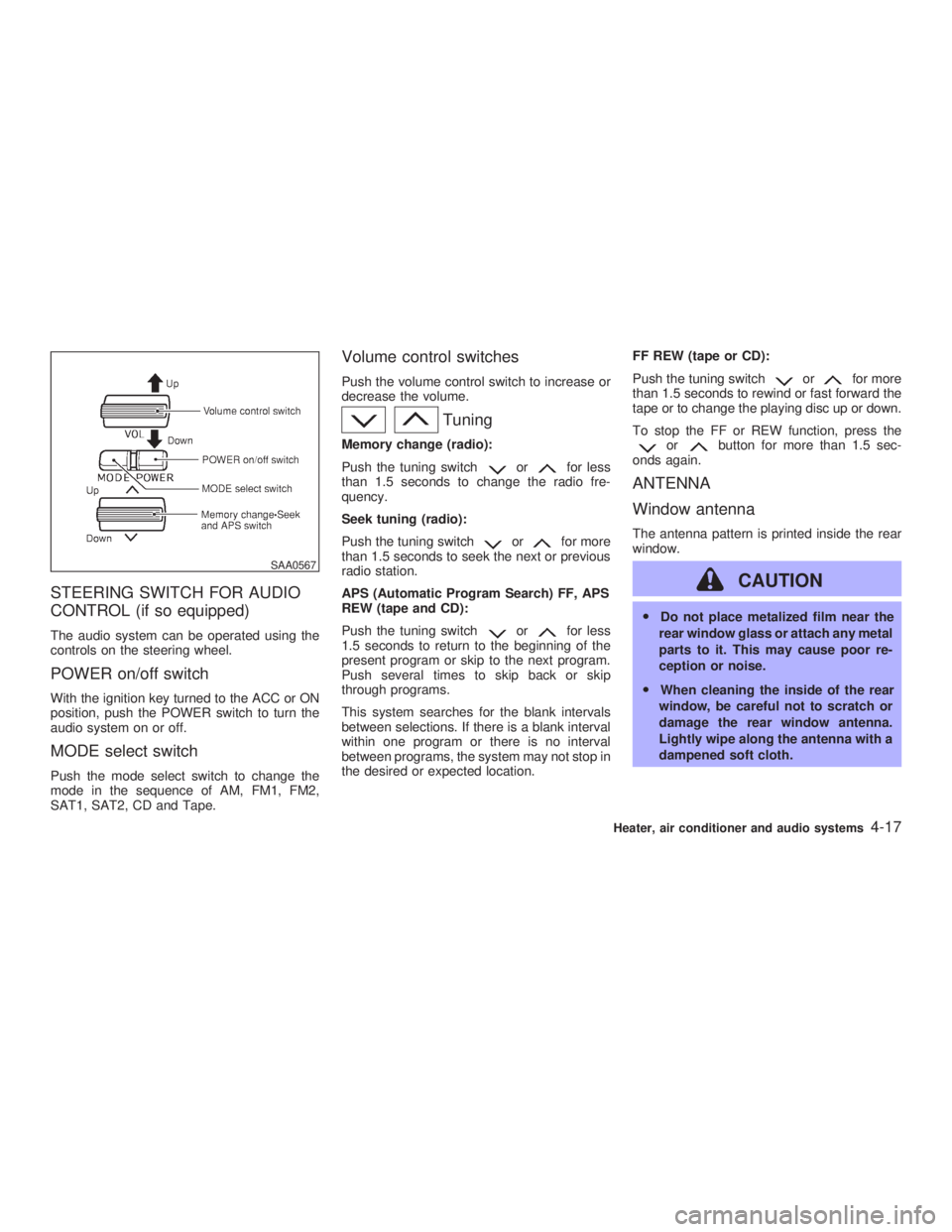
STEERING SWITCH FOR AUDIO
CONTROL (if so equipped) The audio system can be operated using the
controls on the steering wheel.
POWER on/off switch With the ignition key turned to the ACC or ON
position, push the POWER switch to turn the
audio system on or off.
MODE select switch Push the mode select switch to change the
mode in the sequence of AM, FM1, FM2,
SAT1, SAT2, CD and Tape. Volume control switches Push the volume control switch to increase or
decrease the volume.
TuningMemory change (radio):
Push the tuning switch or for less
than 1.5 seconds to change the radio fre-
quency.
Seek tuning (radio):
Push the tuning switch or for more
than 1.5 seconds to seek the next or previous
radio station.
APS (Automatic Program Search) FF, APS
REW (tape and CD):
Push the tuning switch or for less
1.5 seconds to return to the beginning of the
present program or skip to the next program.
Push several times to skip back or skip
through programs.
This system searches for the blank intervals
between selections. If there is a blank interval
within one program or there is no interval
between programs, the system may not stop in
the desired or expected location. FF REW (tape or CD):
Push the tuning switch or for more
than 1.5 seconds to rewind or fast forward the
tape or to change the playing disc up or down.
To stop the FF or REW function, press the
or button for more than 1.5 sec-
onds again.
ANTENNA
Window antenna The antenna pattern is printed inside the rear
window.
CAUTION O Do not place metalized film near the
rear window glass or attach any metal
parts to it. This may cause poor re-
ception or noise.
O When cleaning the inside of the rear
window, be careful not to scratch or
damage the rear window antenna.
Lightly wipe along the antenna with a
dampened soft cloth.SAA0567
Heater, air conditioner and audio systems
4-17
Z 02.7.29/V35-D/V5.0
X
Page 134 of 256
Satellite radio antenna Satellite radio performance may be affected if
cargo carried on the roof rack blocks the
satellite radio signal. If possible, do not put
cargo over the satellite radio antenna. When installing a CB, ham radio or car phone
in your INFINITI, be sure to observe the fol-
lowing cautions, otherwise the new equipment
may adversely affect the Engine control sys-
tem and other electronic parts.
WARNING O A cellular telephone should not be
used while driving so full attention
may be given to vehicle operation.
Some jurisdictions prohibit the use of
cellular telephones while driving.
O If you must make a call while your
vehicle is in motion, the hands free
cellular phone operational mode (if
so equipped) is highly recommended.
Exercise extreme caution at all times
so full attention may be given to ve-
hicle operation.
O If a conversation in a moving vehicle
requires you to take notes, pull off the
road to a safe location and stop your
vehicle before doing so. CAUTION O Keep the antenna as far as possible
away from the Engine Control Module
(ECM).
O Keep the antenna wire more than 8 in
(20 cm) away from the Multiport Fuel
Injection harness. Do not route the
antenna wire next to any harness.
O Adjust the antenna standing-wave ra-
tio as recommended by the manufac-
turer.
O Connect the ground wire from the CB
radio chassis to the body.
O For details, consult an authorized
INFINITI retailer.CAR PHONE OR CB RADIO
4-18 Heater, air conditioner and audio systems
Z 02.7.29/V35-D/V5.0
X
Page 141 of 256
O Make sure the area around the vehicle is
clear.
O Maintenance items should be checked pe-
riodically, e.g., each time you check engine
oil.
O Check that all windows and lights are clean.
O Visually inspect tires for their appearance
and condition. Also, check tires for proper
inflation.
O Lock all doors.
O Position seat and adjust head restraints.
O Adjust inside and outside mirrors.
O Fasten seat belts and ask all passengers to
do likewise.
O Check the operation of warning lights when
key is turned to the ON (3) position. 1. Apply the parking brake.
2. Automatic transmission:
Move the selector lever to P (Park) or N
(Neutral). (P preferred.)
The starter is designed not to operate if the
selector lever is in one of the driving posi-
tions.
Manual transmission:
Move the shift lever to N (Neutral) position,
and depress the clutch pedal to the floor
while cranking the engine.
The starter is designed not to operate un-
less the clutch pedal is fully depressed.
3. Crank the engine with your foot off the
accelerator pedal by turning the ignition
key to START. Release the key when the
engine starts. If the engine starts, but fails
to run, repeat the above procedure.
O If the engine is very hard to start in ex-
tremely cold weather or when restarting,
depress the accelerator pedal a little (ap-
proximately 1/5 to the floor) and hold it then
crank the engine. Release the key and the
accelerator pedal when the engine starts.
O If the engine is very hard to start because it
is flooded, depress the accelerator pedal all the way to the floor and hold it. Crank the
engine for 5 to 6 seconds. After cranking
the engine, release the accelerator pedal.
Crank the engine with your foot off the
accelerator pedal by turning the ignition
key to START. Release the key when the
engine starts. If the engine starts, but fails
to run, repeat the above procedure.
CAUTION Do not operate the starter for more than
15 seconds at a time. If the engine does
not start, turn the key off and wait 10
seconds before cranking again, other-
wise the starter could be damaged.
4. Warm-up
Allow the engine to idle for at least 30
seconds after starting. Drive at moderate
speed for a short distance first, especially in
cold weather.BEFORE STARTING THE ENGINE STARTING THE ENGINE
Starting and driving
5-7
Z 02.7.29/V35-D/V5.0
X
Page 142 of 256

AUTOMATIC TRANSMISSION
5 speed automatic transmission The automatic transmission in your vehicle is
electronically controlled by a transmission con-
trol module to produce maximum power and
smooth operation.
Shown on the following pages are the recom-
mended operating procedures for this trans-
mission. Follow these procedures for maxi-
mum vehicle performance and driving
enjoyment.
Starting the vehicle After starting the engine, fully depress the foot
brake pedal and push the selector lever button
before shifting the selector lever to the R
(Reverse), N (Neutral), D (Drive) or Manual
shift mode position. Be sure the vehicle is fully
stopped before attempting to shift the selector
lever.
This automatic transmission model is de-
signed so that the foot brake pedal must be
depressed before shifting from P (Park) to
any drive position while the ignition switch
is ON.
The selector lever cannot be moved out of
P (Park) position and into any of the other
gear positions if the ignition key is turned to the LOCK, OFF or ACC position or if the
key is removed from the switch.
1. Keep the foot brake pedal depressed and
push the selector lever button to shift into a
driving gear.
2. Release the parking brake and foot brake,
then gradually start the vehicle in motion.
WARNING O Do not depress the accelerator pedal
while shifting from P (Park) or N (Neu-
tral) to R (Reverse), D (Drive) or
manual shift mode. Always depress
the brake pedal until shifting is com-
pleted. Failure to do so could cause
you to lose control and have an acci-
dent.
O Cold engine idle speed is high, so use
caution when shifting into a forward
or reverse gear before the engine has
warmed up.
O On slippery roads, do not downshift.
This may cause a loss of control.
O Never shift to P (Park) or R (Reverse) while vehicle is moving forward.
Never shift to P (Park) or D (Drive)
while vehicle is moving rearward.
These could cause an accident.
CAUTION When stopping the vehicle on an uphill
grade, do not hold the vehicle by de-
pressing the accelerator pedal. The foot
brakes should be used for this purpose.DRIVING THE VEHICLE
5-8 Starting and driving
Z 02.7.29/V35-D/V5.0
X