Page 188 of 392

�µ
�´
A Compact Disc changer is available
foryourvehicle.Itholdsuptosix
discs, providing several hours of
continuous entertainment. You
operate this CD changer with the
same controls used f or the in-dash
CD player.
Load the desired CDs in the
magazine and load the magazine in
the changer according to the
instructions that came with the unit.
Play only standard round discs. Odd-
shaped CDs may jam in the drive or
cause other problems.
For best results when using CD-R
discs, use only high quality discs
labeled f or audio use. When
recording a CD-R, the recording
must be closed in order f or the disc
to be used by CD players. CD-RW
discs will not work in this unit. To select the CD changer, press the
CD button. The disc and track
numbers will be displayed.
To select a dif f erent disc, use the
Preset 5 (DISC ) or Preset 6
(DISC ) button. Press the Preset 6
button to select the next disc in the
magazine. Press the Preset 5 button
to select the previous disc. If you
select an empty slot in the magazine,
the changer will, af ter f inding that
slot empty, try to load the CD in the
next slot. This continues until it f inds
a CD to load and play.
If you load a CD in the in-dash player
while the changer is playing a CD,
the system will stop the changer and
begin playing the in-dash CD. To
select the changer again, press the
CD button. Play will begin where it
left off. Use the CD button to switch
between the player and the changer.
If you eject the in-dash CD while it is
playing, the system will automatically
switch to the CD changer and begin
play where it lef t of f . If there are no
CDs in the changer, the display will
flash. You will have to select another
mode (Radio or Cassette Player).
When you switch back to CD mode,
the system selects the same unit (in-
dash or changer) that was playing
when you switched out of CD mode.
To use the SKIP, REPEAT, and
RANDOM f unctions, ref er to the in-
dash player operating instructions.
Audio System
Comf ort and Convenience Feat ures
Operating the CD Changer
(Optional)
184
Page 189 of 392
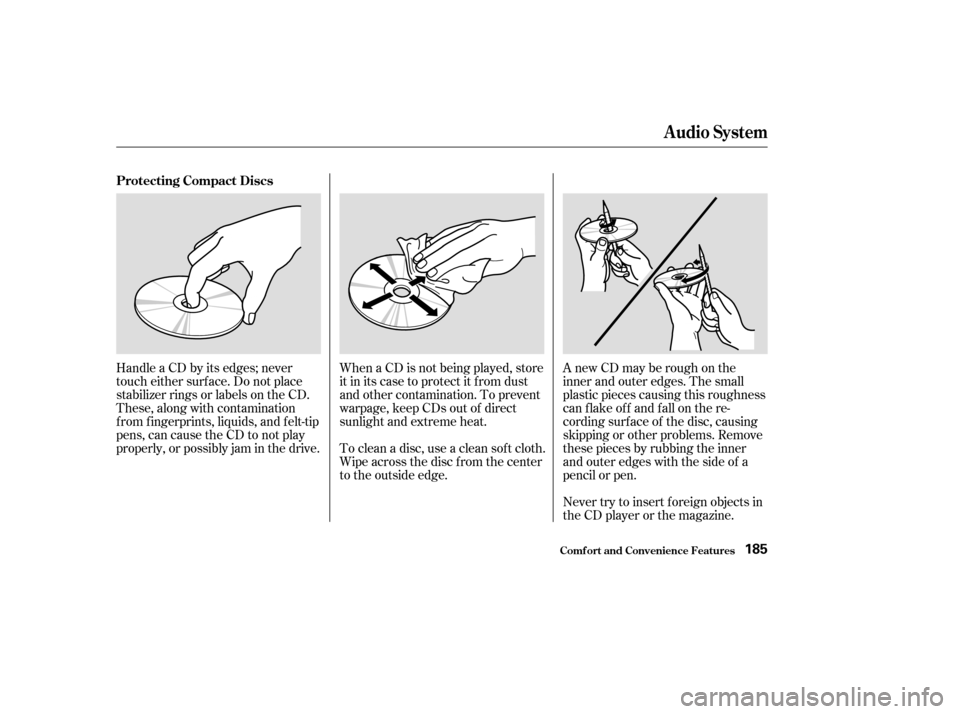
Never try to insert f oreign objects in
the CD player or the magazine. A new CD may be rough on the
inner and outer edges. The small
plastic pieces causing this roughness
can f lake of f and f all on the re-
cording surf ace of the disc, causing
skipping or other problems. Remove
these pieces by rubbing the inner
and outer edges with the side of a
pencil or pen.
Handle a CD by its edges; never
touch either surf ace. Do not place
stabilizer rings or labels on the CD.
These, along with contamination
f rom f ingerprints, liquids, and f elt-tip
pens, can cause the CD to not play
properly, or possibly jam in the drive.
When a CD is not being played, store
it in its case to protect it f rom dust
and other contamination. To prevent
warpage, keep CDs out of direct
sunlight and extreme heat.
To clean a disc, use a clean sof t cloth.
Wipe across the disc f rom the center
to the outside edge.
Protecting Compact Discs
Audio System
Comf ort and Convenience Feat ures185
Page 190 of 392
If you see an error indication in the
display while operating the CD
player,findthecauseinthechartto
the right. If you cannot clear the
error indication, take the vehicle to
your Honda dealer.Indication
Solution
Cause
Press the EJECT button and pull out the disc.
Check if the disc is inserted correctly in the CD
player.
Make sure the disc is not scratched or damaged.
Press the EJECT button and pull out the disc.
Check the disc for damage or deformation.
If the CD cannot be pulled out, or the error
indication does not disappear after the disc is
ejected, see your Honda dealer.
Do not try to force the disc out of the player.
Will disappear when the temperature returns to
normal.
FOCUS Error
Mechanical Error, or a
DVD has been loaded in
the CD player
High Temperature
CD Player Error Indications
Audio System
Comf ort and Convenience Feat ures186
Page 191 of 392
If you see an error indication in the
display while operating the CD
changer, f ind the cause in the chart
to the right. If you cannot clear the
error indication, take the vehicle to
your Honda dealer.Indication Cause
Solution
FOCUS Error
No CD in the CD
magazine
Mechanical Error
High Temperature
No CD magazine in the
CD changerPress the magazine eject button, pull out the
magazine, and check for an error indication.
Insert the magazine again. If the code does not
disappear or the magazine cannot be pulled out,
consult your Honda dealer.
Insert CD.
Press the magazine eject button, pull out the
magazine, and check for an error indication.
Insert the magazine again. If the code does not
disappear or the magazine cannot be pulled out,
consult your Honda dealer.
Will disappear when the temperature returns to
normal.
Insert CD magazine.
CD Changer Error Indications
Audio System
Comf ort and Convenience Feat ures187
Page 192 of 392
�Û�Ý
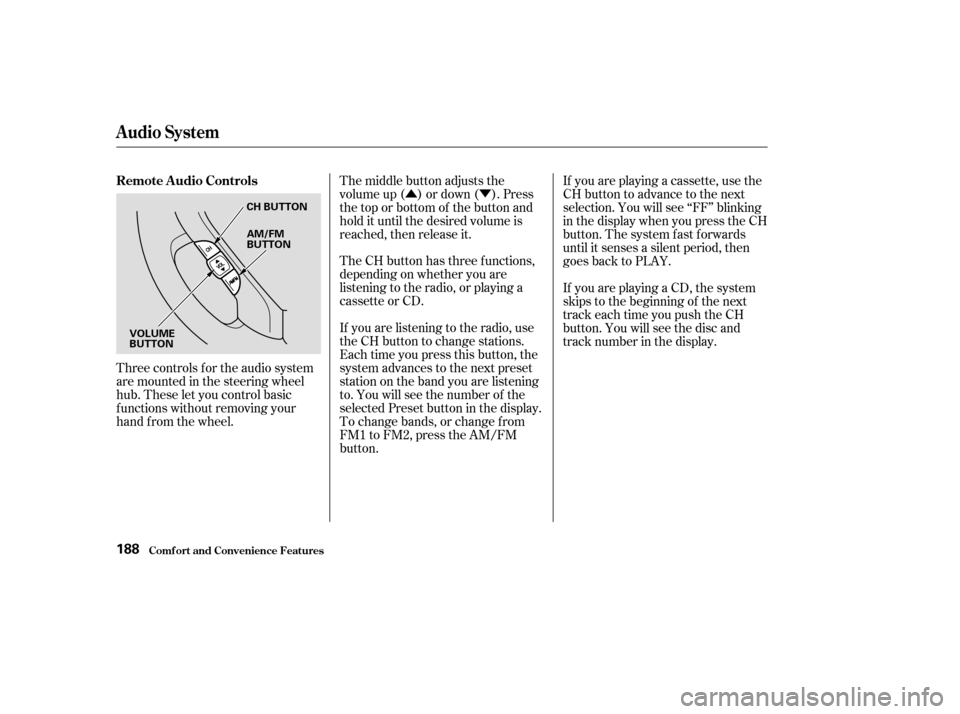
Three controls f or the audio system
are mounted in the steering wheel
hub. These let you control basic
f unctions without removing your
hand f rom the wheel. The middle button adjusts the
volume up ( ) or down ( ). Press
the top or bottom of the button and
hold it until the desired volume is
reached, then release it.
The CH button has three functions,
depending on whether you are
listening to the radio, or playing a
cassette or CD.
If you are listening to the radio, use
the CH button to change stations.
Each time you press this button, the
system advances to the next preset
station on the band you are listening
to. You will see the number of the
selected Preset button in the display.
To change bands, or change f rom
FM1 to FM2, press the AM/FM
button.If you are playing a cassette, use the
CH button to advance to the next
selection. You will see ‘‘FF’’ blinking
in the display when you press the CH
button. The system fast forwards
until it senses a silent period, then
goes back to PLAY.
If youareplayingaCD,thesystem
skips to the beginning of the next
track each time you push the CH
button. You will see the disc and
track number in the display.
Remote Audio Controls
Audio System
Comf ort and Convenience Feat ures188
CH BUTTON
AM/FM
BUTTON
VOLUME
BUTTON
Page 193 of 392

You will have to store your favorite
stations in the Preset buttons after
the system begins working. Your
original settings were lost when
power was disconnected.
If your vehicle’s battery is discon-
nected or goes dead, the audio
system will disable itself . If this
happens, you will see ‘‘Code’’ in the
frequencydisplaythenexttimeyou
turn on the system. Use the Preset
buttons to enter the five-digit code. If
it is entered correctly, the radio will
start playing.
If you make a mistake entering the
code, do not start over or try to
correct your mistake. Complete the
f ive-digit sequence, then enter the
correct code. You have ten tries to
enter the correct code. If you are
unsuccessful in ten attempts, you
must then leave the system on for
one hour bef ore trying again.
Your vehicle’s audio system will
disable itself if it is disconnected
f rom electrical power f or any reason.
To make it work again, the user
must enter a specif ic f ive-digit code
in the Preset buttons. Because there
are hundreds of number
combinations possible f rom f ive
digits, making the system work
without knowing the exact code is
nearly impossible.
Youshouldhavereceivedacardthat
lists your audio system’s code
number and serial number. It is best
tostorethiscardinasafeplaceat
home. In addition, you should write
the audio system’s serial number in
this Owner’s Manual. If you should
happen to lose the card, you must
obtain the code number f rom your
Honda dealer. To do this, you will
need the system’s serial number.
On EX model
Thef t Protection
Audio System
Comf ort and Convenience Feat ures189
Page 197 of 392
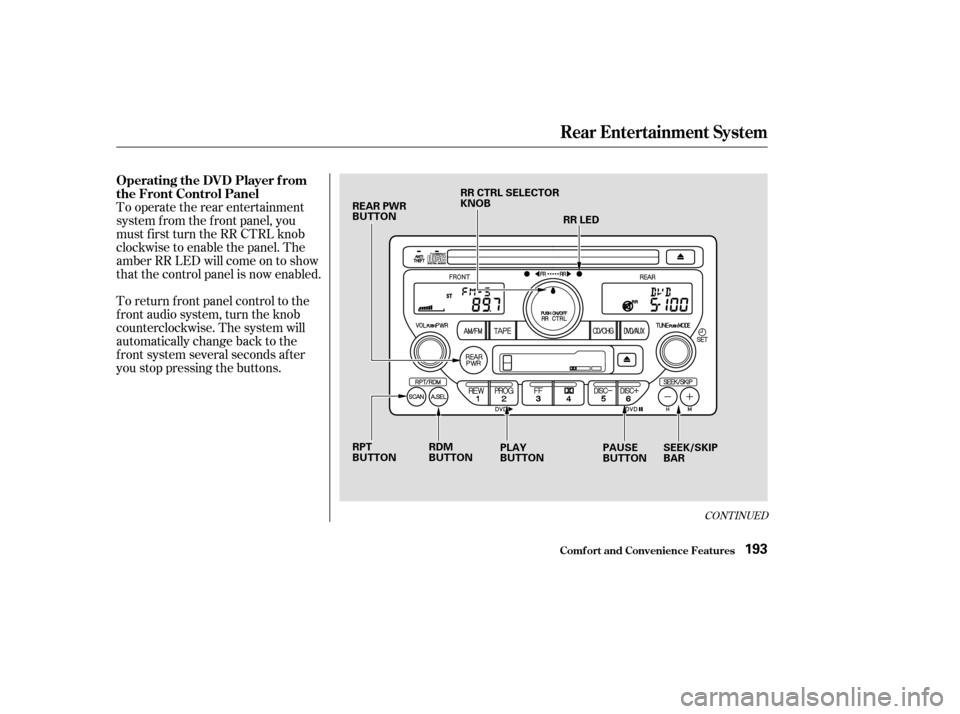
To return f ront panel control to the
front audio system, turn the knob
counterclockwise. The system will
automatically change back to the
f ront system several seconds af ter
you stop pressing the buttons. To operate the rear entertainment
system f rom the f ront panel, you
must first turn the RR CTRL knob
clockwise to enable the panel. The
amber RR LED will come on to show
that the control panel is now enabled.
CONT INUED
Operating the DVD Player f rom
the Front Control Panel
Rear Entertainment System
Comf ort and Convenience Feat ures193
REAR PWR
BUTTONRR CTRL SELECTOR
KNOB
RR LED
RPT
BUTTON PLAY
BUTTONPAUSE
BUTTONSEEK/SKIP
BAR
RDM
BUTTON
Page 200 of 392
You can control all of the DVD
functions with the remote control.
Make sure the rear control operation
has not been disabled with the RR
CTRL knob on the f ront panel.
When using the remote control,
point it at the rear control panel in
the ceiling.
Press this button to start playing a
DVD. Use these buttons to select the
entertainment source (radio,
cassette player, CD player/CD
changer, or DVD player/Auxiliary
device). The selected source will be
showninthedisplay. Operating the DVD Player with
the Remote Control
Source Select ion But t onsPL A Y/PROG Button
Rear Entertainment System
Comf ort and Convenience Feat ures196
SOURCE SELECTION
BUTTONS
REW/FWD BUTTONS STOP BUTTON PAUSE BUTTON
PLAY/PROG BUTTON
MENU BUTTON
SUBTITLE BUTTON
AUDIO BUTTON
ANGLE BUTTON
TITLE BUTTON SEEK/SKIP BUTTONS
DISP BUTTON RETURN (T/C) BUTTON