Page 180 of 392
Your Honda’s radio can receive the
complete AM and FM bands.
Those bands cover these f requen-
cies:
AM band:
530 to 1,710 kilohertz
FM band:
87.7 to 107.9 megahertz
Radio stations on the AM band are
assigned f requencies at least ten
kilohertz apart (530, 540, 550).
Stations on the FM band are
assigned f requencies at least 0.2
megahertz apart (87.9, 88.1, 88.3).
Stations must use these exact
f requencies. It is f airly common f or
stations to round-of f the f requency in
their advertising, so your radio could
display a f requency of 100.9 even
though the announcer may identif y
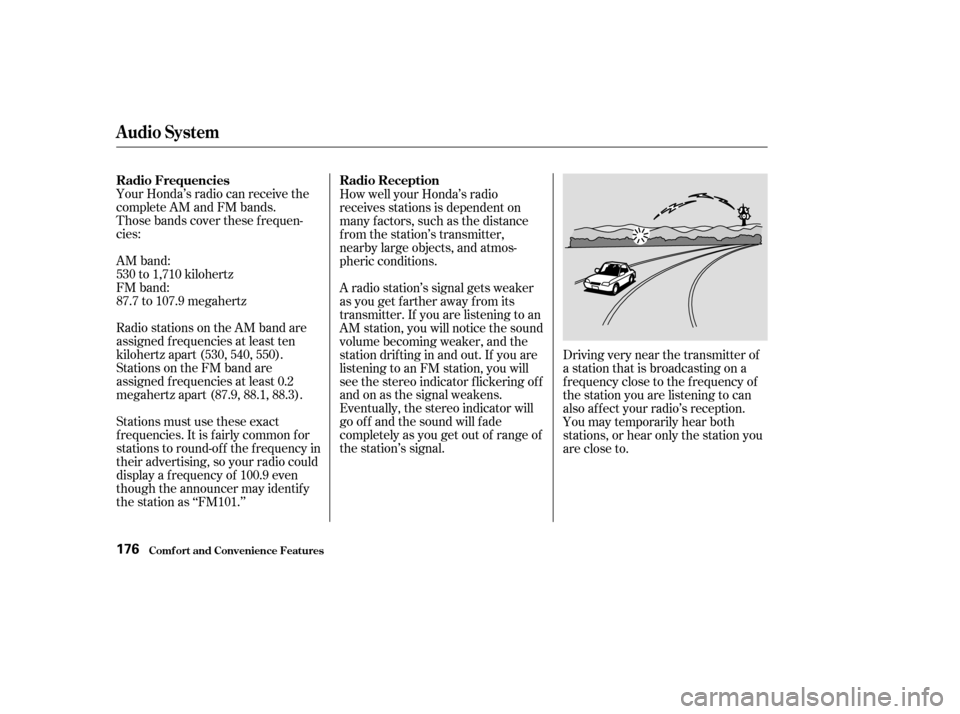
the station as ‘‘FM101.’’A radio station’s signal gets weaker
as you get f arther away f rom its
transmitter. If you are listening to an
AM station, you will notice the sound
volume becoming weaker, and the
stationdriftinginandout.If youare
listening to an FM station, you will
see the stereo indicator f lickering of f
and on as the signal weakens.
Eventually, the stereo indicator will
go of f and the sound will f ade
completely as you get out of range of
the station’s signal. How well your Honda’s radio
receives stations is dependent on
many f actors, such as the distance
from the station’s transmitter,
nearby large objects, and atmos-
pheric conditions.
Driving very near the transmitter of
a station that is broadcasting on a
f requency close to the f requency of
the station you are listening to can
also af f ect your radio’s reception.
You may temporarily hear both
stations,orhearonlythestationyou
are close to.
Audio System
Comf ort and Convenience Feat ures
Radio Frequencies Radio Reception
176
Page 181 of 392
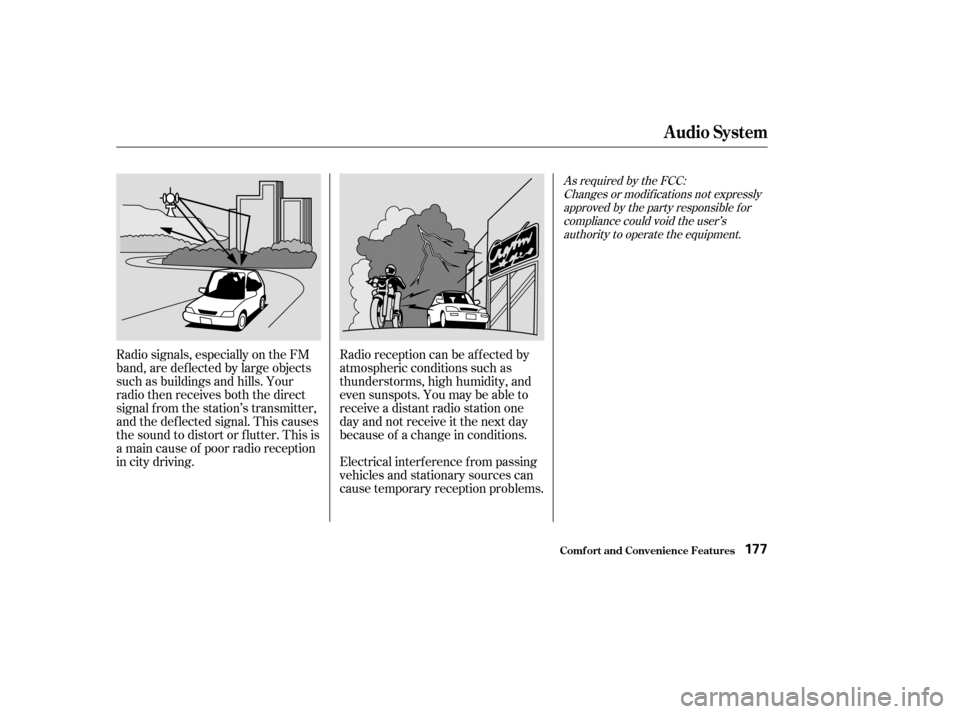
Radio signals, especially on the FM
band, are def lected by large objects
such as buildings and hills. Your
radio then receives both the direct
signal f rom the station’s transmitter,
and the def lected signal. This causes
the sound to distort or flutter. This is
a main cause of poor radio reception
in city driving.Radio reception can be af f ected by
atmospheric conditions such as
thunderstorms, high humidity, and
even sunspots. You may be able to
receive a distant radio station one
day and not receive it the next day
because of a change in conditions.
Electrical interf erence f rom passing
vehicles and stationary sources can
cause temporary reception problems.
As required by the FCC:
Changes or modif ications not expresslyapproved by the party responsible f orcompliance could void the user’sauthority to operate the equipment.
Audio System
Comf ort and Convenience Feat ures177
Page 182 of 392
�Û
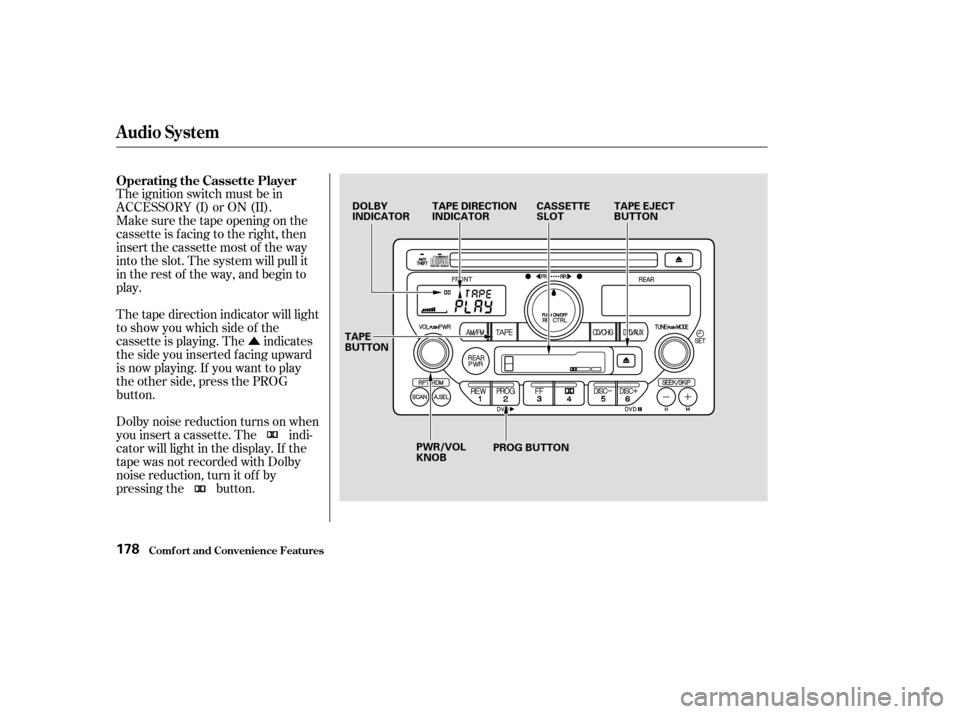
The ignition switch must be in
ACCESSORY (I) or ON (II).
Make sure the tape opening on the
cassette is facing to the right, then
insert the cassette most of the way
into the slot. The system will pull it
in the rest of the way, and begin to
play.
Dolby noise reduction turns on when
you insert a cassette. The indi-
cator will light in the display. If the
tape was not recorded with Dolby
noise reduction, turn it of f by
pressing the button. The tape direction indicator will light
to show you which side of the
cassette is playing. The indicates
thesideyouinsertedfacingupward
is now playing. If you want to play
the other side, press the PROG
button. Operating the Cassette Player
Audio System
Comf ort and Convenience Feat ures178
DOLBY
INDICATOR
TAPE DIRECTION
INDICATOR CASSETTE
SLOTTAPE EJECT
BUTTON
PWR/VOL
KNOB PROG BUTTON
TAPE
BUTTON
Page 183 of 392
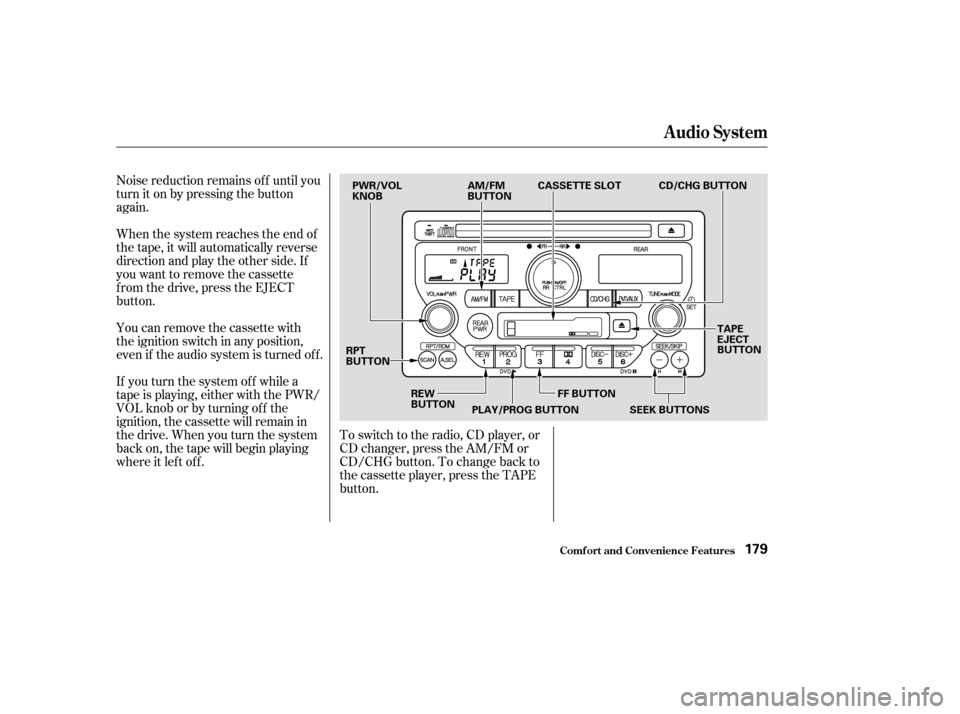
Noise reduction remains of f until you
turn it on by pressing the button
again.
When the system reaches the end of
the tape, it will automatically reverse
direction and play the other side. If
you want to remove the cassette
f rom the drive, press the EJECT
button.
You can remove the cassette with
the ignition switch in any position,
even if the audio system is turned of f .
If you turn the system of f while a
tape is playing, either with the PWR/
VOL knob or by turning of f the
ignition, the cassette will remain in
the drive. When you turn the system
back on, the tape will begin playing
where it lef t of f .To switch to the radio, CD player, or
CD changer, press the AM/FM or
CD/CHG button. To change back to
the cassette player, press the TAPE
button.
Audio System
Comf ort and Convenience Feat ures179
PWR/VOL
KNOB
AM/FM
BUTTONCASSETTE SLOT
TAPE
EJECT
BUTTON
RPT
BUTTON
REW
BUTTONPLAY/PROG BUTTON FF BUTTON CD/CHG BUTTON
SEEK BUTTONS
Page 184 of 392

�µ�µ�´�µ
�µ �µ
�´ With a cassette playing, you can use
the FF, REW, SKIP, or REPEAT
f unction to f ind a desired program. The SKIP and REPEAT f unctions
use silent periods on the tape to f ind
the end of a song or passage. These
f eatures may not work to your
satisfaction if there is almost no gap
between selections, a high noise
level between selections, or a silent
period in the middle of a selection.
Fast Forward and Re-
wind move the tape rapidly. To re-
wind the tape, push the REW button.
You will see REW in the display. To
fast forward the tape, push the FF
button. You will see FF displayed.
Press the FF, REW or PLAY/PROG
button to take the system out of re-
wind or f ast f orward. When the sys-
tem reaches the end of the tape, it
reverses direction and begins to play. To stop the SKIP f unction bef ore it
f inds the beginning of a song or
passage, press either SKIP button
(or).
The Repeat f unction
continuously replays the current
song or passage. Press the RPT
button to activate it; you will see RPT
displayed as a reminder. When the
system reaches the end of the song
or passage currently playing, it will
automatically go into rewind. When
it senses the beginning of the same
song or passage, the system returns
to PLAY mode. It will continue to
repeat this same program until you
deactivate REPEAT by pressing the
button again. Pressing the REW or FF button, or
either SKIP button, also turns off
REPEAT.
The SKIP f unction allows
you to f ind the beginning of a song
or passage. To skip to the beginning
of a song or passage currently
playing, push the button. You will
see REW flashing in the display as
thetaperewinds.Toskiptothe
beginning of the next song, push the button. You will see FF f lashing in the display as the tape fast forwards.
When the system f inds the begin-
ning of a song or passage, it goes
back to PLAY.
T ape Search Functions
FF/REW
REPEAT
SK IP
Audio System
Comf ort and Convenience Feat ures180
Page 185 of 392

The cassette player picks up dirt and
oxides f rom the tape. This contami-
nation builds up over time and
causes the sound quality to degrade.
To prevent this, you should clean the
player af ter every 30 hours of use.
Your dealer has a cleaning kit
available.
If you do not clean the cassette
player regularly, it may eventually
become impossible to remove the
contamination with a normal
cleaning kit.Use 100-minute or shorter cassettes.
Cassettes longer than that use
thinner tape that may break or jam
the drive.
Look at the cassette before you
insert it. If the tape is loose, tighten
it by turning a hub with a pencil or
your f inger.
When they are not in use, store
cassettes in their cases to protect
them f rom dust and moisture. Never
place cassettes where they will be
exposed to direct sunlight, high heat,
or high humidity. If a cassette is
exposed to extreme heat or cold, let
it reach a moderate temperature
bef ore inserting it in the player.
Never try to insert f oreign objects
into the cassette player.
If the label is peeling of f , remove it
from the cassette or it could cause
the cassette to jam in the player.
Never try to insert a warped or
damaged cassette in the player.
Caring f or the Cassette Player
Audio System
Comf ort and Convenience Feat ures181
Page 186 of 392
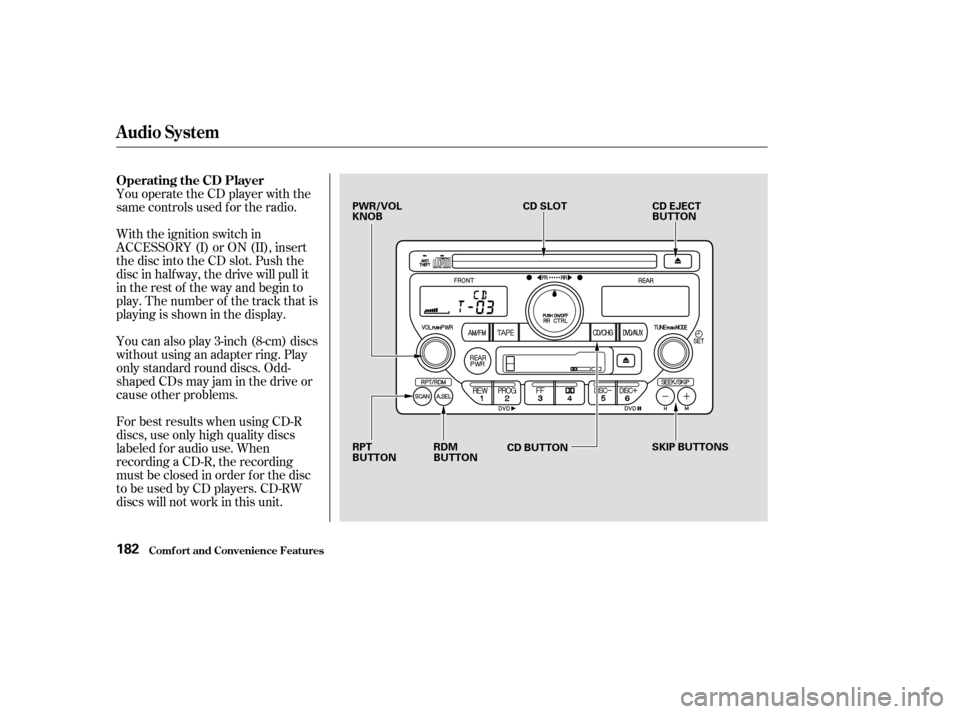
You operate the CD player with the
same controls used f or the radio.
With the ignition switch in
ACCESSORY (I) or ON (II), insert
the disc into the CD slot. Push the
disc in half way, the drive will pull it
in the rest of the way and begin to
play. The number of the track that is
playing is shown in the display.
You can also play 3-inch (8-cm) discs
without using an adapter ring. Play
only standard round discs. Odd-
shaped CDs may jam in the drive or
cause other problems.
For best results when using CD-R
discs, use only high quality discs
labeled f or audio use. When
recording a CD-R, the recording
must be closed in order f or the disc
to be used by CD players. CD-RW
discs will not work in this unit.
Comf ort and Convenience Feat ures
Operating the CD Player
Audio System
182
PWR/VOL
KNOBCD SLOT
CD EJECT
BUTTON
RPT
BUTTON RDM
BUTTON
CD BUTTON
SKIP BUTTONS
Page 187 of 392

�µ�µ
�´
�µ
�´ �µ
When the system reaches the end of
the disc, it will return to the begin-
ning and play that disc again.
You can switch to the radio while a
CD is playing by pressing the AM/
FM button. Press the CD button to
return to playing the CD. The CD
will begin playing where it lef t of f .
If you turn the system of f while a CD
is playing, either with the PWR/VOL
knob or by turning off the ignition,
the disc will stay in the drive. When
youturnthesystembackon,theCD
will begin playing where it lef t of f .
Press the eject button to remove the
disc f rom the drive.
If you eject the disc, but do not
remove it from the slot, the system
will automatically reload the disc
af ter 15 seconds and put the CD
player in pause mode. To begin
playing the disc, press the CD button. To activate the Repeat
f eature, press and release the RPT
button. You will see RPT in the
display. The system continuously
replays the current track. Press the
RPT button again to turn it off.
This feature,
when activated, plays the tracks on
the CD in random order, rather than
in the order they are recorded on the
CD. To activate Random Play, press
and release the A. SEL/RDM button.
You will see RDM in the display. The
system will then select and play
tracks randomly. This continues
until you deactivate Random Play by
pressing A. SEL/RDM again.
You can use the SEEK/SKIP buttons
while a disc is playing to select
passages and change tracks.
To move rapidly within a track, press
and hold the SEEK/SKIP button.
Press the button to move
f orward. You will see CUE in the
display. Press the button to
move backward. You will see REW
displayed. Release the button when
the system reaches the point you
want.
Each time you press and release the
SEEK/SKIP button, the
system skips f orward to the
beginning of the next track. Press
and release the button to skip
backward to the beginning of the
current track. Press it again to skip
to the beginning of the previous
track.
Audio System
Comf ort and Convenience Feat ures
REPEAT
RANDOM PLAY
183