Page 196 of 392
�Î
�Î
The DVD player in your Rear
Entertainment System can play DVD
video discs and CDs. It features
Dolby noise reduction. The video
screen is designed f or use by the
rear seat passengers only.
The driver and f ront seat passenger
should not try to view the screen
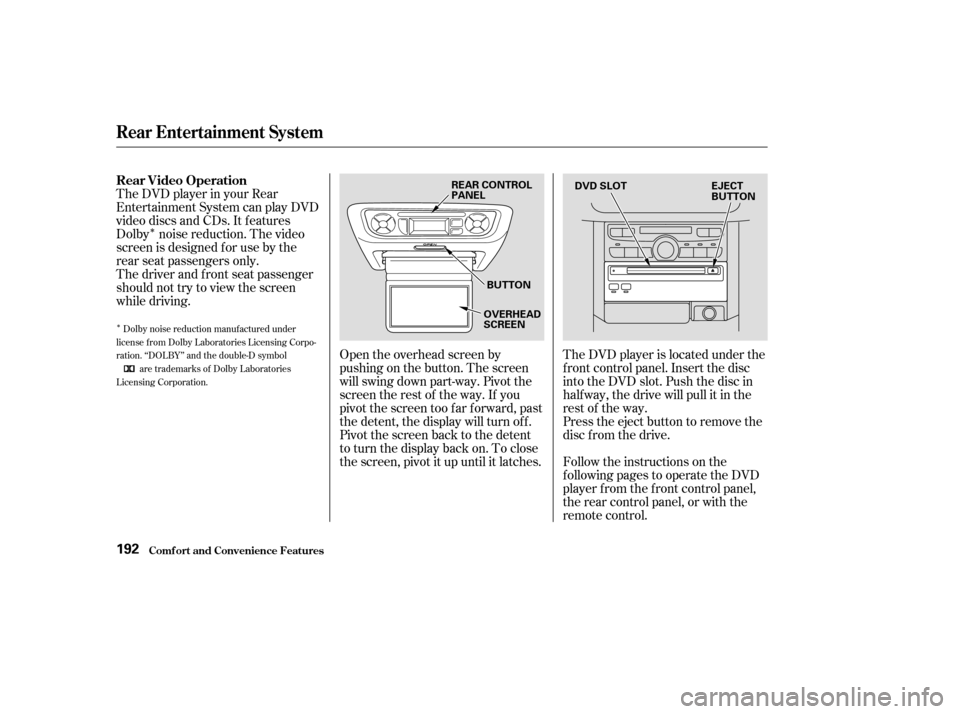
while driving.Open the overhead screen by
pushingonthebutton.Thescreen
will swing down part-way. Pivot the
screen the rest of the way. If you
pivot the screen too far forward, past
the detent, the display will turn off.
Pivot the screen back to the detent
to turn the display back on. To close
the screen, pivot it up until it latches.The DVD player is located under the
f ront control panel. Insert the disc
into the DVD slot. Push the disc in
half way, the drive will pull it in the
rest of the way.
Press the eject button to remove the
disc f rom the drive.
Follow the instructions on the
f ollowing pages to operate the DVD
player f rom the f ront control panel,
the rear control panel, or with the
remote control.
Dolby noise reduction manuf actured under
license from Dolby Laboratories Licensing Corpo-
ration. ‘‘DOLBY’’ and the double-D symbol are trademarks of Dolby Laboratories
Licensing Corporation.
Rear Video Operation
Rear Entertainment System
Comf ort and Convenience Feat ures192
REAR CONTROL
PANEL
BUTTON
OVERHEAD
SCREEN EJECT
BUTTON
DVD SLOT
Page 208 of 392
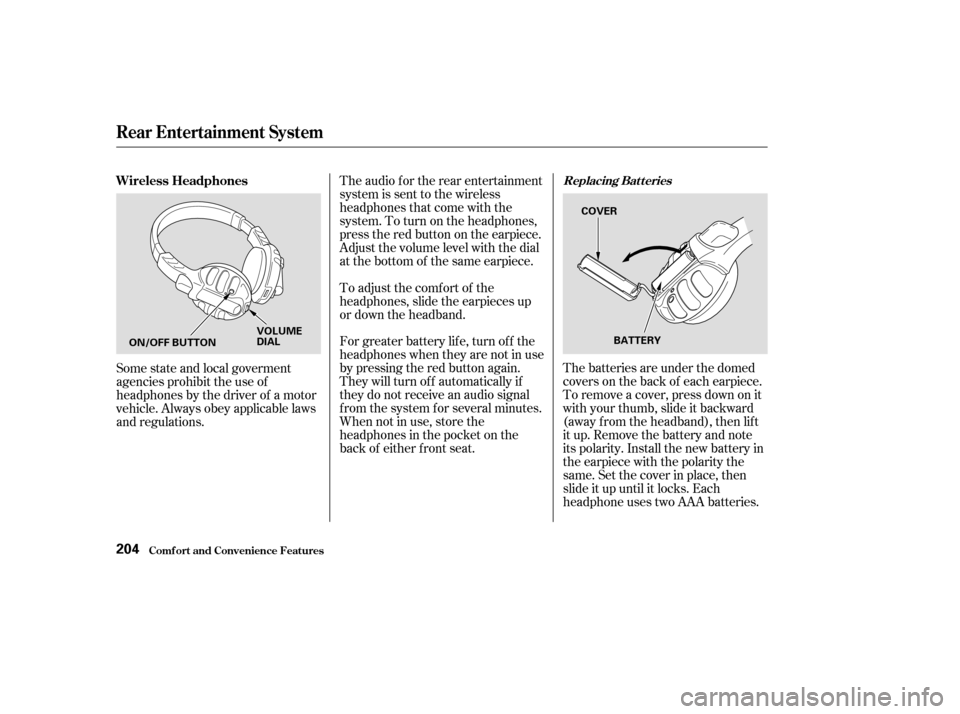
The batteries are under the domed
covers on the back of each earpiece.
To remove a cover, press down on it
with your thumb, slide it backward
(away f rom the headband), then lif t
it up. Remove the battery and note
its polarity. Install the new battery in
theearpiecewiththepolaritythe
same. Set the cover in place, then
slide it up until it locks. Each
headphone uses two AAA batteries.
The audio f or the rear entertainment
system is sent to the wireless
headphones that come with the
system. To turn on the headphones,
presstheredbuttonontheearpiece.
Adjust the volume level with the dial
at the bottom of the same earpiece.
To adjust the comf ort of the
headphones, slide the earpieces up
or down the headband.
For greater battery lif e, turn of f the
headphones when they are not in use
by pressing the red button again.
They will turn of f automatically if
they do not receive an audio signal
f rom the system f or several minutes.
When not in use, store the
headphones in the pocket on the
back of either f ront seat.
Some state and local goverment
agencies prohibit the use of
headphones by the driver of a motor
vehicle. Always obey applicable laws
and regulations. Wireless Headphones
Replacing Bat t eries
Rear Entertainment System
Comf ort and Convenience Feat ures204
ON/OFF BUTTON
VOLUME
DIAL
BATTERY
COVER
Page 209 of 392
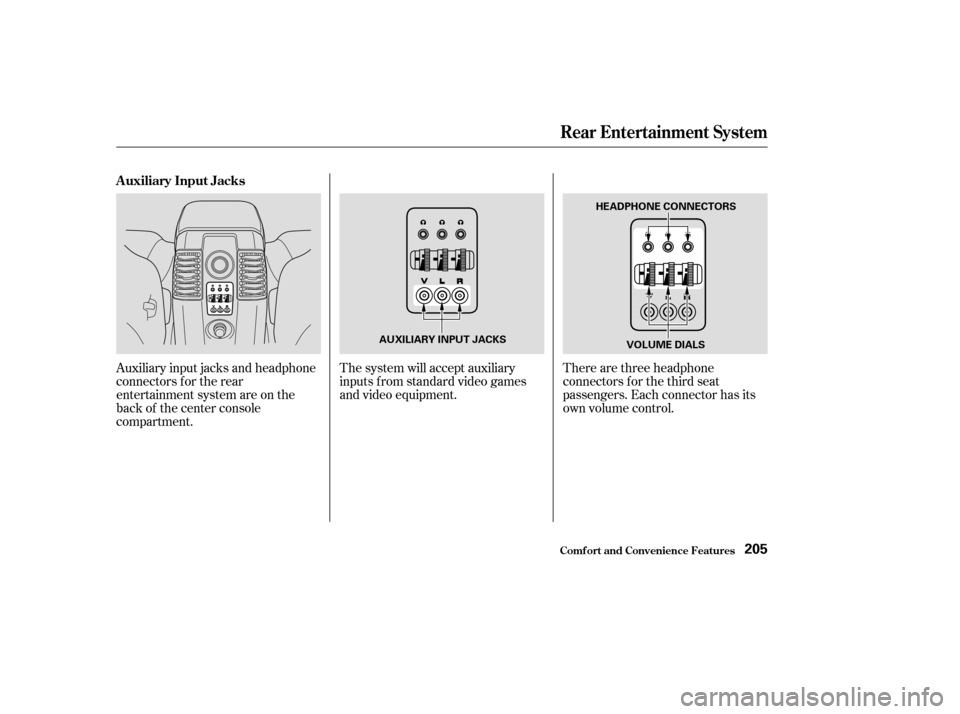
There are three headphone
connectors f or the third seat
passengers. Each connector has its
own volume control.
The system will accept auxiliary
inputs f rom standard video games
and video equipment.
Auxiliary input jacks and headphone
connectors f or the rear
entertainment system are on the
back of the center console
compartment. Auxiliary Input Jacks
Rear Entertainment System
Comf ort and Convenience Feat ures205
AUXILIARY INPUT JACKS HEADPHONE CONNECTORS
VOLUME DIALS
Page 210 of 392
Once the security system is set,
opening any door (without using the
key or the remote transmitter), or
the hood, will cause it to alarm. It
also alarms if the radio is removed
f rom the dashboard or the wiring is
cut.Do not attempt to alter this system
or add other devices to it. The security system will not set if
the hood, tailgate, or any door is not
f ully closed. If the system will not set,
check the Door and Tailgate Open
Monitor on the instrument panel
(see page ) to see if the doors and
tailgate are f ully closed. Since it is
notpartofthemonitordisplay,
manually check the hood.
The security system helps to protect
your vehicle and valuables f rom thef t.
The horn sounds and a combination
of headlights, parking lights, side
marker lights, and taillights f lash if
someone attempts to break into your
vehicleorremovetheradio.This
alarm continues f or two minutes,
then the system resets. To reset an
alarming system before the two
minutes have elapsed, unlock the
driver’s f ront door with the key or
the remote transmitter.
The security system sets auto-
matically, f if teen seconds af ter you
lock the doors, hood, and tailgate.
For the system to activate, you must
lock the doors f rom the outside with
the key, or remote transmitter. The
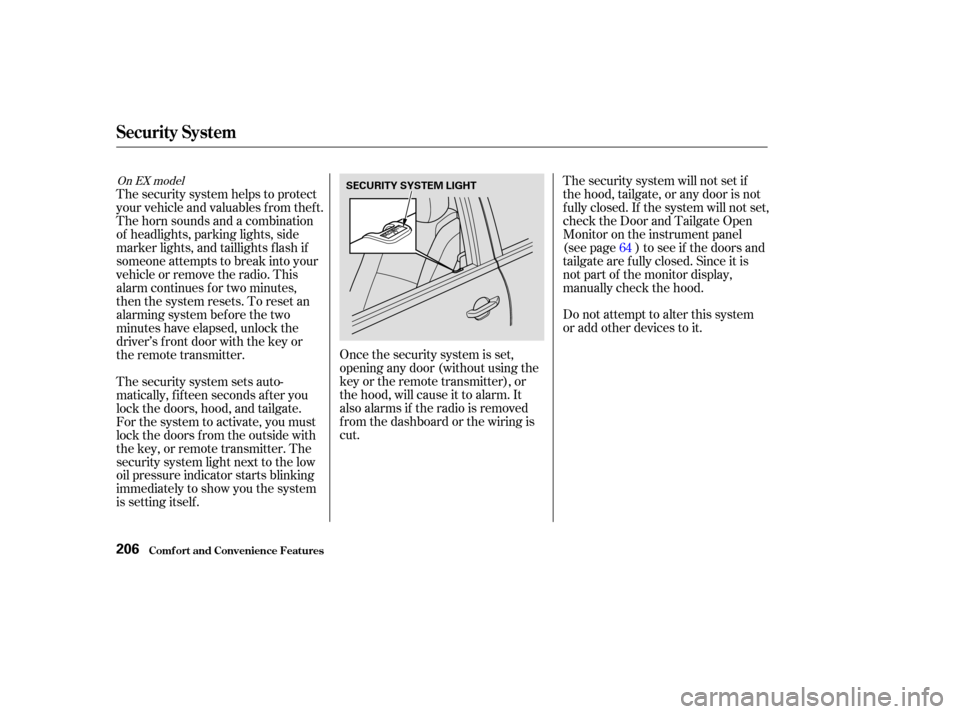
security system light next to the low
oil pressure indicator starts blinking
immediately to show you the system
is setting itself . 64
On EX model
Security System
Comf ort and Convenience Feat ures206
SECURITY SYSTEM LIGHT
Page 231 of 392
Distribute cargo evenly on the
f loor of the cargo area, placing the
heaviest items on the bottom and
as far forward as possible. Tie
down items that could be thrown
about the vehicle during a crash or
sudden stop.If you use an accessory roof rack,
the roof rack weight limit may be
lower. Ref er to the inf ormation that
came with your roof rack.
If you carry large items that
prevent you f rom closing the
tailgate, exhaust gas can enter the
passenger area. To avoid the
possibility of carbon monoxide
poisoning, f ollow the instructions
on page . If you carry any items on a roof
rack,besurethetotalweightof
the rack and the items on it does
not exceed 165 lb (75 kg).
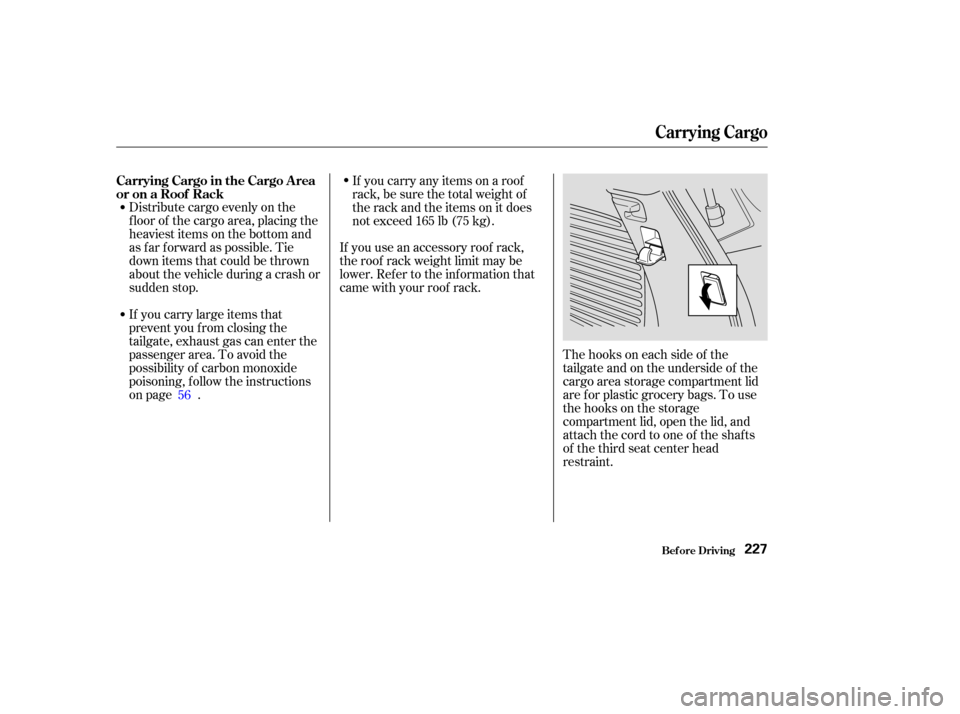
Thehooksoneachsideof the
tailgate and on the underside of the
cargo area storage compartment lid
are f or plastic grocery bags. To use
the hooks on the storage
compartment lid, open the lid, and
attach the cord to one of the shafts
of the third seat center head
restraint.
56
Carrying Cargo in the Cargo A rea
or on a Roof Rack
Carrying Cargo
Bef ore Driving227
Page 246 of 392

You will f eel a pulsation in the brake
pedal when the ABS activates, and
you may hear some noise. This is
normal; it is the ABS rapidly
pumping the brakes.this defeats the
purpose of the ABS. Let the ABS
work f or you by always keeping f irm,
steady pressure on the brake pedal
as you steer away from the hazard.
This is sometimes ref erred to as
Activation varies with the amount of
traction your tires have. On dry
pavement, you will need to press on
thebrakepedalveryhardbeforeyou
activate the ABS. However, you may
feel the ABS activate immediately if
you are trying to stop on snow or ice.
Your vehicle has an Anti-lock Brake
System (ABS) as standard
equipment. ABS helps to prevent the
wheels f rom locking up and skidding
during hard braking, allowing you to
retain steering control.
When the f ront tires skid, you lose
steering control; the vehicle
continues straight ahead even
though you turn the steering wheel.
The ABS helps to prevent lock-up
and helps you retain steering control
by pumping the brakes rapidly; much
f aster than a person can do it.
The hydraulic system that operates
the brakes has two separate circuits.
Each circuit works diagonally across
the vehicle (the lef t-f ront brake is
connected with the right-rear brake,
etc.). If one circuit should develop a
problem, you will still have braking
at two wheels.
The ABS also balances the f ront-to
rear braking distribution according
to vehicle loading.
‘‘stomp and steer.’’
You should never pump the
brake pedal;
Anti-lock Brakes
Brake System Design
The Braking System
Driving242
Front
Page 249 of 392

�µ�µAlways drive
slower than you would in dry
weather. It takes your vehicle longer
to react, even in conditions that may
seem just barely damp. Apply
smooth, even pressure to all the
controls. Abrupt steering wheel
movements or sudden, hard appli-
cation of the brakes can cause loss of
control in wet weather. Be extra
cautious f or the f irst f ew miles
(kilometers) of driving while you
adjust to the change in driving
conditions. This is especially true in
snow. A person can f orget some
snow-driving techniques during the
summer months. Practice is needed
to relearn those skills.
Exercise extra caution when driving
in rain af ter a long dry spell. Af ter
months of dry weather, the f irst
rains bring oil to the surf ace of the
roadway, making it slippery.
Rain, f og, and snow conditions re-
quire a dif f erent driving technique
because of reduced traction and
visibility. Keep your vehicle well-
maintained and exercise greater
caution when you need to drive in
bad weather. The cruise control
should not be used in these condi-
tions. Being able to see
clearly in all directions and being
visible to other drivers are important
in all weather conditions. This is
more dif f icult in bad weather. To be
seen more clearly during daylight
hours, turn on your headlights.
Inspect your windshield wipers and
washers f requently. Keep the wind-
shield washer reservoir f ull of the
proper f luid. Have the windshield
wiper blades replaced if they start to
streak the windshield or leave parts
unwiped. Use the def rosters and air
conditioning to keep the windows
f rom f ogging up on the inside (see
page ). 125
CONT INUED
Driving T echnique Visibility
Driving in Bad Weather
Driving245
Page 261 of 392

The added weight, length, and
height of a trailer will af f ect your
vehicle’s handling and perf ormance,
so driving with a trailer requires
some special driving skills and
techniques.
Foryoursafetyandthesafetyof
others,taketimetopracticedriving
maneuvers bef ore heading f or the
open road, and f ollow the guidelines
discussed below.
Avoid towing a trailer during your
vehicle’s f irst 500 miles (800
kilometers) (see page ).Drive slower than normal in all
driving situations. Obey all local
speed limits f or vehicles with trailers.
To keep the transmission f rom
f requently upshif ting and
downshif ting, drive in D. When
driving with a f ix-sided (e.g, camper,
utility) trailer, do not exceed 55 mph
(88 km/h). At higher speeds, the
trailer may sway or affect vehicle
handling.
Maketurnsmoreslowlyandwider
than normal. The trailer tracks a
smaller arc than your vehicle, and it
canhitorrunoversomethingthe
vehicle misses. Allow more time and
distance f or braking. When you need
to slow down, slowly lif t your f oot of f
the throttle and gradually apply the
brakes. Do not brake or turn
suddenly as this could cause the
trailer to jackknif e or turn over.
216
CONT INUED
Driving Saf ely With a T railer
Break-In Period T owing Speed
Making T urns and Braking
Towing a Trailer
Driving257