Page 118 of 392
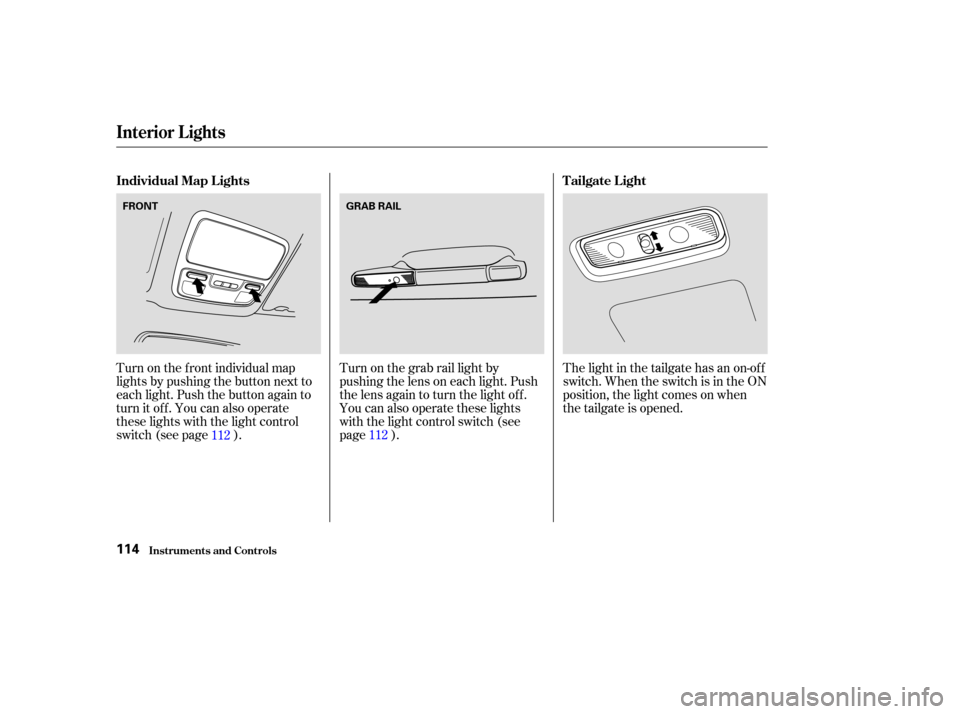
Turn on the f ront individual map
lights by pushing the button next to
each light. Push the button again to
turn it off. You can also operate
these lights with the light control
switch (see page ).Turn on the grab rail light by
pushing the lens on each light. Push
the lens again to turn the light off.
You can also operate these lights
with the light control switch (see
page ).The light in the tailgate has an on-of f
switch. When the switch is in the ON
position, the light comes on when
thetailgateisopened.
112 112
Individual Map L ights
Tailgate L ight
Interior Lights
Inst rument s and Cont rols114
FRONTGRAB RAIL
Page 119 of 392
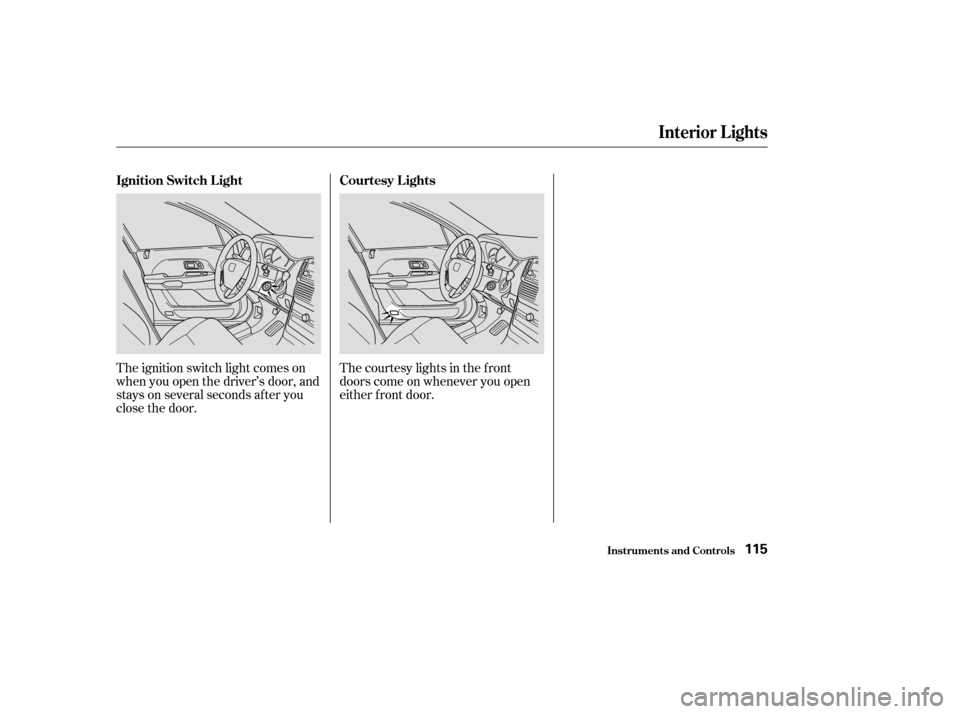
The ignition switch light comes on
when you open the driver’s door, and
stays on several seconds after you
close the door.The courtesy lights in the f ront
doors come on whenever you open
either f ront door.
Interior Lights
Inst rument s and Cont rols
Ignition Switch L ight
Courtesy L ights
115
Page 122 of 392
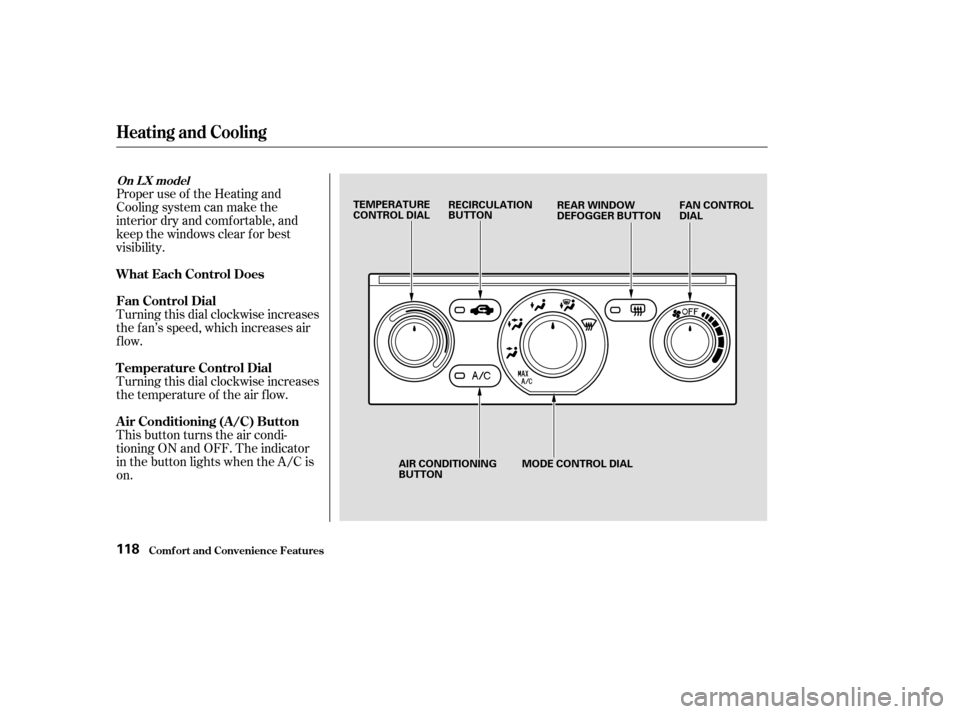
Proper use of the Heating and
Cooling system can make the
interior dry and comf ortable, and
keep the windows clear f or best
visibility.
Turning this dial clockwise increases
the f an’s speed, which increases air
flow.
Turning this dial clockwise increases
the temperature of the air flow.
This button turns the air condi-
tioning ON and OFF. The indicator
in the button lights when the A/C is
on.
Comf ort and Convenience Feat ures
Heating and Cooling
What Each Control Does
Fan Control Dial
T emperature Control Dial
Air Conditioning (A/C) Button
On L X model
118
TEMPERATURE
CONTROL DIALRECIRCULATION
BUTTON
FAN CONTROL
DIAL
REAR WINDOW
DEFOGGER BUTTON
AIR CONDITIONING
BUTTON MODE CONTROL DIAL
Page 123 of 392

This button controls the source of
the air going into the system. When
the indicator in this button is lit, air
f rom the vehicle’s interior is sent
through the system again (Recircula-
tion mode). When the indicator is off,
air is brought in f rom outside the
vehicle (Fresh Air mode).
This button turns the rear window
def ogger on and of f (see page ).Use the MODE control dial to select
the vents the air flows from. Some
air will f low f rom the dashboard
corner vents in all modes.
Air flows from the center
and corner vents in the dashboard.
Air f low is divided between
the vents in the dashboard and the
f loor vents.
Air f lows f rom the f loor
vents.
Air f low is divided between
the f loor vents and the def roster
vents at the base of the windshield.
Air f lows f rom the def roster
vents at the base of the windshield. When you select or ,
the system automatically switches to
Fresh Air mode and turns on the
A/C. In this case you cannot turn it
of f .
When you select , the system
automatically switches to Fresh Air
mode and turns on the A/C.
77
Comf ort and Convenience Feat ures
Heating and Cooling
Recirculation Button
Rear Window Def ogger Button Mode Control Dial
119
Page 127 of 392

The f low-through ventilation system
draws in outside air, circulates it
through the interior, then exhausts it
through vents near the rear side
panels.Turn the temperature control dial
all the way to the lef t.
Make sure the A/C is of f .
Select and Fresh Air mode.
Set the f an to the desired speed. If the interior is very warm f rom
beingparkedinthesun,youcancool
it down more rapidly by setting up
the controls this way: When the interior has cooled down
to a more comf ortable temperature,
close the windows and set the
controls as described f or normal
cooling.
Air conditioning places an extra load
on the engine. Watch the engine
coolant temperature gauge (see page
) when driving in stop-and-go
traf f ic or climbing a long, steep hill.
If it moves near the red zone, turn
of f the A/C until the gauge reads
normally.
Turn on the A/C by pressing the
button. The light in the button
comesonwhenafanspeedis
selected.
Make sure the temperature
control dial is all the way to the left.
Select .
If the outside air is humid, select
Recirculation mode. If the outside
air is dry, select Fresh Air mode.
Set the f an to the desired speed.
Start the engine.
Turn on the A/C by pressing the
button. Make sure the tempera-
ture control dial is turned all the
way to the left.
Set the f an to maximum speed.
Open the windows partially. Select
and Fresh Air mode.
1.
2.
3.
4. 1.
2.
3.
5. 4.
1.
2.
3. 68
Comf ort and Convenience Feat ures
Heating and Cooling
Vent ilat ion
T o Cool wit h A /C
123
Page 128 of 392
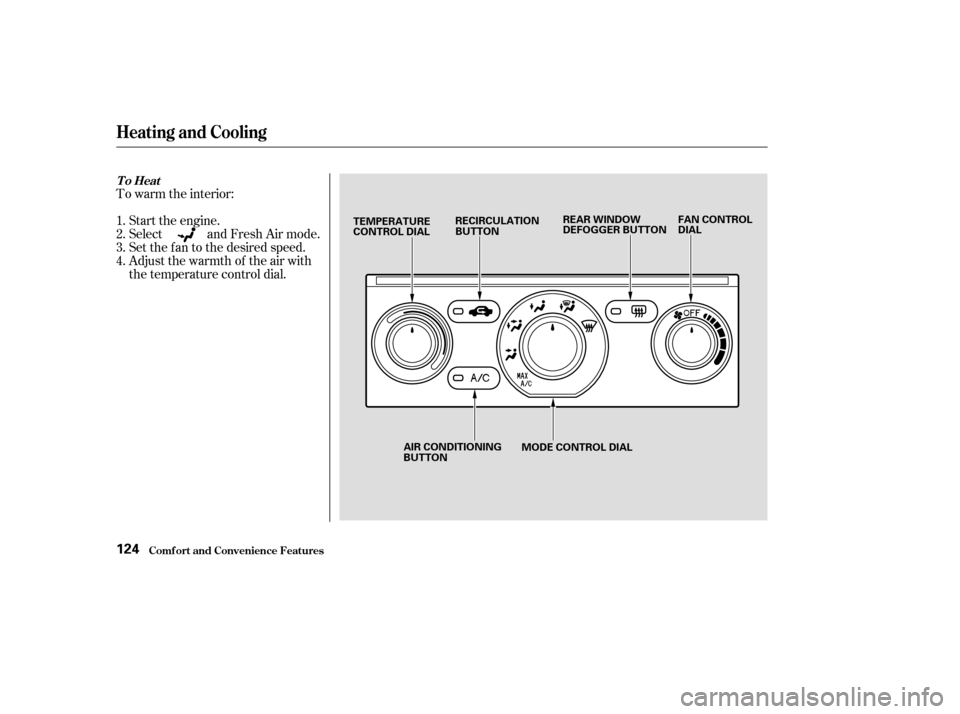
To warm the interior:Start the engine.
Select and Fresh Air mode.
Set the f an to the desired speed.
Adjust the warmth of the air with
the temperature control dial.
1.
2.
3.
4.
Comf ort and Convenience Feat ures
Heating and Cooling
To Heat
124
MODE CONTROL DIAL
TEMPERATURE
CONTROL DIAL
RECIRCULATION
BUTTON REAR WINDOW
DEFOGGER BUTTON
FAN CONTROL
DIAL
AIR CONDITIONING
BUTTON
Page 129 of 392

Air conditioning, as it cools, removes
moisture from the air. When used in
combination with the heater, it
makes the interior warm and dry.
This setting is suitable f or all driving
conditions whenever the outside
temperature is above 32°F (0°C).To remove f og f rom the inside of the
windows:
To remove exterior f rost or ice f rom
the windshield and side windows
after the vehicle has been sitting out
in cold weather:
Switch the f an on.
Turn on the air conditioning
Select and Fresh Air mode.
Adjust the temperature control
dial so the mixture of heated and
cooled air f eels comf ortable. Set the f an to the desired speed.
Select .
When you select , the
system automatically switches to
Fresh Air mode and turns on the
A/C.
Adjust the temperature control
dial so the air f low f rom the
def roster vents f eels warm.
Turn on the rear window def ogger
to help clear the rear window.
When you switch to another mode
f rom , the A/C stays on.
Press the A/C button to turn it of f .Start the engine.
Select .
When you select , the
system automatically switches to
Fresh Air mode and turns on the
A/C.
Set the f an and temperature
controls to maximum.
To rapidly remove exterior f rost or
ice f rom the windshield (on very cold
days), f irst select the Recirculation
mode. Once the windshield is clear,
select the Fresh Air mode to avoid
f ogging the windows.
1.
2.
3.
4.
1.
2.
3.
4.1.
2.
3.
CONT INUED
Comf ort and Convenience Feat ures
Heating and Cooling
T o Heat and Dehumidif y wit h A ir
Condit ioning T o Def og and Def rost
125
Page 131 of 392
Your vehicle also has a rear A/C unit
that allows the rear passengers to
adjust the heating, cooling, and f an
speed. See page f or operation of
the rear A/C unit.To shut of f the system temporarily,
turn the fan speed and temperature
control dials all the way to the lef t.
You should shut the system
completely of f only f or the f irst f ew
minutes of driving in cold weather,
until the engine coolant warms up
enough to operate the heater. Keep
the fan on at all other times so stale
air does not build up in the interior.
136
Rear A/C Unit
To Turn Everything Of f
Heating and Cooling
Comf ort and Convenience Feat ures127