Page 132 of 392
The automatic climate control
system in your Honda picks the
proper combination of air condi-
tioning, heating, and ventilation to
maintain the interior temperature
you select. The system also adjusts
the fan speed and air flow levels.
Your vehicle also has a rear A/C unit
that allows the rear passengers to
adjust the heating, cooling, and air
f low (see page ).
The vents in the corners of the
dashboard can be opened and closed
with the dials underneath them. The direction of air f low f rom the
vents in the center and each corner
of the dashboard is adjustable.
Move the tab in the center of each
vent up-and-down and side-to-side.The climate control system draws air
through the exterior vents at the
bottom of the windshield. Keep
these vents clear of leaves and other
debris.For the climate control system to
provide heating and cooling, the
engine must be running.
135
On EX model
Comf ort and Convenience Feat ures
Climat e Cont rol Syst em
128
CENTER VENTS
CORNER VENT
Page 134 of 392

To put the Automatic Climate
Control in f ully-automatic mode,
press the AUTO button and set the
desired temperature by turning the
temperature control dial. You will
see FULL AUTO in the system’s
display. The light above thebutton also show you which
mode, Recirculation or Fresh Air, is
selected.
The system automatically selects the
proper mix of conditioned and/or
heated air that will, as quickly as
possible, raise or lower the interior
temperature f rom its current level to
the set temperature. Pressing the OFF button shuts the
climate control system completely
of f . Keep the system completely of f
only f or short periods. To keep stale
air and mustiness f rom collecting,
you should have the f an running at
all times.
When you set the temperature to its
lower limit (60°F/18°C) or its upper
limit (90°F/32°C), the system runs
at f ull cooling or heating only. It does
not regulate the interior temperature. When the temperature is set
between the lower and upper limits,
the system regulates the interior
temperature to the set value.
Comf ort and Convenience Feat ures
Climat e Cont rol Syst em
Fully-automatic Operation
130
RECIRCULATION
BUTTON
REAR WINDOW
DEFOGGER BUTTON
FAN CONTROL
BUTTONS
OFF BUTTON
AUTO BUTTON TEMPERATURE CONTROL DIAL
MODE BUTTON
AIR CONDITIONING BUTTON
Page 135 of 392

�Û
You can manually select various
f unctions of the Climate Control
system when it is in FULL AUTO.
All other f eatures remain auto-
matically controlled. Making any
manual selection causes the word
FULL to go out.
Press the A/C button to turn the air
conditioningonandoff.Youwillsee
A/C ON or A/C OFF in the display.
When you turn the A/C of f , the sys-
tem cannot regulate the inside tem-
perature if you set the dial below the
outside temperature. With the A/C
on, use the temperature control dial
to adjust the temperature of the air
flow to a comfortable setting. This button controls the source of
the air going into the system. When
the indicator above this button is lit,
air f rom the vehicle’s interior is sent
through the system again (Recircula-
tion mode). When the indicator is off,
air is brought in f rom outside the
vehicle (Fresh Air mode).
You can, f or example, manually put
the system in recirculation mode
when driving through an area of
smoke or f umes.
You can manually select the f an
speed by pressing the f an control
buttons. When you press either
button, the fan is taken out of
automatic mode and starts to run at
its lowest speed. Pressing the
button repeatedly makes the fan run
f aster. The f an speed is shown by
vertical bars in the display.
CONT INUED
Comf ort and Convenience Feat ures
Climat e Cont rol Syst em
Semi-automatic Operation
A ir Condit ioning (A /C) But t on
Recirculation Button
Fan Control Buttons
131
Page 140 of 392
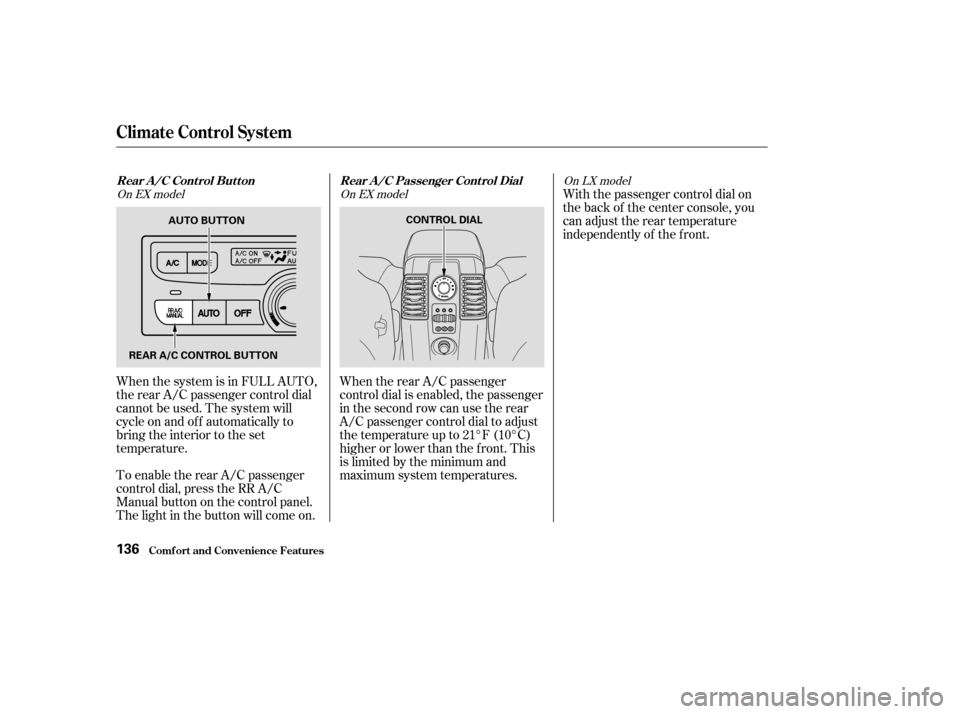
When the system is in FULL AUTO,
the rear A/C passenger control dial
cannot be used. The system will
cycle on and of f automatically to
bring the interior to the set
temperature.
To enable the rear A/C passenger
control dial, press the RR A/C
Manual button on the control panel.
The light in the button will come on.When the rear A/C passenger
control dial is enabled, the passenger
in the second row can use the rear
A/C passenger control dial to adjust
the temperature up to 21°F (10°C)
higher or lower than the f ront. This
is limited by the minimum and
maximum system temperatures.With the passenger control dial on
the back of the center console, you
can adjust the rear temperature
independently of the f ront.
On EX model
On EX modelOn LX model
Rear A /C Cont rol But t on Rear A /C Passenger Cont rol Dial
Comf ort and Convenience Feat ures
Climat e Cont rol Syst em
136
AUTO BUTTON
REAR A/C CONTROL BUTTON CONTROL DIAL
Page 326 of 392
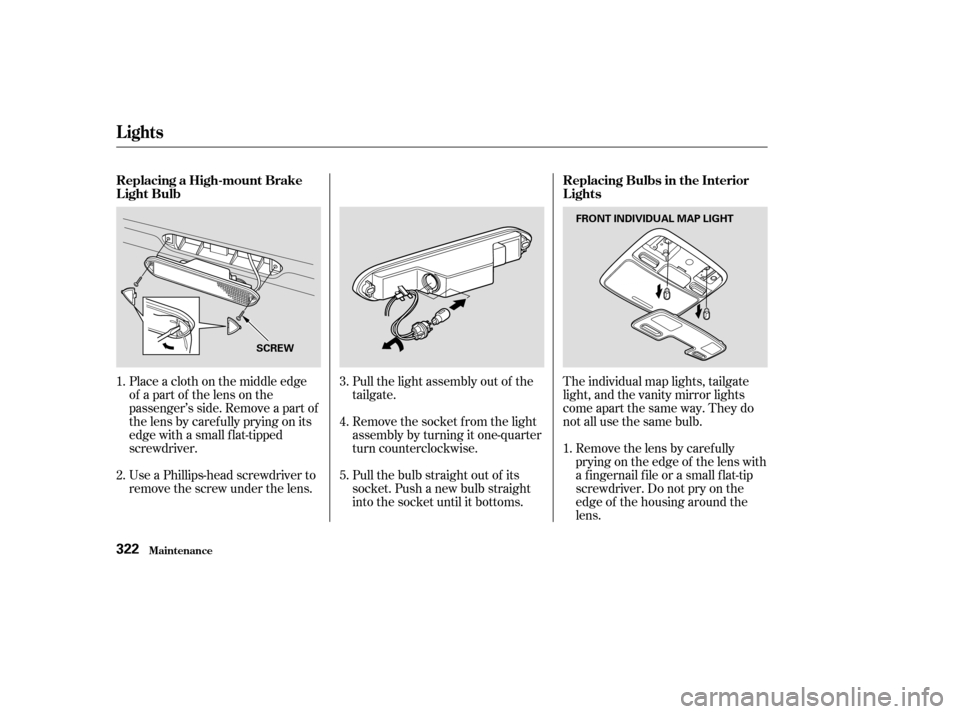
The individual map lights, tailgate
light, and the vanity mirror lights
come apart the same way. They do
not all use the same bulb.Removethelensbycarefully
prying on the edge of the lens with
a f ingernail f ile or a small f lat-tip
screwdriver. Do not pry on the
edge of the housing around the
lens.
Pull the light assembly out of the
tailgate.
Remove the socket f rom the light
assembly by turning it one-quarter
turn counterclockwise.
Pull the bulb straight out of its
socket. Push a new bulb straight
into the socket until it bottoms.
Place a cloth on the middle edge
of a part of the lens on the
passenger’s side. Remove a part of
the lens by caref ully prying on its
edge with a small f lat-tipped
screwdriver.
Use a Phillips-head screwdriver to
remove the screw under the lens.
1.
1.
2. 3.
4.
5.
Lights
Maint enance
Replacing Bulbs in the Interior
Lights
Replacing a High-mount Brake
Light Bulb
322
FRONT INDIVIDUAL MAP LIGHT
SCREW
Page 328 of 392

If you need to park your vehicle f or
an extended period (more than one
month), there are several things you
should do to prepare it f or storage.
Proper preparation helps prevent
deterioration and makes it easier to
get your vehicle back on the road. If
possible, store your vehicle indoors.Block the rear wheels.
If the vehicle is to be stored f or a
longer period, it should be
supported on jackstands so the
tires are of f the ground.
Leave one window open slightly (if
the vehicle is being stored
indoors).
Fill the f uel tank.
Change the engine oil and f ilter
(see page ).
Wash and dry the exterior
completely.
Cleantheinterior.Makesurethe
carpeting, floor mats, etc. are
completely dry.
Leave the parking brake off. Put
the transmission in Park. Support the f ront and rear wiper
blade arms with a f olded towel or
ragsotheydonottouchthe
windshield. Disconnect the battery.
To minimize sticking, apply a
silicone spray lubricant to all door
and tailgate seals. Also, apply a
vehiclebodywaxtothepainted
surfaces that mate with the door
and tailgate seals.Cover the vehicle with a
‘‘breathable’’ cover, one made
f rom a porous material such as
cotton. Nonporous materials, such
as plastic sheeting, trap moisture,
which can damage the paint.
If possible, run the engine f or a
while periodically (pref erably once
amonth).
If you store your vehicle f or 12
months or longer, have your Honda
dealer perf orm the inspections called
f or in the 24 months/30,000 miles
(48,000 km) maintenance schedule
(Normal Conditions) as soon as you
take it out of storage (see page ).
The replacements called f or in the
maintenance schedule are not
needed unless the vehicle has
actually reached that time or mileage.
285
274
St oring Your Vehicle
Maint enance324
Page 329 of 392

Regular cleaning and polishing of
your Honda helps to keep it ‘‘new’’
looking. This section gives you
informationonhowtocleanyour
vehicle and preserve its appearance:
the paint, brightwork, wheels and
interior. Also included are several
things you can do to help prevent
corrosion..................................
Exterior Care .326
.....................................
Washing .326
.......................................
Waxing .327
....................
Aluminum Wheels .327
..........................
Paint Touch-up .327
..................................
Interior Care .328
...................................
Carpeting .328
.................................
Floor Mats .328
.........................................
Fabric .329
...........................................
Vinyl .329
.......................................
Leather .329
...................................
Seat Belts .329
....................................
Windows .330
..........................
Air Fresheners .330
....................
Corrosion Protection .331
.................................
Body Repairs .332
Appearance Care
Appearance Care325
Page 332 of 392
Vacuum the carpeting f requently to
remove dirt. Ground-in dirt will make
the carpet wear out f aster.
Periodically shampoo the carpet to
keep it looking new. Use one of the
foam-type carpet cleaners on the
market. Follow the instructions that
come with the cleaner, applying it
with a sponge or sof t brush. Keep
the carpeting as dry as possible by
not adding water to the f oam.Do not put additional f loor mats on
top of the anchored mat, otherwise
the additional mats may slide
f orward and interf ere with the pedals.
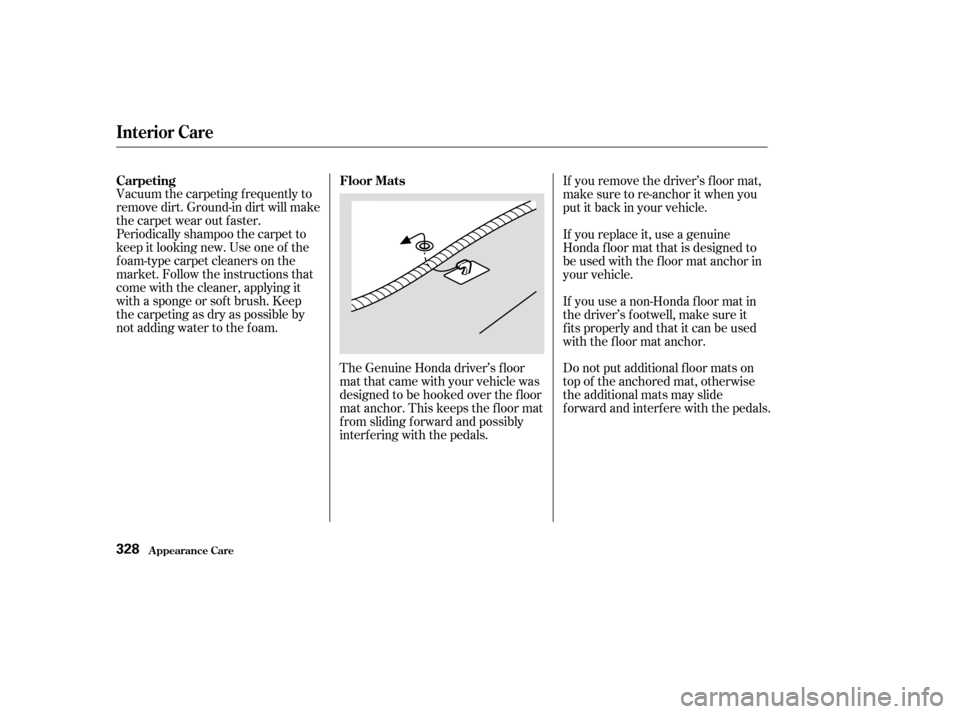
The Genuine Honda driver’s f loor
mat that came with your vehicle was
designed to be hooked over the f loor
mat anchor. This keeps the f loor mat
f rom sliding f orward and possibly
interf ering with the pedals. If you remove the driver’s f loor mat,
make sure to re-anchor it when you
putitbackinyourvehicle.
If you replace it, use a genuine
Honda f loor mat that is designed to
be used with the f loor mat anchor in
your vehicle.
If you use a non-Honda f loor mat in
the driver’s f ootwell, make sure it
f its properly and that it can be used
with the floor mat anchor.
Carpeting
Floor Mats
Appearance Care
Interior Care
328