Page 229 of 392
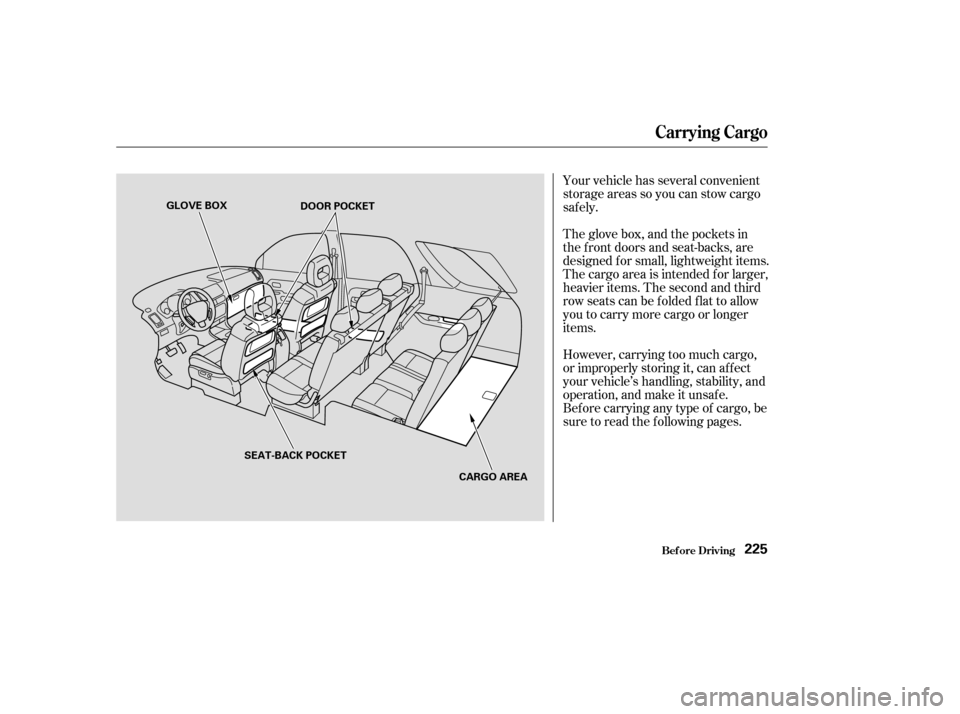
Your vehicle has several convenient
storage areas so you can stow cargo
saf ely.
The glove box, and the pockets in
the f ront doors and seat-backs, are
designed f or small, lightweight items.
The cargo area is intended f or larger,
heavier items. The second and third
row seats can be f olded f lat to allow
you to carry more cargo or longer
items.
However, carrying too much cargo,
or improperly storing it, can af f ect
your vehicle’s handling, stability, and
operation, and make it unsaf e.
Bef ore carrying any type of cargo, be
sure to read the f ollowing pages.
Carrying Cargo
Bef ore Driving225
GLOVE BOXDOOR POCKET
SEAT-BACK POCKET CARGO AREA
Page 232 of 392
The cargo cover can be used to
cover the cargo area behind the third
row seats. When the third row seats
are folded down, the cargo cover can
be installed in a f orward position and
extended over the larger cargo area.
Do not install the cargo cover in the
f orward position if the third row
seats are not f olded down. Theseparationnetcanbeusedto
hold back sof t, lightweight items
stored in the cargo area. Heavy
items should be properly secured on
the f loor of the cargo area. The net
may not prevent heavy items f rom
being thrown f orward in a crash or a
sudden stop.
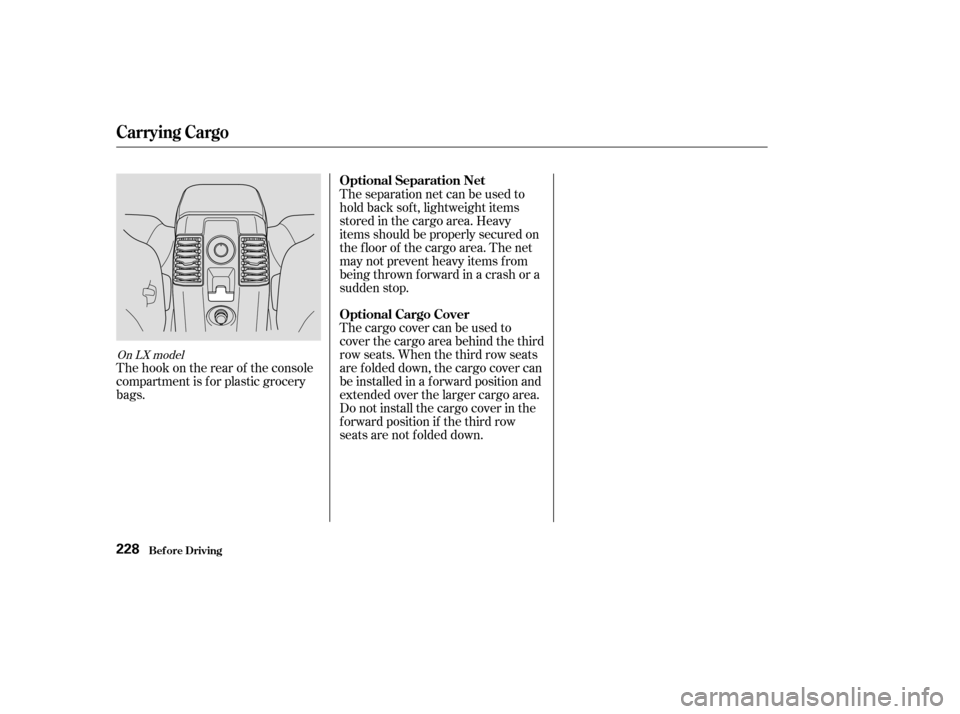
The hook on the rear of the console
compartment is f or plastic grocery
bags.
On LX model
Carrying Cargo
Bef ore Driving
Optional Separation Net
Optional Cargo Cover
228
Page 235 of 392

Youshoulddothefollowingchecks
and adjustments every day bef ore
you drive your vehicle.Make sure all windows, mirrors,
and outside lights are clean and
unobstructed. Remove f rost, snow,
or ice. Check the adjustment of the seat
(see page ).
Check the adjustment of the
inside and outside mirrors (see
page ).
Check the adjustment of the
steering wheel (see page ).
Fasten your seat belt. Check that
your passengers have f astened
their seat belts (see page ).Turn the ignition switch ON (II).
Check the indicator lights in the
instrument panel.
Start the engine (see page ).
Check the gauges and indicator
lights in the instrument panel (see
page ).
Check that any items you may be
carrying with you inside are stored
properly or f astened down
securely. Visually check the tires. If a tire
looks low, use a gauge to check its
pressure. Check that the hood and tailgate
arefullyclosed. Makesurethedoorsandtailgate
are securely closed and locked.
3. 2.
1.
4. 5.
6.
7.
8.
9. 11.
12. 10.
15
78
61
102
232
89
Preparing to Drive
Driving231
Page 243 of 392

To engage the VTM-4 Lock:To disengage the VTM-4 Lock, do
one of the f ollowing:
The VTM-4 Lock will temporarily
disengage when the vehicle speed
exceeds 18 mph (30 km/h). It will
automatically engage again as the
speed slows below 18 mph (30
km/h). The light in the VTM-4 Lock
button will remain on the whole time.
The vehicle must be stopped with
the engine running.
Move the shift lever to first (1),
second (2) or reverse (R) gear.
Press the VTM-4 Lock button.
The light in the button will come
on.
To get unstuck, apply light pressure
to the accelerator pedal. Do not spin
the f ront tires f or more than a f ew
seconds. Because of the amount of
torque applied to the rear tires, they
should not spin. This is normal. If
you are not able to get the vehicle to
move, apply the brakes to stop the
wheels, then reverse direction. Press the VTM-4 Lock button.
Move the shift lever to D, or D .
Turn the ignition to OFF (0).
When you restart your Pilot, the
VTM-4 Lock f eature will be of f .
1.
2.
3.
3
Variable Torque Management 4WD System
Driving239
Do not continuously spin the f ront tires
of your PILOT. Continuously spinning
the f ront tires can cause transmission
or rear dif f erential damage.
Page 244 of 392

�µ
Always use the parking brake when
you park your vehicle. The indicator
on the instrument panel shows that
the parking brake is not f ully
released; it does not indicate that the
parking brake is f irmly set. Make
sure the parking brake is set f irmly
or your vehicle may roll if it is
parked on an incline.
Set the parking brake bef ore you put
the transmission in Park. This keeps
the vehicle from moving and putting
pressure on the parking mechanism
in the transmission making it
easier to move the shif t lever out of
Park when you want to drive away. If the vehicle is f acing uphill, turn
the f ront wheels away f rom the curb.
If the vehicle is f acing downhill, turn
the f ront wheels toward the curb.
Make sure the parking brake is f ully
released bef ore driving away.
Driving with the parking brake
partially set can overheat or damage
the rear brakes.
Make sure the windows are closed.
Turn of f the lights.
Place any packages, valuables, etc.,
in the cargo area or take them
with you.
Lockthedoorswiththekeyorthe
remote transmitter.
Never park over dry leaves, tall
grass, or other f lammable
materials. The three way catalytic
converter gets very hot, and could
cause these materials to catch on
fire.
Parking T ips
Parking
Driving240
Page 245 of 392

When the brake pads need replacing,
you will hear a distinctive metallic
‘‘screeching’’ sound when you apply
the brakes. If you do not have the
brake pads replaced, they will begin
screeching all the time.
Constant application of the brakes
when going down a long hill builds
up heat and reduces their ef f ective-
ness. Use the engine to assist the
brakes by downshif ting to a lower
gear and taking your f oot of f the
accelerator pedal.
Check your brakes af ter driving
through deep water. Apply the
brakes moderately to see if they f eel
normal. If not, apply them gently and
f requently until they do. Since a
longer distance is needed to stop
with wet brakes, be extra cautious
and alert in your driving.
Put your f oot on the brake pedal only
when you intend to brake. Resting
your f oot on the pedal keeps the
brakes applied lightly, causing them
to build up heat. Heat build-up can
reduce how well your brakes work. It
also keeps your brake lights on all
the time, conf using drivers behind
you. All f our brakes have audible brake
wear indicators.
Your Honda is equipped with disc
brakes at all f our wheels. A power
assist helps reduce the ef f ort needed
on the brake pedal. The ABS helps
you retain steering control when
braking very hard.
Your brakes may sometimes squeal
or squeak when you apply them
lightly. Do not conf use this with the
brake wear indicators. The
indicators make a very audible
‘‘screeching.’’ Brake Wear Indicators
The Braking System
Driving241
Page 249 of 392

�µ�µAlways drive
slower than you would in dry
weather. It takes your vehicle longer
to react, even in conditions that may
seem just barely damp. Apply
smooth, even pressure to all the
controls. Abrupt steering wheel
movements or sudden, hard appli-
cation of the brakes can cause loss of
control in wet weather. Be extra
cautious f or the f irst f ew miles
(kilometers) of driving while you
adjust to the change in driving
conditions. This is especially true in
snow. A person can f orget some
snow-driving techniques during the
summer months. Practice is needed
to relearn those skills.
Exercise extra caution when driving
in rain af ter a long dry spell. Af ter
months of dry weather, the f irst
rains bring oil to the surf ace of the
roadway, making it slippery.
Rain, f og, and snow conditions re-
quire a dif f erent driving technique
because of reduced traction and
visibility. Keep your vehicle well-
maintained and exercise greater
caution when you need to drive in
bad weather. The cruise control
should not be used in these condi-
tions. Being able to see
clearly in all directions and being
visible to other drivers are important
in all weather conditions. This is
more dif f icult in bad weather. To be
seen more clearly during daylight
hours, turn on your headlights.
Inspect your windshield wipers and
washers f requently. Keep the wind-
shield washer reservoir f ull of the
proper f luid. Have the windshield
wiper blades replaced if they start to
streak the windshield or leave parts
unwiped. Use the def rosters and air
conditioning to keep the windows
f rom f ogging up on the inside (see
page ). 125
CONT INUED
Driving T echnique Visibility
Driving in Bad Weather
Driving245
Page 259 of 392
Since lighting and wiring vary in
trailer type and brand, you should
also have a qualif ied mechanic install
a suitable connector between the
vehicleandthetrailer.
All states and Canadian provinces
require some type of trailer lights.
Check requirements f or the areas
where you plan to tow.
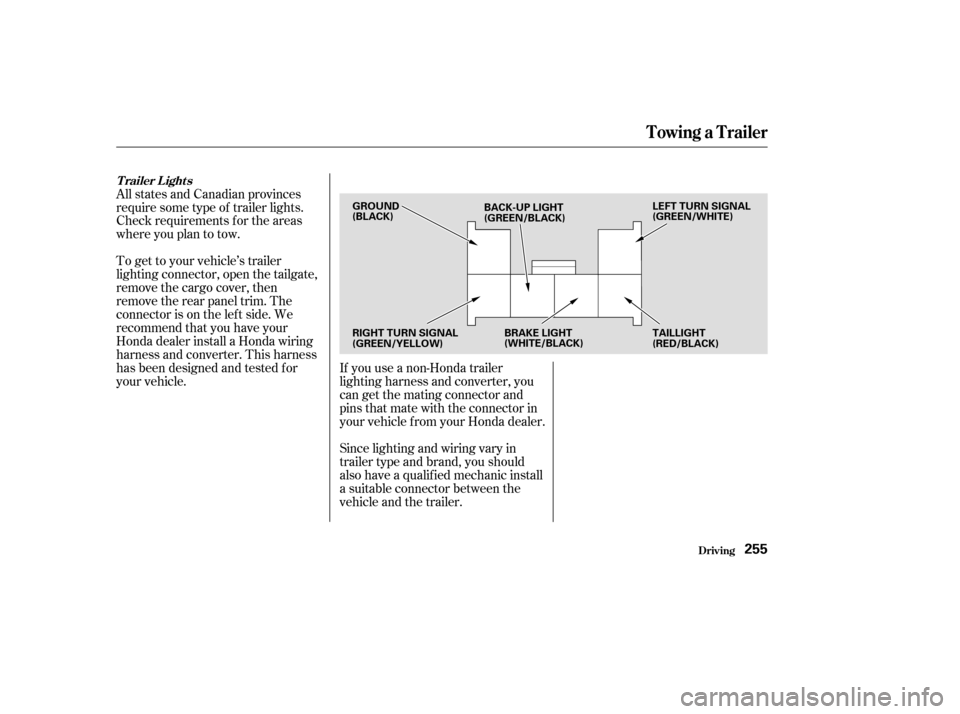
To get to your vehicle’s trailer
lighting connector, open the tailgate,
remove the cargo cover, then
remove the rear panel trim. The
connector is on the lef t side. We
recommend that you have your
Honda dealer install a Honda wiring
harness and converter. This harness
has been designed and tested f or
your vehicle.
If you use a non-Honda trailer
lighting harness and converter, you
cangetthematingconnectorand
pins that mate with the connector in
your vehicle f rom your Honda dealer.
T railer L ights
Towing a Trailer
Driving255
GROUND
(BLACK)
BACK-UP LIGHT
(GREEN/BLACK) LEFT TURN SIGNAL
(GREEN/WHITE)
RIGHT TURN SIGNAL
(GREEN/YELLOW) BRAKE LIGHT
(WHITE/BLACK)
TAILLIGHT
(RED/BLACK)