Page 214 of 415
�µ
�µ �µ �´
�µ�´
�µ
With a cassette playing, you can use
the FF, REW, SKIP, or REPEAT
f unction to f ind a desired program.
Fast Forward and
Rewind move the tape rapidly. To
rewind the tape, push the button. You will see REW in
the display. To fast forward the tape,
push the button. You will see
FF displayed. Press the , or PLAY/PROG button to
take the system out of rewind or fast
f orward. When the system reaches
the end of the tape, it reverses
direction and begins to play.
The Skip f unction allows
you to f ind the beginning of a song
or passage. To skip to the beginning
of a song or passage currently
playing, push the side of the SKIP
bar. You will see REW f lashing in the
display as the tape rewinds. To skip
to the beginning of the next song, push the side of the SKIP bar.
You will see FF f lashing in the
display as the tape f ast f orwards.
When the system finds the
beginning of a song or passage, it
goes back to PLAY.
To stop the SKIP f unction bef ore it
f inds the beginning of a song or
passage, press either side of the
SKIP bar ( or ).
The Repeat f unction
continuously replays the current
song or passage. Press the RPT
button to activate it; you will see RPT
displayed as a reminder. When the
system reaches the end of the song
or passage currently playing, it will
automatically go into rewind. When
it senses the beginning of the same
song or passage, the system returns
to PLAY mode. It will continue to
repeat this same program until you
deactivate REPEAT by pressing the
button again. Pressing the or
button, or either side of the
SKIP bar, also turns of f REPEAT.
The SKIP and REPEAT f unctions
use silent periods on the tape to f ind
the end of a song or passage. These
f eatures may not work to your
satisfaction if there is almost no gap
between selections, a high noise
level between selections, or a silent
period in the middle of a selection.
Damaged cassettes can jam inside
the drive or cause other problems.
See page for information on
cassette care and protection. 198
Audio System
Comf ort and Convenience Feat ures
T ape Search Functions
FF/REW
SK IP REPEAT
Caring f or the Cassette Player
211
Page 215 of 415
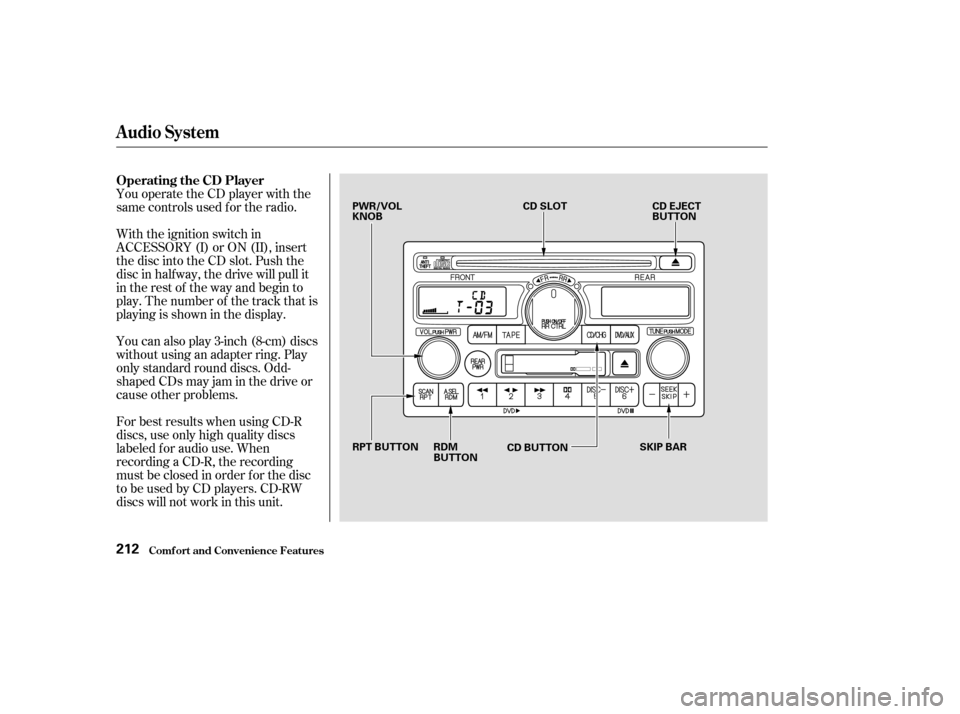
You operate the CD player with the
same controls used f or the radio.
With the ignition switch in
ACCESSORY (I) or ON (II), insert
the disc into the CD slot. Push the
disc in half way, the drive will pull it
in the rest of the way and begin to
play. The number of the track that is
playing is shown in the display.
You can also play 3-inch (8-cm) discs
without using an adapter ring. Play
only standard round discs. Odd-
shaped CDs may jam in the drive or
cause other problems.
For best results when using CD-R
discs, use only high quality discs
labeled f or audio use. When
recording a CD-R, the recording
must be closed in order f or the disc
to be used by CD players. CD-RW
discs will not work in this unit.
Audio System
Comf ort and Convenience Feat ures
Operating the CD Player
212
PWR/VOL
KNOBCD SLOT
CD EJECT
BUTTON
SKIP BAR
CD BUTTON
RDM
BUTTON
RPT BUTTON
Page 216 of 415

�µ�µ
�´
�µ
�´ �µ
When the system reaches the end of
the disc, it will return to the begin-
ning and play the disc again.
You can switch to the radio while a
CD is playing by pressing the AM/
FM button. Press the CD button to
return to playing the CD. The CD
will begin playing where it lef t of f .
If you turn the system of f while a CD
is playing, either with the PWR/VOL
knob or by turning off the ignition,
the disc will stay in the drive. When
youturnthesystembackon,theCD
will begin playing where it lef t of f .
Press the eject button to remove the
disc f rom the drive.
If you eject the disc, but do not
remove it from the slot, the system
will automatically reload the disc
af ter 15 seconds and put the CD
player in pause mode. To begin
playing the disc, press the CD button. You can use the SEEK/SKIP bar
while a disc is playing to select
passages and change tracks.
To move rapidly within a track, press
andholdtheSEEK/SKIPbar.Press
the side to move f orward. You
will see CUE in the display. Press the
side to move backward. You
will see REW displayed. Release the
bar when the system reaches the
point you want.
Each time you press and release the side of the SEEK/SKIP bar,
the system skips forward to the
beginning of the next track. Press
and release the side to skip
backward to the beginning of the
current track. Press it again to skip
to the beginning of the previous
track. To activate the Repeat
f eature, press and release the RPT
button. You will see RPT in the
display. The system continuously
replays the current track. Press the
RPT button again to turn it off.
This feature,
when activated, plays the tracks on
the CD in random order, rather than
in the order they are recorded on the
CD. To activate Random Play, press
and release the A. SEL/RDM button.
You will see RDM in the display. The
system will then select and play
tracks randomly. This continues
until you deactivate Random Play by
pressing A. SEL/RDM again.
Audio System
Comf ort and Convenience Feat ures
REPEAT
RANDOM PLAY
213
Page 217 of 415

�µ
�´
A Compact Disc changer is available
foryourvehicle.Itholdsuptosix
discs, providing several hours of
continuous entertainment. You
operate this CD changer with the
same controls used f or the in-dash
CD player.
Load the desired CDs in the
magazine and load the magazine in
the changer according to the
instructions that came with the unit.
Play only standard round discs. Odd-
shaped CDs may jam in the drive or
cause other problems.
For best results when using CD-R
discs, use only high quality discs
labeled f or audio use. When
recording a CD-R, the recording
must be closed in order f or the disc
to be used by CD players. CD-RW
discs will not work in this unit. To select the CD changer, press the
CD button. The disc and track
numbers will be displayed.
To select a dif f erent disc, use the
Preset 5 (DISC ) or Preset 6
(DISC ) button. Press the Preset 6
button to select the next disc in the
magazine. Press the Preset 5 button
to select the previous disc. If you
select an empty slot in the magazine,
the changer will, af ter f inding that
slot empty, try to load the CD in the
next slot. This continues until it f inds
a CD to load and play.
If you load a CD in the in-dash player
while the changer is playing a CD,
the system will stop the changer and
begin playing the in-dash CD. To
select the changer again, press the
CD button. Play will begin where it
left off. Use the CD button to switch
between the player and the changer.
If you eject the in-dash CD while it is
playing, the system will automatically
switch to the CD changer and begin
play where it lef t of f . If there are no
CDs in the changer, the display will
flash. You will have to select another
mode (Radio or Cassette Player).
When you switch back to CD mode,
the system selects the same unit (in-
dash or changer) that was playing
when you switched out of CD mode.
To use the SKIP, REPEAT, and
RANDOM f unctions, ref er to the in-
dash player operating instructions.
For inf ormation on how to handle
and protect compact discs, see page
.
192
Audio System
Comf ort and Convenience Feat ures
Operating the CD Changer
(Optional)
Protecting Compact Discs
214
Page 218 of 415
If you see an error indication in the
display while operating the CD
player,findthecauseinthechartto
the right. If you cannot clear the
error indication, take the vehicle to
your Honda dealer.Indication Cause
Solution
FOCUS Error
Mechanical Error, or a
DVD has been loaded in
the CD player.
High TemperaturePress the EJECT button and pull out the disc.
Check if the disc is inserted correctly in the CD
player.
Make sure the disc is not scratched or damaged.
Press the EJECT button and pull out the disc.
Check the disc for damage or deformation.
If the CD cannot be pulled out, or the error
indication does not disappear after the disc is
ejected, see your Honda dealer.
Do not try to force the disc out of the player.
Will disappear when the temperature returns to
normal.
CD Player Error Indications
Audio System
Comf ort and Convenience Feat ures215
Page 219 of 415
Indication
If you see an error indication in the
display while operating the optional
CD changer, f ind the cause in the
chart to the right. If you cannot clear
the error indication, take the vehicle
to your Honda dealer. Cause
Solution
FOCUS Error
No CD in the CD
magazine.
Mechanical Error
High Temperature
No CD magazine in the
CD changer. Press the magazine eject button, pull out the
magazine, and check for an error indication.
Insert the magazine again. If the code does not
disappear or the magazine cannot be pulled out,
consult your Honda dealer.
Insert CD.
Press the magazine eject button, pull out the
magazine, and check for an error indication.
Insert the magazine again. If the code does not
disappear or the magazine cannot be pulled out,
consult your Honda dealer.
Will disappear when the temperature returns to
normal.
Insert CD magazine.
Audio System
Comf ort and Convenience Feat ures
CD Changer Error Indications
216
Page 223 of 415
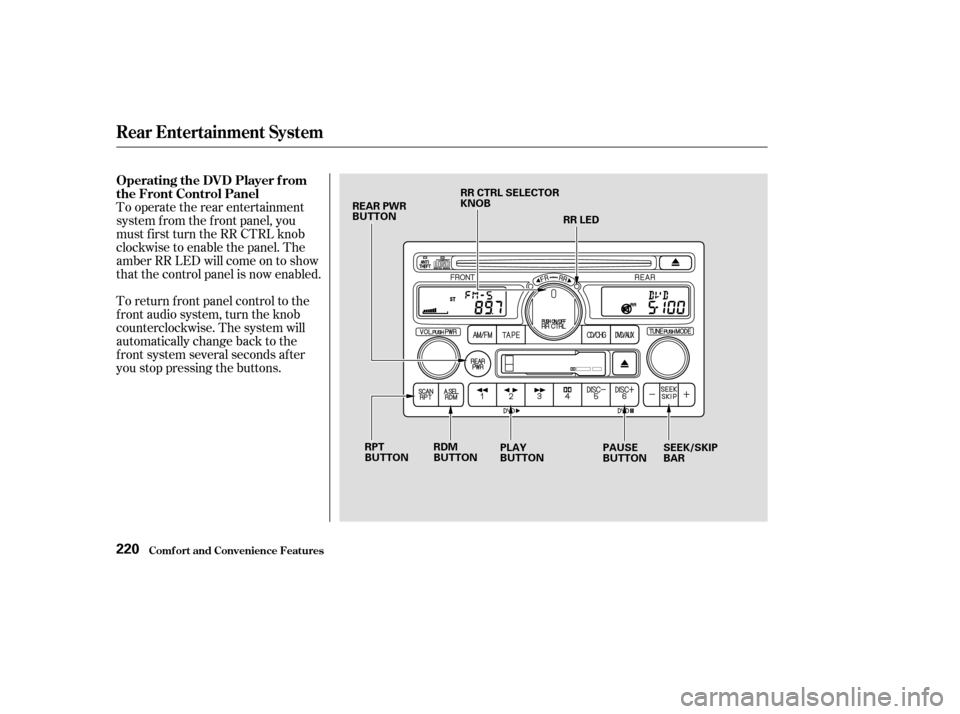
To return f ront panel control to the
front audio system, turn the knob
counterclockwise. The system will
automatically change back to the
f ront system several seconds af ter
you stop pressing the buttons. To operate the rear entertainment
system f rom the f ront panel, you
must first turn the RR CTRL knob
clockwise to enable the panel. The
amber RR LED will come on to show
that the control panel is now enabled.
Comf ort and Convenience Feat ures
Rear Entertainment System
Operating the DVD Player f rom
the Front Control Panel
220
RR CTRL SELECTOR
KNOB
REAR PWR
BUTTON
RR LED
RDM
BUTTON PLAY
BUTTON PAUSE
BUTTONSEEK/SKIP
BAR
RPT
BUTTON
Page 226 of 415
CONT INUED
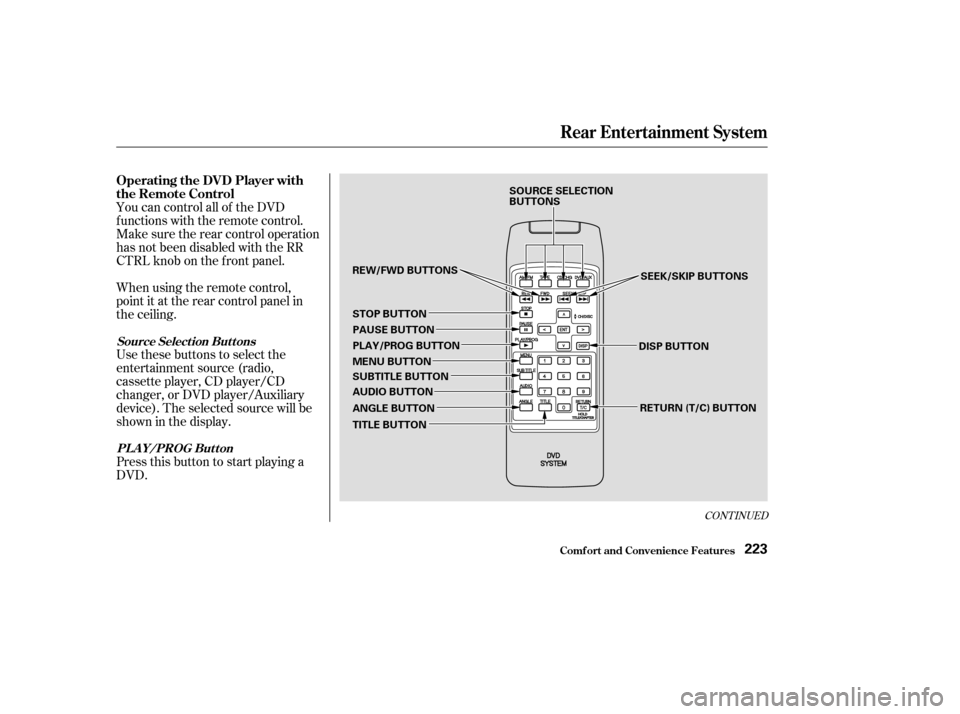
You can control all of the DVD
functions with the remote control.
Make sure the rear control operation
has not been disabled with the RR
CTRL knob on the f ront panel.
When using the remote control,
point it at the rear control panel in
the ceiling.
Press this button to start playing a
DVD. Use these buttons to select the
entertainment source (radio,
cassette player, CD player/CD
changer, or DVD player/Auxiliary
device). The selected source will be
showninthedisplay.
Comf ort and Convenience Feat ures
Rear Entertainment System
Operating the DVD Player with
the Remote Control
Source Select ion But t onsPL A Y/PROG Button
223
SOURCE SELECTION
BUTTONS SEEK/SKIP BUTTONS
DISP BUTTON RETURN (T/C) BUTTON
REW/FWD BUTTONS
STOP BUTTON PAUSE BUTTON
PLAY/PROG BUTTON
MENU BUTTON
SUBTITLE BUTTON
AUDIO BUTTON
ANGLE BUTTON
TITLE BUTTON