Page 202 of 415
�Û�Ý
The top and bottom buttons adjust
thevolumeup( )ordown( ).
Press the proper button and hold it
until the desired volume is reached,
then release it.
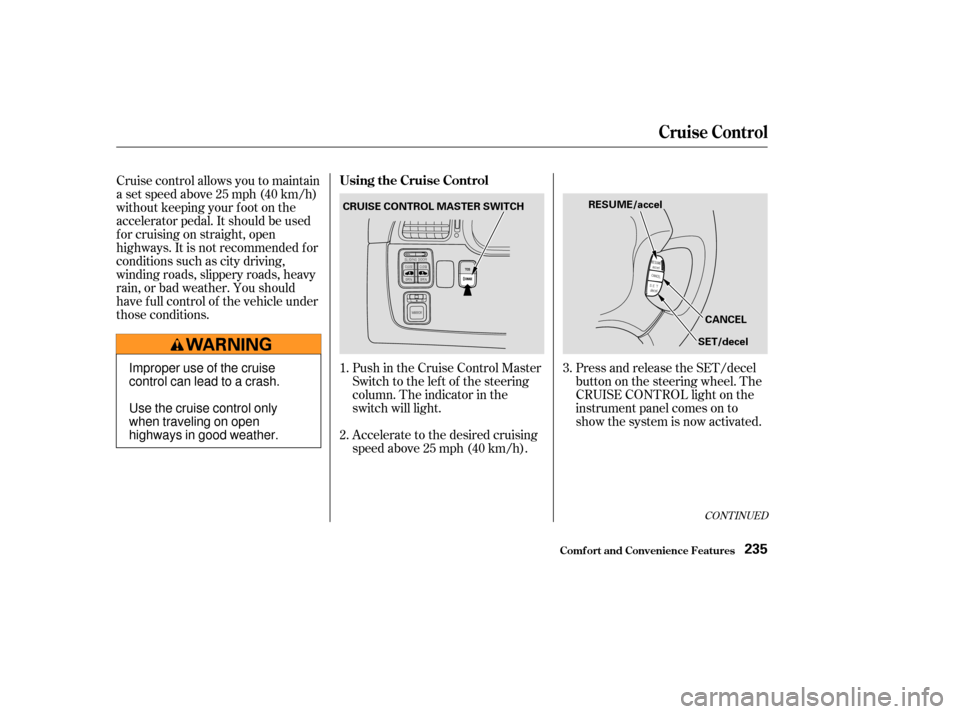
Two controls f or the audio system
are mounted in the steering wheel
hub. These let you control basic
f unctions without removing your
hand f rom the wheel. The AUDIO/CH button has three
f unctions, depending on whether you
are listening to the radio, or playing a
cassette or CD.
If you are playing a cassette, use the
AUDIO/CH button to advance to the
next selection. You will see ‘‘FF’’
blinking in the display when you
press the AUDIO/CH button. The
system f ast f orwards until it senses a
silent period, then goes back to
PLAY.
If youareplayingaCD,thesystem
skips to the beginning of the next
track each time you push the
AUDIO/CH button. You will see the
disc and track number in the display.
If you are listening to the radio, use
the AUDIO/CH button to change
stations. Each time you press this
button, the system advances to the
next preset station on the band you
are listening to. You will see the
number of the selected Preset button
in the display. To change bands,
press the AM/FM button on the
audio system’s f ront panel.
On EX and EX-L models
Remote Audio Controls
Audio System
Comf ort and Convenience Feat ures199
AUDIO/CH
BUTTON
Page 238 of 415
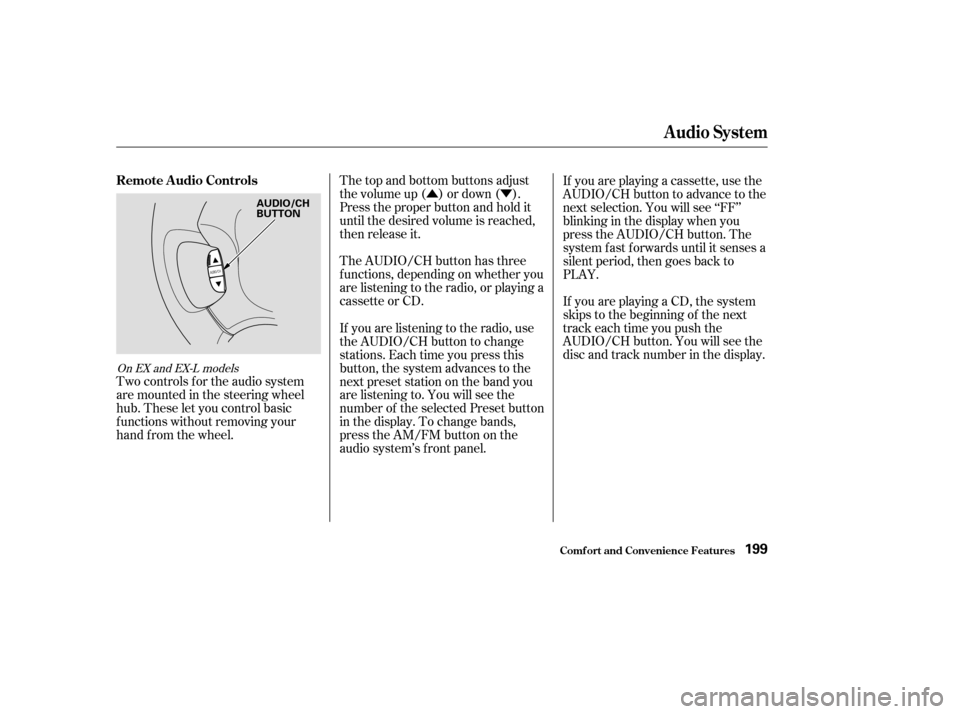
Push in the Cruise Control Master
Switch to the lef t of the steering
column. The indicator in the
switch will light.
Accelerate to the desired cruising
speedabove25mph(40km/h).Press and release the SET/decel
buttononthesteeringwheel.The
CRUISE CONTROL light on the
instrument panel comes on to
show the system is now activated.
Cruise control allows you to maintain
asetspeedabove25mph(40km/h)
without keeping your f oot on the
accelerator pedal. It should be used
f or cruising on straight, open
highways. It is not recommended f or
conditions such as city driving,
winding roads, slippery roads, heavy
rain, or bad weather. You should
have f ull control of the vehicle under
those conditions.
1.
2.3.
CONT INUED
Using the Cruise Control
Cruise Control
Comf ort and Convenience Feat ures235
CRUISE CONTROL MASTER SWITCH
RESUME/accel
CANCEL
SET/decel
Improper use of the cruise
control can lead to a crash.
Use the cruise control only
when traveling on open
highways in good weather.
Page 240 of 415
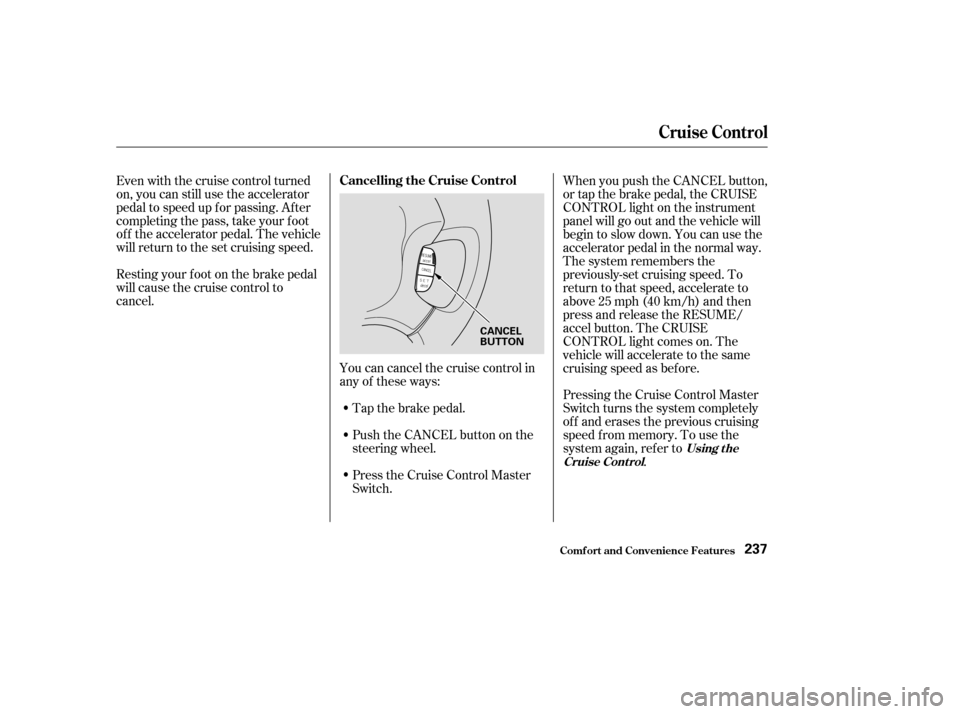
Youcancancelthecruisecontrolin
any of these ways:Push the CANCEL button on the
steering wheel.
Press the Cruise Control Master
Switch.
Even with the cruise control turned
on, you can still use the accelerator
pedal to speed up f or passing. Af ter
completing the pass, take your foot
of f the accelerator pedal. The vehicle
will return to the set cruising speed.
Resting your f oot on the brake pedal
will cause the cruise control to
cancel.
Tap the brake pedal.When you push the CANCEL button,
or tap the brake pedal, the CRUISE
CONTROL light on the instrument
panel will go out and the vehicle will
begin to slow down. You can use the
accelerator pedal in the normal way.
The system remembers the
previously-set cruising speed. To
return to that speed, accelerate to
above25mph(40km/h)andthen
press and release the RESUME/
accel button. The CRUISE
CONTROL light comes on. The
vehicle will accelerate to the same
cruising speed as bef ore.
Pressing the Cruise Control Master
Switch turns the system completely
of f and erases the previous cruising
speed f rom memory. To use the
system again, ref er to
.
Using t he
Cruise Cont rol
Cancelling the Cruise Control
Cruise Control
Comf ort and Convenience Feat ures237
CANCEL
BUTTON
Page 255 of 415

Covering the outside edge of a
f ront seat-back, with a non-Honda
seat cover for example, could
prevent the airbag from inflating
properly.If a side airbag
inflates,acupholderorotherhard
object attached on or near the
door could be propelled inside the
vehicle and hurt someone.
This could make the driver’s seat
position sensor and the f ront
passenger’s weight sensors
inef f ective.
Some examples are:
Lowering the vehicle with an
aftermarket suspension kit that
signif icantly reduces ground
clearance can allow the
undercarriage to impact speed
bumps or other raised objects,
which could cause the airbags to
deploy.
Raising the vehicle with an
af termarket suspension kit can
af f ect the handling and stability.
Af termarket wheels, because they
are a universal design, can cause
excessive stress on suspension
components. Larger or smaller wheels and tires
can interf ere with the operation of
your vehicle’s anti-lock brakes and
other systems.
Do not modif y your steering wheel
or any other part of your
Supplemental Restraint System.
Modif ications could make the
system inef f ective.
Any object
attached to or placed on the covers
marked ‘‘SRS AIRBAG,’’ in the
center of the steering wheel and
on top of the dashboard, could
interf ere with the proper operation
of the airbags. Or, if the airbags
inf late, the objects could be
propelled inside the vehicle and
hurt someone.
If you plan to modif y your vehicle,
consult with your Honda dealer.
Removing parts f rom your vehicle,
or replacing components with non-
Honda (af termarket) components
could seriously af f ect your vehicle’s
handling, stability, and reliability. Modif ications
Additional Saf ety Precautions
A ccessories and Modif ications
Bef ore Driving
Do not place any object s over t heoutsideedgeof afront seat-back.
Do not at t ach hard object s on or
near a f ront door.
Do not modif y t he f ront seat s.
Do not at t ach or place object s on
the f ront airbag covers.
252
Page 261 of 415

Youshoulddothefollowingchecks
and adjustments every day bef ore
you drive your vehicle.Make sure all windows, mirrors,
and outside lights are clean and
unobstructed. Remove f rost, snow,
or ice. Check the adjustment of the seat
(see page ).
Check the adjustment of the
inside and outside mirrors (see
page ).
Check the adjustment of the
steering wheel (see page ).
Fasten your seat belt. Check that
your passengers have f astened
their seat belts (see page ).Turn the ignition switch ON (II).
Check the indicator lights in the
instrument panel.
Start the engine (see page ).
Check the gauges and indicator
lights in the instrument panel (see
page ).
Check that any items you may be
carrying with you inside are stored
properly or f astened down
securely. Visually check the tires. If a tire
looks low, use a gauge to check its
pressure. Check that the hood and tailgate
arefullyclosed. Makesurethedoorsandtailgate
are securely closed and locked.
3. 2.
1.
4. 5.
6.
7.
8.
9. 11.
12. 10.
128 88
17 259
71
110
Preparing to Drive
Driving258
Page 266 of 415

�µ
�µ To shif t to Second,
pull the shif t lever towards you, then
shif t to the lower gear. This position
locks the transmission in second
gear. It does not downshif t to f irst
gear when you come to a stop.
Second gives you more power when
climbing, and increased engine
braking when going down steep hills.
Usesecondgearwhenstartingout
on a slippery surf ace or in deep snow.
It will help reduce wheelspin.
When driving down hill with a trailer,
use the Second position. If you exceed the maximum speed
f or the gear you are in, the engine
speed will enter into the tachometer’s
red zone. If this occurs, you may f eel
the engine cut in and out. This is
caused by a limiter in the engine’s
computer controls. The engine will
run normally when you reduce the
RPM below the red zone.
This allows you to move the shif t
lever out of Park if the normal
method of pushing on the brake
pedal and pulling the shif t lever does
not work.
Set the Parking brake.
Remove the key from the ignition
switch.
Place a cloth on the edge of the
Shif t Lock Release slot cover on
the steering column. Remove the
cover by caref ully prying on the
edge with a small f lat-tipped
screwdriver (not included in the
tool kit).
To shif t f rom Second to
First, pull the shift lever towards you,
then shift to the lower gear. With the
lever in this position, the transmis-
sion locks in First gear. By upshif t-
ing and downshif ting through 1, 2,
D , and D, you can operate this
transmission much like a manual
transmission without a clutch pedal. 1.
2.
3.
CONT INUED
3
Automatic Transmission
Driving
Second (2)
Engine Speed L imiter Shif t L ock Release
First (1)
263
Page 268 of 415

�µ
Always use the parking brake when
you park your vehicle. The indicator
on the instrument panel shows that
the parking brake is not f ully
released; it does not indicate that the
parking brake is f irmly set. Make
sure the parking brake is set f irmly
or your vehicle may roll if it is
parked on an incline.
Set the parking brake bef ore you put
the transmission in Park. This keeps
the vehicle from moving and putting
pressure on the parking mechanism
in the transmission making it
easier to move the shif t lever out of
Park when you want to drive away. If the vehicle is f acing uphill, turn
the f ront wheels away f rom the curb.
If the vehicle is f acing downhill, turn
the f ront wheels toward the curb.
Make sure the parking brake is f ully
released bef ore driving away.
Driving with the parking brake
partially set can overheat or damage
the rear brakes.
Make sure the windows are closed.
Turn of f the lights.
Place any packages, valuables, etc.,
in the cargo area or take them
with you.
Lock the doors and the tailgate
with the key or the remote
transmitter.
Never park over dry leaves, tall
grass, or other f lammable
materials. The three way catalytic
converter gets very hot, and could
cause these materials to catch on
fire.
Parking T ips
Parking
Driving265
Page 269 of 415

When the brake pads need replacing,
you will hear a distinctive metallic
‘‘screeching’’ sound when you apply
the brakes. If you do not have the
brake pads replaced, they will begin
screeching all the time.
Constant application of the brakes
when going down a long hill builds
up heat and reduces their ef f ective-
ness. Use the engine to assist the
brakes by downshif ting to a lower
gear and taking your f oot of f the
accelerator pedal.
Check your brakes af ter driving
through deep water. Apply the
brakes moderately to see if they f eel
normal. If not, apply them gently and
f requently until they do. Since a
longer distance is needed to stop
with wet brakes, be extra cautious
and alert in your driving.
Your Honda is equipped with disc
brakes at all f our wheels. A power
assist helps reduce the ef f ort needed
on the brake pedal. The ABS helps
you retain steering control when
braking very hard.
Put your f oot on the brake pedal only
when you intend to brake. Resting
your f oot on the pedal keeps the
brakes applied lightly, causing them
to build up heat. Heat build-up can
reduce how well your brakes work. It
also keeps your brake lights on all
the time, conf using drivers behind
you.
All f our brakes have audible brake
wear indicators.
Your brakes may sometimes squeal
or squeak when you apply them
lightly. Do not conf use this with the
brake wear indicators. The
indicators make a very audible
‘‘screeching.’’ Brake Wear Indicators
Driving
The Braking System
266