Page 140 of 415
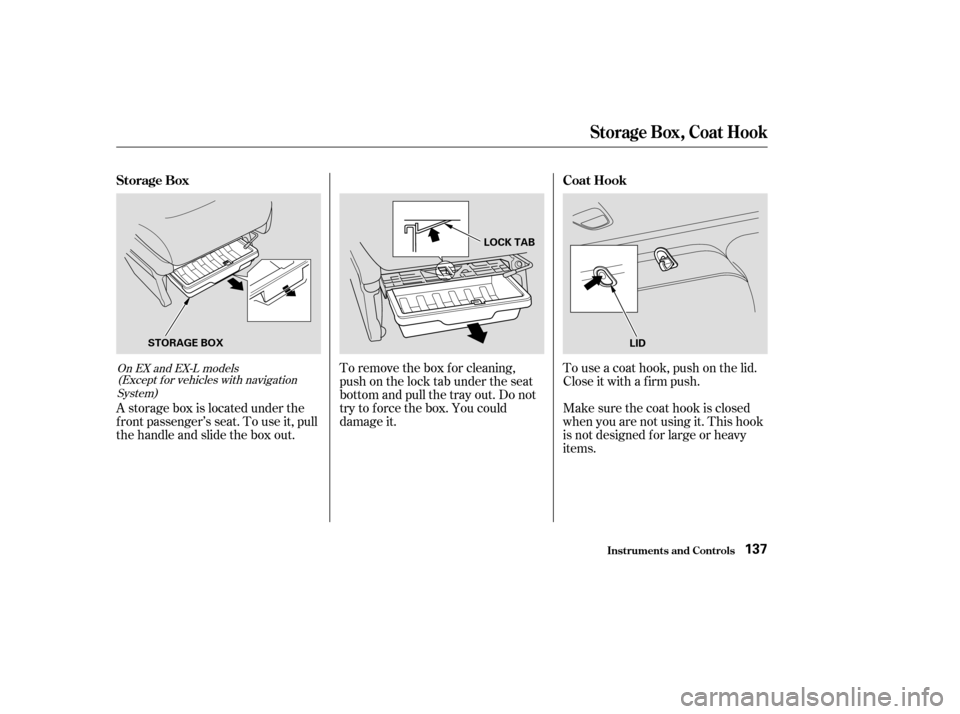
To remove the box for cleaning,
push on the lock tab under the seat
bottom and pull the tray out. Do not
try to f orce the box. You could
damage it.To use a coat hook, push on the lid.
Close it with a f irm push.
Make sure the coat hook is closed
when you are not using it. This hook
is not designed f or large or heavy
items.
A storage box is located under the
f ront passenger’s seat. To use it, pull
the handle and slide the box out.On EX and EX-L models
(Except f or vehicles with navigation
System)
St orage Box, Coat Hook
Inst rument s and Cont rols
Storage Box Coat Hook
137
STORAGE BOXLOCK TAB
LID
Page 152 of 415
To warm the interior:Air conditioning, as it cools, removes
moisture from the air. When used in
combination with the heater, it
makes the interior warm and dry.To remove f og f rom the inside of the
windows:
This setting is suitable f or all driving
conditions whenever the outside
temperature is above 32°F (0°C). Set the f an to the desired speed.
Turn on the air conditioning.
Select and Fresh Air mode.
Adjust the temperature control
dial so the mixture of heated and
cooled air f eels comf ortable.
Set the f an to the desired speed.
Select .
When you select , the
system automatically switches to
Fresh Air mode and turns on the
A/C.
Adjust the temperature control
dial so the air flow from the
def roster vents f eels warm.
Turn on the rear window def ogger
to help clear the rear window.
When you switch to another mode
f rom , the A/C stays on.
PresstheA/Cbuttontoturnitoff.
Start the engine.
Select .
When you select , the
system automatically switches to
Fresh Air mode.
Set the f an to the desired speed.
Adjust the warmth of the air with
the temperature control dial.
1.
2.
3.
4. 1.
2.
3.
4.
1.
2.
3.
4.
CONT INUED
Heating and Cooling
Comf ort and Convenience Feat ures
T o Heat
T o Heat and Dehumidif y wit h A ir
Condit ioning T o Def og and Def rost
149
Page 153 of 415
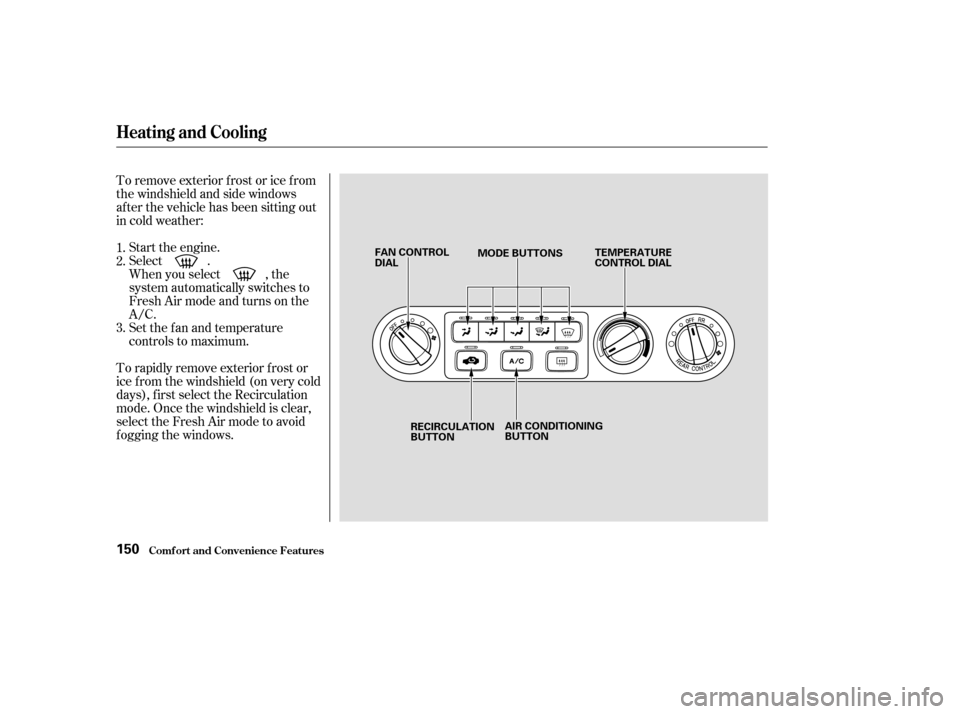
To remove exterior f rost or ice f rom
the windshield and side windows
after the vehicle has been sitting out
in cold weather:Start the engine.
Select .
When you select , the
system automatically switches to
Fresh Air mode and turns on the
A/C.
Set the f an and temperature
controls to maximum.
To rapidly remove exterior f rost or
ice f rom the windshield (on very cold
days), f irst select the Recirculation
mode. Once the windshield is clear,
select the Fresh Air mode to avoid
f ogging the windows. 1.
2.
3.
Comf ort and Convenience Feat ures
Heating and Cooling
150
FAN CONTROL
DIAL MODE BUTTONS
TEMPERATURE
CONTROL DIAL
RECIRCULATION
BUTTON AIR CONDITIONING
BUTTON
Page 175 of 415
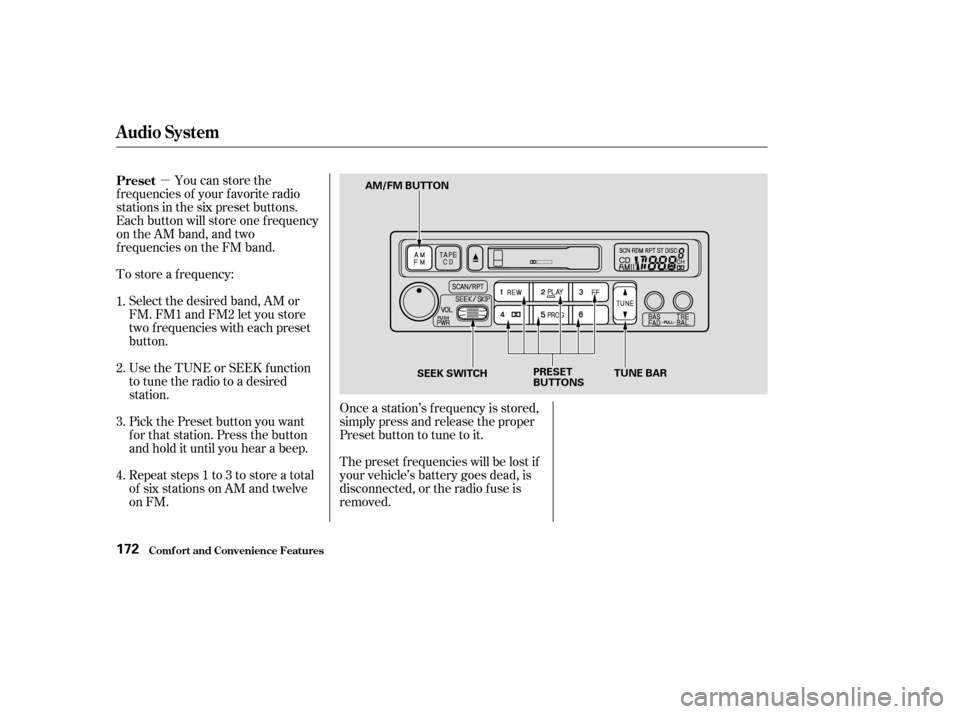
�µYou can store the
f requencies of your f avorite radio
stations in the six preset buttons.
Each button will store one f requency
on the AM band, and two
f requencies on the FM band.
To store a f requency:
Select the desired band, AM or
FM. FM1 and FM2 let you store
two f requencies with each preset
button.
Use the TUNE or SEEK f unction
to tune the radio to a desired
station.
Pick the Preset button you want
for that station. Press the button
and hold it until you hear a beep.
Repeat steps 1 to 3 to store a total
of six stations on AM and twelve
on FM. Once a station’s f requency is stored,
simply press and release the proper
Preset button to tune to it.
The preset f requencies will be lost if
your vehicle’s battery goes dead, is
disconnected, or the radio f use is
removed.
1.
2.
3.
4. Preset
Audio System
Comf ort and Convenience Feat ures172
AM/FM BUTTON
SEEK SWITCH PRESET
BUTTONSTUNE BAR
Page 177 of 415

�Û�µ�µ
When the system reaches the end of
the tape, it will automatically reverse
direction and play the other side. If
you want to remove the cassette
f rom the drive, press the EJECT
button.
You can use the instrument panel
brightness control knob to adjust the
illumination of the audio system (see
page ). The audio system
illuminates when the parking lights
are on, even if the radio is turned of f .
Turn the audio system ON. Make
sure the tape opening on the cassette
is f acing to the right, then insert the
cassette most of the way into the slot.
The system will pull it in the rest of
the way, and begin to play.
The tape direction indicator will light
to show you which side of the
cassette is playing. The indicates
thesideyouinsertedfacingupward
is now playing. If you want to play
the other side, press the PROG
button.
With a cassette playing, you can use
the FF, REW, SKIP, or REPEAT
f unction to f ind a desired program.
Fast Forward and Re-
wind move the tape rapidly. To re-
wind the tape, push the REW button.
You will see REW in the display. To
fast forward the tape, push the FF
button. You will see FF displayed.
Press the PLAY button to take the
system out of rewind or f ast f orward. If the system reaches the end of the
tape while in f ast f orward or rewind,
it automatically stops that function,
reverses direction, and begins to play.
The Skip Function allows
youtofindthebeginningof asong
or passage. To f ind the beginning of
the song or passage currently
playing, push the SKIP switch down.
You will see REW f lashing in the
display as the tape rewinds. To f ind
the beginning of the next song, push
the SKIP switch up. You will see FF
flashing in the display as the tape
fast forwards. When the system
f inds the beginning of a song or
passage, it goes back to PLAY mode.
Dolby noise reduction turns on when
you insert a cassette. If the tape was
not recorded with Dolby noise reduc-
tion, turn it of f by pressing the
button.
83
Audio System
Comf ort and Convenience Feat ures
A udio System L ighting
Operating the Cassette Player
T ape Search Functions
FF/REWSK IP
174
Page 187 of 415
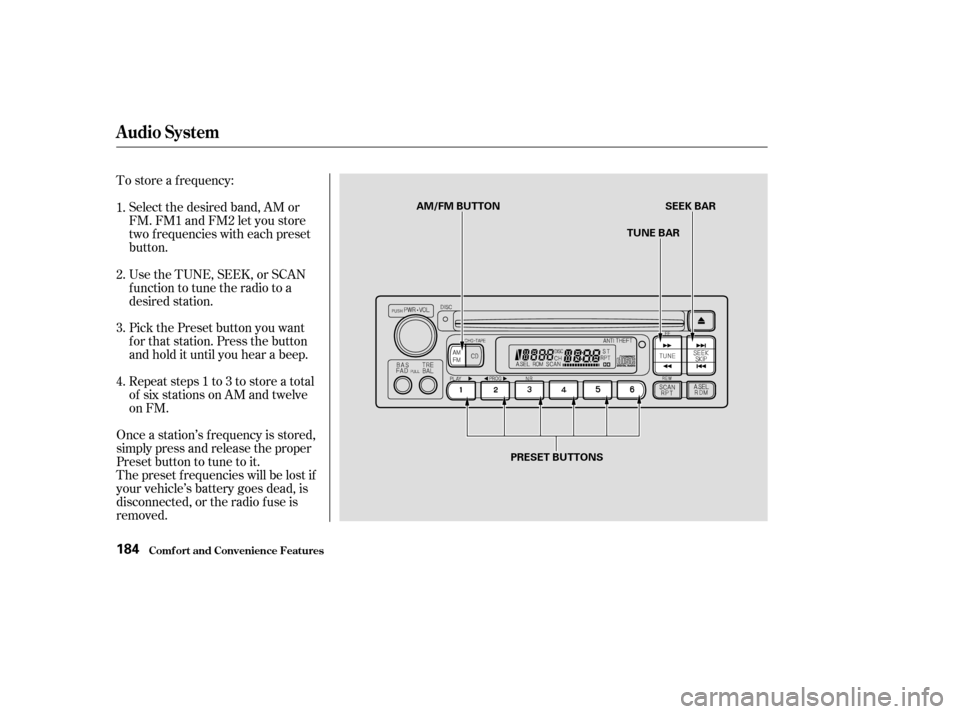
To store a f requency:Select the desired band, AM or
FM. FM1 and FM2 let you store
two f requencies with each preset
button.
Pick the Preset button you want
for that station. Press the button
and hold it until you hear a beep.
Repeat steps 1 to 3 to store a total
of six stations on AM and twelve
on FM.
Once a station’s f requency is stored,
simply press and release the proper
Preset button to tune to it.
The preset f requencies will be lost if
your vehicle’s battery goes dead, is
disconnected, or the radio f use is
removed. UsetheTUNE,SEEK,orSCAN
function to tune the radio to a
desired station.
1.
2.
3.
4.
Audio System
Comf ort and Convenience Feat ures184
AM/FM BUTTON
TUNE BARSEEK BAR
PRESET BUTTONS
Page 193 of 415

�µ�µ
You can use the TUNE and SEEK/
SKIP bars while a disc is playing to
select passages and change tracks.
To move rapidly within a track, press
andholdtheTUNEbar.Pressthe
side to move forward. You will
seeCUEinthedisplay.Pressthe side to move backward. You
will see REW displayed. Release the
bar when the system reaches the
point you want.
Each time you press and release the side of the SEEK/SKIP bar,
the system skips forward to the
beginning of the next track. Press
the sidetoskipbackwardtothe
beginning of the current track. Press
it again to skip to the beginning of
the previous track. To activate the Repeat
f eature, press and release the RPT
button. You will see RPT in the
display. The system continuously
replays the current track. Press the
RPT button again to turn it off.
This feature,
when activated, plays the tracks on
the CD in random order, rather than
in the order they are recorded on the
CD. To activate Random Play, press
and release the A. SEL/RDM button.
You will see RDM in the display. The
system will then select and play
tracks randomly. This continues
until you deactivate Random Play by
pressing A. SEL/RDM again.
If the system is in Repeat mode, you
must turn it of f by pressing the RPT
button bef ore selecting Random Play.
When the system reaches the end of
the disc, it will return to the begin-
ning and play the disc again.
You can switch to the radio while a
CD is playing by pressing the AM/
FM button. Press the CD button to
return to playing the CD. The CD
will begin playing where it lef t of f .
If you turn the system of f while a CD
is playing, either with the PWR/VOL
knob or by turning off the ignition,
the disc will stay in the drive. When
youturnthesystembackon,theCD
will begin playing where it lef t of f .
Press the eject button to remove the
disc f rom the drive.
If you eject the disc, but do not
remove it from the slot, the system
will automatically reload the disc
af ter 15 seconds and put the CD
player in pause mode. To begin
playing the disc, press the CD button.
Audio System
Comf ort and Convenience Feat ures
REPEAT
RANDOM PLAY
190
Page 195 of 415
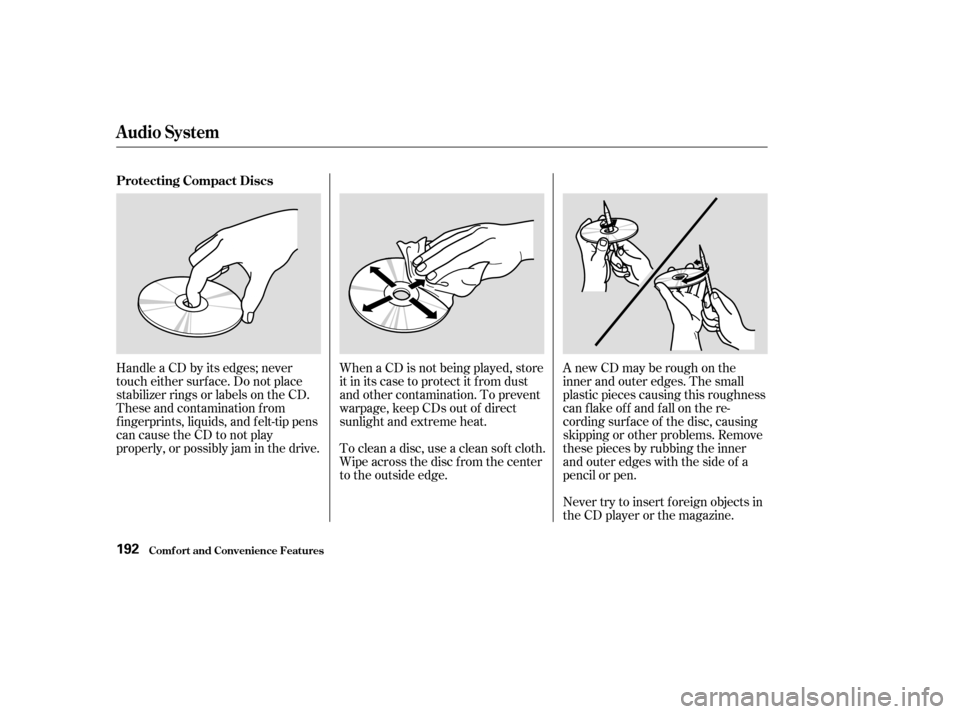
A new CD may be rough on the
inner and outer edges. The small
plastic pieces causing this roughness
can f lake of f and f all on the re-
cording surf ace of the disc, causing
skipping or other problems. Remove
these pieces by rubbing the inner
and outer edges with the side of a
pencil or pen.
Never try to insert f oreign objects in
the CD player or the magazine.
To clean a disc, use a clean sof t cloth.
Wipe across the disc f rom the center
to the outside edge. When a CD is not being played, store
it in its case to protect it f rom dust
and other contamination. To prevent
warpage, keep CDs out of direct
sunlight and extreme heat.
Handle a CD by its edges; never
touch either surf ace. Do not place
stabilizer rings or labels on the CD.
These and contamination f rom
f ingerprints, liquids, and f elt-tip pens
can cause the CD to not play
properly, or possibly jam in the drive. Protecting Compact Discs
Audio System
Comf ort and Convenience Feat ures192