2003 DODGE RAM group 13
[x] Cancel search: group 13Page 427 of 2895
GENERATOR
DESCRIPTION
The generator is belt-driven by the engine using a
serpentine type drive belt. It is serviced only as a
complete assembly. If the generator fails for any rea-
son, the entire assembly must be replaced.
OPERATION
As the energized rotor begins to rotate within the
generator, the spinning magnetic field induces a cur-
rent into the windings of the stator coil. Once the
generator begins producing sufficient current, it also
provides the current needed to energize the rotor.
The stator winding connections deliver the induced
alternating current to 3 positive and 3 negative
diodes for rectification. From the diodes, rectified
direct current is delivered to the vehicle electrical
system through the generator battery terminal.
Although the generators appear the same exter-
nally, different generators with different output rat-
ings are used on this vehicle. Be certain that the
replacement generator has the same output rating
and part number as the original unit. Refer to Gen-
erator Ratings in the Specifications section at the
back of this group for amperage ratings and part
numbers.
Noise emitting from the generator may be caused
by: worn, loose or defective bearings; a loose or defec-
tive drive pulley; incorrect, worn, damaged or misad-
justed fan drive belt; loose mounting bolts; a
misaligned drive pulley or a defective stator or diode.
REMOVAL
3.7L / 4.7L
WARNING: DISCONNECT NEGATIVE CABLE FROM
BATTERY BEFORE REMOVING BATTERY OUTPUT
WIRE (B+ WIRE) FROM GENERATOR. FAILURE TO
DO SO CAN RESULT IN INJURY OR DAMAGE TO
ELECTRICAL SYSTEM.
(1) Disconnect negative battery cable at battery.
(2) Remove generator drive belt. Refer to 7, Cool-
ing System for procedure.
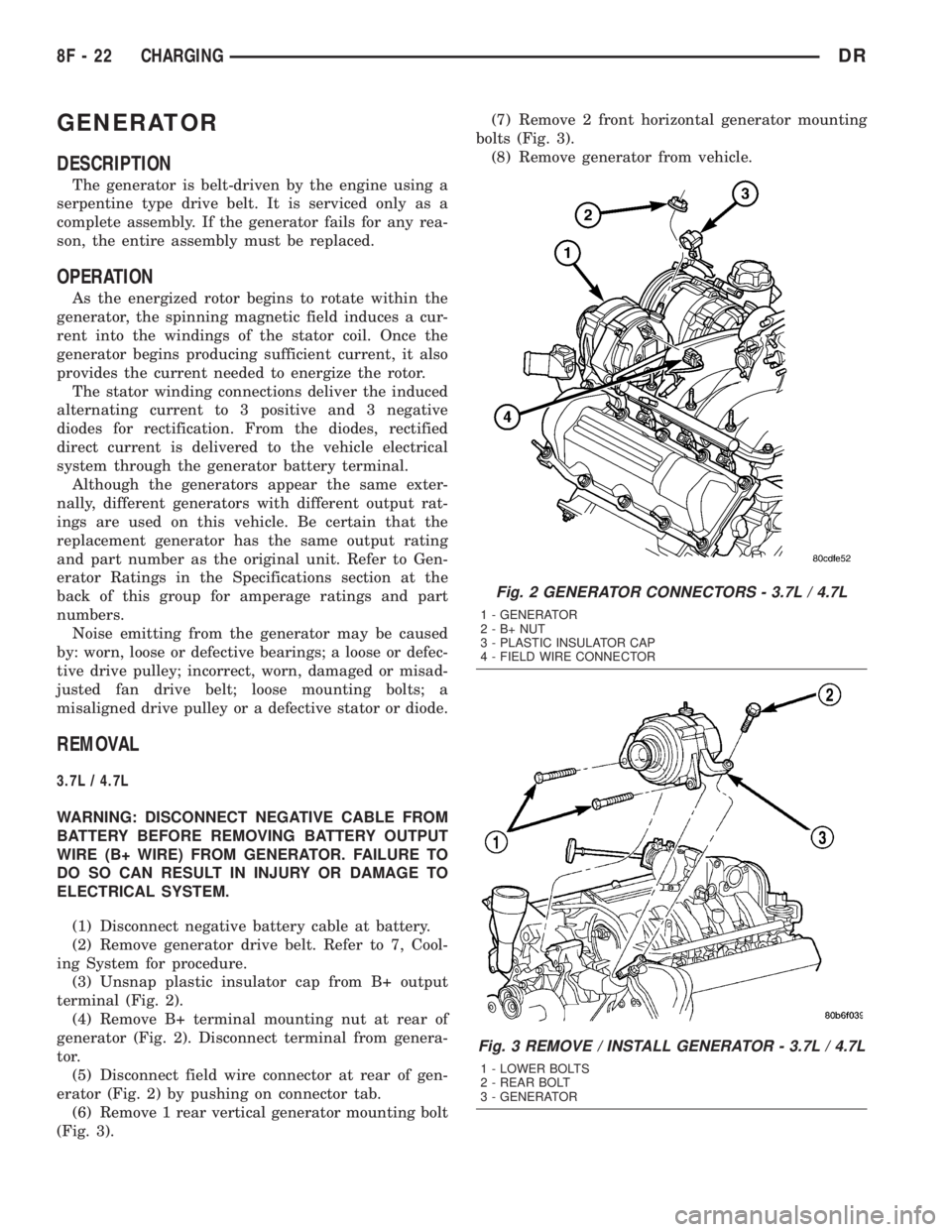
(3) Unsnap plastic insulator cap from B+ output
terminal (Fig. 2).
(4) Remove B+ terminal mounting nut at rear of
generator (Fig. 2). Disconnect terminal from genera-
tor.
(5) Disconnect field wire connector at rear of gen-
erator (Fig. 2) by pushing on connector tab.
(6) Remove 1 rear vertical generator mounting bolt
(Fig. 3).(7) Remove 2 front horizontal generator mounting
bolts (Fig. 3).
(8) Remove generator from vehicle.
Fig. 2 GENERATOR CONNECTORS - 3.7L / 4.7L
1 - GENERATOR
2-B+NUT
3 - PLASTIC INSULATOR CAP
4 - FIELD WIRE CONNECTOR
Fig. 3 REMOVE / INSTALL GENERATOR - 3.7L / 4.7L
1 - LOWER BOLTS
2 - REAR BOLT
3 - GENERATOR
8F - 22 CHARGINGDR
Page 433 of 2895

STARTING
TABLE OF CONTENTS
page page
STARTING
DESCRIPTION.........................28
OPERATION...........................28
DIAGNOSIS AND TESTING - STARTING
SYSTEM............................29
SPECIFICATIONS
STARTING SYSTEM...................33
SPECIFICATIONS - TORQUE - STARTING
SYSTEM............................34
STARTER MOTOR
DIAGNOSIS AND TESTING - STARTER
MOTOR .............................34REMOVAL.............................34
INSTALLATION.........................37
STARTER MOTOR RELAY
DESCRIPTION.........................38
OPERATION...........................38
DIAGNOSIS AND TESTING - STARTER RELAY . 38
REMOVAL.............................39
INSTALLATION.........................39
STARTING
DESCRIPTION
The starting system consists of:
²Starter relay
²Starter motor (including an integral starter sole-
noid)
Other components to be considered as part of start-
ing system are:
²Battery
²Battery cables
²Ignition switch and key lock cylinder
²Clutch pedal position switch (manual transmis-
sion)
²Park/neutral position switch (automatic trans-
mission)
²Wire harnesses and connections.
The Battery, Starting, and Charging systems oper-
ate in conjunction with one another, and must be
tested as a complete system. For correct operation of
starting/charging systems, all components used in
these 3 systems must perform within specifications.
When attempting to diagnose any of these systems, it
is important that you keep their interdependency in
mind.
The diagnostic procedures used in each of these
groups include the most basic conventional diagnostic
methods, to the more sophisticated On-Board Diag-
nostics (OBD) built into the Powertrain Control Mod-
ule (PCM). Use of an induction-type milliampere
ammeter, volt/ohmmeter, battery charger, carbon pile
rheostat (load tester), and 12-volt test lamp may be
required.
Certain starting system components are monitored
by the PCM and may produce a Diagnostic TroubleCode (DTC). Refer to Diagnostic Trouble Codes in
Emission Control for a list of codes.OPERATION
The starting system components form two separate
circuits. A high-amperage feed circuit that feeds the
starter motor between 150 and 350 amperes (700
amperes - diesel engine), and a low-amperage control
circuit that operates on less than 20 amperes. The
high-amperage feed circuit components include the
battery, the battery cables, the contact disc portion of
the starter solenoid, and the starter motor. The low-
amperage control circuit components include the igni-
tion switch, the clutch pedal position switch (manual
transmission), the park/neutral position switch (auto-
matic transmission), the starter relay, the electro-
magnetic windings of the starter solenoid, and the
connecting wire harness components.
If the vehicle is equipped with a manual transmis-
sion, it has a clutch pedal position switch installed in
series between the ignition switch and the coil bat-
tery terminal of the starter relay. This normally open
switch prevents the starter relay from being ener-
gized when the ignition switch is turned to the Start
position, unless the clutch pedal is depressed. This
feature prevents starter motor operation while the
clutch disc and the flywheel are engaged. The starter
relay coil ground terminal is always grounded on
vehicles with a manual transmission.
If the vehicle is equipped with an automatic trans-
mission, battery voltage is supplied through the low-
amperage control circuit to the coil battery terminal
of the starter relay when the ignition switch is
turned to the Start position. The park/neutral posi-
tion switch is installed in series between the starter
relay coil ground terminal and ground. This normally
8F - 28 STARTINGDR
Page 481 of 2895

WARNING: 5.9L V-8 LDC-GAS ENGINES: DO NOT
REMOVE THE COIL MOUNTING BRACKET-TO-CYL-
INDER HEAD MOUNTING BOLTS. THE COIL
MOUNTING BRACKET IS UNDER ACCESSORY
DRIVE BELT TENSION. IF THIS BRACKET IS TO BE
REMOVED FOR ANY REASON, ALL BELT TENSION
MUST FIRST BE RELIEVED. REFER TO THE BELT
SECTION OF GROUP 7, COOLING SYSTEM.
5.9L V-8 HDC-Gas Engine: The coil is mounted to
a bracket that is bolted to the air injection pump
(AIR pump) mounting bracket (Fig. 36).
(1) Disconnect primary coil connector from ignition
coil.
(2) Disconnect secondary cable from ignition coil.
(3) Remove ignition coil from coil mounting
bracket (two bolts).
8.0L V-10
Two separate coil packs containing a total of five
independent coils are attached to a common mount-
ing bracket located above the right engine valve
cover (Fig. 37). The front and rear coil packs can be
serviced separately.
(1) Depending on which coil is being removed, the
throttle body air intake tube or intake box may need
to be removed to gain access to coils.
(2) Remove secondary spark plug cables from coil
packs. Note position of cables before removal.
(3) Disconnect primary wiring harness connectors
at coil packs.
(4) Remove four (4) coil pack-to-coil mounting
bracket bolts for coil pack being serviced (Fig. 37).
(5) Remove coil(s) from mounting bracket.
INSTALLATION
3.7L V-6
(1) Using compressed air, blow out any dirt or con-
taminants from around top of spark plug.
(2) Check condition of coil o-ring and replace as
necessary. To aid in coil installation, apply silicone to
coil o-ring.
(3) Position ignition coil into cylinder head opening
and push onto spark plug. Do this while guiding coil
base over mounting stud.
(4) Install coil mounting stud nut. Refer to torque
specifications.
(5) Connect electrical connector to coil by snapping
into position.
(6) If necessary, install throttle body air tube.
4.7L V-8
(1) Using compressed air, blow out any dirt or con-
taminants from around top of spark plug.
(2) Check condition of coil o-ring and replace as
necessary. To aid in coil installation, apply silicone to
coil o-ring.
(3) Position ignition coil into cylinder head opening
and push onto spark plug. Do this while guiding coil
base over mounting stud.
(4) Install coil mounting stud nut. Refer to torque
specifications.
(5) Connect electrical connector to coil by snapping
into position.
(6) If necessary, install throttle body air tube.
5.7L V-8
(1) Using compressed air, blow out any dirt or con-
taminants from around top of spark plug.
(2) Before installing spark plug cables to either the
spark plugs or coils, or before installing a coil to a
spark plug, apply dielectric grease to inside of boots.
(3) Position ignition coil into cylinder head opening
and push onto spark plug. Twist coil into position.
(4) Install 2 coil mounting bolts. Refer to torque
specifications.
(5) Connect electrical connector to coil by snapping
into position.
(6) Install cable to coil. To prevent ignition cross-
fire, spark plug cablesMUSTbe placed in cable tray
(routing loom) into their original position. Refer to
Spark Plug Cable Removal for a graphic.
(7) If necessary, install throttle body air tube.
5.9L V-8
The ignition coil is an epoxy filled type. If the coil
is replaced, it must be replaced with the same type.
(1) Install ignition coil to coil bracket. If nuts and
bolts are used to secure coil to coil bracket, tighten to
11 N´m (100 in. lbs.) torque. If coil mounting bracket
has been tapped for coil mounting bolts, tighten bolts
to 5 N´m (50 in. lbs.) torque.
(2) Connect all wiring to ignition coil.
8.0L V-10
(1) Position coil packs to mounting bracket (prima-
ry wiring connectors face downward).
(2) Install coil pack mounting bolts. Tighten bolts
to 10 N´m (90 in. lbs.) torque.
(3) Install coil pack-to-engine mounting bracket (if
necessary).
(4) Connect primary wiring connectors to coil
packs (four wire connector to front coil pack and
three wire connector to rear coil pack).
(5) Connect secondary spark plug cables to coil
packs. Refer to (Fig. 38) for correct cable order.
8I - 24 IGNITION CONTROLDR
IGNITION COIL (Continued)
Page 566 of 2895
(1) With the ignition switch in the Off position,
simultaneously depress and hold theSTEP and
RESET buttons.
(2) Turn the ignition switch to the On position.
(3) Following completion of the test, the electronics
module will display one of the following messages:
a.Pass Self Test (EVIC only), PASS (CMTC)-
The electronics module is working properly.
b.Failed Self Test (EVIC only), FAIL (CMTC)-
The electronics module has an internal failure. The
electronics module is faulty and must be replaced.
c.Failed J1850 Communication (EVIC only),
BUS (CMTC)- The electronics module is not receiv-
ing proper message input through the J1850 PCI
data bus circuit. This can result from one or more
faulty electronic modules in the vehicle, or from a
faulty PCI data bus. The use of a DRB IIItscan tool
and the proper Diagnostic Procedures manual are
required for further diagnosis.
NOTE: If the compass functions, but accuracy is
suspect, it may be necessary to perform a variation
adjustment. This procedure allows the compass
unit to accommodate variations in the earth's mag-
netic field strength, based on geographic location.
Refer to Compass Variation Adjustment in the Stan-
dard Procedures section of this group.
NOTE: If the compass reading displays dashes, and
only ªCALº appears in the display, demagnetizing
may be necessary to remove excessive residual
magnetic fields from the vehicle. Refer to Compass
Demagnetizing in the Standard Procedures section
of this group.
STANDARD PROCEDURE
STANDARD PROCEDURE - READING/
COURTESY LAMP REPLACEMENT
(1) Open hood, disconnect and isolate the negative
battery cable.
(2) Remove the reading/courtesy lamp lens. Using
a trim stick, gently pry the forward edge of the read-
ing/courtesy lamp lens outward.
(3) Remove the reading/courtesy lamp socket from
the overhead console. Rotate the reading/courtesy
lamp socket one quarter turn counter clockwise.
(4) Remove the lamp and socket assembly.
(5) Reverse the above procedure to install.
STANDARD PROCEDURE - MODULE LENS
REPLACEMENT
(1) Remove the overhead console (Refer to 8 -
ELECTRICAL/OVERHEAD CONSOLE - REMOV-
AL).
(2) Remove the electronics module from the over-
head console. Refer to the procedure later in this sec-
tion.
(3) Unsnap the lens from the module and replace
lens as necessary.
STANDARD PROCEDURE - MODULE LAMP
REPLACEMENT
(1) Remove the overhead console (Refer to 8 -
ELECTRICAL/OVERHEAD CONSOLE - REMOV-
AL).
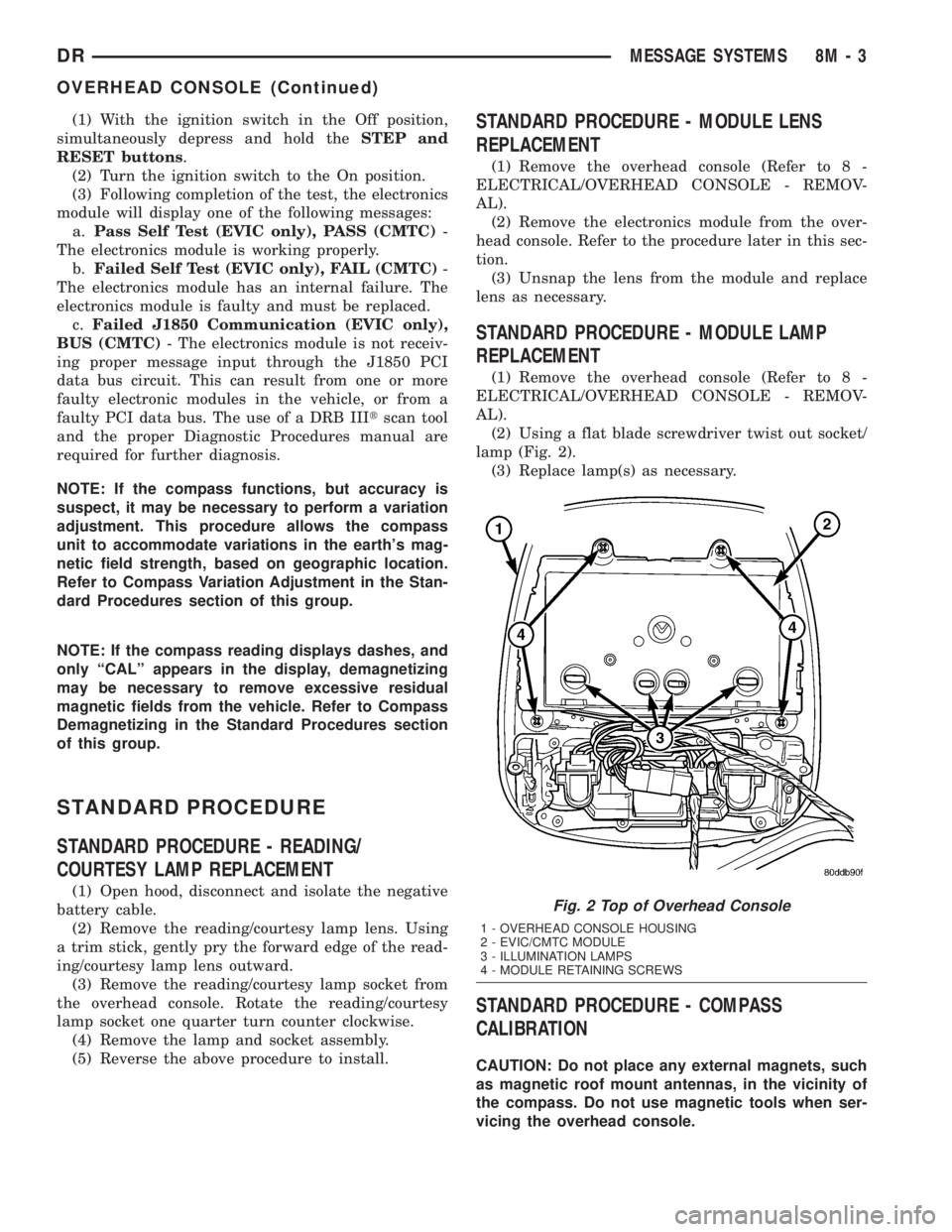
(2) Using a flat blade screwdriver twist out socket/
lamp (Fig. 2).
(3) Replace lamp(s) as necessary.
STANDARD PROCEDURE - COMPASS
CALIBRATION
CAUTION: Do not place any external magnets, such
as magnetic roof mount antennas, in the vicinity of
the compass. Do not use magnetic tools when ser-
vicing the overhead console.
Fig. 2 Top of Overhead Console
1 - OVERHEAD CONSOLE HOUSING
2 - EVIC/CMTC MODULE
3 - ILLUMINATION LAMPS
4 - MODULE RETAINING SCREWS
DRMESSAGE SYSTEMS 8M - 3
OVERHEAD CONSOLE (Continued)
Page 567 of 2895

The electronic compass unit features a self-cali-
brating design, which simplifies the calibration pro-
cedure. This feature automatically updates the
compass calibration while the vehicle is being driven.
This allows the compass unit to compensate for small
changes in the residual magnetism that the vehicle
may acquire during normal use. If the compass read-
ings appear to be erratic or out of calibration, per-
form the following calibration procedure. Also, new
service replacement Electronic Modules (EVIC,
CMTC) must have their compass calibrated using
this procedure. Do not attempt to calibrate the com-
pass near large metal objects such as other vehicles,
large buildings, or bridges; or, near overhead or
underground power lines.
NOTE: Whenever the compass is calibrated manu-
ally, the variance number must also be reset. Refer
to Compass Variation Adjustment in this group.
To calibrate the compass manually proceed as fol-
lows:
(1) Turn the ignition switch to the On position. If
the compass/temperature data is not currently being
displayed, momentarily depress and release the C/T
push button to reach the compass/temperature dis-
play.
(2) Depress the RESET push button and hold the
button down until ªCALº appears in the display. This
takes about ten seconds, and appears about five sec-
onds after ªVAR = XXº is displayed.
(3) Release the RESET push button.
(4) Drive the vehicle on a level surface, away from
large metal objects and power lines, through three or
more complete turns at between five and eight kilo-
meters-per-hour (three and five miles-per-hour) in
not less than 48 seconds. The ªCALº message will
disappear from the display to indicate that the com-
pass is now calibrated.
NOTE: If the ªCALº message remains in the display,
either there is excessive magnetism near the com-
pass, or the unit is faulty. Repeat the calibration
procedure one more time.
NOTE: If the wrong direction is still indicated in the
compass display, the area selected for calibration
may be too close to a strong magnetic field. Repeat
the calibration procedure in another location.
STANDARD PROCEDURE - COMPASS
DEMAGNETIZING
A degaussing tool (Special Tool 6029) is used to
demagnetize, or degauss, the overhead console for-
ward mounting screw and the roof panel above theoverhead console. Equivalent units must be rated as
continuous duty for 110/115 volts and 60 Hz. They
must also have a field strength of over 350 gauss at 7
millimeters (0.25 inch) beyond the tip of the probe.
To demagnetize the roof panel and the overhead
console forward mounting screw, proceed as follows:
(1) Be certain that the ignition switch is in the Off
position, before you begin the demagnetizing proce-
dure.
(2) Connect the degaussing tool to an electrical
outlet, while keeping the tool at least 61 centimeters
(2 feet) away from the compass unit.
(3) Slowly approach the head of the overhead con-
sole mounting screw with the degaussing tool con-
nected.
(4) Contact the head of the screw with the plastic
coated tip of the degaussing tool for about two sec-
onds.
(5) With the degaussing tool still energized, slowly
back it away from the screw. When the tip of the tool
is at least 61 centimeters (2 feet) from the screw
head, disconnect the tool.
(6) Place a piece of paper approximately 22 by 28
centimeters (8.5 by 11 inches), oriented on the vehicle
lengthwise from front to rear, on the center line of
the roof at the windshield header (Fig. 3). The pur-
pose of the paper is to protect the roof panel from
scratches, and to define the area to be demagnetized.
(7) Connect the degaussing tool to an electrical
outlet, while keeping the tool at least 61 centimeters
(2 feet) away from the compass unit.
(8) Slowly approach the center line of the roof
panel at the windshield header, with the degaussing
tool connected.
(9) Contact the roof panel with the plastic coated
tip of the degaussing tool. Be sure that the template
is in place to avoid scratching the roof panel. Using a
slow, back-and-forth sweeping motion, and allowing
13 millimeters (0.50 inch) between passes, move the
tool at least 11 centimeters (4 inches) to each side of
the roof center line, and 28 centimeters (11 inches)
back from the windshield header.
(10) With the degaussing tool still energized,
slowly back it away from the roof panel. When the
tip of the tool is at least 61 centimeters (2 feet) from
the roof panel, disconnect the tool.
(11) Calibrate the compass and adjust the compass
variance (Refer to 8 - ELECTRICAL/OVERHEAD
CONSOLE - STANDARD PROCEDURE).
STANDARD PROCEDURE - COMPASS
VARIATION ADJUSTMENT
Compass variance, also known as magnetic decli-
nation, is the difference in angle between magnetic
north and true geographic north. In some geographic
locations, the difference between magnetic and geo-
8M - 4 MESSAGE SYSTEMSDR
OVERHEAD CONSOLE (Continued)
Page 570 of 2895

OPERATION
The Compass Mini-Trip Computer module in the
overhead console has buttons used to select various
functions. The CMTC selector buttons will not oper-
ate until the ignition is in the RUN position.
When the ignition switch is first turned to the
RUN position the CMTC display;
²Returns to the last mode setting selected before
the ignition was last switched OFF.
DIAGNOSIS AND TESTING - COMPASS
MINI-TRIP COMPUTER
Compass Mini-Trip Computer (CMTC) data is
obtained from other electronic modules (CCN, FCM
and JTEC) on the J1850 Data Bus circuit. The
CMTC will display dashes (- -) for any of the screens
it did not receive the bus messages. The label corre-
sponding to the missing information will be lit. If no
compass mini-trip computer data is displayed, check
the J1850 Data Bus circuit communications and the
other modules.
Refer to Overhead Console Diagnosis and Testing
for instructions on performing a CMTC module Self-
Diagnostic Test. The DRB IIItis recommended for
checking the J1850 Data Bus circuit and the other
modules. Perform the CMTC self diagnosis before
replacing the CMTC module.
REMOVAL
(1) Disconnect and isolate the negative battery
cable.
(2) Remove the overhead console from the headlin-
er.(Refer to 8 - ELECTRICAL/OVERHEAD CON-
SOLE - REMOVAL).
(3) Remove the screws holding Compass Mini-Trip
Computer module in the overhead console (Fig. 5).
(4) Disconnect the CMTC module electrical connec-
tor. Depress the retaining tab and pull straight
apart.
(5) Remove CMTC module from console assembly.
INSTALLATION
(1) Position the compass mini-trip computer mod-
ule in the overhead console.
(2) Install the screws holding the compass mini-
trip computer module in the overhead console.
(3) Connect the module electrical connector.
(4) Install the overhead console on the headlin-
er(Refer to 8 - ELECTRICAL/OVERHEAD CON-
SOLE - INSTALLATION).
(5) Connect the negative battery cable.
(6) Check CMTC module function.
NOTE: If a new module has been installed, the com-
pass will have to be calibrated and the variance set.
Refer to Compass Variation Adjustment and Com-pass Calibration in the Standard Procedures sec-
tion of this group for the procedures.
ELECTRONIC VEHICLE INFO
CENTER
DESCRIPTION
The Electronic Vehicle Information Center (EVIC)
is a module located in the overhead console on some
models. The EVIC module features a large Vacuum
Fluorescent Display (VFD) screen for displaying
information, and back-lit push button switches
labeled C/T (compass/temperature), RESET, STEP,
and MENU.
The EVIC module contains a central processing
unit and interfaces with other electronic modules in
the vehicle over the Programmable Communications
Interface (PCI) J1850 data bus circuit. The PCI data
bus circuit allows the sharing of sensor information.
This helps to reduce wire harness complexity, reduce
internal controller hardware, and reduce component
sensor current loads. At the same time, this system
provides increased reliability, enhanced diagnostics,
and allows the addition of many new feature capabil-
ities.
The EVIC ªMenuº push button provides the vehicle
operator with a user interface, which allows the
selection of several optional customer programmable
electronic features to suit individual preferences.
Fig. 5 OVERHEAD CONSOLE MODULE REMOVAL
1 - COMPASS MINI-TRIP COMPUTER MODULE
2 - OVERHEAD CONSOLE
DRMESSAGE SYSTEMS 8M - 7
COMPASS/MINI-TRIP COMPUTER (Continued)
Page 571 of 2895

Refer toELECTRONIC VEHICLE INFORMA-
TION CENTER PROGRAMMINGin the Standard
Procedures section of this group for more information
on the customer programmable feature options.
If the vehicle is equipped with the optional univer-
sal transmitter transceiver, the EVIC will also dis-
play messages and an icon indicating when the
universal transmitter transceiver is being trained,
which of the three transmitter buttons is transmit-
ting, and when the transceiver is cleared.
Data input for all EVIC functions, including VFD
dimming level, is received through the J1850 PCI
data bus circuit. The EVIC module uses its internal
programming and all of its data inputs to calculate
and display the requested data. If the data displayed
is incorrect, perform the self-diagnostic tests as
described in this group. If these tests prove inconclu-
sive, the use of a DRB IIItscan tool and the proper
Diagnostic Procedures manual are recommended for
further testing of the EVIC module and the J1850
PCI data bus circuit.
The EVIC module cannot be repaired, and is avail-
able for service only as a unit. If any part is faulty or
damaged, the complete EVIC module must be
replaced.
OPERATION
The Electronic Vehicle Information Center is wired
to both constant 12v and ignition switched sources of
battery current so that some of its features remain
operational at any time, while others may only oper-
ate with the ignition switch in the On position. When
the ignition switch is turned to the On position, the
EVIC module display will return to the last function
being displayed before the ignition was turned to the
Off position.
The compass/temperature display is the normal
EVIC display. With the ignition switch in the On
position, momentarily depressing and releasing the
C/T (compass/temperature) push button switch will
cause the EVIC to return to the compass/tempera-
ture display mode from any other mode. While in the
compass/temperature display mode, momentarily
depressing and releasing the Step push button will
step through the available trip computer display
options.
The EVIC trip computer features several functions
that can be reset. The functions that can be reset
are: average fuel economy, trip odometer and elapsed
time. With the ignition switch in the On position and
with one of the functions of the trip computer that
can be reset currently displayed, depressing the
Reset push button twice within three seconds will
perform a global reset, and all of the trip computer
information that can be reset will be reset to zero.
With the ignition switch in the On position and thefunction that is to be reset currently displayed,
momentarily depressing and releasing the Reset
push button once will perform a local reset, and only
the value of the displayed function will be reset to
zero. A global or local reset will only occur if the
function currently displayed is a function that can be
reset. The distance to service function can also be
reset using the local reset method, but it will reset
back to the Service Interval distance that is set in
the EVIC programmable features mode. Refer to
ELECTRONIC VEHICLE INFORMATION CEN-
TER PROGRAMMINGin the Standard Procedures
section of this group for more information on setting
the Service Interval.
For more information on the features, control func-
tions and setting procedures for the EVIC module,
see the owner's manual in the vehicle glove box.
DIAGNOSIS AND TESTING - ELECTRONIC
VEHICLE INFORMATION CENTER
Electronic Vehicle Information Center (EVIC) data
is obtained from other electronic modules (CCN,
FCM, JTEC) on the J1850 Data Bus circuit. The
EVIC will display dashes (- -) for any of the screens
it did not receive the bus messages. The label corre-
sponding to the missing information will be lit. If no
EVIC data is displayed, check the J1850 Data Bus
circuit communications and the other modules. If the
brightness level is improper check the J1850 Data
Bus circuit.
Refer to Overhead Console Diagnosis and Testing
for instructions on performing a EVIC module Self-
Diagnostic Test. The DRB IIItis recommended for
checking the J1850 Data Bus circuit and other mod-
ules. Perform the EVIC self diagnosis before replac-
ing the EVIC module.
STANDARD PROCEDURE - ELECTRONIC
VEHICLE INFORMATION CENTER
PROGRAMMING
EVIC PROGRAMMING MODE
Some vehicles are equipped with a Electronic Vehi-
cle Information Center (EVIC) equipped overhead
console. The Electronic Vehicle Information Center
(EVIC) provides the vehicle operator with a user
interface, which allows the selection of several
optional customer programmable electronic features
to suit individual preferences. The EVIC must be
placed into its programming mode in order to view or
change the programmable features. To enter the
EVIC programming mode and to view or change the
selected programmable features options, proceed as
follows:
(1) Turn the ignition switch to the On position.
8M - 8 MESSAGE SYSTEMSDR
ELECTRONIC VEHICLE INFO CENTER (Continued)
Page 573 of 2895

memory setting 1 and the second transmitter trained
will be associated with memory setting 2. Additional
transmitters will not be associated with a memory
setting. When you have finished training the trans-
mitters, press the menu button again and the EVIC
will display ªTRAIN DONE ªXº TRAINED. If no
transmitters are trained within approximately 30
seconds the EVIC will display ªTRAIN TIMEOUTº.
REMOVAL
(1) Disconnect and isolate the battery negative
cable.
(2) Remove the overhead console from the headlin-
er.(Refer to 8 - ELECTRICAL/OVERHEAD CON-
SOLE - REMOVAL).
(3) Disconnect the EVIC module electrical connec-
tor. Depress the retaining tab and pull straight
apart.
(4) Remove the screws holding the EVIC module in
the overhead console (Fig. 6).
(5) Remove EVIC module from console assembly.
INSTALLATION
(1) Position the EVIC module in the overhead con-
sole.
(2) Install the screws holding the EVIC module in
the overhead console.
(3) Connect the EVIC module electrical connector.(4) Install the overhead console on the headlin-
er(Refer to 8 - ELECTRICAL/OVERHEAD CON-
SOLE - INSTALLATION).
(5) Connect the battery negative cable.
(6) Check EVIC module function.
NOTE: If a new EVIC module has been installed, the
compass will have to be calibrated and the variance
set. Refer to Compass Variation Adjustment and
Compass Calibration in the Standard Procedures
section of this group for the procedures.
AMBIENT TEMP SENSOR
DESCRIPTION
Ambient air temperature is monitored by the over-
head console. The ambient temperature messages are
received from the Front Control Module (FCM) over
the Programmable Communications Interface (PCI)
J1850 data bus circuit. The FCM receives a hard
wired input from the ambient temperature sensor
(Fig. 7). The ambient temperature sensor is a vari-
able resistor mounted to the underside of the hood,
in the engine compartment.
For more information on the front control module,
refer toFront Control Modulein the Electronic
Control Modules section of this manual. For complete
circuit diagrams, refer toWiring. The ambient tem-
perature sensor cannot be adjusted or repaired and,
if faulty or damaged, it must be replaced.
OPERATION
The ambient temperature sensor is a variable
resistor that operates on a five-volt reference signal
sent to it by the Front Control Module. The resis-
tance in the sensor changes as temperature changes,
changing the temperature sensor signal circuit volt-
age to the Front Control Module. Based upon the
resistance in the sensor, the Front Control Module
senses a specific voltage on the temperature sensor
signal circuit, which it is programmed to correspond
to a specific temperature. The Front Control Module
Fig. 6 OVERHEAD CONSOLE MODULE REMOVAL
1 - ELECTRONIC VEHICLE INFORMATION MODULE
2 - OVERHEAD CONSOLE
Fig. 7 Ambient Temperature Sensor - Typical
8M - 10 MESSAGE SYSTEMSDR
ELECTRONIC VEHICLE INFO CENTER (Continued)