2003 DODGE RAM buttons
[x] Cancel search: buttonsPage 586 of 2895

STANDARD PROCEDURE
STANDARD PROCEDURE - RKE TRANSMITTER
BATTERIES
NOTE: Do not disturb the metal terminal near the
batteries. Avoid touching the new batteries. Skin
oils may cause battery deterioration. If batteries are
touched, clean with rubbing alcohol.
The Remote Keyless Entry (RKE) transmitter case
snaps open and shut for battery access. To replace
the RKE transmitter batteries:
(1) Using a thin coin, gently pry at the notch in
the center seam of the RKE transmitter case halves
near the key ring until the two halves unsnap. Be
careful not to damage the rubber gasket when sepa-
rating the case halves.
(2) Lift the back half of the transmitter case off of
the RKE transmitter.
(3) Remove the two batteries from the RKE trans-
mitter.
(4) Replace the two batteries with new 3V lithium
2016 cell. Install the batteries with the positive ter-
minal up. Reference the ª+ SIDE UPº on the inside of
the bottom half of the transmitter case.
(5) Align the two RKE transmitter case halves
with each other, and squeeze them firmly and evenly
together until they snap back into place. Test trans-
mitter operation.
STANDARD PROCEDURE - RKE TRANSMITTER
CUSTOMER PREFERENCES
AUTOMATIC (ROLLING) LOCKS
The rolling locks feature can be toggled ON/OFF
by using the DRB IIItonly.
HORN CHIRP DISABLING / ENABLING
The horn chirp can be toggled using a DRB IIItor
by using the Remote Keyless Entry (RKE) transmit-
ter that is already programmed to the vehicle.
To DISABLE (cancel) the horn chirp feature:
(1) Enter the vehicle and close all doors.
(2) Fasten the seat belt (this will cancel the seat
belt chime).
(3) Turn the ignition to the ON position.
(4) Press and hold the LOCK button for 4 seconds.
Within 6 seconds with the LOCK button still
depressed, press the UNLOCK button. When a single
chime is heard, release both buttons.
(5) Turn the ignition OFF.
(6) Turn the ignition ON or wait 60 seconds.(7) Test the horn chirp feature by pressing the
LOCK button.
If a chime is not heard, program mode was can-
celed before the feature could be disabled. If neces-
sary, repeat the procedure.
To ENABLE the horn chirp feature, repeat the
above procedure.
OPTICAL CHIRP (FLASH) DISABLING / ENABLING
The optical chirp can be toggled using a DRB IIIt
or by using the Remote Keyless Entry (RKE) trans-
mitter that is already programmed to the vehicle.
To DISABLE (cancel) the optical chirp feature:
(1) Enter the vehicle and close all doors.
(2) Fasten the seat belt (this will cancel the seat
belt chime).
(3) Turn the ignition to the ON position.
(4) Press and hold the LOCK button for 4 seconds.
Within 6 seconds with the LOCK button still
depressed, press the PANIC button. When a single
chime is heard, release both buttons.
(5) Turn the ignition OFF.
(6) Turn the ignition ON or wait 60 seconds.
(7) Test the optical chirp feature by pressing the
LOCK button.
If a chime is not heard, program mode was can-
celed before the feature could be disabled. If neces-
sary, repeat the procedure.
To ENABLE the optical chirp feature, repeat the
above procedure.
UNLOCK SEQUENCE
The unlock sequence can be toggled using a DRB
IIItor by using the Remote Keyless Entry (RKE)
transmitter that is already programmed to the vehi-
cle.
To toggle between Driver door first and Unlock all
doors function:
(1) Enter the vehicle and close all doors.
(2) Fasten the seat belt (this will cancel the seat
belt chime).
(3) Turn the ignition to the ON position.
(4) Press and hold the UNLOCK button for 4 sec-
onds. Within 6 seconds with the UNLOCK button
still depressed, press the LOCK button. When a sin-
gle chime is heard, release both buttons.
(5) Turn the ignition OFF.
(6) Turn the ignition ON or wait 60 seconds.
If a chime is not heard, program mode was can-
celed before the feature could be disabled. If neces-
sary, repeat the procedure.
To toggle this feature, repeat the above procedure.
DRPOWER LOCKS 8N - 9
REMOTE KEYLESS ENTRY TRANSMITTER (Continued)
Page 587 of 2895

STANDARD PROCEDURE - RKE TRANSMITTER
PROGRAMING
New Remote Keyless Entry (RKE) transmitters can
be programed using the DRB IIItscan tool and the
proper Diagnostic Procedures manual. The DRB IIIt
scan tool can provide confirmation that the PCI data
bus is functional, and that all of the electronic mod-
ules are sending and receiving the proper messages
on the PCI data bus.
The following procedure can be used as long as one
programmed transmitter is available:
NOTE: When entering program mode using that
programmed fob, ALL currently programmed fobs
will be erased and they will have to be repro-
grammed for the vehicle. If program mode is
entered and no action is performed, the previously
programmed fobs will continue to function.
(1) Enter the vehicle and close all doors.
(2) Fasten the seat belt (this will cancel the seat
belt chime). Turn the ignition to the RUN position.
(3) Press and hold the UNLOCK button on a pro-
grammed transmitter for 4 to 10 seconds. Within the
4 to 10 seconds with the UNLOCK button still
depressed, press the PANIC button for one second.
When a single chime is heard, release both button-
s.The chime indicates the system is in program
mode.(4) Press and release both the LOCK and
UNLOCK buttons simultaneously on a fob to be pro-
grammed. A single chime will be heard, this indicates
the fob has been recognized.
(5) Press and release any button on the same fob.
A single chime will be heard, this indicates the fob
has been programmed.
(6) Repeat steps 4 and 5 for up to a total of 4 fobs.
(7) Turn the ignition OFF.
(8) Turn the ignition ON or wait 60 seconds.
The vehicle will remain in program mode for up to
60 seconds from when the original chime (step 3) was
heard. After 60 seconds, all programmed transmitters
will function normally.
SPECIFICATIONS - REMOTE KEYLESS ENTRY
TRANSMITTER
RANGE
Normal operation range is up to a distance of 3 to
7 meters (10 to 23 ft.) of the vehicle. Range may be
better or worse depending on the environment
around the vehicle.
8N - 10 POWER LOCKSDR
REMOTE KEYLESS ENTRY TRANSMITTER (Continued)
Page 1706 of 2895
(2) Disconnect negative battery cable from battery.
(3) Clean fitting of any foreign material before dis-
assembly.
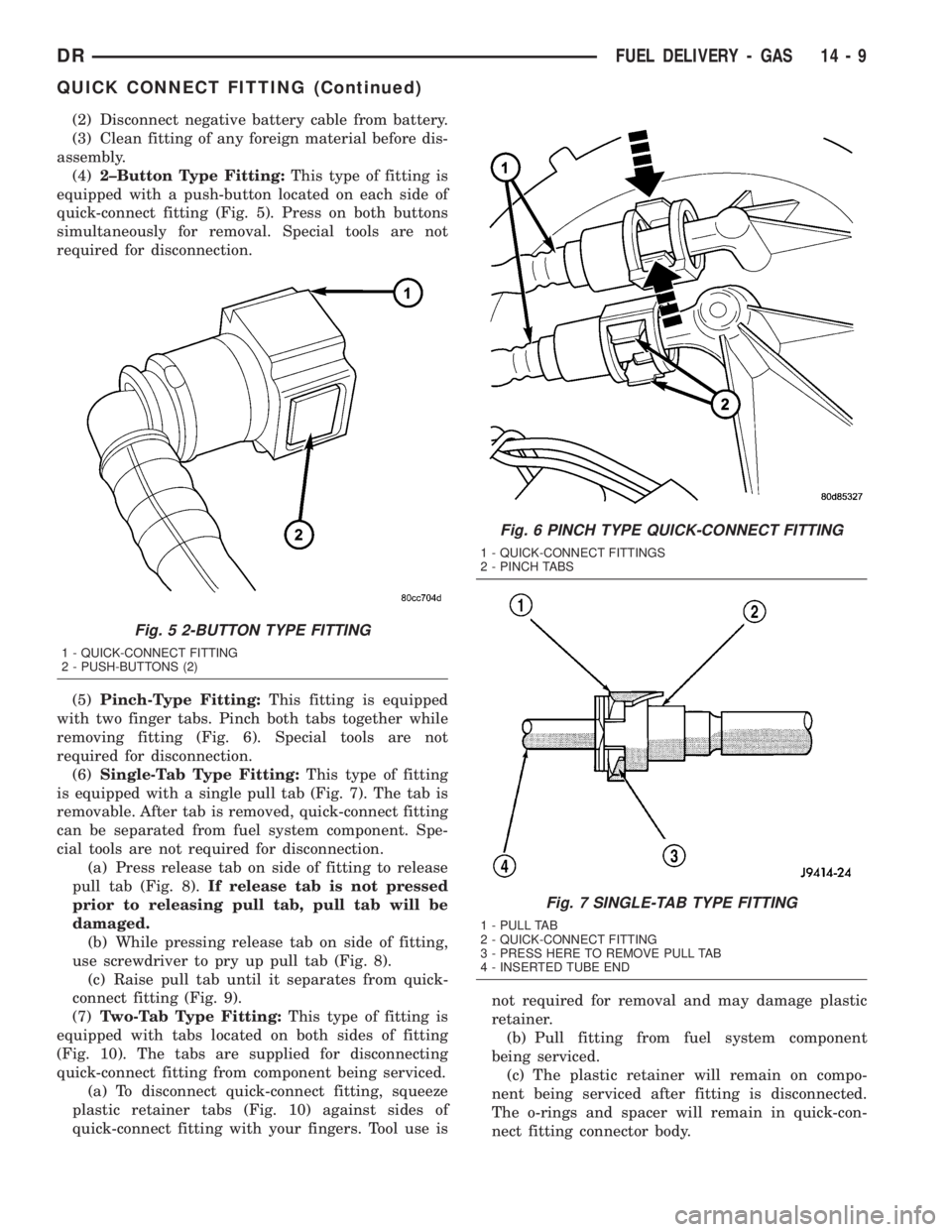
(4)2±Button Type Fitting:This type of fitting is
equipped with a push-button located on each side of
quick-connect fitting (Fig. 5). Press on both buttons
simultaneously for removal. Special tools are not
required for disconnection.
(5)Pinch-Type Fitting:This fitting is equipped
with two finger tabs. Pinch both tabs together while
removing fitting (Fig. 6). Special tools are not
required for disconnection.
(6)Single-Tab Type Fitting:This type of fitting
is equipped with a single pull tab (Fig. 7). The tab is
removable. After tab is removed, quick-connect fitting
can be separated from fuel system component. Spe-
cial tools are not required for disconnection.
(a) Press release tab on side of fitting to release
pull tab (Fig. 8).If release tab is not pressed
prior to releasing pull tab, pull tab will be
damaged.
(b) While pressing release tab on side of fitting,
use screwdriver to pry up pull tab (Fig. 8).
(c) Raise pull tab until it separates from quick-
connect fitting (Fig. 9).
(7)Two-Tab Type Fitting:This type of fitting is
equipped with tabs located on both sides of fitting
(Fig. 10). The tabs are supplied for disconnecting
quick-connect fitting from component being serviced.
(a) To disconnect quick-connect fitting, squeeze
plastic retainer tabs (Fig. 10) against sides of
quick-connect fitting with your fingers. Tool use isnot required for removal and may damage plastic
retainer.
(b) Pull fitting from fuel system component
being serviced.
(c) The plastic retainer will remain on compo-
nent being serviced after fitting is disconnected.
The o-rings and spacer will remain in quick-con-
nect fitting connector body.
Fig. 5 2-BUTTON TYPE FITTING
1 - QUICK-CONNECT FITTING
2 - PUSH-BUTTONS (2)
Fig. 6 PINCH TYPE QUICK-CONNECT FITTING
1 - QUICK-CONNECT FITTINGS
2 - PINCH TABS
Fig. 7 SINGLE-TAB TYPE FITTING
1 - PULL TAB
2 - QUICK-CONNECT FITTING
3 - PRESS HERE TO REMOVE PULL TAB
4 - INSERTED TUBE END
DRFUEL DELIVERY - GAS 14 - 9
QUICK CONNECT FITTING (Continued)