2003 DODGE RAM battery
[x] Cancel search: batteryPage 506 of 2895
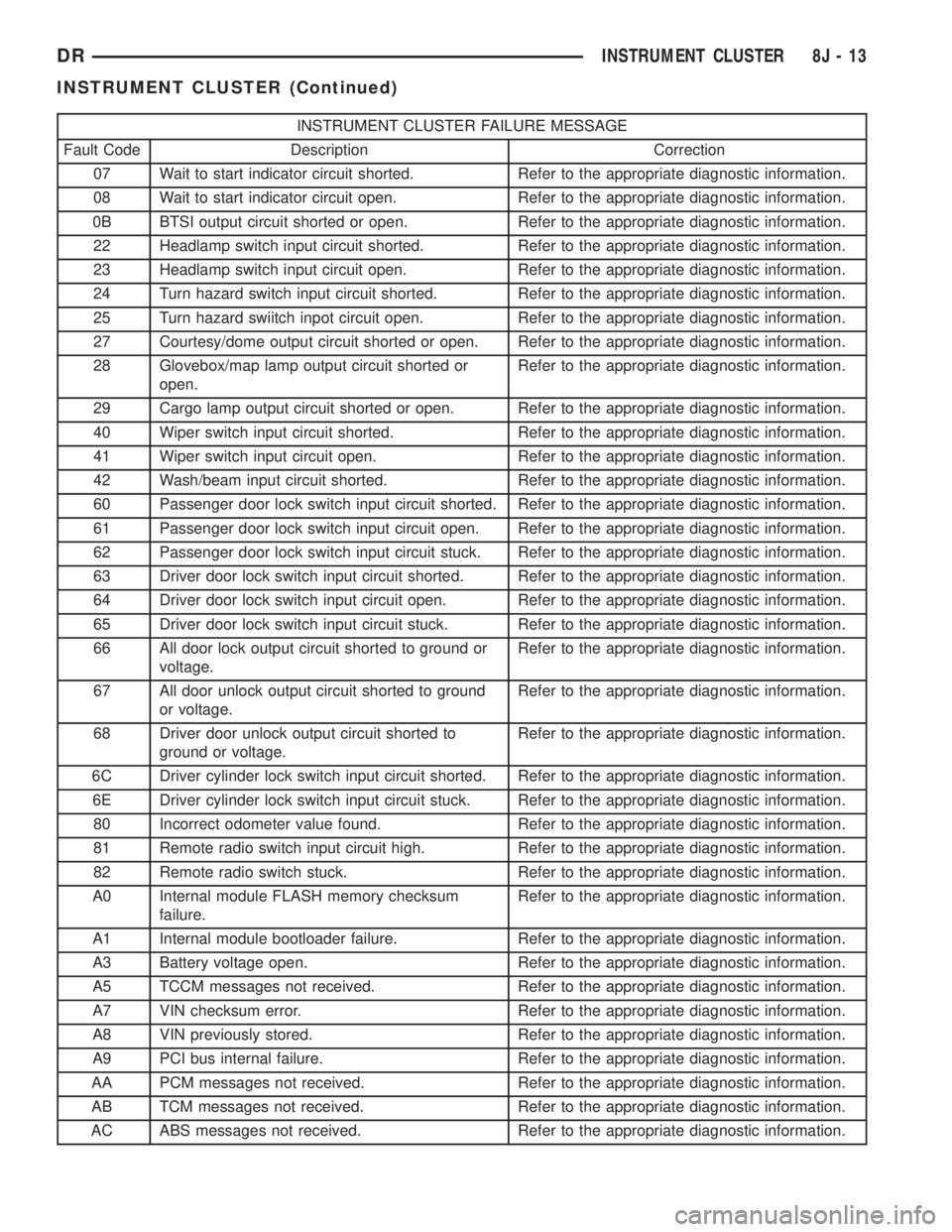
INSTRUMENT CLUSTER FAILURE MESSAGE
Fault Code Description Correction
07 Wait to start indicator circuit shorted. Refer to the appropriate diagnostic information.
08 Wait to start indicator circuit open. Refer to the appropriate diagnostic information.
0B BTSI output circuit shorted or open. Refer to the appropriate diagnostic information.
22 Headlamp switch input circuit shorted. Refer to the appropriate diagnostic information.
23 Headlamp switch input circuit open. Refer to the appropriate diagnostic information.
24 Turn hazard switch input circuit shorted. Refer to the appropriate diagnostic information.
25 Turn hazard swiitch inpot circuit open. Refer to the appropriate diagnostic information.
27 Courtesy/dome output circuit shorted or open. Refer to the appropriate diagnostic information.
28 Glovebox/map lamp output circuit shorted or
open.Refer to the appropriate diagnostic information.
29 Cargo lamp output circuit shorted or open. Refer to the appropriate diagnostic information.
40 Wiper switch input circuit shorted. Refer to the appropriate diagnostic information.
41 Wiper switch input circuit open. Refer to the appropriate diagnostic information.
42 Wash/beam input circuit shorted. Refer to the appropriate diagnostic information.
60 Passenger door lock switch input circuit shorted. Refer to the appropriate diagnostic information.
61 Passenger door lock switch input circuit open. Refer to the appropriate diagnostic information.
62 Passenger door lock switch input circuit stuck. Refer to the appropriate diagnostic information.
63 Driver door lock switch input circuit shorted. Refer to the appropriate diagnostic information.
64 Driver door lock switch input circuit open. Refer to the appropriate diagnostic information.
65 Driver door lock switch input circuit stuck. Refer to the appropriate diagnostic information.
66 All door lock output circuit shorted to ground or
voltage.Refer to the appropriate diagnostic information.
67 All door unlock output circuit shorted to ground
or voltage.Refer to the appropriate diagnostic information.
68 Driver door unlock output circuit shorted to
ground or voltage.Refer to the appropriate diagnostic information.
6C Driver cylinder lock switch input circuit shorted. Refer to the appropriate diagnostic information.
6E Driver cylinder lock switch input circuit stuck. Refer to the appropriate diagnostic information.
80 Incorrect odometer value found. Refer to the appropriate diagnostic information.
81 Remote radio switch input circuit high. Refer to the appropriate diagnostic information.
82 Remote radio switch stuck. Refer to the appropriate diagnostic information.
A0 Internal module FLASH memory checksum
failure.Refer to the appropriate diagnostic information.
A1 Internal module bootloader failure. Refer to the appropriate diagnostic information.
A3 Battery voltage open. Refer to the appropriate diagnostic information.
A5 TCCM messages not received. Refer to the appropriate diagnostic information.
A7 VIN checksum error. Refer to the appropriate diagnostic information.
A8 VIN previously stored. Refer to the appropriate diagnostic information.
A9 PCI bus internal failure. Refer to the appropriate diagnostic information.
AA PCM messages not received. Refer to the appropriate diagnostic information.
AB TCM messages not received. Refer to the appropriate diagnostic information.
AC ABS messages not received. Refer to the appropriate diagnostic information.
DRINSTRUMENT CLUSTER 8J - 13
INSTRUMENT CLUSTER (Continued)
Page 507 of 2895
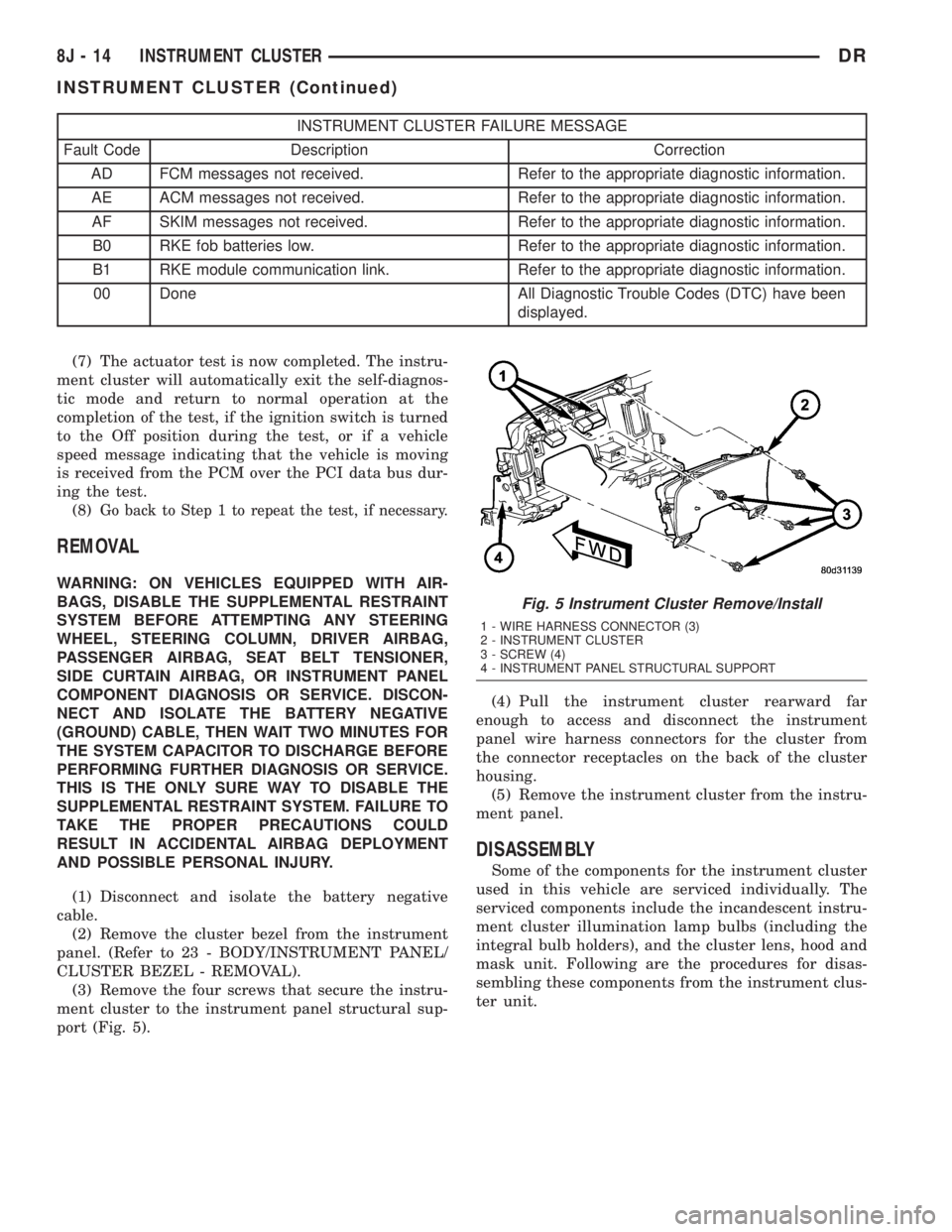
INSTRUMENT CLUSTER FAILURE MESSAGE
Fault Code Description Correction
AD FCM messages not received. Refer to the appropriate diagnostic information.
AE ACM messages not received. Refer to the appropriate diagnostic information.
AF SKIM messages not received. Refer to the appropriate diagnostic information.
B0 RKE fob batteries low. Refer to the appropriate diagnostic information.
B1 RKE module communication link. Refer to the appropriate diagnostic information.
00 Done All Diagnostic Trouble Codes (DTC) have been
displayed.
(7) The actuator test is now completed. The instru-
ment cluster will automatically exit the self-diagnos-
tic mode and return to normal operation at the
completion of the test, if the ignition switch is turned
to the Off position during the test, or if a vehicle
speed message indicating that the vehicle is moving
is received from the PCM over the PCI data bus dur-
ing the test.
(8)
Go back to Step 1 to repeat the test, if necessary.
REMOVAL
WARNING: ON VEHICLES EQUIPPED WITH AIR-
BAGS, DISABLE THE SUPPLEMENTAL RESTRAINT
SYSTEM BEFORE ATTEMPTING ANY STEERING
WHEEL, STEERING COLUMN, DRIVER AIRBAG,
PASSENGER AIRBAG, SEAT BELT TENSIONER,
SIDE CURTAIN AIRBAG, OR INSTRUMENT PANEL
COMPONENT DIAGNOSIS OR SERVICE. DISCON-
NECT AND ISOLATE THE BATTERY NEGATIVE
(GROUND) CABLE, THEN WAIT TWO MINUTES FOR
THE SYSTEM CAPACITOR TO DISCHARGE BEFORE
PERFORMING FURTHER DIAGNOSIS OR SERVICE.
THIS IS THE ONLY SURE WAY TO DISABLE THE
SUPPLEMENTAL RESTRAINT SYSTEM. FAILURE TO
TAKE THE PROPER PRECAUTIONS COULD
RESULT IN ACCIDENTAL AIRBAG DEPLOYMENT
AND POSSIBLE PERSONAL INJURY.
(1) Disconnect and isolate the battery negative
cable.
(2) Remove the cluster bezel from the instrument
panel. (Refer to 23 - BODY/INSTRUMENT PANEL/
CLUSTER BEZEL - REMOVAL).
(3) Remove the four screws that secure the instru-
ment cluster to the instrument panel structural sup-
port (Fig. 5).(4) Pull the instrument cluster rearward far
enough to access and disconnect the instrument
panel wire harness connectors for the cluster from
the connector receptacles on the back of the cluster
housing.
(5) Remove the instrument cluster from the instru-
ment panel.
DISASSEMBLY
Some of the components for the instrument cluster
used in this vehicle are serviced individually. The
serviced components include the incandescent instru-
ment cluster illumination lamp bulbs (including the
integral bulb holders), and the cluster lens, hood and
mask unit. Following are the procedures for disas-
sembling these components from the instrument clus-
ter unit.
Fig. 5 Instrument Cluster Remove/Install
1 - WIRE HARNESS CONNECTOR (3)
2 - INSTRUMENT CLUSTER
3 - SCREW (4)
4 - INSTRUMENT PANEL STRUCTURAL SUPPORT
8J - 14 INSTRUMENT CLUSTERDR
INSTRUMENT CLUSTER (Continued)
Page 508 of 2895
WARNING: ON VEHICLES EQUIPPED WITH AIR-
BAGS, DISABLE THE SUPPLEMENTAL RESTRAINT
SYSTEM BEFORE ATTEMPTING ANY STEERING
WHEEL, STEERING COLUMN, DRIVER AIRBAG,
PASSENGER AIRBAG, SEAT BELT TENSIONER,
SIDE CURTAIN AIRBAG, OR INSTRUMENT PANEL
COMPONENT DIAGNOSIS OR SERVICE. DISCON-
NECT AND ISOLATE THE BATTERY NEGATIVE
(GROUND) CABLE, THEN WAIT TWO MINUTES FOR
THE SYSTEM CAPACITOR TO DISCHARGE BEFORE
PERFORMING FURTHER DIAGNOSIS OR SERVICE.
THIS IS THE ONLY SURE WAY TO DISABLE THE
SUPPLEMENTAL RESTRAINT SYSTEM. FAILURE TO
TAKE THE PROPER PRECAUTIONS COULD
RESULT IN ACCIDENTAL AIRBAG DEPLOYMENT
AND POSSIBLE PERSONAL INJURY.
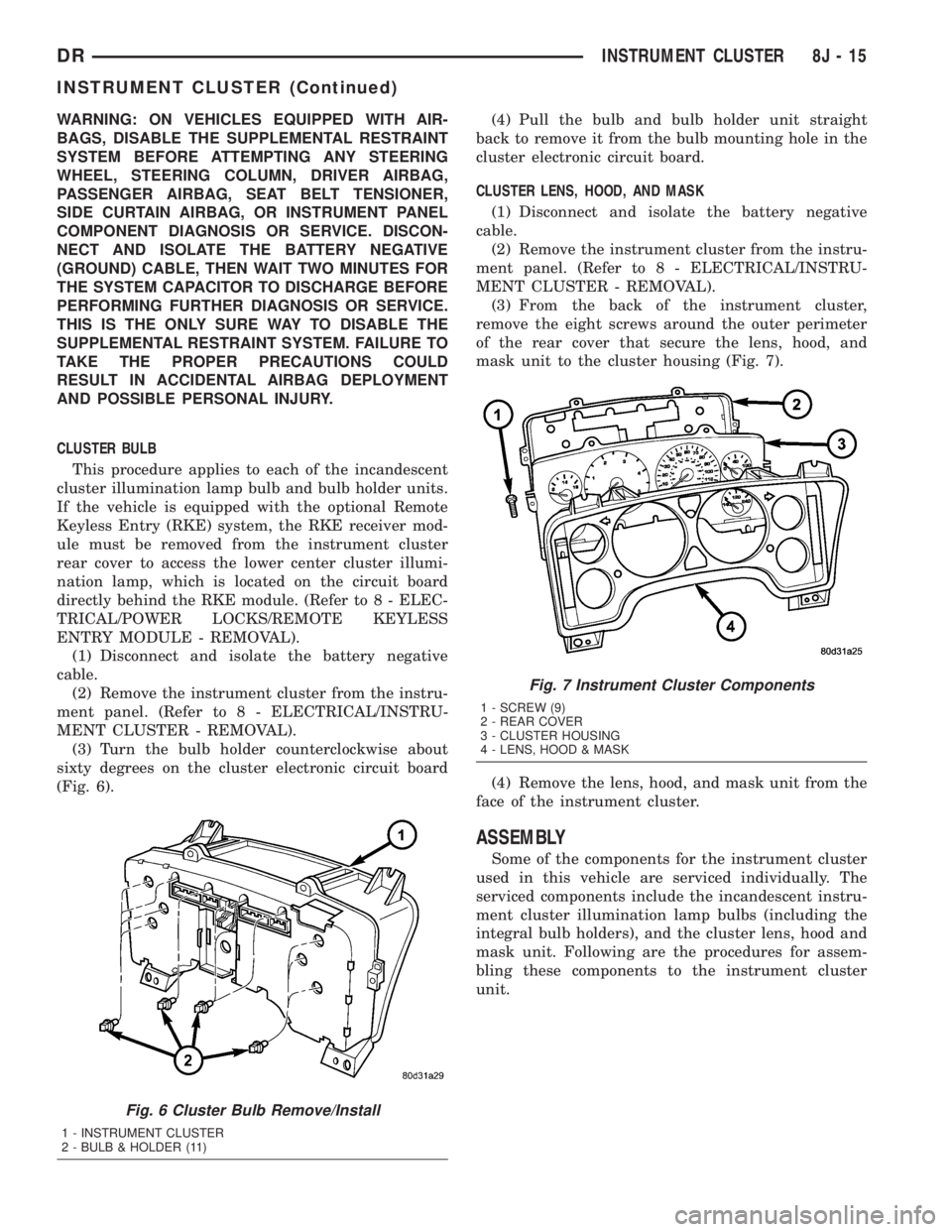
CLUSTER BULB
This procedure applies to each of the incandescent
cluster illumination lamp bulb and bulb holder units.
If the vehicle is equipped with the optional Remote
Keyless Entry (RKE) system, the RKE receiver mod-
ule must be removed from the instrument cluster
rear cover to access the lower center cluster illumi-
nation lamp, which is located on the circuit board
directly behind the RKE module. (Refer to 8 - ELEC-
TRICAL/POWER LOCKS/REMOTE KEYLESS
ENTRY MODULE - REMOVAL).
(1) Disconnect and isolate the battery negative
cable.
(2) Remove the instrument cluster from the instru-
ment panel. (Refer to 8 - ELECTRICAL/INSTRU-
MENT CLUSTER - REMOVAL).
(3) Turn the bulb holder counterclockwise about
sixty degrees on the cluster electronic circuit board
(Fig. 6).(4) Pull the bulb and bulb holder unit straight
back to remove it from the bulb mounting hole in the
cluster electronic circuit board.
CLUSTER LENS, HOOD, AND MASK
(1) Disconnect and isolate the battery negative
cable.
(2) Remove the instrument cluster from the instru-
ment panel. (Refer to 8 - ELECTRICAL/INSTRU-
MENT CLUSTER - REMOVAL).
(3) From the back of the instrument cluster,
remove the eight screws around the outer perimeter
of the rear cover that secure the lens, hood, and
mask unit to the cluster housing (Fig. 7).
(4) Remove the lens, hood, and mask unit from the
face of the instrument cluster.
ASSEMBLY
Some of the components for the instrument cluster
used in this vehicle are serviced individually. The
serviced components include the incandescent instru-
ment cluster illumination lamp bulbs (including the
integral bulb holders), and the cluster lens, hood and
mask unit. Following are the procedures for assem-
bling these components to the instrument cluster
unit.
Fig. 6 Cluster Bulb Remove/Install
1 - INSTRUMENT CLUSTER
2 - BULB & HOLDER (11)
Fig. 7 Instrument Cluster Components
1 - SCREW (9)
2 - REAR COVER
3 - CLUSTER HOUSING
4 - LENS, HOOD & MASK
DRINSTRUMENT CLUSTER 8J - 15
INSTRUMENT CLUSTER (Continued)
Page 509 of 2895
WARNING: ON VEHICLES EQUIPPED WITH AIR-
BAGS, DISABLE THE SUPPLEMENTAL RESTRAINT
SYSTEM BEFORE ATTEMPTING ANY STEERING
WHEEL, STEERING COLUMN, DRIVER AIRBAG,
PASSENGER AIRBAG, SEAT BELT TENSIONER,
SIDE CURTAIN AIRBAG, OR INSTRUMENT PANEL
COMPONENT DIAGNOSIS OR SERVICE. DISCON-
NECT AND ISOLATE THE BATTERY NEGATIVE
(GROUND) CABLE, THEN WAIT TWO MINUTES FOR
THE SYSTEM CAPACITOR TO DISCHARGE BEFORE
PERFORMING FURTHER DIAGNOSIS OR SERVICE.
THIS IS THE ONLY SURE WAY TO DISABLE THE
SUPPLEMENTAL RESTRAINT SYSTEM. FAILURE TO
TAKE THE PROPER PRECAUTIONS COULD
RESULT IN ACCIDENTAL AIRBAG DEPLOYMENT
AND POSSIBLE PERSONAL INJURY.
CLUSTER BULB
This procedure applies to each of the incandescent
cluster illumination lamp bulb and bulb holder units.
If the vehicle is equipped with the optional Remote
Keyless Entry (RKE) system, and the RKE receiver
module was removed from the instrument cluster
rear cover to access the lower center cluster illumi-
nation lamp, reinstall the RKE module after the bulb
is replaced on the circuit board. (Refer to 8 - ELEC-
TRICAL/POWER LOCKS/REMOTE KEYLESS
ENTRY MODULE - INSTALLATION).
CAUTION: Always use the correct bulb size and
type for replacement. An incorrect bulb size or type
may overheat and cause damage to the instrument
cluster, the electronic circuit board and/or the
gauges.
(1) Insert the bulb and bulb holder unit straight
into the correct bulb mounting hole in the cluster
electronic circuit board (Fig. 6).
(2) With the bulb holder fully seated against the
cluster electronic circuit board, turn the bulb holder
clockwise about sixty degrees to lock it into place.
(3) Reinstall the instrument cluster onto the
instrument panel. (Refer to 8 - ELECTRICAL/IN-
STRUMENT CLUSTER - INSTALLATION).
(4) Reconnect the battery negative cable.CLUSTER LENS, HOOD, AND MASK
(1) Position the cluster lens, hood, and mask unit
over the face of the instrument cluster (Fig. 7). Be
certain that the odometer/trip odometer switch but-
ton is inserted through the proper clearance holes in
the mask and the lens.
(2) From the back of the instrument cluster, install
and tighten the eight screws around the outer perim-
eter of the rear cover that secure the lens, hood, and
mask unit to the cluster housing. Tighten the screws
to 1 N´m (10 in. lbs.).
(3) Reinstall the instrument cluster onto the
instrument panel. (Refer to 8 - ELECTRICAL/IN-
STRUMENT CLUSTER - INSTALLATION).
(4) Reconnect the battery negative cable.
INSTALLATION
WARNING: ON VEHICLES EQUIPPED WITH AIR-
BAGS, DISABLE THE SUPPLEMENTAL RESTRAINT
SYSTEM BEFORE ATTEMPTING ANY STEERING
WHEEL, STEERING COLUMN, DRIVER AIRBAG,
PASSENGER AIRBAG, SEAT BELT TENSIONER,
SIDE CURTAIN AIRBAG, OR INSTRUMENT PANEL
COMPONENT DIAGNOSIS OR SERVICE. DISCON-
NECT AND ISOLATE THE BATTERY NEGATIVE
(GROUND) CABLE, THEN WAIT TWO MINUTES FOR
THE SYSTEM CAPACITOR TO DISCHARGE BEFORE
PERFORMING FURTHER DIAGNOSIS OR SERVICE.
THIS IS THE ONLY SURE WAY TO DISABLE THE
SUPPLEMENTAL RESTRAINT SYSTEM. FAILURE TO
TAKE THE PROPER PRECAUTIONS COULD
RESULT IN ACCIDENTAL AIRBAG DEPLOYMENT
AND POSSIBLE PERSONAL INJURY.
(1) Position the instrument cluster to the instru-
ment panel.
(2) Reconnect the instrument panel wire harness
connectors for the cluster to the connector receptacles
on the back of the cluster housing.
(3) Position the instrument cluster into the instru-
ment panel.
(4) Install and tighten the four screws that secure
the instrument cluster to the instrument panel struc-
tural support (Fig. 5). Tighten the screws to 4 N´m
(31 in. lbs.).
(5) Reinstall the cluster bezel onto the instrument
panel. (Refer to 23 - BODY/INSTRUMENT PANEL/
CLUSTER BEZEL - INSTALLATION).
(6) Reconnect the battery negative cable.
8J - 16 INSTRUMENT CLUSTERDR
INSTRUMENT CLUSTER (Continued)
Page 510 of 2895

NOTE: Certain indicators in this instrument cluster
are automatically configured. This feature allows
those indicators to be activated or deactivated for
compatibility with certain optional equipment. If the
problem being diagnosed involves improper illumi-
nation of the cruise indicator, the electronic throttle
control indicator, the overdrive-off indicator, the
service four-wheel drive indicator, the transmission
overtemp indicator, the upshift indicator, the secu-
rity indicator or the gear selector indicator, discon-
nect and isolate the battery negative cable. After
about five minutes, reconnect the battery negative
cable and turn the ignition switch to the On posi-
tion. The instrument cluster should automatically
relearn the equipment in the vehicle and properly
configure the configurable indicators accordingly.
ABS INDICATOR
DESCRIPTION
An Antilock Brake System (ABS) indicator is stan-
dard equipment on all instrument clusters. However,
the instrument cluster can be programmed to disable
this indicator on vehicles that are not equipped with
the ABS or Rear Wheel Anti-Lock (RWAL) brake sys-
tems, which are not available in some markets. On
vehicles equipped with a gasoline engine, the ABS
indicator is located near the lower edge of the instru-
ment cluster, between the tachometer and the speed-
ometer. On vehicles equipped with a diesel engine,
the ABS indicator is located on the right side of the
instrument cluster, to the right of the engine temper-
ature gauge. The ABS indicator consists of a stencil-
like cutout of the International Control and Display
Symbol icon for ªFailure of Anti-lock Braking Sys-
temº in the opaque layer of the instrument cluster
overlay. The dark outer layer of the overlay prevents
the indicator from being clearly visible when it is not
illuminated. An amber Light Emitting Diode (LED)
behind the cutout in the opaque layer of the overlay
causes the icon to appear in amber through the
translucent outer layer of the overlay when the indi-
cator is illuminated from behind by the LED, which
is soldered onto the instrument cluster electronic cir-
cuit board. The ABS indicator is serviced as a unit
with the instrument cluster.
OPERATION
The ABS indicator gives an indication to the vehi-
cle operator when the ABS system is faulty or inop-
erative. This indicator is controlled by a transistor on
the instrument cluster circuit board based upon clus-
ter programming and electronic messages received by
the cluster from the Controller Antilock Brake (CAB)over the Programmable Communications Interface
(PCI) data bus. The ABS indicator Light Emitting
Diode (LED) is completely controlled by the instru-
ment cluster logic circuit, and that logic will only
allow this indicator to operate when the instrument
cluster receives a battery current input on the fused
ignition switch output (run-start) circuit. Therefore,
the LED will always be off when the ignition switch
is in any position except On or Start. The LED only
illuminates when it is provided a path to ground by
the instrument cluster transistor. The instrument
cluster will turn on the ABS indicator for the follow-
ing reasons:
²Bulb Test- Each time the ignition switch is
turned to the On position the ABS indicator is illu-
minated by the cluster for about two seconds as a
bulb test.
²ABS Lamp-On Message- Each time the clus-
ter receives a lamp-on message from the CAB, the
ABS indicator will be illuminated. The indicator
remains illuminated until the cluster receives a
lamp-off message from the CAB, or until the ignition
switch is turned to the Off position, whichever occurs
first.
²Communication Error- If the cluster receives
no lamp-on or lamp-off messages from the CAB for
three consecutive seconds, the ABS indicator is illu-
minated. The indicator remains illuminated until the
cluster receives a valid message from the CAB, or
until the ignition switch is turned to the Off position,
whichever occurs first.
²Actuator Test- Each time the instrument clus-
ter is put through the actuator test, the ABS indica-
tor will be turned on, then off again during the bulb
check portion of the test to confirm the functionality
of the LED and the cluster control circuitry.
²ABS Diagnostic Test- The ABS indicator is
blinked on and off by lamp-on and lamp-off messages
from the CAB during the performance of the ABS
diagnostic tests.
The CAB continually monitors the ABS circuits
and sensors to decide whether the system is in good
operating condition. The CAB then sends the proper
lamp-on or lamp-off messages to the instrument clus-
ter. If the CAB sends a lamp-on message after the
bulb test, it indicates that the CAB has detected a
system malfunction and/or that the ABS system has
become inoperative. The CAB will store a Diagnostic
Trouble Code (DTC) for any malfunction it detects.
Each time the ABS indicator fails to light due to an
open or short in the cluster ABS indicator circuit, the
cluster sends a message notifying the CAB of the
condition, then the instrument cluster and the CAB
will each store a DTC. For proper diagnosis of the
antilock brake system, the CAB, the PCI data bus, or
the electronic message inputs to the instrument clus-
DRINSTRUMENT CLUSTER 8J - 17
INSTRUMENT CLUSTER (Continued)
Page 511 of 2895

ter that control the ABS indicator, a DRBIIItscan
tool is required. Refer to the appropriate diagnostic
information.
AIRBAG INDICATOR
DESCRIPTION
An airbag indicator is standard equipment on all
instrument clusters. However, the instrument cluster
can be programmed to disable this indicator on vehi-
cles that are not equipped with the airbag system,
which is not available in some markets. The airbag
indicator is located near the upper edge of the instru-
ment cluster, between the tachometer and the speed-
ometer. The airbag indicator consists of a stencil-like
cutout of the words ªAIR BAGº in the opaque layer of
the instrument cluster overlay. The dark outer layer
of the overlay prevents the indicator from being
clearly visible when it is not illuminated. A red Light
Emitting Diode (LED) behind the cutout in the
opaque layer of the overlay causes the ªAIR BAGº
text to appear in red through the translucent outer
layer of the overlay when the indicator is illuminated
from behind by the LED, which is soldered onto the
instrument cluster electronic circuit board. The air-
bag indicator is serviced as a unit with the instru-
ment cluster.
OPERATION
The airbag indicator gives an indication to the
vehicle operator when the airbag system is faulty or
inoperative. The airbag indicator is controlled by a
transistor on the instrument cluster circuit board
based upon cluster programming and electronic mes-
sages received by the cluster from the Airbag Control
Module (ACM) over the Programmable Communica-
tions Interface (PCI) data bus. The airbag indicator
Light Emitting Diode (LED) is completely controlled
by the instrument cluster logic circuit, and that logic
will only allow this indicator to operate when the
instrument cluster receives a battery current input
on the fused ignition switch output (run-start) cir-
cuit. Therefore, the LED will always be off when the
ignition switch is in any position except On or Start.
The LED only illuminates when it is provided a path
to ground by the instrument cluster transistor. The
instrument cluster will turn on the airbag indicator
for the following reasons:
²Bulb Test- Each time the ignition switch is
turned to the On position the airbag indicator is illu-
minated for about six seconds. The entire six second
bulb test is a function of the ACM.
²ACM Lamp-On Message- Each time the clus-
ter receives a lamp-on message from the ACM, the
airbag indicator will be illuminated. The indicatorremains illuminated for about twelve seconds or until
the cluster receives a lamp-off message from the
ACM, whichever is longer.
²Communication Error- If the cluster receives
no airbag messages for three consecutive seconds, the
airbag indicator is illuminated. The indicator
remains illuminated until the cluster receives a sin-
gle lamp-off message from the ACM.
²Actuator Test- Each time the cluster is put
through the actuator test, the airbag indicator will be
turned on, then off again during the bulb check por-
tion of the test to confirm the functionality of the
LED and the cluster control circuitry. The actuator
test illumination of the airbag indicator is a function
of the instrument cluster.
The ACM continually monitors the airbag system
circuits and sensors to decide whether the system is
in good operating condition. The ACM then sends the
proper lamp-on or lamp-off messages to the instru-
ment cluster. If the ACM sends a lamp-on message
after the bulb test, it indicates that the ACM has
detected a system malfunction and/or that the air-
bags and seat belt tensioners may not deploy when
required, or may deploy when not required. The ACM
will store a Diagnostic Trouble Code (DTC) for any
malfunction it detects. Each time the airbag indicator
fails to illuminate due to an open or short in the
cluster airbag indicator circuit, the cluster sends a
message notifying the ACM of the condition, the
instrument cluster and the ACM will each store a
DTC, and the cluster will flash the seatbelt indicator
on and off as a backup to notify the vehicle operator.
For proper diagnosis of the airbag system, the ACM,
the PCI data bus, or the electronic message inputs to
the instrument cluster that control the airbag indica-
tor, a DRBIIItscan tool is required. Refer to the
appropriate diagnostic information.
BRAKE/PARK BRAKE
INDICATOR
DESCRIPTION
A brake indicator is standard equipment on all
instrument clusters. The brake indicator is located
near the lower edge of the instrument cluster,
between the tachometer and the speedometer. The
brake indicator consists of stencil-like cutouts of the
word ªBRAKEº and the International Control and
Display Symbol icon for ªBrake Failureº in the
opaque layer of the instrument cluster overlay. The
dark outer layer of the overlay prevents the indicator
from being clearly visible when it is not illuminated.
A red Light Emitting Diode (LED) behind the cutout
in the opaque layer of the overlay causes the
ªBRAKEº text and the icon to appear in red through
8J - 18 INSTRUMENT CLUSTERDR
ABS INDICATOR (Continued)
Page 513 of 2895

WARNING: ON VEHICLES EQUIPPED WITH AIR-
BAGS, DISABLE THE SUPPLEMENTAL RESTRAINT
SYSTEM BEFORE ATTEMPTING ANY STEERING
WHEEL, STEERING COLUMN, DRIVER AIRBAG,
PASSENGER AIRBAG, SEAT BELT TENSIONER,
SIDE CURTAIN AIRBAG, OR INSTRUMENT PANEL
COMPONENT DIAGNOSIS OR SERVICE. DISCON-
NECT AND ISOLATE THE BATTERY NEGATIVE
(GROUND) CABLE, THEN WAIT TWO MINUTES FOR
THE SYSTEM CAPACITOR TO DISCHARGE BEFORE
PERFORMING FURTHER DIAGNOSIS OR SERVICE.
THIS IS THE ONLY SURE WAY TO DISABLE THE
SUPPLEMENTAL RESTRAINT SYSTEM. FAILURE TO
TAKE THE PROPER PRECAUTIONS COULD
RESULT IN ACCIDENTAL AIRBAG DEPLOYMENT
AND POSSIBLE PERSONAL INJURY.
INDICATOR ILLUMINATES DURING BULB TEST, BUT DOES
NOT WHEN PARK BRAKE APPLIED
(1) Disconnect and isolate the battery negative
cable. Disconnect the body wire harness connector for
the park brake switch from the switch terminal.
Apply the parking brake. Check for continuity
between the park brake switch terminal and a good
ground. There should be continuity. If OK, go to Step
2. If not OK, replace the faulty park brake switch.
(2) Disconnect the instrument panel wire harness
connector (Connector C1) for the instrument cluster
from the cluster connector receptacle. Check for con-
tinuity between the park brake switch sense circuit
cavities of the body wire harness connector for the
park brake switch and the instrument panel wire
harness connector for the instrument cluster. There
should be continuity. If not OK, repair the open park
brake switch sense circuit between the park brake
switch and the instrument cluster as required.
INDICATOR REMAINS ILLUMINATED - BRAKE SYSTEM
CHECKS OK
(1) Disconnect and isolate the battery negative
cable. Disconnect the body wire harness connector for
the park brake switch from the switch terminal.
Check for continuity between the terminal of the
park brake switch and a good ground. There should
be no continuity with the park brake released, and
continuity with the park brake applied. If OK, go to
Step 2. If not OK, replace the faulty park brake
switch.
(2) Disconnect the instrument panel wire harness
connector (Connector C1) for the instrument cluster
from the cluster connector receptacle. Check for con-
tinuity between the park brake switch sense circuit
cavity of the body wire harness connector for the
park brake switch and a good ground. There should
be no continuity. If not OK, repair the shorted parkbrake switch sense circuit between the park brake
switch and the instrument cluster as required.
CARGO LAMP INDICATOR
DESCRIPTION
A cargo lamp indicator is standard equipment on
all instrument clusters. The cargo lamp indicator is
located on the right side of the instrument cluster, to
the right of the oil pressure gauge. The cargo lamp
indicator consists of a stencil-like cutout of the words
ªCARGO LAMPº in the opaque layer of the instru-
ment cluster overlay. The dark outer layer of the
overlay prevents the indicator from being clearly vis-
ible when it is not illuminated. An amber Light
Emitting Diode (LED) behind the cutout in the
opaque layer of the overlay causes the ªCARGO
LAMPº text to appear in amber through the translu-
cent outer layer of the overlay when the indicator is
illuminated from behind by the LED, which is sol-
dered onto the instrument cluster electronic circuit
board. The cargo lamp indicator is serviced as a unit
with the instrument cluster.
OPERATION
The cargo lamp indicator gives an indication to the
vehicle operator when the exterior cargo lamp is illu-
minated. This indicator is controlled by a transistor
on the instrument cluster circuit board based upon
cluster programming, a hard wired multiplex input
received by the cluster from the headlamp panel
lamps dimmer switch on the headlamp dimmer
switch mux circuit, and electronic unlock request
messages received from the optional Remote Keyless
Entry (RKE) receiver module. The cargo lamp indica-
tor Light Emitting Diode (LED) is completely con-
trolled by the instrument cluster logic circuit, and
that logic will allow only this indicator to operate
whenever the instrument cluster receives a battery
current input on the fused ignition switch output
(run-start) circuit. Therefore, the LED will always be
off when the ignition switch is in any position except
On or Start. The LED only illuminates when it is
provided a path to ground by the instrument cluster
transistor. The instrument cluster will turn on the
cargo lamp indicator for the following reasons:
²Bulb Test- Each time the ignition switch is
turned to the On position the cargo lamp indicator is
illuminated for about two seconds as a bulb test.
²Cargo Lamp-On Input- Each time the cluster
detects a cargo lamp-on input from the headlamp
switch on the headlamp dimmer switch mux circuit,
the cargo lamp and the cargo lamp indicator will be
illuminated. The cargo lamp and indicator remain
illuminated until the cluster receives a cargo lamp-off
8J - 20 INSTRUMENT CLUSTERDR
BRAKE/PARK BRAKE INDICATOR (Continued)
Page 514 of 2895

input from the headlamp switch, or until the ignition
switch is turned to the Off position, whichever occurs
first.
²Actuator Test- Each time the cluster is put
through the actuator test, the cargo lamp indicator
will be turned on, then off again during the bulb
check portion of the test to confirm the functionality
of the LED and the cluster control circuitry.
The instrument cluster continually monitors the
headlamp dimmer switch circuit to determine the
proper interior lamps features and panel lamps illu-
mination levels to provide. The cluster then energizes
and de-energizes a low side driver circuit to control
the exterior cargo lamp. Each time the instrument
cluster energizes the cargo lamp driver and the igni-
tion switch is in the On or start positions, the cluster
also turns on the cargo lamp indicator. For further
diagnosis of the cargo lamp indicator or the instru-
ment cluster circuitry that controls the indicator,
(Refer to 8 - ELECTRICAL/INSTRUMENT CLUS-
TER - DIAGNOSIS AND TESTING). For proper
diagnosis of the cargo lamp or the headlamp switch
inputs to the instrument cluster that control the
cargo lamp indicator, a DRBIIItscan tool is required.
Refer to the appropriate diagnostic information.
CHECK GAUGES INDICATOR
DESCRIPTION
A check gauges indicator is standard equipment on
all instrument clusters. On vehicles equipped with a
gasoline engine, the check gauges indicator is located
near the lower edge of the instrument cluster,
between the tachometer and the speedometer. On
vehicles equipped with a diesel engine, the check
gauges indicator is located on the left side of the
instrument cluster, to the left of the voltage gauge.
The check gauges indicator consists of a stencil-like
cutout of the words ªCHECK GAGESº in the opaque
layer of the instrument cluster overlay. The dark
outer layer of the overlay prevents the indicator from
being clearly visible when it is not illuminated. A red
Light Emitting Diode (LED) behind the cutout in the
opaque layer of the overlay causes the ªCHECK
GAGESº text to appear in red through the translu-
cent outer layer of the overlay when the indicator is
illuminated from behind by the LED, which is sol-
dered onto the instrument cluster electronic circuit
board. The check gauges indicator is serviced as a
unit with the instrument cluster.
OPERATION
The check gauges indicator gives an indication to
the vehicle operator when certain instrument cluster
gauge readings reflect a condition requiring immedi-ate attention. This indicator is controlled by a tran-
sistor on the instrument cluster circuit board based
upon cluster programming and electronic messages
received by the cluster from the Powertrain Control
Module (PCM) on vehicles equipped with a gasoline
engine, or from the Engine Control Module (ECM) on
vehicles equipped with a diesel engine over the Pro-
grammable Communications Interface (PCI) data
bus. The check gauges indicator Light Emitting
Diode (LED) is completely controlled by the instru-
ment cluster logic circuit, and that logic will only
allow this indicator to operate when the instrument
cluster receives a battery current input on the fused
ignition switch output (run-start) circuit. Therefore,
the LED will always be off when the ignition switch
is in any position except On or Start. The LED only
illuminates when it is provided a path to ground by
the instrument cluster transistor. The instrument
cluster will turn on the check gauges indicator for
the following reasons:
²Bulb Test- Each time the ignition switch is
turned to the On position the check gauges indicator
is illuminated for about two seconds as a bulb test.
²Engine Temperature High Message- Each
time the cluster receives a message from the PCM or
ECM indicating the engine coolant temperature of a
gasoline engine is about 122É C (252É F) or higher, or
of a diesel engine is about 112É C (233É F) or higher,
the check gauges indicator will be illuminated. The
indicator remains illuminated until the cluster
receives a message from the PCM or ECM indicating
that the engine coolant temperature of a gasoline
engine is below about 122É C (252É F), or of a diesel
engine is below about 112É C (233É F), or until the
ignition switch is turned to the Off position, which-
ever occurs first.
²Engine Oil Pressure Low Message- Each
time the cluster receives a message from the PCM or
ECM indicating the engine oil pressure is about 41
kPa (6 psi) or lower, the check gauges indicator will
be illuminated. The indicator remains illuminated
until the cluster receives a message from the PCM or
ECM indicating that the engine oil pressure is above
about 41 kPa (6 psi), or until the ignition switch is
turned to the Off position, whichever occurs first.
The cluster will only turn the indicator on in
response to an engine oil pressure low message if the
engine speed is greater than zero.
²System Voltage Low (Charge Fail) Message
- Each time the cluster receives a message from the
PCM or ECM indicating the electrical system voltage
is less than about 11.5 volts (charge fail condition),
the check gauges indicator will be illuminated. The
indicator remains illuminated until the cluster
receives a message from the PCM or ECM indicating
the electrical system voltage is greater than about
DRINSTRUMENT CLUSTER 8J - 21
CARGO LAMP INDICATOR (Continued)