2003 CHEVROLET VENTURE ECO mode
[x] Cancel search: ECO modePage 266 of 486

Setting Preset PTYs
The six numbered pushbuttons let you return to your
favorite PTYs. These buttons have factory PTY presets.
You can set up to 12 PTYs (six FM1 and six FM2) by
performing the following steps:
1. Press BAND to select FM1 or FM2.
2. Press the P-TYPE button to activate program type
select mode.
3. Turn the P-TYPE knob to select a PTY.
4. Press and hold one of the six numbered
pushbuttons until you hear a beep. Whenever you
press that numbered pushbutton, the PTY you
set will return.
5. Repeat the steps for each pushbutton.
RDS Messages
ALERT!:Alert warns of local or national emergencies.
When an alert announcement comes on the current
radio station, ALERT! will appear on the display. You will
hear the announcement, even if the volume is muted
or a compact disc is playing. If the compact disc player
is playing, play will stop during the announcement.
You will not be able to turn off alert announcements.
ALERT! will not be affected by tests of the emergency
broadcast system. This feature is not supported by
all RDS stations.INFO (Information):If the current station has a
message, INFO will appear on the display. Press this
button to see the message. The message may display
the artist and song title, call in phone numbers, etc.
If the whole message is not displayed, parts of it
will appear every three seconds. To scroll through the
message at your own speed, press the INFO button
repeatedly. A new group of words will appear on
the display with each press. Once the complete
message has been displayed, INFO will disappear from
the display until another new message is received.
The old message can be displayed by pressing
the INFO button until a new message is received or a
different station is tuned to.
TRAF (Traffic):If TRAF appears on the display, the
tuned station broadcasts traffic announcements.
To receive the traffic announcement from the tuned
station, press this button. Brackets will be displayed
around TRAF and when a traffic announcement comes
on the tuned radio station you will hear it.
If the current tuned station does not broadcast traffic
announcements, press this button and the radio
will seek to a station that does. When the radio ®nds a
station that broadcasts traffic announcements, it will
stop and brackets will be displayed around TRAF. When
a traffic announcement comes on the tuned radio
station you will hear it. If no station is found, NO
TRAFFIC will appear on the display.
3-86
Page 270 of 486

sSCANt:To scan one disc, press and hold either
SCAN arrow for more than two seconds until SCAN
appears on the display and you hear a beep. Use this
feature to listen to 10 seconds of each track of the
currently selected disc. SCAN will appear on the display.
Press either SCAN arrow again, to stop scanning.
To scan all loaded discs, press and hold either SCAN
arrow for more than four seconds until DISC SCAN
appears on the display and you hear a beep. Use this
feature to listen to 10 seconds of the ®rst tracks of each
disc loaded. Press either SCAN arrow again, to stop
scanning.
RCL (Recall):Push this knob to see how long the
current track has been playing. To change the default
on the display (track and elapsed time), push the
knob until you see the display you want, then hold the
knob until the display ¯ashes. The selected display
will now be the default.
AM FM:Press this button to play the radio when a
disc(s) is in the player.Using Song List Mode
The integrated six-disc CD changer has a feature called
song list. This feature is capable of saving 20 track
selections.
To save tracks into the song list feature, perform the
following steps:
1. Turn the disc player on and load it with at least one
disc. See ªLOAD CDº listed previously in this
section for more information.
2. Check to see that the disc changer is not in song
list mode. S-LIST should not appear in the display.
If S-LIST is present, press the SONG LIST
button to turn it off.
3. Select the desired disc by pressing the numbered
pushbutton and then use the SEEK SCAN right
arrow button to locate the track that you want
to save. The track will begin to play.
4. Press and hold the SONG LIST button for two or
more seconds to save the track into memory.
When SONG LIST is pressed a beep will be heard
immediately. After two seconds of pressing
SONG LIST continuously, two beeps will sound to
con®rm that the track has been saved.
5. Repeat Steps 3 and 4 for saving other selections.
3-90
Page 271 of 486

If you attempt to save more than 20 selections, S-LIST
FULL will appear on the display.
To play the song list, press the SONG LIST button. One
beep will be heard and S-LIST will appear on the
display. The recorded tracks will begin to play in the
order that they were saved.
You may seek through the song list by using the SEEK
SCAN arrows. Seeking past the last saved track will
return you to the ®rst saved track.
To delete tracks from the song list, perform the
following steps:
1. Turn the disc player on.
2. Press the SONG LIST button to turn song list on.
S-LIST will appear on the display.
3. Press the SEEK SCAN arrows to select the desired
track to be deleted.
4. Press and hold the SONG LIST button for two
seconds. When pressing SONG LIST, one beep
will be heard immediately. After two seconds
of pressing the SONG LIST button continuously,
two beeps will be heard to con®rm that the track has
been deleted.After a track has been deleted, the remaining tracks are
moved up the list. When another track is added to
the song list, the track will be added to the end of
the list.
To delete the entire song list, perform the following
steps:
1. Turn the disc player on.
2. Press the SONG LIST button to turn song list on.
S-LIST will appear on the display.
3. Press and hold the SONG LIST button for more
than four seconds. A beep will be heard, followed
by two beeps after two seconds and a ®nal beep will
be heard after four seconds. S-LIST EMPTY will
appear on the display indicating that the song
list has been deleted.
If a disc is ejected, and the song list contains saved
tracks from that disc, those tracks are automatically
deleted from the song list. Any tracks saved to the song
list again are added to the bottom of the list.
To end song list mode, press the SONG LIST button.
One beep will be heard and S-LIST will be removed from
the display.
3-91
Page 280 of 486
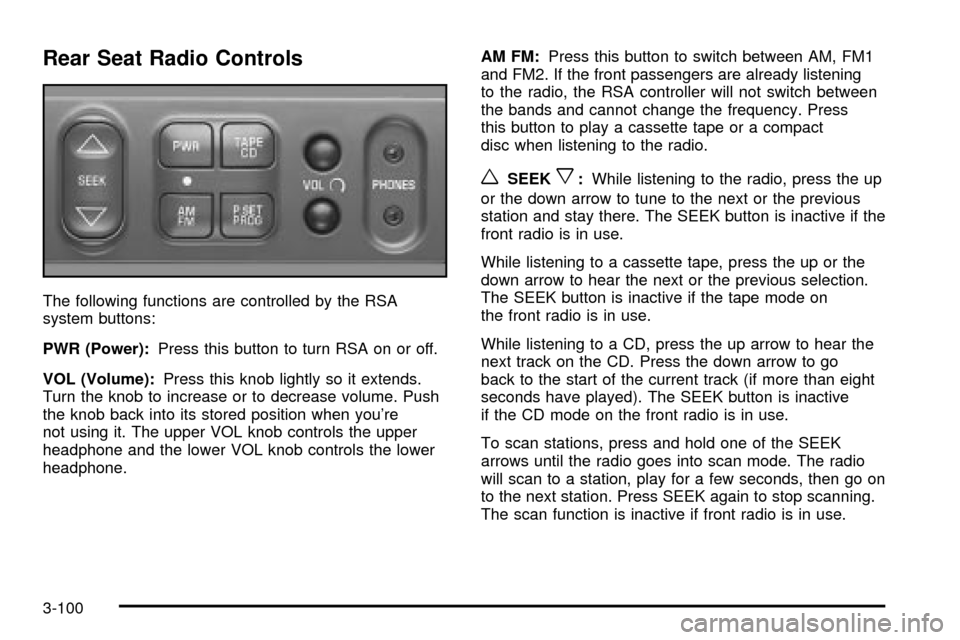
Rear Seat Radio Controls
The following functions are controlled by the RSA
system buttons:
PWR (Power):Press this button to turn RSA on or off.
VOL (Volume):Press this knob lightly so it extends.
Turn the knob to increase or to decrease volume. Push
the knob back into its stored position when you're
not using it. The upper VOL knob controls the upper
headphone and the lower VOL knob controls the lower
headphone.AM FM:Press this button to switch between AM, FM1
and FM2. If the front passengers are already listening
to the radio, the RSA controller will not switch between
the bands and cannot change the frequency. Press
this button to play a cassette tape or a compact
disc when listening to the radio.
wSEEKx:While listening to the radio, press the up
or the down arrow to tune to the next or the previous
station and stay there. The SEEK button is inactive if the
front radio is in use.
While listening to a cassette tape, press the up or the
down arrow to hear the next or the previous selection.
The SEEK button is inactive if the tape mode on
the front radio is in use.
While listening to a CD, press the up arrow to hear the
next track on the CD. Press the down arrow to go
back to the start of the current track (if more than eight
seconds have played). The SEEK button is inactive
if the CD mode on the front radio is in use.
To scan stations, press and hold one of the SEEK
arrows until the radio goes into scan mode. The radio
will scan to a station, play for a few seconds, then go on
to the next station. Press SEEK again to stop scanning.
The scan function is inactive if front radio is in use.
3-100
Page 282 of 486
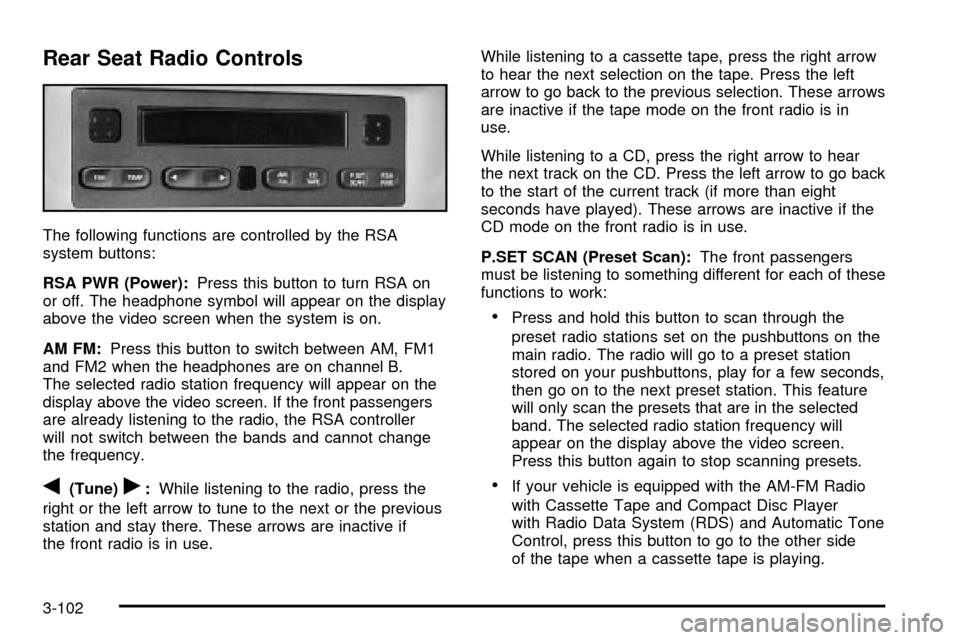
Rear Seat Radio Controls
The following functions are controlled by the RSA
system buttons:
RSA PWR (Power):Press this button to turn RSA on
or off. The headphone symbol will appear on the display
above the video screen when the system is on.
AM FM:Press this button to switch between AM, FM1
and FM2 when the headphones are on channel B.
The selected radio station frequency will appear on the
display above the video screen. If the front passengers
are already listening to the radio, the RSA controller
will not switch between the bands and cannot change
the frequency.
q(Tune)r:While listening to the radio, press the
right or the left arrow to tune to the next or the previous
station and stay there. These arrows are inactive if
the front radio is in use.While listening to a cassette tape, press the right arrow
to hear the next selection on the tape. Press the left
arrow to go back to the previous selection. These arrows
are inactive if the tape mode on the front radio is in
use.
While listening to a CD, press the right arrow to hear
the next track on the CD. Press the left arrow to go back
to the start of the current track (if more than eight
seconds have played). These arrows are inactive if the
CD mode on the front radio is in use.
P.SET SCAN (Preset Scan):The front passengers
must be listening to something different for each of these
functions to work:
·Press and hold this button to scan through the
preset radio stations set on the pushbuttons on the
main radio. The radio will go to a preset station
stored on your pushbuttons, play for a few seconds,
then go on to the next preset station. This feature
will only scan the presets that are in the selected
band. The selected radio station frequency will
appear on the display above the video screen.
Press this button again to stop scanning presets.
·If your vehicle is equipped with the AM-FM Radio
with Cassette Tape and Compact Disc Player
with Radio Data System (RDS) and Automatic Tone
Control, press this button to go to the other side
of the tape when a cassette tape is playing.
3-102
Page 361 of 486
Notice:Engine damage from running your engine
without coolant isn't covered by your warranty.
See ªOverheated Engine Protection Operating
Modeº in the Index for information on driving to a
safe place in an emergency.
Notice:Using coolant other than DEX-COOLžmay
cause premature engine, heater core or radiator
corrosion. In addition, the engine coolant may
require changing sooner, at 30,000 miles (50 000 km)
or 24 months, whichever occurs ®rst. Any repairs
would not be covered by your warranty. Always use
DEX-COOL
ž(silicate-free) coolant in your vehicle.
How to Add Coolant to the Coolant
Recovery Tank
If you haven't found a problem yet, but the coolant level
isn't at or above the FULL COLD mark, add a
50/50 mixture of
clean, drinkable waterand DEX-COOLž
engine coolant at the coolant recovery tank. SeeEngine Coolant on page 5-23for more information.
{CAUTION:
Adding only plain water to your cooling
system can be dangerous. Plain water, or
some other liquid such as alcohol, can boil
before the proper coolant mixture will. Your
vehicle's coolant warning system is set for the
proper coolant mixture. With plain water or the
wrong mixture, your engine could get too hot
but you would not get the overheat warning.
Your engine could catch ®re and you or others
could be burned. Use a 50/50 mixture of clean,
drinkable water and DEX-COOL
žcoolant.
Notice:In cold weather, water can freeze and crack
the engine, radiator, heater core and other parts.
Use the recommended coolant and the proper
coolant mixture.
5-31
Page 416 of 486

Compact Spare Tire
Although the compact spare tire was fully in¯ated when
your vehicle was new, it can lose air after a time.
Check the in¯ation pressure regularly. It should be
60 psi (420 kPa).
After installing the compact spare on your vehicle, you
should stop as soon as possible and make sure
your spare tire is correctly in¯ated. The compact spare
is made to perform well at speeds up to 65 mph
(105 km/h) for distances up to 3,000 miles (5 000 km),
so you can ®nish your trip and have your full-size
tire repaired or replaced where you want. Of course, it's
best to replace your spare with a full-size tire as
soon as you can. Your spare will last longer and be in
good shape in case you need it again.
Notice:When the compact spare is installed, don't
take your vehicle through an automatic car wash
with guide rails. The compact spare can get caught
on the rails. That can damage the tire and wheel,
and maybe other parts of your vehicle.
Don't use your compact spare on other vehicles.
And don't mix your compact spare tire or wheel with
other wheels or tires. They won't ®t. Keep your spare tire
and its wheel together.
Notice:Tire chains won't ®t your compact spare.
Using them can damage your vehicle and can
damage the chains too. Don't use tire chains on
your compact spare.
All-Wheel Drive
After installing a compact spare tire on a vehicle with
all-wheel drive you will need to drive with light to
moderate acceleration, for 10 seconds, in a straight line.
This action will allow the vehicle to detect the compact
spare tire and disable the all-wheel drive system.
The AWD DISABLE message will come on the
instrument panel cluster indicating that the all-wheel
drive system is off. You may detect a slight pull during
this time, but this is normal.
Notice:You may damage your vehicle's all-wheel
drive system if your vehicle is driven for an
extended period with a compact spare tire installed
and the all-wheel drive system in operation. See
ªAll-Wheel Drive Systemº and ªAWD Disable
Warning Messageº in the Index for more
information.
5-86
Page 479 of 486

Mirrors..........................................................2-44
Manual Rearview Mirror................................2-44
Outside Convex Mirror.................................2-45
Outside Heated Mirrors................................2-45
Outside Power Mirrors..................................2-44
MyGMLink.com................................................ 7-3
N
New Vehicle Break-In......................................2-31
Normal Maintenance Replacement Parts...........5-104
O
Odometer......................................................3-38
Off-Road Recovery..........................................4-12
Oil ................................................................5-13
Engine.......................................................5-13
Pressure Message.......................................3-52
Older Children, Restraints................................1-55
Online Owner Center........................................ 7-3
OnStar
žPersonal Calling.................................2-46
OnStaržServices............................................2-46
OnStaržSystem.............................................2-45
OnStaržVirtual Advisor....................................2-46
Operation Tips................................................3-28
Operation......................................................3-25
Other Warning Devices...................................... 3-6
Outlet Adjustment............................................3-28Outside.........................................................2-45
Convex Mirror.............................................2-45
Heated Mirrors............................................2-45
Power Mirrors.............................................2-44
Overhead Console Switchbank..........................3-21
Overhead Console..........................................2-52
Overheated Engine Protection Operating Mode . . . 5-26
Overseas ± Customer Assistance........................ 7-5
Owners, Canadian............................................... ii
Owner's Information........................................7-11
P
Park Aid........................................................3-22
Park (P)........................................................2-39
Shifting Into................................................2-39
Shifting Out of............................................2-41
Parking Brake and Automatic Transaxle Park (P)
Mechanism Check.......................................6-14
Parking on Hills..............................................4-42
Parking.........................................................3-22
Assist........................................................3-22
Brake........................................................2-38
Over Things That Burn.................................2-42
Part A - Scheduled Maintenance Services............ 6-4
Part B - Owner Checks and Services................6-10
Part C - Periodic MaintenanceInspections..........6-15
Part D - Recommended Fluids and Lubricants....6-17
Part E - Maintenance Record...........................6-19
11