2003 CHEVROLET VENTURE wheel
[x] Cancel search: wheelPage 145 of 486
PARK (P):This gear position locks your front wheels.
It's the best position to use when you start your
engine because your vehicle can't move easily.
Ensure the shift lever is fully in PARK (P) before starting
the engine. Your vehicle has an automatic transaxle
shift lock control system. You have to fully
applyyour regular brakesbeforeyou can shift from PARK (P)
when the ignition key is in RUN. As you step on the
brake pedal, while in PARK (P), you may hear a
click from the solenoid of the system. This ensures that
the system is operating properly.
If you cannot shift out of PARK (P), ease pressure on
the shift lever ± push the shift lever all the way into
PARK (P) as you maintain brake application. Then move
the shift lever into the gear you wish. See
Shifting Out
of Park (P) on page 2-41.
{CAUTION:
It is dangerous to get out of your vehicle if the
shift lever is not fully in PARK (P) with the
parking brake ®rmly set. Your vehicle can roll.
Do not leave your vehicle when the engine is
running unless you have to. If you have left the
engine running, the vehicle can move
suddenly. You or others could be injured. To
be sure your vehicle will not move, even when
you are on fairly level ground, always set your
parking brake and move the shift lever to
PARK (P). See ªShifting Into Park (P)º in the
Index. If you are pulling a trailer, see ªTowing
a Trailerº in the Index.
2-35
Page 146 of 486

REVERSE (R):Use this gear to back up.
Notice:Shifting to REVERSE (R) while your vehicle
is moving forward could damage the transaxle.
The repairs would not be covered by your warranty.
Shift to REVERSE (R) only after your vehicle is
stopped.
To rock your vehicle back and forth to get out of snow,
ice or sand without damaging your transaxle, see If
You Are Stuck: In Sand, Mud, Ice or Snow on
page 4-30.
NEUTRAL (N):In this position, your engine doesn't
connect with the wheels. To restart when you're already
moving, use NEUTRAL (N) only. Also, use
NEUTRAL (N) when your vehicle is being towed.
{CAUTION:
Shifting into a drive gear while your engine is
running at high speed is dangerous. Unless
your foot is ®rmly on the brake pedal, your
vehicle could move very rapidly. You could
lose control and hit people or objects. Do not
shift into a drive gear while your engine is
running at high speed.
Notice:Shifting our of PARK (P) or NEUTRAL (N)
with the engine racing may damage the transaxle.
The repairs would not be covered by your warranty.
Be sure the engine is not racing when shifting
your vehicle.
AUTOMATIC OVERDRIVE (D):This position is for
normal driving. If you need more power for passing, and
you're:
·Going less than 35 mph (55 km/h), push your
accelerator pedal about halfway down.
·Going about 35 mph (55 km/h) or more, push the
accelerator all the way down.
You'll shift down to the next gear and have more power.
Notice:Driving your vehicle if you notice that it
is moving slowly or not shifting gears as you
increase speed may damage the transaxle. Have
your vehicle serviced right away. You can drive in
SECOND (2) when you are driving less than
35 mph (55 km/h) and AUTOMATIC OVERDRIVE (D)
for higher speeds until then.
2-36
Page 161 of 486

Reprogramming a Single HomeLinkž
Button
To program a device to HomeLinkžusing a HomeLinkž
button previously trained, follow these steps:
1. Press and hold the desired HomeLink
žbutton. Do
not release the button.
2. The indicator light will begin to ¯ash after
20 seconds. While still holding the HomeLink
ž
button, proceed with Step 2 under ªProgramming
HomeLinkž.º
Resetting Defaults
To reset HomeLinkžto default settings do the following:
1. Hold down the two outside buttons for about
20 seconds until the indicator light begins to ¯ash.
2. Continue to hold both buttons until the HomeLink
ž
indicator light turns off.
3. Release both buttons.
For questions or comments, contact HomeLink
žat
1-800-355-3515, or on the internet at
www.homelink.com.
Storage Areas
Your vehicle's large carrying capacity can store many
items. If you have the extended wheelbase version, you
can carry things as large as a 4' x 8' piece of plywood.
You can also use the ¯oor pins that are used to
attach the seats, to secure larger loads.
Glove Box
Your vehicle has a glove box below the instrument
panel. To open the glove box, lift the latch release.
The glove box door has a detent to prevent the door
from lowering too far. Open the glove box until the door
is partway open, then pull the door down if you need
it fully open. To close the glove box, the door must
be pushed up past the detent.
Cupholder(s)
There are cupholders located below the center
instrument panel switchbank. The cupholders have a
removable liner for larger size cups and for cleaning the
cupholders.
To use the cupholders, simply pull out the tray. Keep
the tray stowed in when not in use.
Your vehicle also has cupholders on the bottom inboard
side of the second row driver's side captain's chairs
and the seatbacks have cupholders that can be
used when the seatbacks are folded forward.
2-51
Page 181 of 486

Instrument Panel Overview...............................3-4
Hazard Warning Flashers................................3-6
Other Warning Devices...................................3-6
Horn.............................................................3-7
Tilt Wheel.....................................................3-7
Turn Signal/Multifunction Lever.........................3-7
Exterior Lamps.............................................3-15
Interior Lamps..............................................3-17
Switchbanks.................................................3-20
Instrument Panel Switchbank..........................3-21
Overhead Console Switchbank.......................3-21
Ultrasonic Rear Parking
Assist (URPA)...........................................3-22
Accessory Power Outlets...............................3-24
Climate Controls............................................3-25
Climate Control System.................................3-25
Outlet Adjustment.........................................3-28
Rear Climate Control System (Without
Entertainment System)...............................3-29
Rear Climate Control System
(With Entertainment System).......................3-31
Passenger Compartment Air Filter...................3-33
Warning Lights, Gages and Indicators.............3-35
Instrument Panel Cluster................................3-36
Speedometer and Odometer...........................3-38Tachometer.................................................3-39
Safety Belt Reminder Light.............................3-40
Air Bag Readiness Light................................3-40
Brake System Warning Light..........................3-41
Anti-Lock Brake System Warning Light.............3-42
Traction Control System (TCS)
Warning Light...........................................3-43
Engine Coolant Temperature Gage..................3-44
Malfunction Indicator Lamp.............................3-45
Fuel Gage...................................................3-48
Message Center.............................................3-50
Service Traction System Warning Message......3-50
Traction Active Message................................3-51
Engine Coolant Temperature Warning
Message..................................................3-51
Charging System Indicator Message................3-52
Low Oil Pressure Message............................3-52
Low Engine Oil Level Message.......................3-53
Change Engine Oil Message..........................3-54
Power Sliding Door Warning Message.............3-54
Door Ajar Warning Message...........................3-55
Rear Hatch Ajar Warning Message..................3-56
PASS-Key
žIII Security Message....................3-56
All-Wheel Drive Disable Warning Message.......3-57
Low Fuel Warning Message...........................3-57
Section 3 Instrument Panel
3-1
Page 187 of 486
Horn
You can sound the horn by pressing the horn symbols
on your steering wheel.
Tilt Wheel
A tilt wheel allows you to adjust the steering wheel
before you drive. You can raise it to the highest level to
give your legs more room when you exit and enter
the vehicle.
The lever that allows you to tilt the steering wheel is
located on the left side of the steering column.
To tilt the wheel, hold
the steering wheel and pull
the lever.
Then move the steering wheel to a comfortable position
and release the lever to lock the wheel in place.
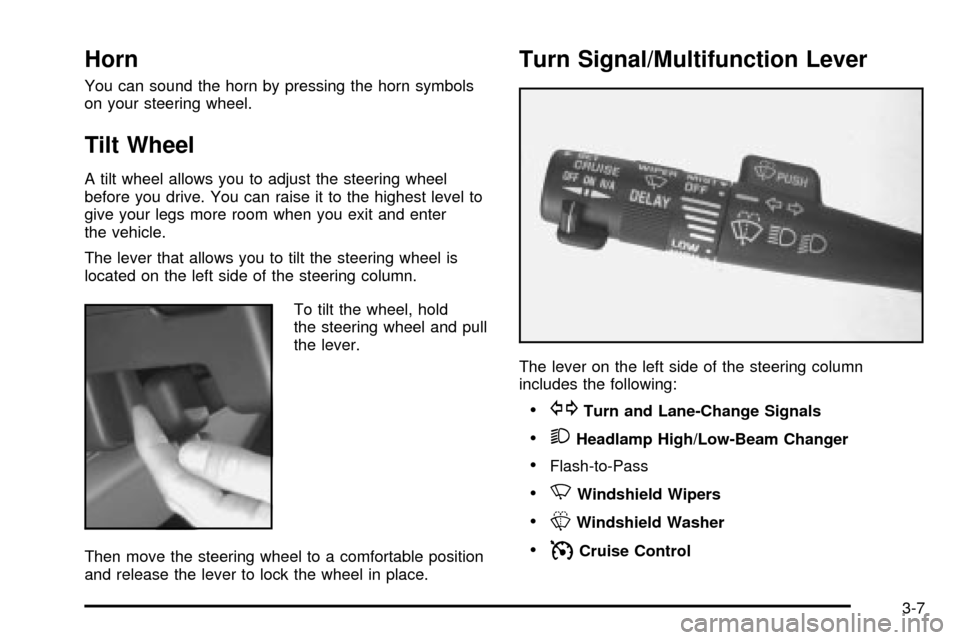
Turn Signal/Multifunction Lever
The lever on the left side of the steering column
includes the following:
·GTurn and Lane-Change Signals
·2Headlamp High/Low-Beam Changer
·Flash-to-Pass
·NWindshield Wipers
·LWindshield Washer
·ICruise Control
3-7
Page 191 of 486
To wash the rear window when the rear wiper is already
on, press the top of the switch with the wash symbol
on it. Press in the bottom of the switch to continue the
intermittent wiper cycle after the washing cycle is
completed.
Cruise Control
Your vehicle may have cruise control. With cruise
control, you can maintain a speed of about 25 mph
(40 km/h) or more without keeping your foot on
the accelerator. This can really help on long trips.
Cruise control does not work at speeds below about
25 mph (40 km/h).
When you apply your brakes, the cruise control
disengages.
{CAUTION:
·Cruise control can be dangerous where
you can not drive safely at a steady speed.
So, do not use your cruise control on
winding roads or in heavy traffic.
·Cruise control can be dangerous on
slippery roads. On such roads, fast
changes in tire traction can cause
needless wheel spinning, and you could
lose control. Do not use cruise control on
slippery roads.
If your vehicle is in cruise control when the optional
traction control system begins to limit wheel spin, the
cruise control will automatically disengage. See
Traction
Control System (TCS) on page 4-8. When road
conditions allow you to safely use it again, you may turn
the cruise control back on.
3-11
Page 197 of 486

Interior Lamps
Instrument Panel Brightness
The thumbwheel for this feature is located below the
exterior lamps control.
Turn the thumbwheel to the right to brighten the lights
or to the left to dim them.
Interior Lamps Control
Turn the thumbwheel all the way to the right to turn on
the interior lamps, if the interior lamps override
switch is off. Turn the thumbwheel to the left to turn the
lamps off.
Interior Lamps Override
This switch is located in
the overhead console
switchbank.
Press the disable symbol to keep the interior lamps off
while any door is opened. Press the top of the switch
to allow the interior lamps to come on while any door is
opened.
3-17
Page 200 of 486

Rear Reading Lamps
There may be two reading lamps in the third row
headliner.
To turn on or off either reading lamp, press the lens of
the lamp.
There is also a reading lamp in the second row,
integrated with the dome lamp. To turn on or off
either reading lamp, press the button next to the
lamp lens.
These lamps will not turn on if the interior lamps
override switch is on. See ªInterior Lamps Overrideº
earlier in this section.
Cargo Lamp
The cargo lamp is located in the rear of your vehicle,
above the liftgate opening, and does not have a switch.
The cargo lamp will come on each time you open a
door, unless you turn on the interior lamps override. See
ªInterior Lamps Overrideº earlier in this section.
Battery Run-Down Protection
Your vehicle has a feature to help prevent you from
draining the battery, in case you accidentally leave the
interior lamps on. If you leave any interior lamps on
while the ignition is in LOCK or OFF, they will
automatically turn off after 10 minutes. The lamps won't
come back on again until you do one of the following:
·Turn the ignition to RUN or ACCESSORY,
·turn the interior lamps thumbwheel all the way to
the right, then slightly back to the left, or
·open (or close and reopen) a door that is closed.
If your vehicle has less than 15 miles (25 km) on
the odometer, the battery saver will turn off the lamps
after only three minutes.
Switchbanks
There are two sets of switchbanks located in the front of
the vehicle. The switches will vary with the options
that are on your vehicle.
3-20