Page 203 of 486

URPA can be turned off by
pressing the rear park aid
disable switch located
in the instrument panel
switchbank. While
the system is disabled, an
indicator light will be lit
on the switch. You will not
see any lights on the
rear display if the switch is
in the off position.
How the System Works
Unless disabled, the URPA will turn on automatically
when the shift lever is moved into REVERSE (R). When
the system turns on, the three lights on the display
will illuminate for one and a half seconds to let you know
that the system is working. If your vehicle is moving in
REVERSE (R) at a speed greater than 3 mph (5 km/h),
the red light will ¯ash to remind you that the system
does not work at speed greater than 3 mph (5 km/h).If an object is detected at a REVERSE (R) speed of
less than 3 mph (5 km/h), one of the following will occur:
Description English Metric
amber light 5 ft. 1.5 m
amber/amber lights 40 in. 1.0 m
amber/amber/red lights &
continuous chime20 in. 0.5 m
amber/amber/red lights
¯ashing & continuous
chime1 ft 0.3 m
A chime will sound the ®rst time an object is detected
between 20 inches (0.5 m) and 5 feet (1.5 m) away.
URPA cannot detect objects that are above liftgate level.
In order for the rear sensors to recognize an object, it
must be within detection range behind the vehicle.
3-23
Page 215 of 486

Warning Lights, Gages and
Indicators
This part describes the warning lights and gages that
may be on your vehicle. The pictures will help you
locate them.
Warning lights and gages can signal that something is
wrong before it becomes serious enough to cause
an expensive repair or replacement. Paying attention to
your warning lights and gages could also save you
or others from injury.
Warning lights come on when there may be or is a
problem with one of your vehicle's functions. As you will
see in the details on the next few pages, some
warning lights come on brie¯y when you start the
engine just to let you know they're working. If you are
familiar with this section, you should not be alarmed
when this happens.Gages can indicate when there may be or is a problem
with one of your vehicle's functions. Often gages
and warning lights work together to let you know when
there's a problem with your vehicle.
When one of the warning lights comes on and stays on
when you are driving, or when one of the gages
shows there may be a problem, check the section that
tells you what to do about it. Please follow this
manual's advice. Waiting to do repairs can be
costly ± and even dangerous. So please get to know
your warning lights and gages. They're a big help.
Your vehicle also has a message center that works
along with the warning lights and gages. See
Message
Center on page 3-50.
3-35
Page 216 of 486
Instrument Panel Cluster
Your instrument panel cluster is designed to let you know at a glance how your vehicle is running. You'll know how
fast you're going, how much fuel you're using, and many other things you'll need to drive safely and economically. The
indicator warning lights and gages are explained on the following pages.
United States version shown, Canada similar
3-36
Page 302 of 486

Here are some tips on night driving.
·Drive defensively.
·Don't drink and drive.
·Adjust your inside rearview mirror to reduce the
glare from headlamps behind you.
·Since you can't see as well, you may need to slow
down and keep more space between you and
other vehicles.
·Slow down, especially on higher speed roads. Your
headlamps can light up only so much road ahead.
·In remote areas, watch for animals.
·If you're tired, pull off the road in a safe place
and rest.
No one can see as well at night as in the daytime. But
as we get older these differences increase. A
50-year-old driver may require at least twice as much
light to see the same thing at night as a 20-year-old.
What you do in the daytime can also affect your
night vision. For example, if you spend the day in bright
sunshine you are wise to wear sunglasses. Your
eyes will have less trouble adjusting to night.But if you're driving, don't wear sunglasses at night.
They may cut down on glare from headlamps, but they
also make a lot of things invisible.
You can be temporarily blinded by approaching
headlamps. It can take a second or two, or even several
seconds, for your eyes to readjust to the dark. When
you are faced with severe glare (as from a driver
who doesn't lower the high beams, or a vehicle with
misaimed headlamps), slow down a little. Avoid staring
directly into the approaching headlamps.
Keep your windshield and all the glass on your vehicle
clean Ð inside and out. Glare at night is made much
worse by dirt on the glass. Even the inside of the glass
can build up a ®lm caused by dust. Dirty glass makes
lights dazzle and ¯ash more than clean glass would,
making the pupils of your eyes contract repeatedly.
Remember that your headlamps light up far less of a
roadway when you are in a turn or curve. Keep
your eyes moving; that way, it's easier to pick out dimly
lighted objects. Just as your headlamps should be
checked regularly for proper aim, so should your eyes
be examined regularly. Some drivers suffer from
night blindness Ð the inability to see in dim light Ð and
aren't even aware of it.
4-16
Page 427 of 486
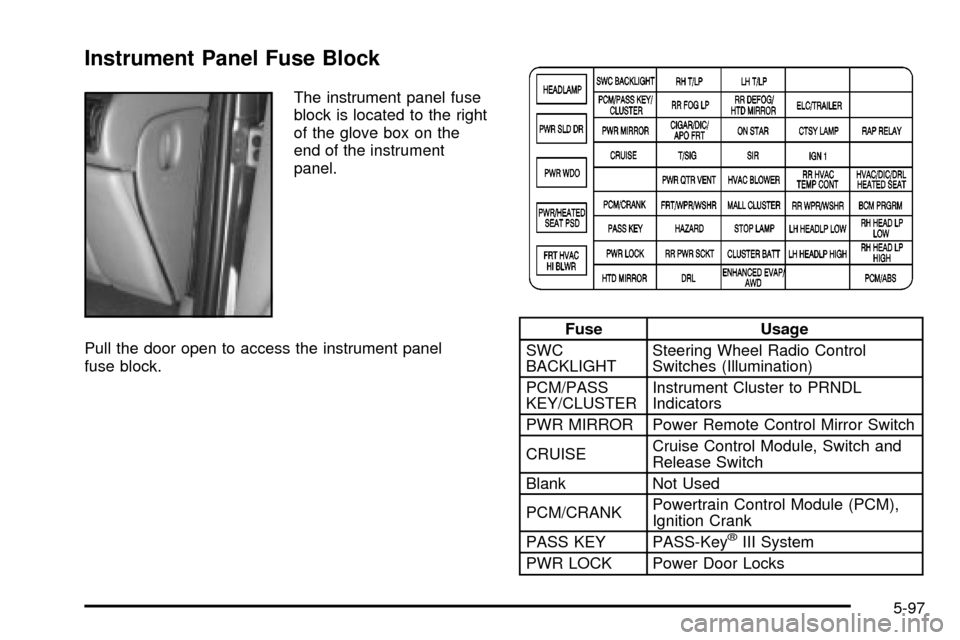
Instrument Panel Fuse Block
The instrument panel fuse
block is located to the right
of the glove box on the
end of the instrument
panel.
Pull the door open to access the instrument panel
fuse block.
Fuse Usage
SWC
BACKLIGHTSteering Wheel Radio Control
Switches (Illumination)
PCM/PASS
KEY/CLUSTERInstrument Cluster to PRNDL
Indicators
PWR MIRROR Power Remote Control Mirror Switch
CRUISECruise Control Module, Switch and
Release Switch
Blank Not Used
PCM/CRANKPowertrain Control Module (PCM),
Ignition Crank
PASS KEY PASS-Key
žIII System
PWR LOCK Power Door Locks
5-97
Page 485 of 486

Understanding Radio Reception.......................3-104
Uniform Tire Quality Grading............................5-65
United States ± Customer Assistance.................. 7-4
Used Replacement Wheels..............................5-67
Using Cleaner on Fabric..................................5-88
Using HomeLink
ž...........................................2-50
Using RDS....................................3-67, 3-75, 3-84
Using Song List Mode.....................................3-90
V
Vehicle Identi®cation........................................5-95
Number (VIN).............................................5-95
Service Parts Identi®cation Label...................5-95
Vehicle Personalization....................................2-61
Arming and Disarming the Content
Theft-Deterrent System.............................2-68
Automatic Door Locks..................................2-63
Content Theft-Deterrent System.....................2-67
Delayed Illumination and Exit Lighting.............2-62
Entering Programming Mode.........................2-62
Exiting Programming Mode...........................2-70
Last Door Locking and Lockout Deterrent........2-64
Remote Driver Unlock Control.......................2-65
Remote Lock and Unlock Con®rmation...........2-66
Vehicle Storage..............................................5-44
Vehicle............................................................ 4-5
Control........................................................ 4-5
Damage Warnings........................................... ivVehicle (cont.)
Loading......................................................4-34
Symbols......................................................... iv
Ventilation Adjustment......................................3-28
Video Screen.................................................3-95
Visor Vanity Mirror..........................................2-26
Visors...........................................................2-26
W
Warm-Up Shift................................................2-37
Warning Lights, Gages and Indicators................3-35
Warnings......................................................... 3-6
Hazard Warning Flashers............................... 3-6
Other Warning Devices.................................. 3-6
Safety and Symbols......................................... iii
Vehicle Damage.............................................. iv
Washing Your Vehicle......................................5-90
Weatherstrip Lubrication...................................6-11
Weight of the Trailer Tongue.............................4-38
Weight of the Trailer........................................4-37
What Engine Coolant to Use............................5-24
What Kind of Engine Oil to Use........................5-16
What Power Steering Fluid to Use....................5-38
What to Do with Used Oil................................5-18
What Washer Fluid to Use...............................5-38
Wheels..........................................................5-66
Alignment and Tire Balance..........................5-66
Replacement...............................................5-66
17