2003 CHEVROLET VENTURE air conditioning
[x] Cancel search: air conditioningPage 206 of 486

)(Bi-Level):This mode directs half of the air to the
instrument panel outlets, then directs the remaining
air to the ¯oor outlets. Cooler air is directed to the upper
outlets and warmer air to the ¯oor outlets.
6(Floor):This mode directs most of the air to the
¯oor outlets. Use this mode to send air to the rear of the
vehicle. Keep the area under the front seats free of
objects that could obstruct air¯ow to the rear of
the vehicle.
The right knob can also be used to select defog or
defrost mode. For more information, see ªDefogging and
Defrostingº later in this section.
9(Fan):Turn the left knob clockwise or
counterclockwise to increase or decrease the fan speed.
Turn the knob to OFF to turn off the fan. The fan
must be turned on for the air conditioning compressor to
operate.
:(Outside Air):Press this button to turn the
outside air mode on or off. When this mode is on,
outside air will circulate throughout your vehicle. When
this mode is on, an indicator light in the button will
come on to let you know that it is activated. The outside
air mode can be used with all modes, but it cannot
be used with the recirculation mode.
?(Recirculation):This mode keeps outside air
from coming in the vehicle. It can be used to prevent
outside air and odors from entering your vehicle or help
heat or cool the air inside your vehicle more quickly.
Press this button to turn the recirculation mode on or off.
When the button is pressed, an indicator light will
come on. The air-conditioning compressor also comes
on. The recirculation mode can be used with vent
and bi-level modes, but it cannot be used with ¯oor,
defog, defrost or outside air modes.
Temperature Control:Turn the center knob clockwise
or counterclockwise to increase or decrease the air
temperature inside your vehicle.
#A/C (Air Conditioning):Press this button to turn
the air-conditioning system on or off. When A/C is
pressed, an indicator light in the button will come on to
let you know that air conditioning is activated.
You may notice a slight change in engine performance
when the air-conditioning compressor shuts off and
turns on again. This is normal. The system is designed
to make adjustments to help with fuel economy while
still maintaining the selected temperature.
On hot days, open the windows to let hot inside air
escape; then close them. This helps to reduce the time
it takes for your vehicle to cool down. It also helps
the system to operate more efficiently.
3-26
Page 207 of 486

For quick cool down on hot days, do the following:
1. Select the vent mode.
2. Select the recirculation mode.
3. Select A/C.
4. Select the coolest temperature.
5. Select the highest fan speed.
Using these settings together for long periods of time
may cause the air inside of your vehicle to become too
dry. To prevent this from happening, after the air
inside of your vehicle has cooled, turn the recirculation
mode off.
The air-conditioning system removes moisture from the
air, so you may sometimes notice a small amount of
water dripping underneath your vehicle while idling
or after turning off the engine. This is normal.
Defogging and Defrosting
Fog on the inside of windows is a result of high humidity
(moisture) condensing on the cool window glass. This
can be minimized if the climate control system is
used properly. There are two modes to clear fog or frostfrom your windshield. Use the defog mode to clear the
windows of fog or moisture and warm the passengers.
Use the defrost mode to remove fog or frost from
the windshield more quickly.
Turn the right knob to select the defog or defrost mode.
-(Defog):This mode directs air to the windshield
and the ¯oor outlets. When you select this mode,
the system turns off recirculation and runs the
air-conditioning compressor unless the outside
temperature is at or below freezing. The recirculation
mode cannot be selected while in the defog mode.
0(Defrost):Pressing this button directs most of the
air to the windshield and the side window outlets,
with some air directed to the ¯oor outlets. In this mode,
the system will automatically turn off recirculation
and run the air-conditioning compressor, unless the
outside temperature is at or below freezing.
Recirculation cannot be selected while in the
defrost mode.
Do not drive the vehicle until all the windows are clear.
3-27
Page 210 of 486

Directing the Air¯ow
To direct the air¯ow to the rear-seating area, use the
right knob located on the main climate-control panel.
·Select vent or bi-level mode to direct air to the
rear of the vehicle through the overhead outlets.
·Select ¯oor, defog or defrost mode to direct air to
the rear of the vehicle through the ¯oor outlets.
Generally the upper outlets are used for air conditioning
and the ¯oor outlets are used for heating.
Selecting the Fan Speed
9
(Fan):Turn the fan knob on either rear fan control
to numeral 1, 2, or 3 to increase or decrease air¯ow
to the rear-seating area. Turn the fan knob on either rear
fan control to 0 or OFF to turn off the fan.
Setting the Temperature
If the driver is adjusting the temperature, do the
following:
To increase or decrease the temperature for the entire
vehicle, use the temperature controls located on the
main climate-control panel.If using the main climate-control panel, then the
air-conditioning system must be on to direct cooled air
to the rear of the vehicle. If it is not on, then the
temperature in the rear of the vehicle will remain at
cabin temperature.
If a rear-seat passenger is adjusting the temperature, do
the following:
Turn the right knob, located on the overhead rear-control
panel, behind the driver's seat, clockwise or
counterclockwise to raise or lower the temperature in
the rear-seating area only.
Rear Air Outlets
To increase air¯ow through the rear ¯oor outlets, place
the left bucket seat in the second row in the forward
position. For more information, see
Rear Seat Operation
on page 1-7.
The outlet behind the left rear seat is the cold air return
outlet. Be sure to keep it free from obstructions.
Also, keep the area around the base of the center
instrument panel console, between and under the front
seats, free of objects that could also obstruct air¯ow
to the rear-seating area.
For more information on how to use the main climate
control system, see ªClimate Control Systemº listed
previously in this section. For information on ventilation,
see ªOutlet Adjustmentº under ªClimate Control
Systemº listed previously in this section.
3-30
Page 212 of 486

Directing the Air¯ow
To direct the air¯ow to the rear-seating area, use the
right knob located on the main climate-control panel.
·Select vent or bi-level mode to direct air to the
rear of the vehicle through the overhead outlets.
·Select ¯oor, defog or defrost mode to direct air to
the rear of the vehicle through the ¯oor outlets.
Generally the upper outlets are used for air conditioning
and the ¯oor outlets are used for heating.
Selecting the Fan Speed
If the driver is adjusting the fan speed, use the following
control:
9(Fan):Turn the fan knob on the rear fan control
located below the main climate-control system on
the switchbank to numeral 1, 2, or 3 to increase or
decrease air¯ow to the rear-seating area. Turn the fan
knob on the rear fan control to 0 to turn off the fan.If a rear-seat passenger is adjusting the fan speed, use
the following control:
FAN:Press the FAN button on the rear control panel.
The display will show the current setting. Press the
left and right arrow buttons to cycle through the available
settings: OFF, LOW, MED and HIGH.
Setting the Temperature
If the driver is adjusting the temperature, do the
following:
To increase or decrease the temperature for the entire
vehicle, use the temperature controls located on the
main climate-control panel.
If using the main climate-control panel, then the
air-conditioning system must be on to direct cooled air
to the rear of the vehicle. If it is not on, then the
temperature in the rear of the vehicle will remain at
cabin temperature.
If a rear-seat passenger is adjusting the temperature, do
the following:
Press the TEMP button on the rear control panel. Use
the left arrow button to make the air cooler. Use the right
arrow button to make the air warmer.
3-32
Page 432 of 486
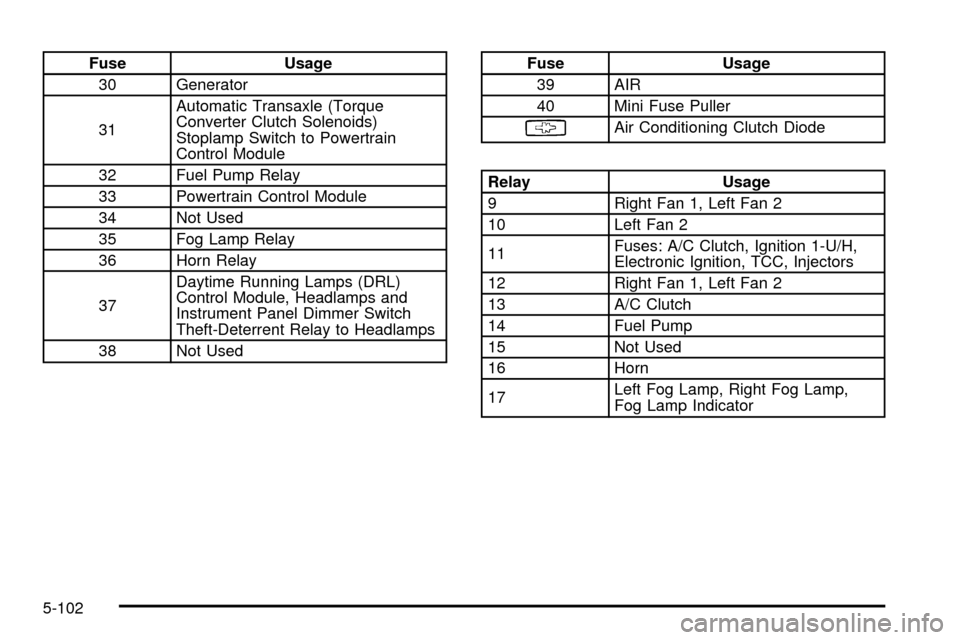
Fuse Usage
30 Generator
31Automatic Transaxle (Torque
Converter Clutch Solenoids)
Stoplamp Switch to Powertrain
Control Module
32 Fuel Pump Relay
33 Powertrain Control Module
34 Not Used
35 Fog Lamp Relay
36 Horn Relay
37Daytime Running Lamps (DRL)
Control Module, Headlamps and
Instrument Panel Dimmer Switch
Theft-Deterrent Relay to Headlamps
38 Not UsedFuse Usage
39 AIR
40 Mini Fuse Puller
§Air Conditioning Clutch Diode
Relay Usage
9 Right Fan 1, Left Fan 2
10 Left Fan 2
11Fuses: A/C Clutch, Ignition 1-U/H,
Electronic Ignition, TCC, Injectors
12 Right Fan 1, Left Fan 2
13 A/C Clutch
14 Fuel Pump
15 Not Used
16 Horn
17Left Fog Lamp, Right Fog Lamp,
Fog Lamp Indicator
5-102
Page 433 of 486
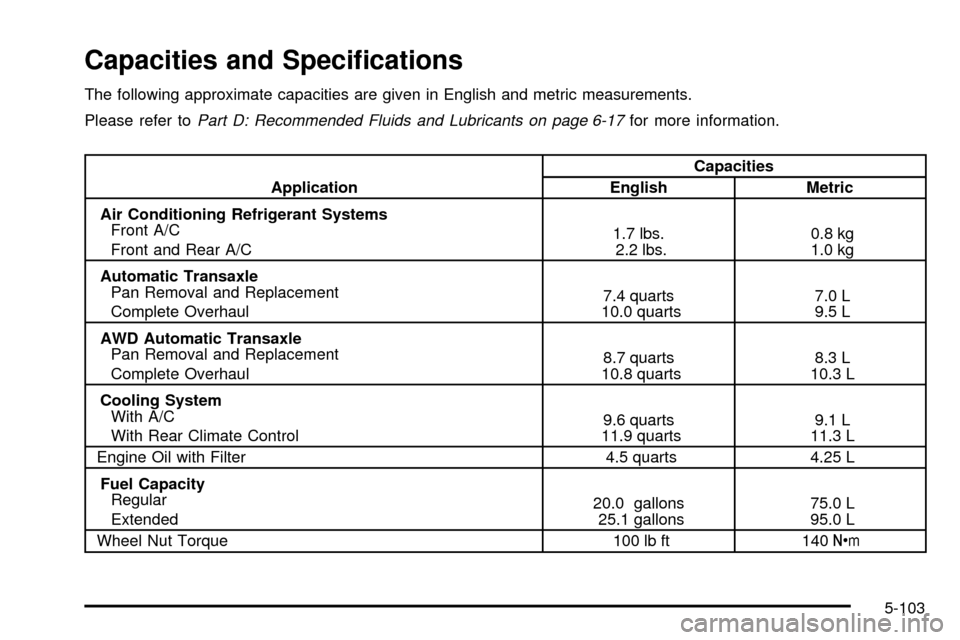
Capacities and Speci®cations
The following approximate capacities are given in English and metric measurements.
Please refer to
Part D: Recommended Fluids and Lubricants on page 6-17for more information.
ApplicationCapacities
English Metric
Air Conditioning Refrigerant Systems
Front A/C
Front and Rear A/C1.7 lbs.
2.2 lbs.0.8 kg
1.0 kg
Automatic Transaxle
Pan Removal and Replacement
Complete Overhaul7.4 quarts
10.0 quarts7.0 L
9.5 L
AWD Automatic Transaxle
Pan Removal and Replacement
Complete Overhaul8.7 quarts
10.8 quarts8.3 L
10.3 L
Cooling System
With A/C
With Rear Climate Control9.6 quarts
11.9 quarts9.1 L
11.3 L
Engine Oil with Filter 4.5 quarts 4.25 L
Fuel Capacity
Regular
Extended20.0 gallons
25.1 gallons75.0 L
95.0 L
Wheel Nut Torque 100 lb ft 140Y
5-103
Page 450 of 486

Fuel System Inspection
Inspect the complete fuel system for damage or leaks.
Engine Cooling System Inspection
Inspect the hoses and have them replaced if they
are cracked, swollen or deteriorated. Inspect all pipes,
®ttings and clamps; replace as needed. Clean the
outside of the radiator and air conditioning condenser.
To help ensure proper operation, a pressure test of
the cooling system and pressure cap is recommended
at least once a year.
Throttle System Inspection
Inspect the throttle system for interference or binding,
and for damaged or missing parts. Replace parts
as needed. Replace any components that have high
effort or excessive wear. Do not lubricate accelerator
and cruise control cables.
All-Wheel Drive Inspection
Inspect the transfer case (power transfer unit) and
carrier assembly-differential (rear drive module) every
12 months or at engine oil change intervals, check rear
differential and transfer case and add lubricant when
necessary. A ¯uid loss could indicate a problem; check
and have it repaired, if needed. Check vent hoses at
transfer case and differential for kinks and proper
installation.
Brake System Inspection
Inspect the complete system. Inspect brake lines and
hoses for proper hook-up, binding, leaks, cracks,
cha®ng, etc. Inspect disc brake pads for wear and rotors
for surface condition. Also inspect drum brake linings
for wear and cracks. Inspect other brake parts, including
drums, wheel cylinders, calipers, parking brake, etc.
Check parking brake adjustment. You may need to have
your brakes inspected more often if your driving
habits or conditions result in frequent braking.
6-16