2003 CHEVROLET IMPALA instrument panel
[x] Cancel search: instrument panelPage 78 of 408

Disconnecting the battery for up to a year will not
change the programmed mode of the programmable
automatic power door locks.
Lockout Protection
To protect you from locking your key in the vehicle, this
feature stops the power door locks from locking while
the key is in the ignition and a door is open.
If a power lock switch is pressed while a door is open
and the key is in the ignition, all of the doors will
lock and then the driver's door will unlock. A chime will
sound continuously until all doors are closed.
Leaving Your Vehicle
If you are leaving the vehicle, take your keys, open your
door and set the locks from inside. Then get out and
close the door.
Trunk
{CAUTION:
It can be dangerous to drive with the trunk lid
open because carbon monoxide (CO) gas can
come into your vehicle. You can't see or smell
CO. It can cause unconsciousness and even
death. If you must drive with the trunk lid open
or if electrical wiring or other cable
connections must pass through the seal
between the body and the trunk lid:
·Make sure all other windows are shut.
·Turn the fan on your heating or cooling
system to its highest speed and select the
control setting that will force outside air
into your vehicle. See ªClimate Control
Systemº in the Index.
·If you have air outlets on or under the
instrument panel, open them all the way.
See ªEngine Exhaustº in the Index.
2-10
Page 79 of 408
Trunk Lock
To unlock the trunk from the outside, insert the key in
the lock and turn it. You can also press the car
symbol on your remote keyless entry transmitter, if
equipped.
Remote Trunk Release
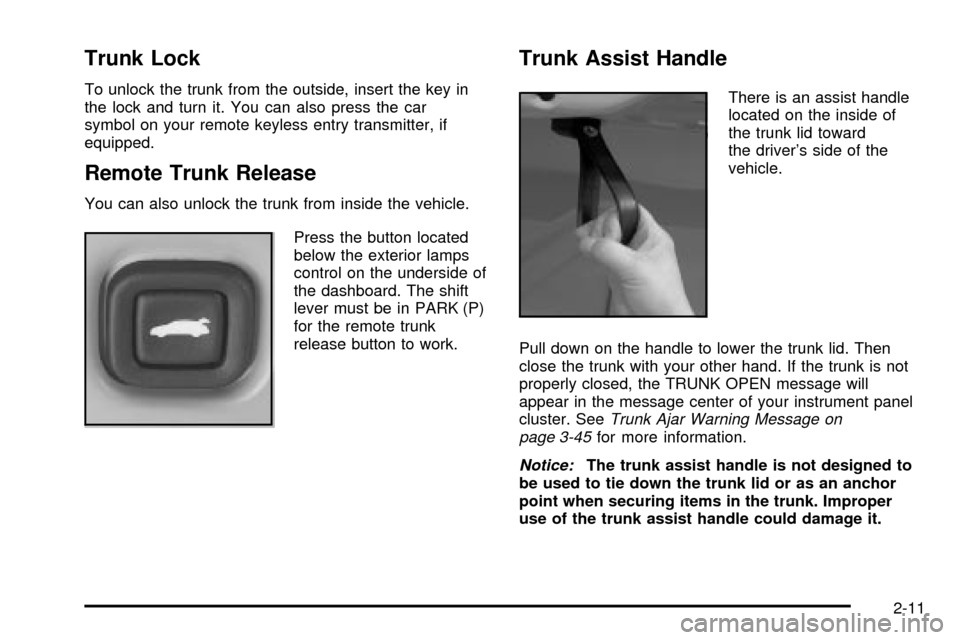
You can also unlock the trunk from inside the vehicle.
Press the button located
below the exterior lamps
control on the underside of
the dashboard. The shift
lever must be in PARK (P)
for the remote trunk
release button to work.
Trunk Assist Handle
There is an assist handle
located on the inside of
the trunk lid toward
the driver's side of the
vehicle.
Pull down on the handle to lower the trunk lid. Then
close the trunk with your other hand. If the trunk is not
properly closed, the TRUNK OPEN message will
appear in the message center of your instrument panel
cluster. See
Trunk Ajar Warning Message on
page 3-45for more information.
Notice:The trunk assist handle is not designed to
be used to tie down the trunk lid or as an anchor
point when securing items in the trunk. Improper
use of the trunk assist handle could damage it.
2-11
Page 86 of 408

Starting and Operating Your
Vehicle
New Vehicle Break-In
Notice:Your vehicle doesn't need an elaborate
ªbreak-in.º But it will perform better in the long run
if you follow these guidelines:
·Don't drive at any one speed Ð fast or slow Ð
for the ®rst 500 miles (805 km). Don't make
full-throttle starts.
·Avoid making hard stops for the ®rst 200 miles
(322 km) or so. During this time your new
brake linings aren't yet broken in. Hard stops
with new linings can mean premature wear and
earlier replacement. Follow this breaking-in
guideline every time you get new brake linings.
·Don't tow a trailer during break-in. See ªTowing
a Trailerº in the Index for more information.
Ignition Positions
With the key in the ignition, you can turn the switch to
four positions.
The ignition switch is
located on the instrument
panel, to the right of
the steering column.
OFF:This is the only position from which you can
remove the key. Removing the key locks your ignition
and automatic transaxle.
Notice:If your key seems stuck in OFF and you
can't turn it, be sure you are using the correct key;
if so, is it all the way in? Turn the key only with
your hand. Using a tool to force it could break the
key or the ignition switch. If none of this works, then
your vehicle needs service.
2-18
Page 87 of 408

ACC (ACCESSORY):This is the position in which you
can operate your electrical accessories. With the key
in this position, the ignition and automatic transaxle
will unlock.
ON:This is the position to which the switch returns
after you start the engine and release the switch. The
switch stays in ON while the engine is running. But
even when the engine is not running, you can use ON
to operate your electrical accessories and to display
some instrument panel cluster messages and
warning lights.
START:This position starts the engine. When the
engine starts, release the key. The ignition switch will
return to ON for normal driving.
While the engine is not running, ACC and ON allow
you to operate your electrical accessories, such as
the radio.
A warning chime will sound if you open the driver's door
while the ignition is in OFF or ACC and the key is in
the ignition.Retained Accessory Power (RAP)
With Retained Accessory Power (RAP), your power
windows, audio system and sunroof (option) will
continue to work for up to 10 minutes after the ignition is
turned to OFF and none of the doors is opened.
Starting Your Engine
Move your shift lever to PARK (P) or NEUTRAL (N).
Your engine won't start in any other position Ð that's a
safety feature. To restart when you're already moving,
use NEUTRAL (N) only.
Notice:Don't try to shift to PARK (P) if your
vehicle is moving. If you do, you could damage the
transaxle. Shift to PARK (P) only when your
vehicle is stopped.
2-19
Page 92 of 408
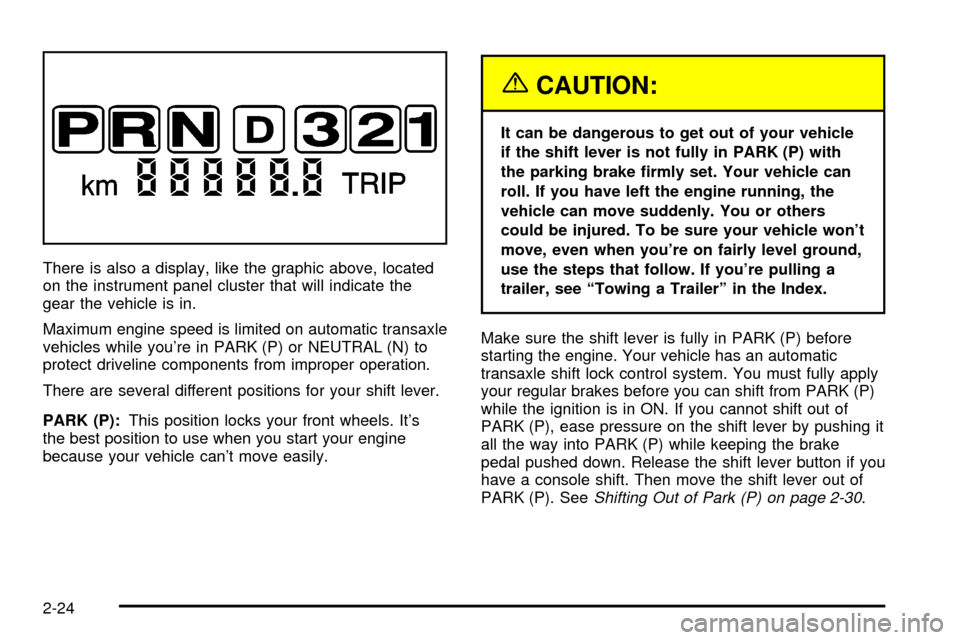
There is also a display, like the graphic above, located
on the instrument panel cluster that will indicate the
gear the vehicle is in.
Maximum engine speed is limited on automatic transaxle
vehicles while you're in PARK (P) or NEUTRAL (N) to
protect driveline components from improper operation.
There are several different positions for your shift lever.
PARK (P):This position locks your front wheels. It's
the best position to use when you start your engine
because your vehicle can't move easily.
{CAUTION:
It can be dangerous to get out of your vehicle
if the shift lever is not fully in PARK (P) with
the parking brake ®rmly set. Your vehicle can
roll. If you have left the engine running, the
vehicle can move suddenly. You or others
could be injured. To be sure your vehicle won't
move, even when you're on fairly level ground,
use the steps that follow. If you're pulling a
trailer, see ªTowing a Trailerº in the Index.
Make sure the shift lever is fully in PARK (P) before
starting the engine. Your vehicle has an automatic
transaxle shift lock control system. You must fully apply
your regular brakes before you can shift from PARK (P)
while the ignition is in ON. If you cannot shift out of
PARK (P), ease pressure on the shift lever by pushing it
all the way into PARK (P) while keeping the brake
pedal pushed down. Release the shift lever button if you
have a console shift. Then move the shift lever out of
PARK (P). See
Shifting Out of Park (P) on page 2-30.
2-24
Page 114 of 408

OIL LIFE (GM Oil Life System Reset)
This feature allows you to reset the GM Oil Life System
Monitor after an oil change, seeEngine Oil on
page 5-16. Be careful not to reset the OIL LIFE at any
time other than when the oil has been changed. To clear
the CHANGE ENGINE OIL light from the instrument
panel cluster and reset the oil life monitor:
1. Scroll, using the SEEK/PSCAN up or down arrows,
until OIL LIFE appears on the display.
2. Press the PREV or NEXT button to enter the
submenu. RESET will then be displayed.
3. Press the TUNE/DISP knob to reset. A chime will
be heard to verify the new setting and DONE will
be displayed for one second.
The CHANGE ENGINE OIL light is now reset. You can
either exit the programming mode by following the
instructions later in this section or program the next
feature available on your vehicle.
TIRE MON (Tire In¯ation Monitor
Reset)
This feature allows you to reset the tire pressure
monitor after checking all tire pressures, seeTires on
page 5-61. To clear the LOW TIRE PRESSURE
light from the instrument panel cluster and reset the low
tire pressure monitor do the following:
1. Scroll, using the SEEK/PSCAN up or down arrows,
until TIRE MON appears on the display.
2. Press the PREV or NEXT button to enter the
submenu. RESET will be displayed.
3. Press the TUNE/DISP knob to reset. A chime will
be heard to verify the new setting and DONE will
be displayed for one second.
The low tire pressure monitor is now reset. You can
either exit the programming mode by following the
instructions later in this section or program the next
feature available on your vehicle.
2-46
Page 123 of 408

Instrument Panel Overview...............................3-4
Hazard Warning Flashers................................3-6
Other Warning Devices...................................3-6
Horn.............................................................3-7
Tilt Wheel.....................................................3-7
Turn Signal/Multifunction Lever.........................3-7
Exterior Lamps.............................................3-14
Interior Lamps..............................................3-17
Accessory Power Outlets...............................3-19
Auxiliary Power Connection
(Power Drop)............................................3-20
Ashtrays and Cigarette Lighter........................3-21
Climate Controls............................................3-22
Dual Climate Control System..........................3-22
Outlet Adjustment.........................................3-25
Passenger Compartment Air Filter...................3-26
Warning Lights, Gages and Indicators.............3-28
Instrument Panel Cluster................................3-29
Speedometer and Odometer...........................3-31
Tachometer.................................................3-32
Safety Belt Reminder Light.............................3-32
Air Bag Readiness Light................................3-33
Brake System Warning Light..........................3-34Anti-Lock Brake System Warning Light.............3-35
Traction Control System (TCS) Warning Light . . .3-35
Engine Coolant Temperature Gage..................3-36
Malfunction Indicator Lamp.............................3-37
Cruise Control Light......................................3-39
Fuel Gage...................................................3-40
Message Center.............................................3-40
Service Traction System Warning Message......3-41
Traction Active Message................................3-41
Battery Warning Message..............................3-42
Hot Coolant Temperature Warning Message.....3-42
Low Oil Pressure Message............................3-43
Low Engine Oil Level Message.......................3-43
Change Engine Oil Message..........................3-44
Low Tire Message........................................3-44
Door Ajar Warning Message...........................3-45
Trunk Ajar Warning Message.........................3-45
Security Message.........................................3-46
Low Washer Fluid Warning Message...............3-46
Low Fuel Warning Message...........................3-47
Low Brake Fluid Warning Message.................3-47
Service Vehicle Soon Message.......................3-48
Highbeam Out Warning Message....................3-48
Section 3 Instrument Panel
3-1
Page 124 of 408

Driver Information Center (DIC).......................3-49
Trip Computer................................................3-52
Audio System(s).............................................3-53
Setting the Time...........................................3-53
Radio with Cassette......................................3-54
Radio with CD..............................................3-64
Radio with Cassette and CD..........................3-75
Theft-Deterrent Feature..................................3-89Audio Steering Wheel Controls.......................3-90
Understanding Radio Reception......................3-91
Care of Your Cassette Tape Player.................3-91
Care of Your CDs.........................................3-92
Care of Your CD Player................................3-92
Backglass Antenna.......................................3-93
XMŸ Satellite Radio Antenna System (United
States Only).............................................3-94
Vehicle Customization Settings.......................3-94
Chime Level Adjustment................................3-94
Section 3 Instrument Panel
3-2