2003 CHEVROLET EXPRESS CARGO VAN ECO mode
[x] Cancel search: ECO modePage 43 of 386
Every time infants and young children ride in vehicles,
they should have the protection provided by the
appropriate restraint. Young children should not use the
vehicles safety belts without an additional restraint,
unless there is no other choice.
Cargo Vans with a Passenger Air Bag
and an Air Bag Off Switch, Passenger
Vans and Cab and Chassis Models
{CAUTION:
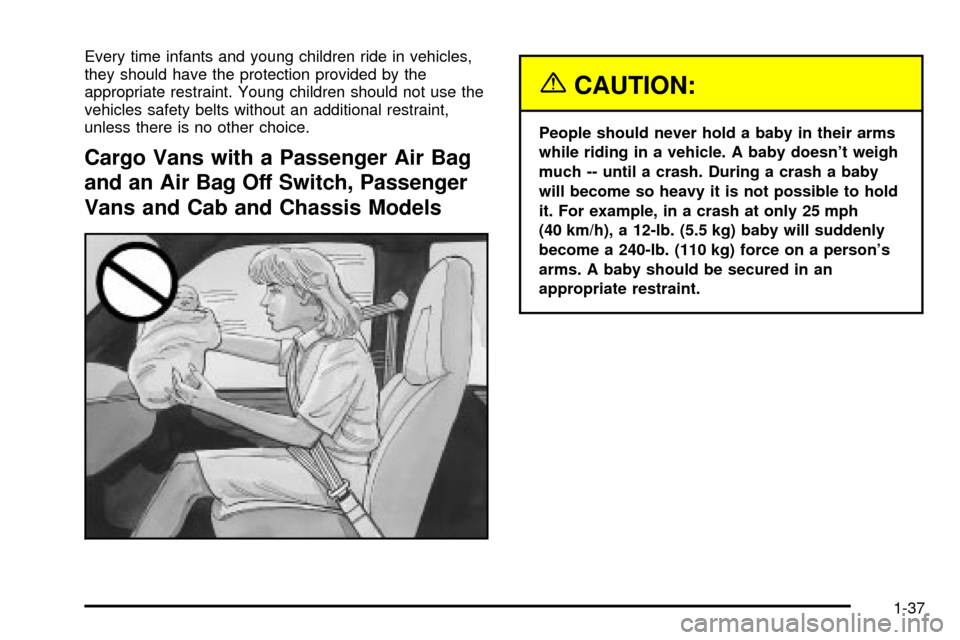
People should never hold a baby in their arms
while riding in a vehicle. A baby doesn't weigh
much -- until a crash. During a crash a baby
will become so heavy it is not possible to hold
it. For example, in a crash at only 25 mph
(40 km/h), a 12-lb. (5.5 kg) baby will suddenly
become a 240-lb. (110 kg) force on a person's
arms. A baby should be secured in an
appropriate restraint.
1-37
Page 54 of 386
Cargo Vans and Cab and Chassis
Models with an Air Bag Off Switch
The child restraint must be secured properly in the right
front passenger seat. If you need to secure a
rear-facing child restraint in the right front passenger's
seat, turn off the passenger's air bag. See
Air Bag
Off Switch on page 1-70andSecuring a Child Restraint
in the Right Front Seat Position on page 1-58for
more on this, including important safety information.
{CAUTION:
A child in a rear-facing child restraint can be
seriously injured or killed if the air bag in¯ates.
This is because the back of the rear-facing
child restraint would be very close to the
in¯ating air bag. Be sure to turn off the air bag
before using a rear-facing child restraint in the
right front seat position.
Even though the AIR BAG OFF switch is
designed to turn off the passenger's frontal air
bag, no system is fail-safe, and no one can
guarantee that an air bag will not deploy under
CAUTION: (Continued)
CAUTION: (Continued)
some unusual circumstance, even though it is
turned off. We, therefore recommend that
rear-facing child restraints be transported in
vehicles with a rear seat that will
accommodate a rear-facing child restraint,
whenever possible.
Keep in mind that an unsecured child restraint can move
around in a collision or sudden stop and injure people in
the vehicle. Be sure to properly secure any child restraint
in your vehicle ± even when no child is in it.
Top Strap
Some child restraints have a top strap, or ªtop tether.º It
can help restrain the child restraint during a collision.
For it to work, a top strap must be properly anchored to
the vehicle. Some top strap-equipped child restraints
are designed for use with or without the top strap being
anchored. Others require the top strap always to be
anchored. Be sure to read and follow the instructions for
your child restraint. If yours requires that the top strap
be anchored, don't use the restraint unless it is anchored
properly.
1-48
Page 56 of 386
Top Strap Anchor Location
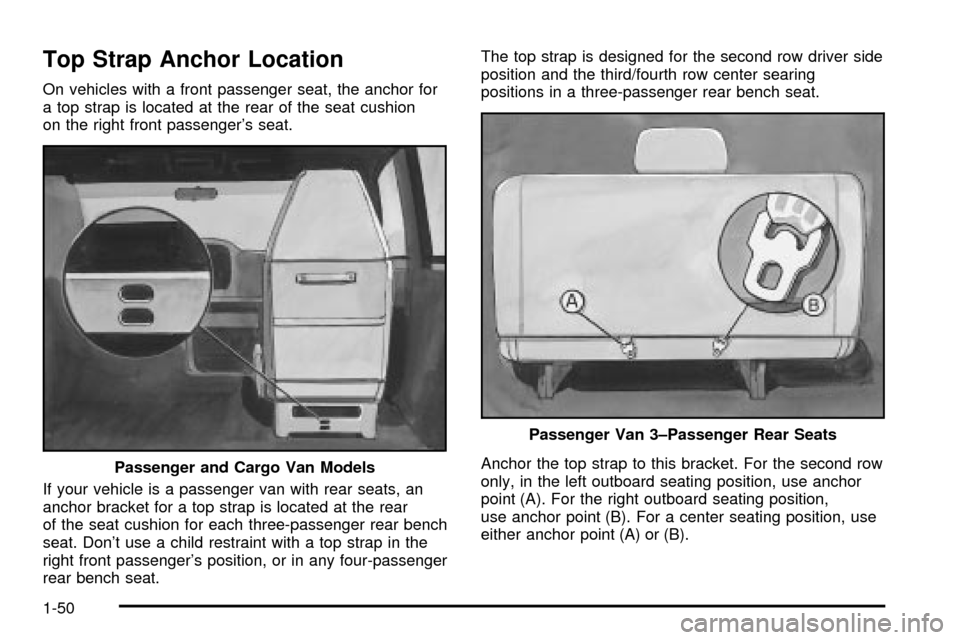
On vehicles with a front passenger seat, the anchor for
a top strap is located at the rear of the seat cushion
on the right front passenger's seat.
If your vehicle is a passenger van with rear seats, an
anchor bracket for a top strap is located at the rear
of the seat cushion for each three-passenger rear bench
seat. Don't use a child restraint with a top strap in the
right front passenger's position, or in any four-passenger
rear bench seat.The top strap is designed for the second row driver side
position and the third/fourth row center searing
positions in a three-passenger rear bench seat.
Anchor the top strap to this bracket. For the second row
only, in the left outboard seating position, use anchor
point (A). For the right outboard seating position,
use anchor point (B). For a center seating position, use
either anchor point (A) or (B). Passenger and Cargo Van Models
Passenger Van 3±Passenger Rear Seats
1-50
Page 99 of 386
Power Windows
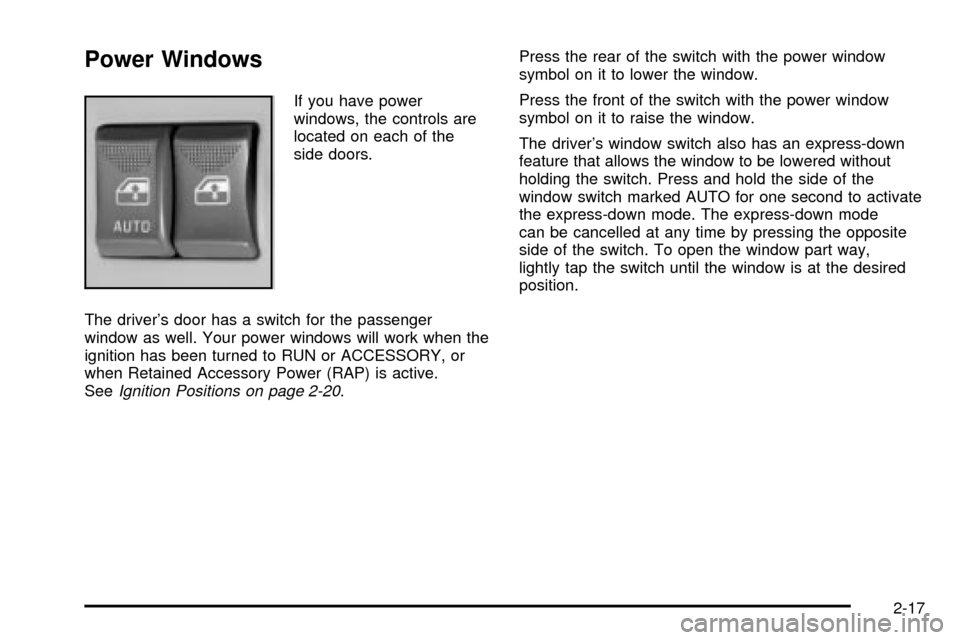
If you have power
windows, the controls are
located on each of the
side doors.
The driver's door has a switch for the passenger
window as well. Your power windows will work when the
ignition has been turned to RUN or ACCESSORY, or
when Retained Accessory Power (RAP) is active.
See
Ignition Positions on page 2-20.Press the rear of the switch with the power window
symbol on it to lower the window.
Press the front of the switch with the power window
symbol on it to raise the window.
The driver's window switch also has an express-down
feature that allows the window to be lowered without
holding the switch. Press and hold the side of the
window switch marked AUTO for one second to activate
the express-down mode. The express-down mode
can be cancelled at any time by pressing the opposite
side of the switch. To open the window part way,
lightly tap the switch until the window is at the desired
position.
2-17
Page 161 of 386

To adjust bass or treble to the middle position, select
BAS or TRE. Then press and hold the AUDIO button for
more than two seconds until you hear a beep. B and
a zero or T and a zero will appear on the display.
To adjust both tone controls and both speaker controls
to the middle position, ®rst end out of audio mode
either by pressing another button, causing the radio to
perform that function, or by waiting ®ve seconds for
the display to return to time of day. Then press and hold
the AUDIO button for more than two seconds until
you hear a beep. CEN will appear on the display.
Adjusting the Speakers (Balance/Fade)
AUDIO:To adjust the balance between the right
and the left speakers, press and release the AUDIO
button until BAL appears on the display. Then press and
hold the up or the down arrow to move the sound
toward the right or the left speakers.
To adjust the fade between the front and the rear
speakers, press and release the AUDIO button until
FAD appears on the display. Then press and hold the up
or the down arrow to move the sound toward the front
or the rear speakers.To adjust balance or fade to the middle position, select
BAL or FAD. Then press and hold AUDIO for more
than two seconds until you hear a beep. L and a zero
or F and a zero will appear on the display.
To adjust both tone controls and both speaker controls
to the middle position, ®rst end out of audio mode
either by pressing another button, causing the radio to
perform that function, or by waiting ®ve seconds for
the display to return to time of day. Then press and hold
AUDIO for more than two seconds until you hear a
beep. CEN will appear on the display.
Radio Messages
CAL (Calibration):Your audio system has been
calibrated for your vehicle from the factory. If CAL
appears on the display it means that your radio has not
been con®gured properly for your vehicle and must
be returned to the dealership for service.
LOC (Locked):This message is displayed when the
THEFTLOCK
žsystem has locked up. You must
return to the dealership for service.
3-43
Page 163 of 386

Setting Preset Stations
The six numbered pushbuttons let you return to your
favorite stations. You can set up to 18 stations (six AM,
six FM1 and six FM2) by performing the following
steps:
1. Turn the radio on.
2. Press AM FM to select AM, FM1 or FM2.
3. Tune in the desired station.
4. Press and hold one of the six numbered
pushbuttons until you hear a beep. Whenever you
press that numbered pushbutton, the station
you set will return.
5. Repeat the steps for each pushbutton.
Setting the Tone (Bass/Treble)
AUDIO:To adjust the bass or the treble, press and
release the AUDIO button repeatedly until BAS or TRE
appears on the display. Then press and hold the up
or the down arrow to increase or to decrease. If a station
is weak or noisy, you may want to decrease the
treble.
To adjust bass or treble to the middle position, select
BAS or TRE. Then press and hold the AUDIO button for
more than two seconds until you hear a beep. B and
a zero or T and a zero will appear on the display.
To adjust both tone controls and both speaker controls
to the middle position, ®rst end out of audio mode
by pressing another button, causing the radio to perform
that function, or by waiting ®ve seconds for the display
to return to time of day. Then press and hold the AUDIO
button for more than two seconds until you hear a
beep. CEN will appear on the display.
3-45
Page 164 of 386

Adjusting the Speakers (Balance/Fade)
AUDIO:To adjust the balance between the right
and the left speakers, press and release the AUDIO
button until BAL appears on the display. Then press and
hold the up or the down arrow to move the sound
toward the right or the left speakers.
To adjust the fade between the front and rear speakers,
press and release the AUDIO button until FAD
appears on the display. Then press and hold the up or
the down arrow to move the sound toward the front
or the rear speakers.
To adjust balance or fade to the middle position, select
BAL or FAD. Then press and hold AUDIO for more
than two seconds until you hear a beep. L and a zero
or F and a zero will appear on the display.
To adjust both tone controls and both speaker controls
to the middle position, ®rst end out of audio mode
by pressing another button, causing the radio to perform
that function, or by waiting ®ve seconds for the display
to return to time of day. Then press and hold AUDIO for
more than two seconds until you hear a beep. CEN
will appear on the display.
Radio Messages
CAL (Calibration):Your audio system has been
calibrated for your vehicle from the factory. If CAL
appears on the display it means that your radio has not
been con®gured properly for your vehicle and must
be returned to the dealership for service.
LOC (Locked):This message is displayed when the
THEFTLOCK
žsystem has locked up. You must
return to the dealership for service.
Playing a Compact Disc
Insert a disc partway into the slot, label side up. The
player will pull it in. The disc should begin playing. The
display will show CD. If you want to insert a compact
disc with the ignition off, ®rst press RCL or the eject
button.
The integral CD player can play the smaller 8 cm single
discs with an adapter ring. Full-size compact discs
and the smaller discs are loaded in the same manner.
If playing a CD-R the sound quality may be reduced due
to CD-R quality, the method of recording, the quality
of the music that has been recorded and the way
the CD-R has been handled. You may experience an
increase in skipping, difficulty in ®nding tracks and/or
difficulty in loading and ejecting. If these problems occur
try a known good CD.
3-46
Page 172 of 386

Radio Messages
CAL ERR (Calibration Error):This message is
displayed when the radio has not been calibrated
properly for the vehicle. You must return to the
dealership for service.
LOCKED:This message is displayed when the
THEFTLOCK
žsystem has locked up. You must return
to the dealership for service.
Playing a Cassette Tape
Your tape player is built to work best with tapes that are
up to 30 to 45 minutes long on each side. Tapes
longer than that are so thin they may not work well in
this player. The longer side with the tape visible should
face to the right. If the ignition is on, but the radio is
off, the tape can be inserted and will begin playing. A
tape symbol is shown on the display whenever a tape is
inserted. If you hear nothing but a garbled sound, the
tape may not be in squarely. Press the eject symbol to
remove the tape and start over.
While the tape is playing, use the VOL, AUDIO and
SEEK controls just as you do for the radio. The display
will show TAPE and an arrow showing which side of
the tape is playing.If you want to insert a tape while the ignition is off, ®rst
press the eject symbol or DISP.
If an error appears on the display, see ªCassette Tape
Messagesº later in this section.
1 PREV (Previous):Your tape must have at least three
seconds of silence between each selection for previous
to work. Press this pushbutton to go to the previous
selection on the tape if the current selection has been
playing for less than three seconds. If pressed when the
current selection has been playing from 3 to 13 seconds,
it will go to the beginning of the previous selection or
the beginning of the current selection, depending upon
the position on the tape. If pressed when the current
selection has been playing for more than 13 seconds, it
will go to the beginning of the current selection.
SEEK and a negative number will appear on the display
while the cassette player is in the previous mode.
Pressing this pushbutton multiple times will increase the
number of selections to be searched back, up to -9.
2 NEXT:Your tape must have at least three seconds of
silence between each selection for next to work.
Press this pushbutton to go to the next selection on the
tape. If you press the pushbutton more than once,
the player will continue moving forward through the tape.
SEEK and a positive number will appear on the
display.
3-54