2003 CHEVROLET BLAZER service
[x] Cancel search: servicePage 95 of 420
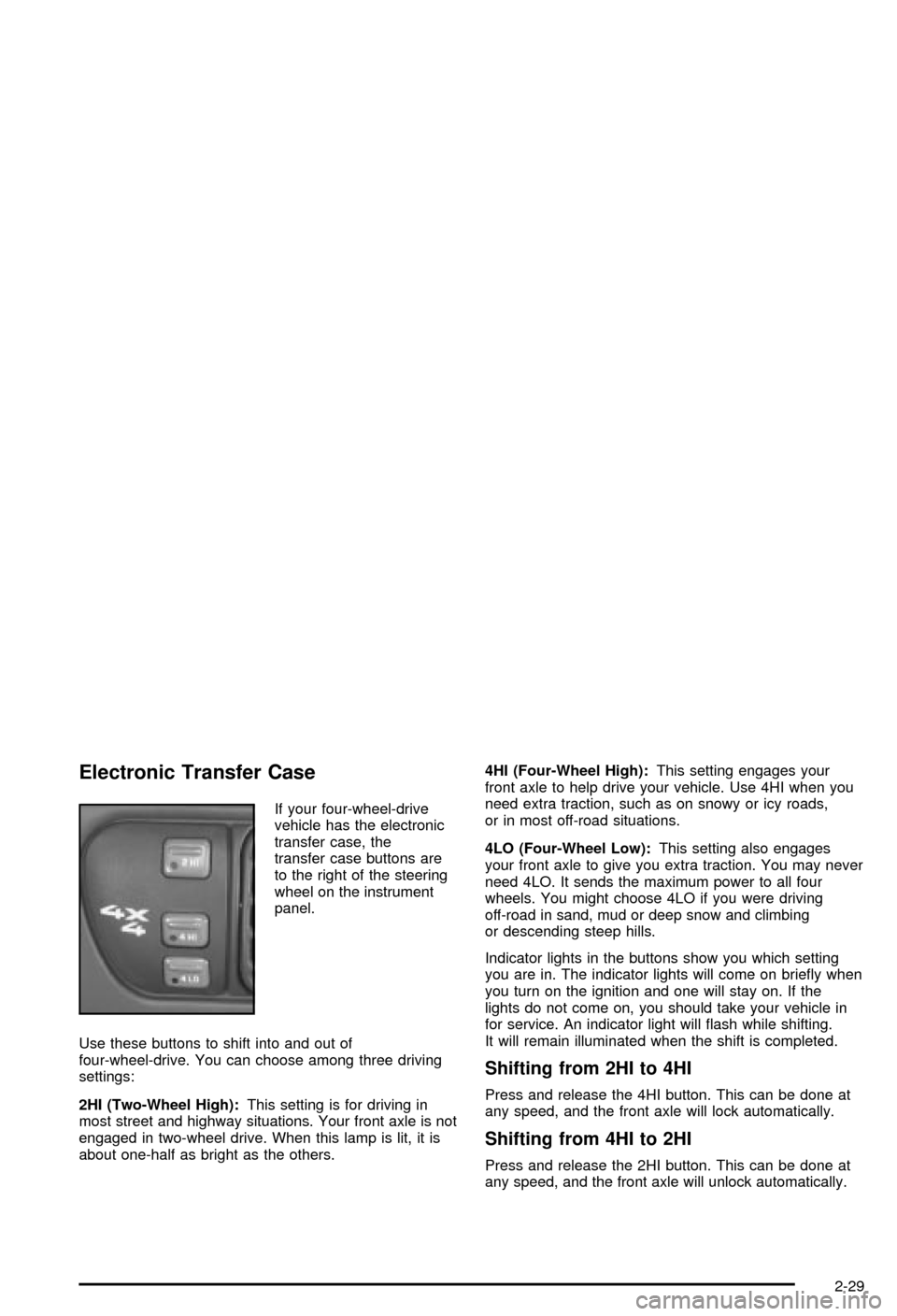
Electronic Transfer Case
If your four-wheel-drive
vehicle has the electronic
transfer case, the
transfer case buttons are
to the right of the steering
wheel on the instrument
panel.
Use these buttons to shift into and out of
four-wheel-drive. You can choose among three driving
settings:
2HI (Two-Wheel High):This setting is for driving in
most street and highway situations. Your front axle is not
engaged in two-wheel drive. When this lamp is lit, it is
about one-half as bright as the others.4HI (Four-Wheel High):This setting engages your
front axle to help drive your vehicle. Use 4HI when you
need extra traction, such as on snowy or icy roads,
or in most off-road situations.
4LO (Four-Wheel Low):This setting also engages
your front axle to give you extra traction. You may never
need 4LO. It sends the maximum power to all four
wheels. You might choose 4LO if you were driving
off-road in sand, mud or deep snow and climbing
or descending steep hills.
Indicator lights in the buttons show you which setting
you are in. The indicator lights will come on brie¯y when
you turn on the ignition and one will stay on. If the
lights do not come on, you should take your vehicle in
for service. An indicator light will ¯ash while shifting.
It will remain illuminated when the shift is completed.
Shifting from 2HI to 4HI
Press and release the 4HI button. This can be done at
any speed, and the front axle will lock automatically.
Shifting from 4HI to 2HI
Press and release the 2HI button. This can be done at
any speed, and the front axle will unlock automatically.
2-29
Page 96 of 420

Shifting from 2HI or 4HI to 4LO
To shift from 2HI or 4HI to 4LO, the vehicle must be
stopped or moving less than 3 mph (4.8 km/h) with the
transmission in NEUTRAL (N) in vehicles equipped
with an automatic transmission or the clutch pedal
engaged in vehicles equipped with a manual
transmission. The preferred method for shifting into 4LO
is to have your vehicle moving 1 to 2 mph (1.6 to
3.2 km/h). Press and release the 4LO button. You must
wait for the 4LO indicator light to stop ¯ashing and
remain illuminated before shifting your transmission into
gear or releasing the clutch pedal.
If the 4LO button is pressed when your vehicle is in
gear and/or moving, the 4LO indicator light will ¯ash for
30 seconds and not complete the shift unless your
vehicle is moving slower than 3 mph (4.8 km/h) and the
transmission is in NEUTRAL (N) or the clutch pedal
engaged.
On automatic transmission equipped vehicles, if your
transfer case does not shift into 4LO, your transmission
indicator switch may require adjustment. With your
transmission in NEUTRAL (N), press and release the
4LO button. While the 4LO indicator light is ¯ashing, shift
your transmission into PARK (P). Wait until the 4LO
indicator light remains illuminated before shifting
your transmission into gear. This will get you into 4LO,
but you should take your vehicle in for service to
restore normal operation.
Shifting from 4LO to 4HI or 2HI
To shift from 4LO to 4HI or 2HI, your vehicle must be
stopped or moving less than 3 mph (4.8 km/h) with
the transmission in NEUTRAL (N) or the clutch pedal
engaged. The preferred method for shifting out of 4LO is
to have your vehicle moving 1 to 2 mph (1.6 to
3.2 km/h). Press and release the 4HI button. You must
wait for the 4HI indicator light to stop ¯ashing and
remain illuminated before shifting your transmission into
gear or releasing the clutch pedal.
If the 4HI button is pressed when your vehicle is in gear
and/or moving, the 4HI indicator light will ¯ash for
30 seconds but not complete the shift unless the vehicle
is moving slower than 3 mph (4.8 km/h) and the
transmission is in NEUTRAL (N) or the clutch pedal
engaged.
On automatic transmission equipped vehicles, if your
transfer case does not shift into 4HI, your transmission
indicator switch may require adjustment. With your
transmission in NEUTRAL (N), press and release the
4HI button. While the 4HI indicator light is ¯ashing, shift
your transmission into PARK (P). Wait until the 4HI
indicator light remains illuminated before shifting your
transmission into gear. This will get you into 4HI, but you
should take your vehicle in for service to restore
normal operation.
2-30
Page 98 of 420

Indicator lights in the buttons show which setting you
are in. The indicator lights will come on brie¯y when you
turn on the ignition and one will stay on. If the lights
do not come on, you should take your vehicle to your
dealer for service. An indicator light will ¯ash while
shifting the transfer case. It will remain illuminated when
the shift is complete. If for some reason the transfer
case cannot make a requested shift, it will return to the
last chosen setting.
If the SERVICE 4WD light stays on, you should take
your vehicle to your dealer for service. See
Service
Four-Wheel Drive Warning Light on page 3-34for further
information.
Shifting to 4HI or AUTO 4WD
Press and release the 4HI or AUTO 4WD button. This
can be done at any speed, and the indicator light
will ¯ash while shifting. It will remain illuminated when
the shift is complete.
Shifting to 2HI
Press and release the 2HI button. This can be done at
any speed.
Shifting to 4LO
To shift to 4LO, the vehicle's engine must be running
and the vehicle must be stopped or moving less
than 3 mph (4.8 km/h) with the transmission in
NEUTRAL (N) or with the clutch pedal pressed for
vehicles with manual transmission. The preferred
method for shifting into 4LO is to have your vehicle
moving 1 or 2 mph (1.6 to 3.2 km/h). Press and release
the 4LO button. You must wait for the 4LO indicator
light to stop ¯ashing and remain illuminated before
shifting your transmission into gear.
If the 4LO button is pressed when your vehicle is in
gear and/or moving, the 4LO indicator light will ¯ash for
30 seconds and not complete the shift unless your
vehicle is moving less than 3 mph (4.8 km/h) and the
transmission is in NEUTRAL (N) or with the clutch pedal
pressed for vehicles with manual transmission. After
30 seconds, the transfer case will return to the setting
last chosen.
2-32
Page 111 of 420

This device complies with RSS-210 of Industry Canada.
Operation is subject to the following two conditions:
(1) this device may not cause interference, and
(2) this device must accept any interference, including
interference that may cause undesired operation of
the device.
Changes and modi®cations to this system by other than
an authorized service facility could void authorization
to use this equipment.
Programming the HomeLinkž
Transmitter
Do not use the HomeLinkžTransmitter with any garage
door opener that does not have the ªstop and reverseº
feature. This includes any garage door opener model
manufactured before April 1, 1982. If you have a newer
garage door opener with rolling codes, please be
sure to follow steps 6 through 8 to complete the
programming of your HomeLink
žTransmitter.
Read the instructions completely before attempting to
program the HomeLink
žTransmitter. Because of
the steps involved, it may be helpful to have another
person available to assist you in programming the
transmitter.Keep the original transmitter for use in other vehicles as
well as for future HomeLink
žprogramming. It is also
recommended that upon the sale of the vehicle,
the programmed HomeLink
žbuttons should be erased
for security purposes. Refer to ªErasing HomeLinkž
Buttonsº or, for assistance, contact HomeLinkžon the
internet at: www.homelink.com or by calling
1-800-355-3515.
Be sure that people and objects are clear of the garage
door or gate operator you are programming. When
programming a garage door, it is advised to park outside
of the garage.
It is recommended that a new battery be installed in
your hand-held transmitter for quicker and more
accurate transmission of the radio frequency.
Your vehicle's engine should be turned off while
programming the transmitter. Follow these steps to
program up to three channels:
1. Press and hold down the two outside buttons,
releasing only when the indicator light begins to
¯ash, after 20 seconds. Do not hold down the
buttons for longer than 30 seconds and do not
repeat this step to program a second and/or third
transmitter to the remaining two HomeLink
žbuttons.
2. Position the end of your hand-held transmitter about
1 to 3 inches (3 to 8 cm) away from the HomeLink
ž
buttons while keeping the indicator light in view.
2-45
Page 129 of 420

Instrument Panel Overview...............................3-2
Hazard Warning Flashers................................3-3
Other Warning Devices...................................3-4
Horn.............................................................3-4
Tilt Wheel.....................................................3-4
Turn Signal/Multifunction Lever.........................3-5
Exterior Lamps.............................................3-11
Interior Lamps..............................................3-14
Accessory Power Outlets...............................3-15
Ashtrays and Cigarette Lighter........................3-16
Climate Controls............................................3-17
Climate Control System.................................3-17
Outlet Adjustment.........................................3-20
Warning Lights, Gages and Indicators.............3-21
Instrument Panel Cluster................................3-22
Speedometer and Odometer...........................3-24
Trip Odometer..............................................3-24
Tachometer.................................................3-24
Safety Belt Reminder Light.............................3-25
Air Bag Readiness Light................................3-25
Charging System Light..................................3-26
Voltmeter Gage............................................3-27
Up-Shift Light...............................................3-27
Brake System Warning Light..........................3-28
Anti-Lock Brake System Warning Light.............3-29
Engine Coolant Temperature Gage..................3-29Malfunction Indicator Lamp.............................3-30
Oil Pressure Gage........................................3-33
Security Light...............................................3-34
Service Four-Wheel Drive Warning Light..........3-34
Tow/Haul Mode Light....................................3-35
Check Gages Warning Light...........................3-35
Gate Ajar Light.............................................3-35
Fuel Gage...................................................3-35
Low Fuel Warning Light.................................3-36
Audio System(s).............................................3-37
Setting the Time for Radios without Radio
Data Systems (RDS)..................................3-37
Setting the Time for Radios with Radio Data
Systems (RDS).........................................3-38
AM-FM Radio...............................................3-38
Radio with CD..............................................3-41
Radio with Cassette and CD..........................3-48
Radio with Six-Disc CD.................................3-58
Theft-Deterrent Feature (Non-RDS Radios).......3-68
Theft-Deterrent Feature (RDS Radios).............3-68
Understanding Radio Reception......................3-69
Care of Your Cassette Tape Player.................3-69
Care of Your CDs.........................................3-70
Care of Your CD Player................................3-70
Fixed Mast Antenna......................................3-70
Section 3 Instrument Panel
3-1
Page 153 of 420

Safety Belt Reminder Light
When the key is turned to RUN or START, a chime will
come on for several seconds to remind people to
fasten their safety belts, unless the driver's safety belt is
already buckled.
The safety belt light will
also come on and stay on
for several seconds,
then it will ¯ash for
several more.
If the driver's belt is already buckled, neither the chime
nor the light will come on.
Air Bag Readiness Light
There is an air bag readiness light on the instrument
panel, which shows the air bag symbol. The system
checks the air bag's electrical system for malfunctions.
The light tells you if there is an electrical problem.
The system check includes the air bag sensors, the air
bag modules, the wiring and the crash sensing and
diagnostic module. For more information on the air bag
system, see
Air Bag System on page 1-52.
This light will come on
when you start your
vehicle, and it will ¯ash for
a few seconds. Then
the light should go out.
This means the system is
ready.
If the air bag readiness light stays on after you start the
vehicle or comes on when you are driving, your air
bag system may not work properly. Have your vehicle
serviced right away.
3-25
Page 154 of 420

{CAUTION:
If the air bag readiness light stays on after you
start your vehicle, it means the air bag system
may not be working properly. The air bags in
your vehicle may not in¯ate in a crash, or they
could even in¯ate without a crash. To help
avoid injury to yourself or others, have your
vehicle serviced right away if the air bag
readiness light stays on after you start your
vehicle.
The air bag readiness light should ¯ash for a few
seconds when you turn the ignition key to RUN. If the
light doesn't come on then, have it ®xed so it will
be ready to warn you if there is a problem.
Charging System Light
The charging system light
will come on brie¯y when
you turn on the ignition,
but the engine is not
running, as a check to
show you it is working.
It should go out once the engine is running. If it stays
on, or comes on while you are driving, you may have a
problem with the charging system. It could indicate
that you have problems with a generator drive belt, or
another electrical problem. Have it checked right
away. Driving while this light is on could drain your
battery.
If you must drive a short distance with the light on, be
certain to turn off all your accessories, such as the radio
and air conditioner.
3-26
Page 155 of 420

Voltmeter Gage
When your engine is not
running, but the ignition is
on (in RUN), this gage
shows your battery's state
of charge in DC volts.
When the engine is running, the gage shows the
condition of the charging system. Readings between the
low and high warning zones indicate the normal
operating range.
Readings in the low warning zone may occur when a
large number of electrical accessories are operating in
the vehicle and the engine is left at an idle for an
extended period. This condition is normal since the
charging system is not able to provide full power
at engine idle. As engine speeds are increased, this
condition should correct itself as higher engine speeds
allow the charging system to create maximum power.You can only drive for a short time with the reading in
either warning zone. If you must drive, turn off all
unnecessary accessories.
Readings in either warning zone indicate a possible
problem in the electrical system. Have the vehicle
serviced as soon as possible.
Up-Shift Light
You have the shift light if
you have a manual
transmission.
Shifting when the indicator light is on will help you get
the best fuel economy. See ªUp±Shift Lightº under
Manual Transmission Operation on page 2-27.
3-27