2003 BMW 760LI SEDAN manual radio set
[x] Cancel search: manual radio setPage 20 of 229
Cockpit
18
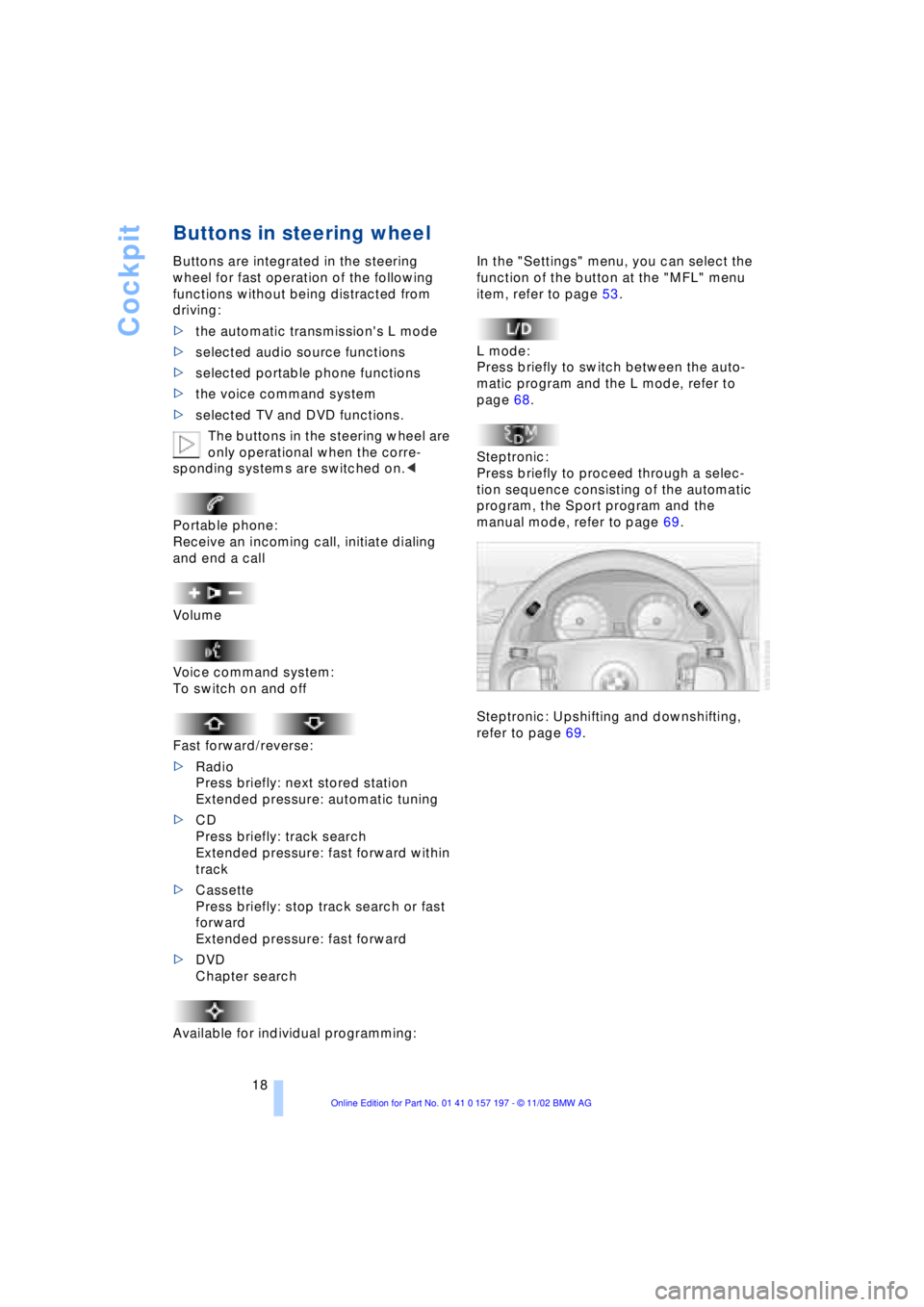
Buttons in steering wheel
Buttons are integrated in the steering
wheel for fast operation of the following
functions without being distracted from
driving:
>the automatic transmission's L mode
>selected audio source functions
>selected portable phone functions
>the voice command system
>selected TV and DVD functions.
The buttons in the steering wheel are
only operational when the corre-
sponding systems are switched on.<
Portable phone:
Receive an incoming call, initiate dialing
and end a call
Volume
Voice command system:
To switch on and off
Fast forward/reverse:
>Radio
Press briefly: next stored station
Extended pressure: automatic tuning
>CD
Press briefly: track search
Extended pressure: fast forward within
track
>Cassette
Press briefly: stop track search or fast
forward
Extended pressure: fast forward
>DVD
Chapter search
Available for individual programming:
In the "Settings" menu, you can select the
function of the button at the "MFL" menu
item, refer to page 53.
L mode:
Press briefly to switch between the auto-
matic program and the L mode, refer to
page 68.
Steptronic:
Press briefly to proceed through a selec-
tion sequence consisting of the automatic
program, the Sport program and the
manual mode, refer to page 69.
Steptronic: Upshifting and downshifting,
refer to page 69.
Page 24 of 229
Control Center
22
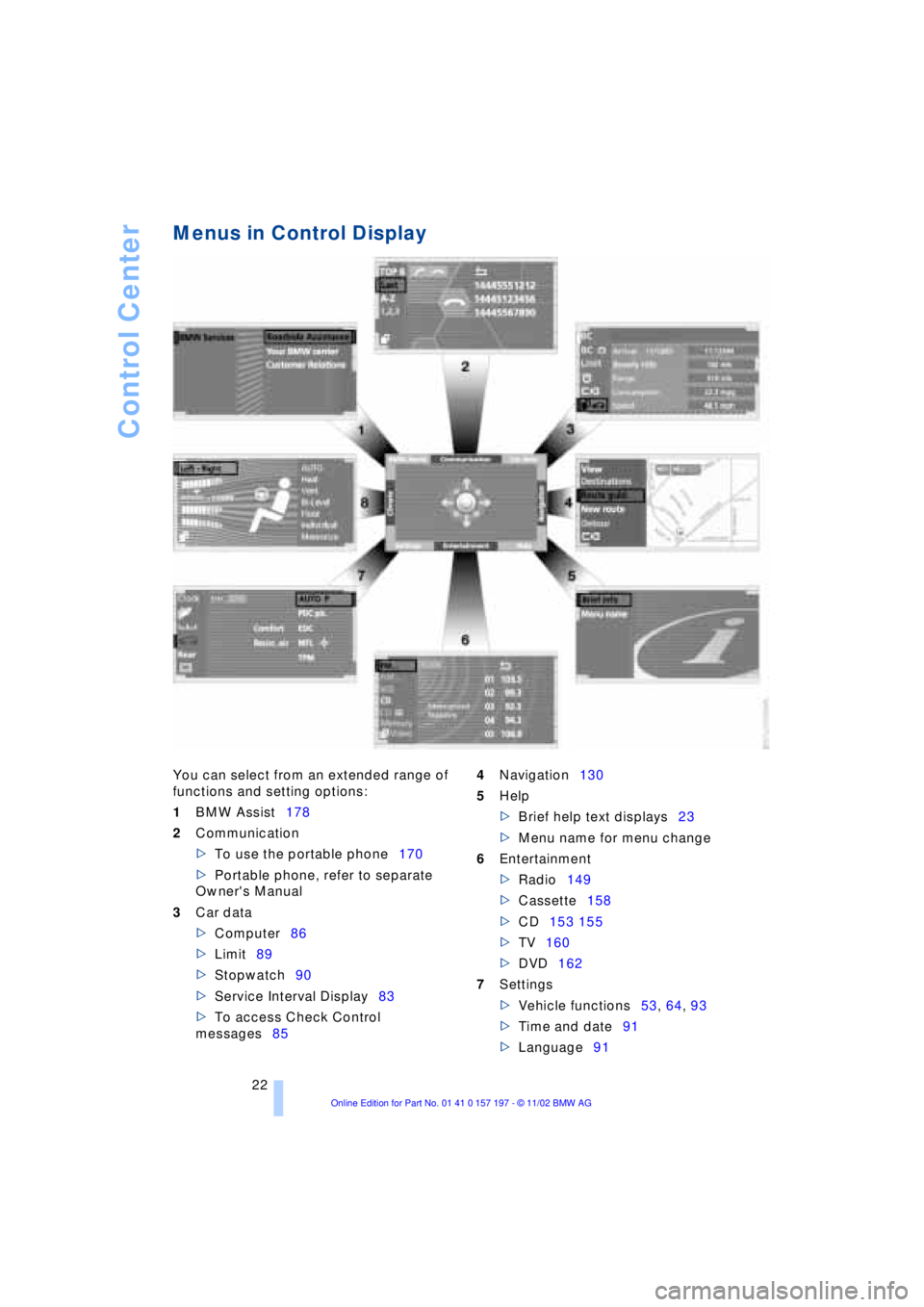
Menus in Control Display
You can select from an extended range of
functions and setting options:
1BMW Assist178
2Communication
>To use the portable phone170
>Portable phone, refer to separate
Owner's Manual
3Car data
>Computer86
>Limit89
>Stopwatch90
>Service Interval Display83
>To access Check Control
messages854Navigation130
5Help
>Brief help text displays23
>Menu name for menu change
6Entertainment
>Radio149
>Cassette158
>CD153 155
>TV160
>DVD162
7Settings
>Vehicle functions53, 64, 93
>Time and date91
>Language91
Page 148 of 229
Entertainment
146
Entertainment
Controls
Operation using buttons
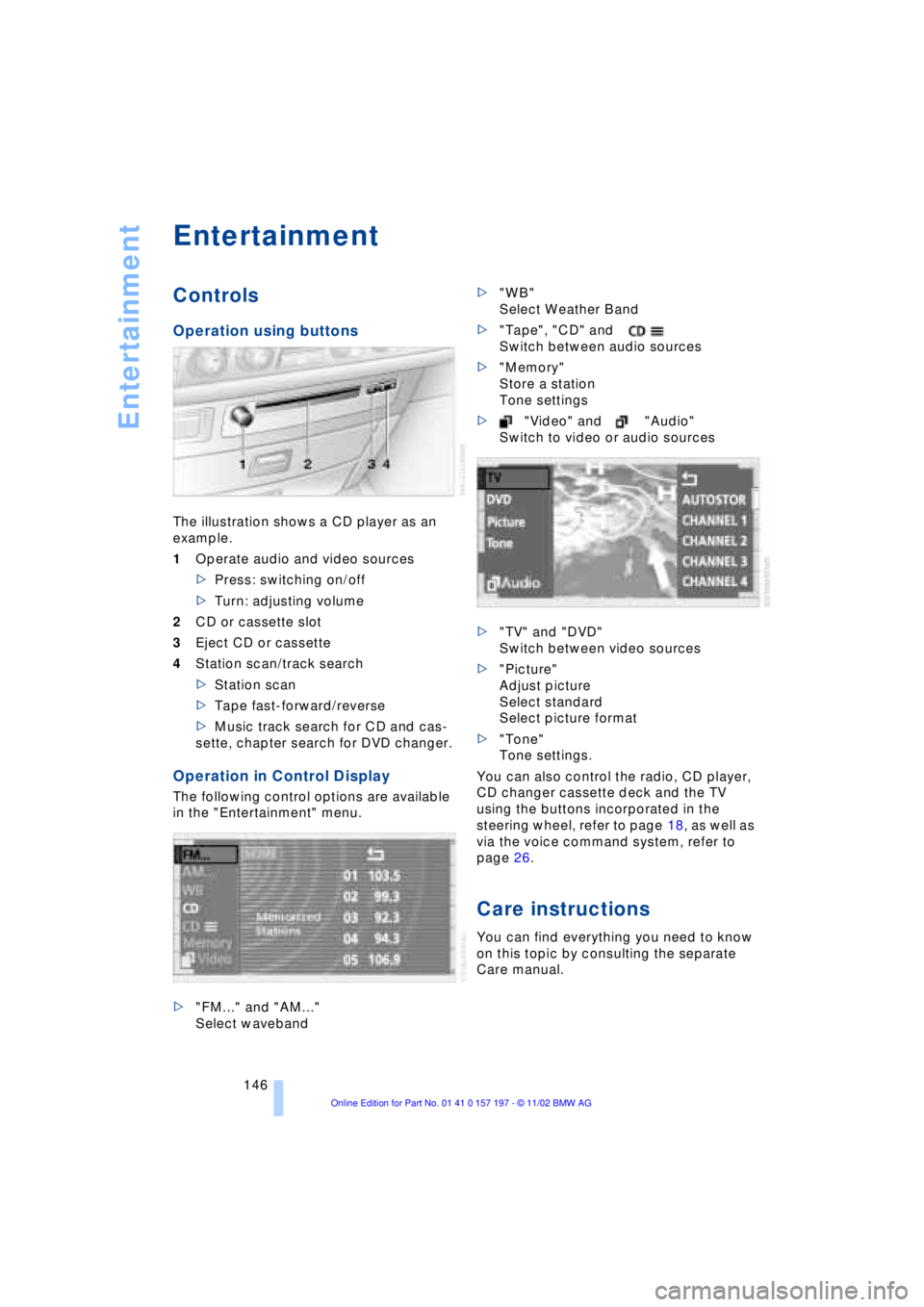
The illustration shows a CD player as an
example.
1Operate audio and video sources
>Press: switching on/off
>Turn: adjusting volume
2CD or cassette slot
3Eject CD or cassette
4Station scan/track search
>Station scan
>Tape fast-forward/reverse
>Music track search for CD and cas-
sette, chapter search for DVD changer.
Operation in Control Display
The following control options are available
in the "Entertainment" menu.
>"FM..." and "AM..."
Select waveband>"WB"
Select Weather Band
>"Tape", "CD" and
Switch between audio sources
>"Memory"
Store a station
Tone settings
>"Video" and "Audio"
Switch to video or audio sources
>"TV" and "DVD"
Switch between video sources
>"Picture"
Adjust picture
Select standard
Select picture format
>"Tone"
Tone settings.
You can also control the radio, CD player,
CD changer cassette deck and the TV
using the buttons incorporated in the
steering wheel, refer to page 18, as well as
via the voice command system, refer to
page 26.
Care instructions
You can find everything you need to know
on this topic by consulting the separate
Care manual.
Page 153 of 229
At a glance
Controls
Driving tips
Communications
Navigation
Entertainment
Mobility
Reference
151
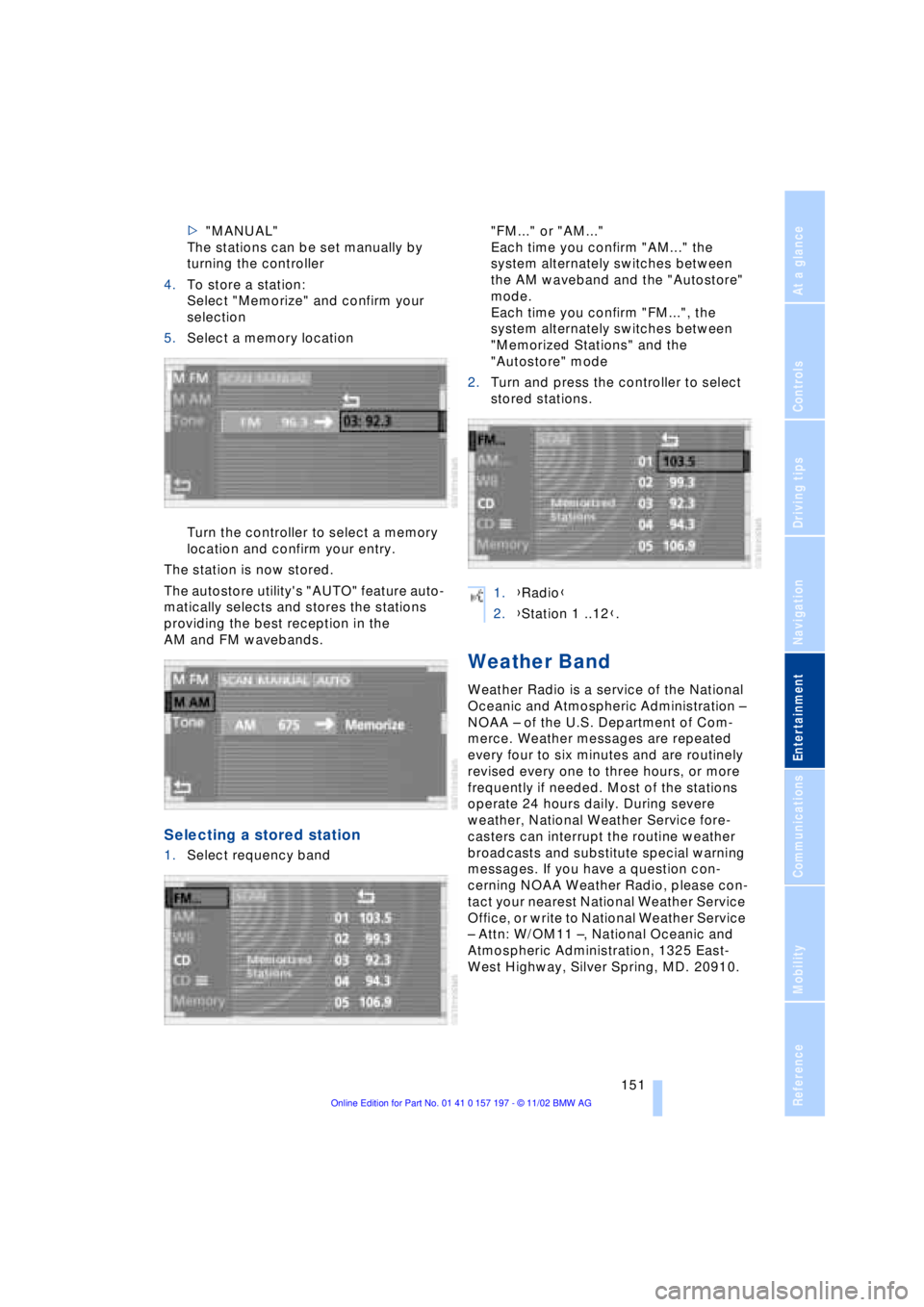
>"MANUAL"
The stations can be set manually by
turning the controller
4.To store a station:
Select "Memorize" and confirm your
selection
5.Select a memory location
Turn the controller to select a memory
location and confirm your entry.
The station is now stored.
The autostore utility's "AUTO" feature auto-
matically selects and stores the stations
providing the best reception in the
AM and FM wavebands.
Selecting a stored station
1.Select requency band "FM..." or "AM..."
Each time you confirm "AM..." the
system alternately switches between
the AM waveband and the "Autostore"
mode.
Each time you confirm "FM...", the
system alternately switches between
"Memorized Stations" and the
"Autostore" mode
2.Turn and press the controller to select
stored stations.
Weather Band
Weather Radio is a service of the National
Oceanic and Atmospheric Administration Ð
NOAA Ð of the U.S. Department of Com-
merce. Weather messages are repeated
every four to six minutes and are routinely
revised every one to three hours, or more
frequently if needed. Most of the stations
operate 24 hours daily. During severe
weather, National Weather Service fore-
casters can interrupt the routine weather
broadcasts and substitute special warning
messages. If you have a question con-
cerning NOAA Weather Radio, please con-
tact your nearest National Weather Service
Office, or write to National Weather Service
Ð Attn: W/OM11 Ð, National Oceanic and
Atmospheric Administration, 1325 East-
West Highway, Silver Spring, MD. 20910.
1.{Radio}
2.{Station 1 ..12}.
Page 166 of 229
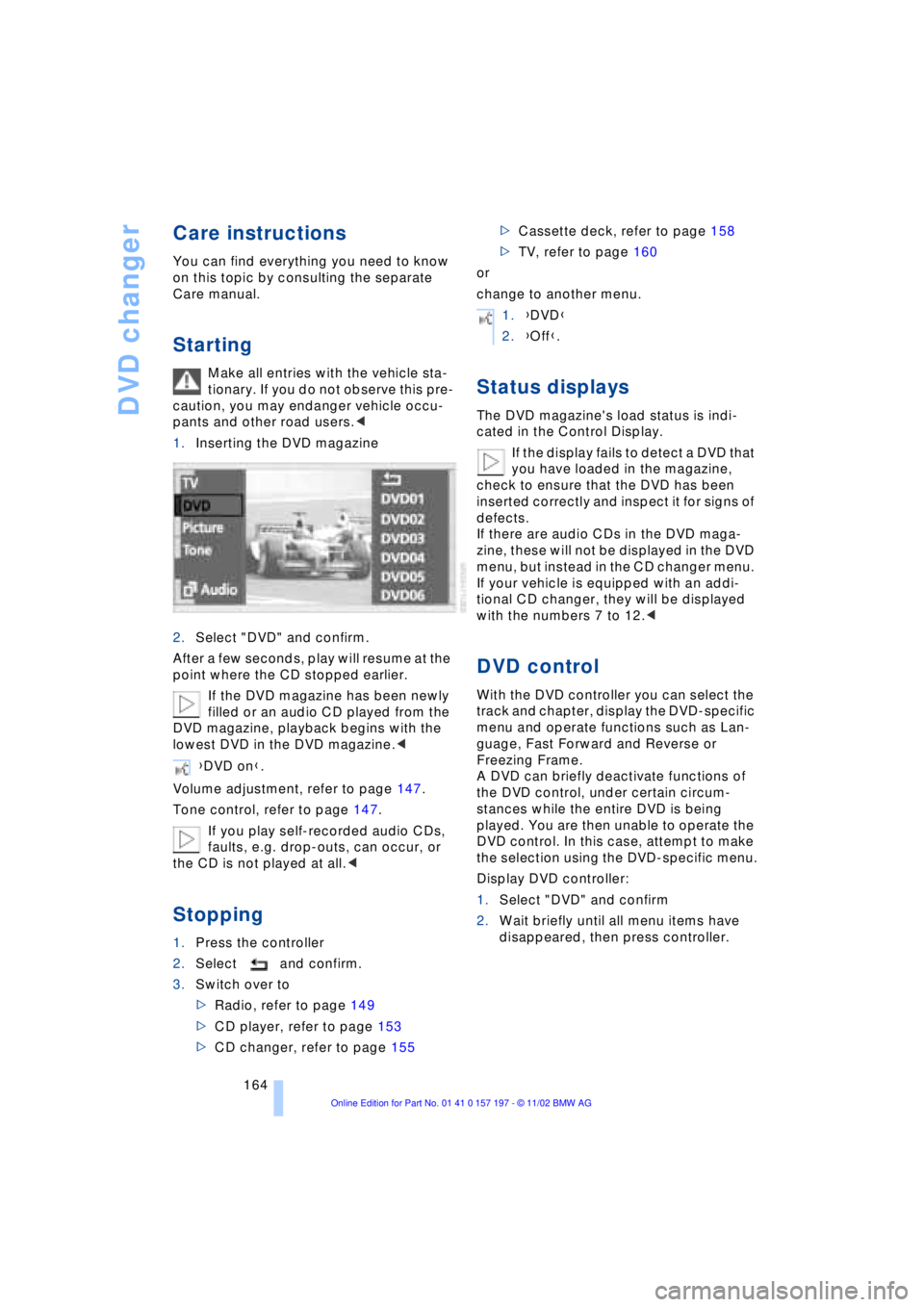
DVD changer
164
Care instructions
You can find everything you need to know
on this topic by consulting the separate
Care manual.
Starting
Make all entries with the vehicle sta-
tionary. If you do not observe this pre-
caution, you may endanger vehicle occu-
pants and other road users.<
1.Inserting the DVD magazine
2.Select "DVD" and confirm.
After a few seconds, play will resume at the
point where the CD stopped earlier.
If the DVD magazine has been newly
filled or an audio CD played from the
DVD magazine, playback begins with the
lowest DVD in the DVD magazine.<
Volume adjustment, refer to page 147.
Tone control, refer to page 147.
If you play self-recorded audio CDs,
faults, e.g. drop-outs, can occur, or
the CD is not played at all.<
Stopping
1.Press the controller
2.Select and confirm.
3.Switch over to
>Radio, refer to page 149
>CD player, refer to page 153
>CD changer, refer to page 155>Cassette deck, refer to page 158
>TV, refer to page 160
or
change to another menu.
Status displays
The DVD magazine's load status is indi-
cated in the Control Display.
If the display fails to detect a DVD that
you have loaded in the magazine,
check to ensure that the DVD has been
inserted correctly and inspect it for signs of
defects.
If there are audio CDs in the DVD maga-
zine, these will not be displayed in the DVD
menu, but instead in the CD changer menu.
If your vehicle is equipped with an addi-
tional CD changer, they will be displayed
with the numbers 7 to 12.<
DVD control
With the DVD controller you can select the
track and chapter, display the DVD-specific
menu and operate functions such as Lan-
guage, Fast Forward and Reverse or
Freezing Frame.
A DVD can briefly deactivate functions of
the DVD control, under certain circum-
stances while the entire DVD is being
played. You are then unable to operate the
DVD control. In this case, attempt to make
the selection using the DVD-specific menu.
Display DVD controller:
1.Select "DVD" and confirm
2.Wait briefly until all menu items have
disappeared, then press controller. {DVD on}.
1.{DVD}
2.{Off}.
Page 215 of 229
213
At a glance
Controls
Driving tips
Communications
Navigation
Entertainment
Mobility
Reference
Automatic recirculated-air
control AUC 107
Automatic transmission
with L mode 67
Automatic transmission
with Steptronic 69
Ð operation via buttons in
steering wheel 69
"AUTO P" 54, 64
"AUTOSTOR" 161
"Autostore" for radio
operation 150
Average fuel
consumption 88
Average speed 88
Avoid false alarms 41
"Avoid highway" 137
"Avoid route" 139
"Avoid sect." 139
"Avoid tolls" 137
Avoid unintentional
alarms 41
"A-Z" 175
B
Backrest adjustment 47
Ð front seats 46
Ð rear seats 47
Backrests, refer to
Seats 45
Backup lamp, bulb
replacement 197
Balance 147
"Balance" in sound system
operation 148
Bass 147
"Bass" in sound system
operation 148
Battery 200
Ð discharged 202
Ð switch 201
"BC", refer to Computer 88
Belts 50
Beverage holders 118
Blinds 115
Blower 107
BMW active seat 52"BMW Assist" 19, 22, 178
Ð "Roadside
Assistance" 178
BMW Assist 178
BMW comfort seat 46
"BMW Services" 178
"Booktape" 158
Brake, malfunctions 192
Brake assistant, refer to
Dynamic Brake Control
DBC 96
Brake fluid 192
Brake hydraulic
systems 192
Brake lamp, adaptive 101
Brake lamps, bulb
replacement 197
Brake pads 125, 193
Brakes 125
Brake system
Ð brake fluid 192
Break-in procedures 124
"Brief info" information
bulletin 23
"Brightness" during
TV operation 161
"Brightness" in the Control
Center 92
Bulb changes 195
Buttons in steering
wheel 18
Ð refer to Automatic
transmission with
Steptronic 69
C
California Proposition
65 Warning 194
Call
Ð ending 175
Ð making 174
Calling 174
Ð from telephone
directory 175
Ð from the redialing list 176
Ð from the Top 8 list 176
Ð redialing 176Can holders, refer to
Beverage holders 118
Capacities 211
Car care, refer to Care
manual
"Car data" 19, 22
Cargo, securing 126
Cargo area
Ð emergency release 40
Ð manual operation 40
Ð opening and locking
separately 39
Ð opening from the
inside 39
Ð opening from the
outside 38
Ð operating via remote
control 36
Cargo loading 126
"Car parked" 109, 112
Car phone 171, 174
Car radio, refer to
Radio 146
Car wash 124
Car wash, refer to Care
manual
Cassette 158
Cassette deck 158
Ð adjusting the tone 147
Ð "Booktape" 158
Ð controls 146
Ð Dolby 158
Ð fast forward 159
Ð music search 159
Ð operating
temperatures 158
Ð reverse 159
Ð selecting tape side 158
Ð skipping pauses 159
Ð switching on 158
Ð volume 147
CBC Cornering Brake
Control 96
CBS Condition Based
Service 193
"CD" 146, 153
Page 220 of 229
Everything from A to Z
218 Light-emitting diodes
LEDs 104
Lighter 119
Lighting of instruments 103
Lights on warning 102
Light switch 102
"Limit" 89
"Limited Release" 25
Limit selection,
adjustment 89
Litter container 117
L mode on automatic
transmission 67
Loading the vehicle 126
"Location" 135, 141, 142
Lock code 174
Locking
Ð from inside 37
Ð from outside 35
"LOGIC7" for audio
operation 148
Louvers 105
Low beams 102
Ð automatic 102
Lower back support, refer
to Lumbar support 46
Lug bolts 199
Luggage compartment lid
Ð emergency release 40
Ð manual operation 40
Ð opening and locking
separately 39
Ð opening from the
inside 39
Ð opening from the
outside 38
Ð operating via remote
control 36
Luggage compartment lid
control, automatic 36, 40
Luggage compartment
net 40
Luggage compartment
volume 210Luggage rack, refer to
Roof-mounted luggage
rack 127
Lug wrench 198
Lumbar support 46
M
M+S tires 188
Maintenance 193
Malfunction displays 85
"M AM" 150
Manually controlled
recirculated air 107
Manually switch air
conditioner mode on and
off 107
Manual operation
Ð doors 37
Ð sliding/tilt sunroof 44
Manual release
Ð automatic transmission
lockout 70
Ð fuel filler door 182
Ð luggage compartment
lid 40
Manual station
search 150
Map CD 130
"Map dir. travel" for
navigation 138
"Map facing N." for
navigation 138
Maximum axle loads 210
Maximum cooling
Ð automatic climate
control 107
Ð rear air conditioner 111
Maximum roof weight 210
Maximum speed
Ð winter tires 188
Maximum speed, refer to
Limit 89
"Memo" 91"Memorize", automatic
climate control 110
Ð "Individual" 111
"Memorized Stations",
radio 151
"Memorize" for audio
operation 151
Memory, refer to Seat,
mirror and steering wheel
memory 54
"Memory" for audio
operation 146, 148, 150
"MENU" in DVD mode 167
"Menu name" 23
Menus
Ð computer 22
Ð Control Center 22
"MFL" 54
"M FM" 150
"Microfilter" 193
Microphone for hands-free
system 173
Mirrors 52
Ð automatic dimming 52
Ð mirror heaters 52
Ð mirror memory 54
"Missed" 177
Missed calls 176
Mobile phone, refer to
separate Portable phone
manual 170
Modifications, technical 8
Monitor, refer to Control
Center 19
Most frequently called
numbers 176
Music search
Ð cassette deck 159
N
"Name" for navigation 133
"Navigation" 19, 22, 131
Ð "NO" 131
Ð "YES" 131
Page 221 of 229
219
At a glance
Controls
Driving tips
Communications
Navigation
Entertainment
Mobility
Reference
Navigation computer
Ð installation location 130
Navigation destination
Ð manual entry 132
Ð selecting from the
directory 134
Ð selecting with map 134
Navigation system 130
Ð "ACCEPT" command 142
Ð current location 142
Ð destination entry 132
Ð destination guidance in
assistance window 131
Ð destination list 136
Ð digital coverage area 130
Ð directory 134
Ð "Hotel / Motel" 135
Ð "Information"
feature 135, 136
Ð manual entry of
destination address 132
Ð map CD 130
Ð map-guided destination
selection 134
Ð new route 139
Ð "On location" 135
Ð recent destinations 136
Ð route display 138
Ð route list 139
Ð route selection 137
Ð safety 130
Ð selecting points of
interest 135
Ð selection options 131
Ð start active guidance 137
Ð starting 131
Ð switching off, refer to
Terminating/interrupting
active guidance 140
Ð terminating/interrupting
active guidance 140
Ð town and city centers 143
Ð "View" function 138, 139
Ð voice guidance 139
Ð volume adjustment 140
Ð what to do if ... 143
Ð wordmatch principle 142
Navigation system GPS,
refer to Navigation
system 130Navigation target
cursor 134, 135
Navigation "With
map" 134, 135
"Navi info" 54
"New route" 139
"Next"
Ð map-guided destination
selection 135
Ð searching for points of
interest 136
"None Release" 25
Notebook of voice
command system 28
Nozzles 105
NTSC during TV
operation 161
O
OBD interface socket 194
Occupant-restraint
systems 50, 55
Odometer 82
Oil additives 191
Oil change intervals, refer
to Service Interval
Display 83
Oil consumption 190
Oil dipstick 190
Oil specifications 191
"OK" for DVD
operation 167
"ON / OFF" speed limit 89
Onboard computer, refer to
Computer 92
Onboard Diagnostic OBD
Ð interface socket 194
Onboard tool kit 195
"On country" 136
"1,2,3" 175
"On location" 135
"On town/city" 136
Opening and closing
Ð from inside 37
Ð from outside 35Operating temperatures
Ð in cassette deck
mode 158
Ð in CD changer mode 156
Ð in CD player mode 153
Ð in DVD mode 163
Ð in radio mode 149
Oral note 28
Orientation
Ð changing the display 138
Orientation menu 19
Orientation to north 138
Outside temperature
display 82
P
Paint and finish care, refer
to Care manual
PAL during TV
operation 161
Panic mode 36
Park detent, refer to
Transmission
lockout 68, 70
Park Distance Control
PDC 93
Parked-car ventilation 112
Ð "Indep. ventil." 112
Ð "Set time 1" 113
Ð "Set time 2" 113
Ð "Switch. time 1" 113
Ð "Switch. time 2" 113
Parking aid 93
Parking brake 62
Ð Automatic Hold 63
Ð manual operation 65
Parking lamp
Ð bulb replacement 196
Parking lamps 102
Parking with
Automatic Hold 64
Particle filter 111
Passenger-side mirror tilt
function 55
PDC Park Distance
Control 93
"PDC pic." 94
Personal Calling 171
Phone directory, refer to
Telephone directory 175