2003 BMW 760LI SEDAN service
[x] Cancel search: servicePage 204 of 229
Giving and receiving assistance
202
Giving and receiving assistance
Warning triangle*
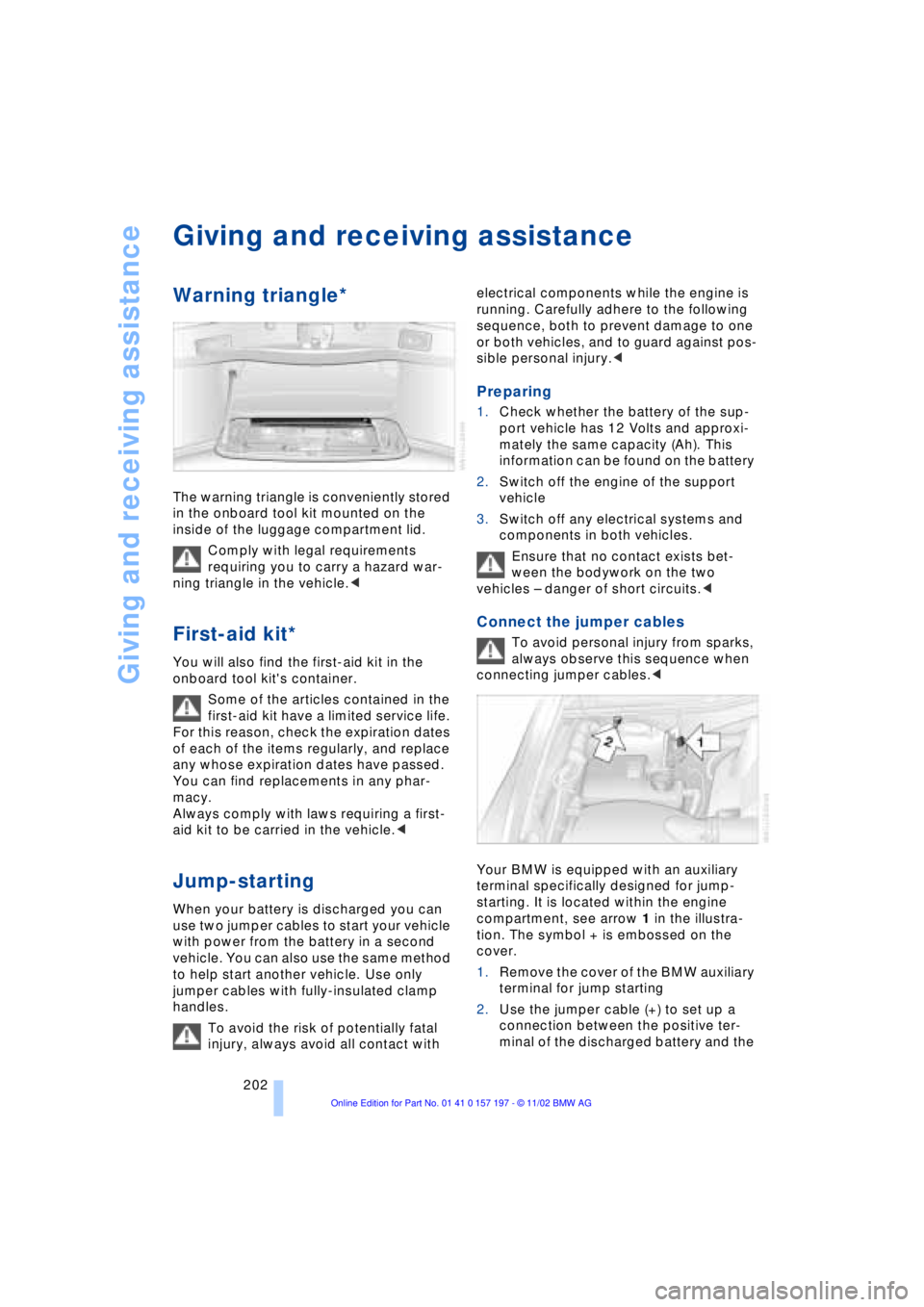
The warning triangle is conveniently stored
in the onboard tool kit mounted on the
inside of the luggage compartment lid.
Comply with legal requirements
requiring you to carry a hazard war-
ning triangle in the vehicle.<
First-aid kit*
You will also find the first-aid kit in the
onboard tool kit's container.
Some of the articles contained in the
first-aid kit have a limited service life.
For this reason, check the expiration dates
of each of the items regularly, and replace
any whose expiration dates have passed.
You can find replacements in any phar-
macy.
Always comply with laws requiring a first-
aid kit to be carried in the vehicle.<
Jump-starting
When your battery is discharged you can
use two jumper cables to start your vehicle
with power from the battery in a second
vehicle. You can also use the same method
to help start another vehicle. Use only
jumper cables with fully-insulated clamp
handles.
To avoid the risk of potentially fatal
injury, always avoid all contact with electrical components while the engine is
running. Carefully adhere to the following
sequence, both to prevent damage to one
or both vehicles, and to guard against pos-
sible personal injury.<
Preparing
1.Check whether the battery of the sup-
port vehicle has 12 Volts and approxi-
mately the same capacity (Ah). This
information can be found on the battery
2.Switch off the engine of the support
vehicle
3.Switch off any electrical systems and
components in both vehicles.
Ensure that no contact exists bet-
ween the bodywork on the two
vehicles Ð danger of short circuits.<
Connect the jumper cables
To avoid personal injury from sparks,
always observe this sequence when
connecting jumper cables.<
Your BMW is equipped with an auxiliary
terminal specifically designed for jump-
starting. It is located within the engine
compartment, see arrow 1 in the illustra-
tion. The symbol + is embossed on the
cover.
1.Remove the cover of the BMW auxiliary
terminal for jump starting
2.Use the jumper cable (+) to set up a
connection between the positive ter-
minal of the discharged battery and the
Page 215 of 229
213
At a glance
Controls
Driving tips
Communications
Navigation
Entertainment
Mobility
Reference
Automatic recirculated-air
control AUC 107
Automatic transmission
with L mode 67
Automatic transmission
with Steptronic 69
Ð operation via buttons in
steering wheel 69
"AUTO P" 54, 64
"AUTOSTOR" 161
"Autostore" for radio
operation 150
Average fuel
consumption 88
Average speed 88
Avoid false alarms 41
"Avoid highway" 137
"Avoid route" 139
"Avoid sect." 139
"Avoid tolls" 137
Avoid unintentional
alarms 41
"A-Z" 175
B
Backrest adjustment 47
Ð front seats 46
Ð rear seats 47
Backrests, refer to
Seats 45
Backup lamp, bulb
replacement 197
Balance 147
"Balance" in sound system
operation 148
Bass 147
"Bass" in sound system
operation 148
Battery 200
Ð discharged 202
Ð switch 201
"BC", refer to Computer 88
Belts 50
Beverage holders 118
Blinds 115
Blower 107
BMW active seat 52"BMW Assist" 19, 22, 178
Ð "Roadside
Assistance" 178
BMW Assist 178
BMW comfort seat 46
"BMW Services" 178
"Booktape" 158
Brake, malfunctions 192
Brake assistant, refer to
Dynamic Brake Control
DBC 96
Brake fluid 192
Brake hydraulic
systems 192
Brake lamp, adaptive 101
Brake lamps, bulb
replacement 197
Brake pads 125, 193
Brakes 125
Brake system
Ð brake fluid 192
Break-in procedures 124
"Brief info" information
bulletin 23
"Brightness" during
TV operation 161
"Brightness" in the Control
Center 92
Bulb changes 195
Buttons in steering
wheel 18
Ð refer to Automatic
transmission with
Steptronic 69
C
California Proposition
65 Warning 194
Call
Ð ending 175
Ð making 174
Calling 174
Ð from telephone
directory 175
Ð from the redialing list 176
Ð from the Top 8 list 176
Ð redialing 176Can holders, refer to
Beverage holders 118
Capacities 211
Car care, refer to Care
manual
"Car data" 19, 22
Cargo, securing 126
Cargo area
Ð emergency release 40
Ð manual operation 40
Ð opening and locking
separately 39
Ð opening from the
inside 39
Ð opening from the
outside 38
Ð operating via remote
control 36
Cargo loading 126
"Car parked" 109, 112
Car phone 171, 174
Car radio, refer to
Radio 146
Car wash 124
Car wash, refer to Care
manual
Cassette 158
Cassette deck 158
Ð adjusting the tone 147
Ð "Booktape" 158
Ð controls 146
Ð Dolby 158
Ð fast forward 159
Ð music search 159
Ð operating
temperatures 158
Ð reverse 159
Ð selecting tape side 158
Ð skipping pauses 159
Ð switching on 158
Ð volume 147
CBC Cornering Brake
Control 96
CBS Condition Based
Service 193
"CD" 146, 153
Page 216 of 229
Everything from A to Z
214 CD changer 155, 156
Ð adjusting the tone 147
Ð controls 146
Ð copy protection 155
Ð fast forward 157
Ð humidity 156
Ð operating
temperatures 156
Ð random play 157
Ð reverse 157
Ð safety 155
Ð sampling 157
Ð scan 157
Ð selecting CD 157
Ð selecting track 157
Ð skipping tracks 157
Ð switching on 156
Ð temperature range 156
Ð track search 157
Ð volume 147
CD player 153
Ð adjusting the tone 147
Ð atmospheric humidity 153
Ð controls 146
Ð fast forward 154
Ð operating
temperatures 153
Ð random play 154
Ð reverse 154
Ð sampling 154
Ð scan 154
Ð selecting track 154
Ð skipping tracks 154
Ð switching on 153
Ð temperature range 153
Ð track search 154
Ð volume 147
Cell phone, refer to
separate Portable phone
manual 170
"Center" 110
Center armrest 120
Center console, refer to
Comfort features 16
Central locking system 35
Ð button 38
Ð remote control 35"CHANGE" for
navigation 136
Changing bulbs, refer to
Lamps and bulbs 195
Changing language 91
Changing settings in the
Control Display 91
Changing units of measure
in Control Display 91
Check Control 85
Ð "Check" 86
Checking engine oil
level 190, 190
Checking tire
pressures 184
Child's seat 57
Child-restraint system 57
Child-safety lock 59
Cigarette lighter 119
Cleaning, refer to Care
manual
Cleaning windshield 72, 73
"Climate" 19, 22
Climate control
Ð automatic air
distribution 107
"Clock" 91
Clock 82
Ð setting time and date 91
Closing
Ð from inside 37
Ð from outside 35
Closing assist
Ð doors 38
Ð luggage compartment
lid 39
Cockpit 12, 16
Coin holder, refer to
Storage
compartments 117
Coin tray, refer to Storage
compartments 117
Cold start 62
"Color" during
TV operation 161
"Comfort"
Ð "EDC" 97
Comfort features 16Comfort seat 46
Ð in rear 47
"Communication"
19, 22, 171
Compact Disc, refer to
CD 153
Compartments, refer to
Storage
compartments 117
Computer 86
Computer, refer to Control
Center 19
Ð automatic climate
control 109
Ð "BC" 89
Ð changing settings 91
Ð display, menus 22
Ð displays in the Control
Display 88
Ð language selection 91
Ð setting time and date 91
Ð status lines 24
Ð symbols 21
Condition Based Service
CBS 193
Confirming a menu item in
the Control Display 20
Connecting car vacuum
cleaner 119
Consumption display 87
"Contrast" during
TV operation 161
Page 221 of 229
219
At a glance
Controls
Driving tips
Communications
Navigation
Entertainment
Mobility
Reference
Navigation computer
Ð installation location 130
Navigation destination
Ð manual entry 132
Ð selecting from the
directory 134
Ð selecting with map 134
Navigation system 130
Ð "ACCEPT" command 142
Ð current location 142
Ð destination entry 132
Ð destination guidance in
assistance window 131
Ð destination list 136
Ð digital coverage area 130
Ð directory 134
Ð "Hotel / Motel" 135
Ð "Information"
feature 135, 136
Ð manual entry of
destination address 132
Ð map CD 130
Ð map-guided destination
selection 134
Ð new route 139
Ð "On location" 135
Ð recent destinations 136
Ð route display 138
Ð route list 139
Ð route selection 137
Ð safety 130
Ð selecting points of
interest 135
Ð selection options 131
Ð start active guidance 137
Ð starting 131
Ð switching off, refer to
Terminating/interrupting
active guidance 140
Ð terminating/interrupting
active guidance 140
Ð town and city centers 143
Ð "View" function 138, 139
Ð voice guidance 139
Ð volume adjustment 140
Ð what to do if ... 143
Ð wordmatch principle 142
Navigation system GPS,
refer to Navigation
system 130Navigation target
cursor 134, 135
Navigation "With
map" 134, 135
"Navi info" 54
"New route" 139
"Next"
Ð map-guided destination
selection 135
Ð searching for points of
interest 136
"None Release" 25
Notebook of voice
command system 28
Nozzles 105
NTSC during TV
operation 161
O
OBD interface socket 194
Occupant-restraint
systems 50, 55
Odometer 82
Oil additives 191
Oil change intervals, refer
to Service Interval
Display 83
Oil consumption 190
Oil dipstick 190
Oil specifications 191
"OK" for DVD
operation 167
"ON / OFF" speed limit 89
Onboard computer, refer to
Computer 92
Onboard Diagnostic OBD
Ð interface socket 194
Onboard tool kit 195
"On country" 136
"1,2,3" 175
"On location" 135
"On town/city" 136
Opening and closing
Ð from inside 37
Ð from outside 35Operating temperatures
Ð in cassette deck
mode 158
Ð in CD changer mode 156
Ð in CD player mode 153
Ð in DVD mode 163
Ð in radio mode 149
Oral note 28
Orientation
Ð changing the display 138
Orientation menu 19
Orientation to north 138
Outside temperature
display 82
P
Paint and finish care, refer
to Care manual
PAL during TV
operation 161
Panic mode 36
Park detent, refer to
Transmission
lockout 68, 70
Park Distance Control
PDC 93
Parked-car ventilation 112
Ð "Indep. ventil." 112
Ð "Set time 1" 113
Ð "Set time 2" 113
Ð "Switch. time 1" 113
Ð "Switch. time 2" 113
Parking aid 93
Parking brake 62
Ð Automatic Hold 63
Ð manual operation 65
Parking lamp
Ð bulb replacement 196
Parking lamps 102
Parking with
Automatic Hold 64
Particle filter 111
Passenger-side mirror tilt
function 55
PDC Park Distance
Control 93
"PDC pic." 94
Personal Calling 171
Phone directory, refer to
Telephone directory 175
Page 223 of 229
221
At a glance
Controls
Driving tips
Communications
Navigation
Entertainment
Mobility
Reference
Route
Ð display 138
Ð list 139
Ð map cancellation 138
Ð map display 138
Ð selection 137
"Route guid." 137, 140
Route map 138
"Route selec." 137
Route selection 137
"RPA" 98
Run-flat tires 186, 200
S
S 154
Safety belts 50
Safety belt tensioners 50
Safety lock buttons 38
Safety precautions to
observe when using your
phone 170
Safety switch for rear
windows 43
"Save dest." 135
"SCAN"
Ð CD changer 157
Ð CD player 154
Ð radio 150
Scan
Ð CD changer 157
Ð CD player 154
Ð radio 150
Scan sampling
Ð CD changer 157
Ð CD player 154
Ð radio 150
Screen
Ð rear 24
Seat, mirror and steering
wheel memory 54
Seat heating 51
Seat memory 54
Seats
Ð adjusting 45
Ð sitting safely 45
"Seat temp." 51, 109
Seat ventilation, refer to
Active seat ventilation 51
SECAM during
TV operation 161Securing cargo, refer to
Cargo loading 126
Securing the load, ski
bag 121
Selecting new route with
navigation system 139
Selecting new scale for
navigation system
display 138
Selecting stored radio
stations 151
Selection options for
navigation 131
Selector lever, automatic
transmission 67
Self-defrosting mirrors 52
Self-leveling
suspension 101
"Service" 83, 193
Ð "Emissions inspection" 84
Ð "Spark plugs" 83
Ð Vehicle inspection 84
Service and Warranty
Information Booklet for
US models 193
Service brakes 125
Service Guide Booklet for
Canadian models 193
Service Interval
Display 83, 193
Service Requirement
Display, refer to Service
Interval Display 83, 193
"SET", refer to Setting
speed limit 89
Set time 113
"Set time 1" 113
"Set time 2" 113
"Settings" 19, 22, 25
Setting the brightness 92
Setting the speed limit 89
Setting time and date 91
Setting timer 113
Shifting, refer to Automatic
transmission with
Steptronic 69
Shiftlock 67
Short commands for voice
command system 29
Shortest distance 137
"Shortest route" 137Shoulder support 46
"Side" in sound system
operation 158
Side window blind, refer to
Sun blinds 115
Sitting safely 45
Ski bag 120
Sliding/tilt sunroof 43
Ð closing in the event of an
electrical defect 44
Ð convenience mode 37
Ð convenience operation 36
Snow chains 188, 188
Soft Close Automatic
Ð doors 38
Ð luggage compartment
lid 39
SOS call
Ð using SOS button 173
Sound system
Ð "MANUAL" selection
mode 151
Sound system adjustments
Ð "Balance" 148
Ð balance left/right 147
Ð "Bass" 148
Ð equalizer 147
Ð "Fader" 148
Ð fader front/rear 147
Ð "LOGIC7" 148
Ð LOGIC7 147
Ð midrange setting 148
Ð "RESET" 148
Ð speed-sensitive
volume 147
Ð "Speed Vol." 148
Ð "Treble" 148
Spare fuses 201
Spare key 34
Ð adapter 34
Spare tire 198
"Spark plugs" 83, 193
Specifications for engine
oil 191
Speed limit
Ð "Limit" 89
Speed limit selection,
revision 89
Speedometer 14
"Speed Vol." in audio
mode 148