2002 NISSAN ALTIMA change wheel
[x] Cancel search: change wheelPage 22 of 249
use of seat belts, help to cushion the impact
force on the face and chest of the front
occupants. They can help save lives and
reduce serious injuries. However, an inflat-
ing front air bag may cause facial abrasions
or other injuries. Front air bags do not
provide restraint to the lower body.
The seat belts should be correctly worn and
the driver and passenger seated upright as
far as practical away from the steering
wheel or dash board. The supplemental
front air bags inflate quickly in order to help
protect the front occupants. Because of this,
the force of the front air bag inflating can
increase the risk of injury if the occupant is
too close to or is against the air bag module
during inflation.The air bag will deflate
quickly after the collision is over.
After turning the ignition key to the ON
position, the supplemental air bag warn-
ing light illuminates. The air bag warning
light will turn off after about 7 seconds if
the system is operational.
WARNING
c
Do not place any objects on the steer-
ing wheel pad or on the instrument
panel. Also, do not place any objectsbetween any occupant and the steer-
ing wheel or instrument panel. Such
objects may become dangerous pro-
jectiles and cause injury if the supple-
mental front air bag inflates.
cRight after inflation, several air bag
system components will be hot. Do
not touch them; you may severely
burn yourself.
c
No unauthorized changes should be
made to any components or wiring of
the supplemental front air bag sys-
tem. This is to prevent accidental in-
flation of the air bag or damage to the
air bag system.
cDo not make unauthorized changes
to your vehicle's electrical system,
suspension system or front end
structure. This could affect proper
operation of the supplemental front
air bag system.
c
Tampering with the supplemental front
air bag system may result in serious
personal injury. For example, do not
change the steering wheel and the in-
strument panel assembly by placing
material over the steering wheel padand above the instrument panel, or by
installing additional trim material
around the air bag system.
cWork around and on the supplemental
front air bag system should be done
by an authorized NISSAN retailer. In-
stallation of electrical equipment
should also be done by an authorized
NISSAN retailer. The yellow and or-
ange Supplemental Restrain System
(SRS) wiring and connectors should
not be modified or disconnected. Un-
authorized electrical test equipment
and probing devices should not be
used on the air bag system.
cA cracked windshield should be re-
placed immediately by a qualified
repair facility. A cracked windshield
could affect inflation of the supple-
mental air bag system.
c
The SRS wiring harness connectors are
yellow and orange for easy identification.
When selling your vehicle, we request that
you inform the buyer about the supple-
mental front air bag system and guide the
buyer to the appropriate sections in this
Owner's Manual.
Seats, restraints and supplemental air bag systems
1-15
ZX
Page 53 of 249

in the speedometer display. When the igni-
tion is turned to ON, the display scrolls all
the modes of the trip computer and then
shows the mode chosen before the ignition
switch is turned OFF.
If the battery terminal is disconnected,
push the trip computer mode switch
more than 1 second to activate the com-
puter.
When the ignition switch is turned to ON,
modes of the trip computer can be selected
by pushing the trip mode switch on the
steering wheel switch for audio controls or
by the trip computer change button. The
following modes can be selected:
Outside air temperature (ICY±ÉF or
ÉC)
The outside air temperature is displayed in
ÉF or ÉC.
The outside air temperature mode includes
a low temperature warning feature: below
37ÉF (3ÉC), the outside air temperaturemode is automatically selected and ICY will
illuminate in order to draw the driver's atten-
tion. Press the mode switch if you wish to
return to the mode that was selected before
the warning occurred. The ICY indicator will
continue blinking as long as the tempera-
ture remains below 39ÉF (4ÉC).
The ambient temperature sensor is located
in front of the radiator. The sensor may be
affected by road or engine heat, wind direc-
tions and other driving conditions. The dis-
play may differ from the actual ambient
temperature or the temperature displayed
on various signs or billboards.
Distance to empty (dte±mile or km)
The distance to empty (dte) mode provides
you with an estimation of the distance that
can be driven before refueling. The dte is
constantly being calculated, based on the
amount of fuel in the fuel tank and the actual
fuel consumption.
The display is updated every 30 seconds.
The dte mode inlcudes a low range warning
feature: when the fuel level is low, the dte
mode is automatically selected and the dig-
its blink in order to draw the driver's atten-
tion. Press the mode switch if you wish to
WIC0159
2-4Instruments and controls
ZX
Page 104 of 249

4Heater, air conditioner and audio systems
Ventilators ..............................................................4-2
Center ventilators ..............................................4-2
Side ventilators ..................................................4-2
Heater and air conditioner (manual) ......................4-3
Controls .............................................................4-3
Heater operation ................................................4-4
Air conditioner operation (if so
equipped) ...........................................................4-5
Air flow charts ....................................................4-6
Heater and air conditioner (automatic) (if so
equipped) ...............................................................4-9
Automatic operation ..........................................4-9
Manual operation .............................................4-10
Operating tips ..................................................4-11
Servicing air conditioner .......................................4-11Audio system ........................................................4-12
Radio ...............................................................4-12
FM radio reception ..........................................4-12
AM radio reception ..........................................4-12
Audio operation precautions ...........................4-13
FM-AM radio with compact disc (CD)
player ...............................................................4-16
FM-AM radio with compact disc (CD)
changer (if so equipped) .................................4-21
CD care and cleaning......................................4-28
Steering wheel switch for audio control
(if so equipped)................................................4-28
Antenna ...........................................................4-29
Car phone or CB radio .........................................4-29
ZX
Page 131 of 249

CD CARE AND CLEANING
cHandle a CD by its edges. Never touch
the surface of the disc.
Always place the discs in the storage
case when they are not being used.
cTo clean a disc, wipe the surface from
the center to the outer edge using a
clean, soft cloth. Do not wipe the disc
using a circular motion.
Do not use a conventional record cleaner
or alcohol intended for industrial use.
cA new disc may be rough on the innerand outer edges. Remove the rough
edges by rubbing the inner and outer
edges with the side of a pen or pencil as
illustrated.
STEERING WHEEL SWITCH FOR
AUDIO CONTROL (if so equipped)
``MODE'' select switch
Push the mode select switch to change the
modes:
PRESET A!PRESET B!
PRESET C!Insert CD (if so equipped)
Volume control switches
Push ``'' or ``'' to increase or decrease
the volume.
LHA0049LHA0137
4-28Heater, air conditioner and audio systems
ZX
Page 159 of 249
CHANGING A FLAT TIRE
If you have a flat tire, follow the instructions
below:
Stopping the vehicle
1. Safely move the vehicle off of the road
and away from traffic.
2. Turn on the hazard warning flashers.
3. Park on a level surface and apply the
parking brake. Shift the manual transmis-
sion into R (Reverse), or the automatic
transmission into P (Park).
4. Turn off the engine.
5. Raise the hood to warn other traffic, and
to signal professional road assistance
personnel that you need assistance.
6. Have all passengers get out of the ve-
hicle and stand in a safe place, away
from traffic and clear of the vehicle.
WARNING
cMake sure the parking brake is se-
curely applied and the manual trans-
mission is shifted into R (Reverse),
or the automatic transmission into P
(Park).
cNever change tires when the vehicle
is on a slope, ice or slippery areas.
This is hazardous.
cNever change tires if oncoming traf-
fic is close to your vehicle. Wait for
professional road assistance.
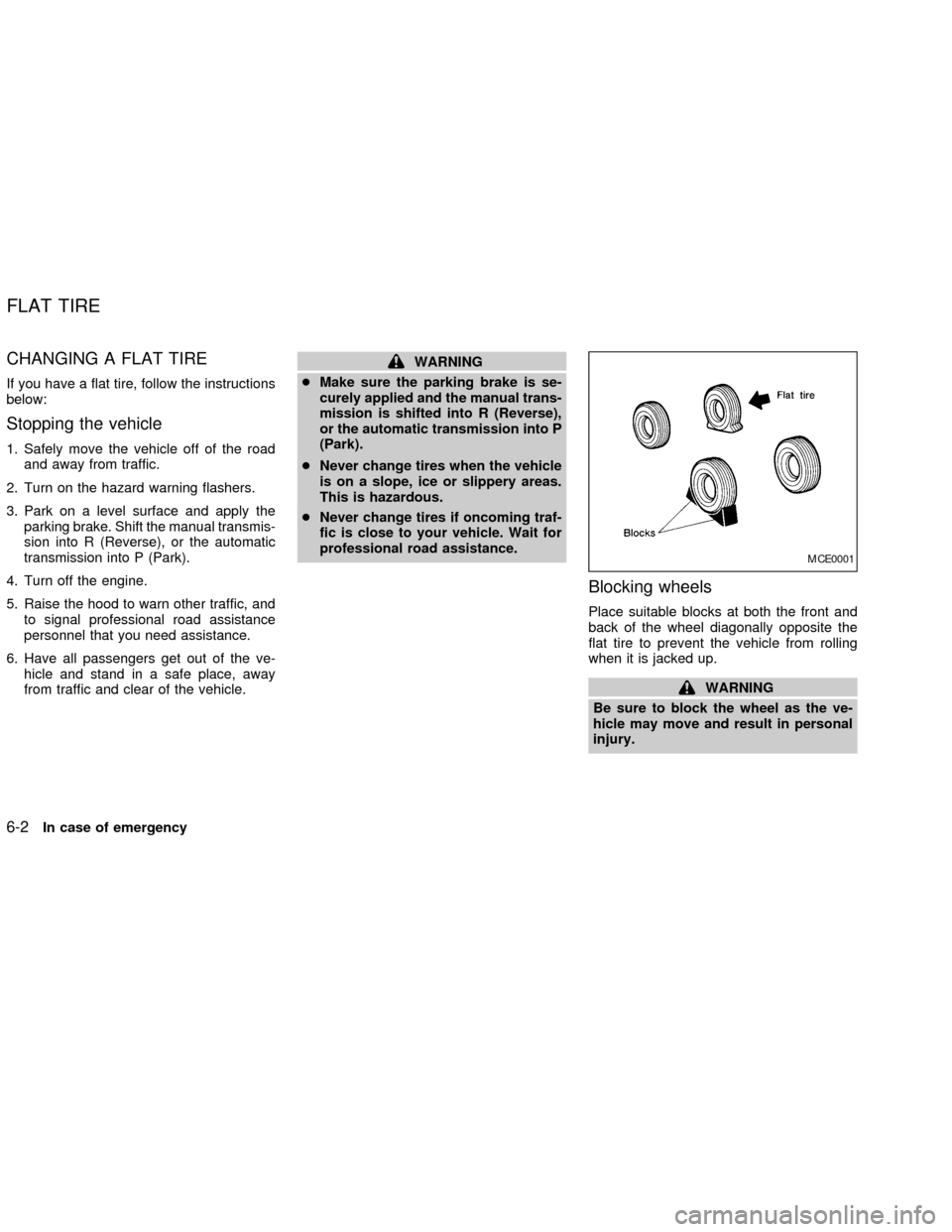
Blocking wheels
Place suitable blocks at both the front and
back of the wheel diagonally opposite the
flat tire to prevent the vehicle from rolling
when it is jacked up.
WARNING
Be sure to block the wheel as the ve-
hicle may move and result in personal
injury.
MCE0001
FLAT TIRE
6-2In case of emergency
ZX
Page 160 of 249
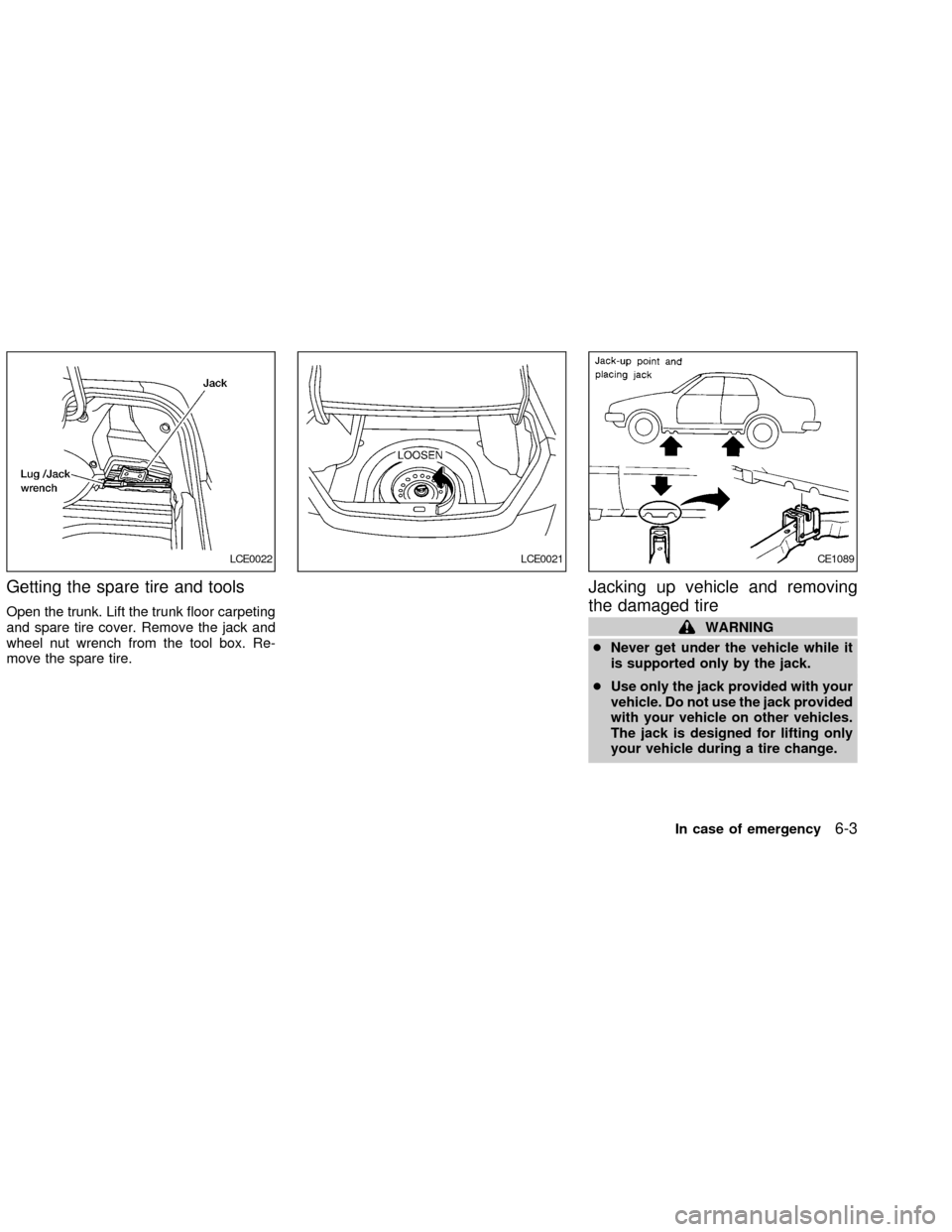
Getting the spare tire and tools
Open the trunk. Lift the trunk floor carpeting
and spare tire cover. Remove the jack and
wheel nut wrench from the tool box. Re-
move the spare tire.
Jacking up vehicle and removing
the damaged tire
WARNING
cNever get under the vehicle while it
is supported only by the jack.
cUse only the jack provided with your
vehicle. Do not use the jack provided
with your vehicle on other vehicles.
The jack is designed for lifting only
your vehicle during a tire change.
LCE0022LCE0021CE1089
In case of emergency6-3
ZX
Page 181 of 249

Steering wheelCheck for changes in the
steering conditions, such as excessive free-
play, hard steering or strange noises.
SeatsCheck seat position controls such as
seat adjusters, seatback recliner, etc. to
ensure they operate smoothly and all
latches lock securely in every position.
Check that the head restraints move up and
down smoothly and the locks (if so
equipped) hold securely in all latched posi-
tions.
Seat beltsCheck that all parts of the seat
belt system (e.g., buckles, anchors, adjust-
ers and retractors) operate properly and
smoothly, and are installed securely. Check
the belt webbing for cuts, fraying, wear or
damage.
Accelerator pedalCheck the pedal for
smooth operation and make sure the pedal
does not catch or require uneven effort.
Keep the floor mat away from the pedal.
Clutch pedal*Make sure the pedal oper-
ates smoothly and check that it has the
proper free travel.
BrakesCheck that the brakes do not pull
the vehicle to one side when applied.Brake pedal and booster*Check the pedal
for smooth operation and make sure it has
the proper distance under it when de-
pressed fully. Check the brake booster func-
tion. Be certain to keep the floor mat away
from the pedal.
Parking brake*Check that the lever has
the proper travel and confirm that your
vehicle is held securely on a fairly steep hill
with only the parking brake applied.
Automatic transmission P (Park) posi-
tion mechanismCheck that the lock re-
lease button on the selector lever operates
properly and smoothly. On a fairly steep hill
check that your vehicle is held securely with
the selector lever in the P position without
applying any brakes.
Under the hood and vehicle
The maintenance items listed here should
be checked periodically (e.g., each time you
check the engine oil or refuel).
Windshield washer fluid*Check that there
is adequate fluid in the reservoir.
Engine oil level*Check the level after
parking the vehicle on a level surface with
the engine off. Wait more than 10 minutesfor the oil to drain back into the oil pan.
Brake and clutch fluid levels*Make sure
that the brake and clutch fluid level is be-
tween the MIN and MAX lines on the reser-
voir.
Power steering fluid level* and lines
Check the level when the fluid is cold, with
the engine off. Check the lines for proper
attachment, leaks, cracks, etc.
Automatic transmission fluid level*
Check the level after putting the selector
lever in P with the engine idling at operating
temperature.
Engine coolant level*Check the coolant
level when the engine is cold.
Radiator and hosesCheck the front of the
radiator and clean off any dirt, insects,
leaves, etc., that may have accumulated.
Make sure the hoses have no cracks, de-
formation, rot or loose connections.
Engine drive belts*Make sure the drive
belts are not frayed, worn, cracked or oily.
Battery*Check the fluid level in each cell. It
should be between the MAX and MIN lines.
Vehicles operated in high temperatures or
under severe conditions require frequent
8-4Maintenance and do-it-yourself
ZX
Page 218 of 249
cImproper service of the spare tire
may result in serious personal in-
jury. If it is necessary to repair the
spare tire, contact an authorized
NISSAN dealer.
cFor additional information regarding
tires, refer to ``Important Tire Safety
Information'' in the Warranty Infor-
mation Booklet (US) or ``Tire Safety
Information'' in the Warranty and
Roadside Assistance Information
booklet (Canada).
Replacing wheels and tires
When replacing a tire, use the same size,
tread design, speed rating and load carrying
capacity as originally equipped. Recom-
mended types and sizes are shown in
``wheels/tire size'' in the ``Technical and con-
sumer information'' section of this manual.
WARNING
c
The use of tires other than those rec-
ommended, or the mixed use of tires
of different brands, construction (bias,
bias-belted, radial), or tread patternscan adversely affect the ride, braking,
handling, ground clearance, body-to-
tire clearance, tire chain clearance,
speedometer calibration, headlight
aim and bumper height. Some of these
effects may lead to accidents and
could result in serious personal injury.
cIf the wheels are changed for any
reason, always replace with wheels
which have the same off-set dimen-
sion. Wheels of a different off-set
could cause premature tire wear, de-
grade vehicle handling characteris-
tics and/or interference with the
brake discs/drums. Such interfer-
ence can lead to decreased braking
efficiency and/or early brake
pad/shoe wear. Refer to ``Wheel/tire
size'' in the ``Technical and con-
sumer information'' section of this
manual for wheel off-set dimen-
sions.
cDo not install a deformed wheel or
tire even if it has been repaired. Such
wheels or tires could have unknown
structural damage and could fail
without warning.cThe use of retread tires is not recom-
mended.
cFor additional information regarding
tires, refer to ``Important Tire Safety
Information'' in the Warranty Infor-
mation Booklet (US) or ``Tire Safety
Information'' in the Warranty and
Roadside Assistance Information
Booklet (Canada).
Wheel balance
Unbalanced wheels may affect vehicle han-
dling and tire life. Even with regular use,
wheels can get out of balance. Therefore,
they should be balanced as required.
Wheel balance service should be per-
formed with the wheels off the vehicle. Spin
balancing the front wheels on the vehicle
could lead to transmission damage.
cFor additional information regarding
tires, refer to ``Important Tire Safety In-
formation'' in the Warranty Information
Booklet (US) or ``Tire Safety Informa-
tion'' in the Warranty and Roadside As-
sistance Information Booklet (Canada).
Maintenance and do-it-yourself8-41
ZX