Page 135 of 250

6-19
Interior Comfort
Audio System
Form No. 8Q50-EA-01G
Power/Volume/Sound Controls ............................................................................................. 6-20
Clock ..................................................................................................................................... 6-22
Operating the Radio ........................................................................................................... ... 6-24
Operating the Cassette Tape Player ....................................................................................... 6-26
Operating the Mini Disc (MD) Player ................................................................................... 6-28
Operating the Compact Disc (CD) Player ............................................................................. 6-30
Operating the In-Dash CD Changer ...................................................................................... 6-32
Error Indications ............................................................................................................. ....... 6-35
Audio Set
CD PlayerIn-dash CD Changer
Cassette Tape Player Mini Disc (MD) PlayerIllustration is of a representative audio unit.
J94S.book Page 19 Saturday, June 23, 2001 1:04 PM
Page 138 of 250

6-22
Interior Comfort
Audio System
Form No. 8Q50-EA-01G
�
�� � Clock
Setting the time
The clock can be set at any time when the
ignition switch is in the ACC or ON
position.
1. To adjust the time, press the clock
button ( ) for about 2 seconds
until a beep is heard.
The clock ’s current time will flash.
2. To advance the hours, press the hour set button ( ). To advance the
minutes, press the minute set button
( ) while the time is flashing.
3. Press the clock button ( ) again to start the clock. Exact hour adjustment 1. To set the exact hour, press the clock
button ( ) for about 2 seconds
until a beep is heard.
The clock ’s current time will flash.
2. Press the clock button ( ) again and the time will be adjusted as
follows:
(Example)
12:01 —12:29→ 12:00
12:30 —12:59→ 1:00
Display Clock button
Hour set
button
Minute set
button
NOTE
If the power supply to the unit is
interrupted (if the fuse blows or the
vehicle ’s battery is disconnected), the
clock will need to be reset.
J94S.book Page 22 Saturday, June 23, 2001 1:04 PM
Page 139 of 250
6-23
Interior Comfort
Audio System
Form No. 8Q50-EA-01G
Changing the display mode
The display on the unit can be changed by
pressing the clock button ( ). This
alternates the display between time and
audio. When the clock mode has been
selected, the time will be displayed.
NOTE
If audio operation is selected while the
time mode is on, the selected audio
mode will be displayed for ten
seconds, then the display will revert to
the time mode.
J94S.book Page 23 Saturday, June 23, 2001 1:04 PM
Page 153 of 250
6-37
Interior Comfort
Form No. 8Q50-EA-01G
Interior Equipment
�
�� � Overhead light
�
��
� Illuminated Entry System
When the switch is in the DOOR position,
the interior light comes on for:
• about 30 seconds after the driver ’s door
is unlocked by the transmitter or the
door lock switch and the ignition key is
removed.
• about 15 seconds after all doors are
closed.
• about 15 seconds after the key is
removed from the ignition.
The light also goes out when:
• the ignition switch is turned to the ON
position and all doors are closed.
• the door is lockedby the transmitter or
the door lock switch .
�
�� � Map Lights
The map lights are switched on or off by
pressing the switches.
Interior Lights
OFF Light off
DOOR Light on when any
door is open
ON Light on
OFFDOOR
ON
NOTE
If any door is left opened, the light
goes out after about 5 minutes.
Map light
Map light
With sunroof
Map light
Without sunroof
J94S.book Page 37 Saturday, June 23, 2001 1:04 PM
Page 156 of 250
6-40
Interior Comfort
Interior Equipment
Form No. 8Q50-EA-01G
1. Using a coin, turn the cap counterclockwise (about 45 ° from the
closed position) and remove it.
2. Open the tray by pulling the release catch.
3. Pass the plug cord through the hole of the tray and insert the plug in the
socket. 4. Make sure the plug cord is running
through the cap slot, reinstall the cap
and turn it clockwise (about 45 ° to the
opened position).
�
�� � Cup Holders
45
Release
catchUsing the Cup Holder:Using the cup holder to hold hot
liquids while the vehicle is moving is
dangerous. If the contents spill, you
could be scalded. Never use the cup
holder to hold hot liquids while the
vehicle is moving.
45
Cord
WARNING
J94S.book Page 40 Saturday, June 23, 2001 1:04 PM
Page 158 of 250
6-42
Interior Comfort
Interior Equipment
Form No. 8Q50-EA-01G
Without sunroof
To open, unlatch the release catch.
�
�� � Storage Pocket
To open, push the release catch down and
pull the lid downward.
�
�� � Center Pocket
To open, push the release catch down and
pull the lid downward.
�
�� � Glove Box
To open the glove box, pull the latch
toward you.
The door has a lock, insert the primary
key and turn it clockwise to lock,
counterclockwise to unlock.
Release catch
Unlock
Lock
J94S.book Page 42 Saturday, June 23, 2001 1:04 PM
Page 164 of 250
7-4
In Case of an Emergency
Flat Tire
Form No. 8Q50-EA-01G
�
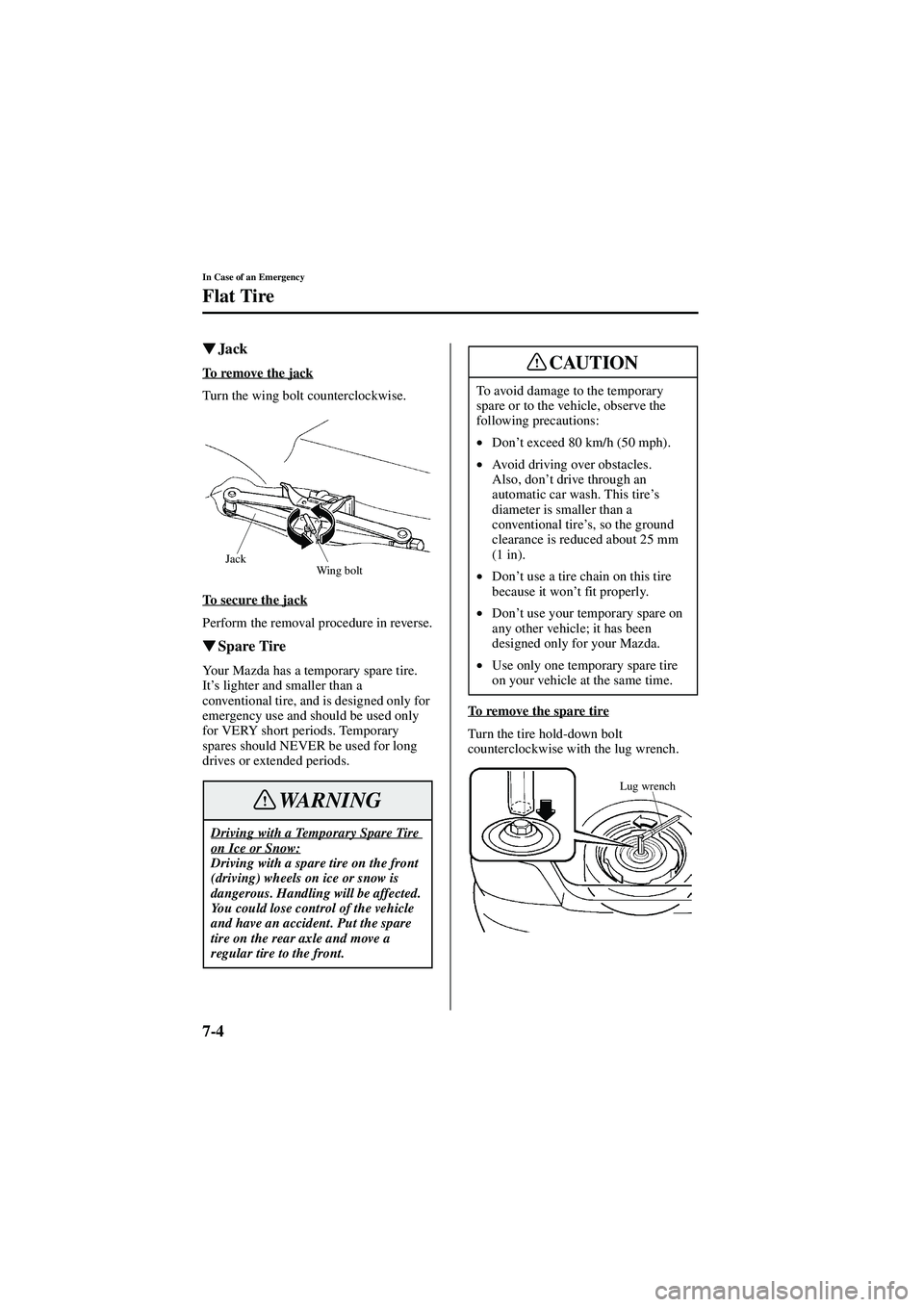
�� � Jack
To remove the jack
Turn the wing bolt counterclockwise.
To secure the jack
Perform the removal procedure in reverse.
�
�� � Spare Tire
Your Mazda has a temporary spare tire.
It’s lighter and smaller than a
conventional tire, and is designed only for
emergency use and should be used only
for VERY short periods. Temporary
spares should NEVER be used for long
drives or extended periods. To remove the spare tire
Turn the tire hold-down bolt
counterclockwise with the lug wrench.
Driving with a Temporary Spare Tire on Ice or Snow:Driving with a spare tire on the front
(driving) wheels on ice or snow is
dangerous. Handling will be affected.
You could lose control of the vehicle
and have an accident. Put the spare
tire on the rear axle and move a
regular tire to the front.
Jack
Wing bolt
WARNING
To avoid damage to the temporary
spare or to the vehicle, observe the
following precautions:
•Don ’t exceed 80 km/h (50 mph).
• Avoid driving over obstacles.
Also, don ’t drive through an
automatic car wash. This tire ’s
diameter is smaller than a
conventional tire ’s, so the ground
clearance is reduced about 25 mm
(1 in).
• Don ’t use a tire chain on this tire
because it won ’t fit properly.
• Don ’t use your temporary spare on
any other vehicle; it has been
designed only for your Mazda.
• Use only one temporary spare tire
on your vehicle at the same time.
CAUTION
Lug wrench
J94S.book Page 4 Saturday, June 23, 2001 1:04 PM
Page 165 of 250

7-5
In Case of an Emergency
Flat Tire
Form No. 8Q50-EA-01G
If you have a flat tire, drive slowly to a
level spot that is well off the road and out
of the way of traffic to change the tire.
Stopping in traffic or on the shoulder of a
busy road is dangerous.1. Park on a level surface off the right-of-
way and firmly set the parking brake.
2. Put a vehicle with an automatic transaxle in park (P), a manual
transaxle in reverse (R), and turn off
the engine.
3. Turn on the hazard warning flasher.
4. Have everyone get out of the vehicle and away from the vehicle and traffic.
5. Remove the jack, tool, and spare tire (page 7-3).
6. Block the wheel diagonally opposite the flat tire. When blocking a front
wheel, place the block in front of the
tire. When blocking a rear wheel, place
the block behind the tire.
Changing a Flat Tire
NOTE
If the following occurs while driving, it
could indicate a flat tire.
•Steering becomes difficult.
• The vehicle begins to vibrate
excessively.
• The vehicle pulls in one direction.
Jacking a Vehicle:Changing a tire is dangerous if not
done properly. The vehicle can slip off
the jack and seriously injure
someone.
Be sure to follow the directions for
changing a tire, and never get under a
vehicle that is supported only by a
jack.
Passenger in Vehicle Supported by a
Jack:Allowing someone to remain in a
vehicle supported by a jack is
dangerous. The occupant could cause
the vehicle to fall resulting in serious
injury. Never allow anyone inside a
vehicle supported by jack.
WARNING
NOTE
Make sure the jack is well lubricated
before using it.
J94S.book Page 5 Saturday, June 23, 2001 1:04 PM


