Page 83 of 250

5-3
Driving Your Mazda
Starting and Driving
Form No. 8Q50-EA-01G
ACC (Accessory)
The steering wheel unlocks and some
electrical accessories will operate.
ON
This is the normal running position after
the engine is started. The warning lights
(except brakes)should be inspected before
the engine is started (page 5-23).
START
The engine is started in this position. It
will crank until you release the key; then
it returns to the ON position. The brake
warning light can be checked after the
engine is started (page 5-23).
�
�� � Ignition Key Reminder
If the ignition switch is in the LOCK or
ACC position, a beep will sound when
any door is opened. 1. Occupants should fasten their seat
belts.
2. Make sure the parking brake is on.
3. Depress the brake pedal.
4. (Manual transaxle)
Depress the clutch pedal all the way
and shift into neutral.
Keep the pedal depressed while
cranking the engine.
NOTE
If turning the key is difficult, jiggle the
steering wheel from side to side.
Starting the Engine
NOTE
Engine-starting is controlled by the
spark ignition system.
This system meets all Canadian
Interference-Causing Equipment
Standard requirements regulating the
impulse electrical field strength of
radio noise.
NOTE
The starter will not operate if the
clutch pedal is not pushed down all the
way.
J94S.book Page 3 Saturday, June 23, 2001 1:04 PM
Page 86 of 250

5-6
Driving Your Mazda
Starting and Driving
Form No. 8Q50-EA-01G
Low brake fluid level warning
If the light stays on after the parking brake
is fully released, you may have a brake
problem.
Drive to the side of the road and park off
the right-of-way.
You may notice that the pedal is harder to
push or that it may go closer to the floor.
In either case, it will take longer to stop
the vehicle.
1. With the engine stopped, check the brake fluid level immediately and add
fluid as required (page 8-15).
2. After adding fluid, check the light again.
If the warning light remains on, or if the
brakes do not operate properly, do not
drive the vehicle. Have it towed to an
Authorized Mazda Dealer.
Even if the light goes off, have your brake
system inspected as soon as possible.
�
�� � Anti-Lock Brake System (ABS)
The ABS control unit continuously
monitors the speed of each wheel. If one
is about to lock up, the ABS responds by
automatically releasing and reapplying
that wheel’ s brake.
The driver will feel a slight vibration in
the brake pedal and may hear a chattering
noise from the brake system. This is
normal when the ABS operates. Don ’t
pump the brakes, continue to press down
on the brake pedal.
Brake Warning Light:Driving with the brake system
warning light on is dangerous. It
indicates that your brakes may not
work at all or that they could
completely fail at any time. If this
light remains on, have the brakes
inspected immediately. Don ’t drive
with this light on, and contact an
Authorized Mazda Dealer to have the
brakes inspected as soon as possible.
WARNING
ABS:The ABS cannot compensate for
unsafe and reckless driving, excessive
speed, tailgating (following another
vehicle too closely), and hydroplaning
(reduced tire friction and road
contact because of water on the road
surface). You can still have an
accident. So don ’t rely on ABS as a
substitute for safe driving.
NOTE
Braking distances may be longer on
loose surfaces (snow or gravel, for
example) which usually have a hard
foundation. A vehicle with a normal
braking system may require less
distance to stop under these conditions
because the tires will build up a wedge
of surface layer when the wheels skid.
WARNING
J94S.book Page 6 Saturday, June 23, 2001 1:04 PM
Page 89 of 250
5-9
Driving Your Mazda
Starting and Driving
Form No. 8Q50-EA-01G
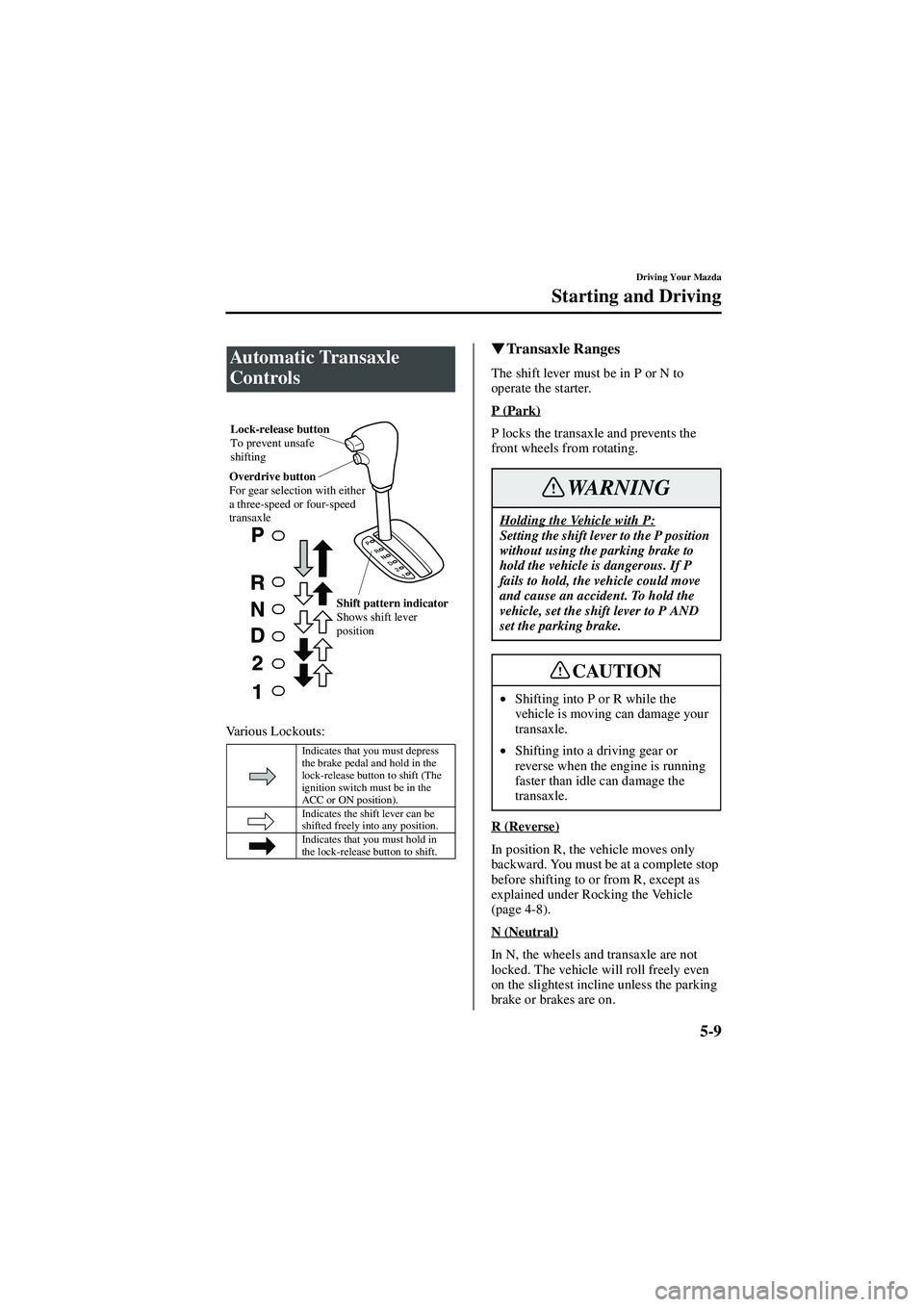
Various Lockouts:
�
�� � Transaxle Ranges
The shift lever must be in P or N to
operate the starter.
P (Park)
P locks the transaxle and prevents the
front wheels from rotating.
R (Reverse)
In position R, the vehicle moves only
backward. You must be at a complete stop
before shifting to or from R, except as
explained under Rocking the Vehicle
(page 4-8).
N (Neutral)
In N, the wheels and transaxle are not
locked. The vehicle will roll freely even
on the slightest incline unless the parking
brake or brakes are on.
Automatic Transaxle
Controls
Indicates that you must depress
the brake pedal and hold in the
lock-release button to shift (The
ignition switch must be in the
ACC or ON position).
Indicates the shift lever can be
shifted freely into any position.
Indicates that you must hold in
the lock-release button to shift.
Lock-release button
To prevent unsafe
shifting
Overdrive button
For gear selection with either
a three-speed or four-speed
transaxle
Shift pattern indicator
Shows shift lever
position
Holding the Vehicle with P:Setting the shift lever to the P position
without using the parking brake to
hold the vehicle is dangerous. If P
fails to hold, the vehicle could move
and cause an accident. To hold the
vehicle, set the shift lever to P AND
set the parking brake.
•Shifting into P or R while the
vehicle is moving can damage your
transaxle.
• Shifting into a driving gear or
reverse when the engine is running
faster than idle can damage the
transaxle.
WARNING
CAUTION
J94S.book Page 9 Saturday, June 23, 2001 1:04 PM
Page 90 of 250

5-10
Driving Your Mazda
Starting and Driving
Form No. 8Q50-EA-01G
D (Drive)
D is the normal driving position. From a
stop, the transaxle will automatically shift
through a 4-gear sequence.
2 (Second)
The 2 position is helpful when driving in
heavy, slow-moving traffic and climbing
hills, for engine braking assist when going
down hills, or for starting on slick
surfaces and other situations where gentle
acceleration may be necessary.
Do not exceed the following speeds in the
2 position.
1 (Low)
Use the 1 position for maximum power in
hard-pulling situations, or for climbing
and descending very steep grades.
Do not exceed the following speeds in the
1 position.
�
�� � Shift-Lock System
For your safety, the automatic transaxle
has a shift-lock, which prevents shifting
out of P unless the brake pedal is
depressed.
To shift from P:
1. Depress and hold the brake pedal.
2. Start the engine.
3. Push and hold the lock-release button.
4. Move the shift lever.
Shifting from N or P:It ’s dangerous to shift from N or P
into a driving gear when the engine is
running faster than idle. If this is
done, the vehicle could move
suddenly, causing an accident or
serious injury. If the engine is
running faster than idle, don ’t shift
from N or P into a driving gear.
2.0-liter engine 116 km/h (72 mph)
2.5-liter engine 104 km/h (65 mph)
2.0-liter engine 63 km/h (39 mph)
2.5-liter engine 60 km/h (38 mph)
WARNING
NOTE
• When the ignition switch is in the
LOCK position, the transaxle
cannot be shifted from P.
• To be sure the vehicle is in park, the
ignition key cannot be removed
unless the shift lever is in P.
J94S.book Page 10 Saturday, June 23, 2001 1:04 PM
Page 111 of 250
5-31
Driving Your Mazda
Warning/Indicator Lights and Beeps
Form No. 8Q50-EA-01G
�
�� � Ignition Key Reminder
If the ignition switch is in the LOCK or
ACC position, a beep will sound when
any door is opened.
�
�� � Lights-On Reminder
If lights are on and the key is removed
from the ignition switch, a beep will
sound when any door is opened.
Beeps
J94S.book Page 31 Saturday, June 23, 2001 1:04 PM
Page 112 of 250

5-32
Driving Your Mazda
Form No. 8Q50-EA-01G
Switches and Controls
�
�� � Headlights
To turn on the lights, turn the knob on the
end of the control lever.
�
�� � Lights-On Reminder
If lights are on and the key is removed
from the ignition switch, a beep will
sound when any door is opened.
�
�� � Headlight High-Low Beam
Push the lever forward for high beams.
Pull it back for low.
�
�� � Flashing the Headlights
To flash the headlights, pull the lever fully
toward you. The headlight switch need
not be on, and the lever will return to the
normal position when released.
Lighting Control
Lever Position OFF
Headlights Off Off OnTaillights
Parking lights
License lights
Side-marker lights Off On On
NOTE
•
If the light switch is left on, the
lights will automatically switch off
30 seconds after turning the ignition
switch to the LOCK position or
removing the key.
The lights will automatically switch
back on when the ignition switch is
turned to the ACC or ON position.
• To prevent discharging the battery,
don ’t leave the lights on while the
engine is off.
Low beams High beams
J94S.book Page 32 Saturday, June 23, 2001 1:04 PM
Page 114 of 250

5-34
Driving Your Mazda
Switches and Controls
Form No. 8Q50-EA-01G
The ignition switch must be in the ON
position.
�
�� � Windshield Wipers
Turn the wipers on by pulling the lever
down.
INT — Intermittent
1 — Normal
2 — Fast
Variable-speed intermittent wipers
Set the lever to INT and choose the
interval timing by rotating the ring.
Windshield Wipers and
Wa s h e r
Frozen Washer Fluid:Using windshield washer fluid in
freezing temperatures is dangerous.
The washer fluid could freeze on the
windshield and block your vision.
You could have an accident. Don ’t use
the washer without first warming the
windshield.
NOTE
Because heavy ice and snow can jam
the wiper blades, the wiper motor is
protected by a circuit breaker. This
mechanism will automatically stop
operation of the blades, but only for
about 5 minutes.
If this happens, turn off the wiper
switch and park off the right-of-way,
and remove the snow and ice.
After 5 minutes, turn on the switch and
the blades should operate normally. If
they don ’t resume functioning, consult
an Authorized Mazda Dealer as soon
as possible.
WARNING
OFF
INT 1
2
OFF INT
J94S.book Page 34 Saturday, June 23, 2001 1:04 PM
Page 122 of 250
6-6
Interior Comfort
Climate Control System
Form No. 8Q50-EA-01G
�
�� � Control Switches
Fan control dial
This dial allows variable fan speeds.
0—Fan off
1—Low speed
2—Medium low speed
3—Medium high speed
4—High speed Temperature control dial
This dial controls temperature of the air
coming through the system. Turn it
clockwise for hot (red) and
counterclockwise for cold (blue).
Manual Type
Fan control dial
Mode selector switch
Mode selector switch
Temperature control dial
Air conditioner switchAir intake selector switch
Hot
Cold
J94S.book Page 6 Saturday, June 23, 2001 1:04 PM

