Page 95 of 394

2-22
FIRST (1): This position gives you even more power
(but lower fuel economy) than SECOND (2). You can
use it on very steep hills, or in deep snow or mud.
If the shift lever is put in FIRST (1) while the vehicle is
moving forward, the transmission won't shift into first
gear until the vehicle is going slowly enough.
NOTICE:
If your rear wheels can't turn, don't try to drive.
This might happen if you were stuck in very deep
sand or mud or were up against a solid object.
You could damage your transmission.
Also, if you stop when going uphill, don't hold
your vehicle there with only the accelerator pedal.
This could overheat and damage the transmission.
Use your brakes or shift into PARK (P) to hold
your vehicle in position on a hill.
On cold days, approximately 32�F (0�C) or colder,
your transmission is designed to shift differently until
the engine reaches normal operating temperature.
This is intended to improve heater performance.
Tow/Haul Mode Switch
Your vehicle is equipped with a tow/haul mode.
The switch is located on the end of the column shift
lever. You can use this feature to assist when towing or
hauling a heavy load. See ªTow/Haul Modeº in the
Index for more information.
Page 102 of 394

2-29
Locking Rear Axle
If your vehicle has this feature, your locking rear axle
can give you additional traction on snow, mud, ice, sand
or gravel. It works like a standard axle most of the time,
but when one of the rear wheels has no traction and
the other does, this feature will allow the wheel with
traction to move the vehicle.
All-Wheel Drive
With this feature, engine power is sent to all four wheels
when extra traction is needed.
This is like four
-wheel drive, but there is no separate
lever or switch to engage or disengage the front axle.
It is fully automatic, and adjusts itself as needed for
road conditions.
QUADRASTEER� (4WS)
The QUADRASTEER System has a control and
diagnostic module that monitors and records current
system status and operational information.
If your vehicle is equipped with the 4WS system it has
the ability to steer the vehicle with all four wheels.
Once this mode is selected, it is recommended to leave
the vehicle in this mode at all times.
The 4WS system is equipped with three different
driving modes:
�Two wheel steering (2WS)
�Four wheel steering (4WS)
�Four wheel steering with a trailer mode (4WS TOW)
Page 103 of 394

2-30
The switch is located on the instrument panel.
2WS: In this mode the vehicle will operate like any
other vehicle with two wheel steering. If you want to
use 2WS and your vehicle is not in this mode, press the
4 Wheel Steer button until the 2WS indicator, located to
the right of the 4 Wheel Steer button, lights up. If the
2WS indicator is flashing you will have to center the
steering wheel by turning it to the left or right.
4WS: In this mode all four wheels will help steer the
vehicle. If you want to use 4WS, and your vehicle is not
in this mode, press the 4 Wheel Steer button, until the
4WS indicator, located to the right of the 4 Wheel Steer
button, lights up. If the 4WS indicator is flashing you
will have to center the steering wheel by turning it to the
left or right.Slower Speed Mode (below 40 mph/64 kph)
At slower speeds the steering will operate in the lower
speed mode. This means the front and rear wheels will
turn in opposite directions. This helps the vehicle make
tighter turns, such as during parking, cornering and
turning into tight spaces.
Page 104 of 394
2-31
Higher Speed Mode (40 mph/64 kph and above)
At higher speeds the steering will operate in the higher
speed mode. This means the front and rear wheels will
turn in the same direction. This improves stability of the
vehicle during lane changes and sweeping turns.4WS TOW: The 4WS TOW mode provides enhanced
stability allowing the trailer to follow the path of the tow
vehicle more closely, especially during lane changes.
In this mode the system operates much like the
4WS mode, but is enhanced for trailer towing.
It is recommended for all types and weights of trailers.
To engage the 4WS TOW mode, press the 4 Wheel Steer
button until the 4WS and TOW indicators light up on
the instrument panel. If the TOW indicator is flashing
you will have to center the steering wheel by turning it
to the left or right. While in the 4WS TOW mode, it is
possible the steering wheel may be slightly off center.
Page 106 of 394
2-33
Horn
To sound the horn, press the center pad on the
steering wheel.
Tilt Wheel
A tilt wheel allows you to adjust the steering wheel before
you drive. You can raise it to the highest level to give your
legs more room when you exit and enter your vehicle.
The tilt steering wheel lever
is located on the lower left
side of the steering column.
To tilt the wheel, hold the steering wheel and pull the
lever. Then move the steering wheel to a comfortable
position and release the lever to lock the wheel in place.
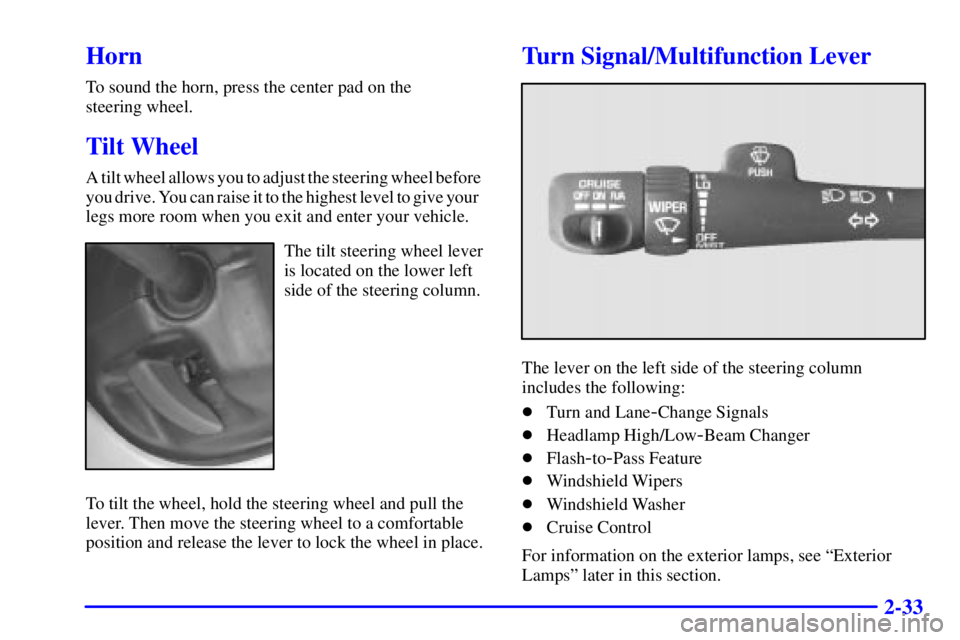
Turn Signal/Multifunction Lever
The lever on the left side of the steering column
includes the following:
�Turn and Lane
-Change Signals
�Headlamp High/Low
-Beam Changer
�Flash
-to-Pass Feature
�Windshield Wipers
�Windshield Washer
�Cruise Control
For information on the exterior lamps, see ªExterior
Lampsº later in this section.
Page 109 of 394

2-36 Cruise Control
With cruise control, you can maintain a speed of about
25 mph (40 km/h) or more without keeping your foot on
the accelerator.
This can really help on long trips. Cruise control does
not work at speeds below about 25 mph (40 km/h).
CAUTION:
�Cruise control can be dangerous where
you can't drive safely at a steady speed.
So, don't use your cruise control on
winding roads or in heavy traffic.
�Cruise control can be dangerous on
slippery roads. On such roads, fast changes
in tire traction can cause needless wheel
spinning, and you could lose control.
Don't use cruise control on slippery roads.
Setting Cruise Control
CAUTION:
If you leave your cruise control switch on when
you're not using cruise, you might hit a button
and go into cruise when you don't want to.
You could be startled and even lose control.
Keep the cruise control switch off until you
want to use cruise control.
1. Move the cruise control switch to ON.
2. Get up to the speed you want.
3. Press in the SET button at the end of the lever and
release it.
4. Take your foot off the accelerator pedal.
Page 113 of 394

2-40
There is a delay in the transition between the daytime
and nighttime operation of the Daytime Running Lamps
(DRL) and the automatic headlamp systems so that
driving under bridges or bright overhead street lights does
not affect the system. The DRL and automatic headlamp
system will only be affected when the light sensor sees a
change in lighting lasting longer than the delay.
To idle your vehicle with the automatic headlamp
system off, set the parking brake while the ignition is
off. Then start your vehicle. The automatic headlamp
system will stay off until you release the parking brake.
You may be able to turn off your automatic headlamp
system. See ªDaytime Running Lamps (DRL)º later in
this section for more information.
As with any vehicle, you should turn on the regular
headlamps if you need them.
Lamps On Reminder
A reminder chime will sound when your headlamps or
parking lamps are manually turned on and your ignition
is in OFF, LOCK or ACCESSORY. To disable the
chime, turn the thumbwheel all the way down. In the
automatic mode, the headlamps turn off once the
ignition key is in OFF.
Daytime Running Lamps
Daytime Running Lamps (DRL) can make it easier
for others to see the front of your vehicle during
the day. DRL can be helpful in many different driving
conditions, but they can be especially helpful in the
short periods after dawn and before sunset. Fully
functional daytime running lamps are required on all
vehicles first sold in Canada.
The DRL system will come on when the following
conditions are met:
�The ignition is on,
�the exterior lamp control off,
�the automatic transmission is not in PARK (P),
�the light sensor determines it is daytime and
�the parking brake is released.
When the DRL are on, only your DRL lamps will be on.
The taillamps, sidemarker and other lamps won't be on.
The instrument panel won't be lit up either.
Page 116 of 394

2-43
Interior Lamps
Instrument Panel Brightness Control
This feature controls the brightness of the instrument
panel lights.
The thumbwheel for this feature is located next to the
exterior lamp control.
Turn the thumbwheel up to adjust the instrument panel
lights and return the radio display to full brightness
when the headlamps or parking lamps are on. To turn on
the dome lamps, with the vehicle doors closed, turn the
thumbwheel all the way up.
Exit Lighting
With exit lighting, the interior lamps will come on when
you remove the key from the ignition. The lamps will
not come on if the DOME OVERRIDE button is
pressed in.
Illuminated Entry
Your vehicle is equipped with an illuminated entry feature.
When a door is opened, the dome lamps and puddle
lamps will come on if the DOME OVERRIDE button is
in the out position. If the DOME OVERRIDE button is
pressed in, the lamps will not come on.
Front Reading Lamps
Your vehicle has front
reading lamps located
in the overhead console.
Press the round button
located next to the lamp
to turn the lamp on.
The lamps can be adjusted
to point in the direction
you want them to go.
Press the button again to turn the lamp off.