Page 101 of 384

2-43
Turn Signal/Multifunction Lever
The lever on the left side of the steering column
includes the following:
�Turn and Lane
-Change Signals
�Headlamp High/Low
-Beam Changer
�Flash
-to-Pass Feature
�Cruise Control
For information on exterior lamps, see ªExterior
Lampsº later in this section.
Turn and Lane-Change Signals
The turn signal has two upward (for right) and two
downward (for left) positions. These positions allow
you to signal a turn or a lane change.
To signal a turn, move the multifunction lever all the
way up or down. When the turn is finished, the lever
will return automatically.
An arrow on the instrument
panel cluster will flash in
the direction of the turn
or lane change.
To signal a lane change, just raise or lower the lever
until the arrow starts to flash. Hold it there until you
complete your lane change. The lever will return by
itself when you release it.
If you signal a turn or a lane change and the arrows flash
faster than normal, a signal bulb may be burned out.
If a bulb is burned out, replace it to help avoid an
accident. If the arrows don't go on at all when you
signal a turn, check the fuses and check for burned
-out
bulbs. See ªFuses and Circuit Breakersº in the Index.
Page 102 of 384

2-44
Turn Signal on Chime
A chime will remind you if you leave the turn signal on
for more than 3/4 mile (1.2 km) of driving.
If you need to leave the turn signal on for more than
3/4 mile (1.2 km), turn off the signal and then turn it
back on.
Headlamp High/Low-Beam Changer
To change the headlamps from low beam to high or high
to low, push the turn signal lever all the way forward.
When the high beams
are on, this light on the
instrument panel cluster
also will be on. To change
the headlamps from high to
low, pull the lever rearward.
Lamps on Reminder
If you turn the ignition off and leave the headlamps or
parking lamps on and open a door, you will hear a chime
reminding you to turn off the lamps.
Flash-to-Pass Feature
To use the flash-to-pass feature, momentarily pull the
turn signal lever toward you. The high
-beam indicator
will flash to indicate to the other driver that you intend
to pass. If the low
-beam headlamps are off and you
have the optional fog lamps on, the fog lamps will flash.
Windshield Wipers
Use this lever located on the right side of the steering
column to operate the windshield wipers.
Page 117 of 384
2-59
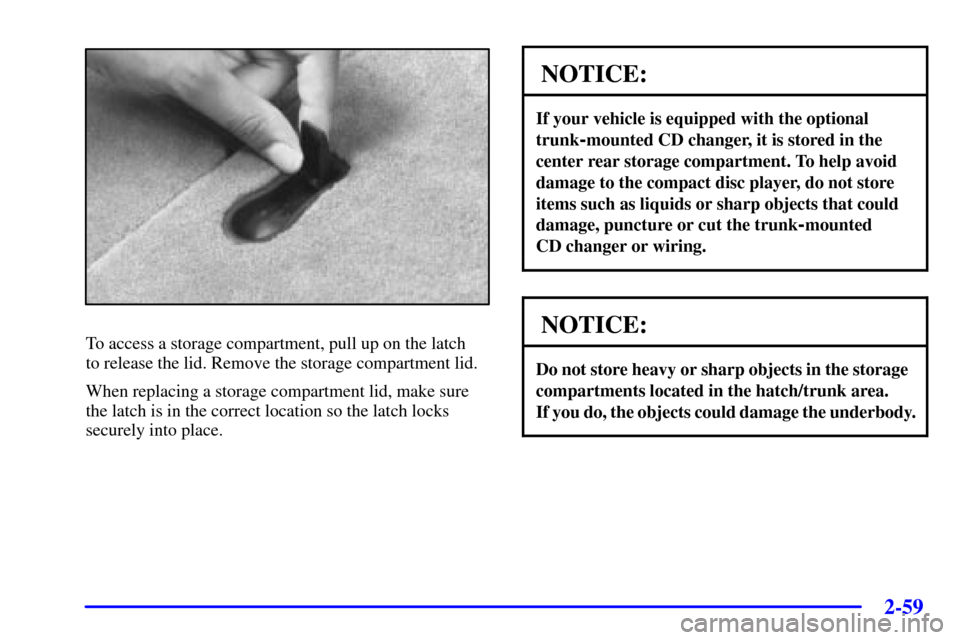
To access a storage compartment, pull up on the latch
to release the lid. Remove the storage compartment lid.
When replacing a storage compartment lid, make sure
the latch is in the correct location so the latch locks
securely into place.
NOTICE:
If your vehicle is equipped with the optional
trunk
-mounted CD changer, it is stored in the
center rear storage compartment. To help avoid
damage to the compact disc player, do not store
items such as liquids or sharp objects that could
damage, puncture or cut the trunk
-mounted
CD changer or wiring.
NOTICE:
Do not store heavy or sharp objects in the storage
compartments located in the hatch/trunk area.
If you do, the objects could damage the underbody.
Page 177 of 384

3-
3-1
Section 3 Comfort Controls and Audio Systems
In this section, you'll find out how to operate the comfort control and audio systems offered with your vehicle.
Be sure to read about the particular systems supplied with your vehicle.
3
-2 Comfort Controls
3
-2 Manual Comfort Controls
3
-3 Automatic Electronic Dual Climate
Control System (Option)
3
-10 Sensors
3
-11 Air Conditioning
3
-11 Heating
3
-12 Defogging and Defrosting
3
-12 Rear Window Defogger
3
-13 Audio Systems
3
-13 Setting the Clock
3
-14 AM-FM Stereo with Cassette Tape Player
and Automatic Tone Control (If Equipped)3
-19 AM-FM Stereo with Compact Disc Player
and Automatic Tone Control
3
-24 Trunk-Mounted CD Changer (Option)
3
-29 Theft-Deterrent Feature
3
-31 Understanding Radio Reception
3
-32 Tips About Your Audio System
3
-33 Care of Your Cassette Tape Player
3
-34 Care of Your Compact Discs
3
-34 Care of Your Compact Disc Player
3
-34 Fixed Mast Antenna (Z06)
3
-35 Power Mast Antenna Care (Convertible)
3
-35 Integrated Windshield and Rear Window
Antennas (Coupe)
Page 200 of 384
3-24 Trunk-Mounted CD Changer (Option)
If your vehicle has the optional trunk-mounted
CD changer it is located in the rear center storage
compartment. See ªRear Storage Compartmentsº in
the Index for more information.
With the trunk
-mounted CD changer you can play up to
12 discs continuously. Normal size discs may be played
using the trays supplied in the magazine. The small discs
(8 cm) can be played only with specially designed trays.
NOTICE:
Heavy objects in the center storage area which
may shift or slide while driving could damage
your CD changer. Protect your CD changer by
not placing heavy, moveable objects in the center
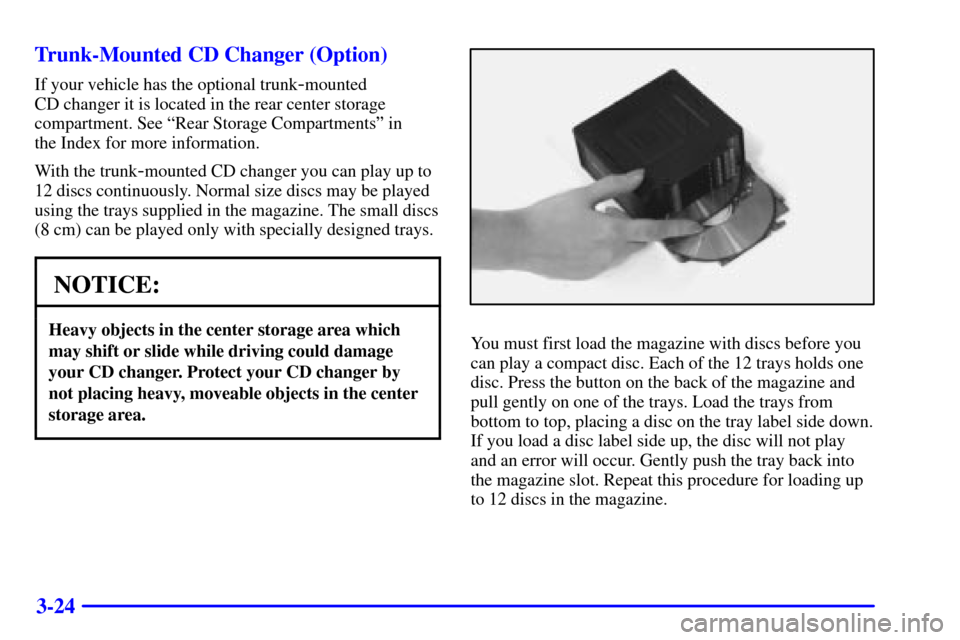
storage area.You must first load the magazine with discs before you
can play a compact disc. Each of the 12 trays holds one
disc. Press the button on the back of the magazine and
pull gently on one of the trays. Load the trays from
bottom to top, placing a disc on the tray label side down.
If you load a disc label side up, the disc will not play
and an error will occur. Gently push the tray back into
the magazine slot. Repeat this procedure for loading up
to 12 discs in the magazine.
Page 201 of 384
3-25
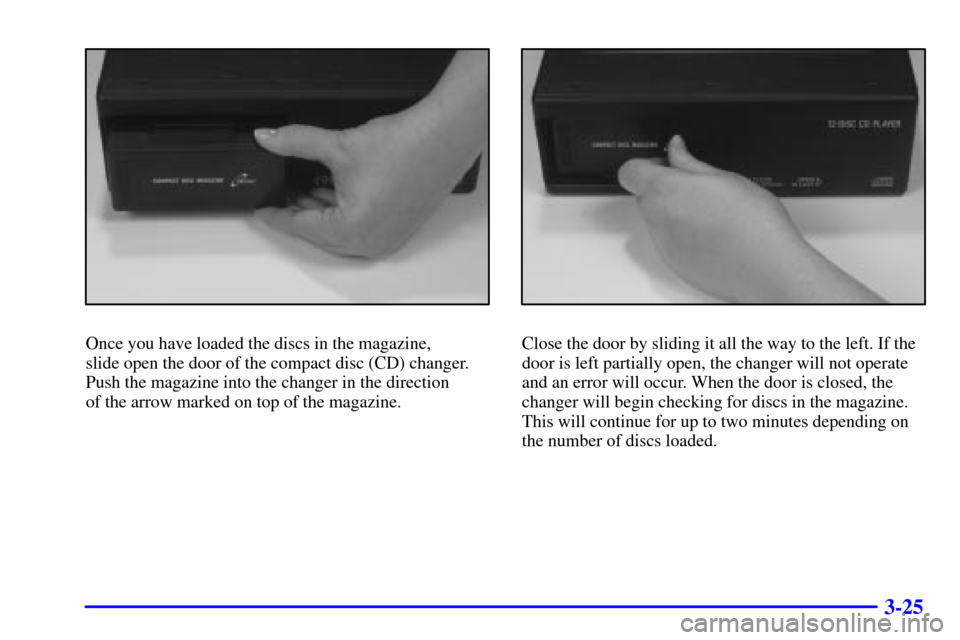
Once you have loaded the discs in the magazine,
slide open the door of the compact disc (CD) changer.
Push the magazine into the changer in the direction
of the arrow marked on top of the magazine.Close the door by sliding it all the way to the left. If the
door is left partially open, the changer will not operate
and an error will occur. When the door is closed, the
changer will begin checking for discs in the magazine.
This will continue for up to two minutes depending on
the number of discs loaded.
Page 202 of 384

3-26
To eject the magazine from the player, slide the CD
changer door all the way open. The magazine will
automatically eject. Remember to keep the door closed
whenever possible to keep dirt and dust from getting
inside the changer.
Whenever a CD magazine with discs is loaded in the
changer, the compact disc symbol will appear on the
radio display. If the CD changer is checking the magazine
for CDs, the compact disc symbol will flash on the
display until the changer is ready to play. When a CD
begins playing, CD will appear in the bottom left corner
and a disc and track number will be displayed. The disc
numbers are listed on the front of the magazine.
All of the CD functions are controlled by the radio
pushbuttons except for ejecting the magazine.Operating the Trunk-Mounted CD Changer with
the AM
-FM Stereo with Cassette Tape Player and
Automatic Tone Control
If an error appears on the display, see ªCompact Disc
Messagesº later in this section.
The following pushbuttons are used for the
trunk
-mounted CD changer.
1 PREV (Previous): Press this pushbutton to go to
the previous track if the current track has been playing
for less than eight seconds. If this pushbutton is pressed
and the current track has been playing for more than
eight seconds, it will go to the beginning of the current
track. If you hold or press this pushbutton more than
once, the player will continue moving back through the
disc. The sound will mute while seeking.
2 PROG (Program): Press this pushbutton to select
the next disc in the magazine. If a CD cannot be played,
its number will be skipped when selecting discs while
using this pushbutton.
Page 203 of 384

3-27
3 NEXT: Press this pushbutton to advance to the next
track. If you press and hold this pushbutton or press it
more than once, the player will continue moving forward
through the disc. The sound will mute while seeking.
REV 4 (Reverse): Press and hold this pushbutton to
quickly reverse within a track. Release this pushbutton
to resume play.
� 5 (Dolby): This pushbutton has no function when
playing a CD.
FWD 6 (Forward): Press and hold this pushbutton to
quickly advance within a track. Release this pushbutton
to resume play.
RECALL: Press this button to see what track is
currently playing. Press it again within five seconds to
see how long the track has been playing. When a new
track starts to play, the track number will also appear.
Press it a third time and the time of day will be displayed.SEEK: The left arrow works the same as the
PREV pushbutton and the right arrow works the same
as the NEXT pushbutton.
P.SCAN (Preset Scan): Press this button to play the
compact discs in random, rather than sequential order.
RDM will appear on the display. Press this button again
to turn off random play.
AM/FM: Press this button to listen to the radio when
playing a cassette tape or a compact disc.
Tape AUX (Auxiliary): Press this button to play a
CD when listening to the radio. You can also press this
button to switch between playing a tape in the cassette
tape player and playing a CD in the trunk
-mounted
CD changer, if both are loaded.