Page 148 of 488
2-82
The Instrument Panel--Your Information System
Page 149 of 488
2-83
The main components of your instrument panel are the following:
A. Air Vents
B. Turn Signal/Multifunction Lever
C. Instrument Panel Cluster
D. Transfer Case Button (If Equipped)
E. Exterior Lamps Control
F. Fog Lamp Button (if equipped)
G. Brake Release
H. Audio Steering Controls (If Equipped)I. Rear Window Washer/Wiper
J. Rear Endgate Release
K. Ashtray
L. Comfort Controls
M. Rear Window Defogger
N. Accessory Power Outlets
O. Audio System
P. Glove Box
Page 150 of 488
2-84
Instrument Panel Cluster
Your instrument panel cluster is designed to let you know at a glance how your vehicle is running. You'll know how
fast you're going, about how much fuel you've used, and many other things you'll need to know to drive safely and
economically.
Base Level cluster with Automatic Transmission United States, Canada cluster similar
Page 154 of 488

2-88
Air Bag Readiness Light
There is an air bag readiness light on the instrument
panel, which shows the air bag symbol. The system
checks the air bag's electrical system for malfunctions.
The light tells you if there is an electrical problem. The
system check includes the air bag sensors, the air bag
modules, the wiring and the crash sensing and
diagnostic module. For more information on the air bag
system, see ªAir Bagº in the Index.
This light will come on
when you start your vehicle,
and it will flash for a few
seconds. Then the light
should go out. This means
the system is ready.
If the air bag readiness light stays on after you start the
vehicle or comes on when you are driving, your air bag
system may not work properly. Have your vehicle
serviced right away.
CAUTION:
If the air bag readiness light stays on after you
start your vehicle, it means the air bag system
may not be working properly. The air bags in
your vehicle may not inflate in a crash, or they
could even inflate without a crash. To help avoid
injury to yourself or others, have your vehicle
serviced right away if the air bag readiness light
stays on after you start your vehicle.
The air bag readiness light should flash for a few
seconds when you turn the ignition key to RUN. If the
light doesn't come on then, have it fixed so it will be
ready to warn you if there is a problem.
Page 156 of 488

2-90
You can only drive for a short time with the reading in
either warning zone. If you must drive, turn off all
unnecessary accessories.
Readings in either warning zone indicate a possible
problem in the electrical system. Have the vehicle
serviced as soon as possible.
Shift Light
You have the shift light on
the instrument panel cluster
if you have a manual
transmission.
Shifting when the indicator light is on will help you get
the best fuel economy. See ªShift Lightº in the Index.
Brake System Warning Light
When the ignition is on, the brake system warning light
will come on when you set your parking brake. The light
will stay on if your parking brake doesn't release fully.
If it stays on after your parking brake is fully released, it
means you have a brake problem.
Your vehicle's hydraulic brake system is divided into
two parts. If one part isn't working, the other part can
still work and stop you. For good braking, though, you
need both parts working well.
If the warning light comes on, there could be a brake
problem. Have your brake system inspected right away.
United States Canada
Page 169 of 488

3-2
Comfort Controls
With this system, you can control the heating, cooling
and ventilation in your vehicle.
Standard Climate Control System
Fan Knob
The knob on the left side of the climate control system
control panel regulates the fan speed. To increase
airflow, move the knob clockwise. To decrease airflow,
move it counterclockwise.Temperature Knob
The middle knob on the control panel lets you select the
relative temperature of the air flowing into the passenger
area of your vehicle. Move the knob clockwise toward
the red area for warmer air. Move the knob
counterclockwise toward the blue area for cooler air.
Mode Knob
The right knob on the control panel allows you to
choose the direction of air delivery.
OFF: This mode turns the system off. Some outside air
will still enter the vehicle whenever the vehicle is
moving forward.
MAX A/C (Maximum Air Conditioning): This mode
provides maximum cooling with the least amount of
work. MAX A/C recirculates much of the air inside your
vehicle so it cools quickly. This setting directs most of
the air through the instrument panel vents and a small
amount through the floor ducts.
Page 170 of 488

3-3
A/C (Air Conditioning): This setting cools and
dehumidifies the air entering your vehicle and directs
most of the air through the instrument panel vents
and a small amount through the floor ducts.
(Bi-Level Air Conditioning): This setting cools
and dehumidifies the air entering your vehicle and
directs it through the floor ducts as well as the
instrument panel outlets.
(Vent): This setting directs most of the air through
the instrument panel outlets and a small amount through
the floor outlets.
(Floor): This setting directs most of the air
through the floor ducts and some air through the
windshield defroster outlets.
(Blend): Airflow is divided equally between the
floor ducts and the windshield defroster outlets.
(Defrost): This setting directs most air through
the windshield defroster outlets and some through the
floor ducts.
Air Conditioning
On hot days, open the windows long enough to let hot
inside air escape. This reduces the time it takes for your
vehicle to cool down. Then keep your windows closed
for the air conditioner to work its best.
For quick cool
-down on very hot days, use MAX A/C
with the temperature knob turned to the left. This setting
should be used to keep odors and/or dust from entering
the vehicle. For normal cooling on hot days, use A/C
with the temperature knob turned to the left.
On cool but sunny days, use Bi
-Level A/C to deliver
warmer air to the floor and cooler air to the instrument
panel outlets.
When the air conditioner is on, you may sometimes
notice slight changes in your vehicle's engine speed and
power. This is normal because the system is designed
to cycle the compressor on and off to keep the
desired temperature.
Page 172 of 488
3-5
The rear window defogger will stay on for five to seven
minutes, then turn off. If you need additional warming
time, turn it on again. You can turn the defogger off at
any time by pressing the button.
Do not attach a temporary vehicle license, tape or decals
across the defogger grid on the rear window.
NOTICE:
Don't use a razor blade or something else sharp
on the inside of the rear window. If you do, you
could cut or damage the warming grid, and the
repairs wouldn't be covered by your warranty.
Ventilation System
For mild outside temperatures when little heating or
cooling is needed, use vent mode to direct outside air
through your vehicle. Airflow is through the instrument
panel outlets.
Your vehicle's ventilation system supplies outside air to
the inside of your vehicle when it is moving. When the
vehicle is not moving, you can get outside air to flow
through by selecting any mode except max A/C and any
fan speed.
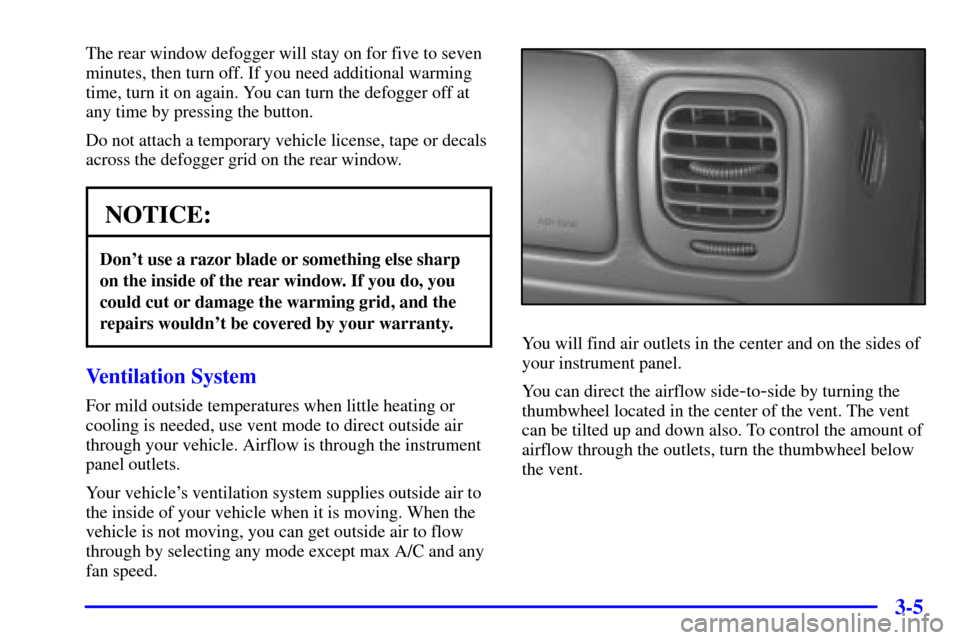
You will find air outlets in the center and on the sides of
your instrument panel.
You can direct the airflow side
-to-side by turning the
thumbwheel located in the center of the vent. The vent
can be tilted up and down also. To control the amount of
airflow through the outlets, turn the thumbwheel below
the vent.