Page 188 of 417

3-11 AM-FM Stereo with Cassette Tape
Player (Bose
�)
Included with the AM-FM Stereo with Cassette Tape
Player is a six disc CD changer. It is equipped with
ten Bose
� high performance speakers, an Acoustimass�
bass module and a seven channel Bose amplifier.
Please see your dealer for details.Playing the Radio
PWR VOL: Press this knob to turn the system on
and off. To increase volume, turn the knob clockwise.
Turn it counterclockwise to decrease volume. The knob
is capable of being turned continuously.
SCV: Your system has a feature called
Speed
-Compensated Volume (SCV). With SCV, your
audio system adjusts automatically to make up for road
and wind noise as you drive. Set the volume at the
desired level. Turn the control ring behind the upper
knob clockwise to adjust the SCV. Then, as you drive,
SCV automatically increases the volume, as necessary,
to overcome noise at any particular speed. The volume
level should always sound the same to you as you drive.
If you don't want to use SCV, turn the control all the
way down. Each notch on the control ring allows for
more volume compensation at faster vehicle speeds.
REAR DSPL: When the main radio is turned on, press
this button to turn on the rear seat audio display on the
main radio. Press it again to turn the rear seat audio
display off.
PR: Press this button to turn rear seat audio on or off.
The light to the right of the button will illuminate to
indicate that rear seat audio is on.
Page 192 of 417
3-15
CD Adapter Kits
It is possible to use a portable CD player adapter kit
with your cassette tape player after activating the bypass
feature on your tape player.
To activate the bypass feature, perform the
following steps:
1. Turn the ignition to RUN or ACCESSORY.
2. Turn the radio off.
3. Press and hold the TAPE button for five seconds.
The tape symbol on the display will flash for
two seconds, indicating the feature is active.
4. Insert the adapter into the cassette slot. It will power
up the radio and begin playing.
This override routine will remain active until EJECT
is pressed.Rear Seat Audio (RSA)
This feature allows rear seat passengers to listen to and
control any of the music sources, including AM FM,
cassette tapes and CDs, through the Rear Seat Audio
(RSA) controller. However, the rear seat passengers can
only control the music sources that the front seat
passengers are not listening to.
Page 193 of 417

3-16
For example, rear seat passengers may listen to a
cassette tape through headphones while the driver listens
to the radio through the front speakers. The rear seat
passengers have control of the volume for each set of
headphones. Be aware that the front seat audio controls
always have priority over the RSA controls. If the front
seat passengers switch the source for the main radio to a
remote source, the RSA will play the same remote
source. The rear speakers will be muted when the RSA
power is turned on. You may operate the RSA functions
even when the main radio is off.
The following functions are controlled by the buttons on
the main radio:
REAR DSPL: When the main radio is turned on, press
this button to turn on the RSA display on the main radio.
Press it again to turn the RSA display off.
PR: Press this button to turn RSA on or off. The light
to the right of the button will illuminate to indicate that
RSA is on.
The following functions are controlled by the RSA
system buttons:
PWR: Press this button to turn RSA on or off.AM FM: Press this button to switch between AM, FM1
and FM2. If the front passengers are already listening to
AM FM, the RSA controller will not switch between the
bands and cannot change the frequency.
SEEK : While listening to the radio, press the up
arrow to tune to the next station and stay there. Press the
down arrow to tune to the previous station and stay
there. The sound will mute while seeking. The SEEK
button is inactive if the AM FM mode on the front radio
is in use.
While listening to a cassette tape, press the up arrow to
hear the next selection on the tape. Press the down arrow
to go back to the previous selection. The SEEK button is
inactive if the tape mode on the front radio is in use.
While listening to a CD, press the up arrow to hear the
next selection on the CD. Press the down arrow to go
back to the start of the current selection (if more than
eight seconds have played). The SEEK button is inactive
in the CD mode if the CD changer is in use.
Press and hold one of the SEEK arrows until the radio
goes into the scan mode. Scan allows you to listen to
stations for a few seconds. The receiver will continue to
scan and momentarily stop at each station until you press
one of the SEEK arrows again. The scan function is
inactive if the AM FM mode on the front radio is in use.
Page 199 of 417

3-22
4. Press the SEEK right pointing arrow button and
000 will appear on the display.
5. Press the SEEK right pointing arrow button again to
make the last two digits agree with your code.
6. Press the SEEK left pointing arrow button to make
the first one or two digits agree with your code.
7. Press AM FM after you have confirmed that the
code matches the secret code you have written down.
The display will show
---, indicating that the radio
is no longer secured.
If the code entered is incorrect, SEC will appear on the
display. The radio will remain secured until the correct
code is entered.
When battery power is removed and later applied to a
secured radio, the radio won't turn on and LOC will
appear on the display.
To unlock a secured radio, see ªUnlocking the
Theft
-Deterrent Feature After a Power Lossº earlier
in this section.
Audio Steering Wheel Controls
If your vehicle has this feature, you can control certain
radio functions using the buttons on your steering wheel.
You can control certain radio functions using the buttons
on your steering wheel.
PROG: Press this button
to play a station you have
programmed on the radio
preset pushbuttons on the
selected band. If a cassette
tape is playing, press this
button to play the other side
of the tape. If a compact
disc is playing in the CD
changer, press this button to
go to the next available CD.
SEEK: Press the up arrow to tune to the next
radio station and the down arrow to tune to the previous
radio station.
Page 200 of 417
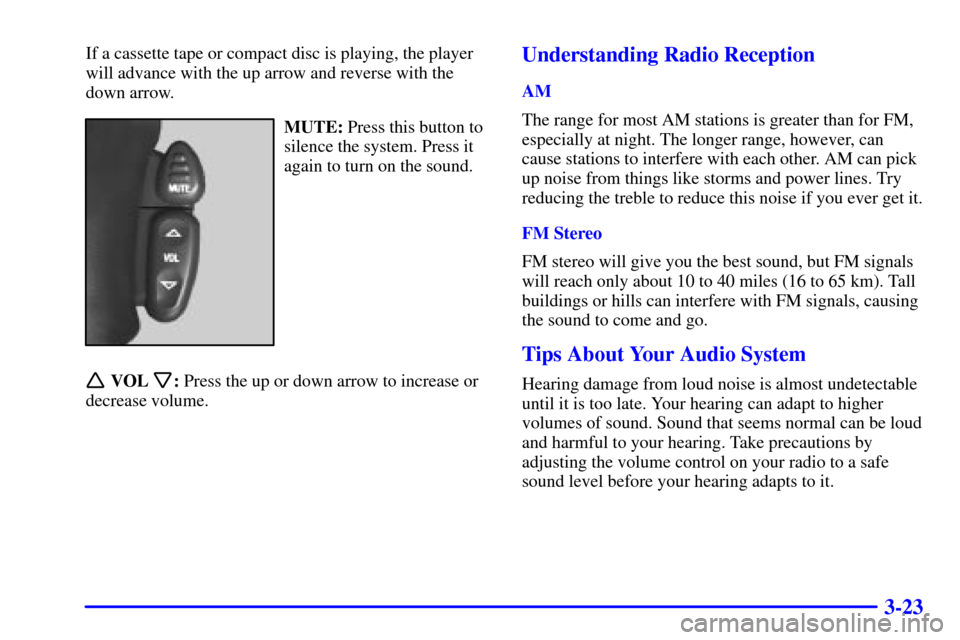
3-23
If a cassette tape or compact disc is playing, the player
will advance with the up arrow and reverse with the
down arrow.
MUTE: Press this button to
silence the system. Press it
again to turn on the sound.
VOL: Press the up or down arrow to increase or
decrease volume.
Understanding Radio Reception
AM
The range for most AM stations is greater than for FM,
especially at night. The longer range, however, can
cause stations to interfere with each other. AM can pick
up noise from things like storms and power lines. Try
reducing the treble to reduce this noise if you ever get it.
FM Stereo
FM stereo will give you the best sound, but FM signals
will reach only about 10 to 40 miles (16 to 65 km). Tall
buildings or hills can interfere with FM signals, causing
the sound to come and go.
Tips About Your Audio System
Hearing damage from loud noise is almost undetectable
until it is too late. Your hearing can adapt to higher
volumes of sound. Sound that seems normal can be loud
and harmful to your hearing. Take precautions by
adjusting the volume control on your radio to a safe
sound level before your hearing adapts to it.
Page 338 of 417

6-37 Vehicle Storage
If you're not going to drive your vehicle for 25 days
or more, remove the black, negative (
-) cable from
the battery. This will help keep your battery from
running down.
CAUTION:
Batteries have acid that can burn you and gas
that can explode. You can be badly hurt if you
aren't careful. See ªJump Startingº in the Index
for tips on working around a battery without
getting hurt.
Contact your dealer to learn how to prepare your vehicle
for longer storage periods.
Also, for your audio system, see ªTheft
-Deterrent
Featureº in the Index.
Bulb Replacement
For any bulb changing procedure not listed in this
section, contact your dealer.
Before you replace any bulbs, be sure that all the lamps
are off and the engine isn't running. See ªReplacement
Bulbsº in the Index for the proper types of bulbs to use.
Halogen Bulbs
CAUTION:
Halogen bulbs have pressurized gas inside and
can burst if you drop or scratch the bulb. You or
others could be injured. Be sure to read and
follow the instructions on the bulb package.
Page 370 of 417
6-69
NAME Usage
HVAC 1 Climate Control System
CRUISE Cruise Control, Instrument Cluster
IGN 3 Ignition, Power Seats
4WD Not Used
CRANK Starting System
INT PRK Interior Lamps
L DOOR Power Door Lock Relay
BRAKE Anti
-Lock Brake System
RR WIPER Rear Window Wiper
ILLUM Interior Lamps
SEAT Power Seat Circuit Breaker
TURN Exterior Lamps, Turn Signals,
Hazard Lamps
UNLOCK Power Door Locks
HTR A/C Climate Control SystemNAME Usage
WS WPR Windshield Wipers
IGN 1 Ignition, Instrument Panel
AIR BAG Air Bag
MIR/LOCK Power Mirrors, Power Door Locks
DR LOCK Power Door Locks
PWR WDO Power Window Circuit Breaker
UNLOCK Power Door Lock Relay
IGN 0 PRND321 Display,
Odometer, VCM/PCM
SEO IGN Special Equipment
Option, Ignition
SEO ACCY Special Equipment Option
Accessory, Cellular Telephone
RAP #1 Retained Accessory Power Relay
RDO 1 Audio System
RAP #2 Rear Power Windows,
Sunroof, Radio
Page 375 of 417
6-74
Name Usage
ATC Automatic Transfer Case
RR DEFOG Rear Window Defogger, Heated
Mirrors (Relay)
RTD Autoride (Real Time Damping)
RR PRK Right Rear Parking Lamps
ECM B VCM/PCM
F/PMP Fuel Pump (Relay)
O2 A Oxygen Sensors
O2 B Oxygen Sensors
LR PRK Left Rear Parking Lamps
RR DEFOG Rear Window Defogger,
Heated Mirrors
HDLP Headlamps (Relay)
TRL PRK Parking Lamps Trailer Wiring
PRIME Not Used
RT HDLP Right Headlamps
DRL Daytime Running Lamps (Relay)Name Usage
HTD MIR Heated Mirrors
LT HDLP Left Headlamps
A/C Air Conditioning
AUX PWR Cigarette Lighter, Auxiliary
Power Outlets
SEO 2 Special Equipment Option Power,
Power Seats
SEO 1 Special Equipment Option Power
DRL Daytime Running Lamps
A/C A/C (Relay)
FOG LP Fog Lamps
FOG LP Fog Lamps (Relay)
RADIO Audio System, Instrument Cluster,
Climate Control System
CIGAR Cigarette Lighter, Auxiliary
Power Outlets
RT TURN Right Turn Signals


