2002 BMW 745LI SEDAN radio
[x] Cancel search: radioPage 63 of 208
Driving
62
Starting the engine
Do not allow the engine to run in
enclosed spaces. The exhaust gases
contain carbon monoxide, an odorless and
colorless, but highly toxic gas. Breathing
the exhaust gases poses an extreme health
risk, and can lead to unconsciousness and
death.
Never leave the vehicle parked with the
engine running, as it would then pose a
potential safety hazard.<
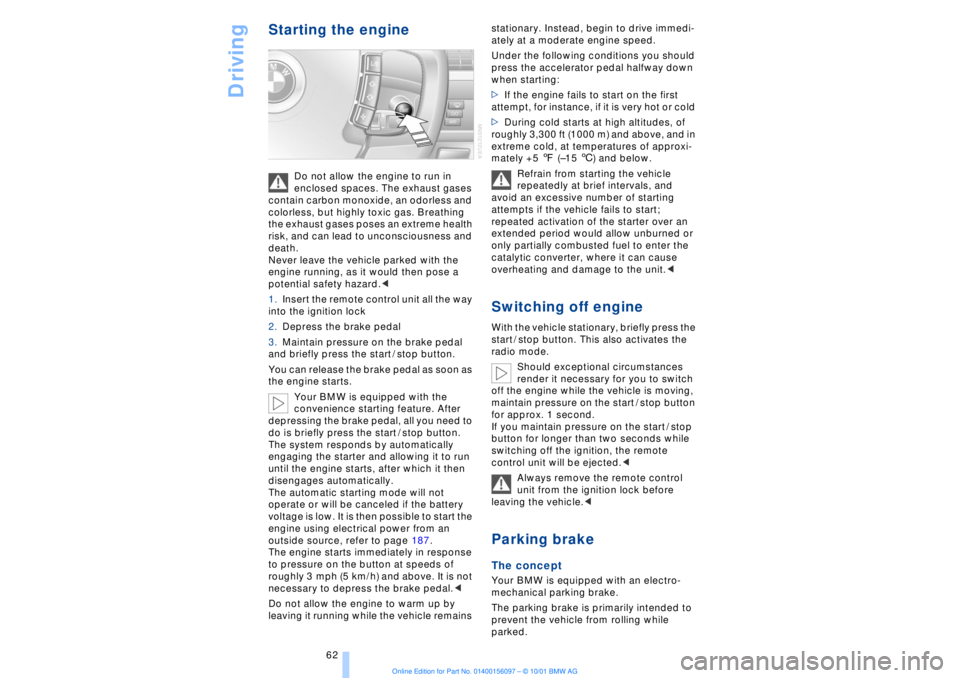
1.Insert the remote control unit all the way
into the ignition lock
2.Depress the brake pedal
3.Maintain pressure on the brake pedal
and briefly press the start / stop button.
You can release the brake pedal as soon as
the engine starts.
Your BMW is equipped with the
convenience starting feature. After
depressing the brake pedal, all you need to
do is briefly press the start / stop button.
The system responds by automatically
engaging the starter and allowing it to run
until the engine starts, after which it then
disengages automatically.
The automatic starting mode will not
operate or will be canceled if the battery
voltage is low. It is then possible to start the
engine using electrical power from an
outside source, refer to page 187.
The engine starts immediately in response
to pressure on the button at speeds of
roughly 3 mph (5 km/h) and above. It is not
necessary to depress the brake pedal.<
Do not allow the engine to warm up by
leaving it running while the vehicle remains stationary. Instead, begin to drive immedi-
ately at a moderate engine speed.
Under the following conditions you should
press the accelerator pedal halfway down
when starting:
>If the engine fails to start on the first
attempt, for instance, if it is very hot or cold
>During cold starts at high altitudes, of
roughly 3,300 ft (1000 m) and above, and in
extreme cold, at temperatures of approxi-
mately +5 7 (Ð15 6) and below.
Refrain from starting the vehicle
repeatedly at brief intervals, and
avoid an excessive number of starting
attempts if the vehicle fails to start;
repeated activation of the starter over an
extended period would allow unburned or
only partially combusted fuel to enter the
catalytic converter, where it can cause
overheating and damage to the unit.<
Switching off engineWith the vehicle stationary, briefly press the
start / stop button. This also activates the
radio mode.
Should exceptional circumstances
render it necessary for you to switch
off the engine while the vehicle is moving,
maintain pressure on the start / stop button
for approx. 1 second.
If you maintain pressure on the start / stop
button for longer than two seconds while
switching off the ignition, the remote
control unit will be ejected.<
Always remove the remote control
unit from the ignition lock before
leaving the vehicle.< Parking brake The concept Your BMW is equipped with an electro-
mechanical parking brake.
The parking brake is primarily intended to
prevent the vehicle from rolling while
parked.
Page 73 of 208
Driving
72
1 Standard wiper speed The system automatically reverts to opera-
tion in the intermittent mode whenever the
vehicle stops. Fast wiper speed You can also select this position by
pressing the lever upward past the detent.
The system automatically reverts to opera-
tion in the standard wipe mode whenever
the vehicle stops. 4 Clean windshield The system sprays washer fluid against the
windshield and activates the wipers for a
brief period. Cleaning headlamps >Each fifth time you press into position 4
to wash the windshield while the head-
lamps are on.
Do not use the washers if there is any
danger that the fluid will freeze on the
windshield. If you do so, your vision could
be obscured. To avoid freezing, use a
washer fluid antifreeze, refer to page 73.
Avoid activating the washer when the
reservoir is empty, as damage to the pump
could result.< Windshield washer nozzles The windshield washer nozzles and the
windshield itself in the area around the
wipers are heated automatically when the
ignition is switched on. Rain sensor
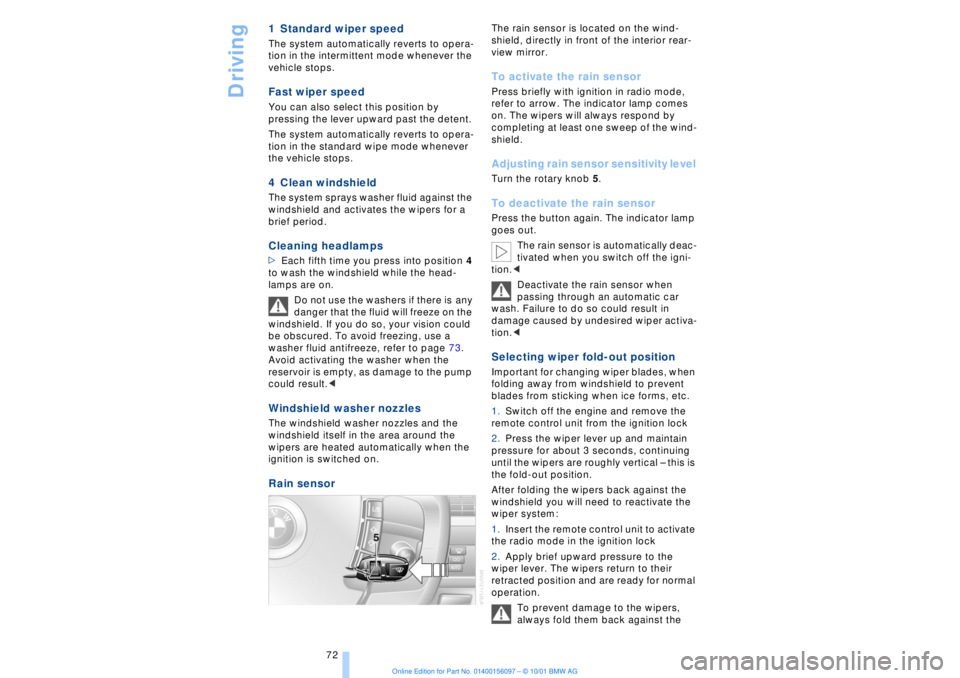
The rain sensor is located on the wind-
shield, directly in front of the interior rear-
view mirror. To activate the rain sensor Press briefly with ignition in radio mode,
refer to arrow. The indicator lamp comes
on. The wipers will always respond by
completing at least one sweep of the wind-
shield. Adjusting rain sensor sensitivity level Turn the rotary knob 5. To deactivate the rain sensor Press the button again. The indicator lamp
goes out.
The rain sensor is automatically deac-
tivated when you switch off the igni-
tion.<
Deactivate the rain sensor when
passing through an automatic car
wash. Failure to do so could result in
damage caused by undesired wiper activa-
tion.< Selecting wiper fold-out position Important for changing wiper blades, when
folding away from windshield to prevent
blades from sticking when ice forms, etc.
1.Switch off the engine and remove the
remote control unit from the ignition lock
2.Press the wiper lever up and maintain
pressure for about 3 seconds, continuing
until the wipers are roughly vertical Ð this is
the fold-out position.
After folding the wipers back against the
windshield you will need to reactivate the
wiper system:
1.Insert the remote control unit to activate
the radio mode in the ignition lock
2.Apply brief upward pressure to the
wiper lever. The wipers return to their
retracted position and are ready for normal
operation.
To prevent damage to the wipers,
always fold them back against the
Page 74 of 208
At a glanceControlsDriving tipsCommunicationsNavigationEntertainmentMobilityReference
73
windshield before switching on either the
radio mode or the ignition.< Washer fluid Windshield and headlamp washers Capacity: approx. 8.2 quarts (7.8 liters)
Fill with water and Ð if required Ð with a
washer antifreeze (according to manufac-
turer's recommendations).
We recommend that you mix the
washer fluid before adding it to the
reservoir.<
Windshield washer antifreeze is flam-
mable. Always keep it well away from
sparks and open flames, and store it in
tightly closed containers well out of the
reach of children. Always observe the
instructions for use provided on the
container.< Programmable cruise
control The concept The programmable cruise control is avail-
able for use at speeds of approx. 18 mph
(30 km/h) and higher. The vehicle maintains
and stores the speed that you set using the
lever mounted on the steering column.
You can also use the multilevel preset
mode to store 6 speeds for later selection
with the lever on the steering column, refer
to page 75. This feature assists you in quickly adapting
vehicle speed to specific road conditions,
for instance, changes in speed limits.
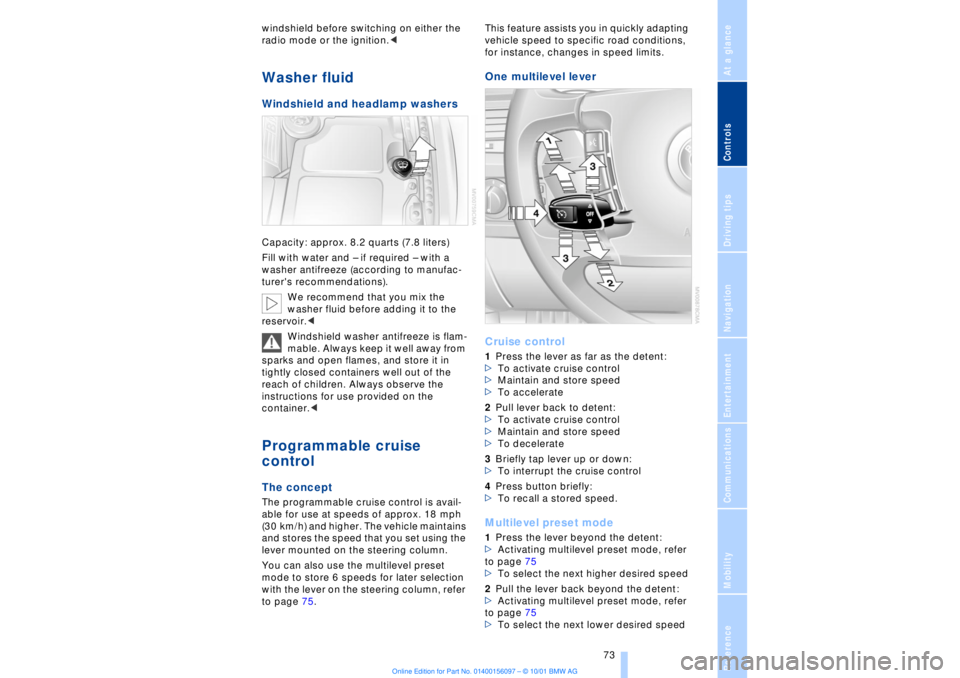
One multilevel lever
Cruise control 1Press the lever as far as the detent:
>To activate cruise control
>Maintain and store speed
>To accelerate
2Pull lever back to detent:
>To activate cruise control
>Maintain and store speed
>To decelerate
3Briefly tap lever up or down:
>To interrupt the cruise control
4Press button briefly:
>To recall a stored speed. Multilevel preset mode 1Press the lever beyond the detent:
>Activating multilevel preset mode, refer
to page 75
>To select the next higher desired speed
2Pull the lever back beyond the detent:
>Activating multilevel preset mode, refer
to page 75
>To select the next lower desired speed
Page 78 of 208
At a glanceControlsDriving tipsCommunicationsNavigationEntertainmentMobilityReference
77
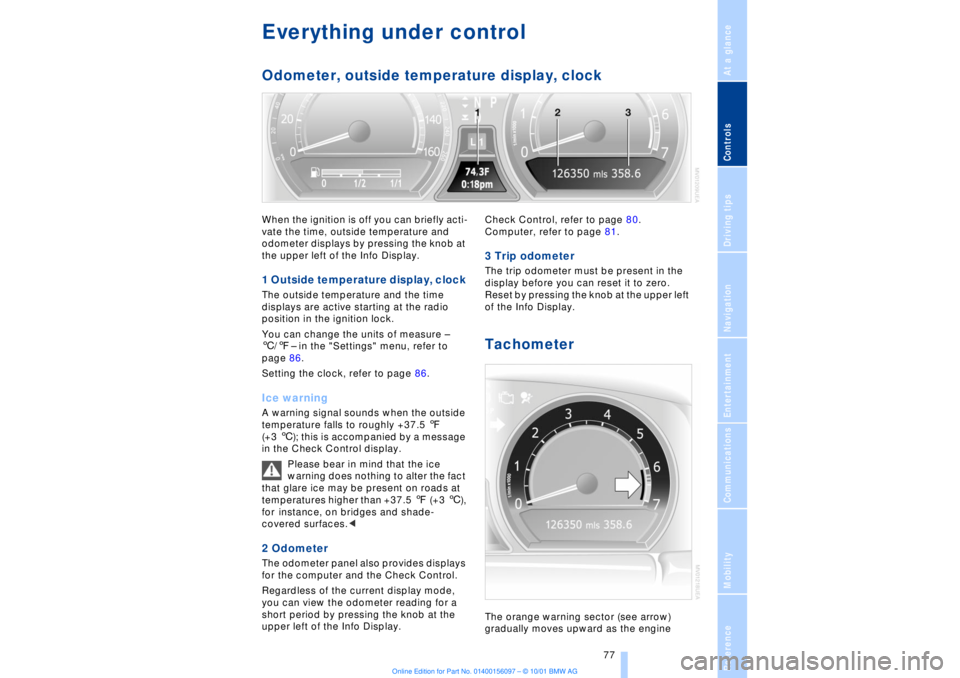
Everything under control Odometer, outside temperature display, clockWhen the ignition is off you can briefly acti-
vate the time, outside temperature and
odometer displays by pressing the knob at
the upper left of the Info Display. 1 Outside temperature display, clock The outside temperature and the time
displays are active starting at the radio
position in the ignition lock.
You can change the units of measure Ð
6/7Ð in the "Settings" menu, refer to
page 86.
Setting the clock, refer to page 86.Ice warning A warning signal sounds when the outside
temperature falls to roughly +37.5 7
(+3 6); this is accompanied by a message
in the Check Control display.
Please bear in mind that the ice
warning does nothing to alter the fact
that glare ice may be present on roads at
temperatures higher than +37.5 7 (+3 6),
for instance, on bridges and shade-
covered surfaces.< 2 Odometer The odometer panel also provides displays
for the computer and the Check Control.
Regardless of the current display mode,
you can view the odometer reading for a
short period by pressing the knob at the
upper left of the Info Display. Check Control, refer to page 80.
Computer, refer to page 81.
3 Trip odometer The trip odometer must be present in the
display before you can reset it to zero.
Reset by pressing the knob at the upper left
of the Info Display. Tachometer The orange warning sector (see arrow)
gradually moves upward as the engine
Page 82 of 208
At a glanceControlsDriving tipsCommunicationsNavigationEntertainmentMobilityReference
81
Select and confirm to cancel the
display.
Selecting stored status reports for
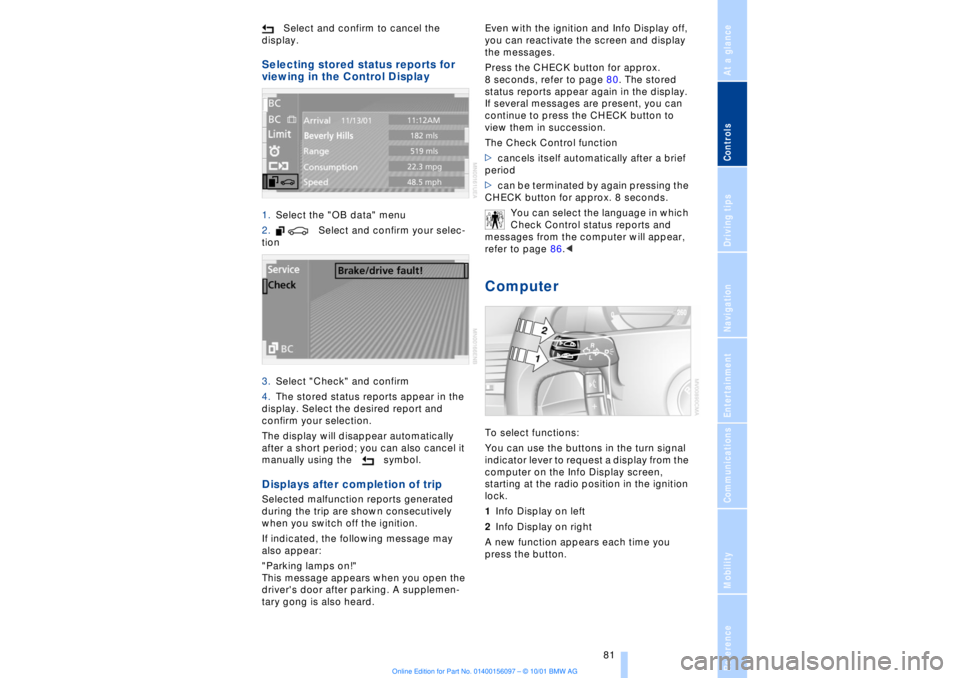
viewing in the Control Display 1.Select the "OB data" menu
2. Select and confirm your selec-
tion
3.Select "Check" and confirm
4.The stored status reports appear in the
display. Select the desired report and
confirm your selection.
The display will disappear automatically
after a short period; you can also cancel it
manually using the symbol. Displays after completion of trip Selected malfunction reports generated
during the trip are shown consecutively
when you switch off the ignition.
If indicated, the following message may
also appear:
"Parking lamps on!"
This message appears when you open the
driver's door after parking. A supplemen-
tary gong is also heard. Even with the ignition and Info Display off,
you can reactivate the screen and display
the messages.
Press the CHECK button for approx.
8 seconds, refer to page 80. The stored
status reports appear again in the display.
If several messages are present, you can
continue to press the CHECK button to
view them in succession.
The Check Control function
>cancels itself automatically after a brief
period
>can be terminated by again pressing the
CHECK button for approx. 8 seconds.
You can select the language in which
Check Control status reports and
messages from the computer will appear,
refer to page 86.<
Computer To select functions:
You can use the buttons in the turn signal
indicator lever to request a display from the
computer on the Info Display screen,
starting at the radio position in the ignition
lock.
1Info Display on left
2Info Display on right
A new function appears each time you
press the button.
Page 95 of 208
Technology for comfort, convenience and safety
94
In the event of loss in tire pressure If the indicator lamp symbol in the Check
Control lights up in yellow, and a message
also appears, this indicates that the infla-
tion pressures in the tires have fallen to
below the specified level, which is normal
in every tire after a certain amount of time.
This alerts you to have the tires inflated to
the specified pressures as soon as
possible.
Please take note of the additional informa-
tion in the Control Display panel.
If you are prompted to check the tire
pressure shortly after a correction has
been made, this indicates that the
corrected values were not accurate. Please
check the inflation pressure again and
make corrections according to the inflation
pressure table. Then reinitialize the
system.< Flat tire If you have a flat tire, the indicator lamp
symbol in the Check Control will light up in
red, and a message will appear. In addition,
a gong sounds.
If this occurs, reduce vehicle speed imme-
diately and stop the vehicle. Avoid hard
and sudden steering and braking maneu-
vers. Replace the damaged tire.
The spare tire provided with your
vehicle is equipped with the elec-
tronics required to support RDC operation;
once the spare tire is installed, the pressure
in this tire will also be monitored following
system initialization.
Have the tires changed at your BMW
center. Your BMW center has the informa-
tion needed for working with RDC and is
equipped with the necessary special
tools.
ference signals that may prevent the
system from operating as intended. The symbol will appear in yellow in the
Check Control panel and a message will
appear.
You will also see the same message
>in the event of a system fault
>if a wheel is mounted without the
appropriate electronics
>if, in addition to the spare tire, additional
wheels with RDC electronics are on board.
Please refer to the additional information
supplied in the Control Display, and have
the system inspected at your BMW center.
Self-leveling suspension*
In the event of malfunction
A Check Control message
appearing together with this symbol
indicates a malfunction in the self-
leveling suspension. Please take note of
the additional information in the Control
Display panel.
Stop and inspect the vehicle. If the rear of
the vehicle is visibly lower than the front,
possibly accompanied by a tilt noticeable
when you compare the left rear with the
right rear, you should respond by immedi-
ately proceeding to the nearest BMW
center. Drive with appropriate caution in
the meantime. The vehicle has reduced
ground clearance and driving comfort may
be noticeably reduced. Even if the attitude
of the vehicle is normal, you should consult
the nearest BMW center if the warning
lamp indicates a system fault.
Adaptive brake lamp The adaptive brake lamp indicates the
intensity with which you are applying your
brakes to drivers of following vehicles.
Page 102 of 208
At a glanceControlsDriving tipsCommunicationsNavigationEntertainmentMobilityReference
101
Temperature adjustment
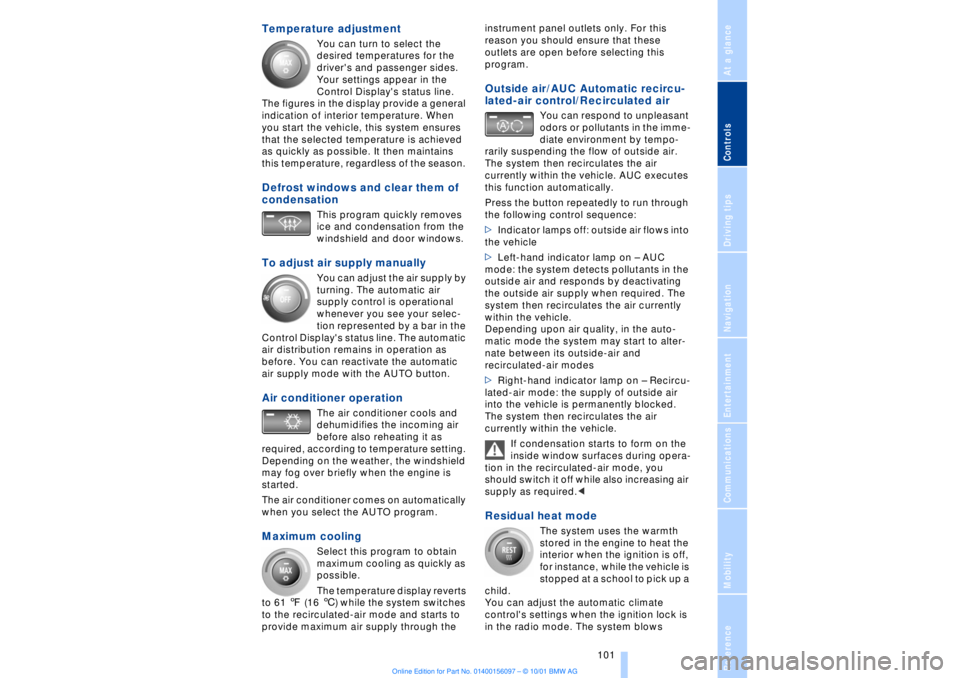
You can turn to select the
desired temperatures for the
driver's and passenger sides.
Your settings appear in the
Control Display's status line.
The figures in the display provide a general
indication of interior temperature. When
you start the vehicle, this system ensures
that the selected temperature is achieved
as quickly as possible. It then maintains
this temperature, regardless of the season.
Defrost windows and clear them of
condensation
This program quickly removes
ice and condensation from the
windshield and door windows.
To adjust air supply manually
You can adjust the air supply by
turning. The automatic air
supply control is operational
whenever you see your selec-
tion represented by a bar in the
Control Display's status line. The automatic
air distribution remains in operation as
before. You can reactivate the automatic
air supply mode with the AUTO button.
Air conditioner operation
The air conditioner cools and
dehumidifies the incoming air
before also reheating it as
required, according to temperature setting.
Depending on the weather, the windshield
may fog over briefly when the engine is
started.
The air conditioner comes on automatically
when you select the AUTO program.
Maximum cooling
Select this program to obtain
maximum cooling as quickly as
possible.
The temperature display reverts
to 61 7 (16 6) while the system switches
to the recirculated-air mode and starts to
provide maximum air supply through the instrument panel outlets only. For this
reason you should ensure that these
outlets are open before selecting this
program.
Outside air/AUC Automatic recircu-
lated-air control/Recirculated air
You can respond to unpleasant
odors or pollutants in the imme-
diate environment by tempo-
rarily suspending the flow of outside air.
The system then recirculates the air
currently within the vehicle. AUC executes
this function automatically.
Press the button repeatedly to run through
the following control sequence:
>Indicator lamps off: outside air flows into
the vehicle
>Left-hand indicator lamp on Ð AUC
mode: the system detects pollutants in the
outside air and responds by deactivating
the outside air supply when required. The
system then recirculates the air currently
within the vehicle.
Depending upon air quality, in the auto-
matic mode the system may start to alter-
nate between its outside-air and
recirculated-air modes
>Right-hand indicator lamp on Ð Recircu-
lated-air mode: the supply of outside air
into the vehicle is permanently blocked.
The system then recirculates the air
currently within the vehicle.
If condensation starts to form on the
inside window surfaces during opera-
tion in the recirculated-air mode, you
should switch it off while also increasing air
supply as required.<
Residual heat mode
The system uses the warmth
stored in the engine to heat the
interior when the ignition is off,
for instance, while the vehicle is
stopped at a school to pick up a
child.
You can adjust the automatic climate
control's settings when the ignition lock is
in the radio mode. The system blows
Page 107 of 208
A congenial climate
106
Rear ventilation Use the lever 1 to vary the airflow direction.
For additional information on rear ventila-
tion options, refer to page 102. Parked-car ventilation
system
System operation is controlled using the
Control Display. You can set two different
times for the system to start.
The parked-car ventilation blows air into
the passenger compartment to lower inte-
rior temperatures.
The system remains on for 30 minutes. You
can also switch the system on and off
manually. Since the system uses a
substantial amount of electrical current,
you should refrain from activating it twice in
succession without allowing the battery to
be recharged in normal operation between
use.
The parked-car ventilation system is avail-
able for preprogrammed operation at
outside temperatures above approx. 50 7
(10 6) and for direct activation at any
temperature, but is not operational when
the vehicle is underway.
The air enters the passenger compartment
through the vent outlets in the instrument
panel, which can be adjusted for both
direction and airflow. These outlets must
be open for the system to operate.
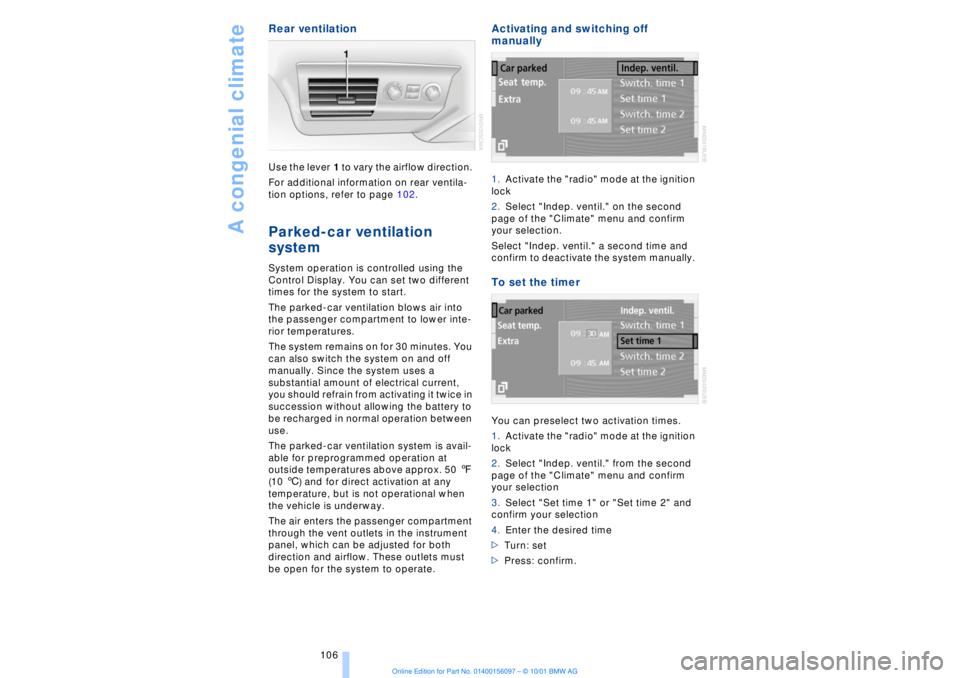
Activating and switching off
manually 1.Activate the "radio" mode at the ignition
lock
2.Select "Indep. ventil." on the second
page of the "Climate" menu and confirm
your selection.
Select "Indep. ventil." a second time and
confirm to deactivate the system manually. To set the timer You can preselect two activation times.
1.Activate the "radio" mode at the ignition
lock
2.Select "Indep. ventil." from the second
page of the "Climate" menu and confirm
your selection
3.Select "Set time 1" or "Set time 2" and
confirm your selection
4.Enter the desired time
>Turn: set
>Press: confirm.