2002 BMW 745LI SEDAN navigation
[x] Cancel search: navigationPage 20 of 208
At a glanceControlsDriving tipsCommunicationsNavigationEntertainmentMobilityReference
19
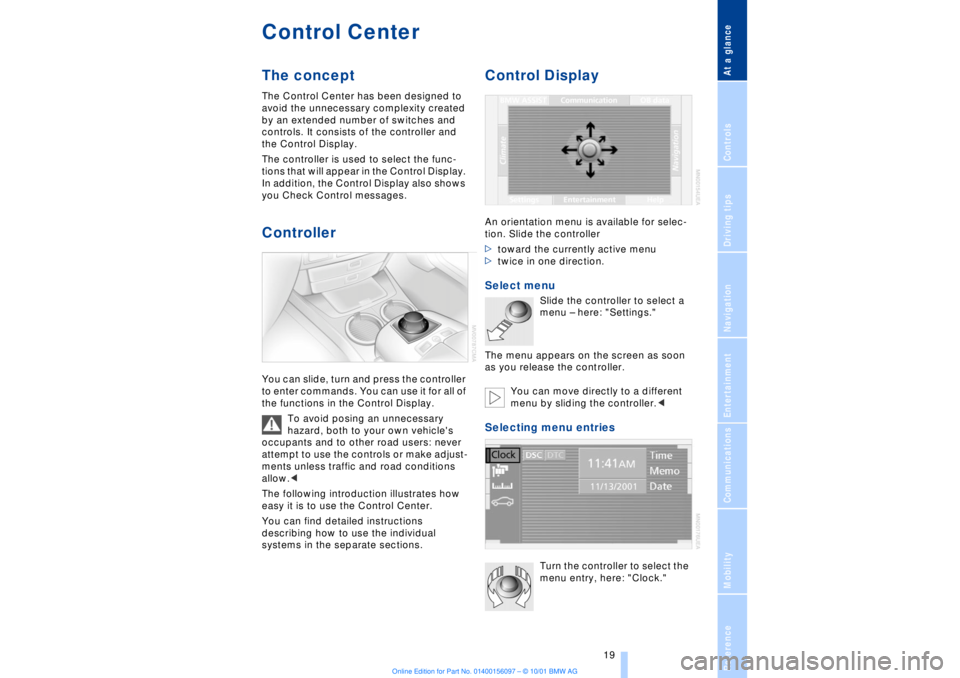
Control CenterThe concept The Control Center has been designed to
avoid the unnecessary complexity created
by an extended number of switches and
controls. It consists of the controller and
the Control Display.
The controller is used to select the func-
tions that will appear in the Control Display.
In addition, the Control Display also shows
you Check Control messages.Controller You can slide, turn and press the controller
to enter commands. You can use it for all of
the functions in the Control Display.
To avoid posing an unnecessary
hazard, both to your own vehicle's
occupants and to other road users: never
attempt to use the controls or make adjust-
ments unless traffic and road conditions
allow.<
The following introduction illustrates how
easy it is to use the Control Center.
You can find detailed instructions
describing how to use the individual
systems in the separate sections.
Control DisplayAn orientation menu is available for selec-
tion. Slide the controller
>toward the currently active menu
>twice in one direction. Select menu
Slide the controller to select a
menu Ð here: "Settings."
The menu appears on the screen as soon
as you release the controller.
You can move directly to a different
menu by sliding the controller.<
Selecting menu entries
Turn the controller to select the
menu entry, here: "Clock."
Page 22 of 208
At a glanceControlsDriving tipsCommunicationsNavigationEntertainmentMobilityReference
21
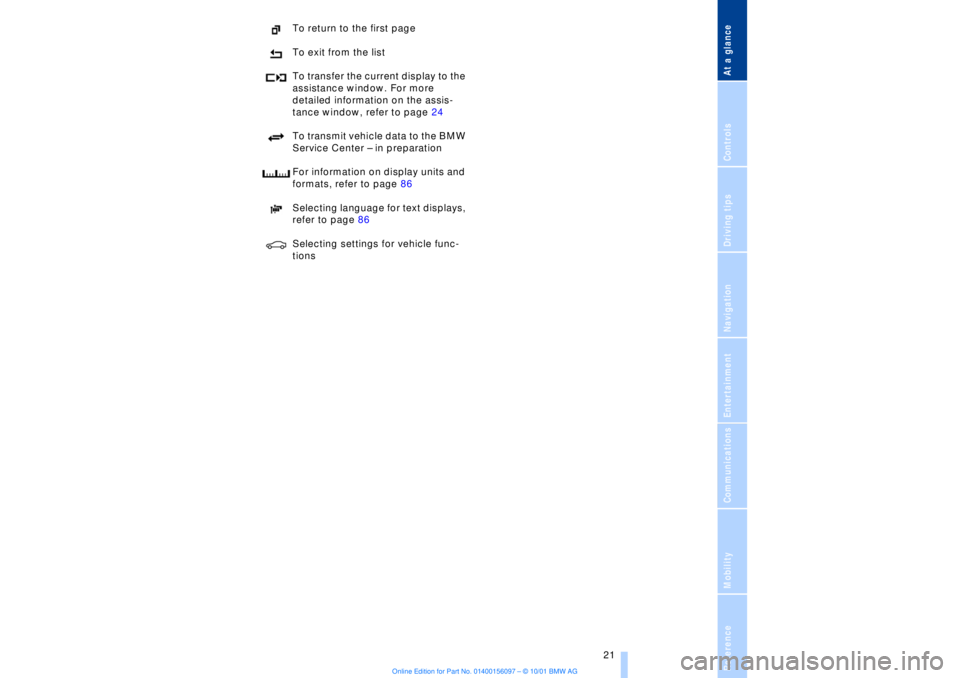
To return to the first page
To exit from the list
To transfer the current display to the
assistance window. For more
detailed information on the assis-
tance window, refer to page 24
To transmit vehicle data to the BMW
Service Center Ð in preparation
For information on display units and
formats, refer to page 86
Selecting language for text displays,
refer to page 86
Selecting settings for vehicle func-
tions
Page 23 of 208
Control Center
22
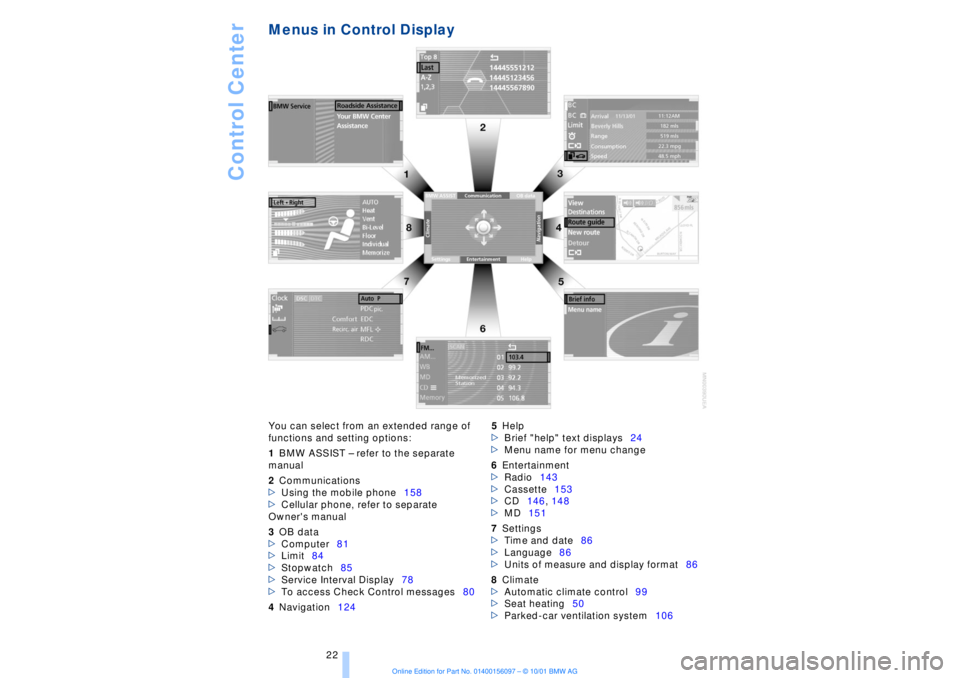
Menus in Control Display You can select from an extended range of
functions and setting options:
1BMW ASSIST Ð refer to the separate
manual
2Communications
>Using the mobile phone158
>Cellular phone, refer to separate
Owner's manual
3OB data
>Computer81
>Limit84
>Stopwatch85
>Service Interval Display78
>To access Check Control messages80
4Navigation1245Help
>Brief "help" text displays24
>Menu name for menu change
6Entertainment
>Radio143
>Cassette153
>CD146, 148
>MD151
7Settings
>Time and date86
>Language86
>Units of measure and display format86
8Climate
>Automatic climate control99
>Seat heating50
>Parked-car ventilation system106
Page 24 of 208
At a glanceControlsDriving tipsCommunicationsNavigationEntertainmentMobilityReference
23
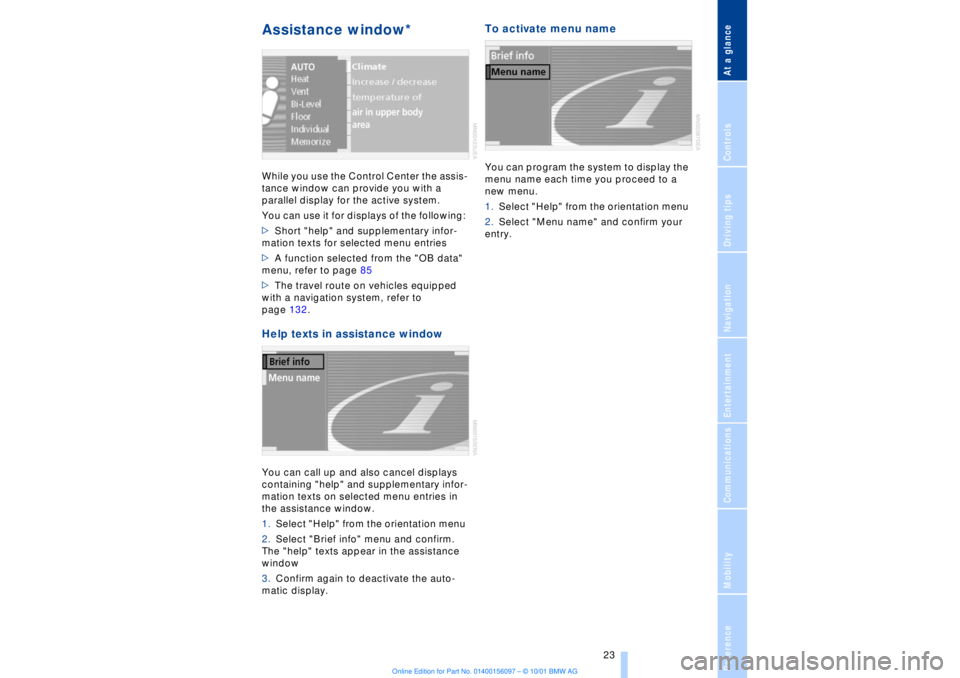
Assistance window* While you use the Control Center the assis-
tance window can provide you with a
parallel display for the active system.
You can use it for displays of the following:
>Short "help" and supplementary infor-
mation texts for selected menu entries
>A function selected from the "OB data"
menu, refer to page 85
>The travel route on vehicles equipped
with a navigation system, refer to
page 132.Help texts in assistance windowYou can call up and also cancel displays
containing "help" and supplementary infor-
mation texts on selected menu entries in
the assistance window.
1.Select "Help" from the orientation menu
2.Select "Brief info" menu and confirm.
The "help" texts appear in the assistance
window
3.Confirm again to deactivate the auto-
matic display.
To activate menu nameYou can program the system to display the
menu name each time you proceed to a
new menu.
1.Select "Help" from the orientation menu
2.Select "Menu name" and confirm your
entry.
Page 25 of 208
Control Center
24
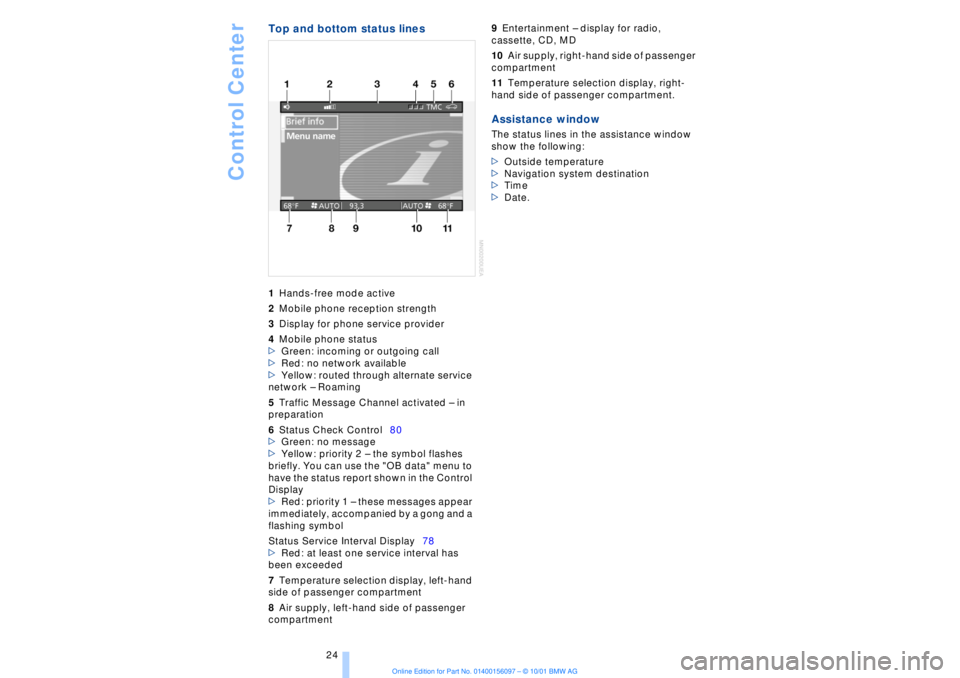
Top and bottom status lines1Hands-free mode active
2Mobile phone reception strength
3Display for phone service provider
4Mobile phone status
>Green: incoming or outgoing call
>Red: no network available
>Yellow: routed through alternate service
network Ð Roaming
5Traffic Message Channel activated Ð in
preparation
6Status Check Control80
>Green: no message
>Yellow: priority 2 Ð the symbol flashes
briefly. You can use the "OB data" menu to
have the status report shown in the Control
Display
>Red: priority 1 Ð these messages appear
immediately, accompanied by a gong and a
flashing symbol
Status Service Interval Display78
>Red: at least one service interval has
been exceeded
7Temperature selection display, left-hand
side of passenger compartment
8Air supply, left-hand side of passenger
compartment 9Entertainment Ð display for radio,
cassette, CD, MD
10Air supply, right-hand side of passenger
compartment
11Temperature selection display, right-
hand side of passenger compartment. Assistance windowThe status lines in the assistance window
show the following:
>Outside temperature
>Navigation system destination
>Time
>Date.
Page 26 of 208
At a glanceControlsDriving tipsCommunicationsNavigationEntertainmentMobilityReference
25
Voice commandVoice command system*The conceptThe voice command system allows you to
control operation of various vehicle
systems without ever removing your hands
from the steering wheel. The system oper-
ates on the basis of voice commands that
you will learn easily after using them a few
times. You issue your commands in the
form of instructions or in dialogs. The
dialog functions provide you with additional
support in the form of questions and infor-
mation.
The voice command system transforms
your commands and dialog answers into
control signals for the selected systems.
Please take the time to acquaint your-
self with how a particular system
operates before proceeding to control it
using the voice command system. At the
time of publication the voice command
system was available for use with the
English and German languages. Other
languages are currently in preparation.
When the voice command system is active
you can adjust the volume, refer to
page 141.
command system.<
>>...<< identifies commands used in the
voice command system. It is not necessary
to speak the words in parentheses.
>...< identifies the answers provided by the
voice command system.
Systems available for use with voice
command>Mobile phone, refer to page 158
>>Telephone (menu)<<
>Navigation system, refer to page 124
>>Navigation (menu)<< or
>>Navi (menu)<<>Radio, refer to page 140
>>Radio (menu)<<
>CD, refer to page 146
>>CD (menu)<<
>CD changer, refer to page 148
>>CD changer (menu)<<
>MiniDisc, refer to page 151
>>MiniDisc (menu)<<
>Cassette, refer to page 153
>>Tape (menu)<<
>Notebook, refer to page 28
>>Notepad (menu)<< or
>>Notebook (menu)<< or >>Note
recorder (menu)<<
Either the system that you are now control-
ling, or any current error messages will
appear in the Info Display, refer to page 14.
Voice commandsTo activate voice command systemActivate by briefly pressing the
button in the steering wheel.
A signal tone and "SVS" in the Info Display
indicate that the system is ready for use.
You automatically proceed to the orienta-
tion menu.
Except in dialogs, always press
the button again before issuing voice
commands.
During dialogs that include entry of text or
numbers, the information that the voice
command system has registered will
appear on the Info Display screen, refer to
page 14.To cancel voice command entryYou can terminate execution of a command
or dialog with >>Cancel<<, >>Exit<< or by
pressing the button in the steering
wheel.
Page 28 of 208
At a glanceControlsDriving tipsCommunicationsNavigationEntertainmentMobilityReference
27
Notices
Do not use the voice command
system to make emergency SOS
calls. Your voice and habitual tone could be
affected by stressful situations, as a result
of which the process of establishing the
telephone connection could be unneces-
sarily delayed. Instead, you should use the
emergency SOS button located adjacent to
the rearview mirror, refer to page 161.<
Environmental conditionsThe voice command system uses a special
microphone located on the front headliner
of your vehicle. Although the system is
designed to filter out ambient noise, you
can help ensure that your commands will
be understood by observing the following
instructions:
>Speak smoothly and clearly, at a normal
volume. Do not place any unusual stress on
individual syllables, and avoid pauses
>Do not speak while the voice command
system is talking
>Keep the doors, windows and sunroof
closed to prevent interference from
ambient noise
>Avoid other sources of noise in the
vehicle while speaking, and ask other
vehicle occupants to refrain from talking
while you are using the system.
>The hands-free microphone is aimed
toward the driver. This means that the
system may be unable to register the
voices of other vehicle occupants properly;
passengers should use the mobile phone
instead.
The notebookRecording a note
>>Record note<<<
You can store approx. ten minutes of
spoken text Ð either as a single entry or as
multiple entries of any desired length.
To terminate recording:
Apply extended pressure to
the button.
The voice command system does not
respond to the commands
>>Cancel<< and >>Exit<< while you are
recording a note. The standard utility that
scans for system commands is deactivated
in the note mode to allow you to record any
text desired, without artificial restrictions.
This feature saves you from having to
concentrate on avoiding these words while
recording.<
To listen to a notebook entryListening to recorded notebook entries:
1.>>Read out (note)<<
or >>Listen to (note)<<
The system plays back roughly the first
3 seconds of the first memorandum.
2.Respond to the query >Note and then<
by selecting the desired function
>To listen to the entire note:
>>Read (note)<<
(>>Listen to (note)<<)
>To hear the next notebook entry:
>>Next note<< (>>(Note) next<<)
>To hear the entry again:
>>(Note) back<<
or
>>Once again<< (>>Repeat<<, >>Read
out<<).<
Page 30 of 208
At a glanceControlsDriving tipsCommunicationsNavigationEntertainmentMobilityReference
29
Brief commandsFunction
Command
To switch on mobile
phone>>Telephone on<<
Redialing >>Redial<<
To select from the
phone directory>>Dial name<<
Dial telephone
number>>Dial (telephone) number<<
To add new entry >>Save name<<
To display the entry >>Read out telephone book<<
Delete entry >>Edit telephone book<<
To deactivate voice
messages from
system>>Message (output) off<<
To activate voice
messages from
system>>Message (output) on<<
To repeat previous
navigation guid-
ance instructions>>Repeat message (output)<<
Destination entry
submenu>>(Navigation) destination entry<<
Select destination >>Select destination<<
To change scale >>(Change) scale<<
Starting the desti-
nation guidance
system>>Route guidance (on)<<
You are searching
for a destination,
but do not know the
exact address>>(Navigation) information<<
To request
addresses>>(Navigation) address book<<
Map display >>Map<<
To switch off audio
source>>Audio off<<
To switch on radio >>Radio on<<
Selecting radio
stations>>(Radio) frequency selection<<, >>Frequence selection<<,
>>Frequency input<<