Page 264 of 2572
'05 HIGHLANDER_U (L/O 0409)
126
2005 HIGHLANDER from Nov. '04 Prod. (OM48570U)
When all the side doors and back door
are unlocked using either the key or the
wireless remote control transmitter simul-
taneously, the light will come on and re-
main on for about 15 seconds before fad-
ing out.
The following adjustments can be made in
this system. For details, contact your
Toyota dealer.
�Cancelling the door key or wireless re-
mote control transmitter linked opera-
tion
�Changing the timing for the light turn-
ing off
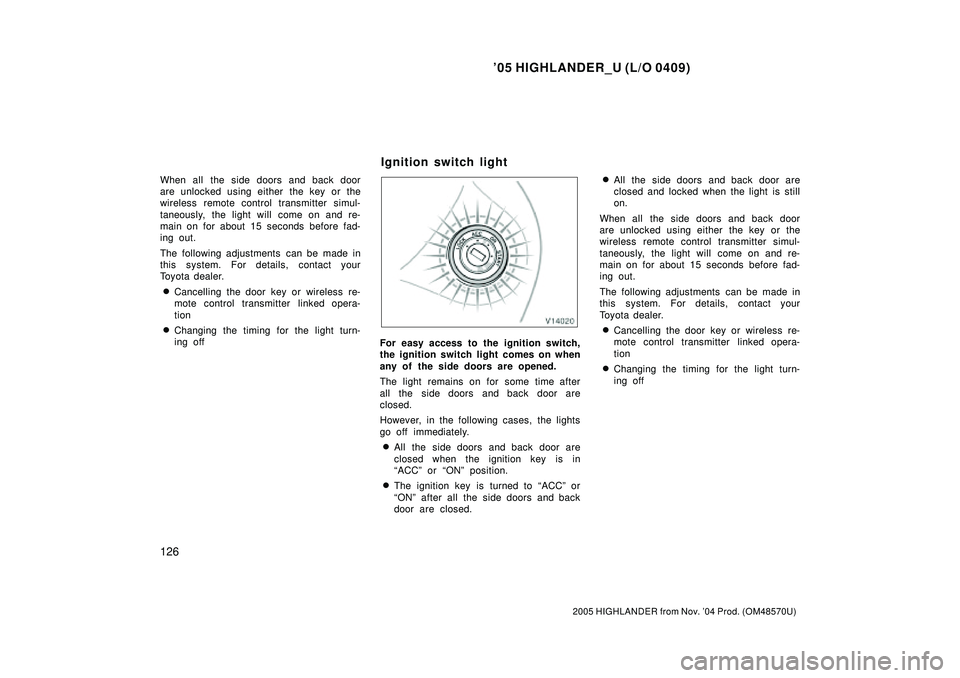
For easy access to the ignition switch,
the ignition switch light comes on when
any of the side doors are opened.
The light remains on for some time after
all the side doors and back door are
closed.
However, in the following cases, the lights
go off immediately.
�All the side doors and back door are
closed when the ignition key is in
ACCº or ONº position.
�The ignition key is turned to ACCº or
ONº after all the side doors and back
door are closed.
�All the side doors and back door are
closed and locked when the light is still
on.
When all the side doors and back door
are unlocked using either the key or the
wireless remote control transmitter simul-
taneously, the light will come on and re-
main on for about 15 seconds before fad-
ing out.
The following adjustments can be made in
this system. For details, contact your
Toyota dealer.
�Cancelling the door key or wireless re-
mote control transmitter linked opera-
tion
�Changing the timing for the light turn-
ing off
Ignition switch light
Page 329 of 2572
'05 HIGHLANDER_U (L/O 0409)
169
2005 HIGHLANDER from Nov. '04 Prod. (OM48570U)
OPERATION OF INSTRUMENTS AND
CONTROLS
Audio system
Reference170 . . . . . . . . . . . . . . . . . . . . . . . . . . . . . . . . . . . . . . . . . . . . . . . . .
Using your audio system170 . . . . . . . . . . . . . . . . . . . . . . . . . . . . . . . . . . . .
Audio remote controls186 . . . . . . . . . . . . . . . . . . . . . . . . . . . . . . . . . . . . . . .
Rear seat entertainment system189 . . . . . . . . . . . . . . . . . . . . . . . . . . . . . .
Audio/video system operating hints240 . . . . . . . . . . . . . . . . . . . . . . . . . . .
For vehicle equipped with Navigation system, please refer to the
separate Navigation System Owner's Manualº.
SECTION 1- 8
Page 346 of 2572
'05 HIGHLANDER_U (L/O 0409)
186
2005 HIGHLANDER from Nov. '04 Prod. (OM48570U)
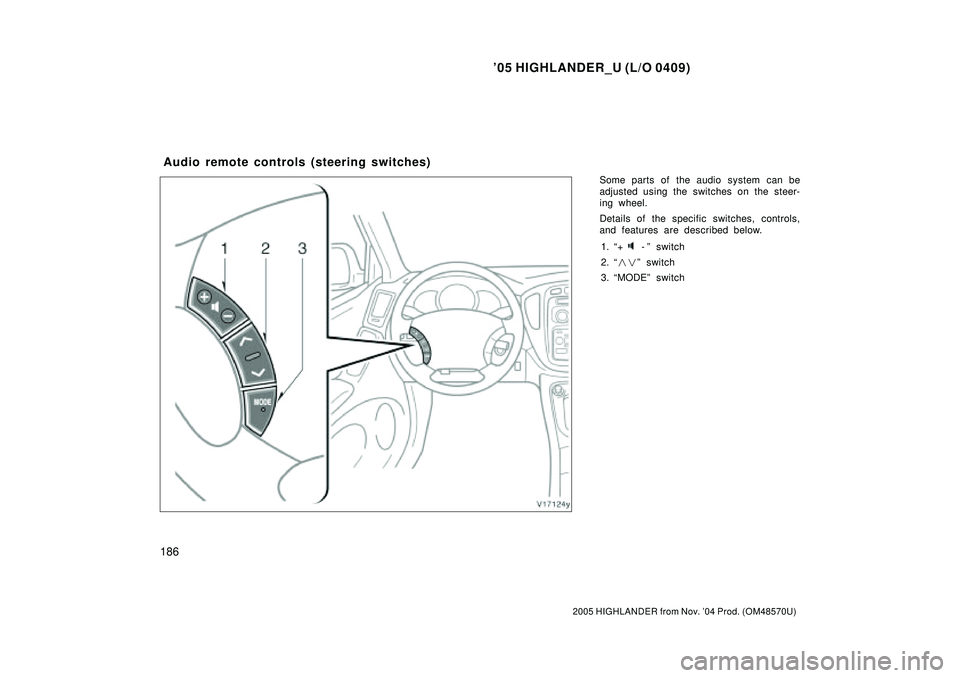
Some parts of the audio system can be
adjusted using the switches on the steer-
ing wheel.
Details of the specific switches, controls,
and features are described below.
1. +
-º switch
2. ��º switch
3. MODEº switch
Audio remote controls (steering switches)
Page 355 of 2572
'05 HIGHLANDER_U (L/O 0409)
195
2005 HIGHLANDER from Nov. '04 Prod. (OM48570U)
LOCATING THE CONTROLLER
If you lose sight of the controller, push
and hold the CURSOR (REMOTE)º button
on the DVD player unit until you hear a
beep. A buzzer sounds from the controller
to let you know where it is.
To stop the buzzer, push any button of the
controller.
If the controller is located close to some-
thing that blocks the signal, such as some
kind of metal, the controller may not re-
ceive the signal and the buzzer may not
sound.FCC Information
Caution: Any changes or modifica-
tions in construction of this device
which are not expressly approved by
the party responsible for compliance
could void the user's authority to op-
erate the equipment.
FCC Label Information
This device complies with part 15 of
the FCC Rules. Operation is subject
to the following two conditions: (1)
This device may not cause harmful
interference, and (2) this device must
accept any interference received, In-
cluding interference that may cause
undesired operation.
Page 358 of 2572
'05 HIGHLANDER_U (L/O 0409)
198
2005 HIGHLANDER from Nov. '04 Prod. (OM48570U)
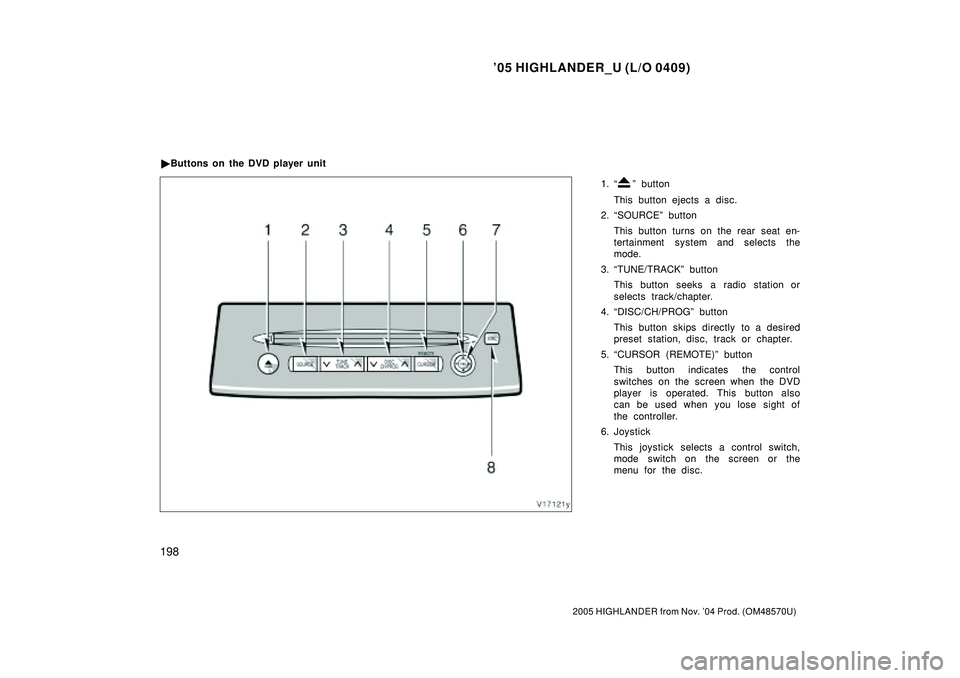
1. º button
This button ejects a disc.
2. SOURCEº button
This button turns on the rear seat en-
tertainment system and selects the
mode.
3. TUNE/TRACKº button
This button seeks a radio station or
selects track/chapter.
4. DISC/CH/PROGº button
This button skips directly to a desired
preset station, disc, track or chapter.
5. CURSOR (REMOTE)º button
This button indicates the control
switches on the screen when the DVD
player is operated. This button also
can be used when you lose sight of
the controller.
6. Joystick
This joystick selects a control switch,
mode switch on the screen or the
menu for the disc. �Buttons on the DVD player unit
Page 519 of 2572
2005 HIGHLANDER (EWD592U)
204
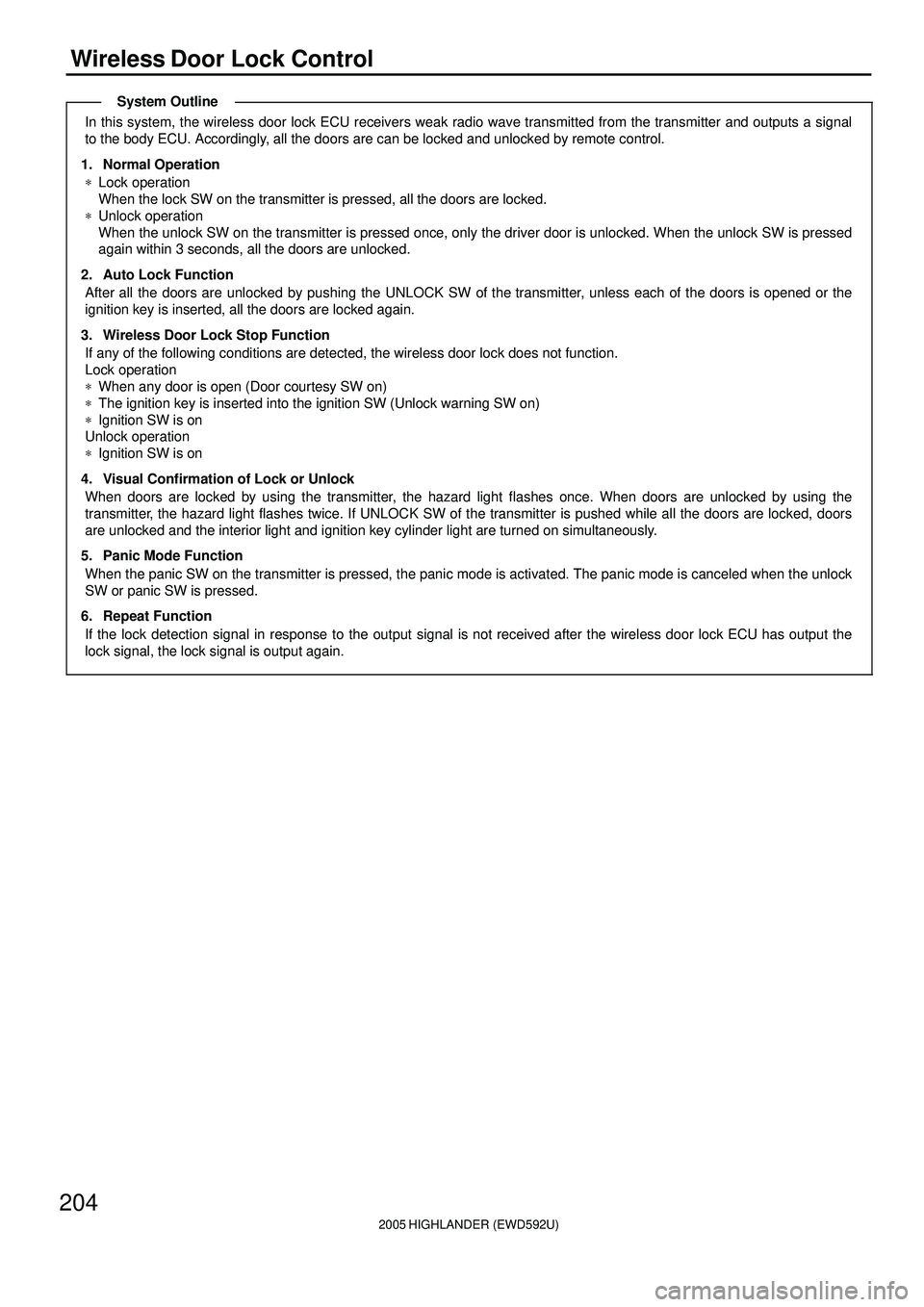
Wireless Door Lock Control
In this system, the wireless door lock ECU receivers weak radio wave transmitted from the transmitter and outputs a signal
to the body ECU. Accordingly, all the doors are can be locked and unlocked by remote control.
1. Normal Operation
*Lock operation
When the lock SW on the transmitter is pressed, all the doors are locked.
*Unlock operation
When the unlock SW on the transmitter is pressed once, only the driver door is unlocked. When the unlock SW is pressed
again within 3 seconds, all the doors are unlocked.
2. Auto Lock Function
After all the doors are unlocked by pushing the UNLOCK SW of the transmitter, unless each of the doors is opened or the
ignition key is inserted, all the doors are locked again.
3. Wireless Door Lock Stop Function
If any of the following conditions are detected, the wireless door lock does not function.
Lock operation
*When any door is open (Door courtesy SW on)
*The ignition key is inserted into the ignition SW (Unlock warning SW on)
*Ignition SW is on
Unlock operation
*Ignition SW is on
4. Visual Confirmation of Lock or Unlock
When doors are locked by using the transmitter, the hazard light flashes once. When doors are unlocked by using the
transmitter, the hazard light flashes twice. If UNLOCK SW of the transmitter is pushed while all the doors are locked, doors
are unlocked and the interior light and ignition key cylinder light are turned on simultaneously.
5. Panic Mode Function
When the panic SW on the transmitter is pressed, the panic mode is activated. The panic mode is canceled when the unlock
SW or panic SW is pressed.
6. Repeat Function
If the lock detection signal in response to the output signal is not received after the wireless door lock ECU has output the
lock signal, the lock signal is output again.
System Outline
Page 555 of 2572
2005 HIGHLANDER (EWD592U)
240
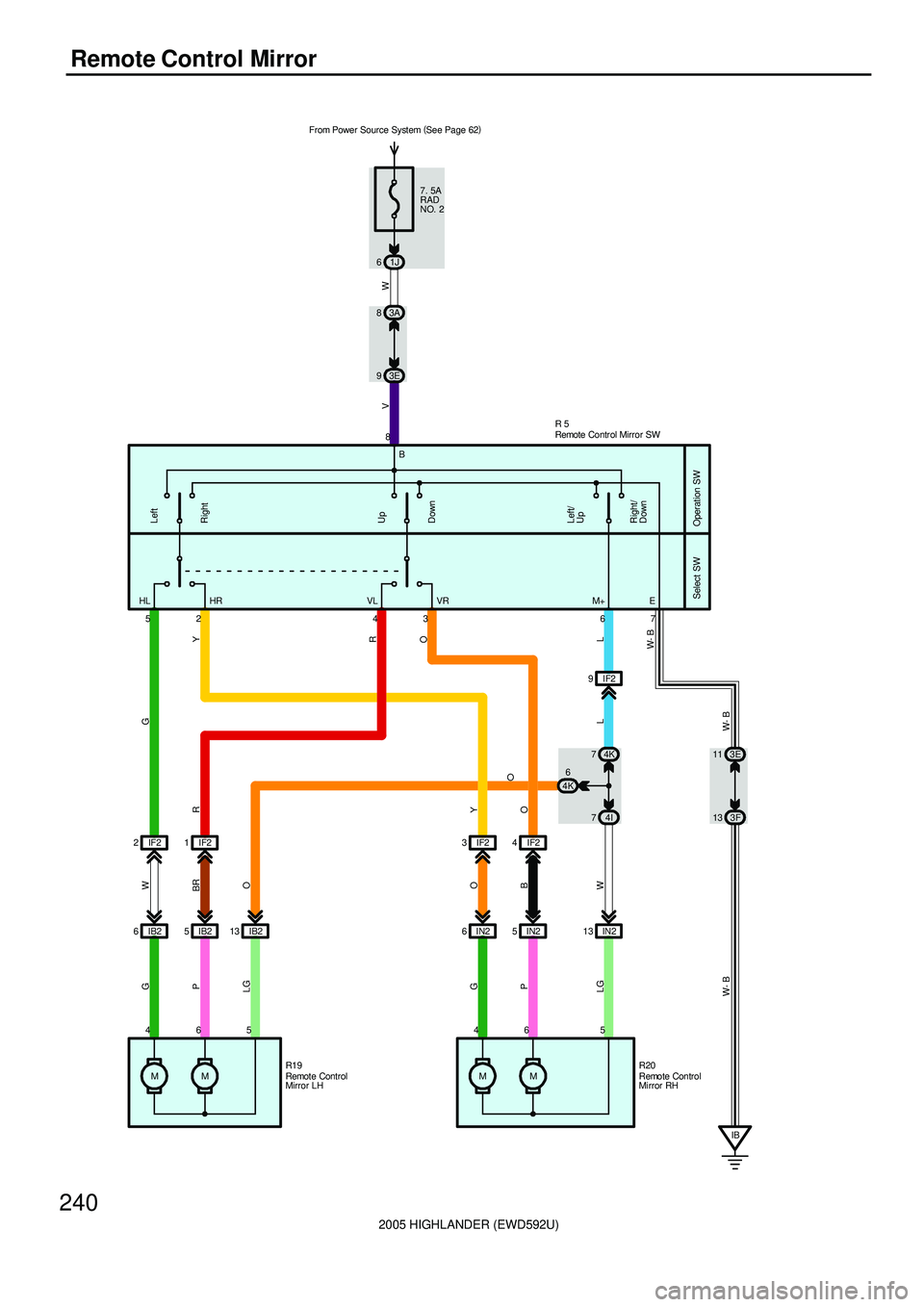
Remote Control Mirror
1J 6
MM MM 4655 6 4 8
52 43 67
IF2 23F 133E 11
IB2 6IB25IB213O
W- B W- BW- BL LGO LG
O PO G
PBRWG
RY
R
GY
HL HR VL VR
Left
Right
Up
Down
Left/
Up
Right/
Down
Select SW Operation SW
7. 5A
RAD
NO. 2
R 5
R20 R19 IF2 1
IB
O
IN2 6IN25IN213
WB
IF2 9 3A 8
3E 9
W V
L
IF2 3IF244I 74K 7
4K6 B
M+ E From Power Source System (
See Page 62)
Remote Control Mirror SW
Remote Control
Mirror LHRemote Control
Mirror RH
Page 556 of 2572
2005 HIGHLANDER (EWD592U)
241
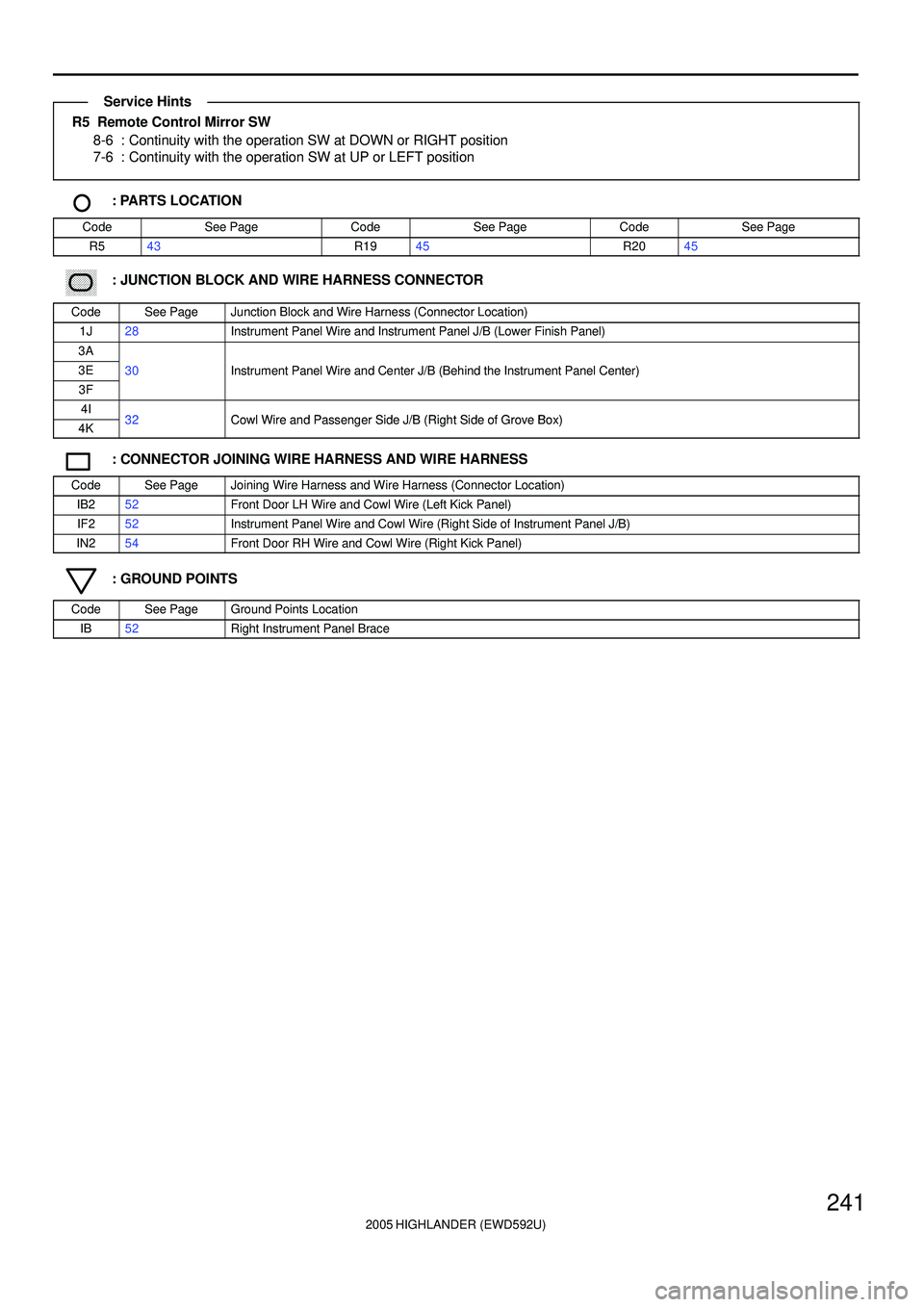
R5 Remote Control Mirror SW
8-6 : Continuity with the operation SW at DOWN or RIGHT position
7-6 : Continuity with the operation SW at UP or LEFT position
: PARTS LOCATION
CodeSee PageCodeSee PageCodeSee Page
R543R1945R2045
: JUNCTION BLOCK AND WIRE HARNESS CONNECTOR
CodeSee PageJunction Block and Wire Harness (Connector Location)
1J28Instrument Panel Wire and Instrument Panel J/B (Lower Finish Panel)
3A
3E30Instrument Panel Wire and Center J/B (Behind the Instrument Panel Center)
3F
()
4I32Cowl Wire and Passenger Side J/B (Right Side of Grove Box)4K32Cowl Wire and Passenger Side J/B (Right Side of Grove Box)
: CONNECTOR JOINING WIRE HARNESS AND WIRE HARNESS
CodeSee PageJoining Wire Harness and Wire Harness (Connector Location)
IB252Front Door LH Wire and Cowl Wire (Left Kick Panel)
IF252Instrument Panel Wire and Cowl Wire (Right Side of Instrument Panel J/B)
IN254Front Door RH Wire and Cowl Wire (Right Kick Panel)
: GROUND POINTS
CodeSee PageGround Points Location
IB52Right Instrument Panel Brace
Service Hints