Page 56 of 290

2 Instruments and controls
Meters and gauges ................................................2-2
Speedometer and odometer .............................2-3............................................2-3
Tachometer........................................................2-5
Engine coolant temperature gauge ...................2-5
Fuel gauge ........................................................2-6
Warning/indicator lights and chimes ......................2-7
Checking bulbs ..................................................2-7
Warning lights ....................................................2-8
Indicator lights .................................................2-10
Chimes.............................................................2-12
Security system ..................................................2-12
Vehicle security system (if so equipped) ........2-12
Windshield wiper and washer switch ...................2-15
Switch operation ..............................................2-16
Rear window defogger switch (Crew Cab
models only) .........................................................2-16
Headlight and turn signal switch ..........................2-17
Headlight switch ..............................................2-17
Turn signal switch............................................2-18
Front fog light switch (if so equipped)..................2-18
Hazard warning flasher switch .............................2-19Horn ......................................................................2-19
Power point (if so equipped) ................................2-20
Cigarette lighter (accessory) and ash tray ...........2-20
Storage .................................................................2-21
Storage compartment (Crew Cab
models only) ....................................................2-21
Cup holders (if so equipped) ...........................2-21
Glove box ........................................................2-22
Grocery hooks (King Cab only) .......................2-23
Windows ...............................................................2-23
Power windows (if so equipped) .....................2-23
Manual windows ..............................................2-25
Rear sliding window (if so equipped) ..............2-25
Sunroof (if so equipped).......................................2-25
Tilting the sunroof ............................................2-25
Removing/installing..........................................2-26
Interior lights .........................................................2-28
Map lights (if so equipped)...................................2-29
Illuminated entry system ......................................2-29
Battery saver ...................................................2-29
ZX
Page 81 of 290
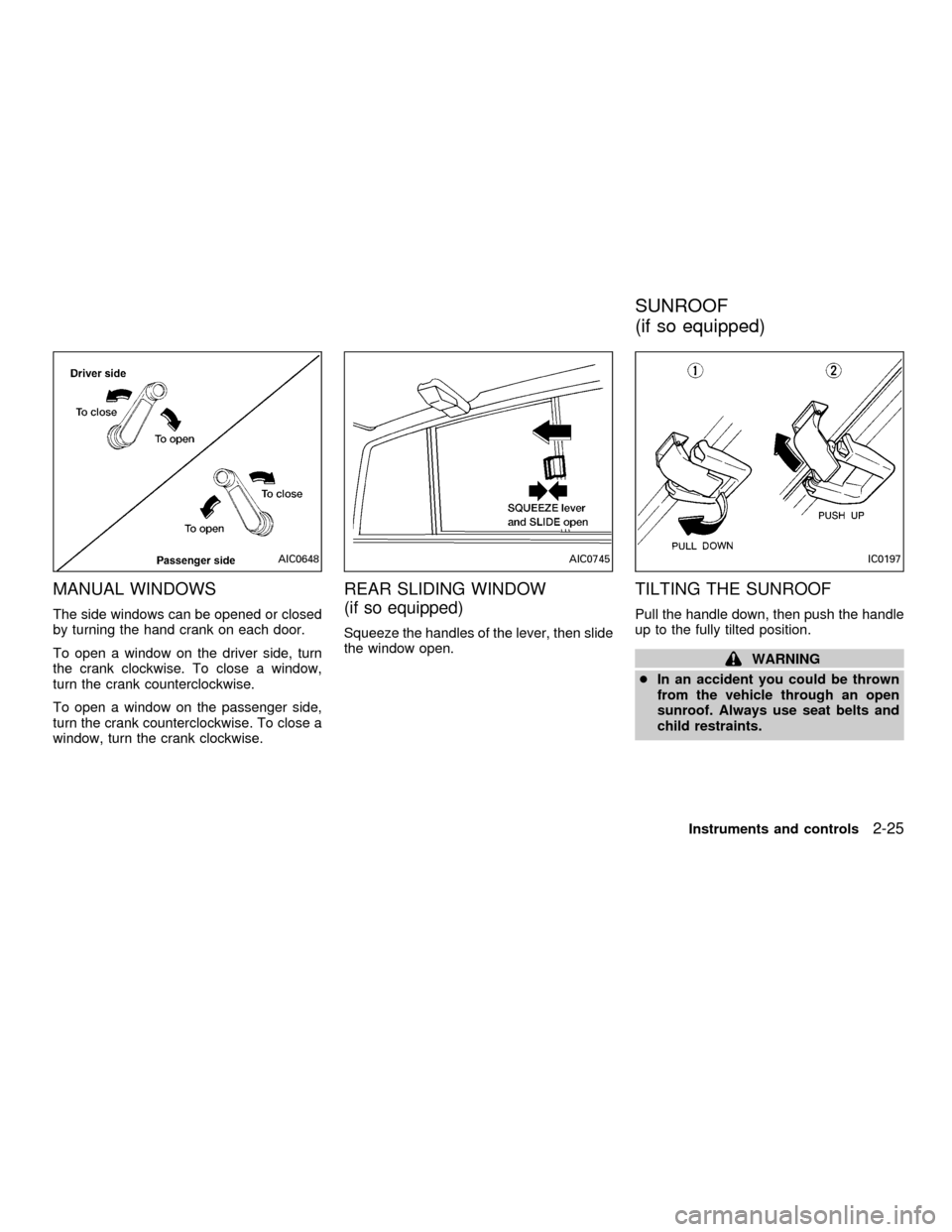
MANUAL WINDOWS
The side windows can be opened or closed
by turning the hand crank on each door.
To open a window on the driver side, turn
the crank clockwise. To close a window,
turn the crank counterclockwise.
To open a window on the passenger side,
turn the crank counterclockwise. To close a
window, turn the crank clockwise.
REAR SLIDING WINDOW
(if so equipped)
Squeeze the handles of the lever, then slide
the window open.
TILTING THE SUNROOF
Pull the handle down, then push the handle
up to the fully tilted position.
WARNING
cIn an accident you could be thrown
from the vehicle through an open
sunroof. Always use seat belts and
child restraints.
AIC0648AIC0745IC0197
SUNROOF
(if so equipped)
Instruments and controls2-25
ZX
Page 82 of 290
cDo not allow anyone to stand up or
extend any portion of their body out
of the sunroof opening while the
vehicle is in motion or while the
sunroof is closing.
CAUTION
cRemove water drops, snow, ice or
sand from the sunroof before open-
ing.
cDo not place heavy objects on the
sunroof or surrounding area.
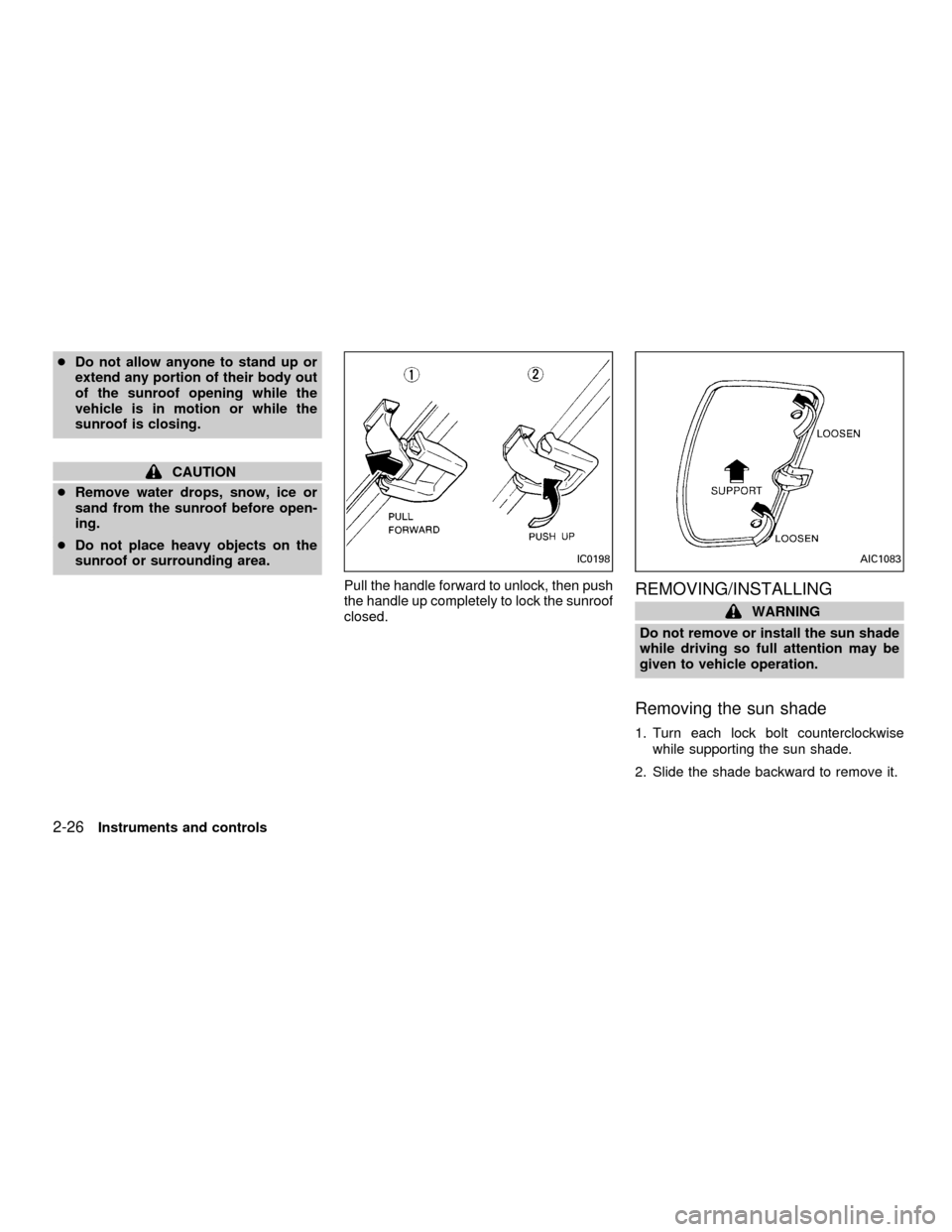
Pull the handle forward to unlock, then push
the handle up completely to lock the sunroof
closed.
REMOVING/INSTALLING
WARNING
Do not remove or install the sun shade
while driving so full attention may be
given to vehicle operation.
Removing the sun shade
1. Turn each lock bolt counterclockwise
while supporting the sun shade.
2. Slide the shade backward to remove it.
IC0198AIC1083
2-26Instruments and controls
ZX
Page 83 of 290
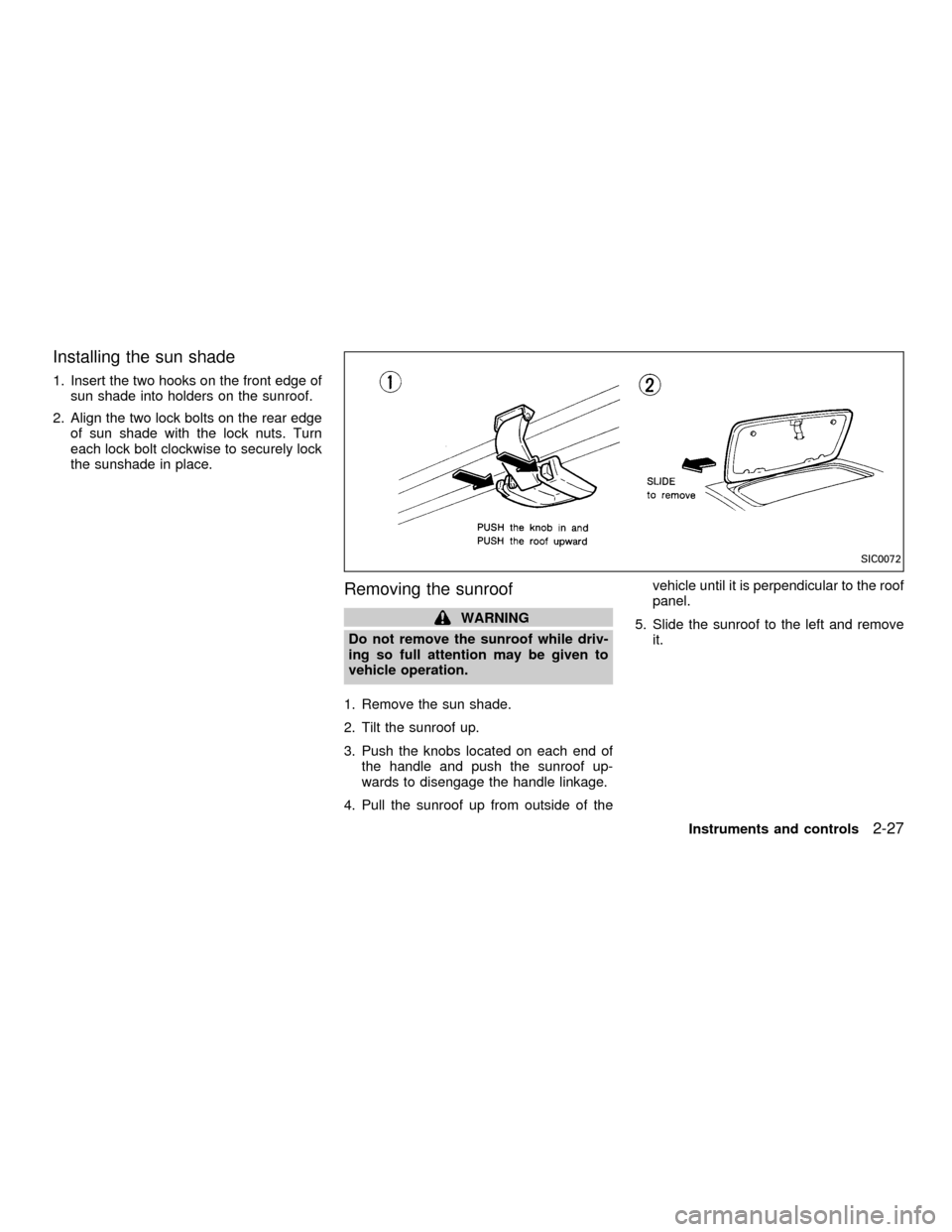
Installing the sun shade
1. Insert the two hooks on the front edge of
sun shade into holders on the sunroof.
2. Align the two lock bolts on the rear edge
of sun shade with the lock nuts. Turn
each lock bolt clockwise to securely lock
the sunshade in place.
Removing the sunroof
WARNING
Do not remove the sunroof while driv-
ing so full attention may be given to
vehicle operation.
1. Remove the sun shade.
2. Tilt the sunroof up.
3. Push the knobs located on each end of
the handle and push the sunroof up-
wards to disengage the handle linkage.
4. Pull the sunroof up from outside of thevehicle until it is perpendicular to the roof
panel.
5. Slide the sunroof to the left and remove
it.
SIC0072
Instruments and controls2-27
ZX
Page 84 of 290
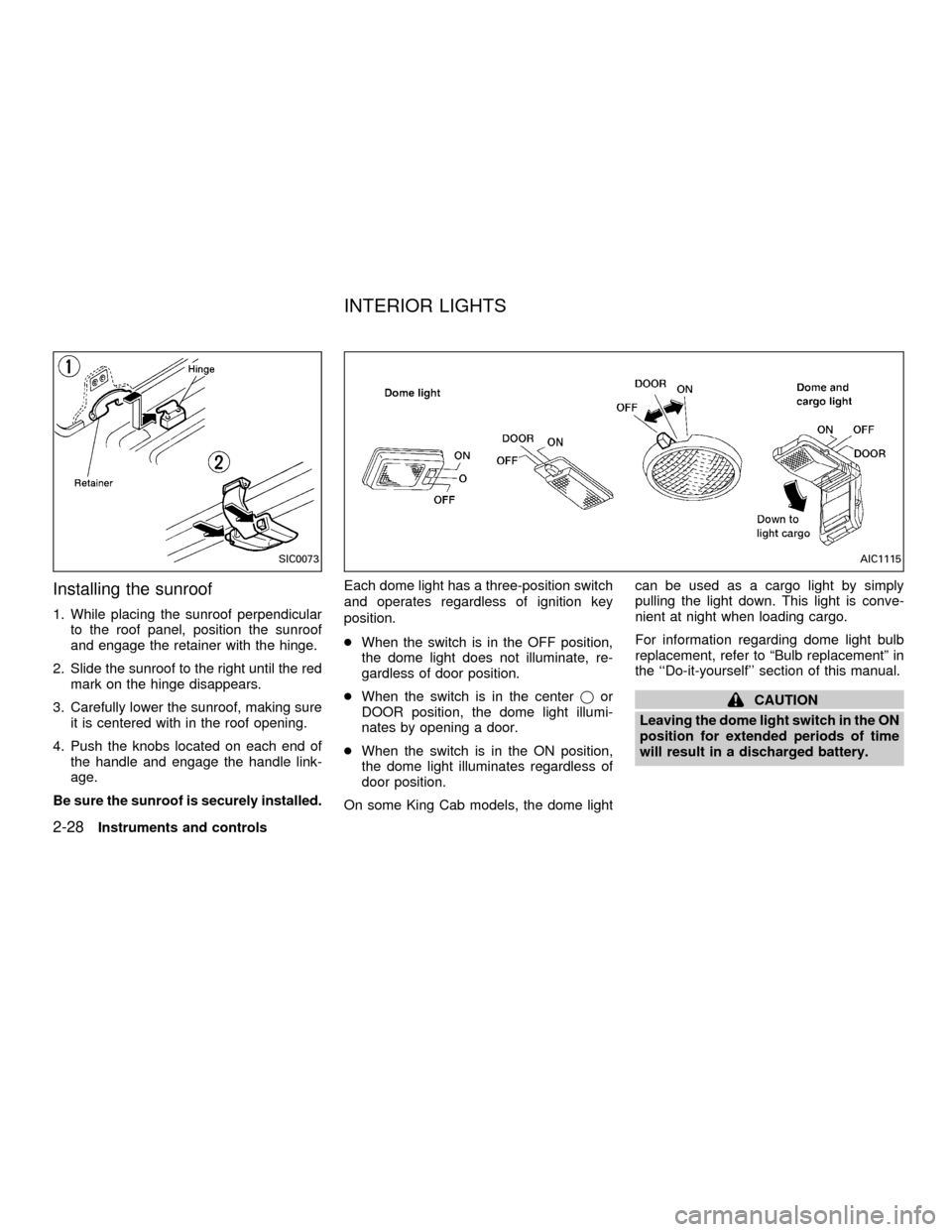
Installing the sunroof
1. While placing the sunroof perpendicular
to the roof panel, position the sunroof
and engage the retainer with the hinge.
2. Slide the sunroof to the right until the red
mark on the hinge disappears.
3. Carefully lower the sunroof, making sure
it is centered with in the roof opening.
4. Push the knobs located on each end of
the handle and engage the handle link-
age.
Be sure the sunroof is securely installed.Each dome light has a three-position switch
and operates regardless of ignition key
position.
cWhen the switch is in the OFF position,
the dome light does not illuminate, re-
gardless of door position.
cWhen the switch is in the centerjor
DOOR position, the dome light illumi-
nates by opening a door.
cWhen the switch is in the ON position,
the dome light illuminates regardless of
door position.
On some King Cab models, the dome lightcan be used as a cargo light by simply
pulling the light down. This light is conve-
nient at night when loading cargo.
For information regarding dome light bulb
replacement, refer to ªBulb replacementº in
the ``Do-it-yourself'' section of this manual.
CAUTION
Leaving the dome light switch in the ON
position for extended periods of time
will result in a discharged battery.
SIC0073AIC1115
INTERIOR LIGHTS
2-28Instruments and controls
ZX
Page 87 of 290

3 Pre-driving checks and adjustments
Key .........................................................................3-2
Doors ......................................................................3-2
Locking with key ................................................3-2
Locking with inside lock knob............................3-3
Locking with power door lock switch.................3-3
Child safety rear door lock
(Crew Cab models only)....................................3-4
Multi-remote control system (if so equipped).........3-4
How to use multi-remote control system...........3-4
Battery replacement ..........................................3-7
Hood .......................................................................3-8
Roof rack (if so equipped)......................................3-9
Step rail (if so equipped) ......................................3-11
Fuel filler lid ..........................................................3-11Fuel filler cap ...................................................3-11
Steering wheel .....................................................3-12
Tilt operation (if so equipped) .........................3-12
Sun visors.............................................................3-13
Vanity mirror (if so equipped) ..........................3-13
Mirrors ..................................................................3-13
Inside mirror.....................................................3-13
Outside mirrors ................................................3-13
Outside mirror remote control
(if so equipped)................................................3-14
Truck box..............................................................3-15
Tailgate ............................................................3-15
Tie down hooks ...............................................3-17
ZX
Page 95 of 290
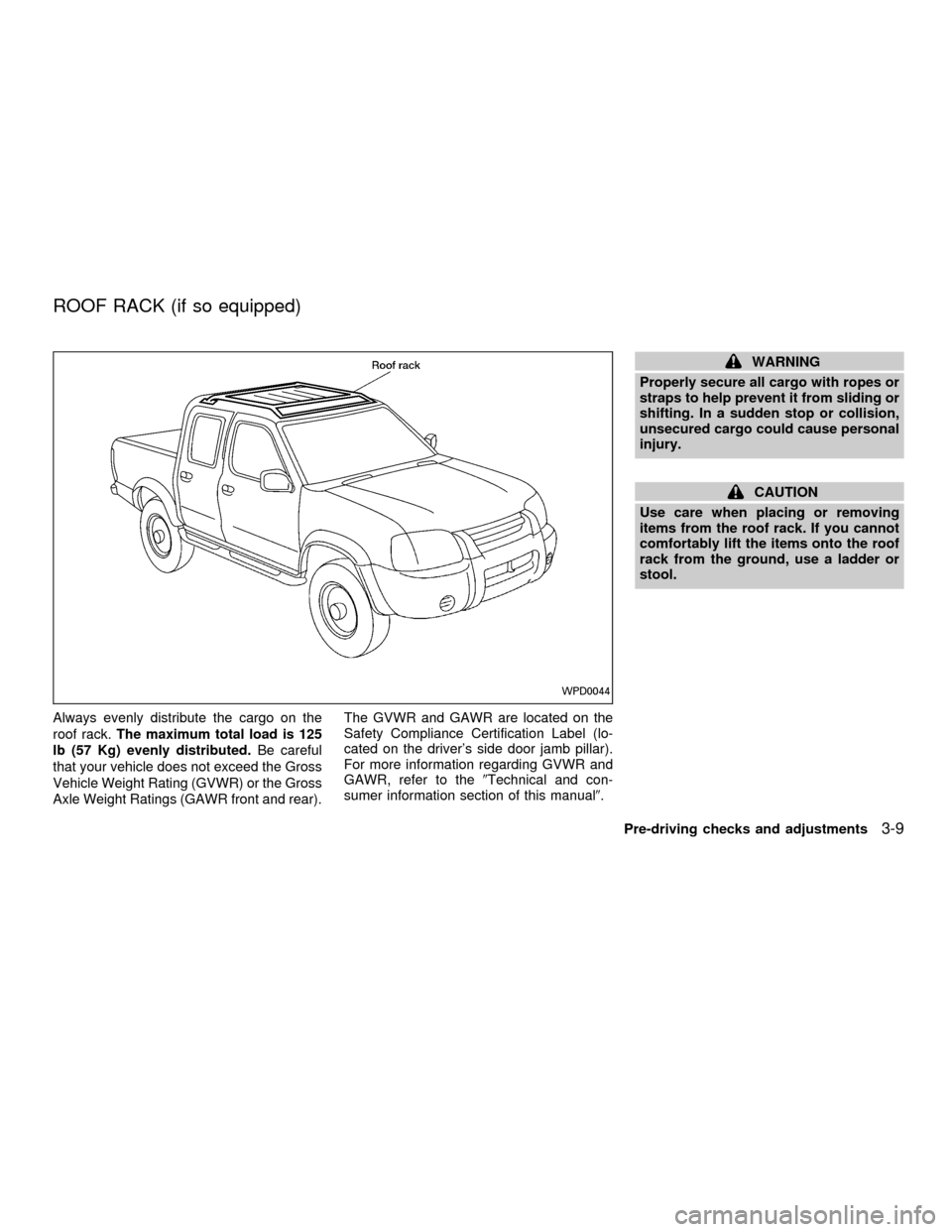
Always evenly distribute the cargo on the
roof rack.The maximum total load is 125
lb (57 Kg) evenly distributed.Be careful
that your vehicle does not exceed the Gross
Vehicle Weight Rating (GVWR) or the Gross
Axle Weight Ratings (GAWR front and rear).The GVWR and GAWR are located on the
Safety Compliance Certification Label (lo-
cated on the driver's side door jamb pillar).
For more information regarding GVWR and
GAWR, refer to the9Technical and con-
sumer information section of this manual9.
WARNING
Properly secure all cargo with ropes or
straps to help prevent it from sliding or
shifting. In a sudden stop or collision,
unsecured cargo could cause personal
injury.
CAUTION
Use care when placing or removing
items from the roof rack. If you cannot
comfortably lift the items onto the roof
rack from the ground, use a ladder or
stool.
WPD0044
ROOF RACK (if so equipped)
Pre-driving checks and adjustments3-9
ZX
Page 96 of 290
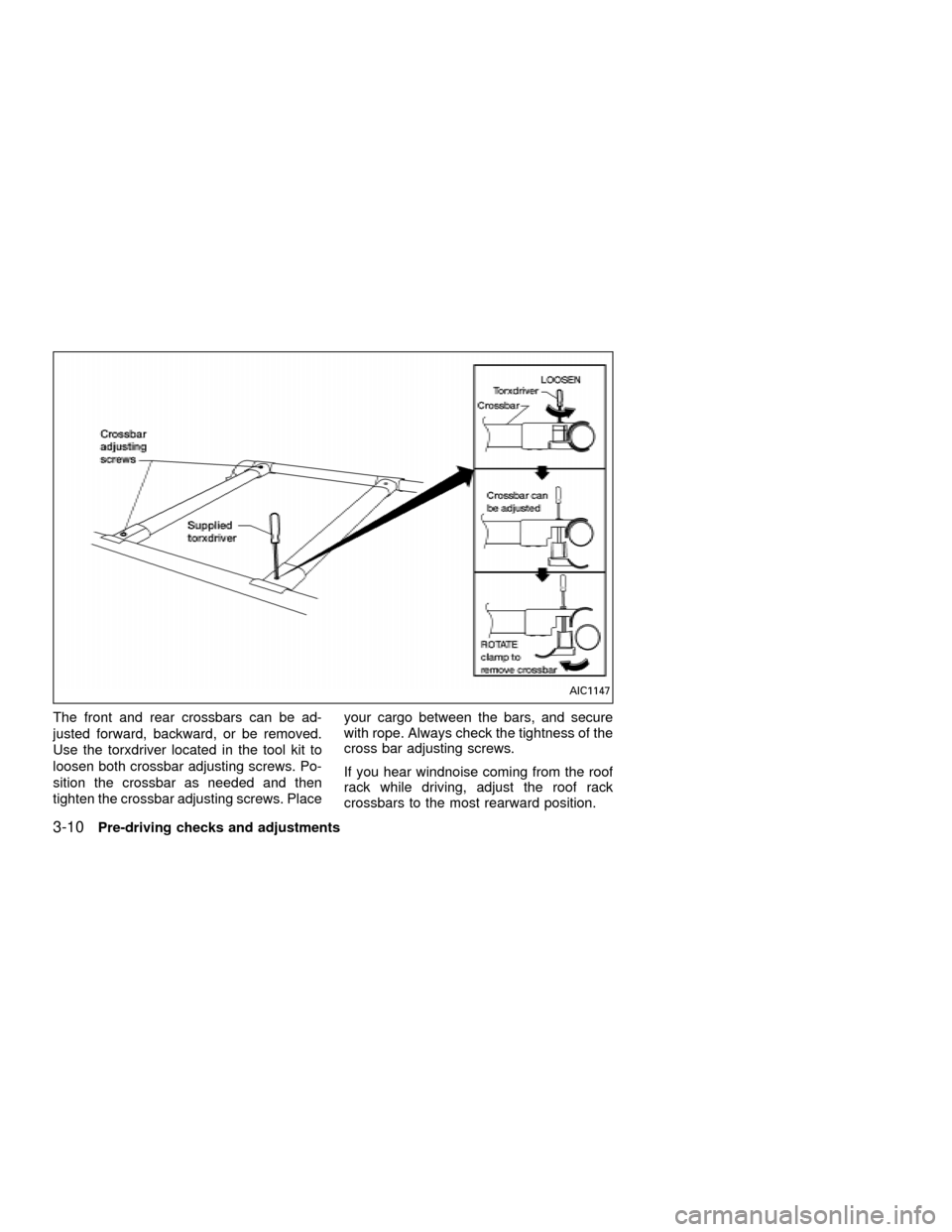
The front and rear crossbars can be ad-
justed forward, backward, or be removed.
Use the torxdriver located in the tool kit to
loosen both crossbar adjusting screws. Po-
sition the crossbar as needed and then
tighten the crossbar adjusting screws. Placeyour cargo between the bars, and secure
with rope. Always check the tightness of the
cross bar adjusting screws.
If you hear windnoise coming from the roof
rack while driving, adjust the roof rack
crossbars to the most rearward position.
AIC1147
3-10Pre-driving checks and adjustments
ZX