Page 100 of 363

Canadian Owners:
The remote control you are training
from may stop transmitting after two
seconds. This is not long enough f or
the HomeLink transmitter to learn
thecode.Releaseandpressthe
button on the remote control every
two seconds until the transmitter has
learned the code.The red light in the transmitter
should begin f lashing. It will f lash
slowly at first, then rapidly.
When the red light f lashes rapidly,
release both buttons. The
transmitter should have learned
the code f rom the remote control.
Plug in the garage door opener
motor, then test the transmitter
button by pushing it. It should
operate the garage door.
If the button does not work, repeat
this procedure to train it again. If it still does not work, you may have a
variable or rolling code garage
door opener. Test this by pressing
and holding the HomeLink
transmitter button you just trained.
If the red light blinks f or two
seconds,thenstayson,youhavea
rolling code garage door opener.
You may be able to verify this with
the manufacturer’s documentation.
Go to ‘‘Training With a Rolling
Code System.’’
Repeat these steps to train the
other two transmitter buttons to
operate any other remotely-
controlled devices around your
home (lighting, automatic gate,
security system, etc.).
For security purposes, newer garage
door opening systems use a ‘‘rolling’’
or variable code. Inf ormation f rom
the remote control and the garage
door opener are needed bef ore the
HomeLink transmitter can operate
the garage door opener.
The‘‘Training the Transmitter’’
procedure trains the HomeLink
transmitter to the proper garage
door opener code. The f ollowing
procedure synchronizes the
HomeLink transmitter to the garage
door opener so they send and
receive the correct codes.
5. 6.
8.
7.
CONT INUED
T raining With a Rolling Code
System
HomeL ink Universal T ransmitter
Inst rument s and Cont rols 101
Page 101 of 363
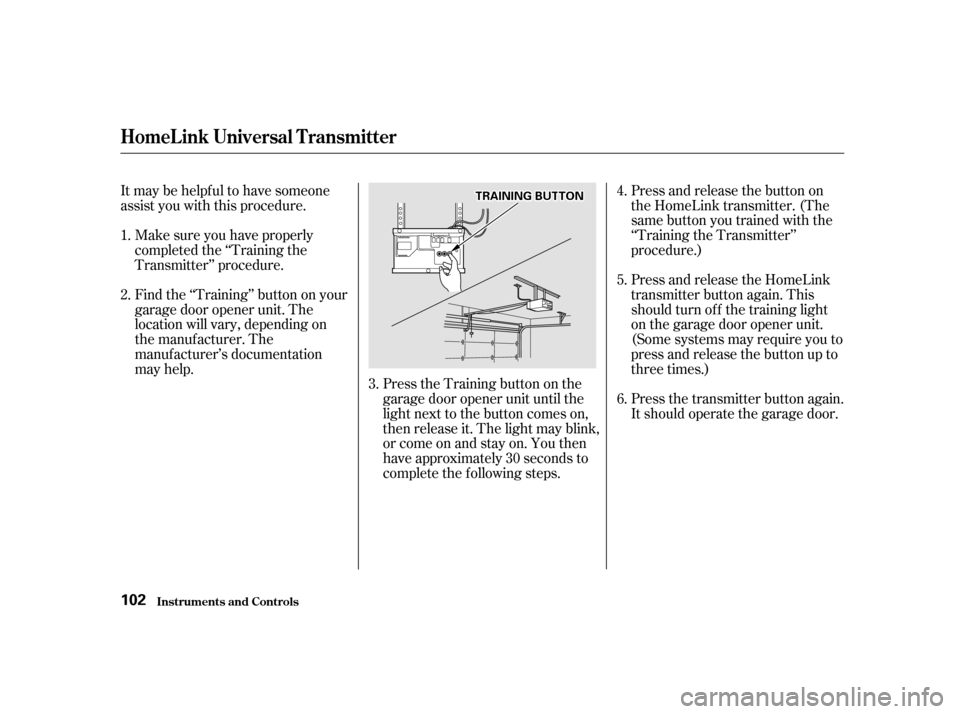
Itmaybehelpfultohavesomeone
assist you with this procedure.Make sure you have properly
completed the ‘‘Training the
Transmitter’’ procedure.
Find the ‘‘Training’’ button on your
garage door opener unit. The
location will vary, depending on
the manufacturer. The
manufacturer’s documentation
may help. Press the Training button on the
garage door opener unit until the
light next to the button comes on,
then release it. The light may blink,
or come on and stay on. You then
have approximately 30 seconds to
complete the f ollowing steps.Press and release the button on
the HomeLink transmitter. (The
same button you trained with the
‘‘Training the Transmitter’’
procedure.)
Press and release the HomeLink
transmitter button again. This
should turn of f the training light
on the garage door opener unit.
(Some systems may require you to
press and release the button up to
three times.)
Press the transmitter button again.
It should operate the garage door.
6.
2.
4. 5.
1.
3.
HomeL ink Universal T ransmitter
Inst rument s and Cont rols
102
TTRRAAIINNIINNGGBBUUTTTTOONN
Page 102 of 363

As required by the FCC:This device complies with Part 15 of theFCC rules. Operation is subject to thef ollowing two conditions: (1) This devicemay not cause harmf ul interf erence, and(2) this device must accept anyinterf erence received, includinginterf erence that may cause undesired
operation.
Changes or modif ications not expresslyapproved by the party responsible f orcompliance could void the user’sauthority to operate the equipment.
This device complies with IndustryCanada Standard RSS-210.Operation is subject to the f ollowing twoconditions: (1) this device may not causeinterf erence, and (2) this device mustaccept any interf erence that may causeundesired operation of the device.
Totrainanalreadyprogrammed
transmitter button to operate a new
device:
Select the transmitter button you
want to train.
Press and hold the transmitter
button until the red light begins to
f lash slowly (approximately 20
seconds).
While continuing to hold the
transmitter button, place the
remotecontrolforthedevice2to
5 inches f rom the HomeLink
transmitter.
Press and hold the button on the
remote control. Hold both buttons
until the red light begins to f lash
rapidly. Release both buttons. The
transmitter should now be trained
to operate the device.
Toerasethecodesstoredinallthree
buttons, press and hold the two
outside buttons until the red light
begins to f lash, then release the
buttons.
Youshoulderaseallthreecodes
bef ore selling the vehicle.
1. 2. 3. 4. 5.
Retraining a Button
Erasing Codes
HomeL ink Universal T ransmitter
Inst rument s and Cont rols103
Page 113 of 363
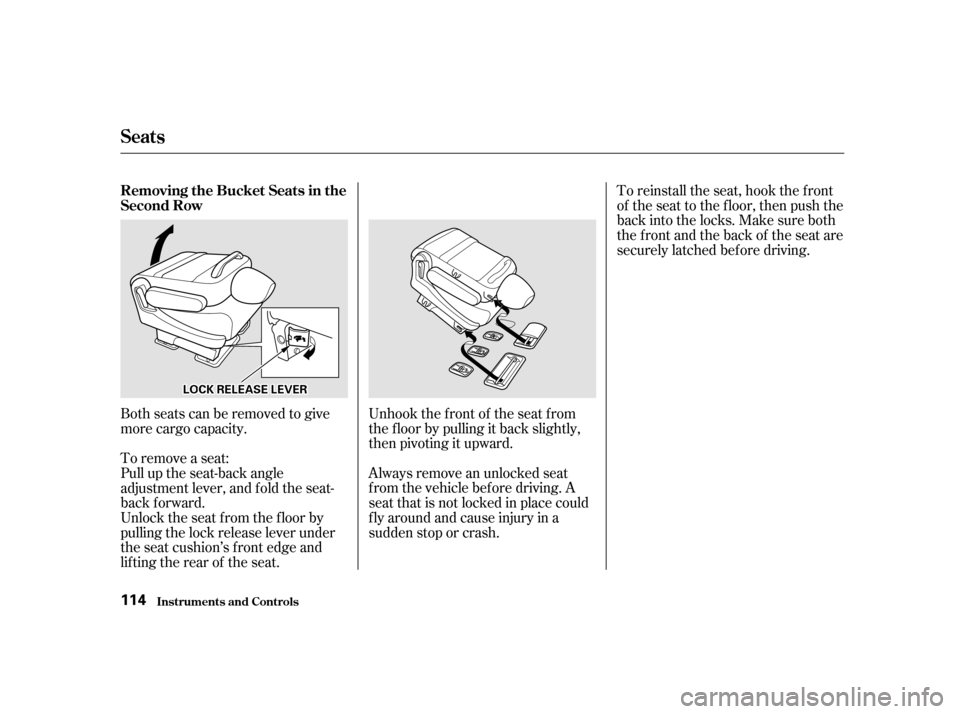
Unhook the f ront of the seat f rom
the f loor by pulling it back slightly,
then pivoting it upward.
Always remove an unlocked seat
f rom the vehicle bef ore driving. A
seat that is not locked in place could
f ly around and cause injury in a
sudden stop or crash.
Both seats can be removed to give
more cargo capacity.
To remove a seat:
Pull up the seat-back angle
adjustment lever, and fold the seat-
back f orward.
Unlock the seat f rom the f loor by
pulling the lock release lever under
the seat cushion’s f ront edge and
lifting the rear of the seat. To reinstall the seat, hook the f ront
of the seat to the f loor, then push the
backintothelocks.Makesureboth
the front and the back of the seat are
securely latched bef ore driving.
Seats
Inst rument s and Cont rols
Removing the Bucket Seats in the
Second Row 114
LLOOCCKKRREELLEEAASSEELLEEVVEERR
Page 118 of 363

�µ
CONT INUED
The master control panel also con-
tains these extra features:To open the driver’s
window f ully, push the window
switch f irmly down and release it.
The window automatically goes all
the way down. To stop the window
f rom going all the way down, pull
back on the window switch brief ly.
To open the driver’s window only
partially, push the window switch
down lightly and hold it. The window
will stop as soon as you release the
switch.
The AUTO f unction only works to
lower the driver’s window. To raise
the window, you must pull back on
the window switch and hold it until
the window reaches the desired
position. The MAIN switch controls power to
the f ront passenger’s window and
the rear power windows. With this
switch of f , the f ront passenger’s
window cannot be raised or lowered
and the rear windows cannot be
opened or closed. The MAIN switch
does not af f ect the driver’s window.
Keep the MAIN switch of f when you
have children in the vehicle so they
do not injure themselves by
operating the windows
unintentionally.
Power Windows
Inst rument s and Cont rols
AUTO
119
Closing a power window on
someone’s hands or fingers can
cause serious injury.
Make sure your passengers are
away from the windows before
closing them.
Page 120 of 363
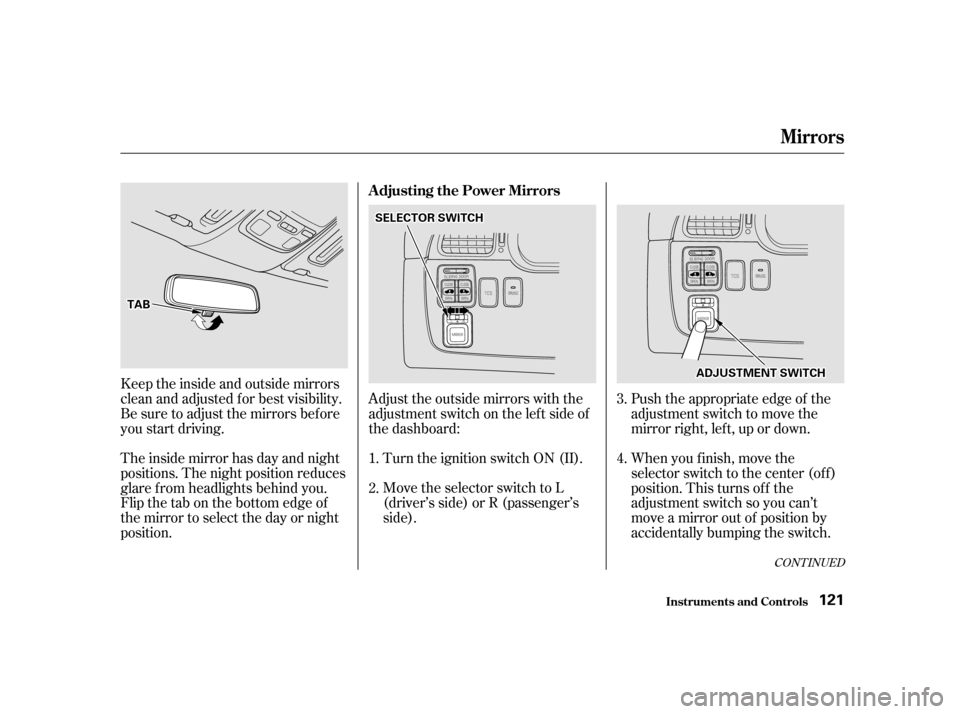
Turn the ignition switch ON (II).
Move the selector switch to L
(driver’s side) or R (passenger’s
side).Push the appropriate edge of the
adjustment switch to move the
mirror right, lef t, up or down.
When you f inish, move the
selector switch to the center (off)
position. This turns of f the
adjustment switch so you can’t
move a mirror out of position by
accidentally bumping the switch.
Keeptheinsideandoutsidemirrors
clean and adjusted f or best visibility.
Be sure to adjust the mirrors bef ore
you start driving.
The inside mirror has day and night
positions. The night position reduces
glare f rom headlights behind you.
Flip the tab on the bottom edge of
the mirror to select the day or night
position.
Adjust the outside mirrors with the
adjustment switch on the lef t side of
the dashboard: 1.2.
3. 4.
CONT INUED
Adjusting the Power Mirrors
Inst rument s and Cont rols
Mirrors
121
TTAABB
SSEELLEECCTTOORRSSWWIITTCCHH
AADDJJUUSSTTMMEENNTTSSWWIITTCCHH
Page 121 of 363
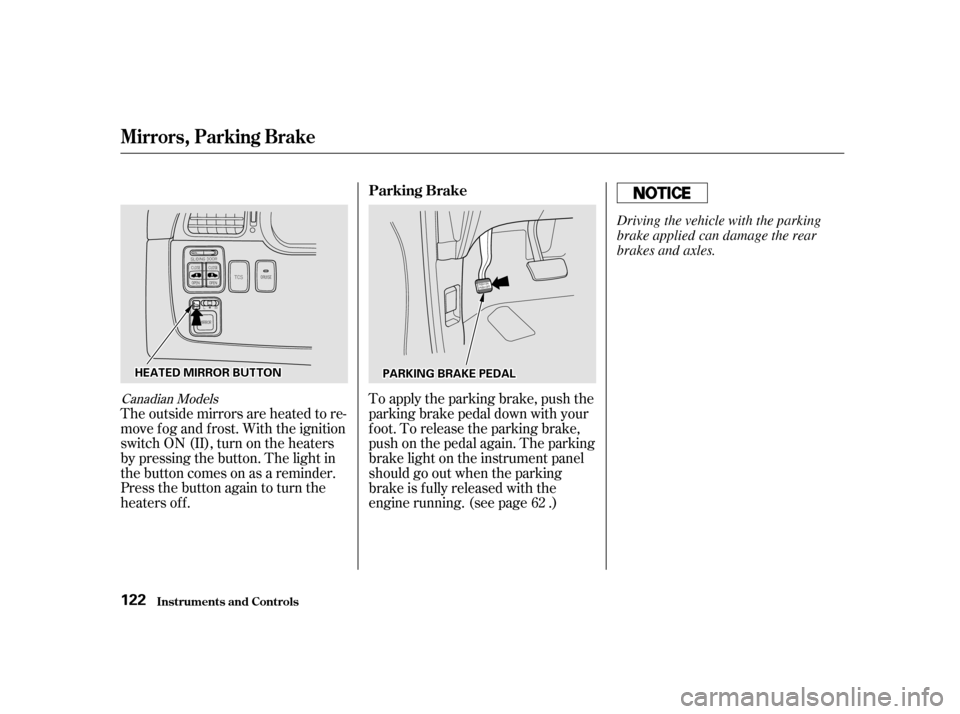
Canadian Models
The outside mirrors are heated to re-
move fog and frost. With the ignition
switchON(II),turnontheheaters
by pressing the button. The light in
the button comes on as a reminder.
Press the button again to turn the
heaters off.To apply the parking brake, push the
parking brake pedal down with your
f oot. To release the parking brake,
push on the pedal again. The parking
brake light on the instrument panel
should go out when the parking
brake is f ully released with the
engine running. (see page .)
62
Mirrors, Parking Brake
Inst rument s and Cont rols Parking Brake
122
HHEEAATTEEDDMMIIRRRROORRBBUUTTTTOONNPPAARRKKIINNGGBBRRAAKKEEPPEEDDAALL Driving the vehicle with the parking
brake applied can damage the rear
brakes and axles.
Page 126 of 363
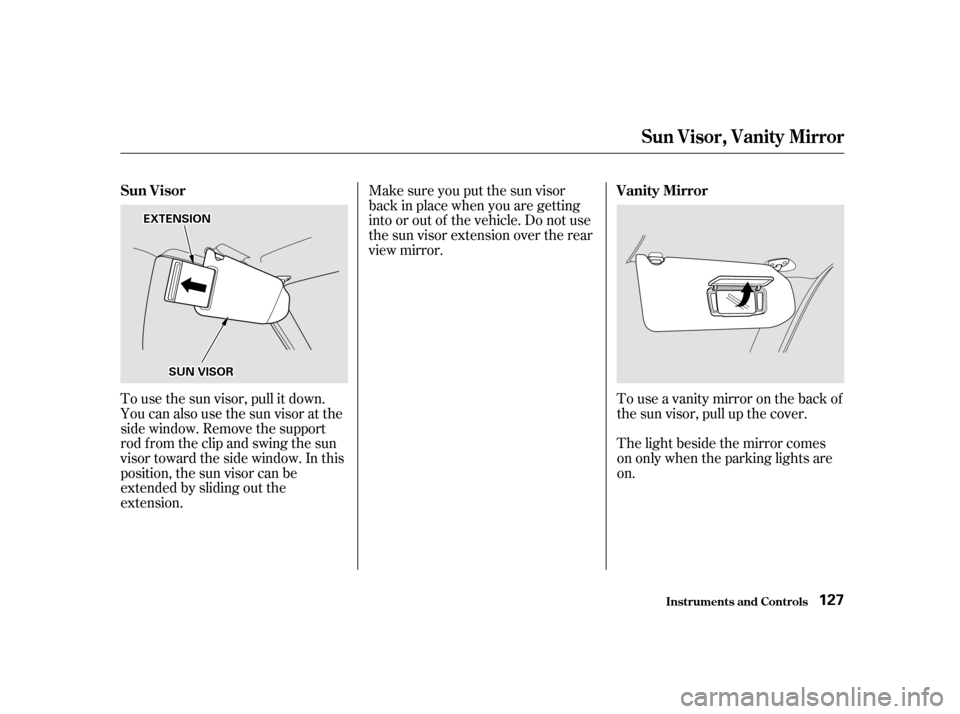
To use the sun visor, pull it down.
You can also use the sun visor at the
side window. Remove the support
rod f rom the clip and swing the sun
visor toward the side window. In this
position, the sun visor can be
extended by sliding out the
extension.Touseavanitymirroronthebackof
the sun visor, pull up the cover.
Make sure you put the sun visor
back in place when you are getting
into or out of the vehicle. Do not use
the sun visor extension over the rear
view mirror.
The light beside the mirror comes
on only when the parking lights areon.Inst rument s and Cont rols
Sun Visor, Vanit y Mirror
Sun Visor Vanity Mirror
127
SSUUNNVVIISSOORR
EEXXTTEENNSSIIOONN