Page 131 of 319

�Û
Turn the audio system ON. Make
sure the tape opening on the cassette
is f acing to the right, then insert the
cassette most of the way into the slot.
The system will pull it in the rest of
the way, and begin to play. The tape direction indicator will light
to show you which side of the
cassette is playing. The indicates
thesideyouinsertedfacingupward
is now playing. If you want to play
the other side, press the PROG
button.
You can quickly set the time to the
nearest hour. If the displayed time is
bef ore the half hour, the clock is set
back to the previous hour by
pressing and holding the CLOCK
button, then pressing the RESET
(Preset 6) button. If the displayed
time is af ter the half hour, the clock
is set forward to the beginning of the
next hour.
1:06 would RESET to 1:00
1:52 would RESET to 2:00
For example:
Operating the Cassette Player
Audio System
Comf ort and Convenience Feat ures
132
RREEWWBBUUTTTTOONN
EEJJEECCTTBBUUTTTTOONN
AAMM//FFMMBBUUTTTTOONN
RREEPPEEAATTBBUUTTTTOONN
CCAASSSSEETTTTEESSLLOOTT
NNRRIINNDDIICCAATTOORR
PPLLAAYY//PPRROOGGBBUUTTTTOONN
CCDD//TTAAPPEEBBUUTTTTOONN
PPWWRR//VVOOLLKKNNOOBB
SSKKIIPPBBAARR
NNRRBBUUTTTTOONN
FFFFBBUUTTTTOONN
Page 138 of 319

�µ�µ�µ
CONT INUED
Use the TUNE knob to
tune the radio to a desired f requency.
Turn the knob clockwise to tune to a
higher f requency, or
counterclockwise to tune to a lower
f requency.
You can use any of f ive methods to
find radio stations on the selected
band: TUNE, SEEK, SCAN, AUTO
SELECT, and the Preset buttons.
To change the f requency rapidly,
press and hold the top or bottom of
theSEEKbar.Releasethebarwhen
the display reaches the desired
f requency. Depending on which part
of the bar you press, the system
scans upward or downward f rom the
current f requency. The SEEK f unction
searches the band for a station with
a strong signal. To activate it, press
and release the top or bottom of the
SEEK bar. Depending on which part
of the bar you press, the system
scans upward or downward f rom the
current f requency. It stops when it
finds a station with a strong signal. The SCAN f unction
samples all the stations with strong
signals on the selected band. To
activate it, press the SCAN button,
then release it. The system will scan
up the band for a station with a
strong signal. When it f inds one, it
will stop and play that station f or
approximately f ive seconds. If you do
nothing, the system will then scan
f or the next strong station and play
that f or f ive seconds. When it plays a
station that you want to continue
listening to, press the SCAN button
again.
Audio System
Comf ort and Convenience Feat ures
TUNE
SEEK SCA N
139
Page 142 of 319
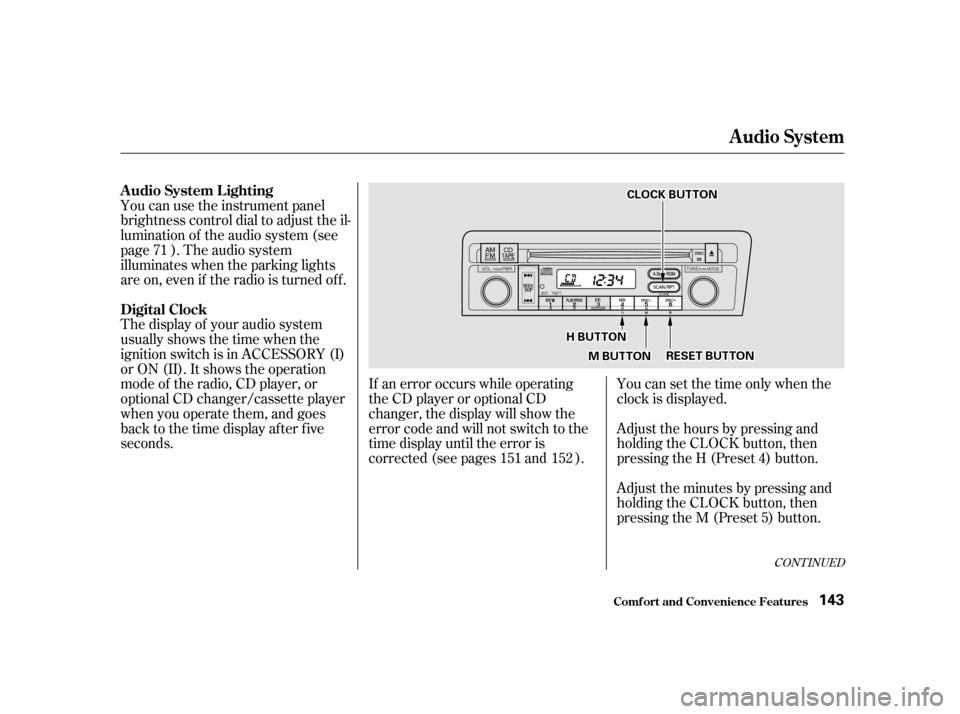
You can use the instrument panel
brightness control dial to adjust the il-
lumination of the audio system (see
page ). The audio system
illuminates when the parking lights
are on, even if the radio is turned of f .
The display of your audio system
usually shows the time when the
ignition switch is in ACCESSORY (I)
or ON (II). It shows the operation
mode of the radio, CD player, or
optional CD changer/cassette player
when you operate them, and goes
back to the time display after five
seconds.You can set the time only when the
clock is displayed.
Adjust the hours by pressing and
holding the CLOCK button, then
pressing the H (Preset 4) button.
Adjust the minutes by pressing and
holding the CLOCK button, then
pressing the M (Preset 5) button.
If an error occurs while operating
the CD player or optional CD
changer, the display will show the
error code and will not switch to the
time display until the error is
corrected (see pages and ).
71
151 152
CONT INUED
A udio System L ighting
Digital Clock
Audio System
Comf ort and Convenience Feat ures143
CCLLOOCCKKBBUUTTTTOONN
HHBBUUTTTTOONN
MMBBUUTTTTOONNRREESSEETTBBUUTTTTOONN
Page 143 of 319

You can quickly set the time to the
nearest hour. If the displayed time is
bef ore the half hour, the clock is set
back to the previous hour by
pressing and holding the CLOCK
button, then pressing the RESET
(Preset 6) button. If the displayed
time is af ter the half hour, the clock
is set forward to the beginning of the
next hour.Your Honda’s radio can receive the
complete AM and FM bands.
Those bands cover these f requen-
cies:
AM band:
530 to 1,710 kilohertz
FM band:
87.7 to 107.9 megahertz
Radio stations on the AM band are
assigned f requencies at least ten
kilohertz apart (530, 540, 550).
Stations on the FM band are
assigned f requencies at least 0.2
megahertz apart (87.9, 88.1, 88.3).Stations must use these exact
f requencies. It is f airly common f or
stations to round-of f the f requency in
their advertising, so your radio could
display a f requency of 100.9 even
though the announcer may identif y
the station as ‘‘FM101.’’
1:06 would RESET to 1:00.
1:52 would RESET to 2:00.
For example:
Audio System
Comf ort and Convenience Feat ures Radio Frequencies
144
Page 166 of 319

Modif ying your car, or installing
some non-Honda accessories, can
make your car unsaf e. Bef ore you
make any modif ications or add any
accessories,besuretoreadthe
f ollowing inf ormation.
Your dealer has Genuine Honda
accessories that allow you to
personalize your car. These
accessories have been designed and
approved f or your car, and are
covered by warranty.
Non-Honda accessories are usually
designed f or universal applications.
Although aftermarket accessories
may f it on your car, they may not
meet f actory specif ications, and
could adversely af f ect your car’s
handling and stability. (See
‘‘Modif ications’’ on the page f or
additional information.)When properly installed, cellular
phones, alarms, two-way radios, and
low-powered audio systems should
not interf ere with your car’s
computer-controlled systems, such
as the SRS and anti-lock brake
system.
If possible, have your dealer inspect
the f inal installation.Have the installer contact your
Honda dealer f or assistance bef ore
installing any electronic accessory.
Be sure electronic accessories do
not overload electrical circuits
(see page ).
Make sure the accessory does not
obscure any lights, or interf ere
with proper car operation or
perf ormance.
Bef ore installing any accessory:
However, if electronic accessories
are improperly installed, or exceed
your car’s electrical system capacity,
they can interfere with the operation
of your car, or even cause the
airbags to deploy.
168 281
A ccessories
A ccessories and Modif ications
Bef ore Driving
167
Improper accessories or
modifications can affect your
car’s handling, stability and
performance, and cause a
crash in which you can be hurt
or killed.
Follow all instructions in this
owner’s manual regarding
accessories and modifications.
Page 167 of 319

In addition, any modif ications that
decrease ground clearance increase
the chance of undercarriage parts
striking a curb, speed bump, or other
raised object, which could cause
your airbags to deploy.
Do not modif y your steering wheel
or any other part of your
Supplemental Restraint System.
Modif ications could make the
system inef f ective.
Do not remove any original
equipment or modif y your car in any
way that would alter its design or
operation. This could make your car
unsaf e and illegal to drive.
For example, do not make any
modif ications that would change the
ride height of your car, or install
wheels and tires with a dif f erent
overall diameter.
Such modif ications can adversely
af f ect handling, and interf ere with
the operation of the car’s anti-lock
brakes and other systems.
Do not attach or place objects on
the airbag covers. Any object
attached to or placed on the covers
marked ‘‘SRS AIRBAG,’’ in the
center of the steering wheel and
on top of the dashboard, could
interf ere with the proper operation
of the airbags. Or, if the airbags
inf late, the objects could be
propelled inside the car and hurt
someone. If a side airbag
inflates,acupholderorotherhard
object attached on or near the
door could be propelled inside the
car and hurt someone.
Covering the outside edge of a
f ront seat-back, with a non-Honda
seat cover for example, could
prevent the airbag from inflating
properly.Only on models equipped with side
airbagsModif ications
Additional Saf ety Precaution
A ccessories and Modif ications
Bef ore Driving
Do not at t ach hard object s on ornear a f ront door.
Do not place any object s over t heoutsideedgeof afront seat-back.
168
Page 169 of 319

Store or secure all items that could
be thrown around and hurt
someone during a crash.
Besureitemsplacedonthefloor
behind the f ront seats cannot roll
under the seats and interf ere with
the driver’s ability to operate the
pedals, or with the proper
operation of the seats.
Keep the glove box closed while
driving. If the lid is open, a
passenger could injure their knees
during a crash or sudden stop.
This f igure includes the total weight
of all occupants, cargo, and
accessories.
To f igure out how much cargo you
can carry:
Add up the weight of all occupants.
The f inal number is the total weight
of cargo you can carry.
The maximum load for your car is
850 lbs (395 kg).
Subtract the total f rom 850 lbs
(395 kg). Do not put any items on top of the
trunk panel. They can block your
viewandbethrownaroundthecar
during a crash.
Carrying Items in the Passenger
Compartment
Load Limit
Carrying Cargo
Bef ore Driving
170 Overloading or improper
loading can affect handling and
stability and cause a crash in
which you can be hurt or killed.
Follow all load limits and other
loading guidelines in thismanual.
Page 172 of 319

This section gives you tips on
starting the engine under various
conditions, and how to operate the
5-speed manual and automatic
transmissions. It also includes impor-
tant inf ormation on parking your car,
and the braking system.........................
Preparing to Drive . 174
.......................
Starting the Engine . 175
Starting in Cold Weather ....................
at High Altitude . 175
....
5-speed Manual Transmission . 176
.....
Recommended Shif t Points . 177
..............
Engine Speed Limiter . 177
..............
Automatic Transmission . 178
.
Shif t Lever Position Indicator . 178
................
Shif t Lever Positions . 179
..............
Engine Speed Limiter . 181
....................
Shif t Lock Release . 182
...........................................
Parking . 183
..............................
Parking Tips . 183
.....................
The Braking System . 184
.............
Brake Wear Indicators . 184
...............
Brake System Design . 185
.......................
Anti-lock Brakes . 185
Important Saf ety .........................
Reminders . 186
........................
ABS Indicator . 187
...............
Driving in Bad Weather . 188
...........................
Towing a Trailer . 189
Driving
Driving 173