Page 93 of 319
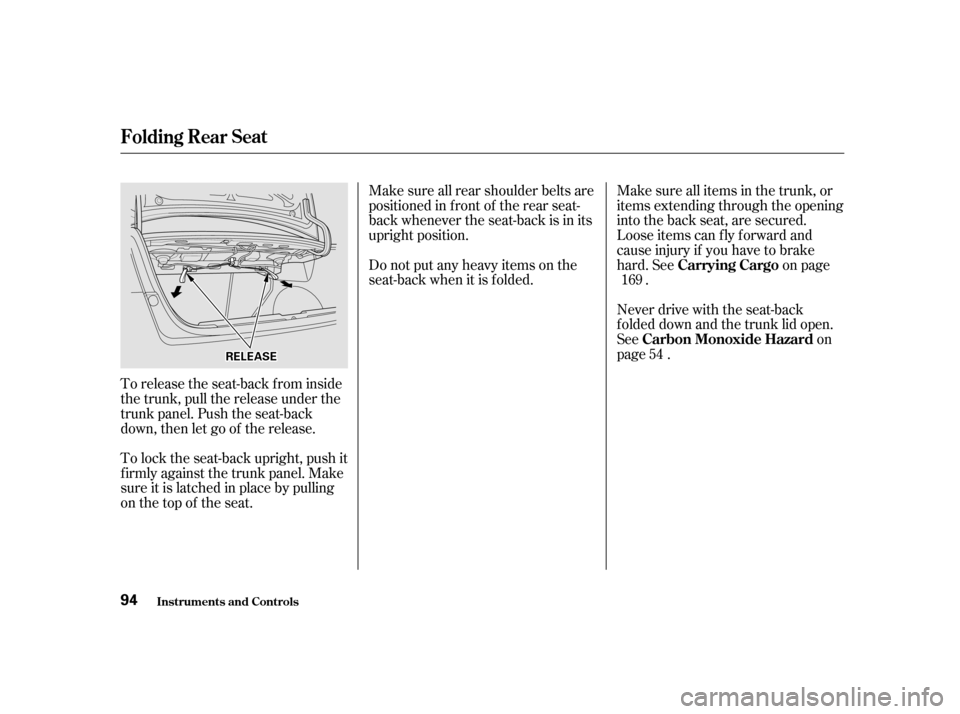
To release the seat-back from inside
the trunk, pull the release under the
trunk panel. Push the seat-back
down, then let go of the release.
To lock the seat-back upright, push it
f irmly against the trunk panel. Make
sure it is latched in place by pulling
on the top of the seat.Make sure all rear shoulder belts are
positioned in f ront of the rear seat-
back whenever the seat-back is in its
upright position.
Do not put any heavy items on the
seat-back when it is folded.
Make sure all items in the trunk, or
items extending through the opening
into the back seat, are secured.
Looseitemscanflyforwardand
cause injury if you have to brake
hard. See on page
.
Never drive with the seat-back
f olded down and the trunk lid open.
See on
page . 169
54
Folding Rear Seat
Inst rument s and Cont rols Carrying Cargo
Carbon Monoxide Hazard
94
RREELLEEAASSEE
Page 102 of 319
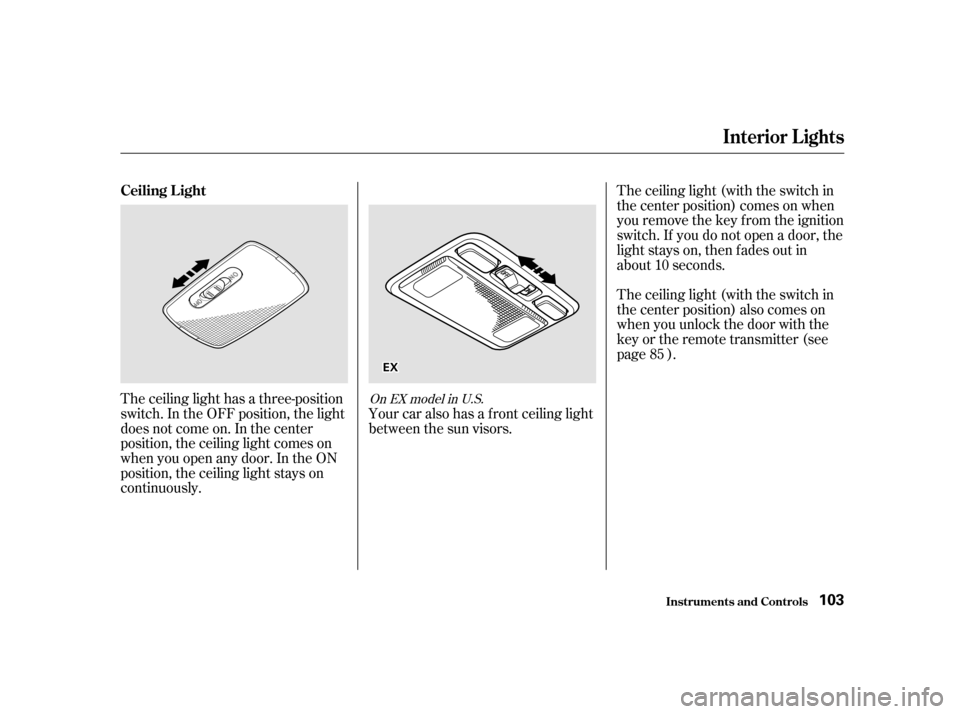
The ceiling light has a three-position
switch. In the OFF position, the light
does not come on. In the center
position, the ceiling light comes on
when you open any door. In the ON
position, the ceiling light stays on
continuously.The ceiling light (with the switch in
the center position) comes on when
you remove the key f rom the ignition
switch. If you do not open a door, the
light stays on, then f ades out in
about 10 seconds.
Your car also has a f ront ceiling light
between the sun visors. The ceiling light (with the switch in
the center position) also comes on
when you unlock the door with the
key or the remote transmitter (see
page ).
85On EX model in U.S.
Ceiling L ight
Interior Lights
Inst rument s and Cont rols 103
EEXX
Page 104 of 319

�Î
�Î
The heating and air conditioning
systems in your Honda provide a
comf ortable driving environment in
all weather conditions.
The standard audio system has
many f eatures. This section de-
scribes those f eatures and how to
use them. (If you selected an
optional audio system, ref er to the
operating instructions that came
with it.)
.....................
Heating and Cooling . 106
.........
What Each Control Does . 106
............
How to Use the System . 108
..........
To Turn Everything Of f . 113
Audio System (U.S. and ........................
Canadian DX) . 114
.................
Operating the Radio . 114
.................
Adjusting the Sound . 118
............
Audio System Lighting . 119
..............................
Digital Clock . 119
Operating the Optional Cassette
.....................................
Player . 120
............
Tape Search Functions . 121
Operating the Optional
.............
CD Player/Changer . 123
...............
Audio System (U.S. LX) . 126
.................
Operating the Radio . 126
.................
Adjusting the Sound . 130
............
Audio System Lighting . 131
..............................
Digital Clock . 131
Operating the Cassette
.....................................
Player . 132
............
Tape Search Functions . 133
Operating the Optional
.............
CD Player/Changer . 135 Audio System (U.S. EX and
........................
Canadian LX) . 138
.................
Operating the Radio . 138
.................
Adjusting the Sound . 142
............
Audio System Lighting . 143
..............................
Digital Clock . 143
....................
Radio Frequencies . 144
........................
Radio Reception . 145
.........
Operating the CD Player . 147
.....
Operating the CD Changer . 149
.......
Protecting Compact Discs . 150
....
CD Player Error Indications . 151
CD Changer Error
.............................
Indications . 152
Operating the Cassette .....................................
Player . 153
............
Tape Search Functions . 154
Caring f or the Cassette
.....................................
Player . 156
.......................
Thef t Protection . 157
Air conditioning is standard on LX
andEXmodelsintheU.S.,andLX
model in Canada. It is optional on
other models.
Comf ort and Convenience Features
Comf ort and Convenience Feat ures 105
Page 105 of 319
Proper use of the Heating and
Cooling system can make the
interior dry and comf ortable, and
keep the windows clear f or best
visibility.
If your car does not have air
conditioning, it can be installed at
any time. Your dealer can install a
genuine Honda air conditioning
system that meets Honda’s high
quality standards and is designed to
exactly f it your car. Please contact
your dealer f or more inf ormation.
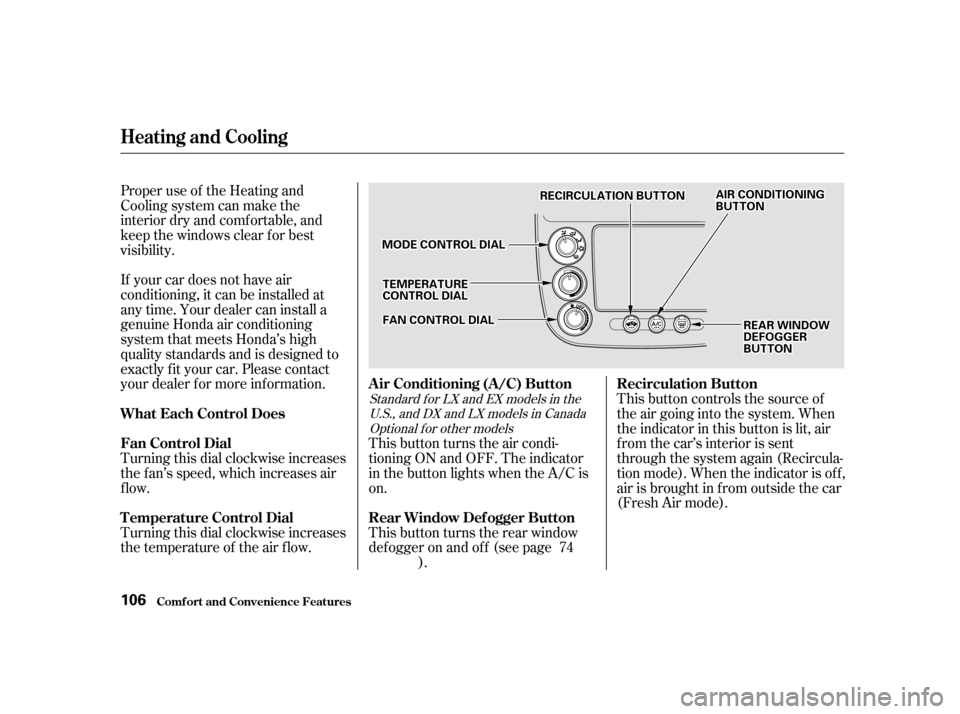
Turning this dial clockwise increases
the f an’s speed, which increases air
flow.This button controls the source of
the air going into the system. When
the indicator in this button is lit, air
from the car’s interior is sent
through the system again (Recircula-
tion mode). When the indicator is off,
air is brought in f rom outside the car
(Fresh Air mode).
Turning this dial clockwise increases
the temperature of the air flow. This button turns the air condi-
tioning ON and OFF. The indicator
in the button lights when the A/C ison.
This button turns the rear window
def ogger on and of f (see page
). 74
Standard f or LX and EX models in the
U.S., and DX and LX models in CanadaOptional f or other models
Comf ort and Convenience Feat ures
Heating and Cooling
Recirculation Button
What Each Control Does
Fan Control Dial
T emperature Control Dial Air Conditioning (A/C) Button
Rear Window Def ogger Button
106
AAIIRRCCOONNDDIITTIIOONNIINNGGBBUUTTTTOONN
MMOODDEECCOONNTTRROOLLDDIIAALL
RREECCIIRRCCUULLAATTIIOONNBBUUTTTTOONN
RREEAARRWWIINNDDOOWWDDEEFFOOGGGGEERRBBUUTTTTOONN
FFAANNCCOONNTTRROOLLDDIIAALL
TTEEMMPPEERRAATTUURREECCOONNTTRROOLLDDIIAALL
Page 114 of 319

�µ�µ�µ
CONT INUED
Use the TUNE knob to
tune the radio to a desired f requency.
Turn the knob clockwise to tune to a
higher f requency, or
counterclockwise to tune to a lower
f requency.
You can use any of f ive methods to
find radio stations on the selected
band: TUNE, SEEK, SCAN, AUTO
SELECT, and the Preset buttons.
To change the f requency rapidly,
press and hold the top or bottom of
theSEEKbar.Releasethebarwhen
the display reaches the desired
f requency. Depending on which part
of the bar you press, the system
scans upward or downward f rom the
current f requency. The SEEK f unction
searches the band for a station with
a strong signal. To activate it, press
and release the top or bottom of the
SEEK bar. Depending on which part
of the bar you press, the system
scans upward or downward f rom the
current f requency. It stops when it
finds a station with a strong signal. The SCAN f unction
samples all the stations with strong
signals on the selected band. To
activate it, press the SCAN button,
then release it. The system will scan
up the band for a station with a
strong signal. When it f inds one, it
will stop and play that station f or
approximately f ive seconds. If you do
nothing, the system will then scan
f or the next strong station and play
that f or f ive seconds. When it plays a
station that you want to continue
listening to, press the SCAN button
again.
Audio System
Comf ort and Convenience Feat ures
TUNE
SEEK SCA N
115
Page 118 of 319

You can use the instrument panel
brightness control dial to adjust the il-
lumination of the audio system (see
page ). The audio system
illuminates when the parking lights
are on, even if the radio is turned of f .
Theaudiosystemalsodisplaysthe
time. To set the time, the ignition
switch must be in ACCESSORY (I)
or ON (II), and you must wait about
f ive seconds af ter perf orming any
other operations with the system.You can quickly set the time to the
nearest hour. If the displayed time is
bef ore the half hour, the clock is set
back to the previous hour by
pressing and holding the CLOCK
button, then pressing the RESET
(Preset 6) button. If the displayed
time is af ter the half hour, the clock
is set forward to the beginning of the
next hour.For example:
1:06 would RESET to 1:00.
1:52 would RESET to 2:00.
Adjust the minutes by pressing and
holding the CLOCK button, then
pressing the M (Preset 5) button.
Adjust the hours by pressing and
holding the CLOCK button, then
pressing the H (Preset 4) button. 71
Audio System
Comf ort and Convenience Feat ures
A udio System L ighting
Digital Clock
119
CCLLOOCCKKBBUUTTTTOONN
RREESSEETTBBUUTTTTOONN
MMBBUUTTTTOONN
HHBBUUTTTTOONN
Page 126 of 319

�µ�µ�µ
CONT INUED
Use the TUNE knob to
tune the radio to a desired f requency.
Turn the knob clockwise to tune to a
higher f requency, or
counterclockwise to tune to a lower
f requency.
You can use any of f ive methods to
find radio stations on the selected
band: TUNE, SEEK, SCAN, AUTO
SELECT, and the Preset buttons.
To change the f requency rapidly,
press and hold the top or bottom of
theSEEKbar.Releasethebarwhen
the display reaches the desired
f requency. Depending on which part
of the bar you press, the system
scans upward or downward f rom the
current f requency. The SEEK f unction
searches the band for a station with
a strong signal. To activate it, press
and release the top or bottom of the
SEEK bar. Depending on which part
of the bar you press, the system
scans upward or downward f rom the
current f requency. It stops when it
finds a station with a strong signal. The SCAN f unction
samples all the stations with strong
signals on the selected band. To
activate it, press the SCAN button,
then release it. The system will scan
up the band for a station with a
strong signal. When it f inds one, it
will stop and play that station f or
approximately f ive seconds. If you do
nothing, the system will then scan
f or the next strong station and play
that f or f ive seconds. When it plays a
station that you want to continue
listening to, press the SCAN button
again.
Audio System
Comf ort and Convenience Feat ures
TUNE
SEEK SCA N
127
Page 130 of 319

You can use the instrument panel
brightness control dial to adjust the il-
lumination of the audio system (see
page ). The audio system
illuminates when the parking lights
are on, even if the radio is turned of f .
The audio system usually shows the
time when the ignition switch is in
ACCESSORY (I) or ON (II). It
shows the operation mode of the
radio, cassette player, or optional CD
changer when you operate them,
then goes back to the time display
af ter f ive seconds.Adjust the hours by pressing and
holding the CLOCK button, then
pressing the H (Preset 4) button.
Adjust the minutes by pressing and
holding the CLOCK button, then
pressing the M (Preset 5) button.
You can set the time only when the
clock is displayed.
If an error occurs while operating
the optional CD player or changer,
the display will keep showing the
error code and will not switch to the
time display until the error is
corrected (see pages and ).
71
151 152
CONT INUED
Audio System
Comf ort and Convenience Feat ures
A udio System L ighting
Digital Clock
131
CCLLOOCCKKBBUUTTTTOONN
RREESSEETTBBUUTTTTOONN
MMBBUUTTTTOONN
HHBBUUTTTTOONN