Page 63 of 319

�µ
This indicator comes on f or a f ew
seconds when you turn the ignition
switch ON (II). It will then go of f if
you have inserted a properly-coded
ignition key. If it is not a properly-
coded key, the indicator will blink
and the engine will not start (see
page ).
This indicator also blinks several
times when you turn the ignition
switch f rom ON (II) to ACCESSORY
(I) or LOCK (0). This indicator reminds you that it is
time to take your car in for
scheduled maintenance.
Ref er to the Maintenance Schedules
f or Normal and Severe Driving
Conditions on pages .
For the f irst 8,000 miles (12,800 km)
af ter the Maintenance Required
Indicator is reset, it will come on f or
two seconds when you turn the
ignition switch ON (II).Between 8,000 miles (12,800 km)
and 10,000 miles (16,000 km) this
indicator will light f or two seconds
when you f irst turn the ignition
switch ON (II), and then f lash f or
ten seconds.
If you exceed 10,000 miles (16,000
km) without having the scheduled
maintenance perf ormed, this
indicator will remain on as a constant
reminder.
80 194 200
Indicator L ights
Immobilizer System
Indicator
Maintenance Required
Indicator
Inst rument s and Cont rols
64
Page 69 of 319
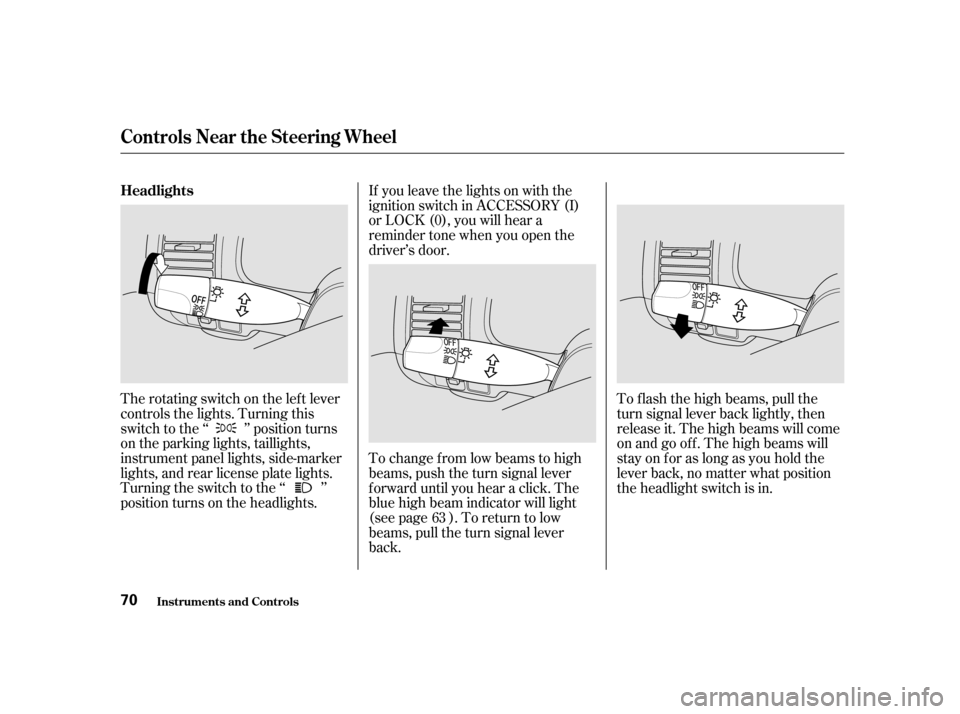
The rotating switch on the lef t lever
controls the lights. Turning this
switch to the ‘‘ ’’ position turns
on the parking lights, taillights,
instrument panel lights, side-marker
lights, and rear license plate lights.
Turning the switch to the ‘‘ ’’
position turns on the headlights.To change f rom low beams to high
beams, push the turn signal lever
f orward until you hear a click. The
blue high beam indicator will light
(see page ). To return to low
beams, pull the turn signal lever
back.
If you leave the lights on with the
ignition switch in ACCESSORY (I)
or LOCK (0), you will hear a
reminder tone when you open the
driver’s door.
To f lash the high beams, pull the
turn signal lever back lightly, then
release it. The high beams will come
on and go of f . The high beams will
stay on f or as long as you hold the
lever back, no matter what position
the headlight switch is in.
63
Headlights
Controls Near the Steering Wheel
Inst rument s and Cont rols
70
Page 74 of 319
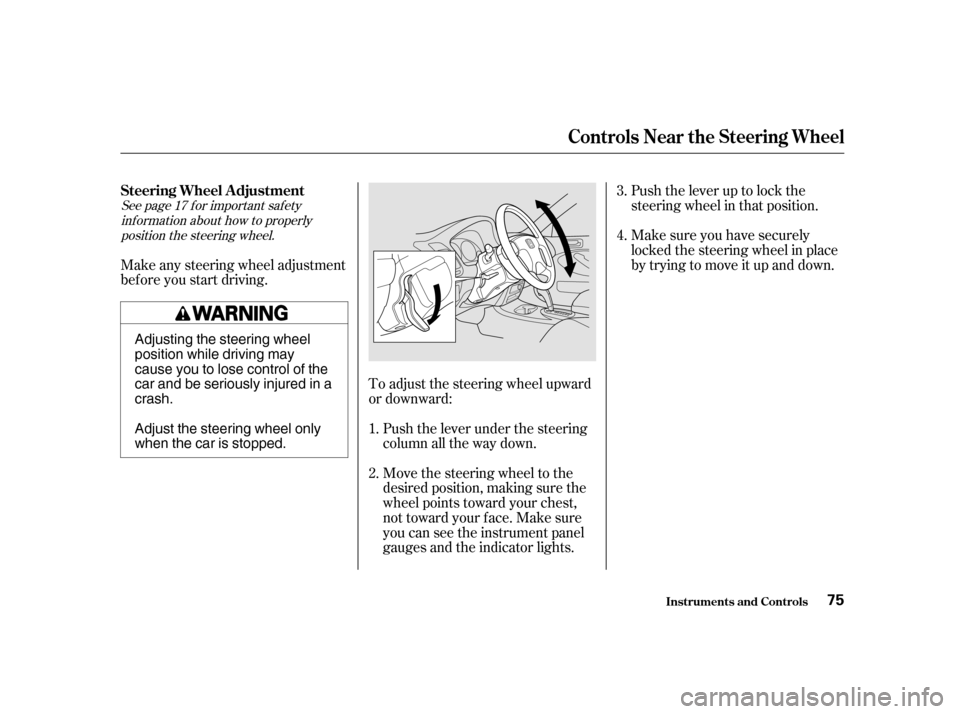
Push the lever up to lock the
steering wheel in that position.
Make sure you have securely
locked the steering wheel in place
by trying to move it up and down.
Move the steering wheel to the
desired position, making sure the
wheel points toward your chest,
not toward your f ace. Make sure
you can see the instrument panel
gauges and the indicator lights.
Push the lever under the steering
column all the way down.
To adjust the steering wheel upward
or downward:
Make any steering wheel adjustment
bef ore you start driving.
1.4.
3.
2.
See page f or important saf ety inf ormation about how to properlyposition the steering wheel. 17
Inst rument s and Cont rols
Controls Near the Steering Wheel
Steering Wheel A djustment
75
Adjusting the steering wheel
position while driving may
cause you to lose control of the
car and be seriously injured in acrash.
Adjust the steering wheel only
when the car is stopped.
Page 78 of 319

The valet key works only in the
ignition and the door locks. You can
keep the trunk, trunk release handle
and rear seat trunk access locked
when you leave your car and the
valet key at a parking f acility. (See
Trunk, page .)
Youshouldhavereceivedakey
number plate with your set of keys.
You will need this key number if you
ever have to get a lost key replaced.
Keep the plate stored in a saf e place.
When replacing keys, use only
Honda-approved key blanks.
Your car comes with two master
keys and a valet key.
The master key fits all the locks on
your car:
Ignition
Doors
Trunk
Trunk release handle
Rear seat trunk access
When you push the CANCEL button,
or tap the brake or clutch pedal, the
CRUISE CONTROL light on the
instrument panel will go out and the
car will begin to slow down. You can
use the accelerator pedal in the
normal way.
The system remembers the
previously-set cruising speed. To
return to that speed, accelerate to
above25mph(40km/h),thenpress
the RESUME/accel button. The
CRUISE CONTROL light comes on,
and the car will accelerate to the
same cruising speed as bef ore.
Pressing the Cruise Control Master
Switch turns the system completely
of f and erases the previous cruising
speed f rom memory. To use the
system again, ref er to
. 89
CONT INUED
Inst rument s and Cont rols
Steering Wheel Controls, K eys and L ocks
Keys
Using t he
Cruise Cont rol
79
KKEEYYNNUUMMBBEERRPPLLAATTEE
MMAASSTTEERRKKEEYYSSVVAALLEETTKKEEYY
Page 79 of 319

The Immobilizer System protects
your car f rom thef t. A properly-
coded master or valet key must be
used in the ignition switch f or the
engine to start. If an improperly-
coded key (or other device) is used,
the engine’s f uel system is disabled.
When you turn the ignition switch to
ON (II), the Immobilizer System
indicator should come on f or a f ew
seconds, then go out. If the indicator
starts to blink, it means the system
does not recognize the coding of the
key. Turn the ignition switch to
LOCK (0), remove the key, reinsert
it, and turn the switch to ON (II)
again.
These keys contain electronic
circuits that are activated by the
Immobilizer System. They will not
work to start the engine if the
circuits are damaged.
Protect the keys f rom direct
sunlight, high temperature, and
high humidity.
Donotdropthekeysorsetheavy
objects on them.
Keep the keys away f rom liquids.
If they get wet, dry them immedi-
ately with a soft cloth.
The keys do not contain batteries.
Do not try to take them apart. Some models also come with two
remote transmitters; see page for
an explanation of their operation.
85
Keys and Locks
Inst rument s and Cont rols Immobilizer System
Remote Transmitter
80
Page 80 of 319

The system may not recognize your
key’s coding if another immobilizer
key or other metal object is near the
ignition switch when you insert the
key. To make sure the system
recognizes the key code:
If the system repeatedly does not
recognize the coding of your key,
contact your Honda dealer.This indicator will also blink several
times when you turn the ignition
switch f rom ON (II) to ACCESSORY
(I) or LOCK (0).
Do not attempt to alter this system
or add other devices to it. Electrical
problems could result that may make
your car undriveable.
If you have lost your key and you
cannot start the engine, contact your
Honda dealer.
Do not keep other immobilizer
keys on the same key ring.
Use a plastic or leather key f ob,
not metal.
Keep other keys away f rom your
car’s key and the ignition switch
while trying to start the engine.As required by the FCC:
This device complies with Part 15 of theFCC rules. Operation is subject to thef ollowing two conditions: (1) This devicemay not cause harmf ul interf erence, and(2) this device must accept anyinterf erence received, includinginterf erence that may cause undesired
operation.
Changes or modif ications not expresslyapproved by the party responsible f orcompliance could void the user’sauthority to operate the equipment.
This device complies with IndustryCanada Standard RSS-210.Operation is subject to the f ollowing twoconditions: (1) this device may not causeinterf erence, and (2) this device mustaccept any interf erence that may causeundesired operation of the device.
Keys and Locks
Inst rument s and Cont rols 81
Page 81 of 319
�µYou can insert or
remove the key only in this position.
To switch f rom ACCESSORY to
LOCK, you must push the key in
slightly as you turn it. If your car has
an automatic transmission, the shif t
lever must also be in Park. The anti-
thef t lock will lock the steering
column when you remove the key.
If the f ront wheels are turned, the
anti-thef t lock may sometimes make
it difficult to turn the key from
LOCK to ACCESSORY. Firmly turn
the steering wheel to the lef t or to
the right as you turn the key.
The ignition switch is on the right
side of the steering column. It has
f our positions:
LOCK(0)
ACCESSORY (I)
ON (II)
START (III)
Inst rument s and Cont rols
Keys and Locks
LOCK (0)
Ignition Switch 82 Removing the key from the
ignition switch while driving
locks the steering. This can
cause you to lose control.
Remove the key from the
ignition switch only whenparked.
Page 82 of 319

�µ
�µ �µ
In this position,
you can operate the audio system
and the accessory power socket.
This is the normal key
position when driving. All f eatures
and accessories on the car are usable.
Several of the lights on the instru-
ment panel come on as a test when
you turn the ignition switch f rom
ACCESSORY to ON.
Each door has a lock tab on the top.
Push the tab down to lock the door
andpullituptounlock.
To lock any passenger’s door when
getting out of the car, push the lock
tab down and close the door. To lock
the driver’s door, pull the outside
door handle and push the lock tab
down. Release the handle, then close
the door.
Use this position
only to start the engine. The switch
returns to ON (II) when you let go of
the key.
The engine will not start if the
Immobilizer System does not
recognize the key’s coding (see page ).
You will hear a reminder beeper if
you leave the key in the ignition
switch in the LOCK (0) or
ACCESSORY (I) position and open
thedriver’sdoor.Removethekeyto
turn of f the beeper. 80
CONT INUED
Keys and Locks
Inst rument s and Cont rols
A CCESSORY (I)
ON (II)
Door L ocks
ST A RT (III)
83