Page 137 of 319
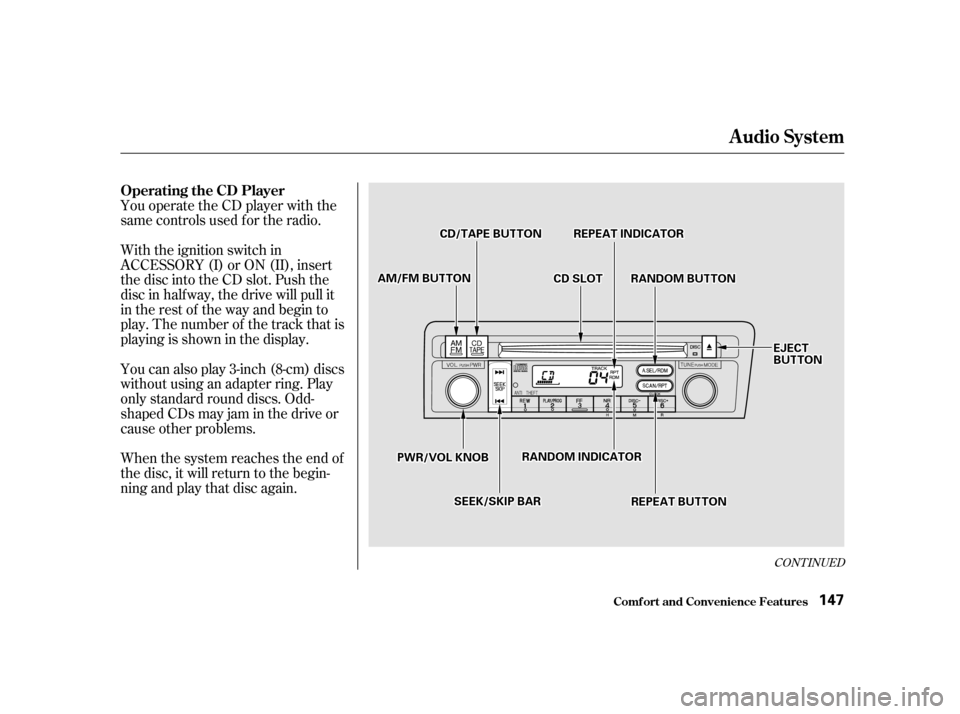
The band and f requency that the
radio was last tuned to is displayed.
To change bands, press the AM/FM
button. On the FM band, ST will be
displayed if the station is broadcast-
ing in stereo. Stereo reproduction on
AM is not available.
Your Honda’s audio system provides
clear reception on both AM and FM
bands, while the preset buttons allow
you to easily select your f avorite
stations.
The anti-thef t f eature will disable the
system if it is disconnected f rom the
car’s battery. To get the system
working again, you must enter a
code number (see page ).
The ignition switch must be in
ACCESSORY (I) or ON (II) to
operate the audio system. Turn the
system on by pushing the PWR/
VOL knob. Adjust the volume by
turning the same knob.
157
For EX model in the U.S., and LX model
in Canada
Audio System
Comf ort and Convenience Feat ures
AM/FM/CD Audio System
Operating the Radio
138
SSTTEERREEOOIINNDDIICCAATTOORR
PPRREESSEETTBBUUTTTTOONNSS
AAMM//FFMMBBUUTTTTOONN
SSEEEEKKBBAARR
AAUUTTOOSSEELLEECCTTBBUUTTTTOONN
TTUUNNEEKKNNOOBBPPWWRR//VVOOLLKKNNOOBB
SSCCAANNIINNDDIICCAATTOORR
SSCCAANNBBUUTTTTOONN
Page 142 of 319
You can use the instrument panel
brightness control dial to adjust the il-
lumination of the audio system (see
page ). The audio system
illuminates when the parking lights
are on, even if the radio is turned of f .
The display of your audio system
usually shows the time when the
ignition switch is in ACCESSORY (I)
or ON (II). It shows the operation
mode of the radio, CD player, or
optional CD changer/cassette player
when you operate them, and goes
back to the time display after five
seconds.You can set the time only when the
clock is displayed.
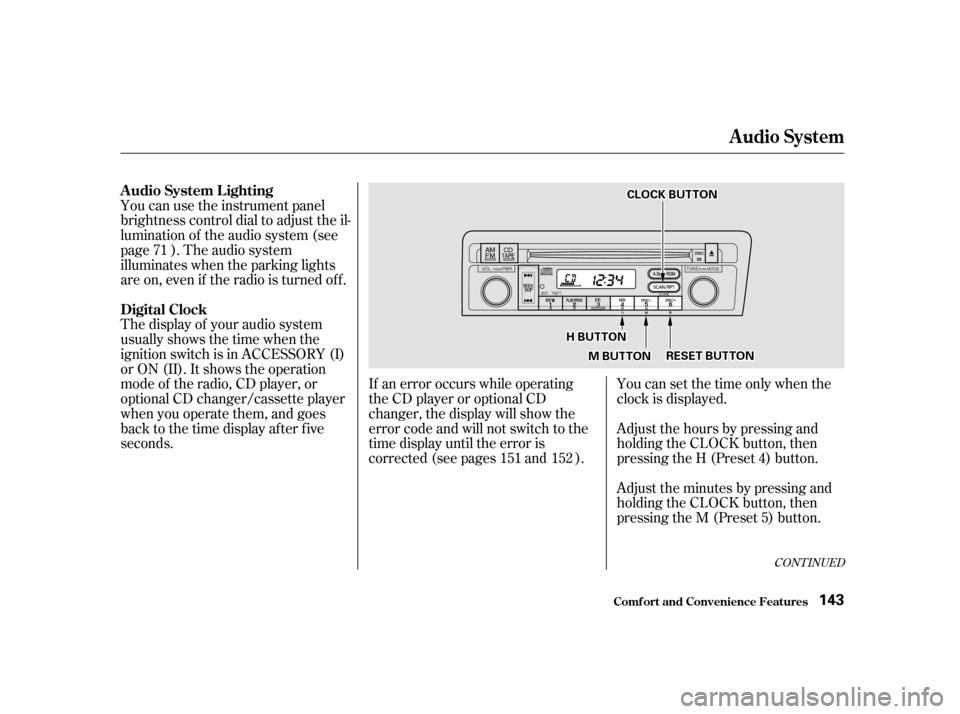
Adjust the hours by pressing and
holding the CLOCK button, then
pressing the H (Preset 4) button.
Adjust the minutes by pressing and
holding the CLOCK button, then
pressing the M (Preset 5) button.
If an error occurs while operating
the CD player or optional CD
changer, the display will show the
error code and will not switch to the
time display until the error is
corrected (see pages and ).
71
151 152
CONT INUED
A udio System L ighting
Digital Clock
Audio System
Comf ort and Convenience Feat ures143
CCLLOOCCKKBBUUTTTTOONN
HHBBUUTTTTOONN
MMBBUUTTTTOONNRREESSEETTBBUUTTTTOONN
Page 146 of 319
CONT INUED
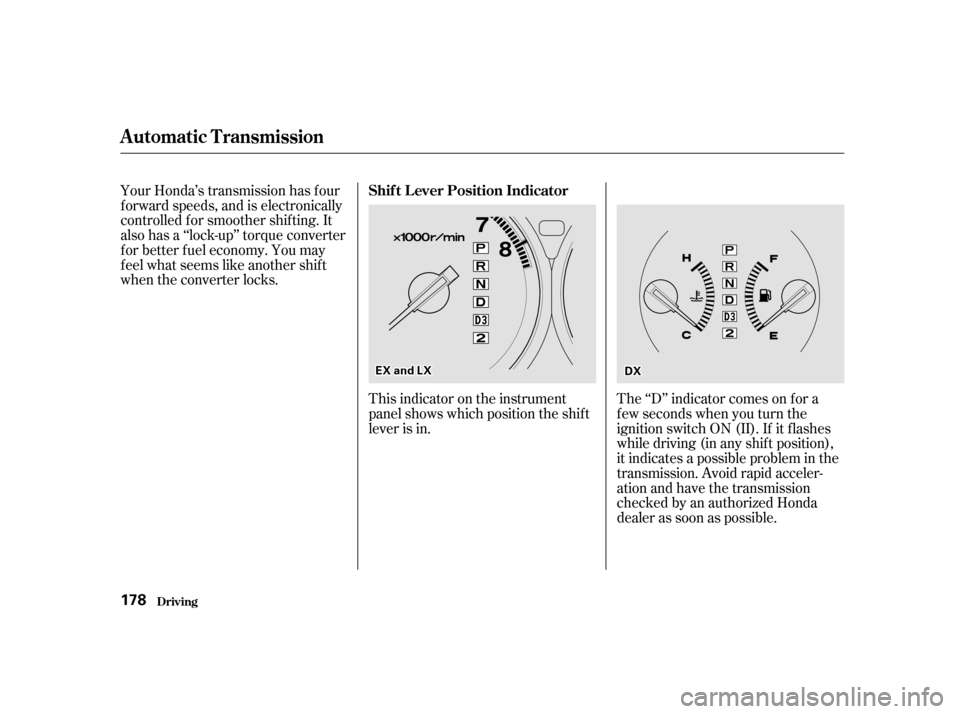
You operate the CD player with the
same controls used f or the radio.
With the ignition switch in
ACCESSORY (I) or ON (II), insert
the disc into the CD slot. Push the
disc in half way, the drive will pull it
in the rest of the way and begin to
play. The number of the track that is
playing is shown in the display.
You can also play 3-inch (8-cm) discs
without using an adapter ring. Play
only standard round discs. Odd-
shaped CDs may jam in the drive or
cause other problems.
When the system reaches the end of
the disc, it will return to the begin-
ning and play that disc again.
Audio System
Comf ort and Convenience Feat ures
Operating the CD Player
147
CCDDSSLLOOTTAAMM//FFMMBBUUTTTTOONN
PPWWRR//VVOOLLKKNNOOBB
CCDD//TTAAPPEEBBUUTTTTOONNRREEPPEEAATTIINNDDIICCAATTOORR
RRAANNDDOOMMBBUUTTTTOONN
SSEEEEKK//SSKKIIPPBBAARR
RRAANNDDOOMMIINNDDIICCAATTOORR
RREEPPEEAATTBBUUTTTTOONN
EEJJEECCTTBBUUTTTTOONN
Page 147 of 319

�µ
�µ
Each time you press and release the side of the SEEK/SKIP bar,
the system skips forward to the
beginning of the next track. Press
the sidetoskipbackwardtothe
beginning of the current track. Press
it again to skip to the beginning of
the previous track.
If you eject the disc, but do not
remove it from the slot, the system
will automatically reload the disc
af ter 15 seconds and put the CD
player in pause mode. To begin
playing the disc, press the CD button.
Press the eject button to remove the
disc f rom the drive.
If you turn the system of f while a CD
is playing, either with the PWR/VOL
knob or by turning off the ignition,
the disc will stay in the drive. When
youturnthesystembackon,theCD
will begin playing where it lef t of f .
You can switch to the radio while a
CD is playing by pressing the AM/
FM button. Press the CD button to
return to playing the CD. The CD
will begin playing where it lef t of f .
You can use the SEEK/SKIP bar
while a disc is playing to select
passages and change tracks.
To move rapidly within a track, press
andholdtheSEEK/SKIPbar.Press
the side to move f orward. You
will see CUE in the display. Press the
side to move backward. You
will see REW displayed. Release the
bar when the system reaches the
point you want. This feature,
when activated, plays the tracks on
the CD in random order, rather than
in the order they are recorded on the
CD. To activate Random Play, press
the RDM button. You will see RDM
in the display. The system will then
select and play tracks randomly.
This continues until you deactivate
RandomPlaybypressingtheRDM
button again. To activate the Repeat
f eature, press and release the RPT
button. You will see RPT in the
display. The system continuously
replays the current track. Press the
RPT button again to turn it off.
Audio System
Comf ort and Convenience Feat ures RANDOM PLAY
REPEAT
148
Page 148 of 319

�´�µ�´
�µ
Load the desired CDs in the
magazine and load the magazine in
the changer according to the
instructions that came with the unit.
Play only standard round discs. Odd-
shaped CDs may jam in the drive or
cause other problems.
To select the CD changer, press the
CD button. The disc and track
numbers will be displayed. To select a dif f erent disc, press the
DISC (Preset 6) or DISC
(Preset 5) button. The next disc in
the changer is loaded and played
when you press the DISC button.
DISC loads and plays the previous
disc. If you select an empty slot in
the magazine, the changer will, af ter
f inding that slot empty, try to load
the CD in the next slot. This
continues until it f inds a CD to load
and play.
If you eject the in-dash CD while it is
playing, the system will automatically
switch to the CD changer and begin
play where it lef t of f . If there are no
CDs in the changer, the display will
flash. You will have to select another
mode (AM or FM) with the button.
When you switch back to CD mode,
the system selects the same unit (in-
dash or changer) that was playing
when you switched out of CD mode.
To use the SKIP, REPEAT, and
RANDOM f unctions, ref er to the in-
dash player operating instructions.
A trunk-mounted Compact Disc
changer is available f or your vehicle.
It holds up to six discs, providing
several hours of continuous
entertainment. You operate this CD
changer with the same controls used
f or the in-dash CD player.
If you load a CD in the in-dash player
while the changer is playing a CD,
the system will stop the changer and
begin playing the in-dash CD. To
select the changer again, press the
CD button. Play will begin where it
left off. Use the CD button to switch
between the player and the changer.
Audio System
Comf ort and Convenience Feat ures
Operating the CD Changer
(Optional)
149
Page 153 of 319

�Û�µ
The tape direction indicator will light
to show you which side of the
cassette is playing. The indicates
thesideyouinsertedfacingupward
is now playing. If you want to play
the other side, press the PROG
button.
Dolby noise reduction turns on when
you insert a cassette. If the tape was
not recorded with Dolby noise
reduction, turn it of f by pressing the
NR button. With a cassette playing, you can use
the FF, REW, SKIP, or REPEAT
f unction to f ind a desired program.
Dolby remains of f until you turn it on
by pressing the button again. If you turn the system of f while a
tape is playing, either with the PWR/
VOL knob or by turning of f the
ignition, the cassette will remain in
the drive. When you turn the system
back on, the cassette player will be in
pause mode. To begin playing, press
the PLAY button.
To switch to the radio or CD player
while a tape is playing, press the
AM/FM, or CD button. To change
back to the cassette player, push the
CD button.
When the system reaches the end of
the tape, it will automatically reverse
direction and play the other side. If
you want to remove the cassette
f rom the drive, press the EJECT
button on the cassette player. Fast Forward and Re-
wind move the tape rapidly. To re-
wind the tape, push the REW button.
You will see REW in the display. To
f ast f orward the tape, push the FF
button. You will see FF displayed.
Press the PLAY button to take the
system out of rewind or f ast f orward.
If the system reaches the end of the
tape while in f ast f orward or rewind,
it automatically stops that function,
reverses direction, and begins to play.
Audio System
Comf ort and Convenience Feat ures T ape Search Functions
FF/REW
154
Page 173 of 319

Make sure all windows, mirrors,
and outside lights are clean and
unobstructed. Remove f rost, snow,
or ice.
Check that the hood and trunk are
f ully closed.Make sure the doors are securely
closed and locked.
Check that any items you may be
carrying with you inside are stored
properly or f astened down
securely.
Visually check the tires. If a tire
looks low, use a gauge to check its
pressure. Check the adjustment of the seat
(see page ).
Check the adjustment of the
inside and outside mirrors (see
page ).
Check the adjustment of the
steering wheel (see page ).Turn the ignition switch ON (II).
Check the indicator lights in the
instrument panel.
Start the engine (see page ).
Check the gauges and indicator
lights in the instrument panel (see
page ).
Fasten your seat belt. Check that
your passengers have f astened
their seat belts (see page ).
Youshoulddothefollowingchecks
and adjustments every day bef ore
you drive your car. 1. 2. 3. 4.
9.
10.
8.
7.
6.
5.
11.
12.
98 90
75 16
175
59
Preparing to Drive
Driving
174
Page 177 of 319
Your Honda’s transmission has f our
f orward speeds, and is electronically
controlled f or smoother shif ting. It
also has a ‘‘lock-up’’ torque converter
forbetterfueleconomy.Youmay
f eel what seems like another shif t
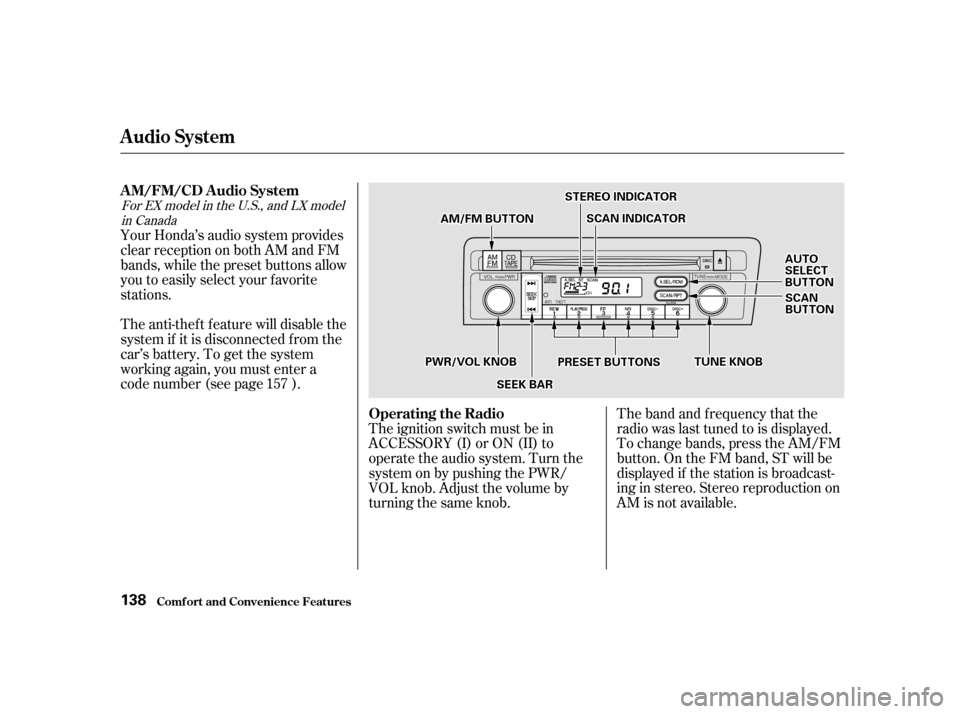
when the converter locks.This indicator on the instrument
panel shows which position the shif t
lever is in.The ‘‘D’’ indicator comes on f or a
f ew seconds when you turn the
ignition switch ON (II). If it f lashes
while driving (in any shif t position),
it indicates a possible problem in the
transmission. Avoid rapid acceler-
ation and have the transmission
checkedbyanauthorizedHonda
dealer as soon as possible.
Automatic Transmission
DrivingShif t L ever Position Indicator
178
EEXXaannddLLXXDDXX