Page 82 of 319

�µ
�µ �µ
In this position,
you can operate the audio system
and the accessory power socket.
This is the normal key
position when driving. All f eatures
and accessories on the car are usable.
Several of the lights on the instru-
ment panel come on as a test when
you turn the ignition switch f rom
ACCESSORY to ON.
Each door has a lock tab on the top.
Push the tab down to lock the door
andpullituptounlock.
To lock any passenger’s door when
getting out of the car, push the lock
tab down and close the door. To lock
the driver’s door, pull the outside
door handle and push the lock tab
down. Release the handle, then close
the door.
Use this position
only to start the engine. The switch
returns to ON (II) when you let go of
the key.
The engine will not start if the
Immobilizer System does not
recognize the key’s coding (see page ).
You will hear a reminder beeper if
you leave the key in the ignition
switch in the LOCK (0) or
ACCESSORY (I) position and open
thedriver’sdoor.Removethekeyto
turn of f the beeper. 80
CONT INUED
Keys and Locks
Inst rument s and Cont rols
A CCESSORY (I)
ON (II)
Door L ocks
ST A RT (III)
83
Page 83 of 319
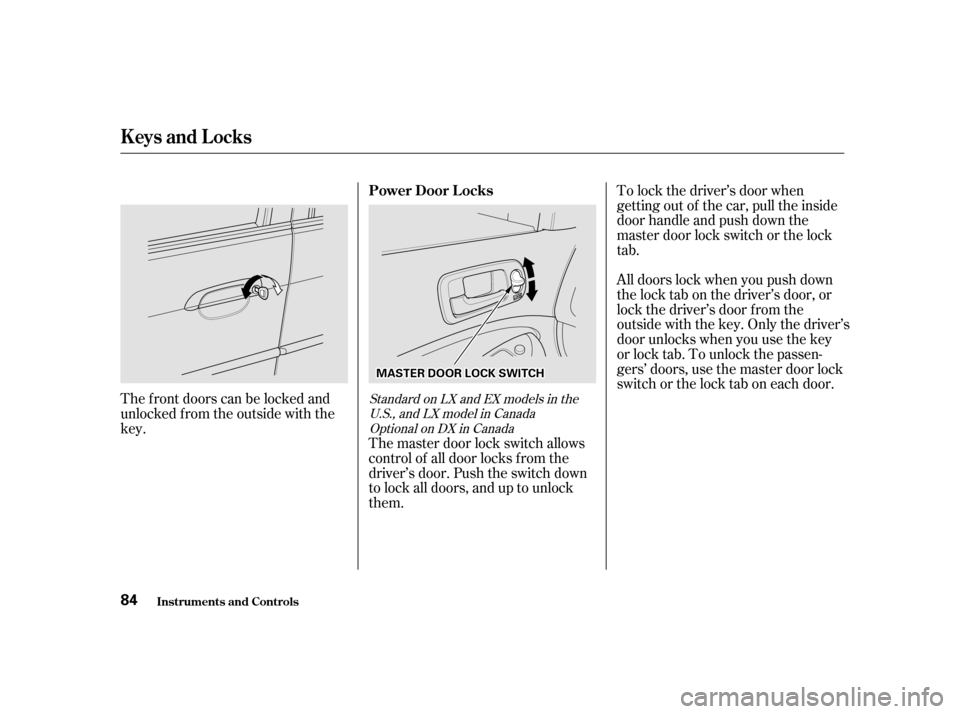
The master door lock switch allows
control of all door locks f rom the
driver’s door. Push the switch down
to lock all doors, and up to unlock
them.
The f ront doors can be locked and
unlocked f rom the outside with thekey. To lock the driver’s door when
getting out of the car, pull the inside
door handle and push down the
master door lock switch or the lock
tab.
All doors lock when you push down
the lock tab on the driver’s door, or
lock the driver’s door f rom the
outside with the key. Only the driver’s
door unlocks when you use the key
or lock tab. To unlock the passen-
gers’ doors, use the master door lock
switch or the lock tab on each door.
Standard on LX and EX models in the
U.S., and LX model in CanadaOptional on DX in Canada
Keys and Locks
Inst rument s and Cont rols Power Door L ocks
84
MMAASSTTEERRDDOOOORRLLOOCCKKSSWWIITTCCHH
Page 84 of 319
CONT INUED
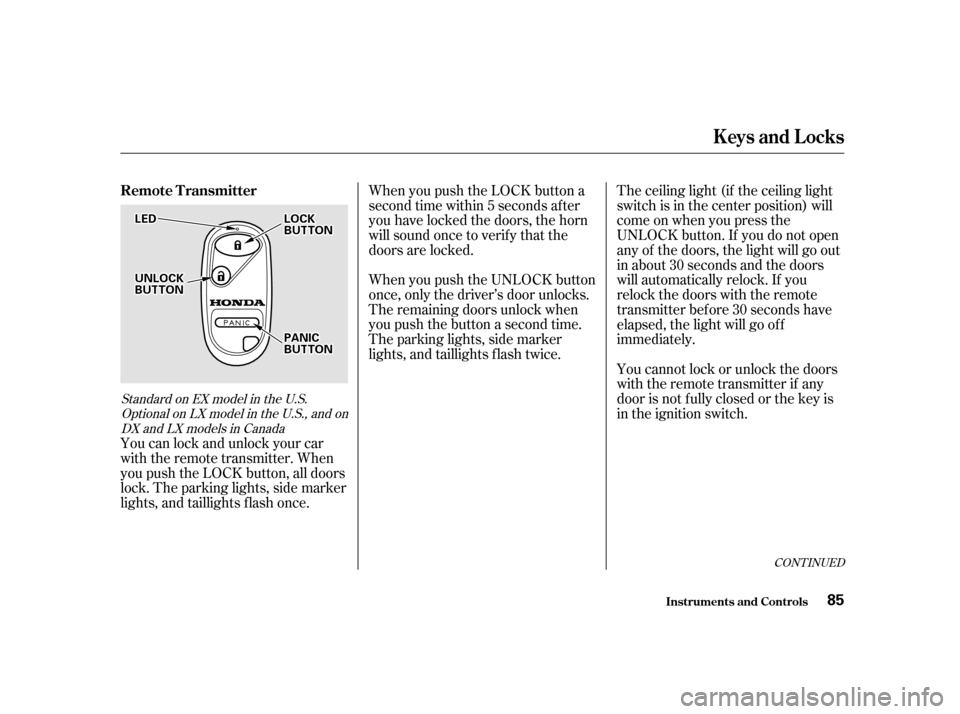
You can lock and unlock your car
with the remote transmitter. When
you push the LOCK button, all doors
lock. The parking lights, side marker
lights, and taillights f lash once.When you push the LOCK button a
second time within 5 seconds after
you have locked the doors, the horn
will sound once to verify that the
doors are locked.
When you push the UNLOCK button
once, only the driver’s door unlocks.
The remaining doors unlock when
you push the button a second time.
The parking lights, side marker
lights, and taillights f lash twice.
The ceiling light (if the ceiling light
switch is in the center position) will
come on when you press the
UNLOCK button. If you do not open
any of the doors, the light will go out
in about 30 seconds and the doors
will automatically relock. If you
relock the doors with the remote
transmitter before 30 seconds have
elapsed, the light will go of f
immediately.
You cannot lock or unlock the doors
with the remote transmitter if any
door is not f ully closed or the key is
in the ignition switch.
Standard on EX model in the U.S.
Optional on LX model in the U.S., and onDX and LX models in Canada
Remote Transmitter
Keys and Locks
Inst rument s and Cont rols 85
LLEEDD
UUNNLLOOCCKKBBUUTTTTOONN
LLOOCCKKBBUUTTTTOONN
PPAANNIICCBBUUTTTTOONN
Page 85 of 319
�´
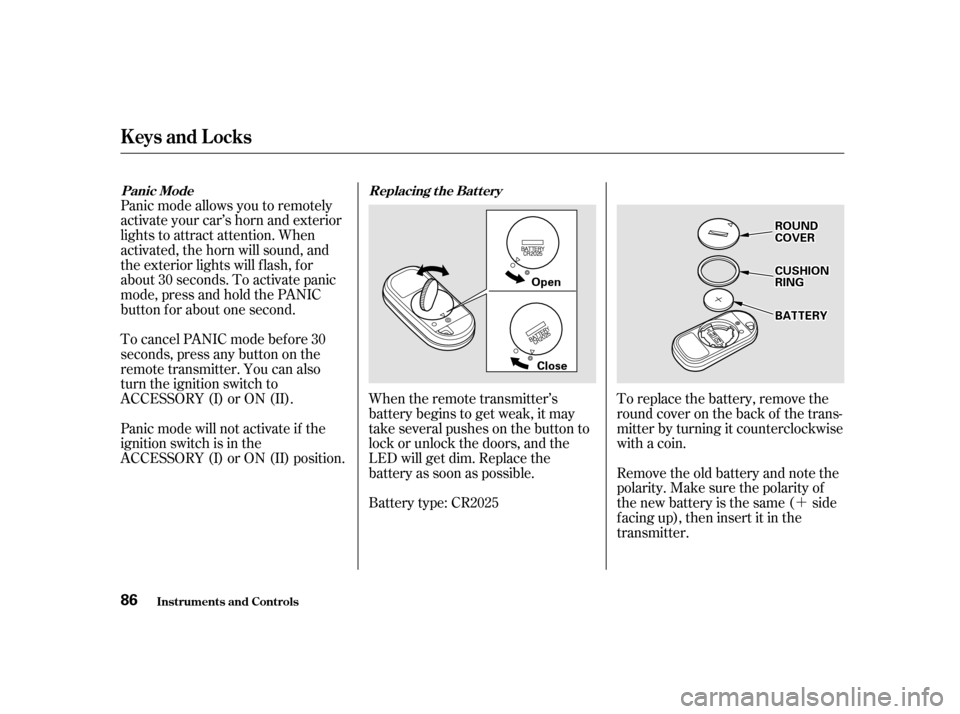
To replace the battery, remove the
round cover on the back of the trans-
mitter by turning it counterclockwise
with a coin.
Remove the old battery and note the
polarity. Make sure the polarity of
the new battery is the same ( side
f acing up), then insert it in the
transmitter.
When the remote transmitter’s
battery begins to get weak, it may
take several pushes on the button to
lock or unlock the doors, and the
LED will get dim. Replace the
battery as soon as possible.
Battery type: CR2025
Panic mode allows you to remotely
activate your car’s horn and exterior
lights to attract attention. When
activated, the horn will sound, and
the exterior lights will f lash, f or
about 30 seconds. To activate panic
mode,pressandholdthePANIC
button f or about one second.
To cancel PANIC mode bef ore 30
seconds, press any button on the
remote transmitter. You can also
turn the ignition switch to
ACCESSORY (I) or ON (II).
Panic mode will not activate if the
ignition switch is in the
ACCESSORY (I) or ON (II) position.
Inst rument s and Cont rols
Keys and Locks
Replacing the Battery
Panic Mode
86
OOppeenn
CClloossee
RROOUUNNDDCCOOVVEERR
CCUUSSHHIIOONNRRIINNGG
BBAATTTTEERRYY
Page 94 of 319
CONT INUED
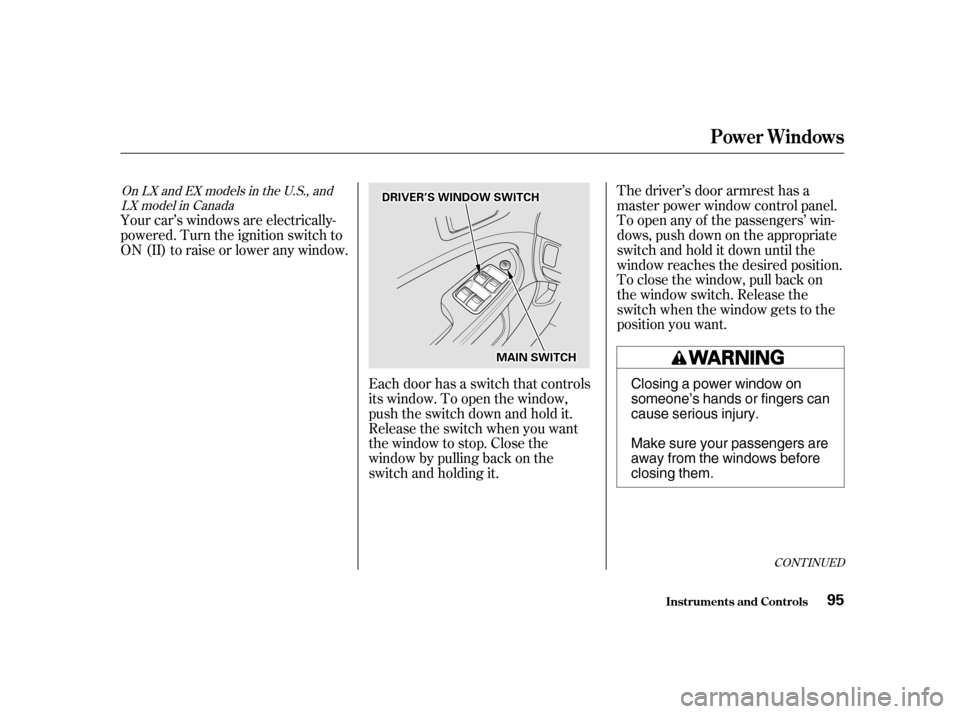
Your car’s windows are electrically-
powered. Turn the ignition switch to
ON(II)toraiseorloweranywindow.The driver’s door armrest has a
master power window control panel.
To open any of the passengers’ win-
dows, push down on the appropriate
switchandholditdownuntilthe
window reaches the desired position.
To close the window, pull back on
the window switch. Release the
switch when the window gets to the
position you want.
Each door has a switch that controls
its window. To open the window,
push the switch down and hold it.
Release the switch when you want
the window to stop. Close the
window by pulling back on the
switch and holding it.
OnLXandEXmodelsintheU.S.,and LX model in Canada
Inst rument s and Cont rols
Power Windows
95
DDRRIIVVEERR’’SSWWIINNDDOOWWSSWWIITTCCHH
MMAAIINNSSWWIITTCCHH
Closing a power window on
someone’s hands or fingers can
cause serious injury.
Make sure your passengers are
away from the windows before
closing them.
Page 95 of 319

�µ
The master control panel also con-
tains these extra features:
To open the driver’s
window f ully, push the window
switch f irmly down and release it.
The window automatically goes all
the way down. To stop the window
f rom going all the way down, pull
back on the window switch brief ly.
To open the driver’s window only
partially, push the window switch
down lightly and hold it. The window
will stop as soon as you release the
switch.
The AUTO f unction only works to
lower the driver’s window. To raise
the window, you must pull back on
the window switch and hold it until
the window reaches the desired
position. The MAIN switch controls power to
the passengers’ windows. With this
switch of f , the passengers’ windows
cannot be raised or lowered. The
MAIN switch does not af f ect the
driver’s window. Keep the MAIN
switch of f when you have children in
the car so they do not injure them-
selves by operating the windows
unintentionally.
AUTO
Inst rument s and Cont rols
Power Windows
96
Page 96 of 319
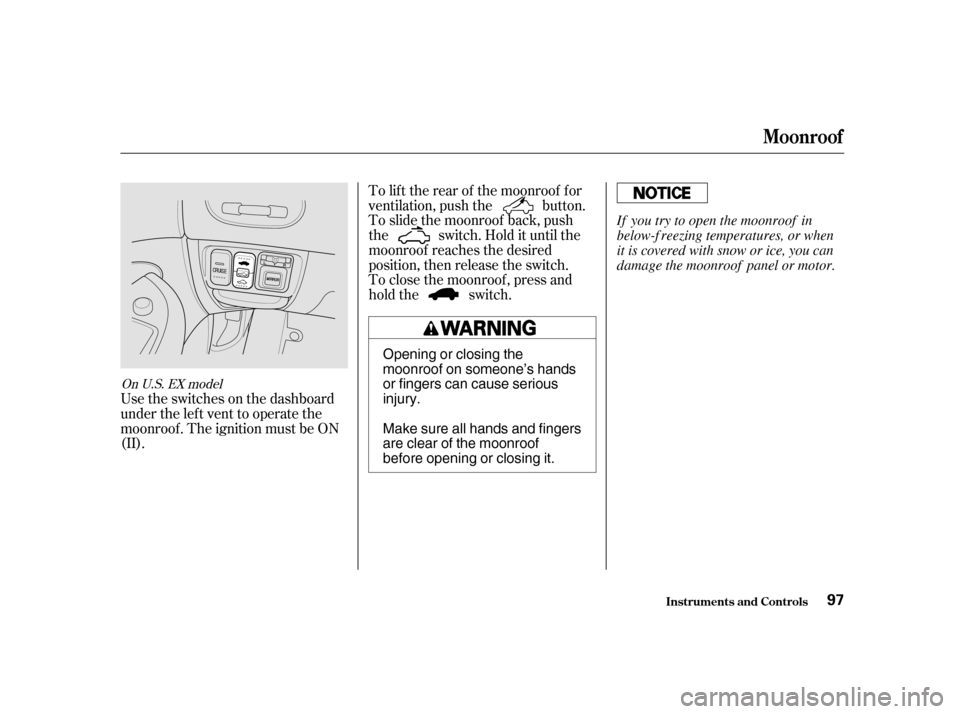
Usetheswitchesonthedashboard
under the lef t vent to operate the
moonroof . The ignition must be ON
(II).To lif t the rear of the moonroof f or
ventilation, push the button.
To slide the moonroof back, push
the switch. Hold it until the
moonroof reaches the desired
position, then release the switch.
To close the moonroof , press and
hold the switch.
On U.S. EX model
Inst rument s and Cont rols
Moonroof
97
Opening or closing the
moonroof on someone’s hands
or fingers can cause seriousinjury.
Make sure all hands and fingers
are clear of the moonroof
before opening or closing it.
If you try to open the moonroof in
below-f reezing temperatures, or when
it is covered with snow or ice, you can
damage the moonroof panel or motor.
Page 97 of 319
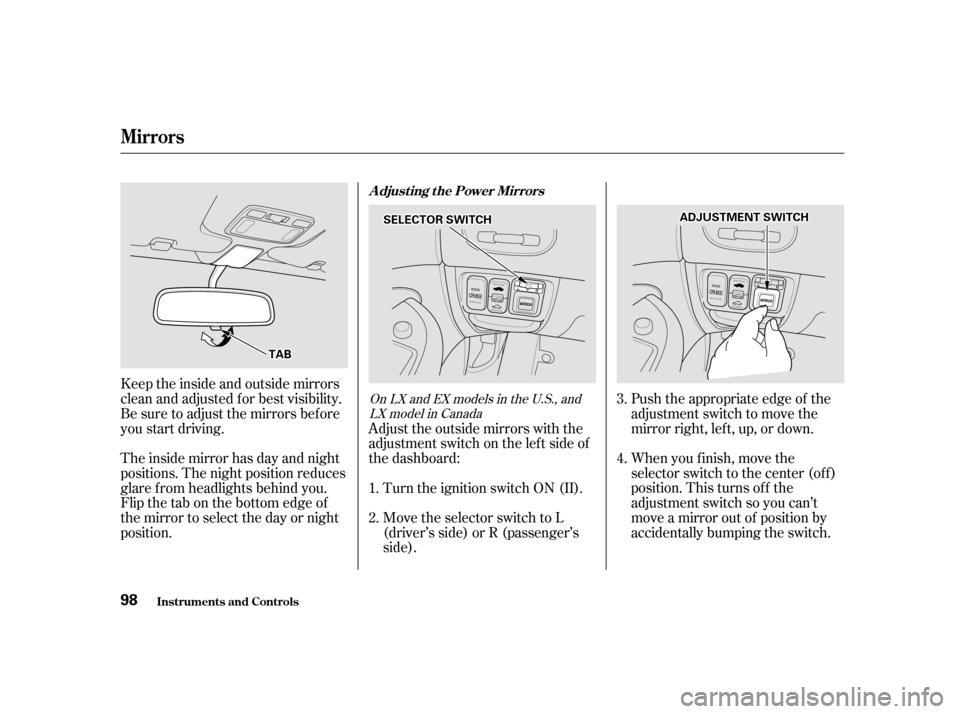
Push the appropriate edge of the
adjustment switch to move the
mirrorright,left,up,ordown.
When you f inish, move the
selector switch to the center (off)
position. This turns of f the
adjustment switch so you can’t
move a mirror out of position by
accidentally bumping the switch.
Adjust the outside mirrors with the
adjustment switch on the lef t side of
the dashboard:
Turn the ignition switch ON (II).
Move the selector switch to L
(driver’s side) or R (passenger’s
side).
Keeptheinsideandoutsidemirrors
clean and adjusted f or best visibility.
Be sure to adjust the mirrors bef ore
you start driving.
The inside mirror has day and night
positions. The night position reduces
glare f rom headlights behind you.
Flip the tab on the bottom edge of
the mirror to select the day or night
position.
3. 4.
1. 2.OnLXandEXmodelsintheU.S.,and LX model in Canada
Inst rument s and Cont rols
Mirrors
Adjusting the Power Mirrors
98
SSEELLEECCTTOORRSSWWIITTCCHH
TTAABB
AADDJJUUSSTTMMEENNTTSSWWIITTCCHH