2001 DODGE RAM light
[x] Cancel search: lightPage 2016 of 2889
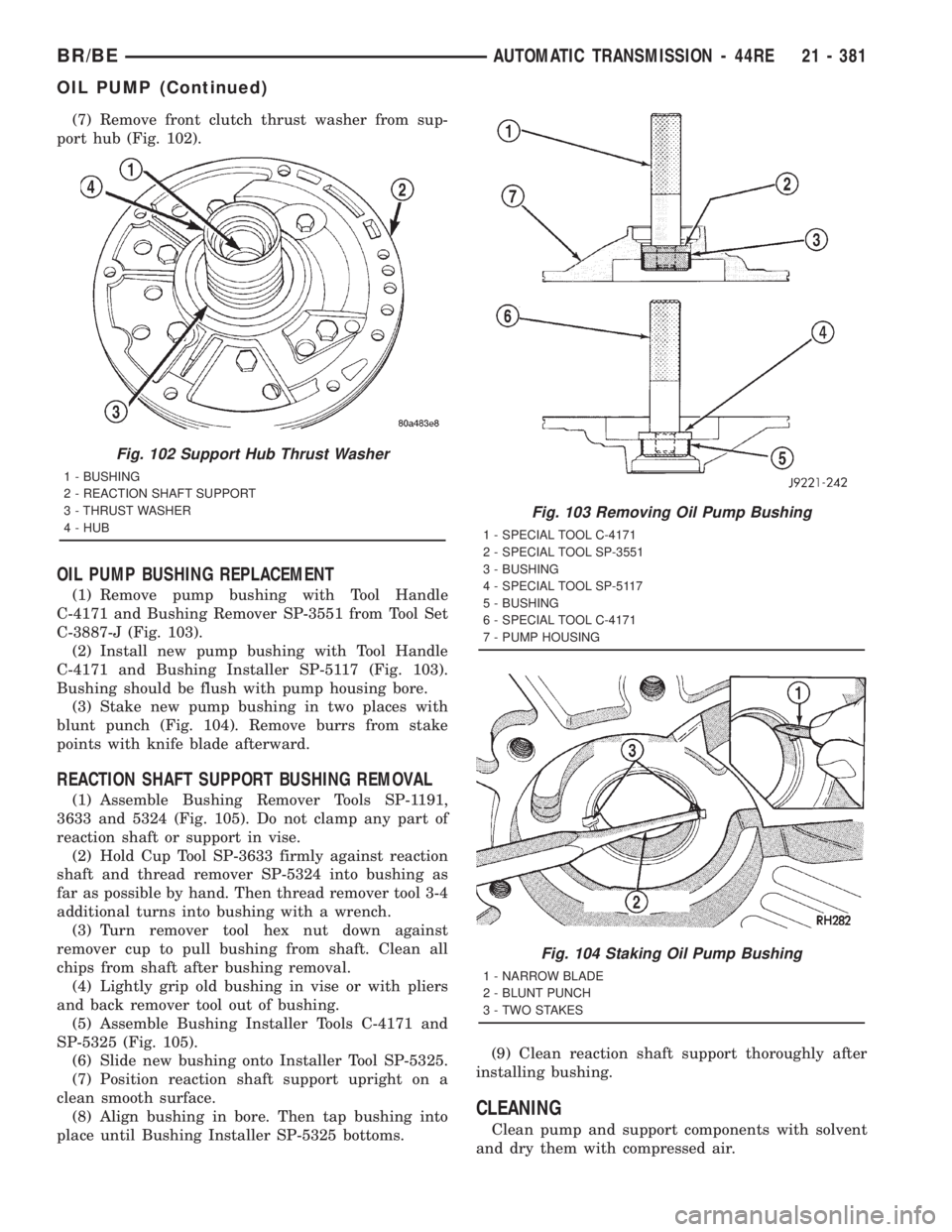
(7) Remove front clutch thrust washer from sup-
port hub (Fig. 102).
OIL PUMP BUSHING REPLACEMENT
(1) Remove pump bushing with Tool Handle
C-4171 and Bushing Remover SP-3551 from Tool Set
C-3887-J (Fig. 103).
(2) Install new pump bushing with Tool Handle
C-4171 and Bushing Installer SP-5117 (Fig. 103).
Bushing should be flush with pump housing bore.
(3) Stake new pump bushing in two places with
blunt punch (Fig. 104). Remove burrs from stake
points with knife blade afterward.
REACTION SHAFT SUPPORT BUSHING REMOVAL
(1) Assemble Bushing Remover Tools SP-1191,
3633 and 5324 (Fig. 105). Do not clamp any part of
reaction shaft or support in vise.
(2) Hold Cup Tool SP-3633 firmly against reaction
shaft and thread remover SP-5324 into bushing as
far as possible by hand. Then thread remover tool 3-4
additional turns into bushing with a wrench.
(3) Turn remover tool hex nut down against
remover cup to pull bushing from shaft. Clean all
chips from shaft after bushing removal.
(4) Lightly grip old bushing in vise or with pliers
and back remover tool out of bushing.
(5) Assemble Bushing Installer Tools C-4171 and
SP-5325 (Fig. 105).
(6) Slide new bushing onto Installer Tool SP-5325.
(7) Position reaction shaft support upright on a
clean smooth surface.
(8) Align bushing in bore. Then tap bushing into
place until Bushing Installer SP-5325 bottoms.(9) Clean reaction shaft support thoroughly after
installing bushing.
CLEANING
Clean pump and support components with solvent
and dry them with compressed air.
Fig. 102 Support Hub Thrust Washer
1 - BUSHING
2 - REACTION SHAFT SUPPORT
3 - THRUST WASHER
4 - HUB
Fig. 103 Removing Oil Pump Bushing
1 - SPECIAL TOOL C-4171
2 - SPECIAL TOOL SP-3551
3 - BUSHING
4 - SPECIAL TOOL SP-5117
5 - BUSHING
6 - SPECIAL TOOL C-4171
7 - PUMP HOUSING
Fig. 104 Staking Oil Pump Bushing
1 - NARROW BLADE
2 - BLUNT PUNCH
3 - TWO STAKES
BR/BEAUTOMATIC TRANSMISSION - 44RE 21 - 381
OIL PUMP (Continued)
Page 2020 of 2889
OVERDRIVE CLUTCH
DESCRIPTION
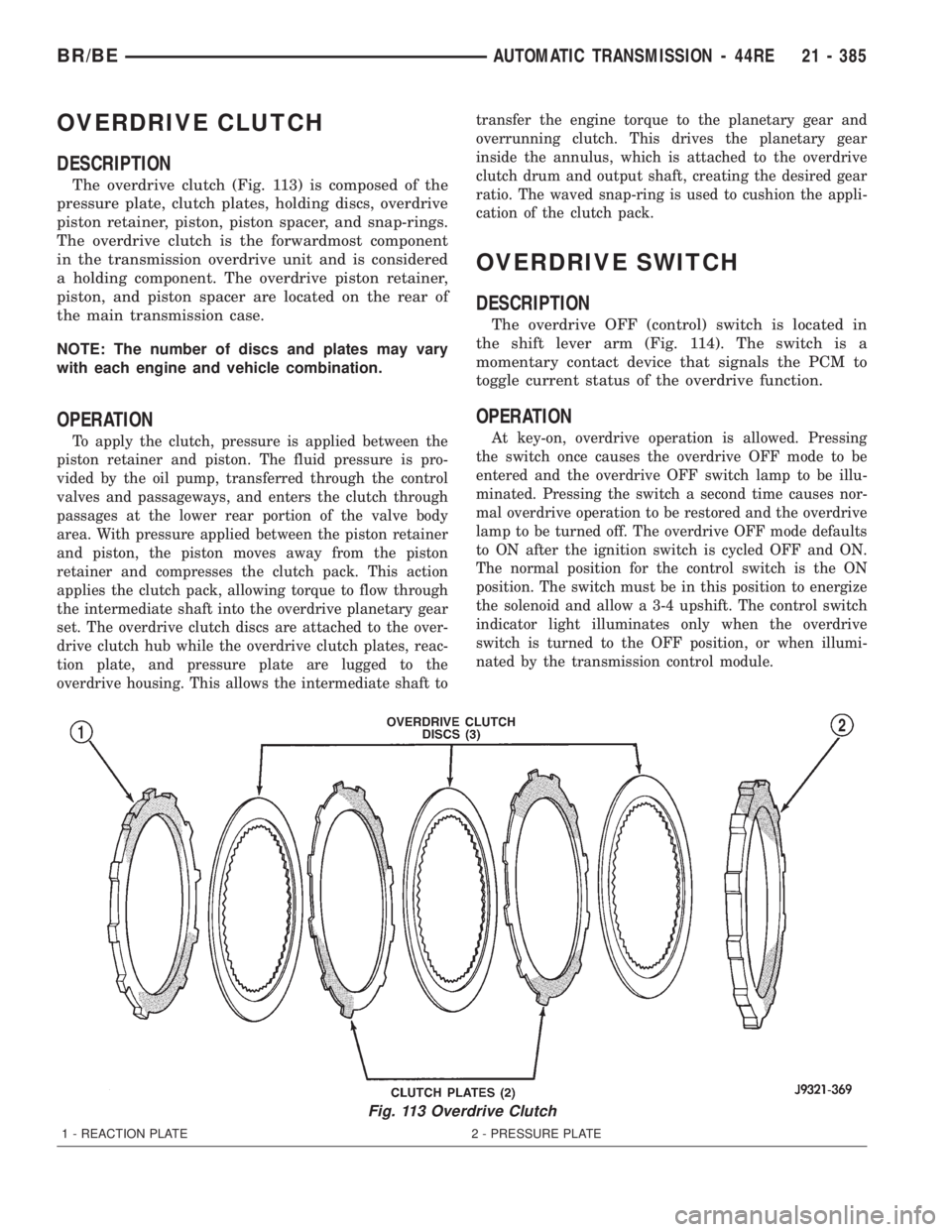
The overdrive clutch (Fig. 113) is composed of the
pressure plate, clutch plates, holding discs, overdrive
piston retainer, piston, piston spacer, and snap-rings.
The overdrive clutch is the forwardmost component
in the transmission overdrive unit and is considered
a holding component. The overdrive piston retainer,
piston, and piston spacer are located on the rear of
the main transmission case.
NOTE: The number of discs and plates may vary
with each engine and vehicle combination.
OPERATION
To apply the clutch, pressure is applied between the
piston retainer and piston. The fluid pressure is pro-
vided by the oil pump, transferred through the control
valves and passageways, and enters the clutch through
passages at the lower rear portion of the valve body
area. With pressure applied between the piston retainer
and piston, the piston moves away from the piston
retainer and compresses the clutch pack. This action
applies the clutch pack, allowing torque to flow through
the intermediate shaft into the overdrive planetary gear
set. The overdrive clutch discs are attached to the over-
drive clutch hub while the overdrive clutch plates, reac-
tion plate, and pressure plate are lugged to the
overdrive housing. This allows the intermediate shaft totransfer the engine torque to the planetary gear and
overrunning clutch. This drives the planetary gear
inside the annulus, which is attached to the overdrive
clutch drum and output shaft, creating the desired gear
ratio. The waved snap-ring is used to cushion the appli-
cation of the clutch pack.
OVERDRIVE SWITCH
DESCRIPTION
The overdrive OFF (control) switch is located in
the shift lever arm (Fig. 114). The switch is a
momentary contact device that signals the PCM to
toggle current status of the overdrive function.
OPERATION
At key-on, overdrive operation is allowed. Pressing
the switch once causes the overdrive OFF mode to be
entered and the overdrive OFF switch lamp to be illu-
minated. Pressing the switch a second time causes nor-
mal overdrive operation to be restored and the overdrive
lamp to be turned off. The overdrive OFF mode defaults
to ON after the ignition switch is cycled OFF and ON.
The normal position for the control switch is the ON
position. The switch must be in this position to energize
the solenoid and allow a 3-4 upshift. The control switch
indicator light illuminates only when the overdrive
switch is turned to the OFF position, or when illumi-
nated by the transmission control module.
Fig. 113 Overdrive Clutch
1 - REACTION PLATE 2 - PRESSURE PLATE
BR/BEAUTOMATIC TRANSMISSION - 44RE 21 - 385
Page 2033 of 2889
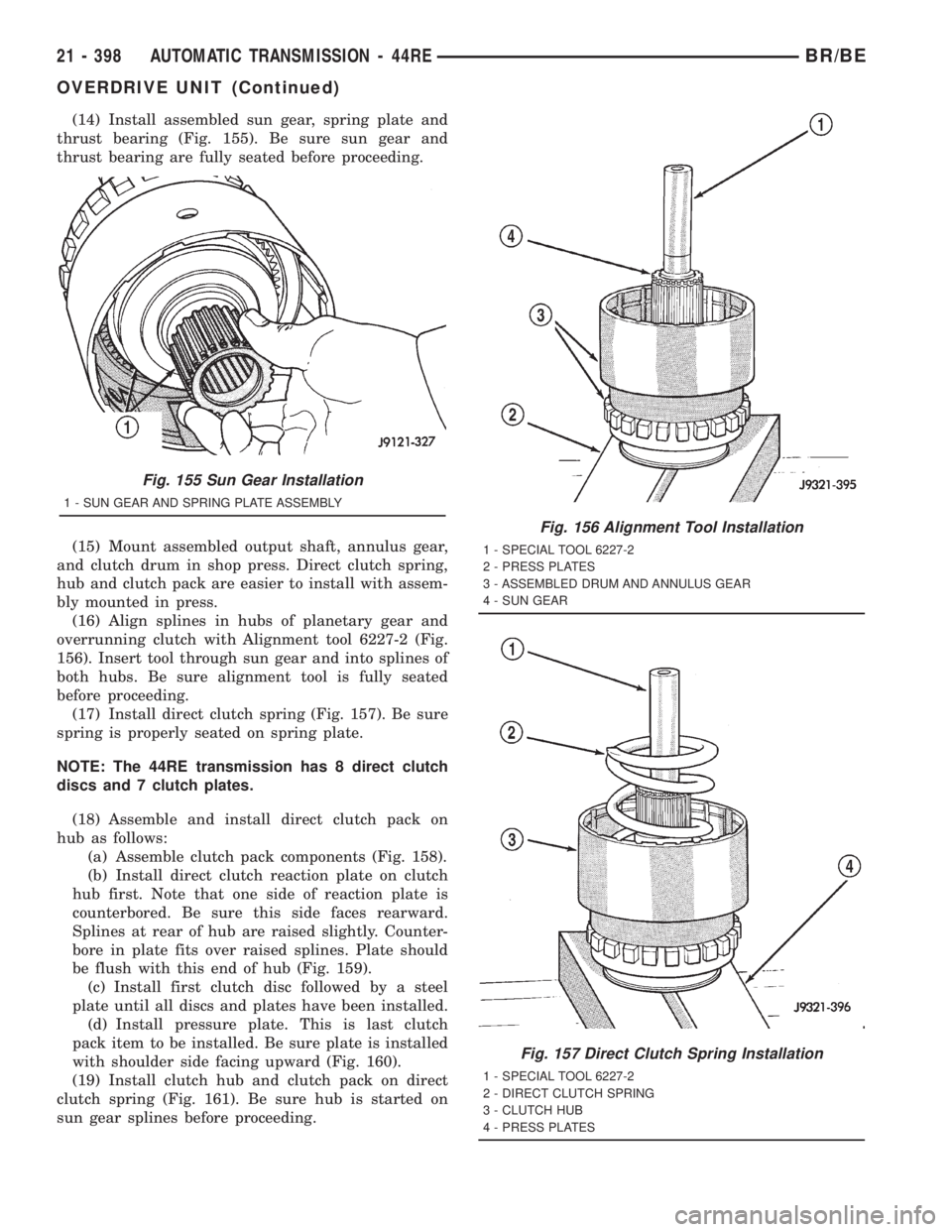
(14) Install assembled sun gear, spring plate and
thrust bearing (Fig. 155). Be sure sun gear and
thrust bearing are fully seated before proceeding.
(15) Mount assembled output shaft, annulus gear,
and clutch drum in shop press. Direct clutch spring,
hub and clutch pack are easier to install with assem-
bly mounted in press.
(16) Align splines in hubs of planetary gear and
overrunning clutch with Alignment tool 6227-2 (Fig.
156). Insert tool through sun gear and into splines of
both hubs. Be sure alignment tool is fully seated
before proceeding.
(17) Install direct clutch spring (Fig. 157). Be sure
spring is properly seated on spring plate.
NOTE: The 44RE transmission has 8 direct clutch
discs and 7 clutch plates.
(18) Assemble and install direct clutch pack on
hub as follows:
(a) Assemble clutch pack components (Fig. 158).
(b) Install direct clutch reaction plate on clutch
hub first. Note that one side of reaction plate is
counterbored. Be sure this side faces rearward.
Splines at rear of hub are raised slightly. Counter-
bore in plate fits over raised splines. Plate should
be flush with this end of hub (Fig. 159).
(c) Install first clutch disc followed by a steel
plate until all discs and plates have been installed.
(d) Install pressure plate. This is last clutch
pack item to be installed. Be sure plate is installed
with shoulder side facing upward (Fig. 160).
(19) Install clutch hub and clutch pack on direct
clutch spring (Fig. 161). Be sure hub is started on
sun gear splines before proceeding.
Fig. 155 Sun Gear Installation
1 - SUN GEAR AND SPRING PLATE ASSEMBLY
Fig. 156 Alignment Tool Installation
1 - SPECIAL TOOL 6227-2
2 - PRESS PLATES
3 - ASSEMBLED DRUM AND ANNULUS GEAR
4 - SUN GEAR
Fig. 157 Direct Clutch Spring Installation
1 - SPECIAL TOOL 6227-2
2 - DIRECT CLUTCH SPRING
3 - CLUTCH HUB
4 - PRESS PLATES
21 - 398 AUTOMATIC TRANSMISSION - 44REBR/BE
OVERDRIVE UNIT (Continued)
Page 2041 of 2889
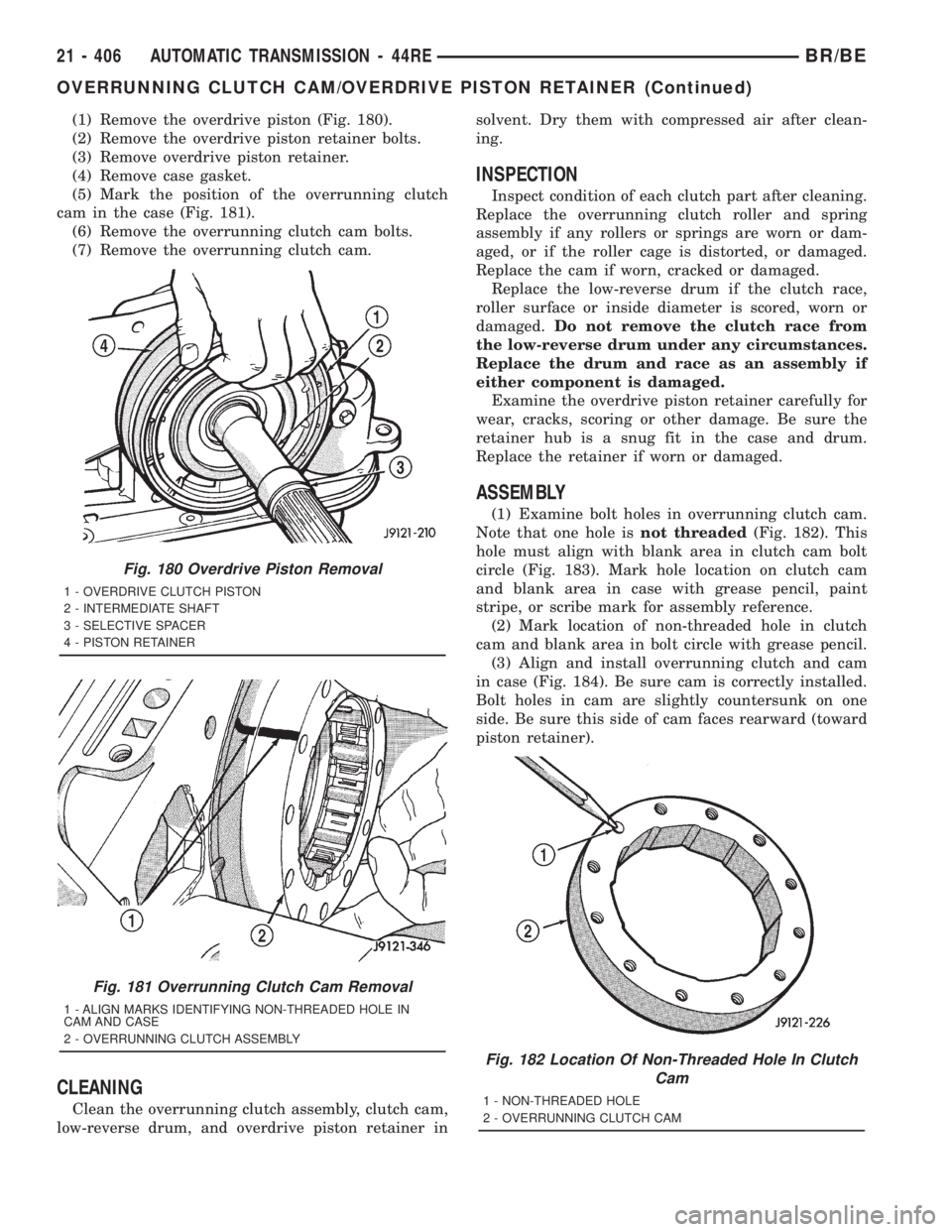
(1) Remove the overdrive piston (Fig. 180).
(2) Remove the overdrive piston retainer bolts.
(3) Remove overdrive piston retainer.
(4) Remove case gasket.
(5) Mark the position of the overrunning clutch
cam in the case (Fig. 181).
(6) Remove the overrunning clutch cam bolts.
(7) Remove the overrunning clutch cam.
CLEANING
Clean the overrunning clutch assembly, clutch cam,
low-reverse drum, and overdrive piston retainer insolvent. Dry them with compressed air after clean-
ing.
INSPECTION
Inspect condition of each clutch part after cleaning.
Replace the overrunning clutch roller and spring
assembly if any rollers or springs are worn or dam-
aged, or if the roller cage is distorted, or damaged.
Replace the cam if worn, cracked or damaged.
Replace the low-reverse drum if the clutch race,
roller surface or inside diameter is scored, worn or
damaged.Do not remove the clutch race from
the low-reverse drum under any circumstances.
Replace the drum and race as an assembly if
either component is damaged.
Examine the overdrive piston retainer carefully for
wear, cracks, scoring or other damage. Be sure the
retainer hub is a snug fit in the case and drum.
Replace the retainer if worn or damaged.
ASSEMBLY
(1) Examine bolt holes in overrunning clutch cam.
Note that one hole isnot threaded(Fig. 182). This
hole must align with blank area in clutch cam bolt
circle (Fig. 183). Mark hole location on clutch cam
and blank area in case with grease pencil, paint
stripe, or scribe mark for assembly reference.
(2) Mark location of non-threaded hole in clutch
cam and blank area in bolt circle with grease pencil.
(3) Align and install overrunning clutch and cam
in case (Fig. 184). Be sure cam is correctly installed.
Bolt holes in cam are slightly countersunk on one
side. Be sure this side of cam faces rearward (toward
piston retainer).
Fig. 180 Overdrive Piston Removal
1 - OVERDRIVE CLUTCH PISTON
2 - INTERMEDIATE SHAFT
3 - SELECTIVE SPACER
4 - PISTON RETAINER
Fig. 181 Overrunning Clutch Cam Removal
1 - ALIGN MARKS IDENTIFYING NON-THREADED HOLE IN
CAM AND CASE
2 - OVERRUNNING CLUTCH ASSEMBLY
Fig. 182 Location Of Non-Threaded Hole In Clutch
Cam
1 - NON-THREADED HOLE
2 - OVERRUNNING CLUTCH CAM
21 - 406 AUTOMATIC TRANSMISSION - 44REBR/BE
OVERRUNNING CLUTCH CAM/OVERDRIVE PISTON RETAINER (Continued)
Page 2053 of 2889
When pressure is released from the piston, the
spring returns the piston to its fully released position
and disengages the clutch. The release spring also
helps to cushion the application of the clutch assem-
bly. When the clutch is in the process of being
released by the release spring, fluid flows through a
vent and one-way ball-check-valve located in the pis-
ton. The check-valve is needed to eliminate the pos-
sibility of plate drag caused by centrifugal force
acting on the residual fluid trapped in the clutch pis-
ton retainer.
DISASSEMBLY
(1) Remove fiber thrust washer from forward side
of clutch retainer.
(2) Remove input shaft front/rear seal rings.
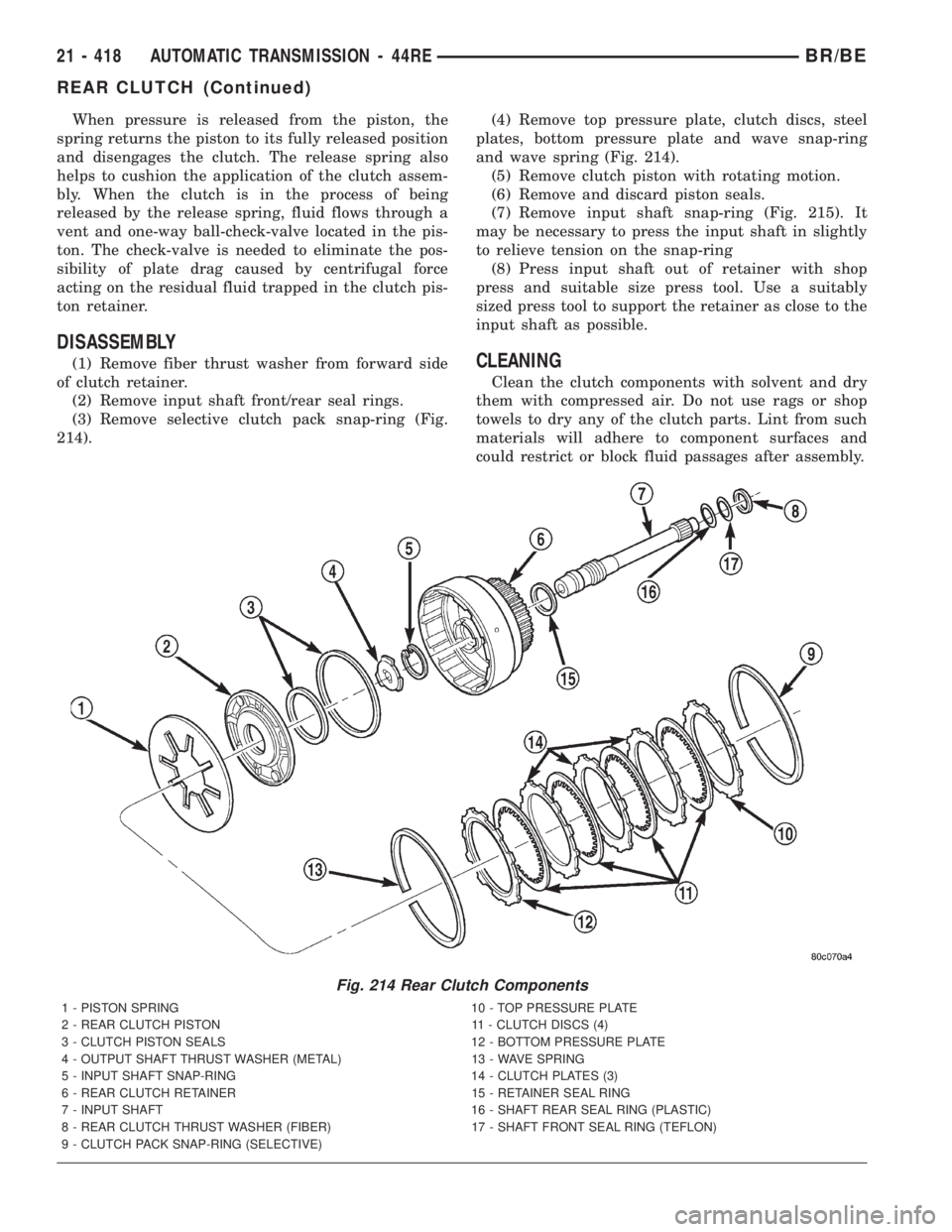
(3) Remove selective clutch pack snap-ring (Fig.
214).(4) Remove top pressure plate, clutch discs, steel
plates, bottom pressure plate and wave snap-ring
and wave spring (Fig. 214).
(5) Remove clutch piston with rotating motion.
(6) Remove and discard piston seals.
(7) Remove input shaft snap-ring (Fig. 215). It
may be necessary to press the input shaft in slightly
to relieve tension on the snap-ring
(8) Press input shaft out of retainer with shop
press and suitable size press tool. Use a suitably
sized press tool to support the retainer as close to the
input shaft as possible.CLEANING
Clean the clutch components with solvent and dry
them with compressed air. Do not use rags or shop
towels to dry any of the clutch parts. Lint from such
materials will adhere to component surfaces and
could restrict or block fluid passages after assembly.
Fig. 214 Rear Clutch Components
1 - PISTON SPRING 10 - TOP PRESSURE PLATE
2 - REAR CLUTCH PISTON 11 - CLUTCH DISCS (4)
3 - CLUTCH PISTON SEALS 12 - BOTTOM PRESSURE PLATE
4 - OUTPUT SHAFT THRUST WASHER (METAL) 13 - WAVE SPRING
5 - INPUT SHAFT SNAP-RING 14 - CLUTCH PLATES (3)
6 - REAR CLUTCH RETAINER 15 - RETAINER SEAL RING
7 - INPUT SHAFT 16 - SHAFT REAR SEAL RING (PLASTIC)
8 - REAR CLUTCH THRUST WASHER (FIBER) 17 - SHAFT FRONT SEAL RING (TEFLON)
9 - CLUTCH PACK SNAP-RING (SELECTIVE)
21 - 418 AUTOMATIC TRANSMISSION - 44REBR/BE
REAR CLUTCH (Continued)
Page 2054 of 2889

INSPECTION
Replace the clutch discs if warped, worn, scored,
burned/charred, the lugs are damaged, or if the fac-
ing is flaking off. Replace the top and bottom pres-
sure plates if scored, warped, or cracked. Be sure the
driving lugs on the pressure and clutch plates are
also in good condition. The lugs must not be bent,
cracked or damaged in any way.
Replace the piston spring and wave spring if either
part is distorted, warped or broken.
Check the lug grooves in the clutch retainer. The
clutch and pressure plates should slide freely in the
slots. Replace the retainer if the grooves are worn or
damaged. Also check action of the check balls in the
retainer and piston. Each check ball must move
freely and not stick.
Replace the retainer bushing if worn, scored, or
doubt exists about bushing condition.
Inspect the piston and retainer seal surfaces for
nicks or scratches. Minor scratches can be removed
with crocus cloth. However, replace the piston and/or
retainer if the seal surfaces are seriously scored.
Check condition of the fiber thrust washer and
metal output shaft thrust washer. Replace either
washer if worn or damaged.
Check condition of the seal rings on the input shaft
and clutch retainer hub. Replace the seal rings only
if worn, distorted, or damaged. The input shaft front
seal ring is teflon with chamfered ends. The rear ring
is metal with interlocking ends.
Check the input shaft for wear, or damage. Replace
the shaft if worn, scored or damaged in any way.
ASSEMBLY
(1) Soak clutch discs in transmission fluid while
assembling other clutch parts.
(2) Install new seal rings on clutch retainer hub
and input shaft, if necessary, (Fig. 216) and (Fig.
217).
(a) Be sure clutch hub seal ring is fully seated in
groove and is not twisted.
(3) Lubricate splined end of input shaft and clutch
retainer with transmission fluid. Then press input
shaft into retainer (Fig. 218). Use a suitably sized
press tool to support retainer as close to input shaft
as possible.
(4) Install input shaft snap-ring (Fig. 217).
(5) Invert retainer and press input shaft in oppo-
site direction until snap-ring is seated.
(6) Install new seals on clutch piston. Be sure lip
of each seal faces interior of clutch retainer.
(7) Lubricate lip of piston seals with generous
quantity of MopartDoor Ease. Then lubricate
retainer hub and bore with light coat of transmission
fluid.
(8) Install clutch piston in retainer. Use twisting
motion to seat piston in bottom of retainer. A thin
strip of plastic (about 0.0209thick), can be used to
guide seals into place if necessary.
CAUTION: Never push the clutch piston straight in.
This will fold the seals over causing leakage and
clutch slip. In addition, never use any type of metal
tool to help ease the piston seals into place. Metal
tools will cut, shave, or score the seals.
(9) Install piston spring in retainer and on top of
piston (Fig. 219). Concave side of spring faces down-
ward (toward piston).
(10) Install wave spring in retainer (Fig. 219). Be
sure spring is completely seated in retainer groove.
(11) Install bottom pressure plate (Fig. 216).
Ridged side of plate faces downward (toward piston)
and flat side toward clutch pack.
(12) Install first clutch disc in retainer on top of
bottom pressure plate. Then install a clutch plate fol-
lowed by a clutch disc until entire clutch pack is
installed (4 discs and 3 plates are required) (Fig.
216).
(13) Install top pressure plate.
(14) Install selective snap-ring. Be sure snap-ring
is fully seated in retainer groove.
Fig. 215 Removing Input Shaft Snap-Ring
1 - REAR CLUTCH RETAINER
2 - INPUT SHAFT SNAP-RING
3 - SNAP-RING PLIERS
BR/BEAUTOMATIC TRANSMISSION - 44RE 21 - 419
REAR CLUTCH (Continued)
Page 2055 of 2889
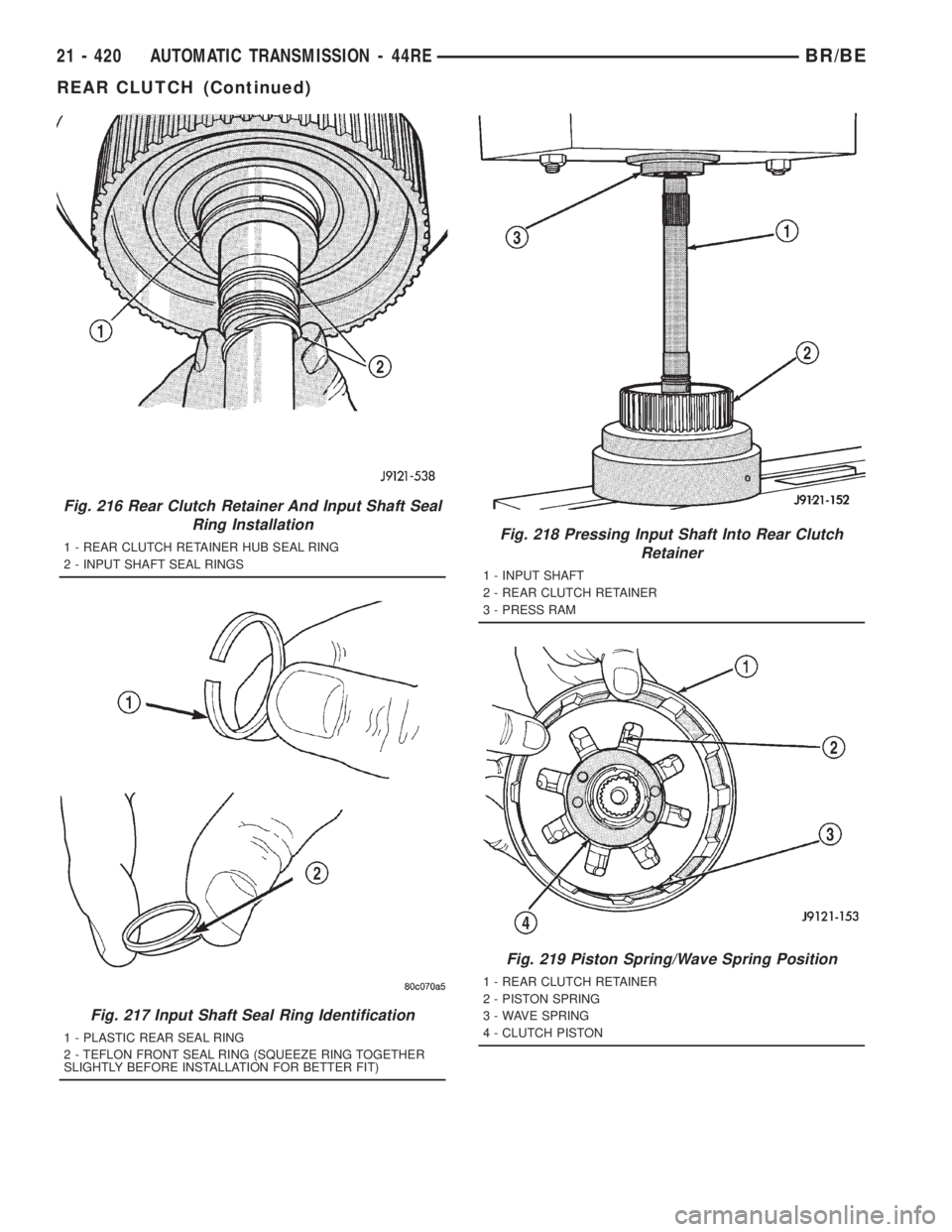
Fig. 216 Rear Clutch Retainer And Input Shaft Seal
Ring Installation
1 - REAR CLUTCH RETAINER HUB SEAL RING
2 - INPUT SHAFT SEAL RINGS
Fig. 217 Input Shaft Seal Ring Identification
1 - PLASTIC REAR SEAL RING
2 - TEFLON FRONT SEAL RING (SQUEEZE RING TOGETHER
SLIGHTLY BEFORE INSTALLATION FOR BETTER FIT)
Fig. 218 Pressing Input Shaft Into Rear Clutch
Retainer
1 - INPUT SHAFT
2 - REAR CLUTCH RETAINER
3 - PRESS RAM
Fig. 219 Piston Spring/Wave Spring Position
1 - REAR CLUTCH RETAINER
2 - PISTON SPRING
3 - WAVE SPRING
4 - CLUTCH PISTON
21 - 420 AUTOMATIC TRANSMISSION - 44REBR/BE
REAR CLUTCH (Continued)
Page 2061 of 2889
ADJUSTMENT PROCEDURE
(1) Turn ignition switch to OFF position.
(2) Remove air cleaner if necessary.
(3) Disconnect cable end from attachment stud.
Carefully slide cable off stud. Do not pry or pull
cable off.
(4) Verify that transmission throttle lever is in
fully closed position. Then be sure lever on throttle
body is at curb idle position.
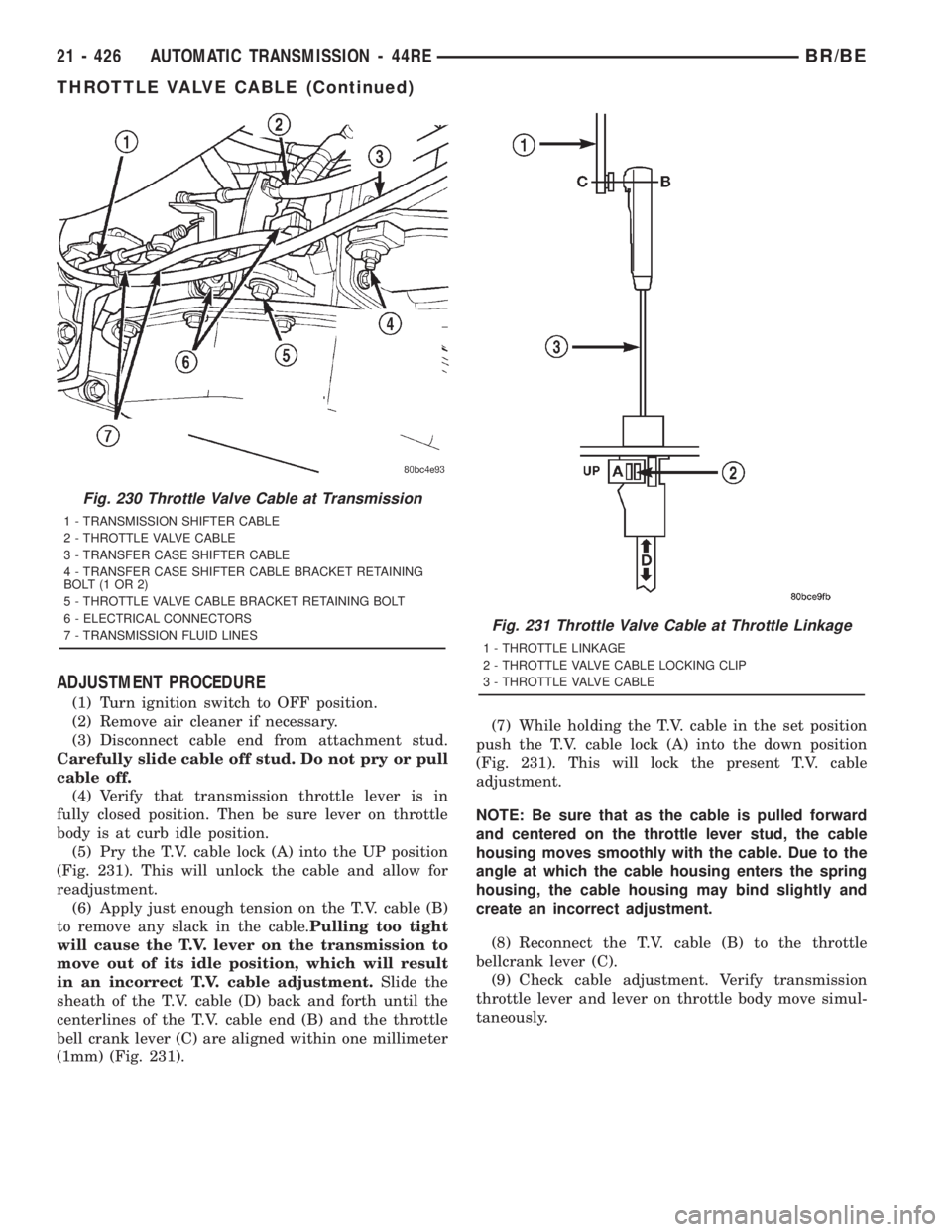
(5) Pry the T.V. cable lock (A) into the UP position
(Fig. 231). This will unlock the cable and allow for
readjustment.
(6) Apply just enough tension on the T.V. cable (B)
to remove any slack in the cable.Pulling too tight
will cause the T.V. lever on the transmission to
move out of its idle position, which will result
in an incorrect T.V. cable adjustment.Slide the
sheath of the T.V. cable (D) back and forth until the
centerlines of the T.V. cable end (B) and the throttle
bell crank lever (C) are aligned within one millimeter
(1mm) (Fig. 231).(7) While holding the T.V. cable in the set position
push the T.V. cable lock (A) into the down position
(Fig. 231). This will lock the present T.V. cable
adjustment.
NOTE: Be sure that as the cable is pulled forward
and centered on the throttle lever stud, the cable
housing moves smoothly with the cable. Due to the
angle at which the cable housing enters the spring
housing, the cable housing may bind slightly and
create an incorrect adjustment.
(8) Reconnect the T.V. cable (B) to the throttle
bellcrank lever (C).
(9) Check cable adjustment. Verify transmission
throttle lever and lever on throttle body move simul-
taneously.
Fig. 230 Throttle Valve Cable at Transmission
1 - TRANSMISSION SHIFTER CABLE
2 - THROTTLE VALVE CABLE
3 - TRANSFER CASE SHIFTER CABLE
4 - TRANSFER CASE SHIFTER CABLE BRACKET RETAINING
BOLT(1OR2)
5 - THROTTLE VALVE CABLE BRACKET RETAINING BOLT
6 - ELECTRICAL CONNECTORS
7 - TRANSMISSION FLUID LINES
Fig. 231 Throttle Valve Cable at Throttle Linkage
1 - THROTTLE LINKAGE
2 - THROTTLE VALVE CABLE LOCKING CLIP
3 - THROTTLE VALVE CABLE
21 - 426 AUTOMATIC TRANSMISSION - 44REBR/BE
THROTTLE VALVE CABLE (Continued)