2001 DODGE RAM four wheel drive
[x] Cancel search: four wheel drivePage 589 of 2889

(3) Turn the ignition switch to the Off position.
Disconnect and isolate the battery negative cable.
Remove the instrument cluster from the instrument
panel. Check for continuity between the 4WD switch
sense circuit cavities of the instrument panel wire
harness connector (Connector C2) for the instrument
cluster and the engine wire harness connector for the
four-wheel drive switch. There should be continuity.
If OK, replace the faulty instrument cluster. If not
OK, repair the open 4WD switch sense circuit
between the instrument cluster and the four-wheel
drive switch as required.
INDICATOR STAYS ILLUMINATED WITH FOUR-WHEEL DRIVE
MODE NOT SELECTED
(1) Disconnect and isolate the battery negative
cable. Disconnect the engine wire harness connector
for the four-wheel drive switch from the switch con-
nector receptacle. Check for continuity between the
ground circuit terminal and the 4WD switch sense
circuit terminal in the four-wheel drive switch con-
nector receptacle. There should be no continuity. If
OK, repair the shorted 4WD switch sense circuit
between the four-wheel drive switch and the instru-
ment cluster as required. If not OK, replace the
faulty four-wheel drive switch.
SPEEDOMETER
DESCRIPTION
A speedometer is standard equipment on all instru-
ment clusters. The speedometer is located just to the
right of the tachometer near the center of the instru-
ment cluster. The speedometer consists of a movable
gauge needle or pointer controlled by the instrument
cluster circuitry and a fixed 210 degree primary scale
on the gauge dial face that reads left-to-right either
from 0 to 120 mph, or from 0 to 200 km/h, depending
upon the market for which the vehicle is manufac-
tured. Each version also has a secondary inner scale
on the gauge dial face that provides the equivalent
opposite units from the primary scale. Text appearing
on the cluster overlay just below the hub of the
speedometer needle abbreviates the unit of measure
for the primary scale in all upper case letters (i.e.:
MPH or KM/H), followed by the unit of measure for
the secondary scale in all lower case letters (i.e.: mph
or km/h). The speedometer graphics are white (pri-
mary scale) and red (secondary scale) against a black
field, making them clearly visible within the instru-
ment cluster in daylight. When illuminated from
behind by the panel lamps dimmer controlled cluster
illumination lighting with the exterior lamps turned
On, the white graphics appear blue-green, while the
red graphics still appear red. The orange gauge nee-
dle is internally illuminated. Gauge illumination isprovided by replaceable incandescent bulb and bulb
holder units located on the instrument cluster elec-
tronic circuit board. The speedometer is serviced as a
unit with the instrument cluster.
OPERATION
The speedometer gives an indication to the vehicle
operator of the vehicle road speed. This gauge is con-
trolled by the instrument cluster circuit board based
upon the cluster programming and electronic mes-
sages received by the cluster from the Powertrain
Control Module (PCM) over the Chrysler Collision
Detection (CCD) data bus. The speedometer is an air
core magnetic unit that receives battery current on
the instrument cluster electronic circuit board
through the fused ignition switch output (st-run) cir-
cuit whenever the ignition switch is in the On or
Start positions. The cluster is programmed to move
the gauge needle back to the low end of the scale
after the ignition switch is turned to the Off position.
The instrument cluster circuitry controls the gauge
needle position and provides the following features:
²Message Failure- If the cluster fails to receive
a speedometer message, it will hold the gauge needle
at the last indication for about four seconds, or until
the ignition switch is turned to the Off position,
whichever occurs first. If a new speedometer message
is not received after about four seconds, the gauge
needle will return to the far left (low) end of the
scale.
²Actuator Test- Each time the cluster is put
through the actuator test, the gauge needle will be
swept to several calibration points on the gauge scale
in a prescribed sequence in order to confirm the func-
tionality of the gauge and the cluster control cir-
cuitry.
The PCM continually monitors the vehicle speed
sensor to determine the vehicle road speed, then
sends the proper vehicle speed messages to the
instrument cluster. For further diagnosis of the
speedometer or the instrument cluster circuitry that
controls the gauge, (Refer to 8 - ELECTRICAL/IN-
STRUMENT CLUSTER - DIAGNOSIS AND TEST-
ING). For proper diagnosis of the vehicle speed
sensor, the PCM, the CCD data bus, or the message
inputs to the instrument cluster that control the
speedometer, a DRBIIItscan tool is required. Refer
to the appropriate diagnostic information.
TACHOMETER
DESCRIPTION
A tachometer is standard equipment on all instru-
ment clusters. The tachometer is located just to the
left of the speedometer near the center of the instru-
8J - 30 INSTRUMENT CLUSTERBR/BE
SHIFT INDICATOR (TRANSFER CASE) (Continued)
Page 630 of 2889
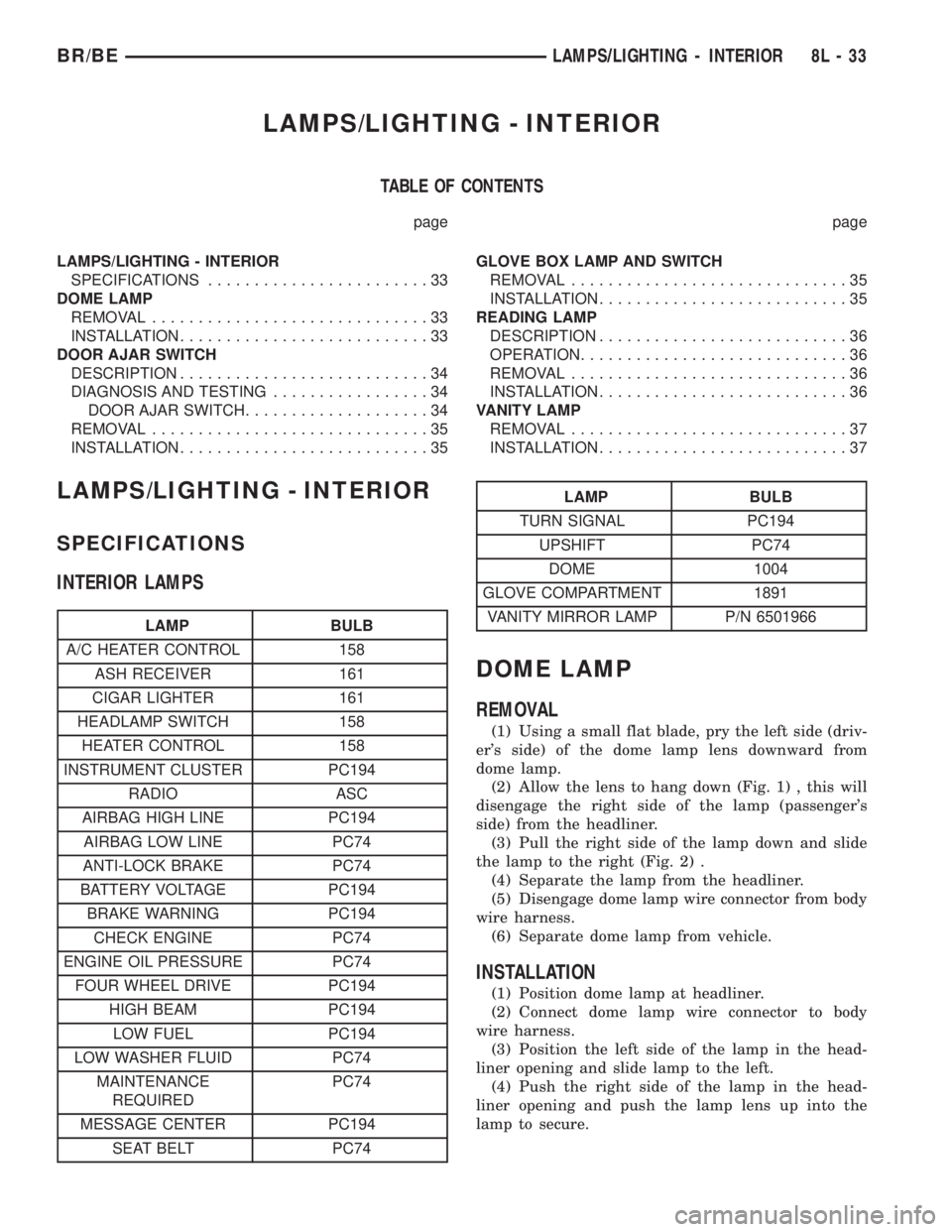
LAMPS/LIGHTING - INTERIOR
TABLE OF CONTENTS
page page
LAMPS/LIGHTING - INTERIOR
SPECIFICATIONS........................33
DOME LAMP
REMOVAL..............................33
INSTALLATION...........................33
DOOR AJAR SWITCH
DESCRIPTION...........................34
DIAGNOSIS AND TESTING.................34
DOOR AJAR SWITCH....................34
REMOVAL..............................35
INSTALLATION...........................35GLOVE BOX LAMP AND SWITCH
REMOVAL..............................35
INSTALLATION...........................35
READING LAMP
DESCRIPTION...........................36
OPERATION.............................36
REMOVAL..............................36
INSTALLATION...........................36
VANITY LAMP
REMOVAL..............................37
INSTALLATION...........................37
LAMPS/LIGHTING - INTERIOR
SPECIFICATIONS
INTERIOR LAMPS
LAMP BULB
A/C HEATER CONTROL 158
ASH RECEIVER 161
CIGAR LIGHTER 161
HEADLAMP SWITCH 158
HEATER CONTROL 158
INSTRUMENT CLUSTER PC194
RADIO ASC
AIRBAG HIGH LINE PC194
AIRBAG LOW LINE PC74
ANTI-LOCK BRAKE PC74
BATTERY VOLTAGE PC194
BRAKE WARNING PC194
CHECK ENGINE PC74
ENGINE OIL PRESSURE PC74
FOUR WHEEL DRIVE PC194
HIGH BEAM PC194
LOW FUEL PC194
LOW WASHER FLUID PC74
MAINTENANCE
REQUIREDPC74
MESSAGE CENTER PC194
SEAT BELT PC74
LAMP BULB
TURN SIGNAL PC194
UPSHIFT PC74
DOME 1004
GLOVE COMPARTMENT 1891
VANITY MIRROR LAMP P/N 6501966
DOME LAMP
REMOVAL
(1) Using a small flat blade, pry the left side (driv-
er's side) of the dome lamp lens downward from
dome lamp.
(2) Allow the lens to hang down (Fig. 1) , this will
disengage the right side of the lamp (passenger's
side) from the headliner.
(3) Pull the right side of the lamp down and slide
the lamp to the right (Fig. 2) .
(4) Separate the lamp from the headliner.
(5) Disengage dome lamp wire connector from body
wire harness.
(6) Separate dome lamp from vehicle.
INSTALLATION
(1) Position dome lamp at headliner.
(2) Connect dome lamp wire connector to body
wire harness.
(3) Position the left side of the lamp in the head-
liner opening and slide lamp to the left.
(4) Push the right side of the lamp in the head-
liner opening and push the lamp lens up into the
lamp to secure.
BR/BELAMPS/LIGHTING - INTERIOR 8L - 33
Page 689 of 2889
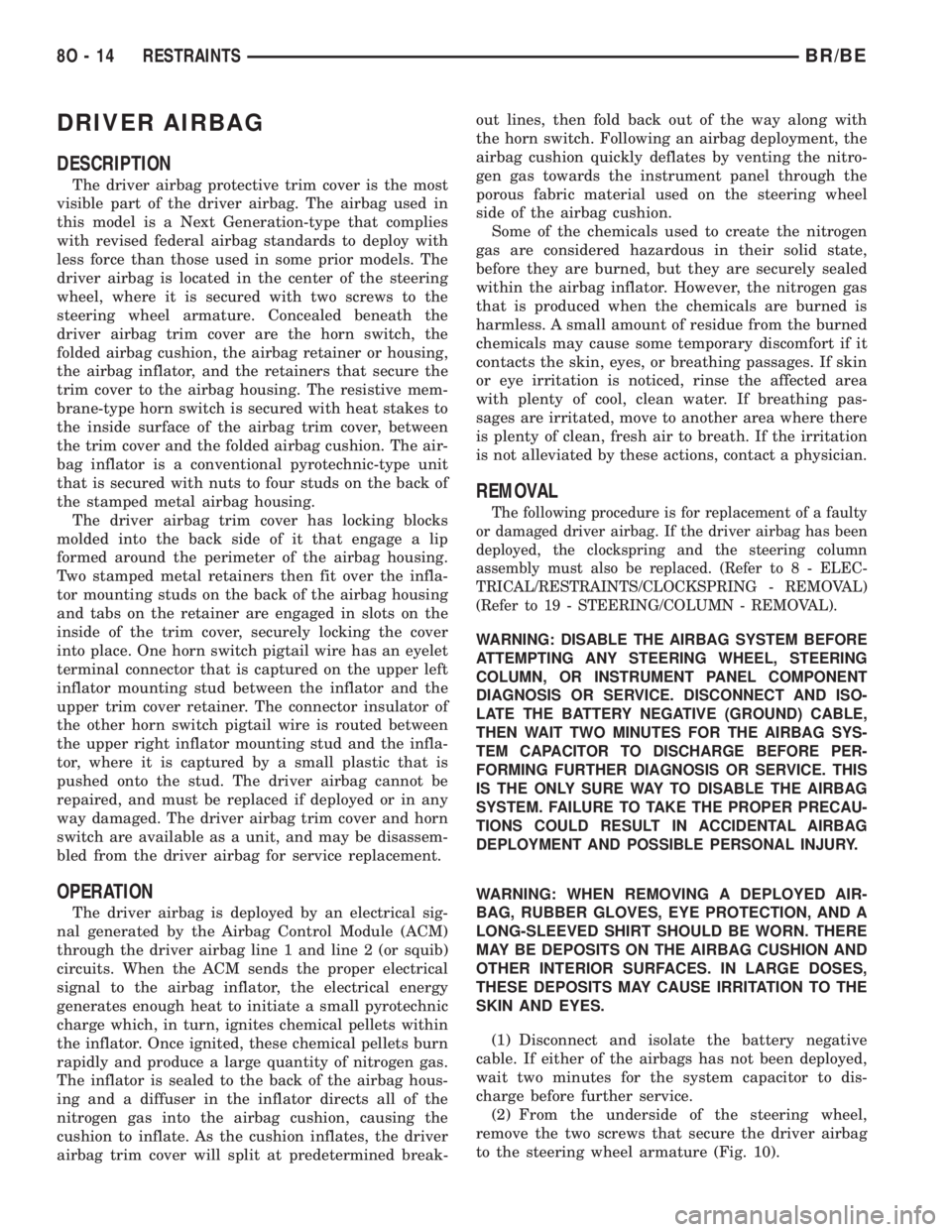
DRIVER AIRBAG
DESCRIPTION
The driver airbag protective trim cover is the most
visible part of the driver airbag. The airbag used in
this model is a Next Generation-type that complies
with revised federal airbag standards to deploy with
less force than those used in some prior models. The
driver airbag is located in the center of the steering
wheel, where it is secured with two screws to the
steering wheel armature. Concealed beneath the
driver airbag trim cover are the horn switch, the
folded airbag cushion, the airbag retainer or housing,
the airbag inflator, and the retainers that secure the
trim cover to the airbag housing. The resistive mem-
brane-type horn switch is secured with heat stakes to
the inside surface of the airbag trim cover, between
the trim cover and the folded airbag cushion. The air-
bag inflator is a conventional pyrotechnic-type unit
that is secured with nuts to four studs on the back of
the stamped metal airbag housing.
The driver airbag trim cover has locking blocks
molded into the back side of it that engage a lip
formed around the perimeter of the airbag housing.
Two stamped metal retainers then fit over the infla-
tor mounting studs on the back of the airbag housing
and tabs on the retainer are engaged in slots on the
inside of the trim cover, securely locking the cover
into place. One horn switch pigtail wire has an eyelet
terminal connector that is captured on the upper left
inflator mounting stud between the inflator and the
upper trim cover retainer. The connector insulator of
the other horn switch pigtail wire is routed between
the upper right inflator mounting stud and the infla-
tor, where it is captured by a small plastic that is
pushed onto the stud. The driver airbag cannot be
repaired, and must be replaced if deployed or in any
way damaged. The driver airbag trim cover and horn
switch are available as a unit, and may be disassem-
bled from the driver airbag for service replacement.
OPERATION
The driver airbag is deployed by an electrical sig-
nal generated by the Airbag Control Module (ACM)
through the driver airbag line 1 and line 2 (or squib)
circuits. When the ACM sends the proper electrical
signal to the airbag inflator, the electrical energy
generates enough heat to initiate a small pyrotechnic
charge which, in turn, ignites chemical pellets within
the inflator. Once ignited, these chemical pellets burn
rapidly and produce a large quantity of nitrogen gas.
The inflator is sealed to the back of the airbag hous-
ing and a diffuser in the inflator directs all of the
nitrogen gas into the airbag cushion, causing the
cushion to inflate. As the cushion inflates, the driver
airbag trim cover will split at predetermined break-out lines, then fold back out of the way along with
the horn switch. Following an airbag deployment, the
airbag cushion quickly deflates by venting the nitro-
gen gas towards the instrument panel through the
porous fabric material used on the steering wheel
side of the airbag cushion.
Some of the chemicals used to create the nitrogen
gas are considered hazardous in their solid state,
before they are burned, but they are securely sealed
within the airbag inflator. However, the nitrogen gas
that is produced when the chemicals are burned is
harmless. A small amount of residue from the burned
chemicals may cause some temporary discomfort if it
contacts the skin, eyes, or breathing passages. If skin
or eye irritation is noticed, rinse the affected area
with plenty of cool, clean water. If breathing pas-
sages are irritated, move to another area where there
is plenty of clean, fresh air to breath. If the irritation
is not alleviated by these actions, contact a physician.
REMOVAL
The following procedure is for replacement of a faulty
or damaged driver airbag. If the driver airbag has been
deployed, the clockspring and the steering column
assembly must also be replaced. (Refer to 8 - ELEC-
TRICAL/RESTRAINTS/CLOCKSPRING - REMOVAL)
(Refer to 19 - STEERING/COLUMN - REMOVAL).
WARNING: DISABLE THE AIRBAG SYSTEM BEFORE
ATTEMPTING ANY STEERING WHEEL, STEERING
COLUMN, OR INSTRUMENT PANEL COMPONENT
DIAGNOSIS OR SERVICE. DISCONNECT AND ISO-
LATE THE BATTERY NEGATIVE (GROUND) CABLE,
THEN WAIT TWO MINUTES FOR THE AIRBAG SYS-
TEM CAPACITOR TO DISCHARGE BEFORE PER-
FORMING FURTHER DIAGNOSIS OR SERVICE. THIS
IS THE ONLY SURE WAY TO DISABLE THE AIRBAG
SYSTEM. FAILURE TO TAKE THE PROPER PRECAU-
TIONS COULD RESULT IN ACCIDENTAL AIRBAG
DEPLOYMENT AND POSSIBLE PERSONAL INJURY.
WARNING: WHEN REMOVING A DEPLOYED AIR-
BAG, RUBBER GLOVES, EYE PROTECTION, AND A
LONG-SLEEVED SHIRT SHOULD BE WORN. THERE
MAY BE DEPOSITS ON THE AIRBAG CUSHION AND
OTHER INTERIOR SURFACES. IN LARGE DOSES,
THESE DEPOSITS MAY CAUSE IRRITATION TO THE
SKIN AND EYES.
(1) Disconnect and isolate the battery negative
cable. If either of the airbags has not been deployed,
wait two minutes for the system capacitor to dis-
charge before further service.
(2) From the underside of the steering wheel,
remove the two screws that secure the driver airbag
to the steering wheel armature (Fig. 10).
8O - 14 RESTRAINTSBR/BE
Page 691 of 2889
WARNING: THE HORN SWITCH IS INTEGRAL TO
THE DRIVER AIRBAG UNIT. SERVICE OF THIS UNIT
SHOULD BE PERFORMED ONLY BY DAIMLER-
CHRYSLER-TRAINED AND AUTHORIZED DEALER
SERVICE TECHNICIANS. FAILURE TO TAKE THE
PROPER PRECAUTIONS OR TO FOLLOW THE
PROPER PROCEDURES COULD RESULT IN ACCI-
DENTAL, INCOMPLETE, OR IMPROPER AIRBAG
DEPLOYMENT AND POSSIBLE OCCUPANT INJU-
RIES.
(1) Disconnect and isolate the battery negative
cable. If either of the airbags has not been deployed,
wait two minutes for the system capacitor to dis-
charge before further service.
(2) Remove the driver airbag from the steering
wheel. (Refer to 8 - ELECTRICAL/RESTRAINTS/
DRIVER AIRBAG - REMOVAL).
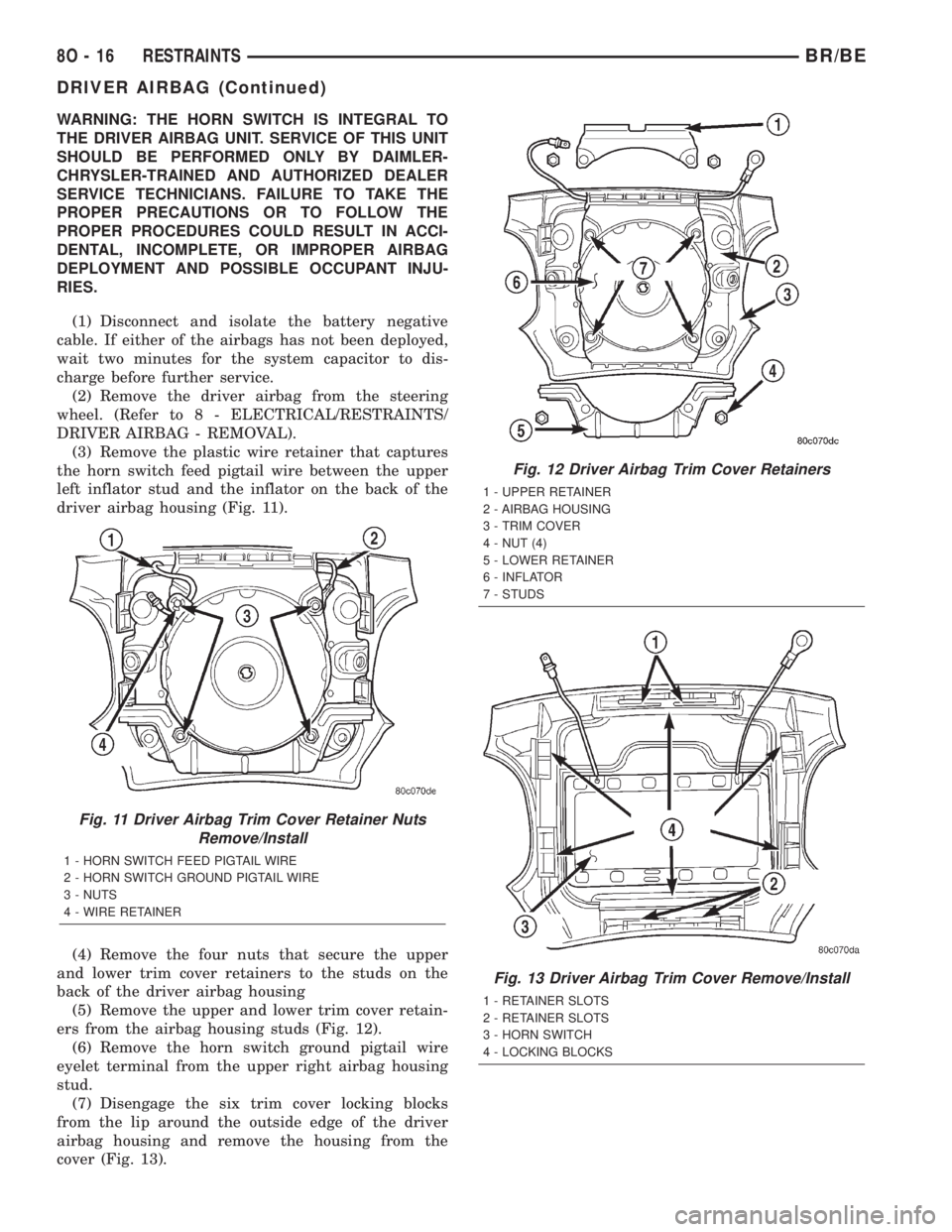
(3) Remove the plastic wire retainer that captures
the horn switch feed pigtail wire between the upper
left inflator stud and the inflator on the back of the
driver airbag housing (Fig. 11).
(4) Remove the four nuts that secure the upper
and lower trim cover retainers to the studs on the
back of the driver airbag housing
(5) Remove the upper and lower trim cover retain-
ers from the airbag housing studs (Fig. 12).
(6) Remove the horn switch ground pigtail wire
eyelet terminal from the upper right airbag housing
stud.
(7) Disengage the six trim cover locking blocks
from the lip around the outside edge of the driver
airbag housing and remove the housing from the
cover (Fig. 13).
Fig. 11 Driver Airbag Trim Cover Retainer Nuts
Remove/Install
1 - HORN SWITCH FEED PIGTAIL WIRE
2 - HORN SWITCH GROUND PIGTAIL WIRE
3 - NUTS
4 - WIRE RETAINER
Fig. 12 Driver Airbag Trim Cover Retainers
1 - UPPER RETAINER
2 - AIRBAG HOUSING
3 - TRIM COVER
4 - NUT (4)
5 - LOWER RETAINER
6 - INFLATOR
7 - STUDS
Fig. 13 Driver Airbag Trim Cover Remove/Install
1 - RETAINER SLOTS
2 - RETAINER SLOTS
3 - HORN SWITCH
4 - LOCKING BLOCKS
8O - 16 RESTRAINTSBR/BE
DRIVER AIRBAG (Continued)
Page 1636 of 2889
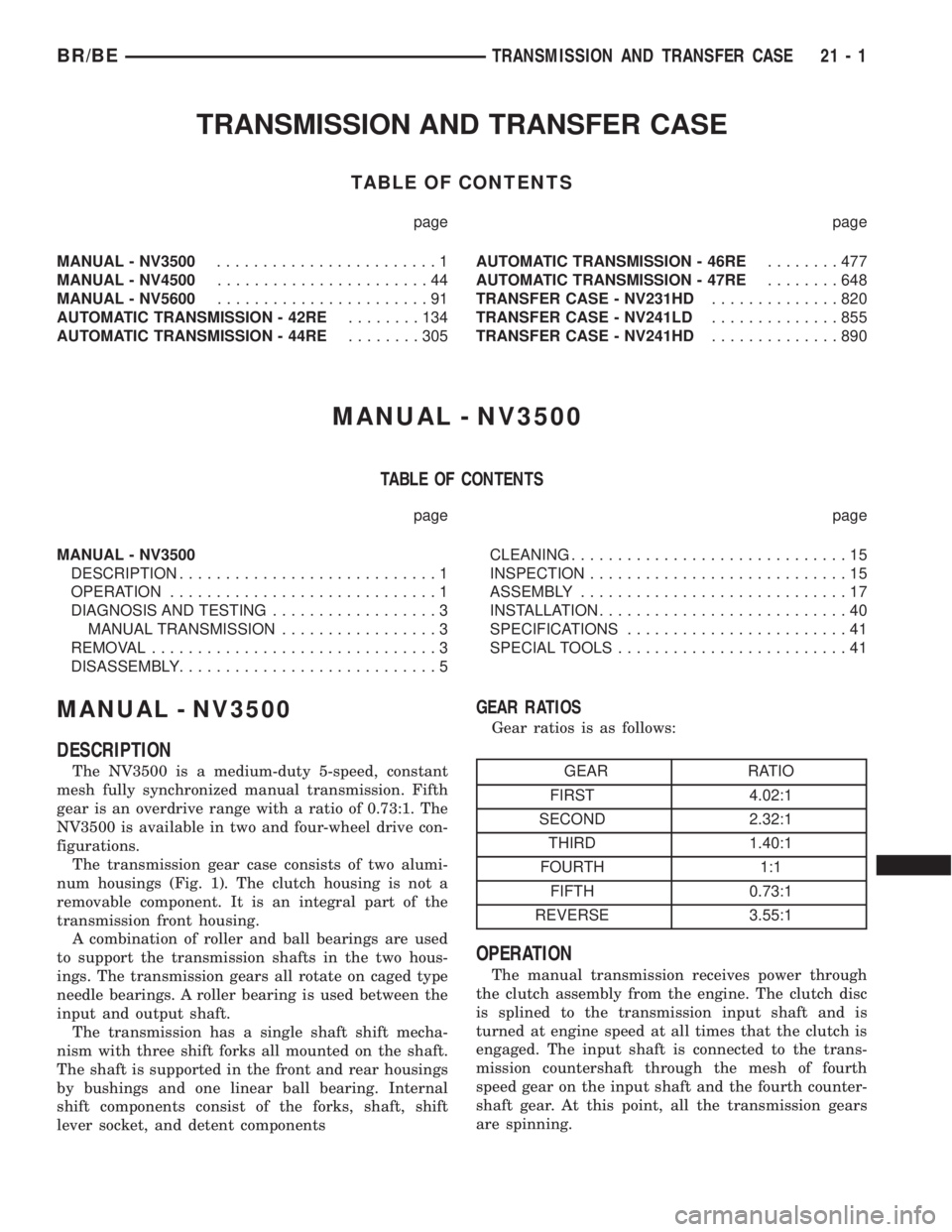
TRANSMISSION AND TRANSFER CASE
TABLE OF CONTENTS
page page
MANUAL - NV3500........................1
MANUAL - NV4500.......................44
MANUAL - NV5600.......................91
AUTOMATIC TRANSMISSION - 42RE........134
AUTOMATIC TRANSMISSION - 44RE........305AUTOMATIC TRANSMISSION - 46RE........477
AUTOMATIC TRANSMISSION - 47RE........648
TRANSFER CASE - NV231HD..............820
TRANSFER CASE - NV241LD..............855
TRANSFER CASE - NV241HD..............890
MANUAL - NV3500
TABLE OF CONTENTS
page page
MANUAL - NV3500
DESCRIPTION............................1
OPERATION.............................1
DIAGNOSIS AND TESTING..................3
MANUAL TRANSMISSION.................3
REMOVAL...............................3
DISASSEMBLY............................5CLEANING..............................15
INSPECTION............................15
ASSEMBLY.............................17
INSTALLATION...........................40
SPECIFICATIONS........................41
SPECIAL TOOLS.........................41
MANUAL - NV3500
DESCRIPTION
The NV3500 is a medium-duty 5-speed, constant
mesh fully synchronized manual transmission. Fifth
gear is an overdrive range with a ratio of 0.73:1. The
NV3500 is available in two and four-wheel drive con-
figurations.
The transmission gear case consists of two alumi-
num housings (Fig. 1). The clutch housing is not a
removable component. It is an integral part of the
transmission front housing.
A combination of roller and ball bearings are used
to support the transmission shafts in the two hous-
ings. The transmission gears all rotate on caged type
needle bearings. A roller bearing is used between the
input and output shaft.
The transmission has a single shaft shift mecha-
nism with three shift forks all mounted on the shaft.
The shaft is supported in the front and rear housings
by bushings and one linear ball bearing. Internal
shift components consist of the forks, shaft, shift
lever socket, and detent components
GEAR RATIOS
Gear ratios is as follows:
GEAR RATIO
FIRST 4.02:1
SECOND 2.32:1
THIRD 1.40:1
FOURTH 1:1
FIFTH 0.73:1
REVERSE 3.55:1
OPERATION
The manual transmission receives power through
the clutch assembly from the engine. The clutch disc
is splined to the transmission input shaft and is
turned at engine speed at all times that the clutch is
engaged. The input shaft is connected to the trans-
mission countershaft through the mesh of fourth
speed gear on the input shaft and the fourth counter-
shaft gear. At this point, all the transmission gears
are spinning.
BR/BETRANSMISSION AND TRANSFER CASE 21 - 1
Page 1639 of 2889
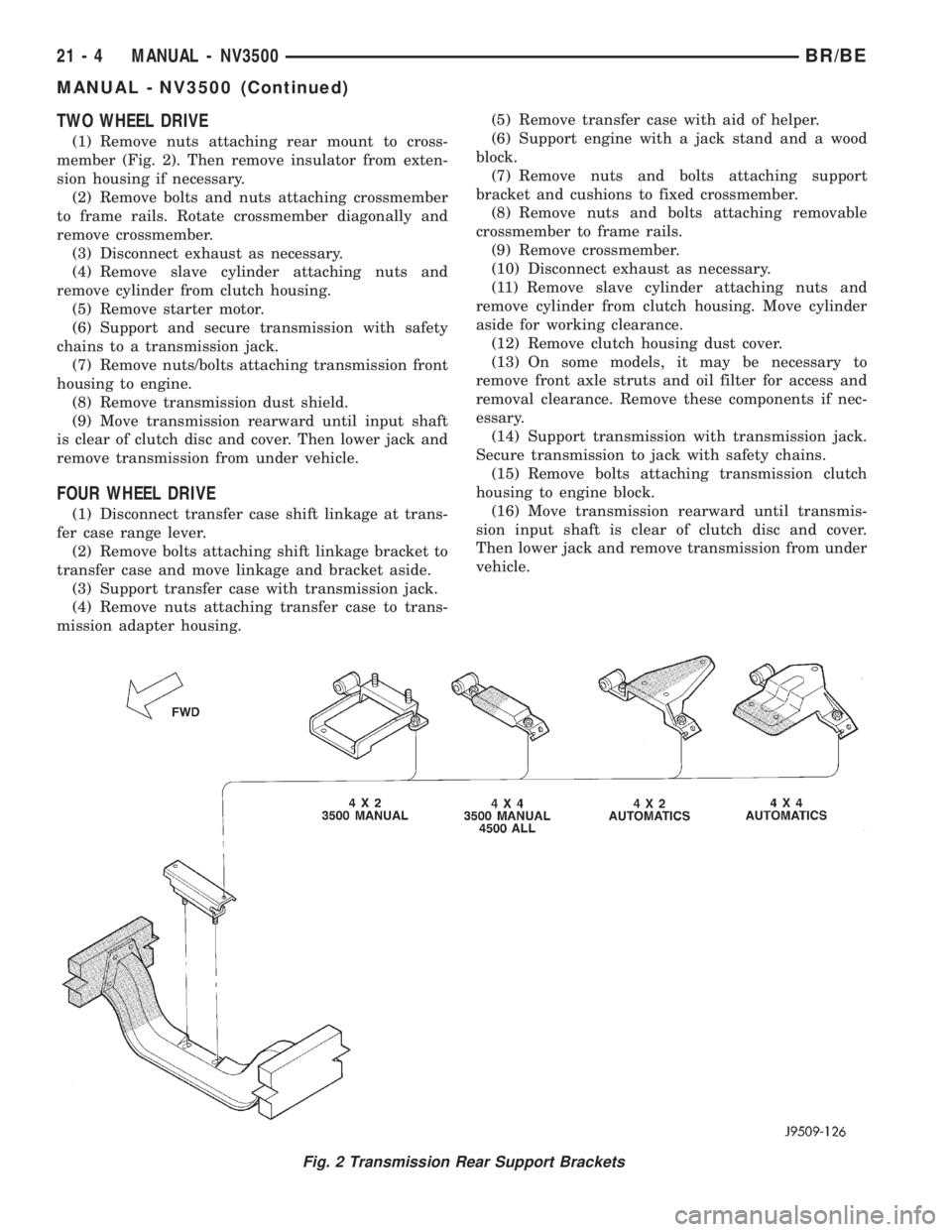
TWO WHEEL DRIVE
(1) Remove nuts attaching rear mount to cross-
member (Fig. 2). Then remove insulator from exten-
sion housing if necessary.
(2) Remove bolts and nuts attaching crossmember
to frame rails. Rotate crossmember diagonally and
remove crossmember.
(3) Disconnect exhaust as necessary.
(4) Remove slave cylinder attaching nuts and
remove cylinder from clutch housing.
(5) Remove starter motor.
(6) Support and secure transmission with safety
chains to a transmission jack.
(7) Remove nuts/bolts attaching transmission front
housing to engine.
(8) Remove transmission dust shield.
(9) Move transmission rearward until input shaft
is clear of clutch disc and cover. Then lower jack and
remove transmission from under vehicle.
FOUR WHEEL DRIVE
(1) Disconnect transfer case shift linkage at trans-
fer case range lever.
(2) Remove bolts attaching shift linkage bracket to
transfer case and move linkage and bracket aside.
(3) Support transfer case with transmission jack.
(4) Remove nuts attaching transfer case to trans-
mission adapter housing.(5) Remove transfer case with aid of helper.
(6) Support engine with a jack stand and a wood
block.
(7) Remove nuts and bolts attaching support
bracket and cushions to fixed crossmember.
(8) Remove nuts and bolts attaching removable
crossmember to frame rails.
(9) Remove crossmember.
(10) Disconnect exhaust as necessary.
(11) Remove slave cylinder attaching nuts and
remove cylinder from clutch housing. Move cylinder
aside for working clearance.
(12) Remove clutch housing dust cover.
(13) On some models, it may be necessary to
remove front axle struts and oil filter for access and
removal clearance. Remove these components if nec-
essary.
(14) Support transmission with transmission jack.
Secure transmission to jack with safety chains.
(15) Remove bolts attaching transmission clutch
housing to engine block.
(16) Move transmission rearward until transmis-
sion input shaft is clear of clutch disc and cover.
Then lower jack and remove transmission from under
vehicle.
Fig. 2 Transmission Rear Support Brackets
21 - 4 MANUAL - NV3500BR/BE
MANUAL - NV3500 (Continued)
Page 1675 of 2889
(5) Fill transmission to bottom edge of fill plug
hole with Mopar Transmission Lubricant.
(6) Install and tighten fill plug to 34 N´m (25 ft.
lbs.).
(7) Check transmission vent. Be sure vent is open
and not restricted.
INSTALLATION
NOTE: If a new transmission is being installed, be
sure to use all components supplied with the new
transmission. For example, if a new shift tower is
supplied with the new transmission, do not re-use
the original shift tower.
Make sure transmission front housing mounting
surface is clean. Before installation apply light coat
of Mopar high temperature bearing grease to contact
surfaces of following components:
²input shaft splines.
²release bearing slide surface of front retainer.
²release bearing bore.
²release fork.
²release fork ball stud.
²propeller shaft slip yoke.
(1) Support and secure transmission to jack with
safety chains.
(2) Raise and align transmission input shaft with
clutch disc, then slide transmission into place.
(3) Install and tighten transmission bolts to 54-61
N´m (40-45 ft. lbs.). Be sure front housing is fully
seated before tightening bolts. Install front dust
cover after all bolts are tightened.
(4) Fill transmission with Mopar lubricant. Correct
fill level is to bottom edge of fill plug hole.
(5) Connect backup lamp switch wires.(6) Connect transmission harnesses to clips on
case.
(7) Install crossmember. Tighten crossmember-to-
frame bolts to 68 N´m (50 ft. lbs.).
(8) Tighten crossmember-to-transmission insulator
nuts to 68 N´m (50 ft. lbs.).
(9) Install slave cylinder. Tighten cylinder nuts to
23 N´m (200 in. lbs.).
(10) Remove jack used to support transmission.
(11) Install strut bolts/nuts, if removed. Also
install oil filter if removal was necessary.
(12) Install and connect exhaust system. Align
exhaust components before tightening clamp and
bracket bolts and nuts. Be sure exhaust components
are clear of all chassis and driveline components.
TWO WHEEL DRIVE
(1) Align and install propeller shaft.
(2) Verify that all linkage components, hoses and
electrical wires have been connected.
(3) Remove any remaining support stands and
lower vehicle.
(4) Install crankshaft position sensor.
(5) Connect battery negative cable.
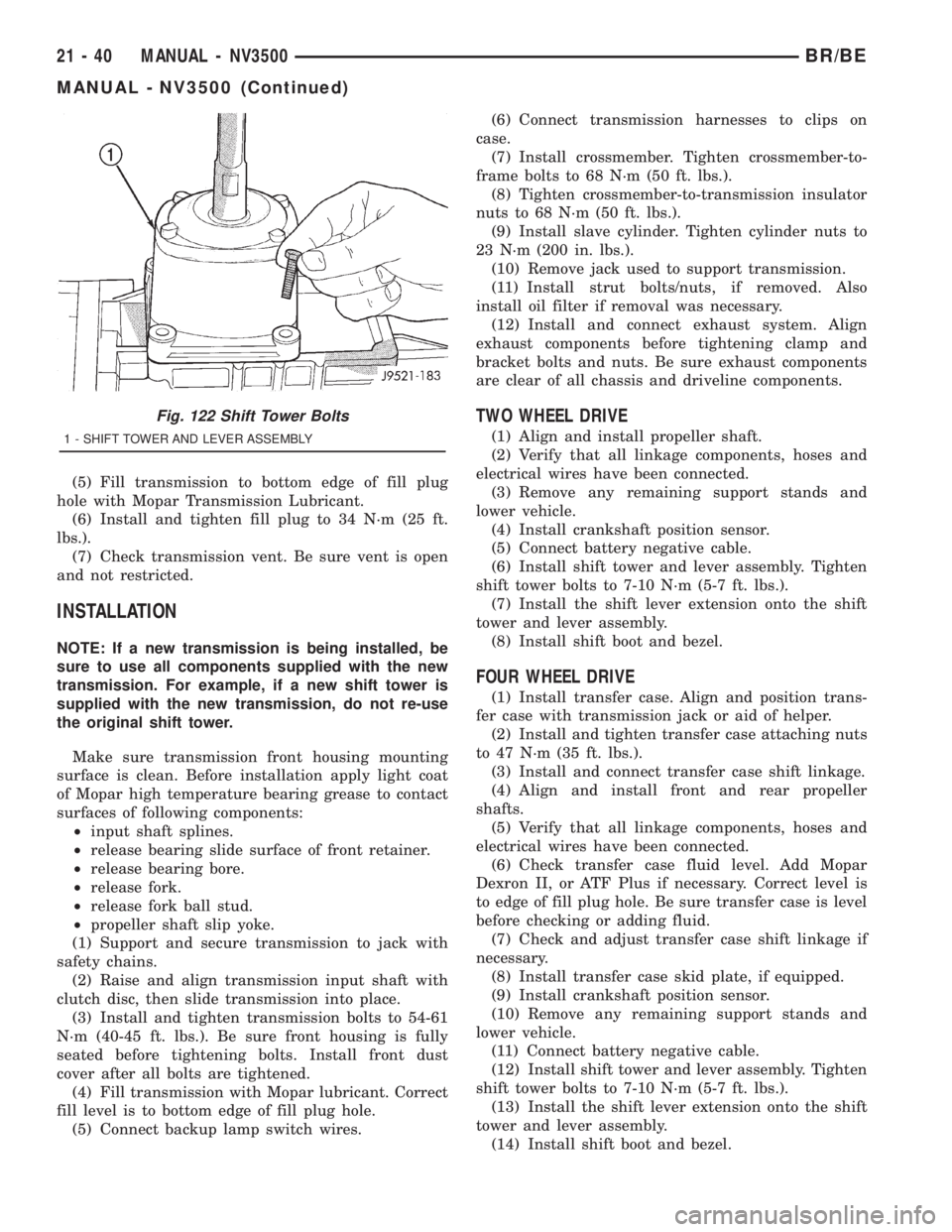
(6) Install shift tower and lever assembly. Tighten
shift tower bolts to 7-10 N´m (5-7 ft. lbs.).
(7) Install the shift lever extension onto the shift
tower and lever assembly.
(8) Install shift boot and bezel.
FOUR WHEEL DRIVE
(1) Install transfer case. Align and position trans-
fer case with transmission jack or aid of helper.
(2) Install and tighten transfer case attaching nuts
to 47 N´m (35 ft. lbs.).
(3) Install and connect transfer case shift linkage.
(4) Align and install front and rear propeller
shafts.
(5) Verify that all linkage components, hoses and
electrical wires have been connected.
(6) Check transfer case fluid level. Add Mopar
Dexron II, or ATF Plus if necessary. Correct level is
to edge of fill plug hole. Be sure transfer case is level
before checking or adding fluid.
(7) Check and adjust transfer case shift linkage if
necessary.
(8) Install transfer case skid plate, if equipped.
(9) Install crankshaft position sensor.
(10) Remove any remaining support stands and
lower vehicle.
(11) Connect battery negative cable.
(12) Install shift tower and lever assembly. Tighten
shift tower bolts to 7-10 N´m (5-7 ft. lbs.).
(13) Install the shift lever extension onto the shift
tower and lever assembly.
(14) Install shift boot and bezel.
Fig. 122 Shift Tower Bolts
1 - SHIFT TOWER AND LEVER ASSEMBLY
21 - 40 MANUAL - NV3500BR/BE
MANUAL - NV3500 (Continued)
Page 1682 of 2889
A leak at the front of the transmission will be from
either the front bearing retainer or retainer seal.
Lubricant may be seen dripping from the clutch
housing after extended operation. If the leak is
severe, it may also contaminate the clutch disc caus-
ing the disc to slip, grab and or chatter.
A correct lubricant level check can only be made
when the vehicle is level. Also allow the lubricant to
settle for a minute or so before checking. These rec-
ommendations will ensure an accurate check and
avoid an underfill or overfill condition. Always check
the lubricant level after any addition of fluid to avoid
an incorrect lubricant level condition.
HARD SHIFTING
Hard shifting is usually caused by a low lubricant
level, improper or contaminated lubricants. The con-
sequence of using non-recommended lubricants is
noise, excessive wear, internal bind and hard shift-
ing. Substantial lubricant leaks can result in gear,
shift rail, synchro, and bearing damage. If a leak
goes undetected for an extended period, the first indi-
cations of component damage are usually hard shift-
ing and noise.
Component damage, incorrect clutch adjustment or
damaged clutch pressure plate or disc are additional
probable causes of increased shift effort. Incorrect
adjustment or a worn/damaged pressure plate or disc
can cause incorrect release. If clutch problem is
advanced, gear clash during shifts can result. Worn
or damaged synchro rings can cause gear clash when
shifting into any forward gear. In some new or
rebuilt transmissions, new synchro rings may tend to
stick slightly causing hard or noisy shifts. In most
cases this condition will decline as the rings wear-in.
TRANSMISSION NOISE
Most manual transmissions make some noise dur-
ing normal operation. Rotating gears generate a mild
whine that is audible, but generally only at extreme
speeds.
Severe highly audible transmission noise is gener-
ally the initial indicator of a lubricant problem.
Insufficient, improper or contaminated lubricant will
promote rapid wear of gears, synchros, shift rails,
forks and bearings. The overheating caused by a
lubricant problem, can also lead to gear breakage.
REMOVAL
(1) Disconnect battery negative cable.
(2) Shift transmission into Neutral.
(3) Remove shift boot screws from floorpan and
slide boot upward on the shift lever.
(4) Remove shift lever extension from shift tower
and lever assembly.(5) Remove shift tower bolts holding tower to iso-
lator plate and transmission shift cover.
(6) Remove shift tower and isolator plate from
transmission shift cover.
(7) Raise and support vehicle.
(8) Remove skid plate, if equipped.
(9) Mark propeller shaft and axle yokes for instal-
lation reference and remove shaft/shafts.
(10) Remove exhaust system Y-pipe.
(11) Disconnect speed sensor and backup light
switch connectors.
(12) Support engine with safety stand and a wood
block.
(13) If transmission is to be disassembled for,
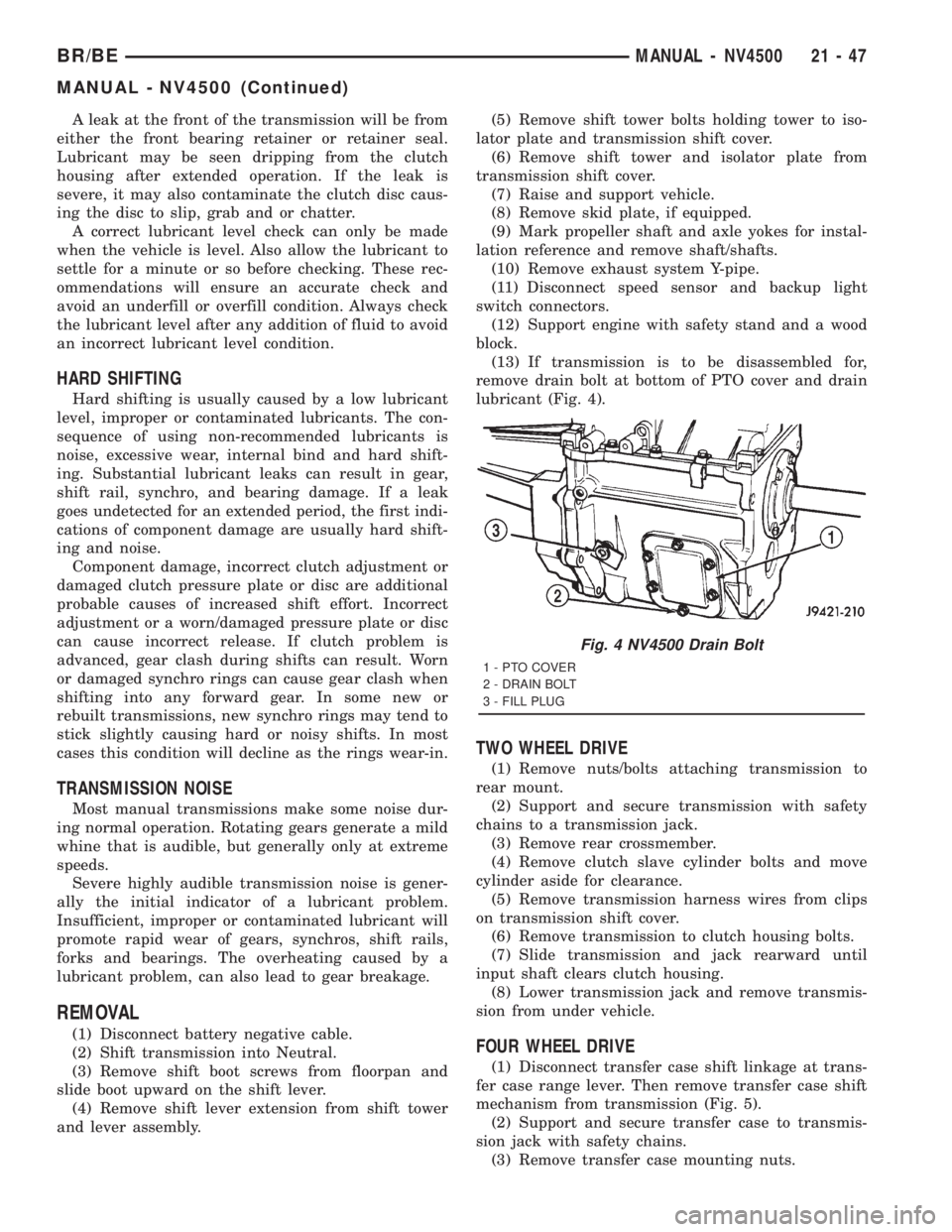
remove drain bolt at bottom of PTO cover and drain
lubricant (Fig. 4).
TWO WHEEL DRIVE
(1) Remove nuts/bolts attaching transmission to
rear mount.
(2) Support and secure transmission with safety
chains to a transmission jack.
(3) Remove rear crossmember.
(4) Remove clutch slave cylinder bolts and move
cylinder aside for clearance.
(5) Remove transmission harness wires from clips
on transmission shift cover.
(6) Remove transmission to clutch housing bolts.
(7) Slide transmission and jack rearward until
input shaft clears clutch housing.
(8) Lower transmission jack and remove transmis-
sion from under vehicle.
FOUR WHEEL DRIVE
(1) Disconnect transfer case shift linkage at trans-
fer case range lever. Then remove transfer case shift
mechanism from transmission (Fig. 5).
(2) Support and secure transfer case to transmis-
sion jack with safety chains.
(3) Remove transfer case mounting nuts.
Fig. 4 NV4500 Drain Bolt
1 - PTO COVER
2 - DRAIN BOLT
3 - FILL PLUG
BR/BEMANUAL - NV4500 21 - 47
MANUAL - NV4500 (Continued)