2001 DODGE RAM ABS
[x] Cancel search: ABSPage 641 of 2889
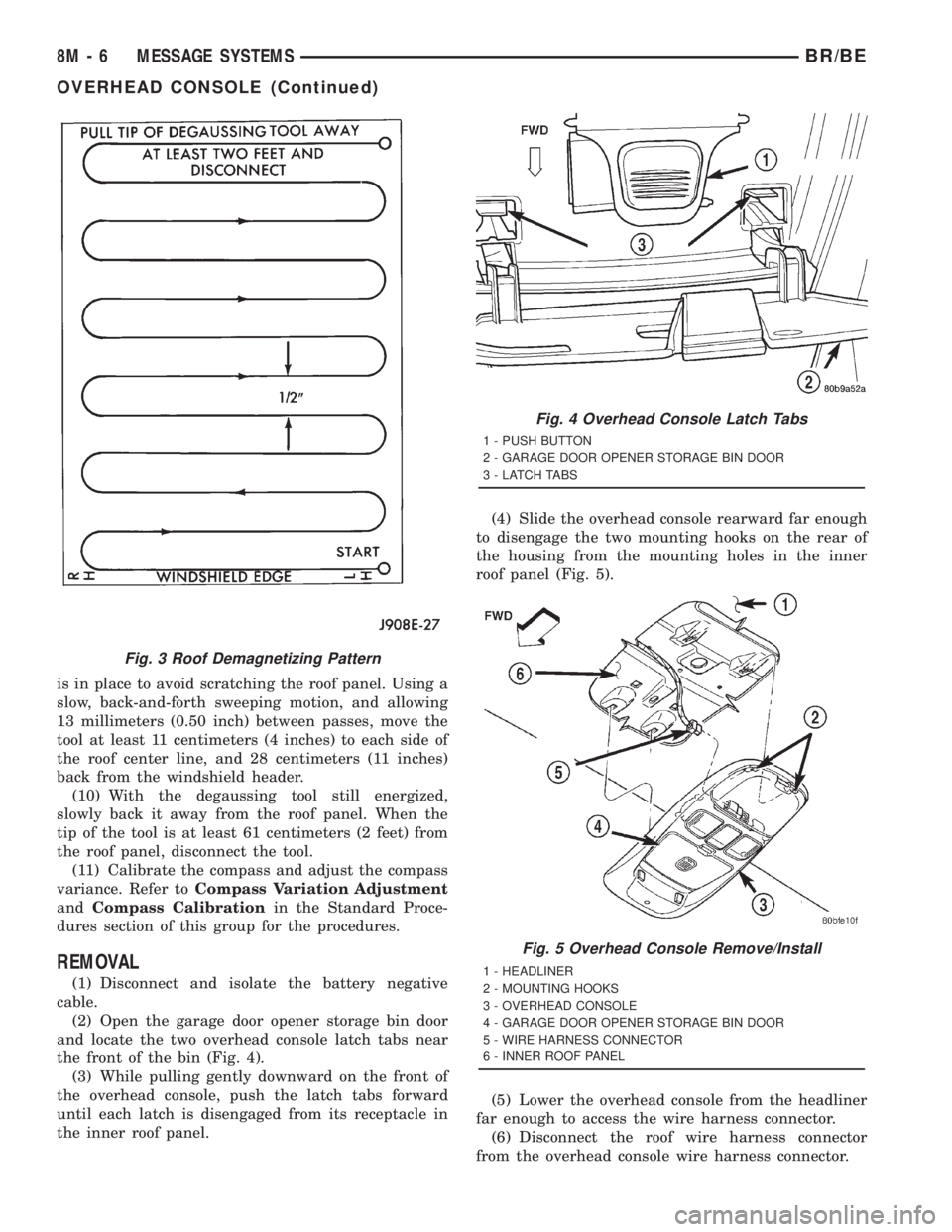
is in place to avoid scratching the roof panel. Using a
slow, back-and-forth sweeping motion, and allowing
13 millimeters (0.50 inch) between passes, move the
tool at least 11 centimeters (4 inches) to each side of
the roof center line, and 28 centimeters (11 inches)
back from the windshield header.
(10) With the degaussing tool still energized,
slowly back it away from the roof panel. When the
tip of the tool is at least 61 centimeters (2 feet) from
the roof panel, disconnect the tool.
(11) Calibrate the compass and adjust the compass
variance. Refer toCompass Variation Adjustment
andCompass Calibrationin the Standard Proce-
dures section of this group for the procedures.
REMOVAL
(1) Disconnect and isolate the battery negative
cable.
(2) Open the garage door opener storage bin door
and locate the two overhead console latch tabs near
the front of the bin (Fig. 4).
(3) While pulling gently downward on the front of
the overhead console, push the latch tabs forward
until each latch is disengaged from its receptacle in
the inner roof panel.(4) Slide the overhead console rearward far enough
to disengage the two mounting hooks on the rear of
the housing from the mounting holes in the inner
roof panel (Fig. 5).
(5) Lower the overhead console from the headliner
far enough to access the wire harness connector.
(6) Disconnect the roof wire harness connector
from the overhead console wire harness connector.
Fig. 3 Roof Demagnetizing Pattern
Fig. 4 Overhead Console Latch Tabs
1 - PUSH BUTTON
2 - GARAGE DOOR OPENER STORAGE BIN DOOR
3 - LATCH TABS
Fig. 5 Overhead Console Remove/Install
1 - HEADLINER
2 - MOUNTING HOOKS
3 - OVERHEAD CONSOLE
4 - GARAGE DOOR OPENER STORAGE BIN DOOR
5 - WIRE HARNESS CONNECTOR
6 - INNER ROOF PANEL
8M - 6 MESSAGE SYSTEMSBR/BE
OVERHEAD CONSOLE (Continued)
Page 642 of 2889
(7) Remove the overhead console from the vehicle.
OVERHEAD CONSOLE DISASSEMBLY
GARAGE DOOR OPENER STORAGE BIN REMOVAL
(1) Disconnect and isolate the battery negative
cable.
(2) Remove the overhead console from the head-
liner. Refer toOverhead Consolein the Removal
and Installation section of this group for the proce-
dures.
(3) If the vehicle is so equipped, remove the three
screws that secure the compass mini-trip computer
module to the back side of the overhead console hous-
ing. Move the module aside as needed for access to
the pivot latches that are integral to the overhead
console housing for the garage door opener storage
bin door pivot pins.
(4) Open the garage door opener storage bin door.
(5) From the back side of the of the overhead con-
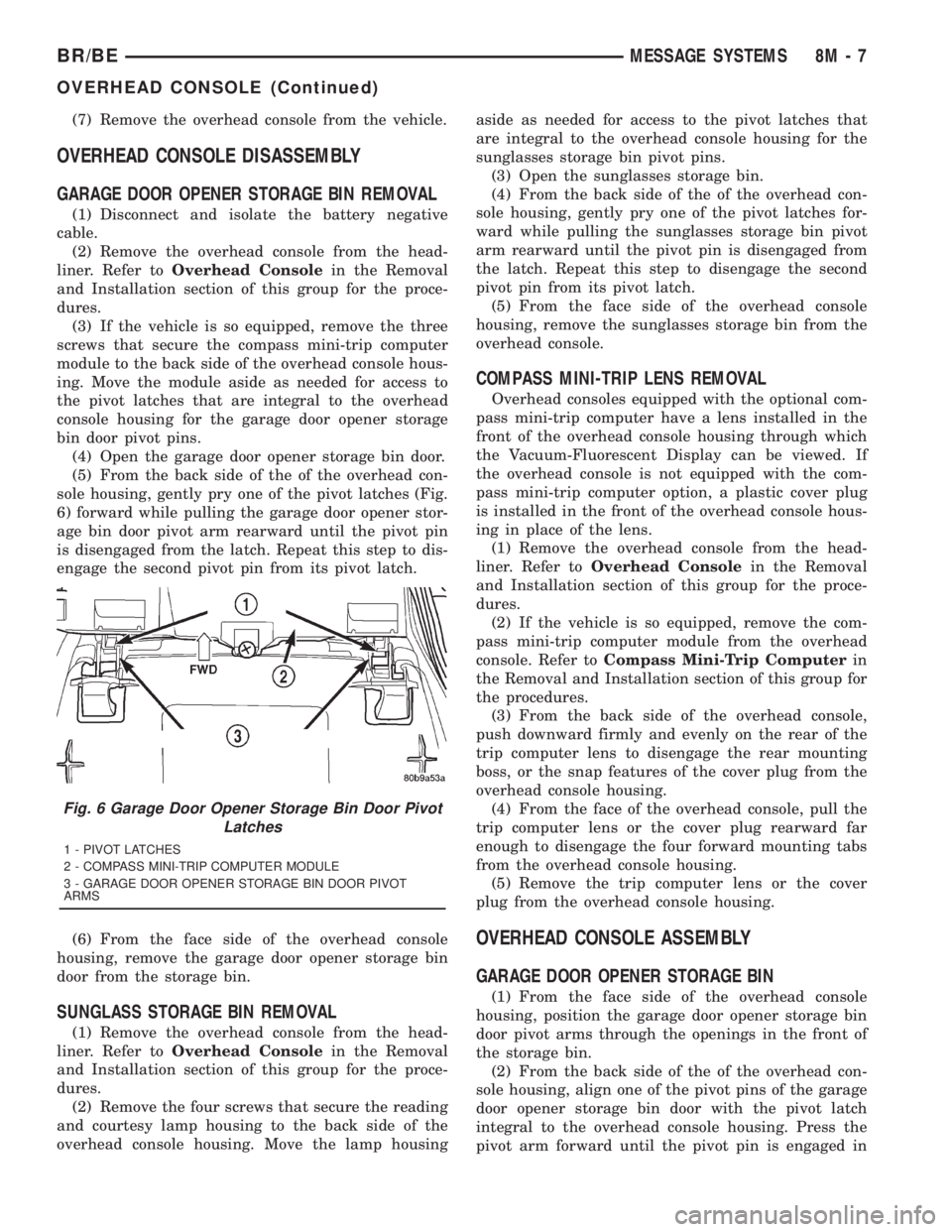
sole housing, gently pry one of the pivot latches (Fig.
6) forward while pulling the garage door opener stor-
age bin door pivot arm rearward until the pivot pin
is disengaged from the latch. Repeat this step to dis-
engage the second pivot pin from its pivot latch.
(6) From the face side of the overhead console
housing, remove the garage door opener storage bin
door from the storage bin.
SUNGLASS STORAGE BIN REMOVAL
(1) Remove the overhead console from the head-
liner. Refer toOverhead Consolein the Removal
and Installation section of this group for the proce-
dures.
(2) Remove the four screws that secure the reading
and courtesy lamp housing to the back side of the
overhead console housing. Move the lamp housingaside as needed for access to the pivot latches that
are integral to the overhead console housing for the
sunglasses storage bin pivot pins.
(3) Open the sunglasses storage bin.
(4) From the back side of the of the overhead con-
sole housing, gently pry one of the pivot latches for-
ward while pulling the sunglasses storage bin pivot
arm rearward until the pivot pin is disengaged from
the latch. Repeat this step to disengage the second
pivot pin from its pivot latch.
(5) From the face side of the overhead console
housing, remove the sunglasses storage bin from the
overhead console.
COMPASS MINI-TRIP LENS REMOVAL
Overhead consoles equipped with the optional com-
pass mini-trip computer have a lens installed in the
front of the overhead console housing through which
the Vacuum-Fluorescent Display can be viewed. If
the overhead console is not equipped with the com-
pass mini-trip computer option, a plastic cover plug
is installed in the front of the overhead console hous-
ing in place of the lens.
(1) Remove the overhead console from the head-
liner. Refer toOverhead Consolein the Removal
and Installation section of this group for the proce-
dures.
(2) If the vehicle is so equipped, remove the com-
pass mini-trip computer module from the overhead
console. Refer toCompass Mini-Trip Computerin
the Removal and Installation section of this group for
the procedures.
(3) From the back side of the overhead console,
push downward firmly and evenly on the rear of the
trip computer lens to disengage the rear mounting
boss, or the snap features of the cover plug from the
overhead console housing.
(4) From the face of the overhead console, pull the
trip computer lens or the cover plug rearward far
enough to disengage the four forward mounting tabs
from the overhead console housing.
(5) Remove the trip computer lens or the cover
plug from the overhead console housing.
OVERHEAD CONSOLE ASSEMBLY
GARAGE DOOR OPENER STORAGE BIN
(1) From the face side of the overhead console
housing, position the garage door opener storage bin
door pivot arms through the openings in the front of
the storage bin.
(2) From the back side of the of the overhead con-
sole housing, align one of the pivot pins of the garage
door opener storage bin door with the pivot latch
integral to the overhead console housing. Press the
pivot arm forward until the pivot pin is engaged in
Fig. 6 Garage Door Opener Storage Bin Door Pivot
Latches
1 - PIVOT LATCHES
2 - COMPASS MINI-TRIP COMPUTER MODULE
3 - GARAGE DOOR OPENER STORAGE BIN DOOR PIVOT
ARMS
BR/BEMESSAGE SYSTEMS 8M - 7
OVERHEAD CONSOLE (Continued)
Page 643 of 2889
the latch. Repeat this step to engage the second pivot
pin with its pivot latch.
(3) Close the garage door opener storage bin door.
(4) If the vehicle is so equipped, position the com-
pass mini-trip computer module to the back side of
the overhead console housing. Install and tighten the
three screws that secure the module to the housing.
Tighten the screws to 2.2 N´m (20 in. lbs.).
(5) Install the overhead console onto the headliner.
Refer toOverhead Consolein the Removal and
Installation section of this group for the procedures.
SUNGLASS STORAGE BIN
(1) From the face side of the overhead console
housing, position the sunglasses storage bin pivot
arms through the openings in the front of the storage
bin housing in the overhead console.
(2) From the back side of the of the overhead con-
sole housing, align one of the pivot pins of the sun-
glasses storage bin with the pivot latch integral to
the overhead console housing. Press the pivot arm
forward until the pivot pin is engaged in the latch.
Repeat this step to engage the second pivot pin with
its pivot latch.
(3) Close the sunglasses storage bin.
(4) Position the reading and courtesy lamp housing
to the back side of the overhead console housing.
Install and tighten the four screws that secure the
lamp housing to the back of the overhead console
housing. Tighten the screws to 2.2 N´m (20 in. lbs.).
(5) Install the overhead console onto the headliner.
Refer toOverhead Consolein the Removal and
Installation section of this group for the procedures.
MINI-TRIP COMPUTER LENS
Overhead consoles equipped with the optional com-
pass mini-trip computer have a lens installed in the
front of the overhead console housing through which
the Vacuum-Fluorescent Display can be viewed. If
the overhead console is not equipped with the com-
pass mini-trip computer option, a plastic cover plug
is installed in the front of the overhead console hous-
ing in place of the lens.
(1) Remove the trip computer lens or the cover
plug onto the overhead console housing.
(2) From the face of the overhead console, push the
trip computer lens or the cover plug forward far
enough to engage the four forward mounting tabs in
the overhead console unit.
(3) From the face of the overhead console, align
the rear mounting boss of the trip computer lens or
the alignment pin of the cover plug with the recepta-
cle in the overhead console housing.
(4) Press firmly and evenly on the rear edge of the
trip computer lens or the cover plug until the rear
mounting boss is fully seated in the receptacle, or thesnap features of the cover plug are fully engaged in
the overhead console housing.
(5) If the vehicle is so equipped, install the com-
pass mini-trip computer module onto the overhead
console. Refer toCompass Mini-Trip Computerin
the Removal and Installation section of this group for
the procedures.
(6) Install the overhead console onto the headliner.
Refer toOverhead Consolein the Removal and
Installation section of this group for the procedures.
INSTALLATION
(1) Position the overhead console near the mount-
ing location on the headliner in the vehicle.
(2) Reconnect the roof wire harness connector to
the overhead console wire harness connector.
(3) Engage the two mounting hooks on the rear of
the overhead console housing in the mounting holes
in the inner roof panel.
(4) Slide the overhead console forward far enough
to align the two latches on the front of the housing
with their receptacles in the inner roof panel.
(5) Push upward firmly and evenly on the front of
the overhead console until each of the two latches is
fully engaged in its receptacle in the inner roof panel.
(6) Close the garage door opener storage bin door.
(7) Reconnect the battery negative cable.
SPECIAL TOOLS
OVERHEAD CONSOLE SYSTEMS
COMPASS/MINI-TRIP
COMPUTER
DESCRIPTION
The compass mini-trip computer is located in the
premium overhead console on models equipped with
this option. Two compass mini-trip computer units
are available. One unit is used on vehicles not
equipped with the Vehicle Theft Security System
(VTSS) option, and the other is used on vehicles with
the VTSS option. Both compass mini-trip computer
units include the electronic control module, a Vacu-
um-Fluorescent Display (VFD), a compass flux-gate
unit and two push button function switches.
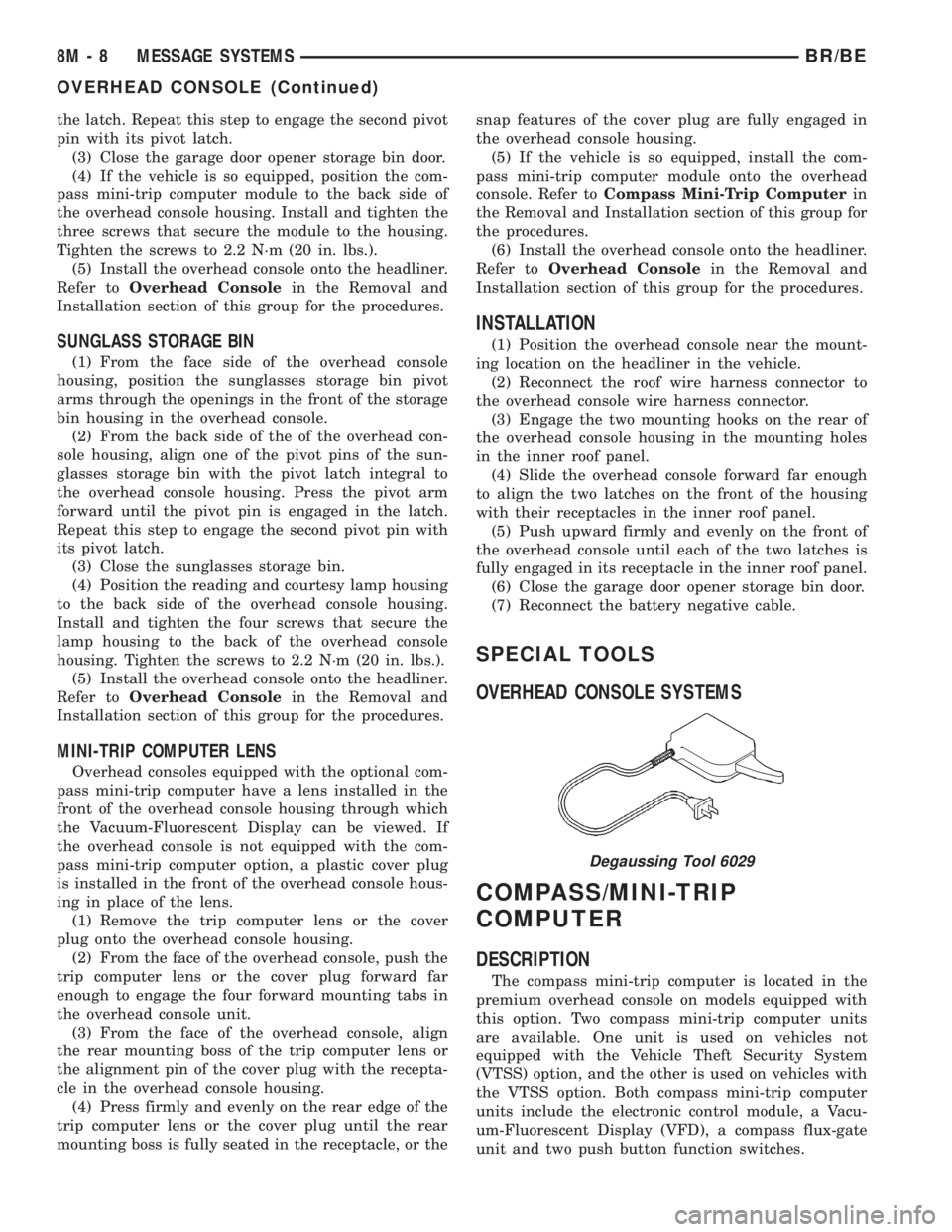
Degaussing Tool 6029
8M - 8 MESSAGE SYSTEMSBR/BE
OVERHEAD CONSOLE (Continued)
Page 666 of 2889
REMOVAL
(1) Disconnect and isolate the battery negative
cable.
(2) If equipped with a 6-way power seat, remove
the two screws that secure the power seat switch and
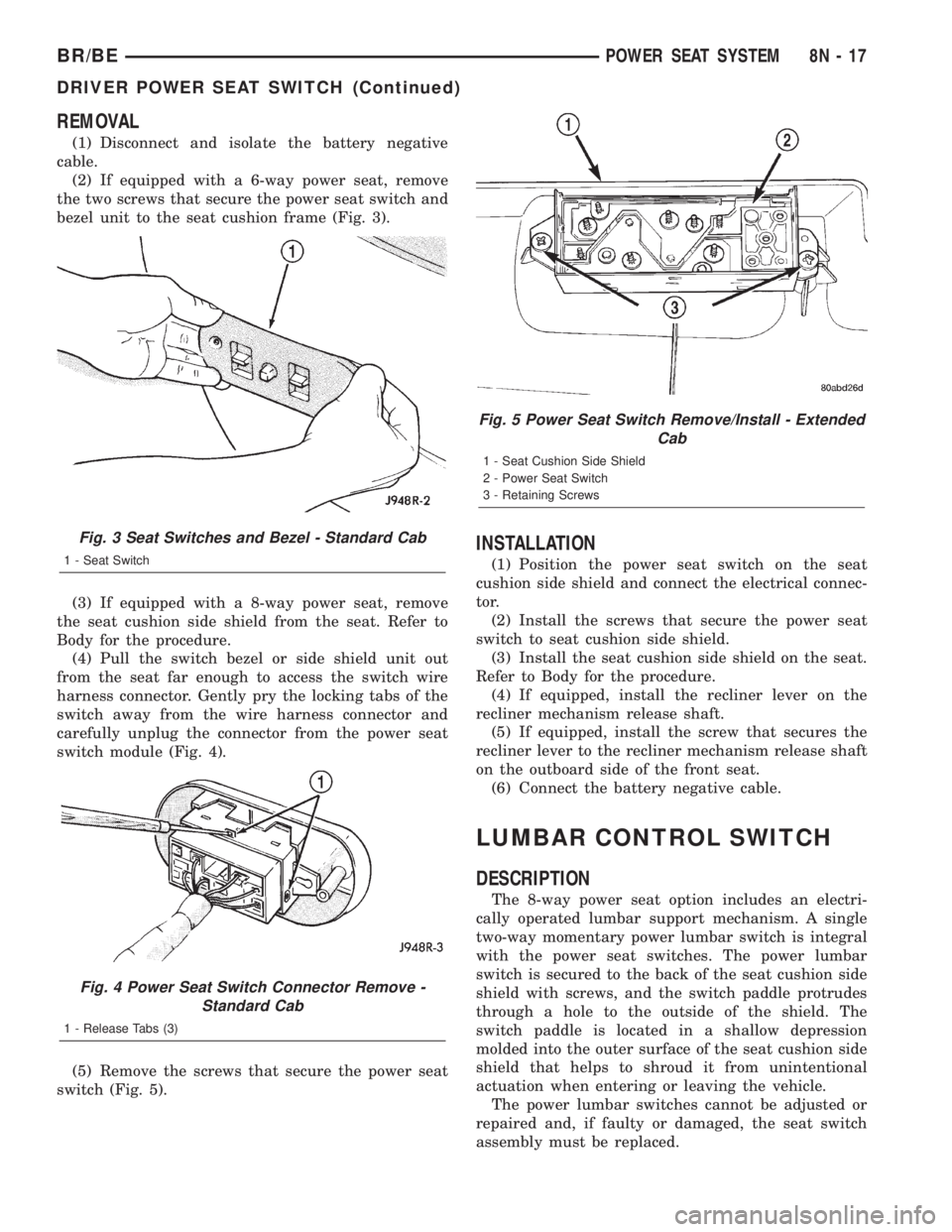
bezel unit to the seat cushion frame (Fig. 3).
(3) If equipped with a 8-way power seat, remove
the seat cushion side shield from the seat. Refer to
Body for the procedure.
(4) Pull the switch bezel or side shield unit out
from the seat far enough to access the switch wire
harness connector. Gently pry the locking tabs of the
switch away from the wire harness connector and
carefully unplug the connector from the power seat
switch module (Fig. 4).
(5) Remove the screws that secure the power seat
switch (Fig. 5).
INSTALLATION
(1) Position the power seat switch on the seat
cushion side shield and connect the electrical connec-
tor.
(2) Install the screws that secure the power seat
switch to seat cushion side shield.
(3) Install the seat cushion side shield on the seat.
Refer to Body for the procedure.
(4) If equipped, install the recliner lever on the
recliner mechanism release shaft.
(5) If equipped, install the screw that secures the
recliner lever to the recliner mechanism release shaft
on the outboard side of the front seat.
(6) Connect the battery negative cable.
LUMBAR CONTROL SWITCH
DESCRIPTION
The 8-way power seat option includes an electri-
cally operated lumbar support mechanism. A single
two-way momentary power lumbar switch is integral
with the power seat switches. The power lumbar
switch is secured to the back of the seat cushion side
shield with screws, and the switch paddle protrudes
through a hole to the outside of the shield. The
switch paddle is located in a shallow depression
molded into the outer surface of the seat cushion side
shield that helps to shroud it from unintentional
actuation when entering or leaving the vehicle.
The power lumbar switches cannot be adjusted or
repaired and, if faulty or damaged, the seat switch
assembly must be replaced.
Fig. 3 Seat Switches and Bezel - Standard Cab
1 - Seat Switch
Fig. 4 Power Seat Switch Connector Remove -
Standard Cab
1 - Release Tabs (3)
Fig. 5 Power Seat Switch Remove/Install - Extended
Cab
1 - Seat Cushion Side Shield
2 - Power Seat Switch
3 - Retaining Screws
BR/BEPOWER SEAT SYSTEM 8N - 17
DRIVER POWER SEAT SWITCH (Continued)
Page 669 of 2889
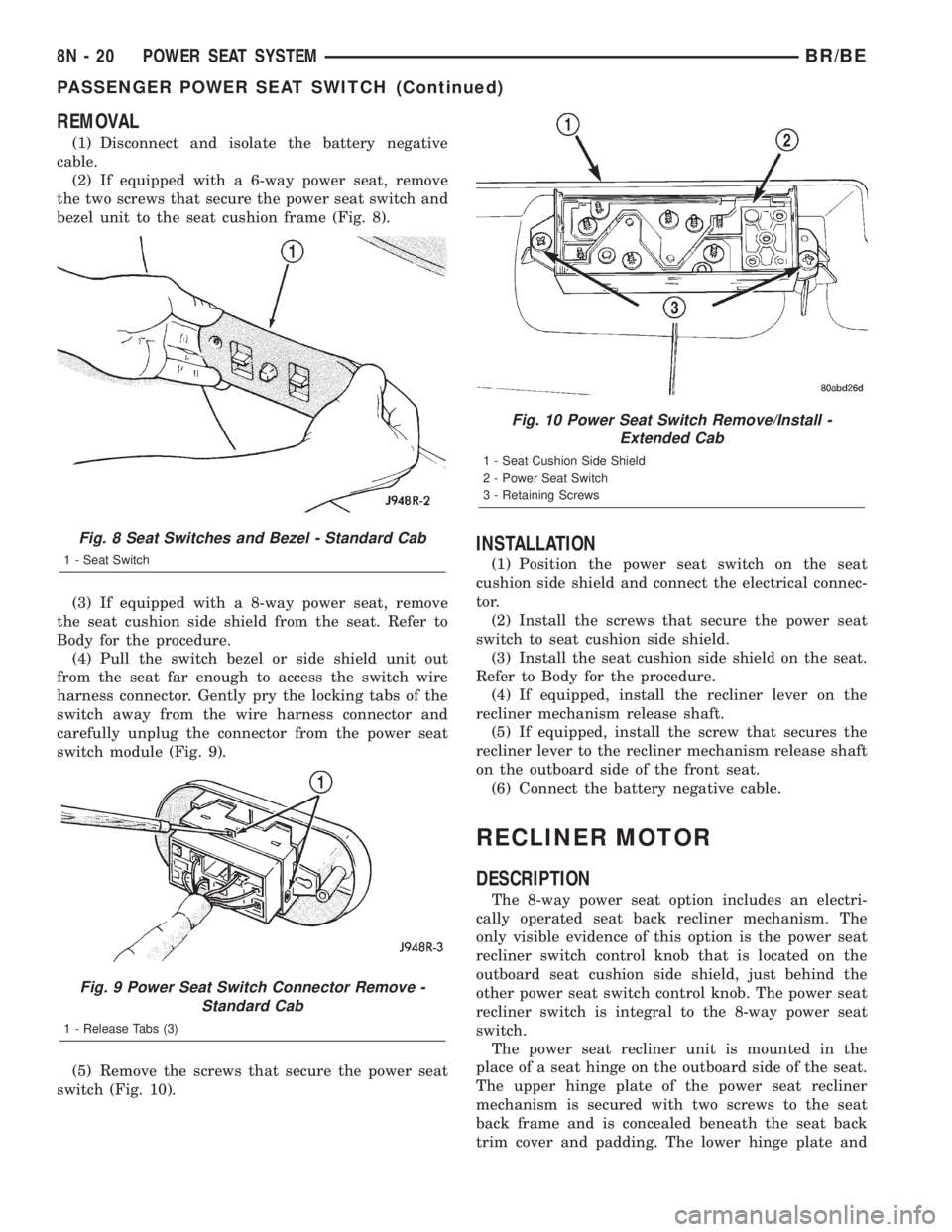
REMOVAL
(1) Disconnect and isolate the battery negative
cable.
(2) If equipped with a 6-way power seat, remove
the two screws that secure the power seat switch and
bezel unit to the seat cushion frame (Fig. 8).
(3) If equipped with a 8-way power seat, remove
the seat cushion side shield from the seat. Refer to
Body for the procedure.
(4) Pull the switch bezel or side shield unit out
from the seat far enough to access the switch wire
harness connector. Gently pry the locking tabs of the
switch away from the wire harness connector and
carefully unplug the connector from the power seat
switch module (Fig. 9).
(5) Remove the screws that secure the power seat
switch (Fig. 10).
INSTALLATION
(1) Position the power seat switch on the seat
cushion side shield and connect the electrical connec-
tor.
(2) Install the screws that secure the power seat
switch to seat cushion side shield.
(3) Install the seat cushion side shield on the seat.
Refer to Body for the procedure.
(4) If equipped, install the recliner lever on the
recliner mechanism release shaft.
(5) If equipped, install the screw that secures the
recliner lever to the recliner mechanism release shaft
on the outboard side of the front seat.
(6) Connect the battery negative cable.
RECLINER MOTOR
DESCRIPTION
The 8-way power seat option includes an electri-
cally operated seat back recliner mechanism. The
only visible evidence of this option is the power seat
recliner switch control knob that is located on the
outboard seat cushion side shield, just behind the
other power seat switch control knob. The power seat
recliner switch is integral to the 8-way power seat
switch.
The power seat recliner unit is mounted in the
place of a seat hinge on the outboard side of the seat.
The upper hinge plate of the power seat recliner
mechanism is secured with two screws to the seat
back frame and is concealed beneath the seat back
trim cover and padding. The lower hinge plate and
Fig. 8 Seat Switches and Bezel - Standard Cab
1 - Seat Switch
Fig. 9 Power Seat Switch Connector Remove -
Standard Cab
1 - Release Tabs (3)
Fig. 10 Power Seat Switch Remove/Install -
Extended Cab
1 - Seat Cushion Side Shield
2 - Power Seat Switch
3 - Retaining Screws
8N - 20 POWER SEAT SYSTEMBR/BE
PASSENGER POWER SEAT SWITCH (Continued)
Page 675 of 2889
INSTALLATION
(1) Connect the power window switch to the har-
ness connector.
(2) Insert the rear of the switch and bezel unit into
the opening.
(3) Push down on the front of the switch until the
retaining tabs snap into place.
(4) Reconnect the battery negative cable.
WINDOW MOTOR
DESCRIPTION
A permanent magnet reversible motor moves the
window regulator through an integral gearbox mech-
anism. A positive and negative battery connection to
the two motor terminals will cause the motor to
rotate in one direction. Reversing the current
through these same two connections will cause the
motor to rotate in the opposite direction.
In addition, each power window motor is equipped
with an integral self-resetting circuit breaker to pro-
tect the motor from overloads. The power window
motor and gearbox assembly cannot be repaired and,
if faulty or damaged, the entire power window regu-
lator assembly must be replaced.
DIAGNOSIS AND TESTING - WINDOW MOTOR
For circuit descriptions and diagrams, refer to the
appropriate wiring information. The wiring informa-
tion includes wiring diagrams, proper wire and con-
nector repair procedures, details of wire harness
routing and retention, connector pin-out information
and location views for the various wire harness con-
nectors, splices and grounds. Before you proceed withthis diagnosis, confirm proper switch operation.
(Refer to 8 - ELECTRICAL/POWER WINDOWS/
POWER WINDOW SWITCH - DIAGNOSIS AND
TESTING).
(1) Disconnect and isolate the battery negative
cable. Remove the trim panel from the door with the
inoperative power window.
(2) Unplug the power window motor wire harness
connector. Apply 12 volts across the motor terminals
to check its operation in one direction. Reverse the
connections across the motor terminals to check the
operation in the other direction. Remember, if the
window is in the full up or full down position, the
motor will not operate in that direction by design. If
OK, repair the circuits from the power window motor
to the power window switch as required. If not OK,
replace the faulty motor.
(3) If the motor operates in both directions, check
the operation of the window glass and lift mechanism
through its complete up and down travel. There
should be no binding or sticking of the window glass
or lift mechanism through the entire travel range. If
not OK, (Refer to 23 - BODY/DOOR - FRONT/WIN-
DOW REGULATOR - REMOVAL).
REMOVAL
The power window motor and mechanism is inte-
gral to the power window regulator unit. If the power
window motor or mechanism is faulty or damaged,
the entire power window regulator unit must be
replaced. (Refer to 23 - BODY/DOOR - FRONT/WIN-
DOW REGULATOR - REMOVAL) for the window
regulator service procedures.
8N - 26 POWER WINDOWSBR/BE
POWER WINDOW SWITCH (Continued)
Page 678 of 2889

Deployment of the airbags depends upon the angle
and severity of the impact. The airbag system is
designed to deploy upon a frontal impact within a
thirty degree angle from either side of the vehicle
center line. Deployment is not based upon vehicle
speed; rather, deployment is based upon the rate of
deceleration as measured by the forces of gravity (G
force) upon the airbag system impact sensor, which is
integral to the ACM. When a frontal impact is severe
enough, the microprocessor in the ACM signals the
inflator units of both airbag modules to deploy the
airbags. During a frontal vehicle impact, the knee
blockers work in concert with properly fastened and
adjusted seat belts to restrain both the driver and
the front seat passenger in the proper position for an
airbag deployment. The knee blockers also absorb
and distribute the crash energy from the driver and
the front seat passenger to the structure of the
instrument panel.
Typically, the driver and front seat passenger recall
more about the events preceding and following a col-
lision than they have of the airbag deployment itself.
This is because the airbag deployment and deflation
occur so rapidly. In a typical 48 kilometer-per-hour
(30 mile-per-hour) barrier impact, from the moment
of impact until both airbags are fully inflated takes
about 40 milliseconds. Within one to two seconds
from the moment of impact, both airbags are almost
entirely deflated. The times cited for these events are
approximations, which apply only to a barrier impact
at the given speed. Actual times will vary somewhat,
depending upon the vehicle speed, impact angle,
severity of the impact, and the type of collision.
When the ACM monitors a problem in any of the
airbag system circuits or components, it stores a
fault code or Diagnostic Trouble Code (DTC) in its
memory circuit and sends an electronic message to
the EMIC to turn on the airbag indicator. Proper
testing of the airbag system components, the
Chrysler Collision Detection (CCD) data bus, the
data bus message inputs to and outputs from the
EMIC or the ACM, as well as the retrieval or erasure
of a DTC from the ACM requires the use of a
DRBIIItscan tool. Refer to the appropriate diagnos-
tic information.
See the owner's manual in the vehicle glove box for
more information on the features, use and operation
of all of the factory-installed passenger restraints,
including the airbag system.
WARNING
WARNING: THE AIRBAG SYSTEM IS A SENSITIVE,
COMPLEX ELECTROMECHANICAL UNIT. BEFORE
ATTEMPTING TO DIAGNOSE OR SERVICE ANY AIR-
BAG SYSTEM OR RELATED STEERING WHEEL,STEERING COLUMN, OR INSTRUMENT PANEL
COMPONENTS YOU MUST FIRST DISCONNECT
AND ISOLATE THE BATTERY NEGATIVE (GROUND)
CABLE. THEN WAIT TWO MINUTES FOR THE SYS-
TEM CAPACITOR TO DISCHARGE BEFORE FUR-
THER SYSTEM SERVICE. THIS IS THE ONLY SURE
WAY TO DISABLE THE AIRBAG SYSTEM. FAILURE
TO DO THIS COULD RESULT IN ACCIDENTAL AIR-
BAG DEPLOYMENT AND POSSIBLE PERSONAL
INJURY.
WARNING: THE DRIVER AIRBAG INFLATOR UNIT
CONTAINS SODIUM AZIDE AND POTASSIUM
NITRATE. THESE MATERIALS ARE POISONOUS
AND EXTREMELY FLAMMABLE. CONTACT WITH
ACID, WATER, OR HEAVY METALS MAY PRODUCE
HARMFUL AND IRRITATING GASES (SODIUM
HYDROXIDE IS FORMED IN THE PRESENCE OF
MOISTURE) OR COMBUSTIBLE COMPOUNDS. THE
PASSENGER AIRBAG UNIT CONTAINS ARGON GAS
PRESSURIZED TO OVER 2500 PSI. DO NOT
ATTEMPT TO DISMANTLE AN AIRBAG UNIT OR
TAMPER WITH ITS INFLATOR. DO NOT PUNCTURE,
INCINERATE, OR BRING INTO CONTACT WITH
ELECTRICITY. DO NOT STORE AT TEMPERATURES
EXCEEDING 93É C (200É F).
WARNING: REPLACE AIRBAG SYSTEM COMPO-
NENTS ONLY WITH PARTS SPECIFIED IN THE
DAIMLERCHRYSLER MOPAR PARTS CATALOG.
SUBSTITUTE PARTS MAY APPEAR INTERCHANGE-
ABLE, BUT INTERNAL DIFFERENCES MAY RESULT
IN INFERIOR OCCUPANT PROTECTION.
WARNING: THE FASTENERS, SCREWS, AND
BOLTS ORIGINALLY USED FOR THE AIRBAG SYS-
TEM COMPONENTS HAVE SPECIAL COATINGS
AND ARE SPECIFICALLY DESIGNED FOR THE AIR-
BAG SYSTEM. THEY MUST NEVER BE REPLACED
WITH ANY SUBSTITUTES. ANY TIME A NEW FAS-
TENER IS NEEDED, REPLACE IT WITH THE COR-
RECT FASTENERS PROVIDED IN THE SERVICE
PACKAGE OR SPECIFIED IN THE DAIMLER-
CHRYSLER MOPAR PARTS CATALOG.
WARNING: WHEN A STEERING COLUMN HAS AN
AIRBAG UNIT ATTACHED, NEVER PLACE THE COL-
UMN ON THE FLOOR OR ANY OTHER SURFACE
WITH THE STEERING WHEEL OR AIRBAG UNIT
FACE DOWN.
BR/BERESTRAINTS 8O - 3
RESTRAINTS (Continued)
Page 685 of 2889

(1) Position the child tether anchor (standard cab)
or child tether (club/quad cab) onto the cab back
panel (Fig. 7).
(2) Install and tighten the screw that secures the
child tether anchor (standard cab) or child tether
(club/quad cab) onto the cab back panel. Tighten the
screw to 13.5 N´m (120 in. lbs.).
(3) Reinstall the trim onto the inside of the cab
back panel. (Refer to 23 - BODY/INTERIOR/REAR
CLOSURE PANEL TRIM - INSTALLATION).
CLOCKSPRING
DESCRIPTION
The clockspring assembly is secured with two inte-
gral plastic latches onto the steering column lock
housing near the top of the steering column, behind
the steering wheel. The clockspring consists of a flat,
round molded plastic case with a stubby tail that
hangs below the steering column and contains a con-
nector receptacle and a long pigtail wire with connec-
tor that face toward the instrument panel. Within
the plastic housing is a spool-like molded plastic
rotor with a large exposed hub. The upper surface of
the rotor hub has a large center hole, two large flats,
two auto-locking tabs, and three short pigtail wires
with connectors that face toward the steering wheel.
The lower surface of the rotor hub has two integral
turn signal cancelling cam lobes. Within the plastic
case and wound around the rotor spool is a long rib-
bon-like tape that consists of several thin copper wire
leads sandwiched between two thin plastic mem-
branes. The outer end of the tape terminates at the
connector receptacle and pigtail wire that face the
instrument panel, while the inner end of the tape
terminates at the pigtail wires on the hub of the
clockspring rotor that face the steering wheel.
Service replacement clocksprings are shipped pre-
centered and with a piece of tape covering the
engaged auto-locking tabs. The auto-locking tabs
secure the centered clockspring rotor to the clock-
spring case during shipment, but these tabs are auto-
matically disengaged once the clockspring is installed
on the steering column. (Refer to 8 - ELECTRICAL/
RESTRAINTS/CLOCKSPRING - STANDARD PRO-
CEDURE - CLOCKSPRING CENTERING).
The clockspring cannot be repaired. If the clock-
spring is faulty, damaged, or if the driver airbag has
been deployed, the clockspring must be replaced.
OPERATION
The clockspring is a mechanical electrical circuit
component that is used to provide continuous electri-
cal continuity between the fixed instrument panel
wire harness and the electrical components mountedon or in the rotating steering wheel. On this model
the rotating electrical components include the driver
airbag, the horn switch, the speed control switches,
and the remote radio switches if the vehicle is so
equipped. The clockspring case is positioned and
secured to the upper steering column lock housing by
two integral plastic latches. The connector receptacle
on the tail of the fixed clockspring housing connect
the clockspring to the vehicle electrical system
through a take out with connector from the instru-
ment panel wire harness. The lower clockspring pig-
tail on the tail of the clockspring housing connect the
clockspring driver airbag circuits to a separate take
out and connector of the instrument panel wire har-
ness located near the lower instrument panel rein-
forcement, below the steering column. The
clockspring rotor is movable and is keyed to the hub
of the steering wheel by two large flats that are
molded into the rotor hub. The two lobes on the
lower surface of the clockspring rotor hub contact a
turn signal cancel actuator of the multi-function
switch to provide automatic turn signal cancellation.
The pigtail wires on the upper surface of the clock-
spring connect the clockspring to the horn switch, the
two speed control switches, and the remote radio
switches on vehicles that are so equipped.
Like the clockspring in a timepiece, the clockspring
tape has travel limits and can be damaged by being
wound too tightly during full stop-to-stop steering
wheel rotation. To prevent this from occurring, the
clockspring must be centered when it is installed on
the steering column. Centering the clockspring
indexes the clockspring spool to the movable steering
components so that the tape can operate within its
designed travel limits. However, if the clockspring is
removed from the steering column or if the steering
shaft is disconnected from the steering gear, the
clockspring spool can change position relative to the
movable steering components and must be re-cen-
tered following completion of the service or the tape
may be damaged. Service replacement clocksprings
are shipped pre-centered and with the auto-locking
tabs engaged. A piece of tape covers the auto-locking
tabs to discourage tampering. These auto-locking
tabs should not be disengaged until the clockspring
has been installed on the steering column. If this
shipping tape is removed or damaged, or if the auto-
locking tabs are disengaged before the clockspring is
installed on a steering column, the clockspring cen-
tering procedure must be performed. (Refer to 8 -
ELECTRICAL/RESTRAINTS/CLOCKSPRING -
STANDARD PROCEDURE - CLOCKSPRING CEN-
TERING).
8O - 10 RESTRAINTSBR/BE
CHILD TETHER (Continued)