Page 377 of 4284
Symptom:
FCM, RADIO COMMUNICATION FAULT
When Monitored and Set Condition:
FCM, RADIO COMMUNICATION FAULT
When Monitored: With the ignition in run, and the IOD fuse installed.
Set Condition: The FCM does not receive any messages from the radio for at least 5
seconds.
POSSIBLE CAUSES
ATTEMPT TO COMMUNICATE WITH THE RADIO
FRONT CONTROL MODULE
TEST ACTION APPLICABILITY
1 Turn the ignition on.
With the DRB, attempt to communicate with the Radio.
Was the DRB able to I/D or communicate with the Radio?All
Ye s®Go To 2
No®Refer to the Communication category for the related symptom(s).
Perform BODY VERIFICATION TEST - VER 1.
2 With the DRB, erase DTC's.
Cycle the ignition switch from off to on and wait approximately 1 minute.
With the DRB, read DTC's.
Did this DTC reset?All
Ye s®Replace the Front Control Module.
Perform BODY VERIFICATION TEST - VER 1.
No®Test Complete.
348
COMMUNICATION
Page 391 of 4284

Symptom:
NO PCI MESSAGES FROM CD CHANGER
When Monitored and Set Condition:
NO PCI MESSAGES FROM CD CHANGER
When Monitored: With the ignition on and the radio on.
Set Condition:
POSSIBLE CAUSES
CD CHANGER (DIN) CABLE
CD CHANGER PCI BUS CIRCUIT OPEN
IGNITION SWITCH OUTPUT CIRCUIT OPEN
RADIO GROUND CKT OPEN
CD CHANGER
TEST ACTION APPLICABILITY
1 Turn the ignition off.
Disconnect the Radio C4 connector (DIN cable) from the Radio and the CD Changer.
Visually inspect the Radio C4 (DIN) cable for damage.
In the next step check for open wires in the DIN cable.
Measure the resistance of the each DIN cable circuit between the Radio DIN cable
connector and the CD Changer DIN cable connector.
In the next step check for wires shorted to the DIN cable metal connectors.
Measure the resistance between each Radio C4 connector ( DIN cable) circuit and the
Radio Din cable metal connector.
Is the DIN cable circuits shorted together or open?All
Ye s®Replace the CD Changer (DIN) cable.
Perform BODY VERIFICATION TEST - VER 1.
No®Go To 2
362
COMMUNICATION
Page 392 of 4284

TEST ACTION APPLICABILITY
2 Use Scope input cable CH7058, Cable to Probe adapter CH7062, and the red and
black test probes.
Connect the scope input cable to the channel one connector on the DRB. Attach the
red and black leads and the cable to probe adapter to the scope input cable.
Select DRB Standalone.
Select lab scope.
Select Live.
Select 12 volt square wave.
Press F2 for Scope.
Press F2 and use the down arrow to set voltage range to 20 volts. Press F2 again
when complete.
Disconnect the CD Changer harness connector (DIN cable).
Reconnect the Radio C4 (DIN Cable) harness connector.
Connect the Black lead to the chassis ground. Connect the Red lead to the PCI Bus
circuit in the CD Changer DIN Cable connector.
Turn the ignition on.
Turn the Radio and CD Changer on.
Observe the voltage display on the DRB Lab Scope.
Does the voltage pulse from 0 to approximately 7.5 volts?All
Ye s®Go To 3
No®Replace the Radio.
Perform BODY VERIFICATION TEST - VER 1.
3 Turn the ignition off.
Disconnect the CD Changer harness connector (DIN cable).
Turn the ignition on.
Turn the Radio and the CD Changer on.
Using a 12-volt test light connected to ground, probe the Ignition Switch Output
circuit in the CD Changer DIN Cable connector.
Is the test light illuminated?All
Ye s®Go To 4
No®Replace the Radio.
Perform BODY VERIFICATION TEST - VER 1.
4 Turn the ignition off.
Disconnect the CD Changer harness connector (DIN cable).
Using a 12-volt test light connected to 12-volts, probe the CD Changer ground circuit
in the CD Changer connector (DIN cable).
Is the test light illuminated?All
Ye s®Go To 5
No®Replace the Radio.
Perform BODY VERIFICATION TEST - VER 1.
5 If there are no possible causes remaining, view repair. All
Repair
Replace the CD Changer.
Perform BODY VERIFICATION TEST - VER 1.
363
COMMUNICATION
NO PCI MESSAGES FROM CD CHANGER ÐContinued
Page 397 of 4284

Symptom:
RADIO MEM MSG NOT RECEIVED
When Monitored and Set Condition:
RADIO MEM MSG NOT RECEIVED
When Monitored: With the ignition in run, and the IOD fuse installed.
Set Condition:
POSSIBLE CAUSES
ATTEMPT TO COMMUNICATE WITH THE RADIO
CHECK THE MEMORY SYSTEM
BODY CONTROL MODULE
TEST ACTION APPLICABILITY
1 Turn the ignition on.
With the DRB, attempt to communicate with the Radio.
Was the DRB able to I/D or communicate with the Radio?All
Ye s®Go To 2
No®Refer to the Communication category for the related symptom(s).
Perform BODY VERIFICATION TEST - VER 1.
2 Turn the ignition on.
Operate the memory seat system.
Did the memory seat system operate properly?All
Ye s®Go To 3
No®Refer to the Memory Seat category and perform the appropriate
symptom.
Perform BODY VERIFICATION TEST - VER 1.
3 With the DRB, erase DTC's.
Cycle the ignition switch from off to on and wait approximately 1 minute.
With the DRB, read DTC's.
Did this DTC reset?All
Ye s®Replace the Body Control Module.
Perform BODY VERIFICATION TEST - VER 1.
No®Test Complete.
368
COMMUNICATION
Page 445 of 4284
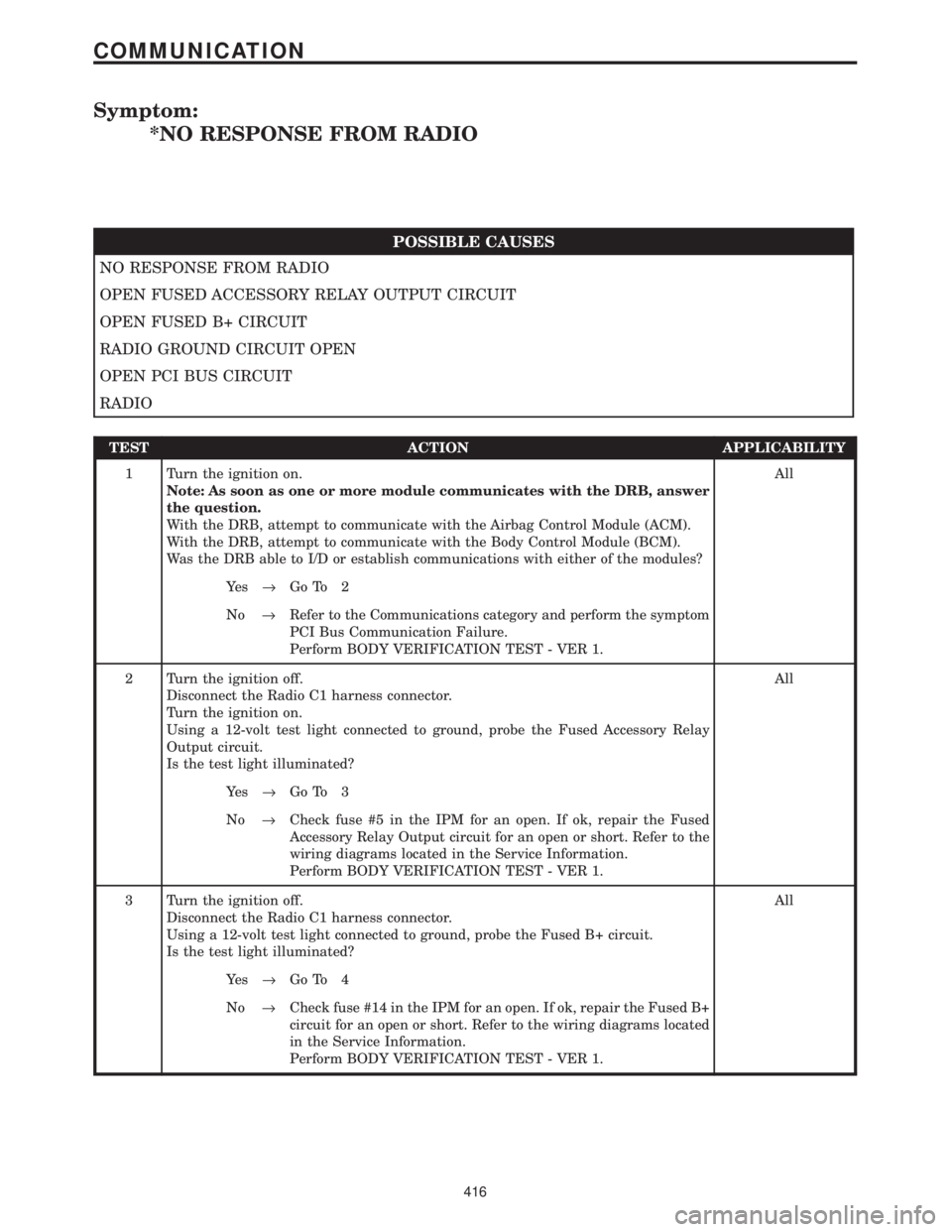
Symptom:
*NO RESPONSE FROM RADIO
POSSIBLE CAUSES
NO RESPONSE FROM RADIO
OPEN FUSED ACCESSORY RELAY OUTPUT CIRCUIT
OPEN FUSED B+ CIRCUIT
RADIO GROUND CIRCUIT OPEN
OPEN PCI BUS CIRCUIT
RADIO
TEST ACTION APPLICABILITY
1 Turn the ignition on.
Note: As soon as one or more module communicates with the DRB, answer
the question.
With the DRB, attempt to communicate with the Airbag Control Module (ACM).
With the DRB, attempt to communicate with the Body Control Module (BCM).
Was the DRB able to I/D or establish communications with either of the modules?All
Ye s®Go To 2
No®Refer to the Communications category and perform the symptom
PCI Bus Communication Failure.
Perform BODY VERIFICATION TEST - VER 1.
2 Turn the ignition off.
Disconnect the Radio C1 harness connector.
Turn the ignition on.
Using a 12-volt test light connected to ground, probe the Fused Accessory Relay
Output circuit.
Is the test light illuminated?All
Ye s®Go To 3
No®Check fuse #5 in the IPM for an open. If ok, repair the Fused
Accessory Relay Output circuit for an open or short. Refer to the
wiring diagrams located in the Service Information.
Perform BODY VERIFICATION TEST - VER 1.
3 Turn the ignition off.
Disconnect the Radio C1 harness connector.
Using a 12-volt test light connected to ground, probe the Fused B+ circuit.
Is the test light illuminated?All
Ye s®Go To 4
No®Check fuse #14 in the IPM for an open. If ok, repair the Fused B+
circuit for an open or short. Refer to the wiring diagrams located
in the Service Information.
Perform BODY VERIFICATION TEST - VER 1.
416
COMMUNICATION
Page 446 of 4284
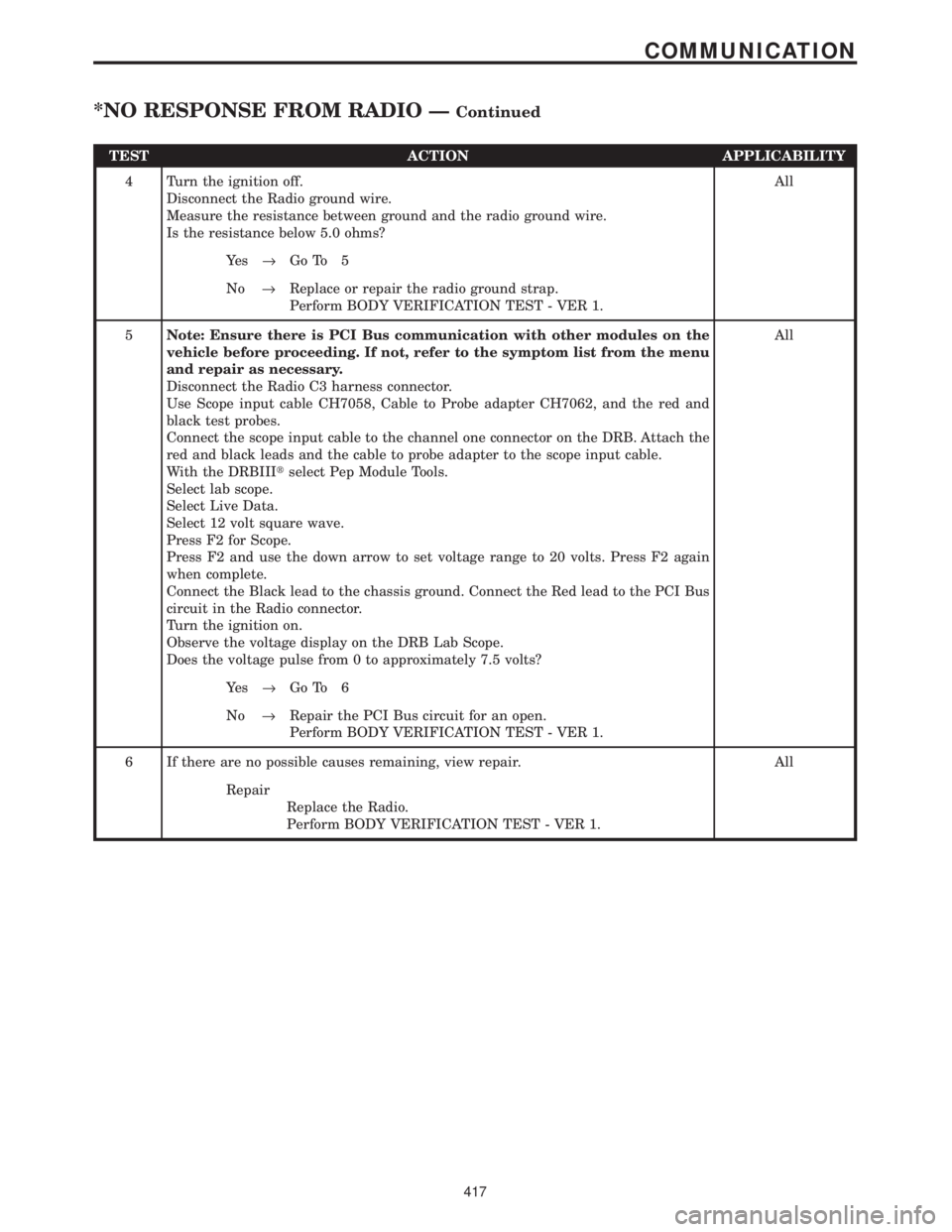
TEST ACTION APPLICABILITY
4 Turn the ignition off.
Disconnect the Radio ground wire.
Measure the resistance between ground and the radio ground wire.
Is the resistance below 5.0 ohms?All
Ye s®Go To 5
No®Replace or repair the radio ground strap.
Perform BODY VERIFICATION TEST - VER 1.
5Note: Ensure there is PCI Bus communication with other modules on the
vehicle before proceeding. If not, refer to the symptom list from the menu
and repair as necessary.
Disconnect the Radio C3 harness connector.
Use Scope input cable CH7058, Cable to Probe adapter CH7062, and the red and
black test probes.
Connect the scope input cable to the channel one connector on the DRB. Attach the
red and black leads and the cable to probe adapter to the scope input cable.
With the DRBIIItselect Pep Module Tools.
Select lab scope.
Select Live Data.
Select 12 volt square wave.
Press F2 for Scope.
Press F2 and use the down arrow to set voltage range to 20 volts. Press F2 again
when complete.
Connect the Black lead to the chassis ground. Connect the Red lead to the PCI Bus
circuit in the Radio connector.
Turn the ignition on.
Observe the voltage display on the DRB Lab Scope.
Does the voltage pulse from 0 to approximately 7.5 volts?All
Ye s®Go To 6
No®Repair the PCI Bus circuit for an open.
Perform BODY VERIFICATION TEST - VER 1.
6 If there are no possible causes remaining, view repair. All
Repair
Replace the Radio.
Perform BODY VERIFICATION TEST - VER 1.
417
COMMUNICATION
*NO RESPONSE FROM RADIO ÐContinued
Page 624 of 4284
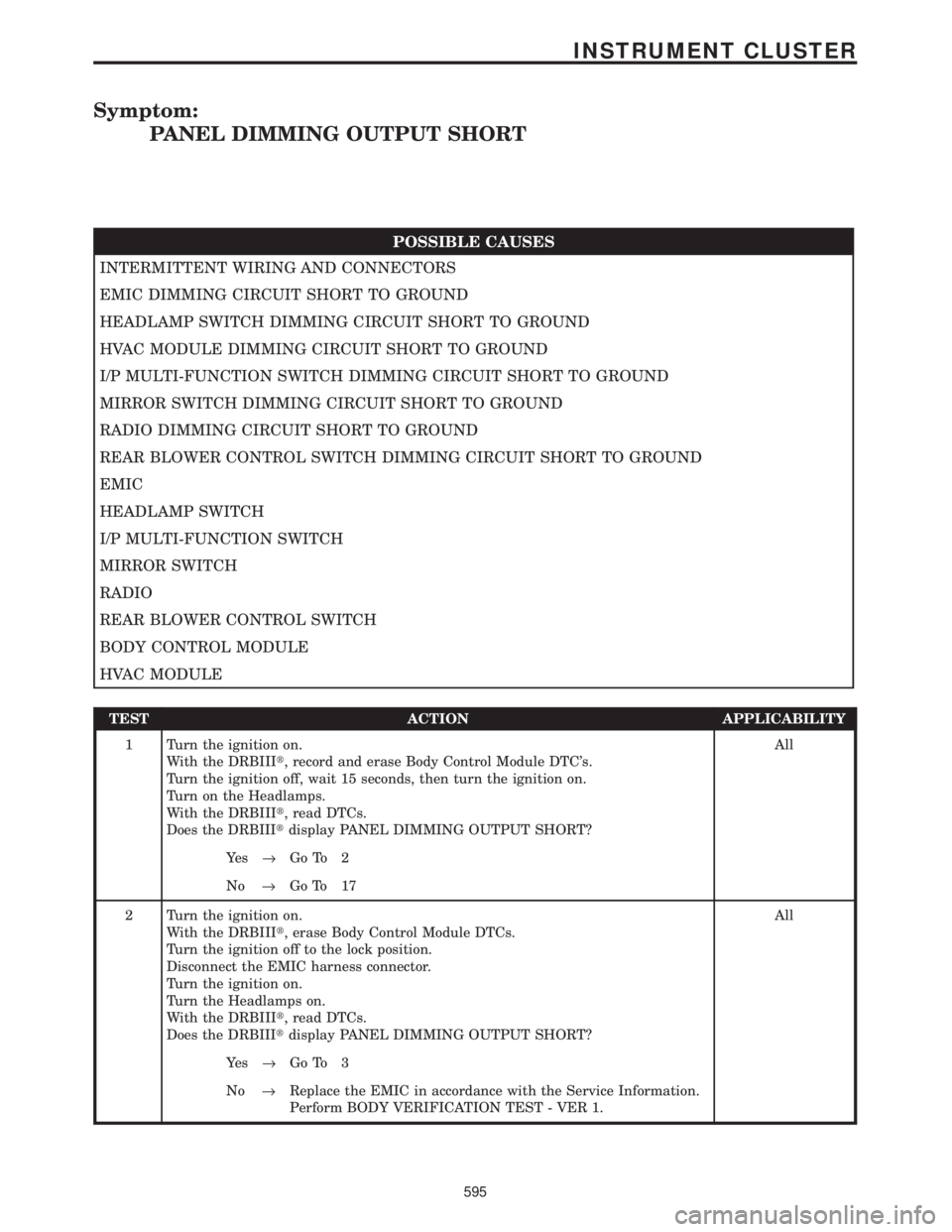
Symptom:
PANEL DIMMING OUTPUT SHORT
POSSIBLE CAUSES
INTERMITTENT WIRING AND CONNECTORS
EMIC DIMMING CIRCUIT SHORT TO GROUND
HEADLAMP SWITCH DIMMING CIRCUIT SHORT TO GROUND
HVAC MODULE DIMMING CIRCUIT SHORT TO GROUND
I/P MULTI-FUNCTION SWITCH DIMMING CIRCUIT SHORT TO GROUND
MIRROR SWITCH DIMMING CIRCUIT SHORT TO GROUND
RADIO DIMMING CIRCUIT SHORT TO GROUND
REAR BLOWER CONTROL SWITCH DIMMING CIRCUIT SHORT TO GROUND
EMIC
HEADLAMP SWITCH
I/P MULTI-FUNCTION SWITCH
MIRROR SWITCH
RADIO
REAR BLOWER CONTROL SWITCH
BODY CONTROL MODULE
HVAC MODULE
TEST ACTION APPLICABILITY
1 Turn the ignition on.
With the DRBIIIt, record and erase Body Control Module DTC's.
Turn the ignition off, wait 15 seconds, then turn the ignition on.
Turn on the Headlamps.
With the DRBIIIt, read DTCs.
Does the DRBIIItdisplay PANEL DIMMING OUTPUT SHORT?All
Ye s®Go To 2
No®Go To 17
2 Turn the ignition on.
With the DRBIIIt, erase Body Control Module DTCs.
Turn the ignition off to the lock position.
Disconnect the EMIC harness connector.
Turn the ignition on.
Turn the Headlamps on.
With the DRBIIIt, read DTCs.
Does the DRBIIItdisplay PANEL DIMMING OUTPUT SHORT?All
Ye s®Go To 3
No®Replace the EMIC in accordance with the Service Information.
Perform BODY VERIFICATION TEST - VER 1.
595
INSTRUMENT CLUSTER
Page 626 of 4284

TEST ACTION APPLICABILITY
7 Turn the ignition on.
With the DRBIIIt, erase Body Control Module DTCs.
Turn the ignition off to the lock position.
Disconnect the HVAC Module harness connector.
Turn the ignition on.
Turn the Headlamps on.
With the DRBIIIt, read DTCs.
Does the DRBIIItdisplay PANEL DIMMING OUTPUT SHORT?All
Ye s®Go To 8
No®Replace the HVAC Module in accordance with the Service Infor-
mation.
Perform BODY VERIFICATION TEST - VER 1.
8 Turn the ignition on.
With the DRBIIIt, erase Body Control Module DTCs.
Turn the ignition off to the lock position.
Disconnect the Radio harness connector.
Turn the ignition on.
Turn the Headlamps on.
With the DRBIIIt, read DTCs.
Does the DRBIIItdisplay PANEL DIMMING OUTPUT SHORT?All
Ye s®Go To 9
No®Replace the Radio in accordance with the Service Information.
Perform BODY VERIFICATION TEST - VER 1.
9 Turn the ignition off to the lock position.
Disconnect the Body Control Module harness connector.
Disconnect the EMIC harness connector.
Note: Check connectors - Clean/repair as necessary.
Measure the resistance between ground and the EMIC Dimming circuit.
Is the resistance below 5.0 ohms?All
Ye s®Repair the EMIC Dimming circuit for a short to ground.
Perform BODY VERIFICATION TEST - VER 1.
No®Go To 10
10 Turn the ignition off to the lock position.
Disconnect the Body Control Module harness connector.
Disconnect the Headlamp Switch harness connector.
Note: Check connectors - Clean/repair as necessary.
Measure the resistance between ground and the Headlamp Switch Dimming circuit.
Is the resistance below 5.0 ohms?All
Ye s®Repair the Headlamp Switch Dimming circuit for a short to
ground.
Perform BODY VERIFICATION TEST - VER 1.
No®Go To 11
597
INSTRUMENT CLUSTER
PANEL DIMMING OUTPUT SHORT ÐContinued
