2-89
Driver Information Center (DIC)
This display gives you the status of many of your
vehicle's systems. The DIC is also used to display driver
personalization features and warning/status messages.
DIC Controls and Displays
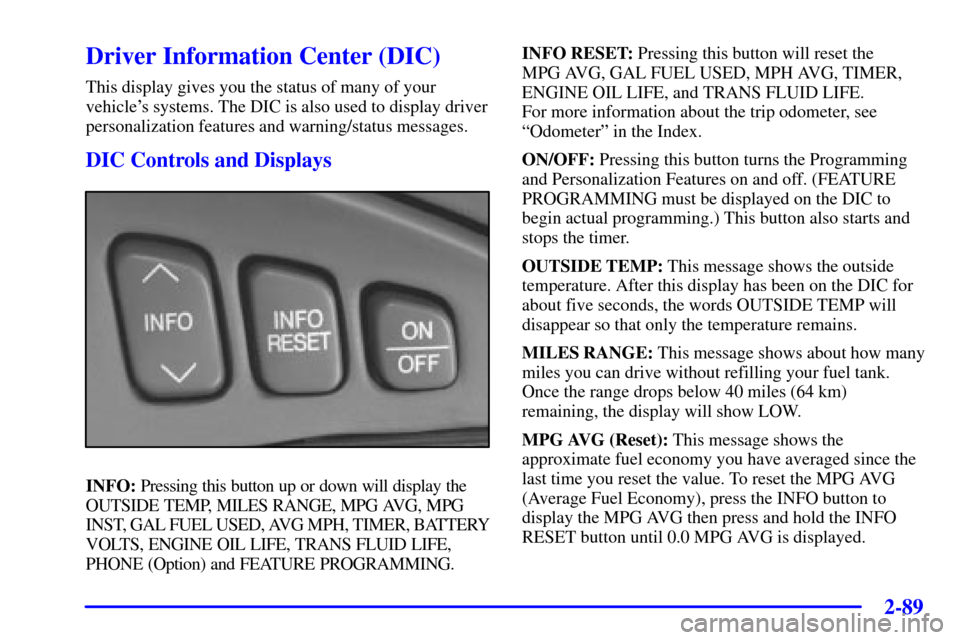
INFO: Pressing this button up or down will display the
OUTSIDE TEMP, MILES RANGE, MPG AVG, MPG
INST, GAL FUEL USED, AVG MPH, TIMER, BATTERY
VOLTS, ENGINE OIL LIFE, TRANS FLUID LIFE,
PHONE (Option) and FEATURE PROGRAMMING.INFO RESET: Pressing this button will reset the
MPG AVG, GAL FUEL USED, MPH AVG, TIMER,
ENGINE OIL LIFE, and TRANS FLUID LIFE.
For more information about the trip odometer, see
ªOdometerº in the Index.
ON/OFF: Pressing this button turns the Programming
and Personalization Features on and off. (FEATURE
PROGRAMMING must be displayed on the DIC to
begin actual programming.) This button also starts and
stops the timer.
OUTSIDE TEMP: This message shows the outside
temperature. After this display has been on the DIC for
about five seconds, the words OUTSIDE TEMP will
disappear so that only the temperature remains.
MILES RANGE: This message shows about how many
miles you can drive without refilling your fuel tank.
Once the range drops below 40 miles (64 km)
remaining, the display will show LOW.
MPG AVG (Reset): This message shows the
approximate fuel economy you have averaged since the
last time you reset the value. To reset the MPG AVG
(Average Fuel Economy), press the INFO button to
display the MPG AVG then press and hold the INFO
RESET button until 0.0 MPG AVG is displayed.
2-90
MPG INST: This message shows the instantaneous fuel
economy which varies with your driving conditions,
such as acceleration, braking and the grade of the road
being traveled. The INFO RESET button does not
function in this mode.
GAL FUEL USED (Reset): This message shows how
much fuel has been used since the last reset. To learn
how much fuel is used from a new starting point, press
the RESET button while the GAL FUEL USED is
displayed in the DIC.
AVG MPH (Reset): This message shows the average
speed you have traveled at since the last time you reset
the value. To reset the value, press the INFO button to
display AVG MPH then press and hold the INFO
RESET button until 0.0 AVG MPH is displayed.
TIMER: This feature is like a stopwatch, in that
you can clock the time it takes to get from one point
to another.
To operate, press the INFO button to display TIMER.
Each of the fields for the hours, minutes and seconds are
two numeric digits.Once TIMER 00:00:00 is displayed, press the ON/OFF
button to start the timing feature. Press the ON/OFF
button again to stop it. If you will be starting and
stopping your vehicle, during a trip for instance, the
TIMER feature will automatically start timing where it
left off when you last stopped. To reset it, press and hold
the INFO RESET button until the display reads TIMER
00:00:00. Press the INFO button to exit from the
TIMER display.
BATTERY VOLTS: This message shows the current
battery voltage. If the voltage is normal the display will
show BATTERY VOLTS OK. If the voltage drops
below 10.5 volts, the display will show BATTERY
VOLTS LOW. If the voltage is above 16 volts, the
display will show BATTERY VOLTS HIGH. If the
display shows the high or low message, you will need
to have your battery checked. See ªDriver Information
Center (DIC) Messagesº in the Index for
more information.