Page 66 of 285
Control
s Nea r th e Steerin g Whee l
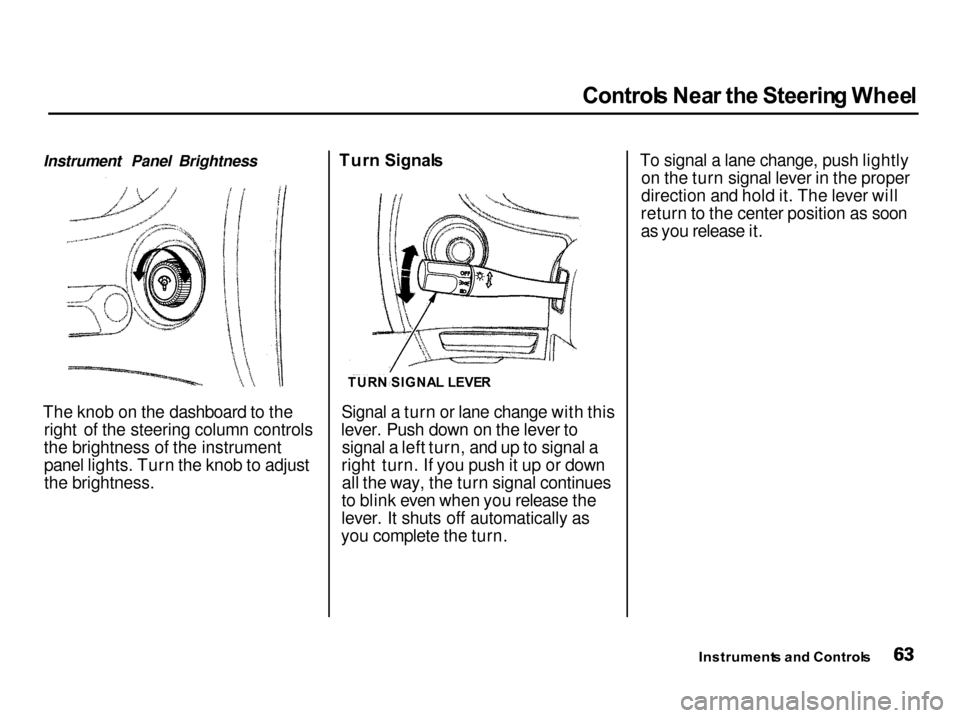
Instrument Panel Brightness
The knob on the dashboard to the right of the steering column controls
the brightness of the instrument panel lights. Turn the knob to adjust
the brightness. Tur
n Signal s
Signal a turn or lane change with this
lever. Push down on the lever to signal a left turn, and up to signal a
right turn. If you push it up or down all the way, the turn signal continues
to blink even when you release the
lever. It shuts off automatically as
you complete the turn. To signal a lane change, push lightly
on the turn signal lever in the proper
direction and hold it. The lever will
return to the center position as soon
as you release it.
Instrument s an d Control s
TUR
N SIGNA L LEVE R
Page 68 of 285

Control
s Nea r th e Steerin g Whee l
Rea r Windo w Wipe r an d Washe r
To turn on the rear window wiper, turn the ring clockwise to ON. Toalso use the rear window washer,
turn the ring clockwise past ON. The
washer will spray as long as you hold
the ring in this position. If you turn
the ring counterclockwise from the OFF position, the washer will spray
without activating the rear window
wiper. Hazar
d Warnin g
Push the red button under the center air vent to turn on the hazard warn-
ing lights (four-way flashers). This
causes all four outside turn signals and both indicators in the instrument
panel to flash. Use the hazard
warning lights if you need to park in a dangerous area near heavy traffic,
or if your car is disabled. Rea
r Windo w Defogge r
The rear window defogger will clear fog, frost, and thin ice from the
window. Push the defogger button to turn it on and off. The light in the
button lights to show the defogger ison. If you do not turn it off, the
defogger will shut itself off after
about 25 minutes. It also shuts off
when you turn off the ignition. You have to turn it on again when you
restart the car.
Instrument s an d Control s
CONTINUED
WIPER/WASHE
R
Page 70 of 285

Control
s Nea r th e Steerin g Wheel , Steerin g Whee l Control s
2. Move the steering wheel to the desired position, making sure the
wheel points toward your chest, not toward your face. Make sure
you can see the instrument panel gauges and the indicator lights.
3. Push the lever up to lock the steering wheel in that position.
4. Make sure you have securely locked the steering wheel in place
by trying to move it up and down. Cruis
e Contro l
LS, GS and GS-R models
Cruise control allows you to maintain
a set speed above 25 mph (40 km/h)
without keeping your foot on the accelerator pedal. It should be used
for cruising on straight, open
highways. It is not recommended for conditions such as city driving,
winding roads, slippery roads, heavy rain, or bad weather. You should
have full control of the car under
those conditions.
The cruise control, as it operates,
moves the accelerator pedal. You can
damage your car's accelerator
mechanism by resting your foot under the pedal and blocking the movement.
CONTINUED
Instrument s an d Control s
NOTIC
E
Improper use of the cruise
control can lead to a crash.
Use the cruise control only
when traveling on open
highways in good weather.
Page 77 of 285

Key
s an d Lock s
LOC K (0 ) — You can insert or
remove the key only in this position.
To switch from ACCESSORY to LOCK, you must push the key inslightly as you turn it. If your car has
an automatic transmission, the shift
lever must also be in Park. The anti-
theft lock will lock the steering column when you remove the key.
If the front wheels are turned, theanti-theft lock may sometimes make
it difficult to turn the key from LOCK to ACCESSORY. Firmly turn
the steering wheel to the left or to the right as you turn the key. ACCESSOR
Y (I ) — In this position,
you can operate the audio system and the cigarette lighter.
O N (II ) — This is the normal key
position whe n driving. All features
and accessories on the car are usable.
Several of the lights on the instru-
ment panel come on as a test when
you turn the ignition switch from
ACCESSORY to ON. STAR
T (III ) — Use this position
only to start the engine. The switch
returns to ON (II) when you let go of
the key.
The engine will not start if the Immobilizer System does not
recognize the key's coding (see page 72).
You will hear a reminder beeper if
you leave the key in the ignition
switch in the LOCK (0) or
ACCESSORY (I) position and open the driver's door. Remove the key to
turn off the beeper.
Instrument s an d Control s Removing the key from the
ignition switch while driving
locks the steering. This can
cause you to lose control.
Remove the key from the
ignition switch only when
parked.
Page 81 of 285
Key
s an d Lock s
Glov e Bo x
Open the glove box by pulling the
bottom of the handle. Close it with a
firm push. Lock or unlock the glove
box with the master key.
LS, GS, GS-R and Type-R models
The glove box light comes on only when the instrument panel lights are
on.
Instrument s an d Control s
An open glove box can cause
serious injury to your passengerin a crash, even if the
passenger is wearing the seat
belt.
Always keep the glove box
closed while driving.
Page 89 of 285
Moonroof
, Mirror s
If you try to open the moonroof in below-freezing temperatures, or whenit is covered with snow or ice, you can
damage the moonroof panel or motor.
Mirror
s
Keep the inside and outside mirrors clean and adjusted for best visibility.
Be sure to adjust the mirrors before
you start driving.
The inside mirror has day and night positions. The night position reduces
glare from headlights behind you.Flip the tab on the bottom edge of
the mirror to select the day or night
position.
Adjusting the Power Mirrors
Adjust the outside mirrors with the adjustment switch on the driver's
door:
1. Turn the ignition switch ON (II).
2. Move the selector switch to L (driver's side) or R (passenger's
side).
Instrument s an d Control s
NOTIC
E
TAB
SELECTO
R SWITC H
Closing the moonroof on
someone's hands or fingers can
cause serious injury.
Make sure passengers are
clear of the moonroof before
closing it.
Page 95 of 285
Interio
r Light s
Ceilin g Ligh t
The ceiling light has a three-position switch. In the OFF position, the light
does not come on. In the center
position, the ceiling light conies on
when you open either door. In the ON position, the ceiling light stays
on continuously. Spotlight
s
LS, GS and GS-R models
Turn on the spotlight by pushing the button next to each light. Push thebutton again to turn it off. You can
use the spotlights at all times. Carg
o Are a Ligh t
The cargo area light has a two- position switch. In the OFF (down)
position, the light does not come on.In the ON (up) position, the light
comes on when you open the hatch.
Instrument s an d Control s
DOO
R ACTIVATE D
Page 97 of 285

Heatin
g an d Coolin g
Proper use of the Heating and Cooling system can make the
interior dry and comfortable, and
keep the windows clear for best
visibility.
(Canadian Type-R model only)
If your car does not have air
conditioning, it can be installed at
any time. Your dealer will install a Genuine Acura air conditioning
system that meets Acura's high
quality standards and is designed to
exactly fit your car. Please contact
your dealer for more information.
Wha t Eac h Contro l Doe s
Fa n Contro l Leve r
Sliding this lever to the right
increases the fan's speed, which increases air flow. Temperatur
e Contro l Leve r
Sliding this lever to the right
increases the temperature of the air
flow.
Ai r Conditionin g (A/C ) Butto n
This button turns the air condi- tioning ON and OFF. The indicatorin the button lights when the A/C is
on.
Recirculatio
n Butto n
This button controls the source of the air going into the system. When
the indicator in this button is lit, air
from the car's interior is sent through the system again (Recircula-
tion mode). When the indicator is off, air is brought in from outside the car (Fresh Air mode).
Comfor t an d Convenienc e Feature s MOD
E BUTTON SRECIRCULATIO
N
BUTTO N AI
R CONDITIONIN G
BUTTO N
TEMPERATUR E
CONTRO L LEVE R
FA
N CONTRO L
LEVE R