Page 216 of 285
Light
s
2. Undo the seven cover fasteners by pushing on the center of each
fastener's head until it pops in. Remove the taillight cover panel. 3. Remove the socket by turning it
one-quarter turn counterclockwise. 4. Try the tail/stoplights and back-up
light to verify which bulb needs
replacing. Remove the bulb by
turning it counterclockwise.
5. Install the new bulb in the socket. Test it to make sure it works.
6. Reinstall the socket into the light
assembly.
7. Reinstall the tether anchor hardware.
Make sure the toothed washer is
on the bottom of the bolt. Tighten
the bolt to:
16 lbf.ft (22 N.m,2.2 kgf.m)
If a torque wrench was not used,
see your Acura dealer as soon as
possible to verify proper
installation.
CONTINUED
Maintenanc e
Page 217 of 285
Light
s
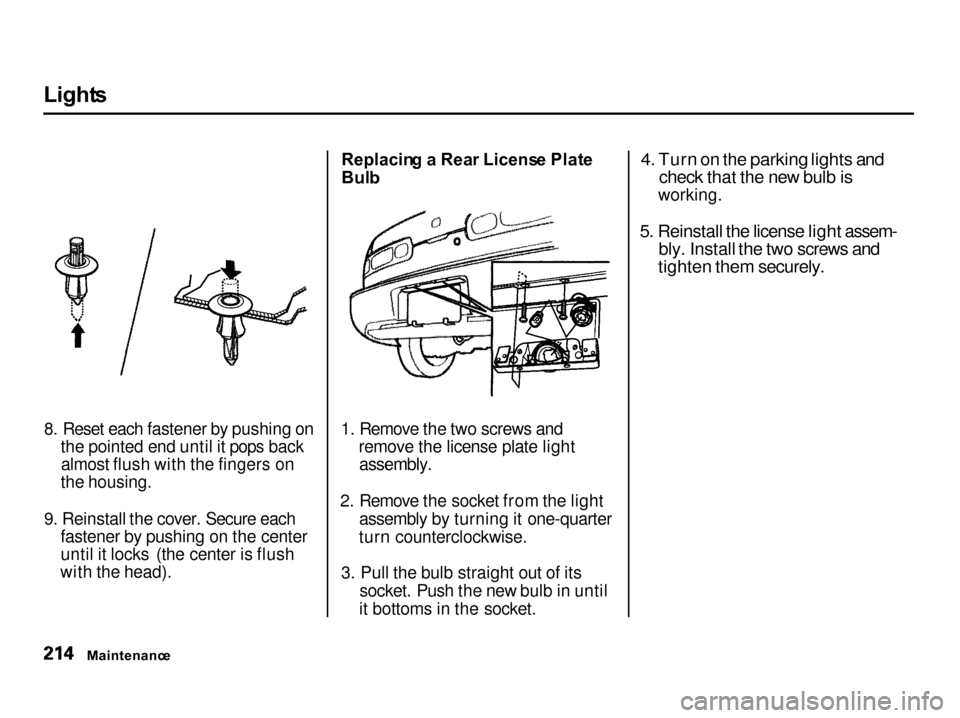
8. Reset each fastener by pushing on the pointed end until it pops backalmost flush with the fingers on
the housing.
9. Reinstall the cover. Secure each fastener by pushing on the center
until it locks (the center is flush
with the head). Replacin
g a Rea r Licens e Plat e
Bul b
1. Remove the two screws and remove the license plate light
assembly.
2. Remove the socket from the light assembly by turning it one-quarter
turn counterclockwise.
3. Pull the bulb straight out of its socket. Push the new bulb in until
it bottoms in the socket.
4. Turn on the parking lights and
check that the new bulb is
working.
5. Reinstall the license light assem-
bly. Install the two screws and
tighten them securely.
Maintenanc e
Page 218 of 285
Light
s
Replacin g Ceiling , Spo t an d Carg o
Are a Ligh t Bulb s
The ceiling, spot and cargo area lights come apart the same way.
They do not use the same type of bulb.
1. Remove the lens by carefully prying on the edge of the lens witha fingernail file or a small flat-tipscrewdriver. Do not pry on the
edge of the housing around the
lens.
2. Remove the bulb by pulling it
straight out of its metal tabs.
3. Push the new bulb into the metal tabs. Snap the lens back in place. LS, GS and GS-R models
Maintenance
SPOTLIGHT
S
CARG
O ARE A LIGH T
CEILIN G LIGH T
Page 230 of 285

Changin
g a Fla t Tir e
If you have a flat tire while driving, stop in a safe place to change it.
Stopping in traffic or on the shoulder
of a busy road is dangerous. Driveslowly along the shoulder until you
get to an exit or an area to stop that is far away from the traffic lanes.
JAC
K
SPAR E TIR E
TOOL KI T
1. Park the car on firm, level and non-slippery ground away from
traffic. Put the transmission in Park (automatic) or Reverse (manual). Apply the parking brake.
If you are towing a trailer, unhitch
the trailer. 2. Turn on the hazard warning lights
and turn the ignition switch to
LOCK (0). Have all the
passengers get out of the car while
you change the tire.
3. Open the hatch. Pull up the floor mat and remove the spare tire
cover.
4. Take the tool kit out of the spare tire well.
5. Unscrew the wing bolt and take the spare tire out of its well.
CONTINUED
Takin g Car e o f th e Unexpecte d
The car can easily roll off the
jack, seriously injuring anyone
underneath.
Follow the directions for
changing a tire exactly, and never get under the car when it
is supported only by the jack.
Page 235 of 285

I
f You r Engin e Won' t Star t
Nothin g Happen s o r th e Starte r
Moto r Operate s Ver y Slowl y
When you turn the ignition switch to START (III), you do not hear the
normal noise of the engine trying tostart. You may hear a clicking sound
or series of clicks, or nothing at all.
Check these things: Your car has the Immobilizer
System. You should use a
properly-coded master or valet key
to start the engine (see page 72 ).
A key that is not properly coded will cause the immobilizer systemindicator in the dash panel to blink
rapidly. Check the transmission interlock.
If you have a manual transmission,
the clutch pedal must be pushed all the way to the floor or thestarter will not operate. With an
automatic transmission, it must be
in Park or Neutral. Turn the ignition switch to ON (II).
Turn on the headlights and check
their brightness. If the headlightsare very dim or don't light at all,
the battery is discharged. See
Jum p Startin g on page 233. Turn the ignition switch to START
(III). If the headlights do not dim,
check the condition of the fuses. If
the fuses are OK, there is proba-
bly something wrong with the electrical circuit for the ignitionswitch or starter motor. You will
need a qualified technician to determine the problem. (See
Emergenc y Towin g on page 248.)
If the headlights dim noticeably or
go out when you try to start the engine, either the battery is dis-
charged or the connections are
corroded. Check the condition of
the battery and terminal connec-
tions (see page 189 ). You can
then try jump starting the car from
a booster battery (see page 233 ).
Takin g Car e o f th e Unexpecte d
Page 237 of 285

Jum
p Startin g
To jump start your car, follow these directions closely:
1. Open the hood and check the physical condition of the battery(see page 191 ). In very cold
weather, check the condition of the electrolyte. If it seems slushy or like ice, do not try jump starting
until it thaws.
If a battery sits in extreme cold, the electrolyte inside can freeze.
Attempting to jump start with a frozen battery can cause it to rupture.
2. Turn off all the electrical acces- sories: heater, A/C, stereo system,
lights, etc.
Put the transmission in Neutral orPark and set the parking brake. 3. Connect one jumper cable to the
positive (+) terminal on your
Acura's battery. Connect the other end to the positive (+) terminalon the booster battery. 4. Connect the second jumper cable
to the negative (—) terminal on
the booster battery. Connect theother end to the grounding strap
as shown. Do not connect this
jumper cable to any other part of the engine.
5. If the booster battery is in another vehicle, have an assistant startthat vehicle and run it at a fast idle.
Takin g Car e o f th e Unexpecte d
NOTIC
E
Page 247 of 285
Fuse
s
Checkin g an d Replacin g Fuse s
If something electrical in your car stops working, the first thing you
should check for is a blown fuse.
Determine from the chart on pages 246 and 247, or the diagram on the
fuse box lid, which fuse or fuses control that component. Check those
fuses first, but check all the fuses
before deciding that a blown fuse is not the cause. Replace any blown
fuses and check the component's
operation.
1. Turn the ignition switch to LOCK (0). Make sure the headlights and
all other accessories are off.
2. Remove the cover from the fuse
box.
FUS
E
3. Check each of the large fuses in the under-hood fuse box by
looking through the top at the wireinside. Removing these fuses
requires a Phillips-head screw-driver. 4. Check the smaller fuses in the
under-hood fuse box and all the
fuses in the interior fuse box by pulling out each fuse with the fuse
puller provided in the interior fuse
box.
Takin g Car e o f th e Unexpecte d
BLOW
N
FUS
E PULLE R
Page 276 of 285

Inde
x
Accessories and Modifications.... 130 Accessories................................. 130Additional Safety Precaution.... 131
Modifications............................. 131
ACCESSORY (Ignition Key Position)........................................ 74
Additives, Engine Oil..................... 175
Airbag (SRS)............................... 9, 45Ai
r Cleane
r Element...................... 188
Air Conditioning System................. 94
Maintenance............................... 196Usage............................................. 94
Air Outlets (Vents).......................... 96
Air Pressure, Tires........................ 198
Alcohol in Gasoline........................ 258
Antifreeze....................................... 178 Anti-lock Brakes (ABS) Indicator................................ 55
, 148
Operation.................................... 14
6
Anti-theft Steering Column
Lock............................................... 74
Appearance Care........................... 217
Ashtrays............................................ 91
Audio System................................. 102
Automatic Speed Control................ 67
Automatic Transmission............... 140
Capacity, Fluid........................... 255
Checking Fluid Level................ 183
Shifting........................................ 140
Shift Lever Position Indicator.. 140
Shift Lever Positions................. 140
Shift Lock Release..................... 143
Battery Charging SystemIndicator............................ 55,
239
Jump Starting............................
. 233
Maintenance............................... 191
Specifications............................. 255
Before Driving............................... 121
Belts, Seat.................................... 8, 42
Beverage Holder.............................. 89
Body Repair.................................... 224
Brakes Anti-lock System (ABS)............ 146
Break-in, New Linings.............. 123
Bulb Replacement..................... 212
Fluid............................................ 185
Parking.......................................... 87
System Indicator................. 54,
241
Wear Indicators........................
. 145
Braking System.............................. 145
Break-in, New Car......................... 123
Brightness Control, Instruments... 63
Brights, Headlights......................... 62
Bulb Replacement Back-up Lights........................... 212
Brake Lights............................... 212 Cargo Area Light....................... 215
Ceiling Light............................... 215
Front Parking Lights................. 210
Front Side Marker Lights......... 210
Headlights.................................. 209
High-mount Brake Light.......... 211
License Plate Light.................... 214
Rear Side Marker Lights.......... 212
Specifications............................. 255
Spotlights.................................... 215
Turn Signal Lights..................... 210
Bulbs, Halogen............................... 209
CONTINUED