Page 46 of 282
00 SIENNA(U)
40
Seats
While the vehicle is being driven, all ve-
hicle occupants should have the seatback
upright, sit well back in the seat and prop-
erly wear the seat belts provided.
CAUTION
�Do not drive the vehicle unless the
occupants are properly seated. Do
not allow sitting on top of a
folded−down seatback, or in the
luggage compartment. Persons not
properly seated and not properly re-
strained by seat belts can be se-
verely injured in the event of emer-
gency braking or a collision.
�During driving, do not allow pas-
sengers to stand up or move
around between seats. Severe inju-
ries can occur in the event of emer-
gency braking or a collision.
Adjust the driver’s seat so that the foot
pedals, steering wheel and instrument
panel controls are within easy reach of
the driver.
CAUTION
�Adjustments should not be made
while the vehicle is moving, as the
seat may unexpectedly move and
cause the driver to lose control of
the vehicle.
�When adjusting the seat, be careful
not to hit the seat against a pas-
senger or luggage.
�After adjusting the seat position,
try sliding it forward and backward
to make sure it is locked in posi-
tion.
�After adjusting the seatback, exert
body pressure to make sure it is
locked in position.
�Do not put objects under the seats
except putting in the auxiliary box.
The objects may interfere with the
seat−lock mechanism or unexpect-
edly push up the seat position ad-
justing lever; the seat may suddenly
move, causing the driver to lose
control of the vehicle.
�While adjusting the seat, do not put
your hands under the seat or near
the moving parts. You may catch
and injure your hands or fingers.
Front seats—
—Seat adjustment
precautions
ProCarManuals.com
Page 48 of 282
00 SIENNA(U)
42
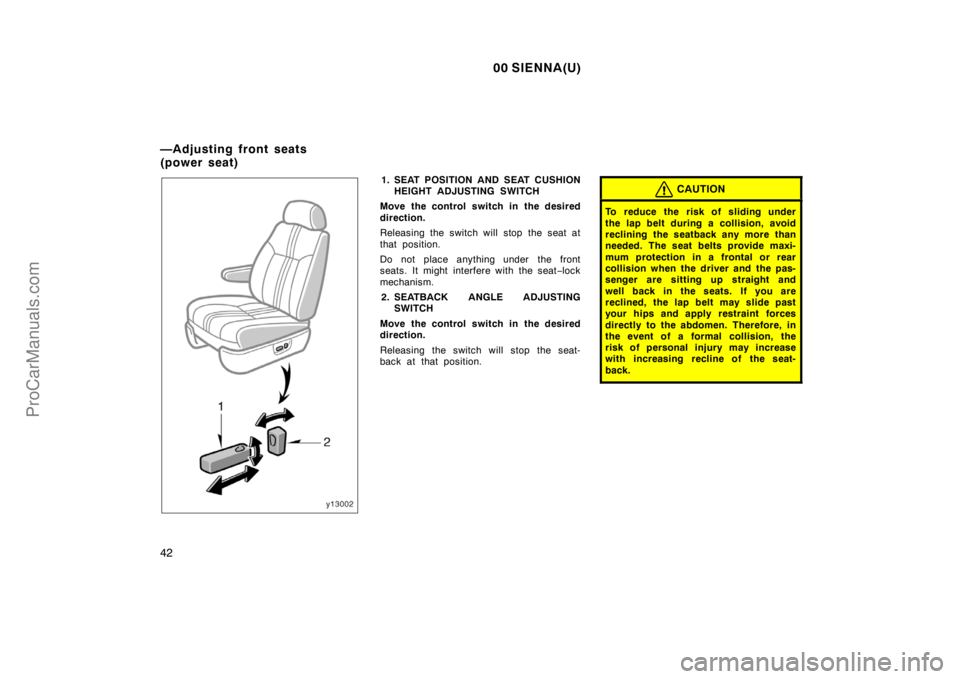
1. SEAT POSITION AND SEAT CUSHION
HEIGHT ADJUSTING SWITCH
Move the control switch in the desired
direction.
Releasing the switch will stop the seat at
that position.
Do not place anything under the front
seats. It might interfere with the seat−lock
mechanism.
2. SEATBACK ANGLE ADJUSTING
SWITCH
Move the control switch in the desired
direction.
Releasing the switch will stop the seat-
back at that position.CAUTION
To reduce the risk of sliding under
the lap belt during a collision, avoid
reclining the seatback any more than
needed. The seat belts provide maxi-
mum protection in a frontal or rear
collision when the driver and the pas-
senger are sitting up straight and
well back in the seats. If you are
reclined, the lap belt may slide past
your hips and apply restraint forces
directly to the abdomen. Therefore, in
the event of a formal collision, the
risk of personal injury may increase
with increasing recline of the seat-
back.
—Adjusting front seats
(power seat)
ProCarManuals.com
Page 49 of 282
00 SIENNA(U)
43
CAUTION
�Any operations should not be made
while the vehicle is moving.
�When adjusting the seat, be careful
not to hit the seat against a pas-
senger or luggage.
�After adjusting the seat position,
try sliding it forward and backward
to make sure it is lock in position.
�After adjusting the seatback, exert
body pressure to make sure it is
locked in position.
�When returning seats to their origi-
nal position:
Make sure the seat belts are not
twisted or caught under the seat
and are arranged in their proper
position and are ready to use.
Make sure the seat is securely
locked by pushing forward and rear-
ward on the top of the seatback or
by trying to pull up the edge of the
bottom cushion. Failure to do so
will prevent seat belt from operat-
ing properly.
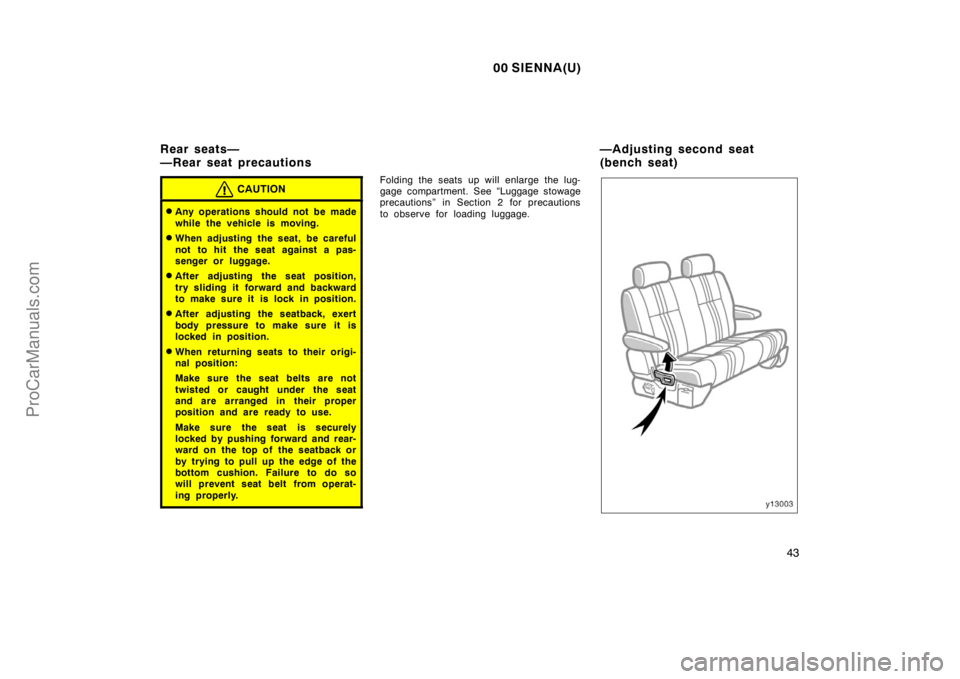
Folding the seats up will enlarge the lug-
gage compartment. See “Luggage stowage
precautions” in Section 2 for precautions
to observe for loading luggage.
Rear seats—
—Rear seat precautions—Adjusting second seat
(bench seat)
ProCarManuals.com
Page 50 of 282
00 SIENNA(U)
44
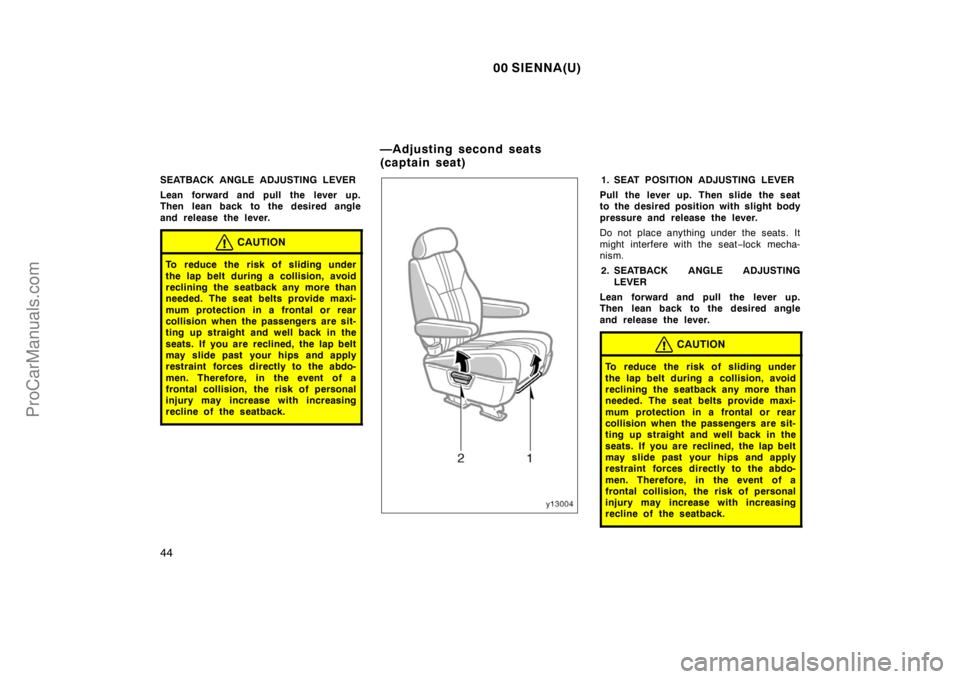
SEATBACK ANGLE ADJUSTING LEVER
Lean forward and pull the lever up.
Then lean back to the desired angle
and release the lever.
CAUTION
To reduce the risk of sliding under
the lap belt during a collision, avoid
reclining the seatback any more than
needed. The seat belts provide maxi-
mum protection in a frontal or rear
collision when the passengers are sit-
ting up straight and well back in the
seats. If you are reclined, the lap belt
may slide past your hips and apply
restraint forces directly to the abdo-
men. Therefore, in the event of a
frontal collision, the risk of personal
injury may increase with increasing
recline of the seatback.
1. SEAT POSITION ADJUSTING LEVER
Pull the lever up. Then slide the seat
to the desired position with slight body
pressure and release the lever.
Do not place anything under the seats. It
might interfere with the seat−lock mecha-
nism.
2. SEATBACK ANGLE ADJUSTING
LEVER
Lean forward and pull the lever up.
Then lean back to the desired angle
and release the lever.
CAUTION
To reduce the risk of sliding under
the lap belt during a collision, avoid
reclining the seatback any more than
needed. The seat belts provide maxi-
mum protection in a frontal or rear
collision when the passengers are sit-
ting up straight and well back in the
seats. If you are reclined, the lap belt
may slide past your hips and apply
restraint forces directly to the abdo-
men. Therefore, in the event of a
frontal collision, the risk of personal
injury may increase with increasing
recline of the seatback.
—Adjusting second seats
(captain seat)
ProCarManuals.com
Page 51 of 282
00 SIENNA(U)
45
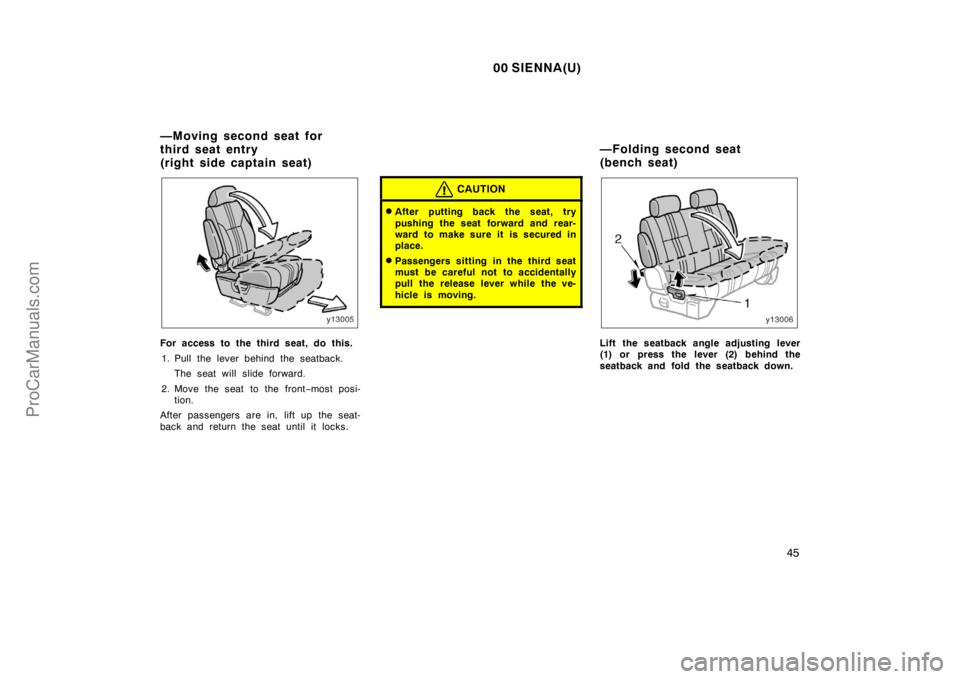
For access to the third seat, do this.
1. Pull the lever behind the seatback.
The seat will slide forward.
2. Move the seat to the front−most posi-
tion.
After passengers are in, lift up the seat-
back and return the seat until it locks.
CAUTION
�After putting back the seat, try
pushing the seat forward and rear-
ward to make sure it is secured in
place.
�Passengers sitting in the third seat
must be careful not to accidentally
pull the release lever while the ve-
hicle is moving.
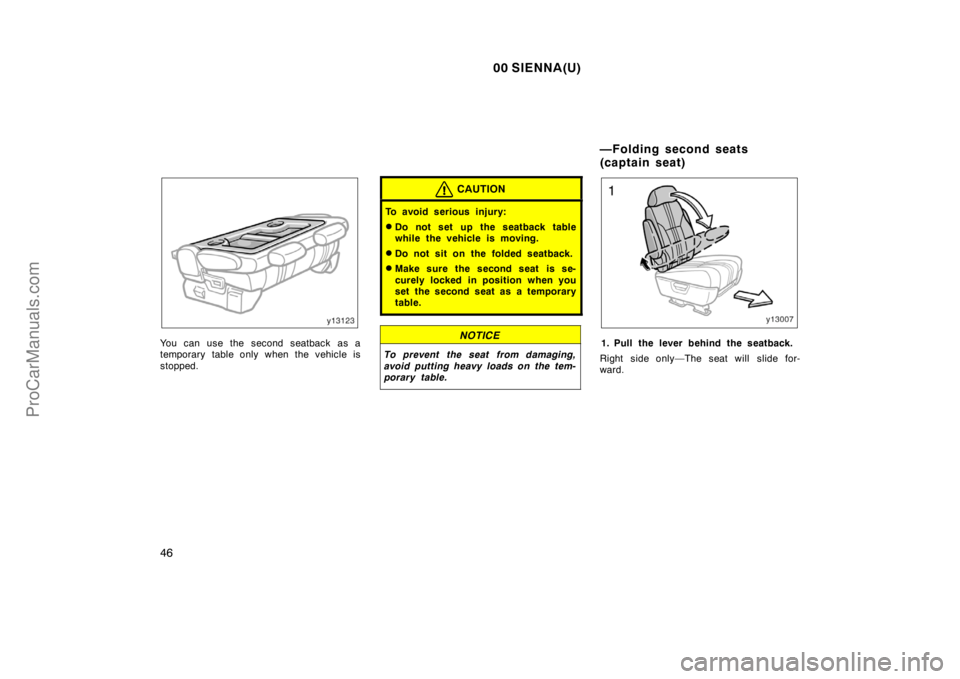
Lift the seatback angle adjusting lever
(1) or press the lever (2) behind the
seatback and fold the seatback down.
—Moving second seat for
third seat entry
(right side captain seat)—Folding second seat
(bench seat)
ProCarManuals.com
Page 52 of 282
00 SIENNA(U)
46
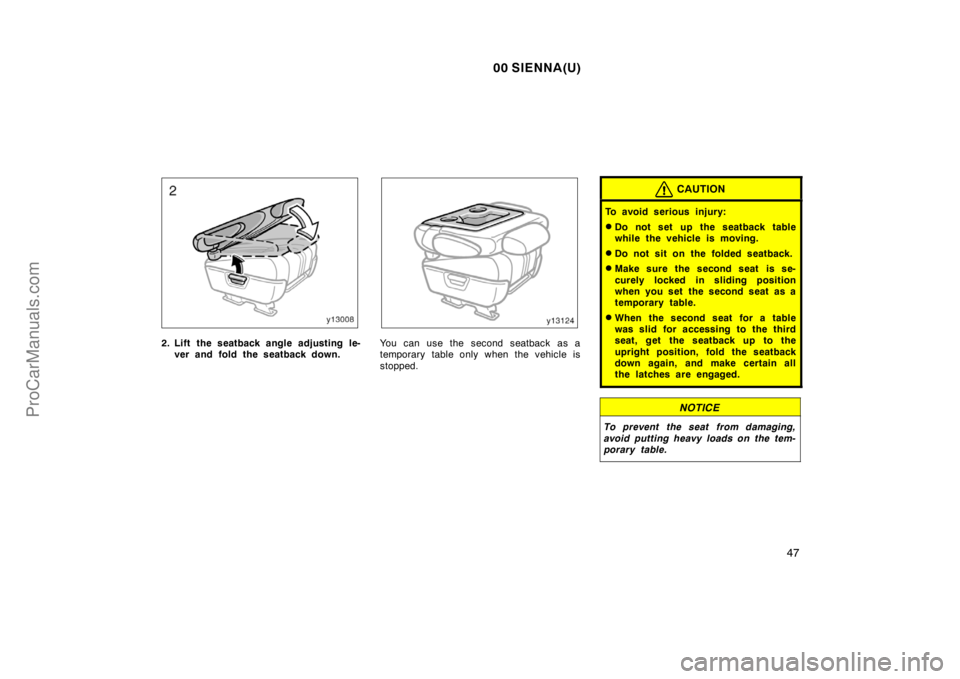
You can use the second seatback as a
temporary table only when the vehicle is
stopped.
CAUTION
To avoid serious injury:
�Do not set up the seatback table
while the vehicle is moving.
�Do not sit on the folded seatback.
�Make sure the second seat is se-
curely locked in position when you
set the second seat as a temporary
table.
NOTICE
To prevent the seat from damaging,
avoid putting heavy loads on the tem-
porary table.
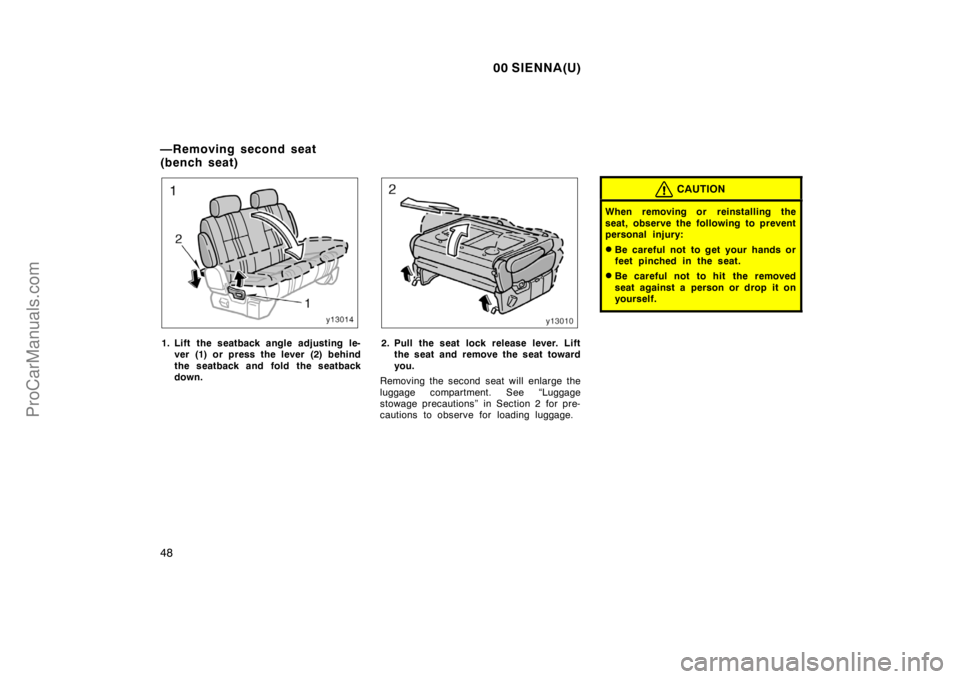
1. Pull the lever behind the seatback.
Right side only—The seat will slide for-
ward.
—Folding second seats
(captain seat)
ProCarManuals.com
Page 53 of 282
00 SIENNA(U)
47
2. Lift the seatback angle adjusting le-
ver and fold the seatback down.You can use the second seatback as a
temporary table only when the vehicle is
stopped.
CAUTION
To avoid serious injury:
�Do not set up the seatback table
while the vehicle is moving.
�Do not sit on the folded seatback.
�Make sure the second seat is se-
curely locked in sliding position
when you set the second seat as a
temporary table.
�When the second seat for a table
was slid for accessing to the third
seat, get the seatback up to the
upright position, fold the seatback
down again, and make certain all
the latches are engaged.
NOTICE
To prevent the seat from damaging,
avoid putting heavy loads on the tem-
porary table.
ProCarManuals.com
Page 54 of 282
00 SIENNA(U)
48
1. Lift the seatback angle adjusting le-
ver (1) or press the lever (2) behind
the seatback and fold the seatback
down.2. Pull the seat lock release lever. Lift
the seat and remove the seat toward
you.
Removing the second seat will enlarge the
luggage compartment. See “Luggage
stowage precautions” in Section 2 for pre-
cautions to observe for loading luggage.
CAUTION
When removing or reinstalling the
seat, observe the following to prevent
personal injury:
�Be careful not to get your hands or
feet pinched in the seat.
�Be careful not to hit the removed
seat against a person or drop it on
yourself.
—Removing second seat
(bench seat)
ProCarManuals.com