Page 106 of 282
00 SIENNA(U)
100
This model sold in Canada is provided
with a bracket set in the glove box, de-
signed for use with any of the 3 anchor
locations shown in the illustrations.
If your child restraint system does not
provide any of the necessary parts, ask
your Toyota dealer. (See “—Child restraint
system”.)
Tilt steering wheel
To change the steering wheel angle,
hold the steering wheel, pull the lock
release lever toward you, tilt the steer-
ing wheel to the desired angle and re-
lease the lever.
When the steering wheel is in a low posi-
tion, it will spring up as you release the
lock release lever.
CAUTION
�Do not adjust the steering wheel
while the vehicle is moving.
�After adjusting the steering wheel,
try moving it up and down to make
sure it is locked in position.
Outside rear view mirrors—
Adjust the mirror so that you can just
see the side of your vehicle in the mir-
ror.
Be careful when judging the size or dis-
tance of any object seen in the outside
rear view mirror on the passenger ’s side.
It is a convex mirror with a curved sur-
face. Any object seen in a convex mirror
will look smaller and farther away than
when seen in a flat mirror.
On some models, when you push the rear
window defogger switch, the heater panels
in the outside rear view mirrors will quick-
ly clear the mirror surface.
ProCarManuals.com
Page 109 of 282
00 SIENNA(U)
103
Sun visors—
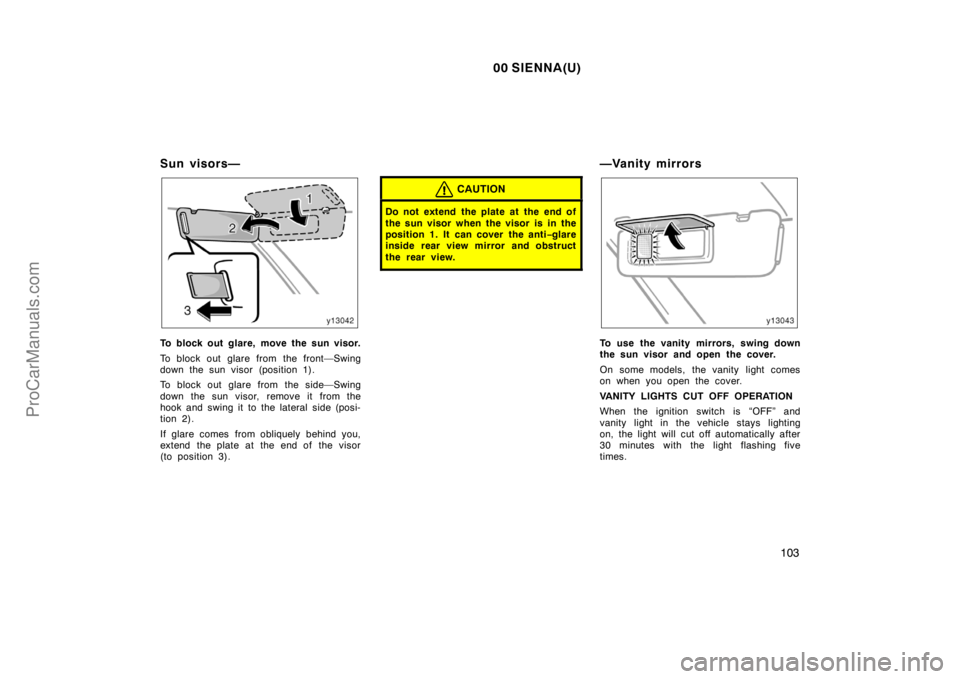
To block out glare, move the sun visor.
To block out glare from the front—Swing
down the sun visor (position 1).
To block out glare from the side—Swing
down the sun visor, remove it from the
hook and swing it to the lateral side (posi-
tion 2).
If glare comes from obliquely behind you,
extend the plate at the end of the visor
(to position 3).
CAUTION
Do not extend the plate at the end of
the sun visor when the visor is in the
position 1. It can cover the anti−glare
inside rear view mirror and obstruct
the rear view.
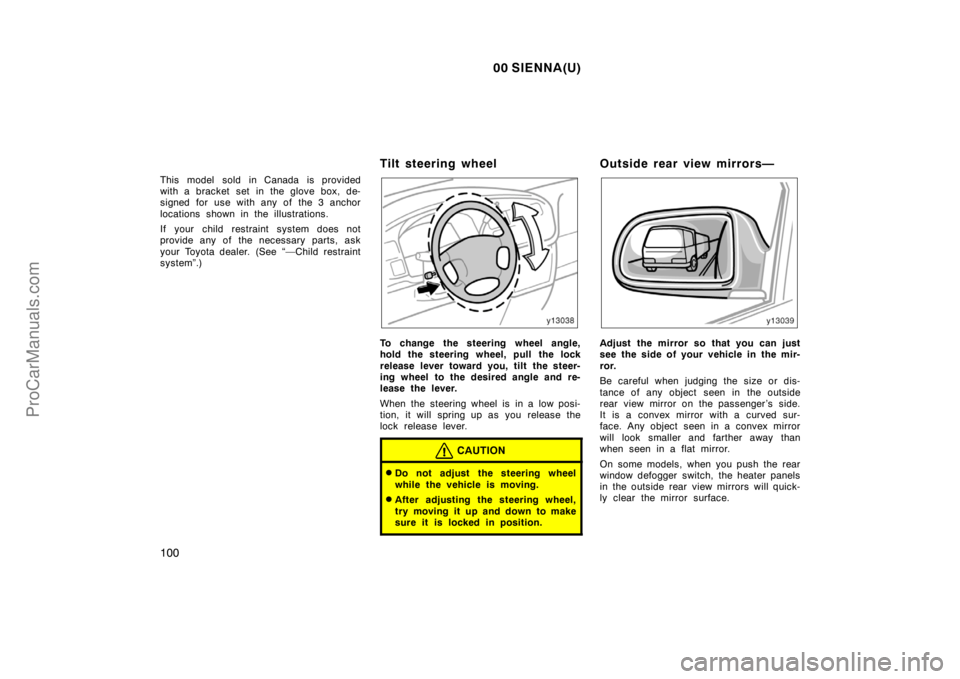
—Vanity mirrors
To use the vanity mirrors, swing down
the sun visor and open the cover.
On some models, the vanity light comes
on when you open the cover.
VANITY LIGHTS CUT OFF OPERATION
When the ignition switch is “OFF” and
vanity light in the vehicle stays lighting
on, the light will cut off automatically after
30 minutes with the light flashing five
times.
ProCarManuals.com
Page 110 of 282
00 SIENNA(U)
104
You can cancel the cut off operation by:
�Turning the key to the “ACC” position.
�Opening or closing any of front and
sliding doors
�Turning off all the “ON” lights.
All the lights are cut off when all the
doors are locked by key or wireless re-
mote control transmitter.
The key must be in the “OFF” position.
ProCarManuals.com
Page 112 of 282

00 SIENNA(U)
106
HEADLIGHTS
To turn on the following lights: Twist
the headlight/turn signal lever knob.
Position 1—Parking, tail, license plate,
side marker and instrument panel lights
Position 2—Headlights and all of the
above
Position 3 (“AUTO”)—Headlights and/or all
of the above
They automatically turn on or off depend-
ing on the darkness of the surroundings.
Manually twist the knob to the position 2
to turn on the headlights if they are need-
ed immediately when entering a dark tun-
nel, parking structure, etc.The automatic light control sensor is on
the top of the driver’s side instrument
panel.
Do not place anything on the instrument
panel, and/or do not affix anything on the
windshield to block this sensor.
If you feel that the automatic light control
comes into operation too early or too late,
have the sensor adjusted by your Toyota
dealer.The lights automatically turn off when any
of the doors is opened with the ignition
key in the “ACC” or “LOCK” position. To
turn them on again, turn the key to the
“ON” position or actuate the headlight
switch. If you are going to park for over
one week, make sure the headlight switch
is off.
NOTICE
To prevent the battery from being dis-
charged, do not leave the lights on
for a long period when the engine is
not running.
Daytime running light system
(on some models)
The headlights turn on at reduced intensi-
ty when the parking brake is released with
the engine started, even with the light
switch in the “OFF” position. They will not
go off until the ignition switch is turned
off.
To turn on the other exterior lights and
instrument panel lights, twist the knob to
the position 1.
Twist the knob to the position 2 to turn
the headlights to full intensity for driving
at night.
Headlights and turn signals
(with automatic light control
system)
ProCarManuals.com
Page 117 of 282
00 SIENNA(U)
111
ILLUMINATED ENTRY SYSTEM
Front (with moon roof)—
The light comes on when either front or
sliding door is opened. After all the doors
are closed, the light remains on for about
15 seconds and then goes out.
Front (without moon roof) and center—
With the switch in the “DOOR” position,
the light comes on when either front or
sliding door is opened. After all the doors
are closed, the light remains on for about
15 seconds and then goes out.
However, in the following cases, the light
goes out immediately:
�All the doors are closed when the igni-
tion key is in “ACC”, “ON” or “START”
position.
�The ignition key is turned to “ACC”,
“ON” or “START” when the light is still
on.
�All the doors are locked when the light
is still on.
�One door will be closed with the lock
knob pushed forward (front door) or
downward (sliding door) while the other
doors are locked.PERSONAL LIGHTS CUT OFF
OPERATION
When the ignition switch is “OFF” and any
personal lights in the vehicle stay lighting
on, the lights will cut off automatically
after 30 minutes with the light flashing five
times.
You can cancel the cut off operation by:
�Turning the key to the “ACC” position.
�Opening or closing any of front and
sliding doors
�Turning off all the “ON” lights.
All the lights are cut off when all the
doors are locked by key or wireless re-
mote control transmitter.
The key must be in the “OFF” position.
Interior light
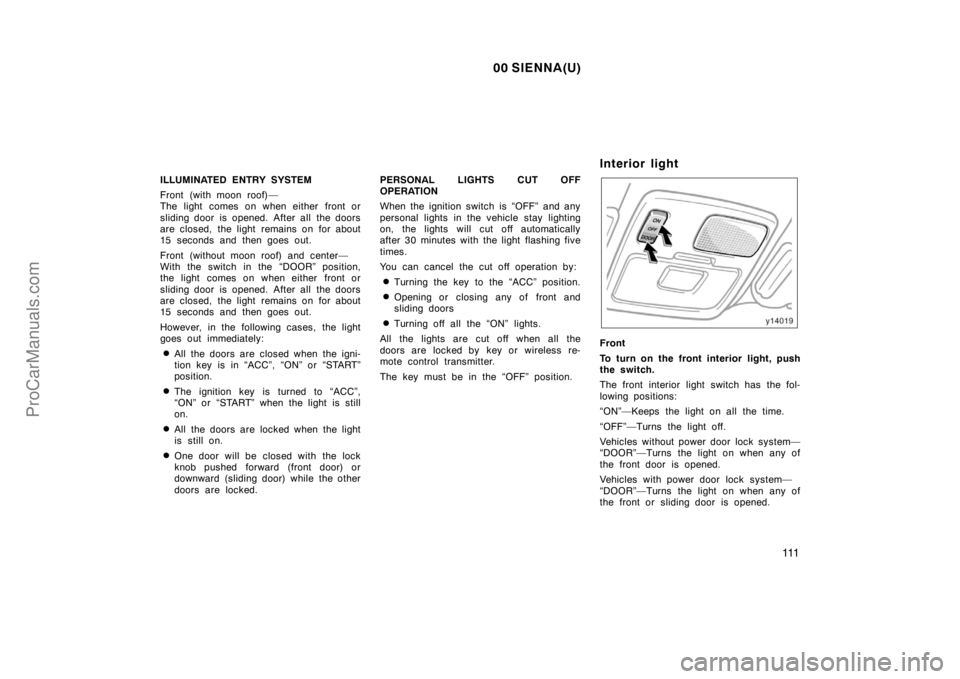
Front
To turn on the front interior light, push
the switch.
The front interior light switch has the fol-
lowing positions:
“ON”—Keeps the light on all the time.
“OFF”—Turns the light off.
Vehicles without power door lock system—
“DOOR”—Turns the light on when any of
the front door is opened.
Vehicles with power door lock system—
“DOOR”—Turns the light on when any of
the front or sliding door is opened.
ProCarManuals.com
Page 118 of 282
00 SIENNA(U)
11 2
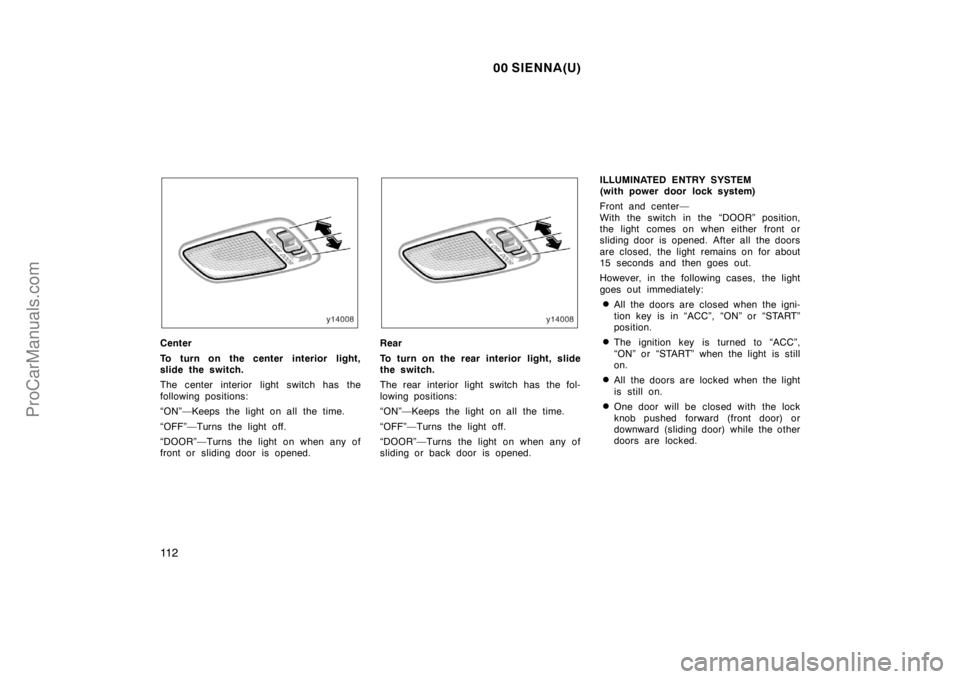
Center
To turn on the center interior light,
slide the switch.
The center interior light switch has the
following positions:
“ON”—Keeps the light on all the time.
“OFF”—Turns the light off.
“DOOR”—Turns the light on when any of
front or sliding door is opened.Rear
To turn on the rear interior light, slide
the switch.
The rear interior light switch has the fol-
lowing positions:
“ON”—Keeps the light on all the time.
“OFF”—Turns the light off.
“DOOR”—Turns the light on when any of
sliding or back door is opened.ILLUMINATED ENTRY SYSTEM
(with power door lock system)
Front and center—
With the switch in the “DOOR” position,
the light comes on when either front or
sliding door is opened. After all the doors
are closed, the light remains on for about
15 seconds and then goes out.
However, in the following cases, the light
goes out immediately:
�All the doors are closed when the igni-
tion key is in “ACC”, “ON” or “START”
position.
�The ignition key is turned to “ACC”,
“ON” or “START” when the light is still
on.
�All the doors are locked when the light
is still on.
�One door will be closed with the lock
knob pushed forward (front door) or
downward (sliding door) while the other
doors are locked.
ProCarManuals.com
Page 119 of 282
00 SIENNA(U)
11 3
INTERIOR LIGHTS CUT OFF OPERATION
When the ignition switch is “OFF” and any
interior lights in the vehicle stay lighting
on, the lights will cut off automatically
after 30 minutes with the light flashing five
times.
You can cancel the cut off operation by:
�Turning the key to the “ACC” position.
�Opening or closing any of front and
sliding doors
�Turning off all the “ON” lights.
All the lights are cut off when all the
doors are locked by key or wireless re-
mote control transmitter.
The key must be in the “OFF” position.
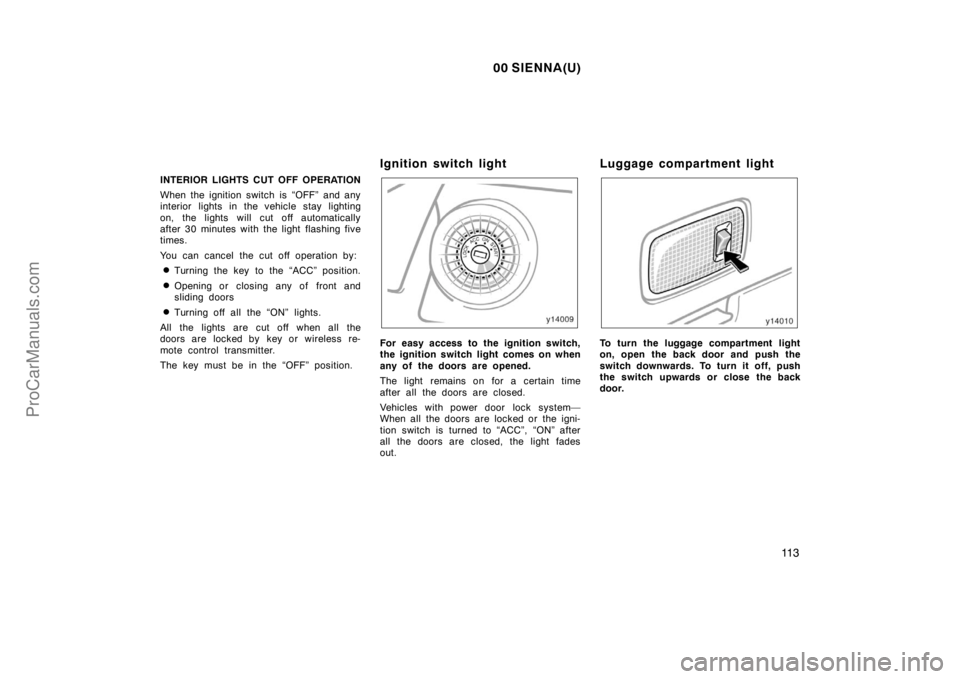
Ignition switch light
For easy access to the ignition switch,
the ignition switch light comes on when
any of the doors are opened.
The light remains on for a certain time
after all the doors are closed.
Vehicles with power door lock system—
When all the doors are locked or the igni-
tion switch is turned to “ACC”, “ON” after
all the doors are closed, the light fades
out.
Luggage compartment light
To turn the luggage compartment light
on, open the back door and push the
switch downwards. To turn it off, push
the switch upwards or close the back
door.
ProCarManuals.com
Page 120 of 282
00 SIENNA(U)
11 4
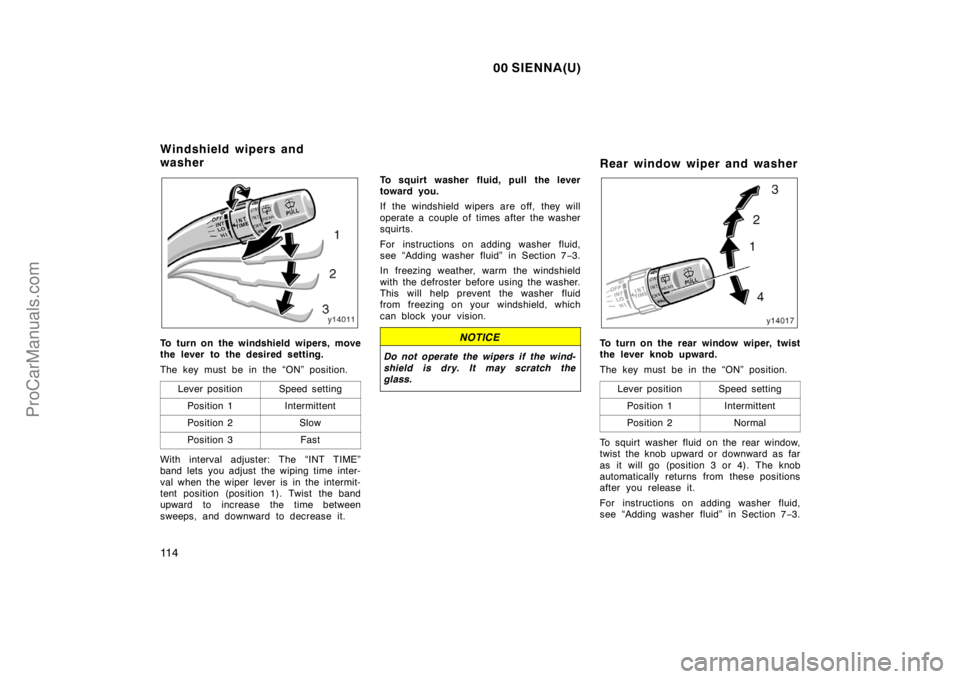
To turn on the windshield wipers, move
the lever to the desired setting.
The key must be in the “ON” position.
Lever position
Speed setting
Position 1Intermittent
Position 2Slow
Position 3Fast
With interval adjuster: The “INT TIME”
band lets you adjust the wiping time inter-
val when the wiper lever is in the intermit-
tent position (position 1). Twist the band
upward to increase the time between
sweeps, and downward to decrease it.To squirt washer fluid, pull the lever
toward you.
If the windshield wipers are off, they will
operate a couple of times after the washer
squirts.
For instructions on adding washer fluid,
see “Adding washer fluid” in Section 7−3.
In freezing weather, warm the windshield
with the defroster before using the washer.
This will help prevent the washer fluid
from freezing on your windshield, which
can block your vision.
NOTICE
Do not operate the wipers if the wind-
shield is dry. It may scratch the
glass.
Rear window wiper and washer
To turn on the rear window wiper, twist
the lever knob upward.
The key must be in the “ON” position.
Lever position
Speed setting
Position 1Intermittent
Position 2Normal
To squirt washer fluid on the rear window,
twist the knob upward or downward as far
as it will go (position 3 or 4). The knob
automatically returns from these positions
after you release it.
For instructions on adding washer fluid,
see “Adding washer fluid” in Section 7−3.
Windshield wipers and
washer
ProCarManuals.com