2000 NISSAN PATHFINDER brake light
[x] Cancel search: brake lightPage 62 of 265
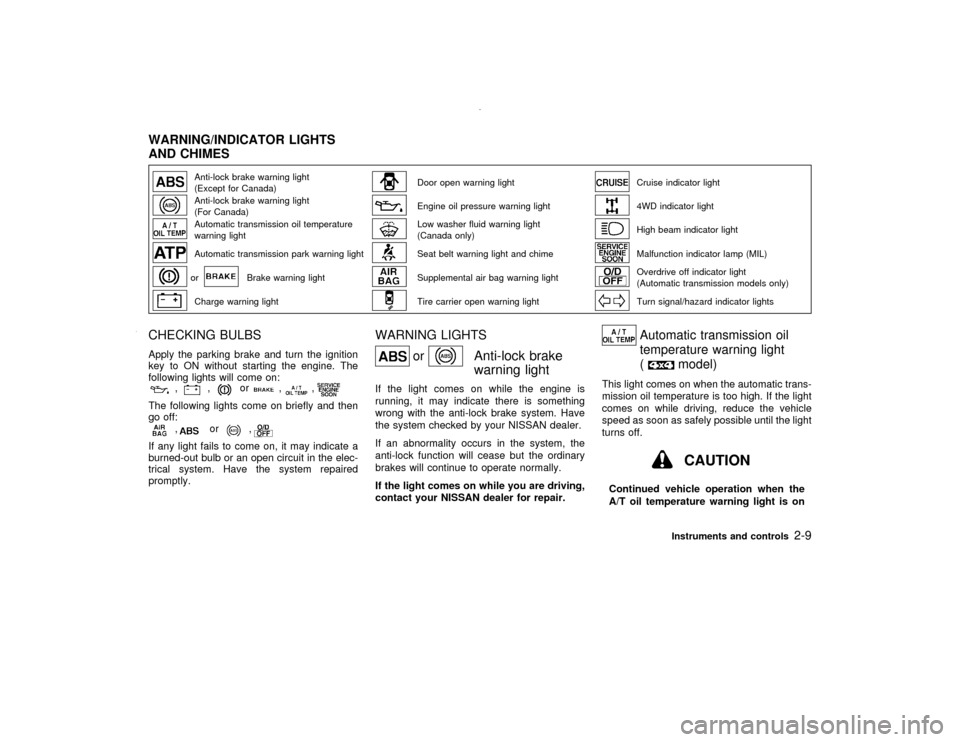
Anti-lock brake warning light
(Except for Canada)
Door open warning light
Cruise indicator light
Anti-lock brake warning light
(For Canada)
Engine oil pressure warning light
4WD indicator light
Automatic transmission oil temperature
warning light
Low washer fluid warning light
(Canada only)
High beam indicator light
Automatic transmission park warning light
Seat belt warning light and chime
Malfunction indicator lamp (MIL)
or
Brake warning light
Supplemental air bag warning light
Overdrive off indicator light
(Automatic transmission models only)
Charge warning light
Tire carrier open warning light
Turn signal/hazard indicator lights
CHECKING BULBSApply the parking brake and turn the ignition
key to ON without starting the engine. The
following lights will come on:
,
,
or
,
,
The following lights come on briefly and then
go off:
,
or
,
If any light fails to come on, it may indicate a
burned-out bulb or an open circuit in the elec-
trical system. Have the system repaired
promptly.
WARNING LIGHTS
or
Anti-lock brake
warning light
If the light comes on while the engine is
running, it may indicate there is something
wrong with the anti-lock brake system. Have
the system checked by your NISSAN dealer.
If an abnormality occurs in the system, the
anti-lock function will cease but the ordinary
brakes will continue to operate normally.
If the light comes on while you are driving,
contact your NISSAN dealer for repair.
Automatic transmission oil
temperature warning light
(
model)
This light comes on when the automatic trans-
mission oil temperature is too high. If the light
comes on while driving, reduce the vehicle
speed as soon as safely possible until the light
turns off.
CAUTION
Continued vehicle operation when the
A/T oil temperature warning light is on
WARNING/INDICATOR LIGHTS
AND CHIMES
Instruments and controls
2-9
Z
00.1.17/R50-D/V5
X
Page 63 of 265

may damage the automatic trans-
mission.
Automatic transmission park
warning light (
model)
This light indicates that the automatic trans-
mission parking function is not engaged. If the
transfer control is not secured in any drive
position while the automatic transmission se-
lector lever is in the P (Park) position, the
transmission will disengage and the wheel will
not lock.
Shift the transfer control lever into the 2H or 4L
position when the warning light comes on.
WARNING
IWhen parking, always make sure that
the transfer lever is in H or 4L and the
parking brake is set.
IIf the ATP light is ON, this indicates
that the automatic transmission P
(Park) position will not function and
the transfer lever is in neutral.IFailure to engage the transfer control
lever in H or 4L could result in the
vehicle moving unexpectedly, result-
ing in serious personal injury or prop-
erty damage.
or
Brake warning light
This light functions for both the parking brake
and the foot brake systems.
Parking brake indicator:
The light comes on when the parking brake is
applied.
Low brake fluid warning light:
When the ignition key is in the ON position, the
light warns of a low brake fluid level. If the light
comes on while the engine is running, stop the
vehicle and perform the following:
1. Check the brake fluid level. Add brake fluid
as necessary. See ªBrake and clutch fluidº
in the ª8. Do-it-yourselfº section.
2. If the brake fluid level is correct:
Have the warning system checked by a
NISSAN dealer.
WARNING
IYour brake system may not be work-
ing properly if the warning light is on.
Driving could be dangerous. If you
judge it to be safe, drive carefully to
the nearest service station for re-
pairs. Otherwise, have your vehicle
towed.
IPressing the brake pedal with the
engine stopped and/or low brake fluid
level may increase your stopping dis-
tance and braking will require greater
pedal effort as well as greater pedal
travel.
IIf the brake fluid level is below the
MIN mark on the brake fluid reservoir,
do not drive until the brake system
has been checked at a NISSAN
dealer.
Charge warning light
If the light comes on while the engine is
running, it may indicate that there is something
wrong with the charging system. Turn the
2-10
Instruments and controls
Z
00.1.17/R50-D/V5
X
Page 66 of 265

fuel economy, and possible damage to
the emission control system.
Overdrive off indicator light
(Automatic transmission
models only)
This light comes on during driving when the
overdrive switch is pressed to prevent over-
drive operation.
The O/D OFF indicator light comes on for two
seconds each time the ignition key is turned
ON. This shows the light is functioning prop-
erly.If the O/D OFF indicator light blinks for
approximately 8 seconds after coming on for
2 seconds, have your NISSAN dealer check
the transmission and repair it if necessary.The automatic transmission is equipped with
an electronic Fail-Safe mode. This system
allows the vehicle to be driven even in the
event of damage to the electrical circuits. If this
occurs, the gears automatically engage and
lock into 3rd gear.
See ªDriving the vehicleº in the ª5. Starting
and drivingº section for failsafe before vis-
iting your NISSAN dealer.
Turn signal/hazard indicator
lights
The light flashes when the turn signal switch
lever or hazard switch is turned on.CHIMES
Key reminder chimesThe chime will sound when the driver side door
is opened if the key is left in the ignition switch.
Take the ignition key when you leave the
vehicle.Light reminder chimesA chime will sound if the driver's door is
opened with the light switch on unless the
ignition key is in the ON position. Turn the light
switch off when you leave the vehicle.
A chime will sound when the light switch is in
the ON position and the driver's door is
opened after the light switch has been turned
to the OFF position when the light has already
turned off automatically.Brake pad wear warningThe disc brake pads have audible wear warn-
ings. When a brake pad requires replacement,
it will make a high pitched scraping sound.
Have the brakes checked as soon as possibleif the warning sound is heard when the vehicle
is moving, whether or not the brake pedal is
depressed.
Instruments and controls
2-13
Z
00.1.17/R50-D/V5
X
Page 72 of 265

Headlight beam selectTo select the high beam, push the lever for-
ward. Pull it back to select the low beam.
Passing signalPulling the lever toward you will turn on the
passing signal even when the headlight switch
is off.Daytime running light system
(Canada only)The headlights automatically illuminate at a
reduced intensity when the engine is started
with the parking brake released. The daytime
running lights operate with the headlight switch
in the off position or in the
position. Turn
the headlight switch to theposition for
full illumination when driving at night.
If the parking brake is applied before the
engine is started, the daytime running lights do
not illuminate. The daytime running lights illu-
minate once the parking brake is released.
The daytime running lights will remain on until
the ignition switch is turned off.
WARNING
When the daytime running light system
is active, tail lights on your vehicle are
not on. It is necessary at dusk to turn on
your headlights. Failure to do so could
cause an accident injuring yourself and
others.
SIC1069
Instruments and controls
2-19
Z
00.1.17/R50-D/V5
X
Page 140 of 265

fastened. This will keep you and your
passengers in position when driving
over rough terrain.
IDo not drive across steep slopes.
Instead drive either straight up or
straight down the slopes. Off-road
vehicles can tip over sideways much
more easily than they can forward or
backward.
IMany hills are too steep for any ve-
hicle. If you drive up them, you may
stall. If you drive down them, you may
not be able to control your speed. If
you drive across them, you may roll
over.
IDo not shift gears while driving on
downhill grades as this could cause
loss of control of the vehicle.
IStay alert when driving to the top of a
hill. At the top there could be a drop-
off or other hazard that could cause
an accident.
IIf your engine stalls or you cannot
make it to the top of a steep hill, neverattempt to turn around. Your vehicle
could tip or roll over. Always back
straight down in R (Reverse) gear.
Never back down in N (Neutral) or
with the clutch depressed (manual
transmission vehicles), using only
the brake, as this could cause loss of
control.
IHeavy braking going down a hill
could cause your brakes to overheat
and fade, resulting in loss of control
and an accident. Apply brakes lightly
and use a low gear to control your
speed.
IUnsecured cargo can be thrown
around when driving over rough ter-
rain. Properly secure all cargo so it
will not be thrown forward and cause
injury to you or your passengers.
ITo avoid raising the center of gravity
excessively, do not exceed the rated
capacity of the roof rack/gear bin (if
so equipped) and evenly distribute
the load. Secure heavy loads in the
cargo area as far forward and as lowas possible. Do not equip the vehicle
with tires larger than specified in this
manual. This could cause your ve-
hicle to roll over.
IDo not grip the inside or spokes of
the steering wheel when driving of-
froad. The steering wheel could move
suddenly and injure your hands. In-
stead drive with your fingers and
thumbs on the outside of the rim.
IBefore operating the vehicle, ensure
that the driver and all passengers
have their seat belts fastened.
IAlways drive with the floor mats in
place as the floor may become hot.
ILower your speed when encounter-
ing strong crosswinds. With a higher
center of gravity, your NISSAN is
more affected by strong side winds.
Slower speeds ensure better vehicle
control.
IDo not drive beyond the performance
of the tires, even with 4WD engaged.
Starting and driving
5-5
Z
00.1.17/R50-D/V5
X
Page 142 of 265

1) Move the selector lever into the P (Park)
position.
2) Turn the ignition key slightly in the ON
direction.
3) Turn the key toward the LOCK position.
4) Remove the key.
If the key is removed from the ignition switch,
the selector lever cannot be moved from P
(Park).The selector lever can be moved if
the ignition switch is in the ACC position.
This allows the vehicle to be moved if the
battery is discharged. The selector lever
can also be moved if the ignition switch is
in the ON position and the foot brake pedal
is depressed.
There is an OFF position in between LOCK
and ACC, although it does not show on the
lock cylinder. When the ignition is in OFF the
steering wheel is not locked.
In order for the steering wheel to be locked, it
must be turned about 1/6 of a turn clockwise
from the straight up position.
To lock the steering wheel, turn the key to
the LOCK position. Remove the key. To
unlock the steering wheel, insert the key
and turn it gently while rotating the steer-
ing wheel slightly right and left.
WARNING
Never remove or turn the key to the
LOCK position while driving. The steer-
ing wheel will lock. This may cause the
driver to lose control of the vehicle and
could result in serious vehicle damage
or personal injury.
MANUAL TRANSMISSIONThe switch includes an anti-theft steering lock
device.
LOCK Normal parking position (0)
The ignition key can only be removed when
the switch is in this position.
On manual transmission models, to turn the
ignition key to LOCK from ACC or ON, first turn
the key to OFF and turn the key to LOCK while
pushing the key in.
In order for the steering wheel to be locked, it
must be turned about 1/6 of a turn clockwise
from the straight up position.
SSD0082C
Starting and driving
5-7
Z
00.1.17/R50-D/V5
X
Page 144 of 265

IMake sure the area around the vehicle is
clear.
ICheck fluid levels such as engine oil, cool-
ant, brake and clutch fluid, window washer
fluid as frequently as possible, at least
whenever you refuel.
ICheck to be sure that all windows and light
lenses are clean.
IVisually inspect tires for their appearance
and condition. Also check tires for proper
inflation.
ILock all doors.
IPosition seat and adjust head restraints.
IAdjust inside and outside mirrors.
IFasten seat belts and ask all passengers to
do likewise.
ICheck the operation of warning lights when
key is turned to the ON (3) position.1. Apply the parking brake.
2.Automatic transmission:
Move the selector lever to P (Park position)
or N (Neutral position). (P preferred)
The selector lever cannot be moved out
of P and into any of the other gear
positions if the ignition key is turned to
LOCK or if the key is removed from the
switch.
The starter is designed not to operate if
the selector lever is in one of the driving
positions.
Manual transmission:
Move the gearshift lever to N (Neutral po-
sition), and depress the clutch pedal to the
floor while starting the engine.
The starter is designed not to operate
unless the clutch pedal is fully de-
pressed.
3. Crank the enginewith your foot off the
accelerator pedalby turning the ignition
key to START. Release the key when the
engine starts. If the engine starts, but fails
to run, repeat the above procedure.
Ð If the engine is very hard to start in
extremely cold or hot weather ÐUse the accelerator pedal to help start the
engine.
CAUTION
Do not operate the starter for more than
10 seconds at a time. If the engine does
not start, turn the key off and wait 10
seconds before cranking again, other-
wise the starter could be damaged.
4.Warm-up
Always allow the engine to idle for at least
30 seconds after starting. Drive at moder-
ate speed for a short distance first, espe-
cially in cold weather.
BEFORE STARTING THE ENGINE STARTING THE ENGINE
Starting and driving
5-9
Z
00.1.17/R50-D/V5
X
Page 146 of 265

ShiftingPush the button to shift into P, R or from D to
2. All other positions can be selected without
pushing the button.
P (Park):
Use this selector position when the vehicle is
parked or when starting the engine. Always be
sure the vehicle is at a complete stop. For
maximum safety, depress the brake pedal,
then push in the select lever button and move
the lever to the P position. Apply the parking
brake. When parking on a hill, apply the park-ing brake first, then shift the lever into the P
position.
Shifting from P (Park):
If the ignition switch is in the ON position and
the foot brake pedal is depressed, but the
selector lever still cannot be moved out of P
(Park), follow these instructions:
1. Shut the engine off and remove the key.
2. Apply the parking brake.
3. Reinsert the ignition key and turn it clock-
wise to the ACC position.
4. Depress the brake pedal, move the selector
lever to N (Neutral) and start the engine.
5. Check stop light operation.
WARNING
If the selector lever cannot be moved
from the P (Park) position while the
engine is running and the brake pedal
depressed, the stop lights may not work.
Malfunctioning stop lights could cause
an accident injuring yourself and others.
These instructions for starting the vehicle in N(Neutral) should only be used until service can
be obtained. Never drive the vehicle if the stop
lights are not operating properly.
R (Reverse):
Use this position to back up. Shift into this
position only after the vehicle has completely
stopped.
N (Neutral):
Neither forward nor reverse gear is engaged.
The engine can be started in this position. You
may shift to N and restart a stalled engine
while the vehicle is moving.
D (Drive):
Use this position for all normal forward driving.
2 (Second gear):
Use for hill climbing, effective engine braking
on downhill grades or starting on slippery
roads.
Do not downshift into the 2 position at speeds
over the following speeds and do not exceed
the following speeds in the 2 position:
SSD0105
Starting and driving
5-11
Z
00.1.17/R50-D/V5
X